Leaderboard




Popular Content
Showing content with the highest reputation on 03/01/26 in Posts
-
https://www.nvidia.com/en-us/geforce/forums/shield-tv/9/582849/shield-experience-upgrade-924-22526/ Enhancements: Security patches are updated to Jan 2026. Resolved Bugs: Resolved Disney+ playback issue. Resolved 3rd party remote connection issue with Xbox after sleep mode. Resolved a crash issue which turns on SHIELD and CEC devices during sleep mode. Resolved 3rd party Bluetooth remote frequent disconnect issue. Resolved Settings page closes when triggering NVIDIA share on top of settings page.4 points
-
Upgrade went okay with mine. Projectivy boot loader seems to still work.2 points
-
If you find any bugs or feature request (and have a github account) pls report them here: https://github.com/soderlund91/AutoTag/issues It's a lot easier for me to sort everything out and keep progress. If typing here in the forum i might miss it. Tanks for all help testing and all kind words!2 points
-
The problem has been that Samsung won't do a country addition at the same time there are app updates being tested. So, when one is being done the other is held up. Which is why Luke usually gathers all these country names over a period of time and submits them all at the same time.2 points
-
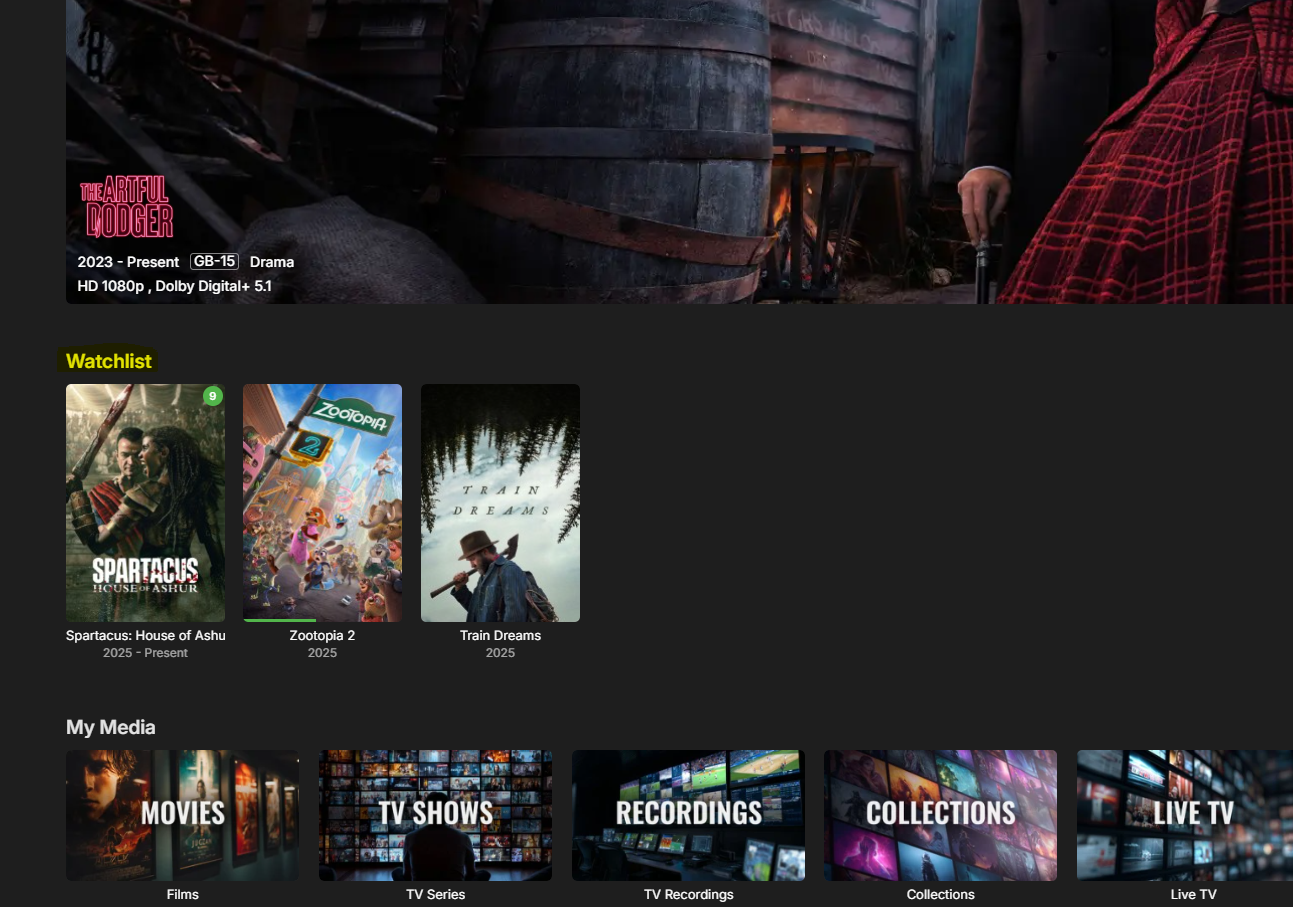
Here is a teaser I just need to get it working properly and some smaller UI fixes.
 2 points
 -
@@Luke stated in a previous post (https://emby.media/community/index.php?/topic/49933-replaygain-music-support/) adding support for this could easily be done for at least the theater client seeing as the player used already supports replaygain. I'm making this feature request in hopes that this support is added, as I have no dev experience myself1 point
-
Is there plans on the roadmap for OpenID. I have searched but not found any indication this is in development. With many admins taking up SSO through Authelia or Authentik to enhance security it would be great for Emby to support it. One of the easier open standards is OpenID which the aforementioned support. Users could continue to use LDAP if they wish while others can use the arguably better SSO experience.1 point
-
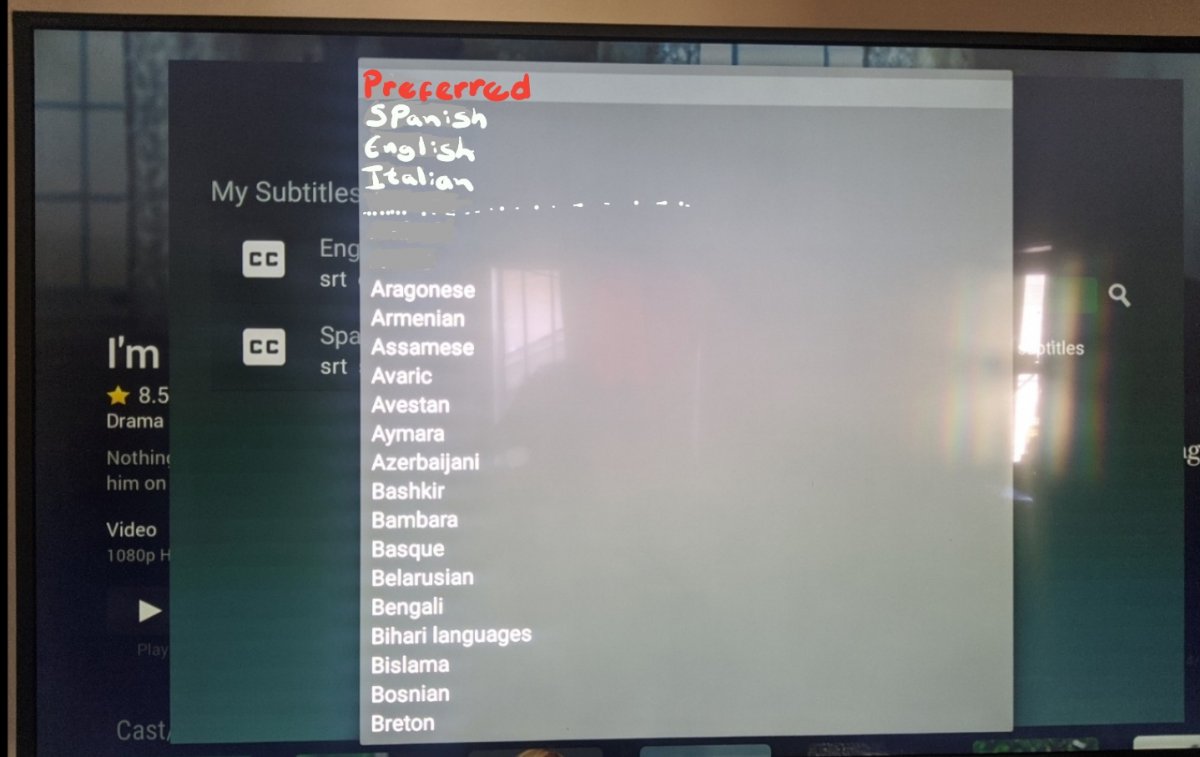
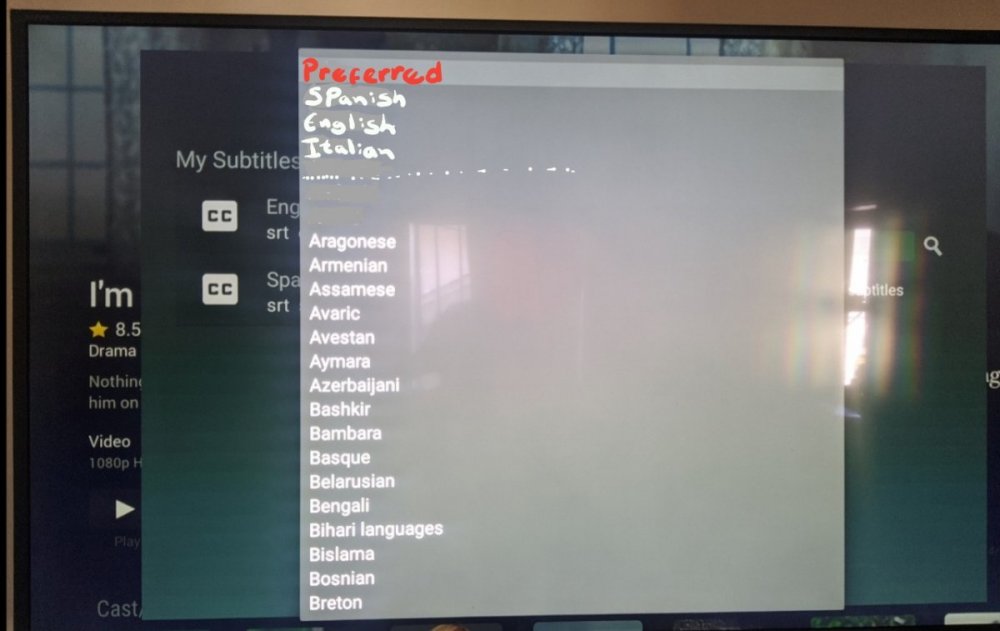
Downloading subtitles in the TV app is very annoying, you have move one by one until you go to the language you are looking for and in the TV the switching interface is very slow. wanted to suggest a better way to display the language menu for the TV app, because you use a tv controller and there is no scrolling. I did an example for a better understanding, in the preferred part I put the languages that are set in the server to automatically download. When I want to download subtitles I avoid the TV app, I rather use the phone or the Ipad because unlike the TV app, you can scroll fast and go directly to the language you want.
 1 point
 -
Ok I am just about in a place where I can jump back in on Aperture, stay tuned!1 point
-
WIth the beta 4 it is much better. Now it rarlely occurs and when it happens, it corrects itself after a few seconds.1 point
-
I would very much like to have this too!1 point
-
Thanks, I try this out and see if it works.1 point
-
I'm just going to resort to using windows scheduler to shut down the vpn and run the guide refresh in that window. Nothing else is consistent. Thanks1 point
-
You good sir, are AWESOME1 point
-
The icon for the first picture is actually correct, it's under 1080p so shows as 720p. The last one me having made a small mistake where it looked for the wrong icon and since it wasn't there it couldn't display it. I have changed it to show what ever Emby displays in the title now. So if Emby shows for example 1080p then the icon will be 1080p. EmbyIcons.dll1 point
-
Same version.1 point
-
Did you configure the path to where your backups are? It will scan what is available and the restore option will appear.1 point
-
I'm curently using the favourite as a watshlist, and have always done. Honestly I dont get why I want to mark something as a favourite? With the new home screen i made a dynamic section including all media on the server, and in filter just toggle on the "Favourite". Then its automatic sorts for all users to only show their own fav list. I then also put a custom title named "my watshlist". Works pretty well. Regarding the URL upload of picture Claude code solved it in less than two minutes, next beta release is coming up in 3.. 2.. 1..1 point
-
I mean I guess I could add a selection to "hide watched" and then a selection of what user to take the status from. It's not ideal and need quite a lot of administration to set up for all users. It's absolutely possible, but only fits for a watchlist funtion. What i would like to do in that case is acually to create a separate "watchlist settings/menu" or something where you can manage this for all users. It's more job but would fit the direction I want to go with this plugin - to be a complete homescreen companion (at least thats my ambition). We also have to see what the Emby devs are planning and where the native functionality is going. Might have been, cant remember honestly. I'll se what i can do! Edit: Putting Claude on finding a soulution to this!1 point
-
Don't see why not - though it might take some time, depending on current outstanding requests/submission and response time. @Luke1 point
-
I'll put in down on the to-do-list for an upcoming release Thats awesome! Didn't realise it myself you could do it like this! I have been using the "Favourite" as a watchlist, and with the new homescreen we can give a row dedicated to favourites items. And i agree, why add episodes to a playlist? But your idéa seems great! Gonna be trying it myself aswell! I'll look into it. The problem I see is "whos unwatchaed status"? I beleve this needs to be a front end fix from Emby devs, when creating a "dynamic media" in home screen settings, the should be a selection to hide watched. @LukeIs this possible to implement? I belive this fits a lot more usecases. Thas my fault, was just playing around during testing and forgot to enter the correct number. The version you have installed is 2.3.1.0-beta. Thanks for reporting! It's kind of on the to-do list. I tried to get it working before but run into some trouble. So the quickest/easiest way was to create an upload function instead. Its still on my to do list but not at the top right now.1 point
-
App is already available in Croatia and Serbia stores.1 point
-
Hi everyone I wanted to share a project I’ve been working on called Aether — a modern Emby client built specifically for people who care about direct play, quality, and control. Aether The Definitive Direct-Play Experience for Emby Platforms: Windows, Android TV License: MIT Source: https://github.com/DanielVNZ/Aether What is Aether? Aether is a community first Emby media player. It is designed to avoid server-side transcoding entirely wherever possible and always request original streams, delivering the highest possible audio and video fidelity. If your server is already set up correctly and your media is well-encoded, Aether aims to get completely out of the way and just play it — cleanly and efficiently. Key Features Premium Experience Modern UI/UX Built with React, featuring smooth transitions designed for both desktop mouse use and the “10-foot” couch experience (…mostly still work to do on d-pad navigation). Dynamic Home Screen Continue Watching and personalised recommendations synced directly with your Emby account. (optional TMDB API key, also builds recommendations from your watch history) Technical Focus Direct Play First No forced transcoding, no unnecessary quality loss. Aether explicitly requests original streams whenever possible. Stats for Nerds Real-time playback stats including bitrate, resolution, codec info, and buffering health. Rust-Powered Desktop/Android TV App Built with Tauri, giving lightweight, secure, and fast native Windows builds without the Electron bloat. Current State This is still early-stage and under active development. There will be rough edges, and some features are still evolving — but the core playback and navigation goals are already in place. Feedback Welcome I’d really appreciate: Feedback from Emby power users Bug reports Feature requests Anyone interested in contributing Repo & docs are here: https://github.com/DanielVNZ/Aether1 point
-
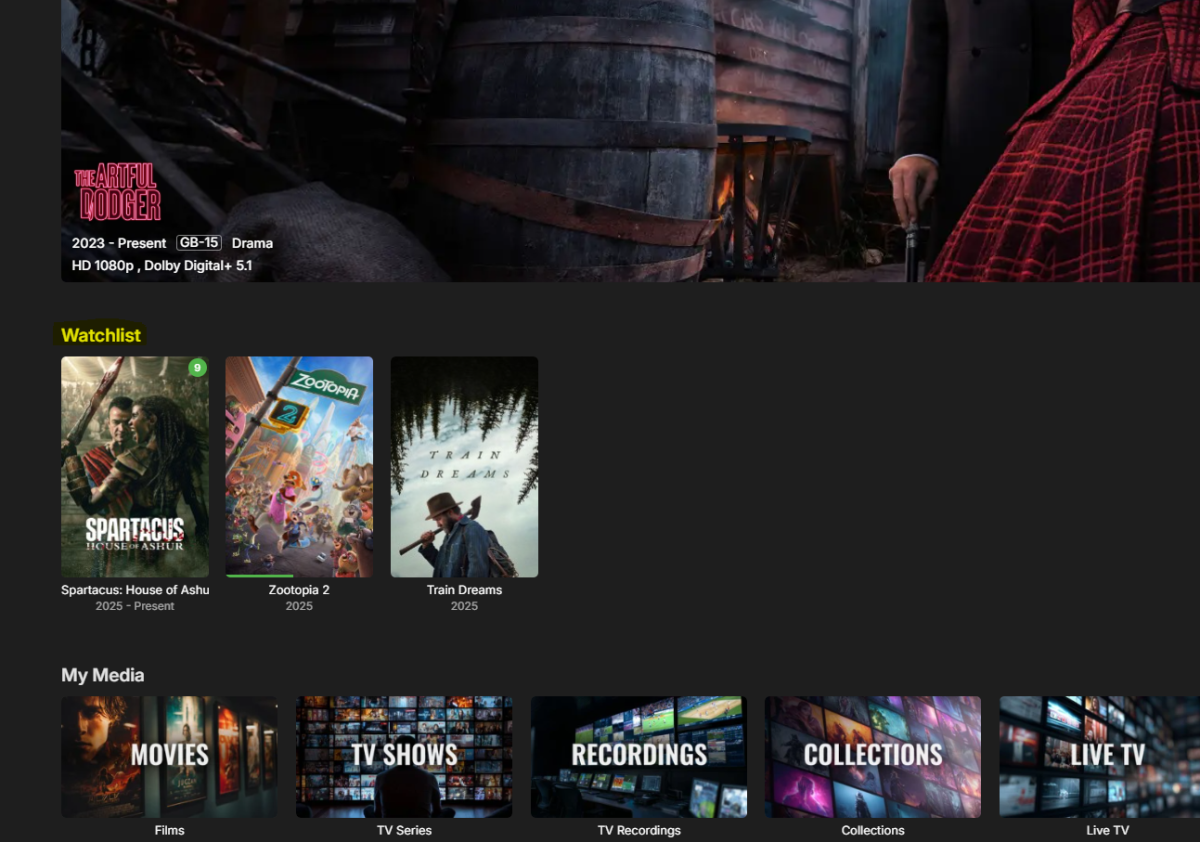
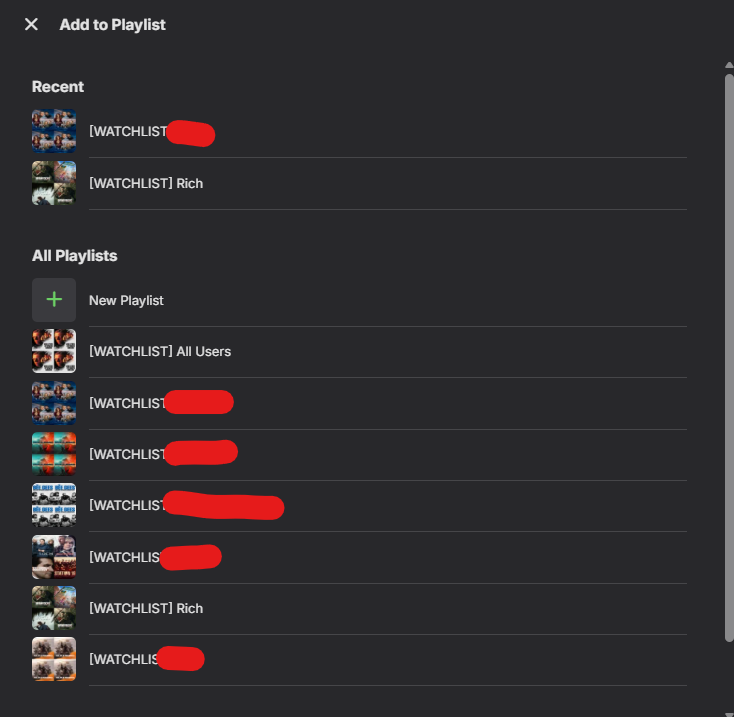
@soderlund91WOW ! - when did the Playlist to Tag work as I hoped it would do for TV Shows !? If a USER uses 'add to Playlist' on a TV Show, Emby currently (incorrectly imo), adds all the episodes (but not the show or season). Meaning you could never easily use that to create a Watchlist. However, I've just realised that if you now use that Playlist as a Tag source, it just Tags the SHOW with the Tag, not the individual episodes - this is just PERFECT for creating a Watchlist.!! This is excellent - and I now just need to tell users to add to their own (or others if they have permission) playlists to get the SHOW added to their own Watchlist (which thanks to the new homescreen, now has their own ROW called Watchlist) Fantastic ! Going to be fully testing this for sure -- Perfect .. ie - in ANY App - a USER can add to their own Playlist .. at last a Watchlist has become a reality without me needing some scripting to convert it .. hooray !
 1 point
 -
Yes it is. The logic is like this: 1. Download external list / check local media info filter 2. Compare to your movie library 3. Tag movies/series and remove the tag from items that no longer match from step 1. So if your manually added movie isn’t part of the filter or the external list, the plugin says “this has once been on the spotlight list but is no more, I need to remove the tag.” I believe this is the best way to ensure an automated and curated tag/collection. With the latest beta release you can manually include a movie by its name. Maybe I can add a more direkt way to all options to “also include this movie/series”.1 point
-
I've switched from casting to my ancient chromecast 4k ultra to casting my brand new odido stb but still the same problem. Any update on this, @Luke1 point
-
just a follow up on this in case it benefits others: EMBY SERVER AND HAUPPAUGE TUNERS You not only need to purchase and install wintv10 for Emby to work with a HAUPPAUGE tuner, you also need to immediately configure the default recording folder and pause buffer location. Wintv10 should catch this, but either way, without these settings Emby will not record or play and live tv. Fortunately my Hauppauge tuner is recent enough that wintv10 does not need to remain running in the background after these settings are made.1 point
-
Thank you so much Luke. The problem was my failure to create a default recordings folder (or any other for that matter) in WinTV10 for my Hauppauge tuner. I had purchased and installed WinTV10 as I read that it was necessary to set up emby; however, I was not aware that it's default recording settings needed to be setup first in order for Emby to work. By this time I had also reinstalled Emby from scratch and it looks like I am now on track.1 point
-
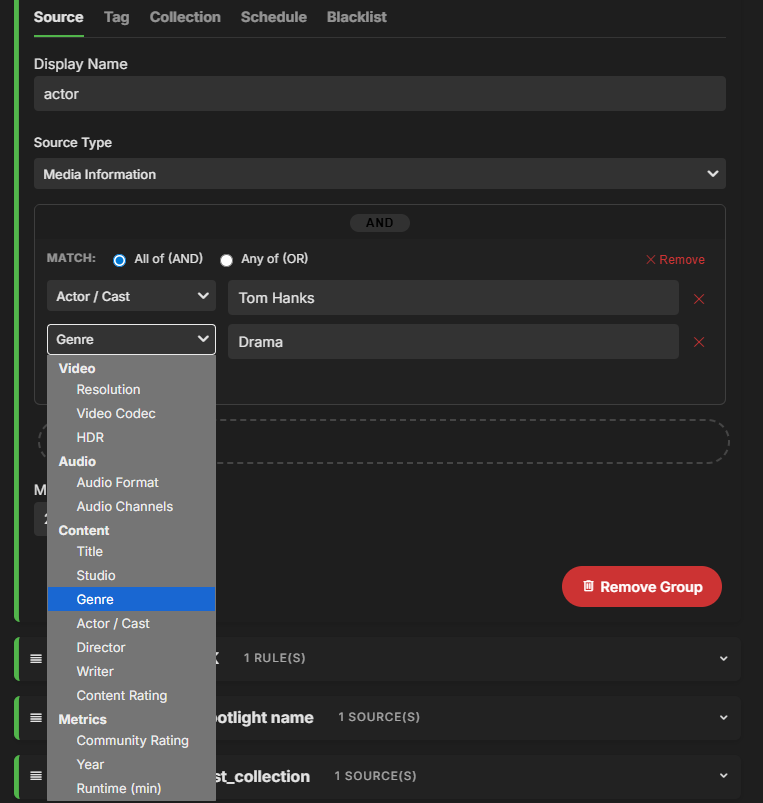
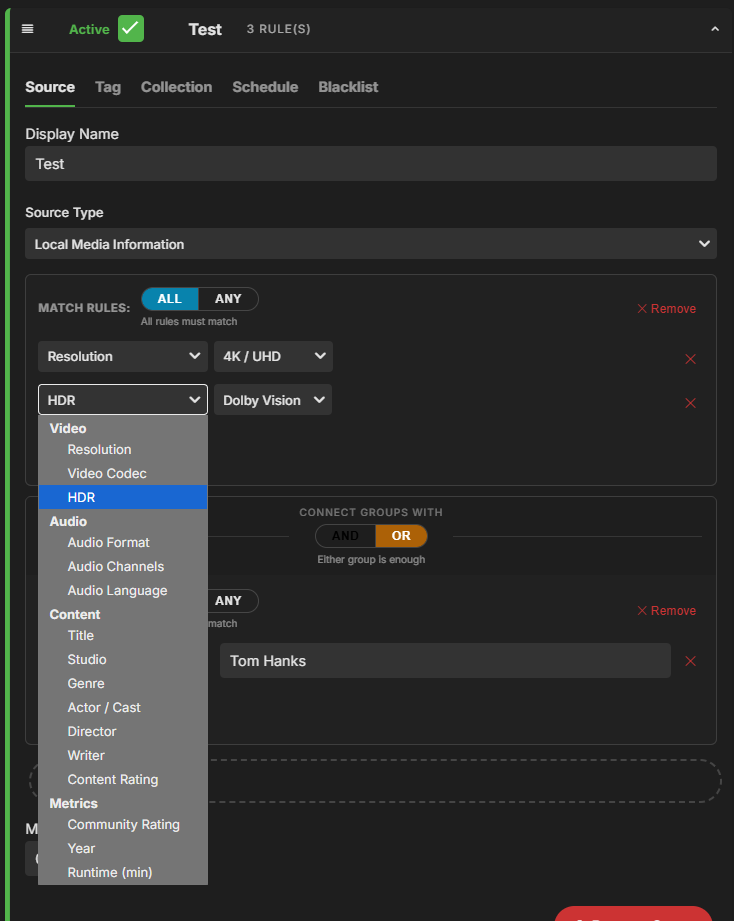
Beta release - Version 2.3.1.0-beta Download .dll here: https://github.com/soderlund91/AutoTag/releases/tag/v2.3.1.0 Also attached to this post Releasing this as a beta sinse i havent tested all functionality, and i need your help to find bugs etc. Please help me find and report! This update includes major improvements to the handling of local media information. Make sure to back up your settings before updating! Improvements Local media information: Significantly improved selection and filtering when using local media information as a source. Added multiple filtering options (e.g., resolution, media codec, title, actor, director). Added AND/OR logic for filtering. UI/UX: Introduced a separate menu for tag settings (creating a tag is enabled by default). If you dont enter a separate "tag name" it will get it from the Display name from the source-tab. Also removed the option from Collection-tab to not create a tag. Fixes Save button: Fixed an issue where saving was possible during an active run (could lead to data corruption). Known bugs When running a filter based on local media information on a large library, Emby may become slow or temporarily unresponsive (continuous loading spinner). Be patient and allow it to complete for a minute. I beleve database writes may still be in progress even after the plugin run has finished. Screenshot: AutoTag.dll
 1 point
 -
Looked interesting, shame about the dropped Android TV support..1 point
-
Finally getting back to this. Logs didn't have any other information relating to the problem. I uninstalled via the universal installer and installed the .deb as suggested and the server is now running. Maybe it would be good to remove emby server from the universal installer? At any rate, thanks for the help.1 point
-
Thanks! I'm testing the next version at the moment, will put out a release tonight or tomorrow if it goes well. It will have a HUGE upgrade regarding local media info, with inspiration from the smart playlist plugin @crusher11 On release I would be happy to get your help testing, i'm just gonna do some basic function test, and you seem to have pretty specific use case1 point
-
Hi SamES, I think there is a bit of a misunderstanding regarding how the Nvidia Shield TV Pro operates compared to native TV apps like those on LG (webOS) or Samsung (Tizen). While it is true that native TV apps are often limited by the OS and hardware to lossy Dolby Digital Plus (DD+), the Nvidia Shield is a completely different beast. I have my Shield connected to an LG C3 OLED, which then passes the audio via eARC to my Samsung Q990D soundbar. I can confirm that when using the Emby app on the Shield, it correctly performs passthrough for lossless TrueHD (Atmos). My soundbar explicitly displays 'Dolby Atmos' (TrueHD) and not just 'Dolby Digital'. The limitation you mentioned applies to the native LG webOS app—which, in my experience, often struggles with licenses and even downgrades Atmos to basic Dolby Digital (not even Plus) during certain updates. However, claiming that the Shield has the same limitation within the app is incorrect; the Shield is specifically designed to handle these high-definition passthrough formats without conversion, provided the hardware chain (TV eARC and Soundbar) supports it, which mine does perfectly Hi SamES, In addition to everything described above, I would also like to add that, to further clarify, there is a massive performance gap between the Nvidia Shield TV Pro and the native LG webOS app that goes beyond just audio. In my setup (Shield TV Pro -> LG C3 -> Samsung Q990D via eARC), the Shield handles lossless TrueHD (Atmos) perfectly. My soundbar explicitly displays 'Dolby Atmos' (TrueHD), proving that the bitstream passthrough is working exactly as intended. The Shield does NOT convert Atmos to basic Dolby Digital; it is designed specifically to avoid that limitation. On the other hand, the native LG app is a complete disaster. Not only does it often fail to passthrough Atmos (downgrading it to basic Dolby Digital, not even Plus), but it also struggles with Dolby Vision metadata. I’ve noticed that when the LG app encounters certain audio tracks it can't handle, it seems to go into a 'protection mode' or forces a transcode that breaks the video layer. As a result, I often see the TV trigger HDR10 instead of Dolby Vision, which is absurd for a high-end OLED C3. This inconsistency doesn't happen on the Shield. Because the Shield supports Direct Play for both TrueHD and various Dolby Vision profiles, the server doesn't need to touch the file. Everything stays intact. Claiming the Shield app has the same limitations as the LG or Samsung native apps is simply incorrect; the Shield is the only way to actually get the full quality out of a setup like mine.1 point
-
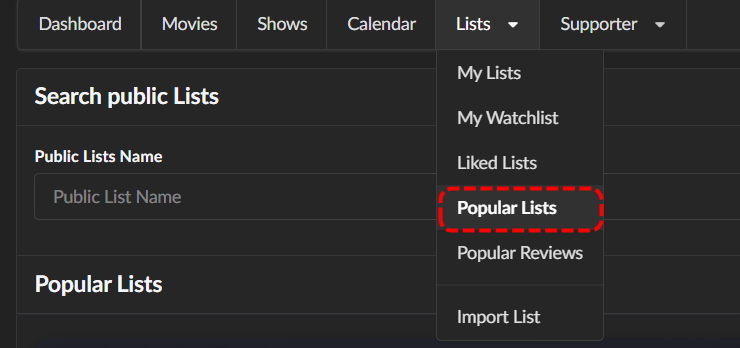
MDBList is free if all you use are the public lists, which there are many great and well maintained lists for almost anything I've ever searched for Once you found a list you like, all you need is the public URL to pop into AutoTag.
 1 point
 -
Saw this while I was trying to figure the same thing out. Save this as like Seer.js and add this to the bottom of your index.html, above </body> <script src="Seer.js" defer></script> Seer.js (edit the placeholder link at the bottom) const AddRequestMedia = () => { const targetClass = '.headerSelectedPlayer.headerSectionItem'; const headerRightClass = '.headerTop-withSectionTabs .headerRight'; const osdClass = '.view-videoosd-videoosd'; const breakpoint = 1080; // 1. Inject Styles const styleId = 'injected-button-styles'; if (!document.getElementById(styleId)) { const styleSheet = document.createElement("style"); styleSheet.id = styleId; styleSheet.textContent = ` .request-button { background-color: #21A9E1 !important; color: white !important; border: none !important; margin: 0 15px 0 0 !important; padding: 5px 10px !important; font-family: sans-serif !important; font-size: 14px !important; font-weight: 600 !important; border-radius: 3px !important; cursor: pointer !important; transition: background-color 0.3s ease; display: inline-block !important; text-decoration: none !important; text-align: center !important; white-space: nowrap !important; } .request-button:hover { background-color: #1B8CBA !important; } `; document.head.appendChild(styleSheet); } // 2. Advanced Check: Is the OSD actually visible? const isElementVisible = (selector) => { const el = document.querySelector(selector); if (!el) return false; // Checks if element is hidden via CSS or has no size const style = window.getComputedStyle(el); return (style.display !== 'none' && style.visibility !== 'hidden' && el.offsetParent !== null); }; // 3. Logic for Visibility and Layout const updateLayout = () => { const btn = document.querySelector('.request-button'); const headerRight = document.querySelector(headerRightClass); // Hide if screen is small OR OSD is actually visible const isVideoOSDActive = isElementVisible(osdClass); const isSmallScreen = window.innerWidth <= breakpoint; const shouldHide = isSmallScreen || isVideoOSDActive; if (btn) { btn.style.setProperty('display', shouldHide ? 'none' : 'inline-block', 'important'); } if (headerRight) { if (!shouldHide) { headerRight.style.setProperty('width', '30%', 'important'); } else { headerRight.style.removeProperty('width'); } } }; // 4. Observe and Inject const observer = new MutationObserver(() => { const targetDiv = document.querySelector(targetClass); if (targetDiv && !document.querySelector('.request-button')) { const link = document.createElement('a'); link.href = 'https://your-request-url.com'; link.target = '_blank'; link.rel = 'noopener noreferrer'; link.className = 'request-button'; link.textContent = 'Request Media'; targetDiv.prepend(link); } updateLayout(); }); observer.observe(document.body, { childList: true, subtree: true, attributes: true, // Crucial: detects style changes like display: none attributeFilter: ['style', 'class'] }); window.addEventListener('resize', updateLayout); }; AddRequestMedia();
 1 point
 -
Same here! The app looks sweet, hoping u get it up and running for Android TV1 point
-
You had me at Android TV, but lost me at Windows. BTW, this isn't a "community first Emby media player", as the first Android TV app was by a contributor, and they created a 2nd one as well, called TIAMAT. I'll come back if/when you get back on the Android TV route again. Thanks.1 point
-
It's nice to have an alternative client. Well done for starting this. Quote from Github - if this is true, then sadly I have lost my original interest as I rarely use Windows for playback ... You may also want to remove this topic from the AndroidTV section to avoid future disappointments.. if confirmed development has stopped then maybe reach out to @GrimReaperto remove ?1 point
-
https://github.com/DanielVNZ/Aether/tree/main Screenshots are up on github thanks!1 point
-
Opensubtitles.org is shutting down for good. Opensubtitles.com will be the forward option. Emby already made the transition. So this is a notice for all not using the Emby plugin. OpenSubtitles.org API - Final Shutdown Notice - OpenSubtitles forum1 point
-
@all4domThank you for your kind words. My oldest son is very ill and it is taking all of my attention. I will be back soon. To build a 4k channel I think you can use one of the filters. I have never tried this. I will help you more when I get back. Vic1 point
-
I don't know about the OP, but I would rather just have the separate Shows tab and Movies tab. No combined tab.1 point
-
I. Runterfahren von Emby 1. Mit Deinem Account an Emby anmelden. 2. Oben rechts auf das Zahnrad klicken. 3. auf der linken Seite erscheint ein Menü, dort Übersicht auswählen 4. Rechts, neben den Namen von Server gibt es drei Punkte und nochmals rechts gibt es so ein ausschalt Symbol. Da drauf klicken und runterfahren auswählen. II. Update: 1. Update für Dein Gerät und Deine DSM Version hier https://github.com/MediaBrowser/Emby.Releases/releases runterladen. (Das richtige Paket sollte dieses hier sein: https://github.com/MediaBrowser/Emby.Releases/releases/download/4.9.1.90/emby-server-synology72_4.9.1.90_x86_64.spk) 2. Im Paketzentrum Deiner Syno oben rechts manuelle Installation auswählen. 3. Dort das oben runtergeladene Paket auswählen und den einzelnen Schritten folgen. Damit installierst Du das neue Paket über das alte drüber. Datenbank usw. bleibt alles erhalten. 4. Im Paketzentrum Emby wieder starten. 5. fertig.1 point
-
I've lost track of how many times this has been brought up over the years, with troubleshooting steps basically being typing: "No, that can't be done." This is a great addition to any server (not only for those users that were unaware of saving metadata/artwork with media in the first place or users that decided to change their setup halfthrough), sort-of perma-backup in place, on-demand. Great work. As a sidenote, kudos, you have made several really useful plugins lately, well done. Keep up the good work. Cheers1 point
-
Hi, not exactly, but what about creating a collection?1 point
-
Hello, I recently switched from Plex to Emby, so far I like everything. But I would like to request a feature such as displaying detailed playback statistics on the client. I am interested in the current streaming speed or at least the percentage of buffer filling. In Plex, this is well implemented, in real time you see the streaming speed, and the percentage of buffer filling is displayed by many media players.1 point
-
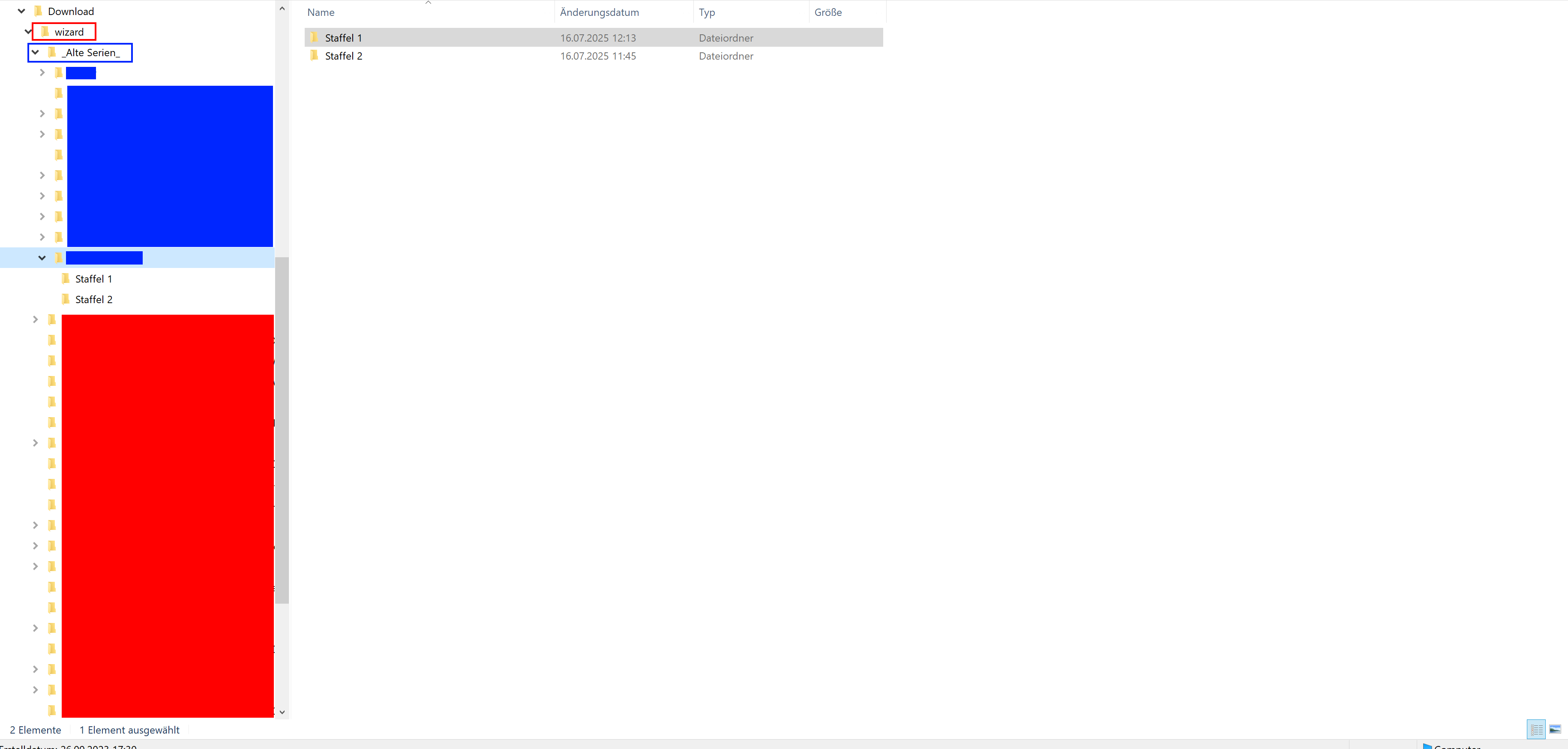
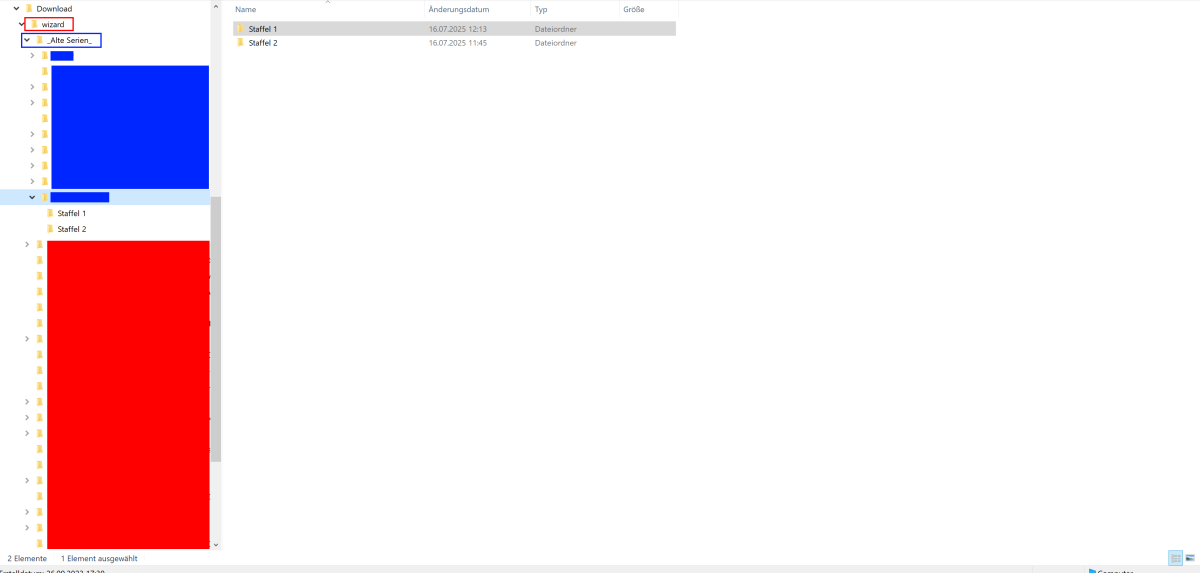
Hi, the red is the main folder, the blue is the not functioning sub folder with a Series and divided in two seasons. The main folder works, even if I add new media, the sub folder is a mess
 1 point
 -
Hello everyone, It's great to have options for every single existing language in the subtitle Download options to integrate with the Plug-ins, however, in the TV/Web Client, it's annoying to have to scroll down several pages between 2 preferred languages (i.e. English and Portuguese for example have 89 entries in between). Despite of the time required to scroll between selections, it also consumes a lot of remote control batteries Would be possible to edit the combo list to show only the preferred languages on the top or somehow sort the order manually to present only some selected languages first (English, Spanish, Portuguese, Italian then the remaining for example ) ? Please also advise if there's a possible workaround (meaning edit a file/DB in the server to change the alphabetic sorting in the language selection), it would be a great relief. Thank you very much !1 point