Leaderboard




Popular Content
Showing content with the highest reputation on 02/20/26 in Posts
-
Absolutely! As a minimum, make sure: The port must be secured with SSL/TLS All user names must be hidden for remote access All users have strong passwords Any Administrator accounts must not have remote logins there are many more ways to secure your server, but you need to start with most of this...3 points
-
Tutoriel : Ce script est un outil de maintenance "tout-en-un" qui automatise la compression de vos médias tout en garantissant une compatibilité maximale avec Emby. Il transforme vos fichiers (AVI, MP4, WMV...) en MKV HEVC 10-bit de manière totalement autonome. Pré-requis Indispensables Avant de lancer le script, vous devez installer ces deux moteurs de conversion : HandBrake CLI : Télécharger ici (Essentiel pour la gestion des pistes audio/sous-titres). FFmpeg : Télécharger ici (Sert de moteur de secours si HandBrake échoue). Configuration du Script Ouvrez le fichier .ps1 avec un éditeur de texte (Notepad++ ou VS Code) et vérifiez ces 3 lignes : Les Chemins : Assurez-vous que $HB et $FF pointent vers vos dossiers d'installation. Le Dossier de Travail ($T_DIR) : Par défaut configuré sur Z:\. C'est ici que le fichier est encodé avant d'être déplacé. Choisissez votre disque le plus rapide (SSD) pour gagner du temps. Les Logs ($L_BASE) : Le script crée un historique pour ne jamais ré-encoder un fichier déjà traité. Fonctionnalités Avancées Sélection "Touche Unique" : Plus besoin de taper "Entrée". Appuyez simplement sur la lettre de votre lecteur (S, T, U, etc.) pour lancer l'analyse. Compression Intelligente : Vidéo : Passage en HEVC 10-bit via NVIDIA NVENC (Accélération GPU). Résolution : Redimensionne automatiquement en 1080p (Max Width 1920) pour économiser de l'espace. Audio : Conversion en AAC 192k pour une compatibilité parfaite sur tous les navigateurs et TV. Gestion Multilingue : Le script priorise le Français, mais pour les lecteurs T et W, il conserve automatiquement le Japonais (idéal pour les fans d'Animes). Sécurité Totale : Le script renomme l'original en .old, vérifie l'intégrité du nouveau fichier, et ne supprime l'original que si tout est correct. Comment l'utiliser ? Préparez vos lecteurs : Assurez-vous que vos disques (NAS ou internes) sont bien mappés avec les lettres prévues (S à Y). Lancez PowerShell en Administrateur. Exécutez le script : .\Emby_Optimize.ps1 Choisissez votre cible : Appuyez sur la lettre correspondant au disque à traiter. [!IMPORTANT] Chemin des lecteurs : Si vos disques utilisent d'autres lettres, modifiez simplement la ligne if ("STUVWXY" -notlike "*$SEL*") dans le script pour ajouter les vôtres. Emby_Optimize.ps12 points
-
IMO I'm not really sure we should. An error in auto-skipping the intro is easily corrected with a back skip or two but the same cannot be said for auto skipping to the next item. If this were marked incorrectly it could be hard to even realize it and even harder to recover from.2 points
-
Same here. I think flatpak would solve it mainly for immutble distros such as Bazzite and SteamOS. (SteamOS is a big chunk of linux desktop users as of today)2 points
-
+1 for flatpak - I dare say that would already be on the radarr though. Current build seems to be mostly working for me, however I keep finding myself defaulting to the browser version more often than not out of habit from not having a usable linux app for the longest time.2 points
-
I think having a flatpak package would solve it. Many linux distros support it (Bazzite, SteamOS, Arch based, etc)2 points
-
+1 for this! Another useful feature/workaround would be the option to filter the playlist for "unwatched" or a button to jump scroll to next unwatched item in the list.2 points
-
First and foremost: 1. This is heavily vibe-coded with the help of Claude Sonnet 4.5 and just a proof of concept (though it's fully functional on my side)! 2. Tested with stable Server 4.9.1.80 on a 1080p-Screen 3. Pretty sure that the code is not the best and shpuld be reviewed by anyone with good js-Skills. 4. This Banner just works on the Web Client. I hope one of the experienced devs here can make more out of it, e.g. a Plugin. Perhaps something like that can be incorporated as a menu option by Emby itself in the future. What the Spotlight does: On every Homepage load the Spotlight takes 10 items (Movies/TV Shows) from 50 latest Releases in the library and displays them as a slideshow. Banner is clickable to get to the item detail screen. Ratings are also included. Download from: https://github.com/v1rusnl/EmbySpotlight 20251005-1807-48.9352916.mp4.b64639dcb41419847c7795874d16a84b.mp41 point
-
This version works, thank you so much. Would you mind explaining what the issue was?1 point
-
Might have found the reason it failed. You can try this version to see if it's better. EmbyCredits.dll1 point
-
Not sure why this happens.. As a workaround you can clone your list, wait for it to populate and then enter your new link. Then you could delete the first list. I’ll see if can fix this bug1 point
-
You appear to be the only person who is experiencing this, which means it is limited to your hardware/software. You were also asked for ffpmeg logs back in 2024, which you did not provide. Luke also asked you for logs constantly, which you did provide. No one else has apparently reported your issues, so this "level of support" is to be expected as the dev team absolutely can not duplicate your problem. PGSSUBS are image based and Roku does not support them. From a user standpoint, if you demand to play pgssubs and your current hardware can't play them back properly, I would just replace the hardware with something that can and stop complaining, or stop using pgssubs altogether. As a server admin myself, I ended up buying Android devices for several family members to shut them up for other playback reasons. Those that refused, got booted.1 point
-
I wrote a script to change this setting as it was enabled, seems to be enabled by default or it was a few server versions back. But as i changed it and refreshed my library, this solved my problem. Thanks a lot for this info1 point
-
Ok, it all makes sense now. That was the missing piece. I added that tag to the filenames to keep them identical with the folder and it's all working like it should be now. Thanks folks!1 point
-
I have just confirmed that I have "Enable access to all libraries" selected. Since I'm the administrator, that seemed reasonable. I'll get the rest of the info to you via PM shortly. Thanks again for all your time & effort digging into everyone's issues, especially mine.1 point
-
Thank you, definitely going to give that a try1 point
-
If you'd like to show your support for an official feature, please go here to do so:1 point
-
Hi, you can currently only achieve this functionality via a community built plugin, please see:1 point
-
My model is slightly older, but of a similar generation (no DTS) it could be a model specific issue, but it would be quirky if this is the case and I am really only seeing issues from the two of you. I would try the cable again. I know it is only 100Mb/s but the reality is that you won’t (and shouldn’t) play anything with bitrates higher than that anyway. I play 80Mbps files on my 2017 Samsung with a 100Mb/s port without any problems and to me that is the upper limit on what anyone should be playing and it’s also way above the supported specs from both LG and Samsung. I’ll test the remote connection and let you know how I go.1 point
-
Hi, neither People nor Studio fields/tags currently work for Music as far as I am aware. Although they do still appear in the Metadata Editor: Therefore, there are likely only a few workaround ways to get extra People added and displayed for Music: Use the Genres and Tags fields that work (as per above image) Add additional People to the dedicated music fields: Album Artist, Artist, Composer Add the extra People and their contribution into the relevant Overview text E.g. you could add "person (writer)" to the Composer field and they would show up under the Composer tab. Likewise, a contributing Artist could be added to the Artist field. Either way, presently, you would possibly need to come up with you own preferred system to show additional people using the available fields.
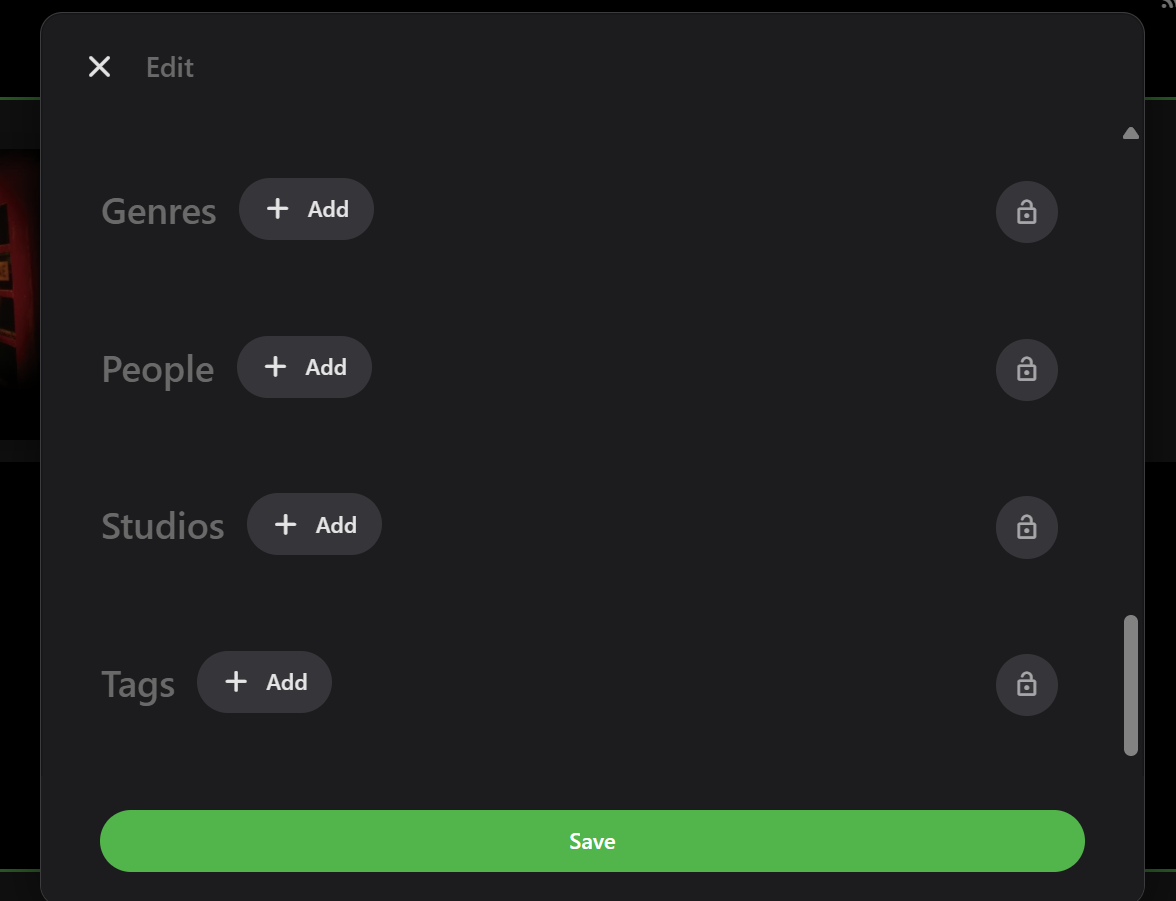 1 point
 -
I hit "play all" on a collection and it doesn't show the next film in "Next Up" after I quit out of it. This is apparently intended behaviour, and the same applies to playlists. This is absurd. Why even have the "play all" option? Who's sitting down to watch a full collection's worth of films, or a full playlist? I have playlists for The Prisoner for its various episode orders, and there's no way I'm getting through them in one sitting. I was going to make that my next show to watch but if I'm going to have to keep track manually of my progress through the playlist it makes the playlist fairly pointless TBH. There's no reason playlists or collections shouldn't show up in Next Up.1 point
-
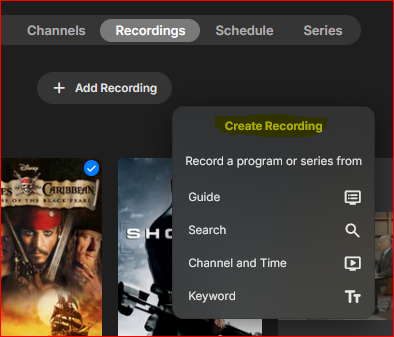
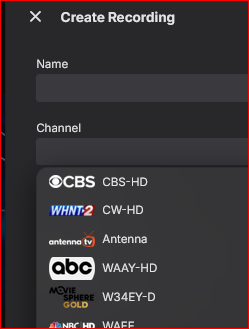
It seems like the "Add Recording" command or ("Create Recording" in the dialog ) would be more natural or intuitive to be on Schedule tab of the Live TV library. Recordings is past tense so I wouldn't think to look there, and the Schedule tab shows what is not yet recorded - I need to schedule a recording. Also, It would be helpful to show the channel #s in the Channel drop list:
 1 point
 -
Ah this is a per user setting. Then yeah I'm not sure it would work for this plugin. My assumption is @ChaoOossaw the update and thought he could exclude libraries on a per library basis from getting included in the statistics equations.1 point
-
Hola, disculpa no he podido contestar antes, al parecer algunos archivos de metadatos quedaron en las carpetas de medios y al escanear quedaron con esa información, ahora parece ir todo bien. Esta es la estructura que tengo en la carpeta de documentales, La tierra (2026) sería documental, El espacio (2026) sería serie documental. Muchas gracias a todos por la ayuda. Documentales La tierra (2026) La Tierra (2026).mkv El Espacio (2026) El Espacio S01E01.mkv El Espacio S01E02.mkv El Espacio S01E03.mkv1 point
-
Update was posted. This one is mostly UI tweaks and small improvements and a few features. What’s new: Added support for multiple versions. I had limited ability to test this since I only have one film with both black‑and‑white and colorized versions. Added a Full Rescan button in the media source panel. Added support for external subtitle files. Added a Minimize to Tray toggle. External links now open in the default browser. Still in progress: Fixing the EP and Singles disabling option. Broken at the moment. That’s next on my list. Similar content suggestions Continue enhancement of multiple version support. Enhancement of Wishlist (auto detect better versions or when content is added and automatically check Wishlist item as completed) Collections: There are two phases: Phase 1: During the Emby scan itself When you have a BoxSets library in Emby and scan it, Totality does a two-step process: 1. It asks Emby for all the BoxSet containers (e.g., "Marvel Cinematic Universe", "The Lord of the Rings Trilogy"). 2. For each BoxSet, it asks Emby for all the movies inside it, scans those movies as normal media items, and immediately creates a collection record in the database. At this point, the collection is marked as 100% complete, because it only knows about the movies Emby has in its BoxSet. It doesn't yet know what's missing. Phase 2: TMDB enrichment (separate analysis step) When you run "Analyze Collections", the MovieCollectionService kicks in: 1. For each collection that has a TMDB collection ID, it calls the TMDB API to get the full list of movies in that franchise. 2. It compares TMDB's full list against what you actually own. 3. It updates the collection record with the real completeness percentage and a list of missing movies. So a collection that was "100% complete" after the Emby scan might become "85% complete — 3 movies missing" after TMDB analysis. If an Emby BoxSet doesn't have a TMDB collection ID attached, Totality generates a fallback ID (emby-boxset-{id}) and stores it at 100% complete. Without the TMDB ID, the enrichment step can't find the full franchise, so it stays at 100%. It only knows about what Emby told it.1 point
-
Hi, more options to control this are certainly possible. Thanks.1 point
-
New version on GH supports enabling or disabling every Rating provider.1 point
-
Why would you need this for your family and friends? You only communicate with them on Discord?1 point
-
Yes, but then it acts like an extra and you have to navigate down, find the trailer and click on it. How it should work is if you have a LOCAL stored "real" trailer, not YouTube garbage, then hitting the trailer button should play the local trailer and avoid YouTube altogether. So basically locally stored trailers are useless and YouTube trailers are useless. So for now, at least for me, trailers in emby are not worth messing with. I have a bunch stored offline hoping someday they'll be usable. How locally trailers SHOULD work is like Netflix....when you select a movie and go to it's info page if there is a locally stored trailer it should play in the background.....now that would be slick and it could be optional too.1 point
-
I doubt you're going to get a lot of support for this as a home server really doesn't have a need to register. That's more "Commercial" in the sense of needs. With that said, if you were to switch to using LDAP for authorization, then account creation and registration are moved outside of Emby and could be controlled any way you want including a public facing web page.1 point