Leaderboard




Popular Content
Showing content with the highest reputation on 02/12/26 in Posts
-
Hi guys, finally got around implementing this, just pushed the latest beta as a multi-platform image. Please let us know how it fares. Cheers.2 points
-
@softworkzIt looks like wayland is adding the persistent window positioning protocol... finally... https://gitlab.freedesktop.org/wayland/wayland-protocols/-/merge_requests/264
 2 points
 -
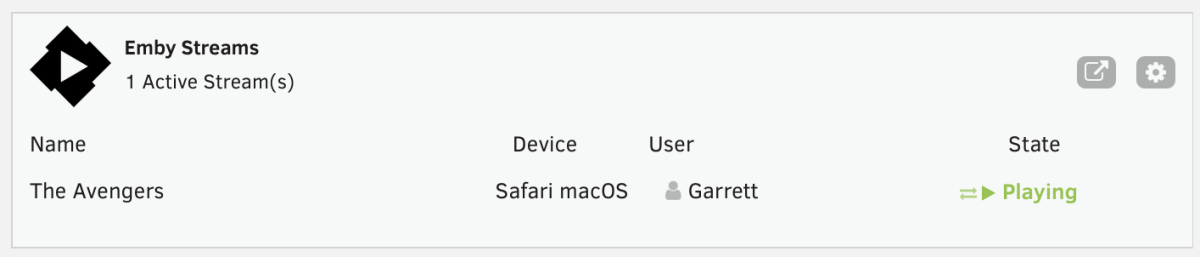
This is a simple Unraid plugin that adds a widget to the Unraid dashboard. The widget will show: All active streams The user streaming The device it is streaming on And the current state with icons indicating normal playback or transcoding. I don't have plans to really expand the feature set, except to maybe change the current state to the current streams timestamp or progress. Otherwise the current state really meets my needs but I'm open to feedback and suggestions. If I get enough feedback, I'll work on packaging it correctly and submitting to the Unraid Community Apps store. As of now, you manually install the plugin by going to Plugins > Install Plugin > and pasting the url for the plg file. You can click on the cog on the widget or in the installed plugins list, click the emby icon to go to the settings page. You'll need to enter the server ip, port, api key and choose a refresh rate. It currently defaults to 5 seconds. https://github.com/gthrift/unraid-embystreams/tree/main
 1 point
 -
Referencing this reply: This works like a charm on mobile devices like an iPad: emby://items?serverId={id}&itemId={id} Using the DeepLink Beta tvOS app (https://testflight.apple.com/join/7jcRh9fo) I’ve been able to do some sick home automations starting movie in plex (before they imploded). trying the same link on tvOS, emby opens but does not load the specific item page. Would greatly appreciate this feature. …. And while I’m asking for stuff, just wanted to say thanks for the awesome product. So happy to be free from plex. Emby has great functionality, great api documentation, etc. Very fun to play with!1 point
-
ability to be able to add a collection into another collection. ie: Spiderman Collection into a SuperHero Collection. like i could with mediabrowser with shortcuts. TIA1 point
-
No, you don't get random theme/video while browsing, you get them in item detail view. If you don't have any theme songs and/or theme videos, there are few plugins in the Catalogue: Movie/TV Theme Songs/Videos:1 point
-
Per the KB, you have to have specified audio files also: "Any folder (movie, series, season, game, etc) can have theme songs." Mystery solved - you have to configure media files to do this. No indication at all in the settings about extra work needed. No way anyone could know this. Why can't Settings have a helper tip or KB link???? Thanks, GrimReaper.1 point
-
Not that I know of. You do have theme videos in \backdrops subfolder, as per linked KB article? That should work across all client apps (including AndroidTV app - which has a separate tick box to enable them), AFAIK. Maybe you have volume set too low?1 point
-
Thought you asked for it? For Standard Android app it's at the same place, App Settings>General. AndroidTV app does not support theme videos. Works in both apps for me on 4.9.3.0.1 point
-
Movie Naming TV Naming Music Naming1 point
-
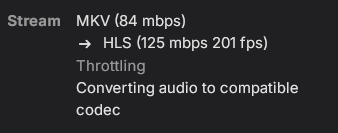
I re enabled changing of container formats to see why it was converting the stream. It is converting the audio codec when its a TRUEHD audio stream and which causes Dolby Vision to play with the improper colors. When I switch the audio to AC3 and play it, the colors for Dolby Vision are correct. What is happening is Emby sees that the Apple TV doesn't support TRUEHD audio natively and converts it to a compatible format which messes with the video stream.The Emby Server doesn't know that the Apple TV can do the conversion on its own and doesn't need the server to do it. By disabling changing of container formats for the user it forces the Emby Server to send the stream directly to the Apple TV and the Apple TV converts the audio to LPCM (another lossless format) while retaining the accurate colors for Dolby Vision. Just have to make sure your audio settings on the Apple TV 4k is set to convert to LPCM which I believe is the default for the device anyway.
 1 point
 -
They are subsets of the same superset. A Playlist is an ordered list of playable items whereas a collection is a collection of pretty much any items.1 point
-
It worked! Thanks for the lightning fast support.1 point
-
You need to take that up with unRaid. TBH this all comes down to You not knowing your OS and how to use it. Its on you to know.1 point
-
Hi. Totally personal preference but I'd choose the TV for its picture quality and other features and forget about the built in OS. A much better experience is most likely available for $60 through another device. If you must, though, I'd stick with one of the standard majors like Android TV or Roku whichever is the most to your liking.1 point
-
Environment Emby Server Version: 4.9.1.90 (also tested notification for 4.9.3.0 available) Operating System: macOS (Darwin 25.2.0 - macOS Sequoia) Hardware: Mac Studio M1 Ultra (20 cores, ARM64) FFmpeg Version: 5.1-emby_2023_06_25_p4 Problem Description VideoToolbox H.264 hardware encoding fails immediately on transcode attempts. Emby falls back to software encoding (libx264), which works but uses CPU instead of the hardware encoder. The root cause appears to be an invalid profile parameter being passed to the VideoToolbox encoder. Emby is sending profile=77 (the FFmpeg internal constant for "Main" profile) when VideoToolbox expects values in the range 0-5. Settings Transcoding → VideoToolbox H.264 → Encoding Profile Limit: High Profile Error from Logs [h264_videotoolbox @ 0x145604300] Value 77.000000 for parameter 'profile' out of range [0 - 5] [h264_videotoolbox @ 0x145604300] Error setting option profile to value 77. Error initializing output stream 0:0 -- Error while opening encoder for output stream #0:0 - maybe incorrect parameters such as bit_rate, rate, width or height FFmpeg Command Generated by Emby /Applications/EmbyServer.app/Contents/MacOS/ffmpeg -loglevel +timing -y \ -print_graphs_file "/Users/macstudio/emby-server/logs/ffmpeg-transcode-bd87cbd9-f7be-4e12-9f95-e53c30a9d65c_1graph.txt" \ -copyts -start_at_zero -f mp4 -c:v:0 h264 -noautorotate \ -i "/Volumes/media/Budgie Course/FLIGHTED/FLIGHTED - Sugar - 4 (Tube).mp4" \ -filter_complex "[0:0]scale@f1=width=640:height=360[f1_out0]" \ -map [f1_out0] -map 0:1 -sn \ -c:v:0 h264_videotoolbox -b:v:0 746626 -g:v:0 72 -maxrate:v:0 746626 \ -bufsize:v:0 1493252 -profile:v:0 77 -keyint_min:v:0 72 \ -r:v:0 23.976024627685547 -c:a:0 copy ... The problematic parameter is -profile:v:0 77. Expected Behavior Emby should translate "High Profile" to the correct VideoToolbox profile value. According to FFmpeg's VideoToolbox encoder, valid profile values are: 0 = Baseline 1 = Main 2 = High (or similar mapping) Workaround Emby automatically falls back to software encoding (libx264), which works correctly. The software encoder achieves ~40x realtime on the M1 Ultra, so playback is not affected. However, this defeats the purpose of having hardware encoding available. Additional Context This appears to be specific to Apple Silicon Macs using VideoToolbox. The profile parameter mapping that works for other hardware encoders (like Intel QSV or NVIDIA NVENC) doesn't translate correctly to VideoToolbox's expected values. Relevant Log Sections Codec Selection (shows hardware encoder being selected then failing) >>>>>> Hardware Encoders for h264 [X] VideoToolbox H.264 >>>>>> Selected Codecs Encoder VideoToolbox H.264 Max Bitrate: 781 Mbit/s Bit Depths: 8 Profiles: Baseline Profile (Level 6.2), Main Profile (Level 6.2), High Profile (Level 6.2) >>>>> Non-Default Encoder Parameters Warning EncoderParametersH264VideoToolbox.ProfileLimit: Original: Actual: AvcProfileHigh Fallback to Software Encoding Info Previous transcoding attempt failed. Falling back to software transcoding. >>>>>> FindVideoEncoder - MediaType: h264, UseHardwareCodecs: False, HWA-Mode: Advanced Info Checking: 'x264' Info Check successful - selecting 'x264' Request Could the profile parameter mapping for VideoToolbox H.264 be reviewed? The encoder expects different values than what Emby is currently passing. Thank you!1 point
-
That is the earlier removals from the database - the removals is what we need to try to overcome. Hopefully there would be some firewall settings. Lets wait and confirm it is a firewall issue1 point
-
I don't know if there would be a way for Emby Server to detect that it is a firewall block and treat it in same way as the path is not available. Maybe the firewall has configuration options for whitelisting specific paths. Lets wait until that is confirmed and then would require you to look into what firewall options exist and if QNAP support can help you. May be some web search on the qnap firewall and smb My understanding that access to the smb path is not being failed but an empty directory listing is being returned - which is causing the problem1 point
-
ive restarted scheduled tasks. if it turns out to be firewall, what do you suppose would be best option for me to fix it?1 point
-
I will add a note once I know what the algorithm is1 point
-
I just swapped GPU in my windows server from AMD to Nvidia (4060) to be able to do HDR to SDR tone mapping and HEVC transcoding in hw. Is there a list of supported clients for HEVC transcoding as out of 3 TVs I got at home only one receives HEVC. Samsung s95c gets HEVC but LG BX and C1 still only get h264. All TVs running latest clients. Obviously when watching at home I’m using direct play but this was only for testing as I want my friends and family to enjoy better quality on their TVs when watching from my server.1 point
-
Yes, I realized that yesterday. no1 point
-
Cheers mate; I'll test it out as soon as i get a chance.1 point
-
Hi, that's odd. We'll take a look at it. Thanks.1 point
-
Ah you mean to avoid the detection of credits in already failed episodes. I am cooking up something for it, it might be a little while before i have a good system for it. Best i can recommend atm. is using OCR detection (with paddleORC) as it tends to not fail.1 point
-
New version up (v1.2.4.0) on yocksers/EmbyCredits Github. Added: Rule system. Fixed: Improved hanged thread protection. Note: If a thread has hung for 5 minutes it will end it.1 point
-
The User Guide is now live. If it makes sense to clean up the initial post, then I'll oblige.1 point
-
Sorted! Just had to change the permission of allow all for all usergroups and did a re-scan and that seemed to work. Thank you. What was so strange was that movies added prior to updating Emby in December all had the same permissions in Tnas as the movies that were not showing. The solution for anyone with the same issue is to navigate to Terramaster. Click "properties" on the movies folder and check "allow all" for the emby user (I did for all users just to be safe) then check the box for all Sub folders to inherit the same permissions. Thanks all1 point
-
I can reproduce this every time. It doesn't happen if I start a movie from a chapter not at the beginning, but if I start a movie from the beginning and either wait the required number of minutes or skip a few chapters after starting from the beginning it defaults to play from beginning. Steps: Start movie from beginning wait , or bring up the chapters and skip to a chapter later in the movie now back out to the details page focus is on Play from beginning v 3.5.29 Edit: doesn't matter if you pause first, or just click Back during play, it always goes back with focus on play from beginning.1 point
-
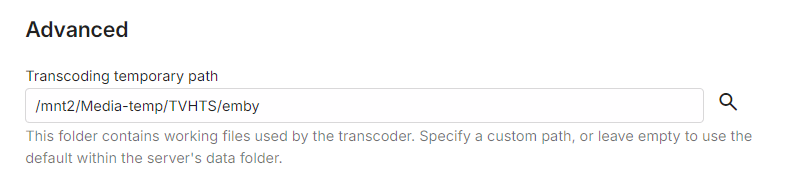
Change your transcoding temp path to a different mount/filesystem. Manage Server -> Transcoding Edit to add: Emby is supposed to cleanup after itself but that doesn't always happen. Runaway sessions, mostly LiveTV, can also cause unexpected growth in the transcoding temp path. You can delete temporary segments that are older without problem.
 1 point
 -
btw if it does need multiple episodes then I suggest the docs are updated to reflect this, there is no mention of it here https://emby.media/support/articles/Intro-Skip.html1 point
-
@sa2000I think Emby Windows: Beta Program is closed for new users atm.1 point
-
Any news on the Remote Control issues of Emby WMC (example: the 1,2,3,4,5,6,7,8,9,0 keys, but also others), as this functionallity seems still not to be implemented in Emby WMC. Thanks and keep up the good work!, grtz. Peter1 point
-
Interesting. I didn't notice that limitation and see the same thing on mine. Currently running 4.9.2.6b using Intel 14th gen cpu H.265 (HEVC) encoder: Adapter #0: 'Arrow Lake-P Intel Graphics' Id:32081 (Driver: , Vendor: 32902, SDK Version: 1.255) Max Bitrate: 39 Mbit/s Frame Sizes: 32x32...8192x8192 Color Formats: NV12 Profile Max Level Max Bitrate Bit Depths Resolutions Main Level 5.1 39 Mbit/s 8 4096x2160@60 - 1920x1080@256 Main Still Picture Level 5.1 39 Mbit/s 4096x2160@60 - 1920x1080@2561 point
-
Mejor instala por docker, así tienes la ultima versión1 point
-
HI, we are working on improving this. Thanks for the feedback.1 point
-
I guess you can’t call it a security vulnerability because it’s an open door and there is no security around it. There’s no authentication around this so there’s technically no breach that is actually occurring. While your point maybe valid depending on how you look at it, Emby pushes the app photo sync feature as a premier feature meaning they are encouraging its use (while giving the idea authentication exists around the access within the app) while leaving a backdoor open to get those photos. Think of it this way… I can control the access of an authenticated user to see the photos that have been uploaded. However, anyone that can access the URL of the server can get them unauthenticated if they just try hard enough. Insert bot here. Most companies would call this a security flaw. I also don’t think that the users in this thread are frustrated that the issue is occurring (although it was reported years ago). It’s that we were promised a fix several beta versions ago and it still hasn’t been resolved. New features (non-premier) have been added.1 point
-
It seems to be working after testing the initial file I used as an example. There was a little stutter 2x when it first started playing, then worked just fine after that. Thank you!1 point
-
I am planning on releasing it yes! I have only been working on it for 2 days, so it is not quite ready. what I would love is some conceptual feedback and any other possibly related idea/enhancement that I could include. Be advised this is not a plugin in the traditional Emby sense. It is an external application which will run inside a Docker Container, that interfaces with Emby via the API to create libraries/collections/playlists and setup the correct library/user associations.1 point
-
We could also have a custom option added in which we can select specific libraries that will be shows for that home screen section line. Example: Let's say I have 6 libraries right now. On my android phone I can see only 2 and need to scroll horizontally to see others. My suggestion would allow users to do this: Home screen section 1: Library 1 Library 2 Home screen section 2: Library 3 Library 4 Home screen section 3: Library 5 Library 6 So all 6 would be visible on the homescreen without any need for scrolling.1 point
-
Hi, an option for this hasn't been added yet, but it's possible for future updates. Thanks.1 point
-
Hi, currently live tv can fill up your drive because the entire stream is stored on disk from the time you start until the time you stop. We do plan to improve this in future updates. Thanks for the feedback.1 point
-
This is a matter of privacy rather than security - your whole machine isn't compromised by an image being downloadable. Sure, it matters - but it's not always the most important thing. Also, I believe that there is more than one Emby developer, so the fact that one person may be actively working on the images issue doesn't mean that the work of another cannot be presented in a beta. Paul0 points

.thumb.png.1ddf135ad99a72646a26d671a28ffe35.png)