Leaderboard




Popular Content
Showing content with the highest reputation on 02/02/26 in Posts
-
Worth a read. https://www.xda-developers.com/switched-to-emby-better-than-plex-jellyfin/5 points
-
I can confirm the same behavior on my FireTV. AV1 direct play stopped working recently. If I remember correctly, it was still working around version 3.5.21 or 3.5.23 - unfortunately I can't say for certain which exact version.3 points
-
Thank you! We're on the same boat I'm debugging it and adding new features so check the github in a couple of weeks.2 points
-
Thank you so much for your time and explanation; the information is very valuable for a better understanding of the cache flow. I will be monitoring and commenting further. Best regards.2 points
-
Home Screen Companion Plugin https://github.com/soderlund91/HomeScreenCompanion Below is a summary for this plugin, visit GitHub for latest release and full documentation. Home Screen Companion is a plugin for Emby Server that automatically manages home screen sections using tags and collections for your Movies and TV Shows — and keeps your home screen sections in sync across multiple users. It works by connecting one or more sources to a tag and/or collection in your Emby library. Sources can be external lists from Trakt, MDBList or TMDb, rules-based filters on your own library, AI-generated recommendations, or your existing local collections and playlists. Each source runs on a schedule, and the plugin makes sure your tags and collections always reflects the current state — adding and removing movies and series automatically. The plugin can then use the tags or collections to create a home section and give you a living and curated home screen experience. With Home screen companion you can also manage the home screen sections for all users - copy, manage and create home sections directly from selected source. No need to set it up for every individual user, just copy it from one user and you can have a server wide home screen! Important Requires minimum Emby server 4.10.0.10 Key Features Different source types — External List, Smart Playlist, AI List, Local Collection, Local Playlist Automatic tagging and collections — items are added and removed as lists change Advanced scheduling — annual, weekly, or specific date windows Per-entry home screen sections — automatically managed sections for any tag or collection Home screen sync — mirror one user's home screen layout to any number of other users Top-List — Create a "Top 10 movies of today", and the plugin will create a new home section for selected users with numbered posters Home screen sync — mirror one user's home screen layout to any number of other users Source Types External List Connect to curated lists on Trakt or MDBList. The plugin fetches the list on a schedule, matches items to your library by IMDB ID, and keeps tags and collections in sync automatically. Smart Playlist Build dynamic lists directly from your library using a flexible rule builder. No external service needed — the plugin scans your library and tags items that match your criteria. AI List Generate recommendations using AI. Write a natural language prompt and the plugin calls an AI model to produce a list of movies and shows, then matches them against your library. Local Collection and Local Playlist Tag items based on an existing Emby Collection. Combine with scheduling to create time-limited promotions of curated content — no external API needed. Tags The plugin take the source type you have and put a tag on Movies and Series. You can choose at what level to put the tag, either the Series, Seasons, or the episode. Collections Any source type can automatically maintain an Emby Collection alongside its tag. Playlist Any source type can automatically maintain an Emby Playlist for all or selected users. Scheduling Set up advanced rules when the tag or collection should be active. For example you only want to tag a Christmas list during December, or you only want your collection be available during Halloween. With the scheduler, tags and collections get added and removed automatically. Home screen Add a dedicated home screen section to any tag/collection entry. The plugin creates, updates, and removes the section automatically on each sync, no manual Emby configuration needed. Just select your source and enable the home screen option - and you will have this source as a row on your home screen for all selected users. Home Screen Sync - server wide home screen With this function you can easily copy a users full home screen sections to all other users. No need to set this up for every user now! Just configure the home screen sections and library order for one user, and you can have a server wide home screen that looks the same for all selected users in the blink of an eye. Top-List The plugin can create a "Top 10" style of home section for selected users. This can be done by either manually select what movies you want, or use existing tags to have a list that is auto-updated. Installation Download the latest .dll from the Releases page (GitHub). Place the .dll file in your Emby plugins folder. Restart Emby Server. Screenshots More screenshots in below spoiler1 point
-
Hi I hope someone can help. I have the emby server on my 2019 Nvidia Shield TV Pro. I have the Emby app on my android phone and Google home TV. Whenever I press play on a film the Emby server crashes/shutdown on the Nvidia Shield. I've watched this in realtime having the Emby server screen open and it just crashed back to the Nvidia Shield home screen even when the theme music starts playing. Any ideas or help would be much appreciated.1 point
-
Unless I'm being a bit blind (highly possible!), I'd love a way to hide a couple of the top green navigation items without hacking it in myself. For example, in Movies I don't want the 'Trailers' item to appear for any profile and for TV I don't need the 'Upcoming' nav link. Obviously not a major issue but thought it would be a nice thing to have, perhaps allowing them to be re-ordered like the home page items but again just a nice extra,1 point
-
Currently, BIF files (video preview thumbnails) are only generated during library scans or via scheduled task. This causes problems when files are renamed - Emby treats them as new files and regenerates all BIFs, which can take days for large libraries. Request: Add an option for on-demand BIF generation: - Generate BIF only when user first seeks/scrubs in a video - Cache it for future use - Lower priority background generation Benefits: - Faster library scans after bulk file renames - Reduced server load (only generate what's actually used) - Better user experience for large libraries1 point
-
A lot has changed in the last week, new version up in GH https://github.com/v1rusnl/EmbySpotlight1 point
-
Why use an nfo when you can put the id right there in the name of the media file? Just add "[tmdbid=nnnnn]" to it. Paul1 point
-
Happy to help, look forward to this issue being resolved.1 point
-
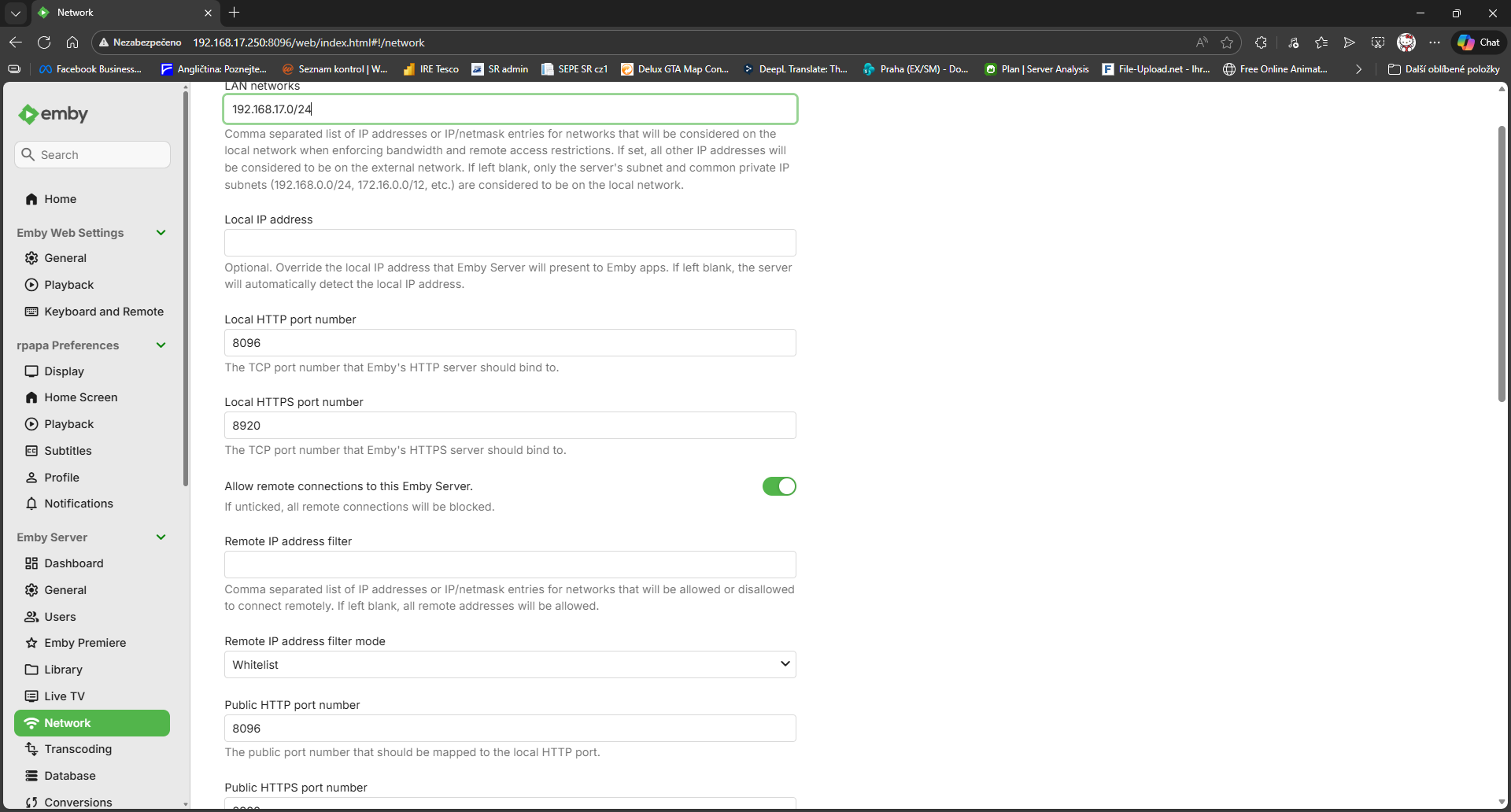
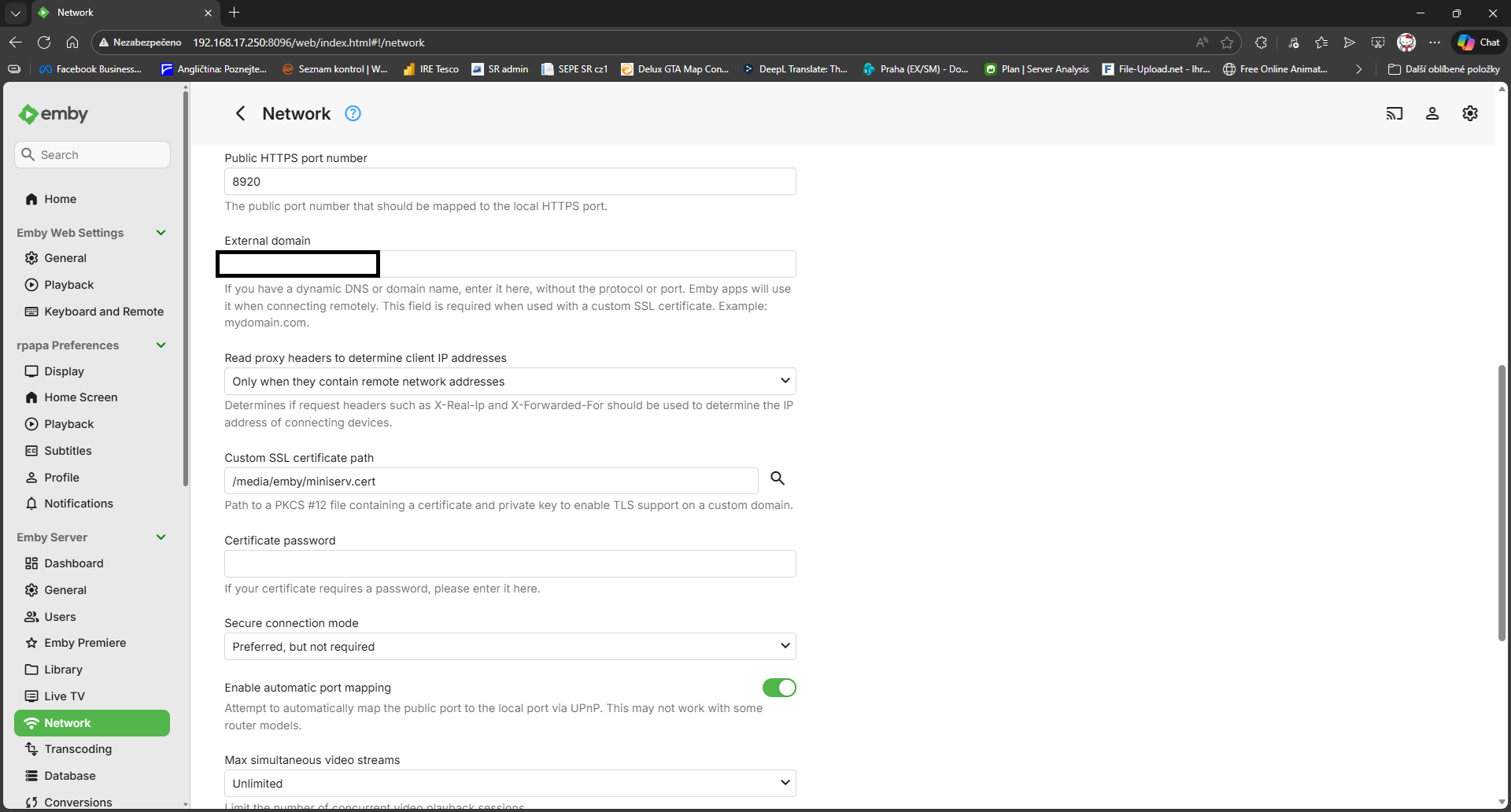
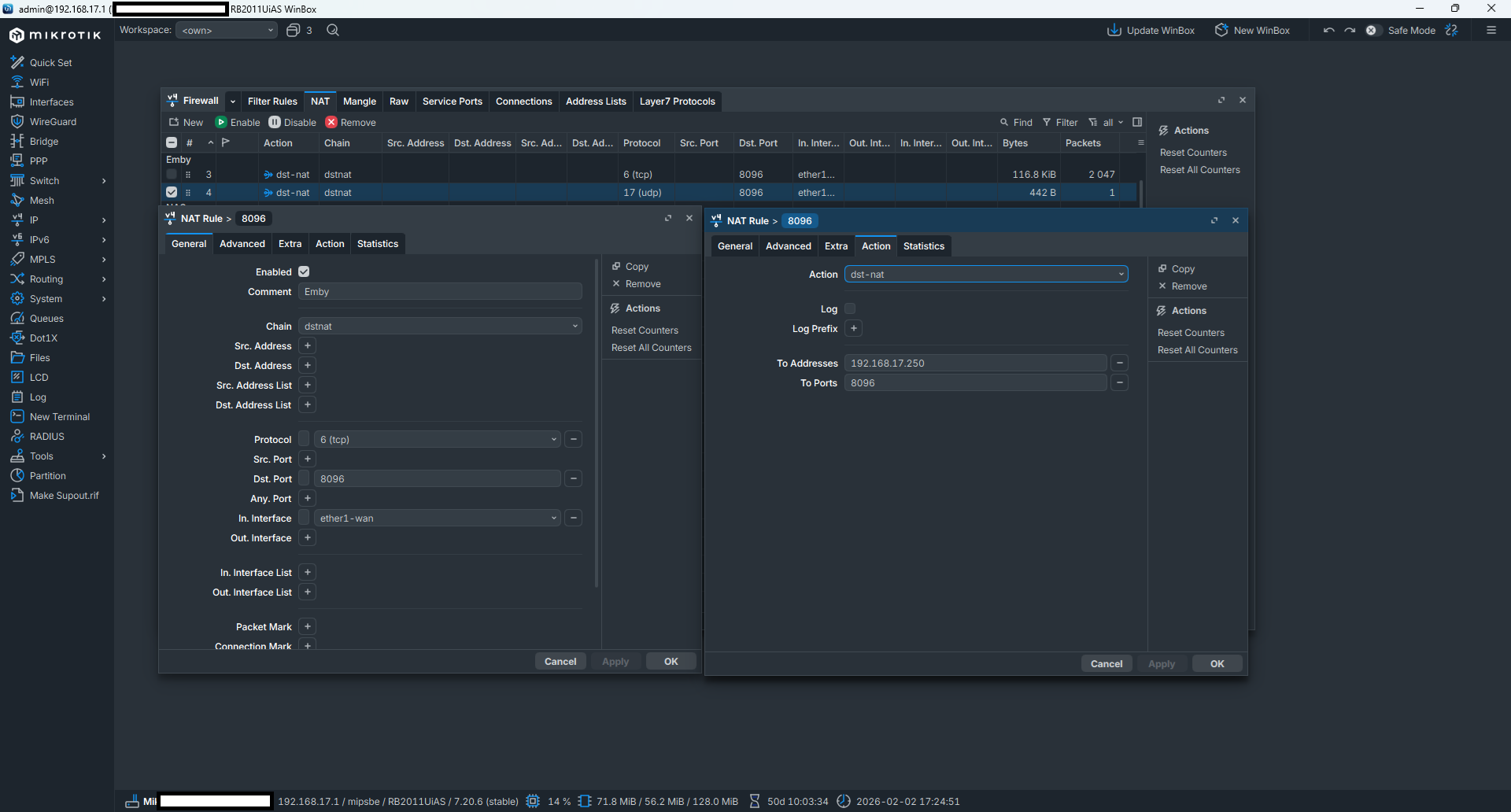
Hi, my settings look like this, which works and may help someone else too. I signed the SSL certificate myself on my webmin server - but here the primary reason is because of LDAP. (My ISP allows me to use my public IP address even within my LAN network, so i can also use my public IP to access services inside my local network.) I log in to my TitanOS TV using my public IP address (not ddns) and use the standard port 8096 (not SSL port 8920), and the login and access work. My settings:
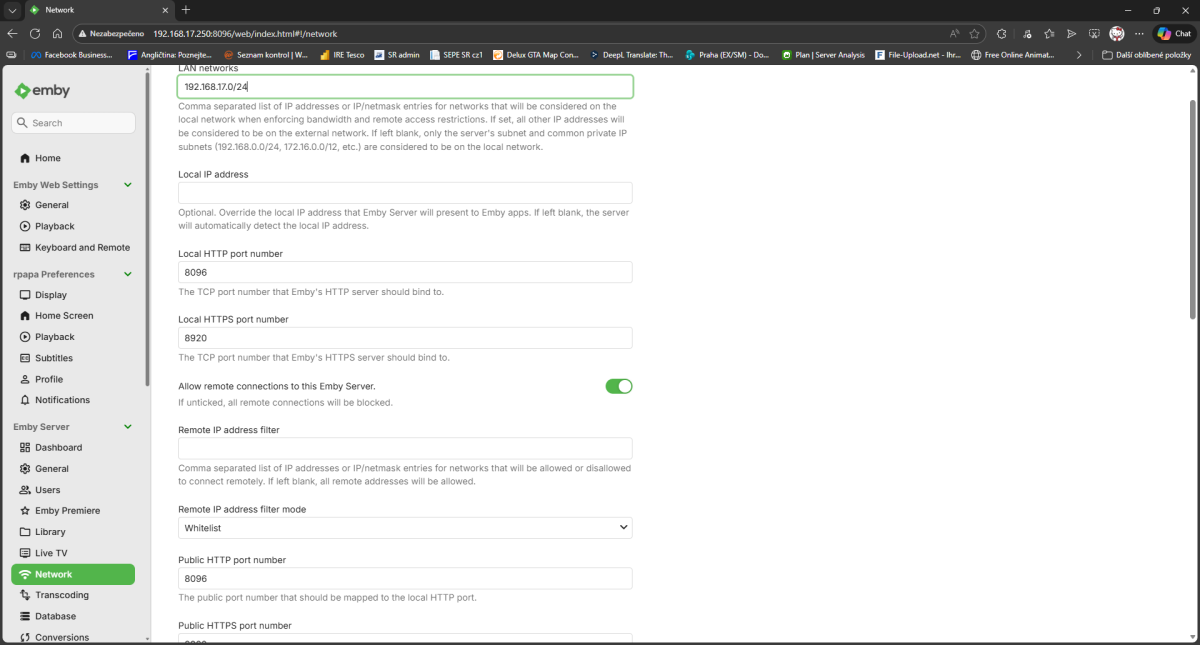
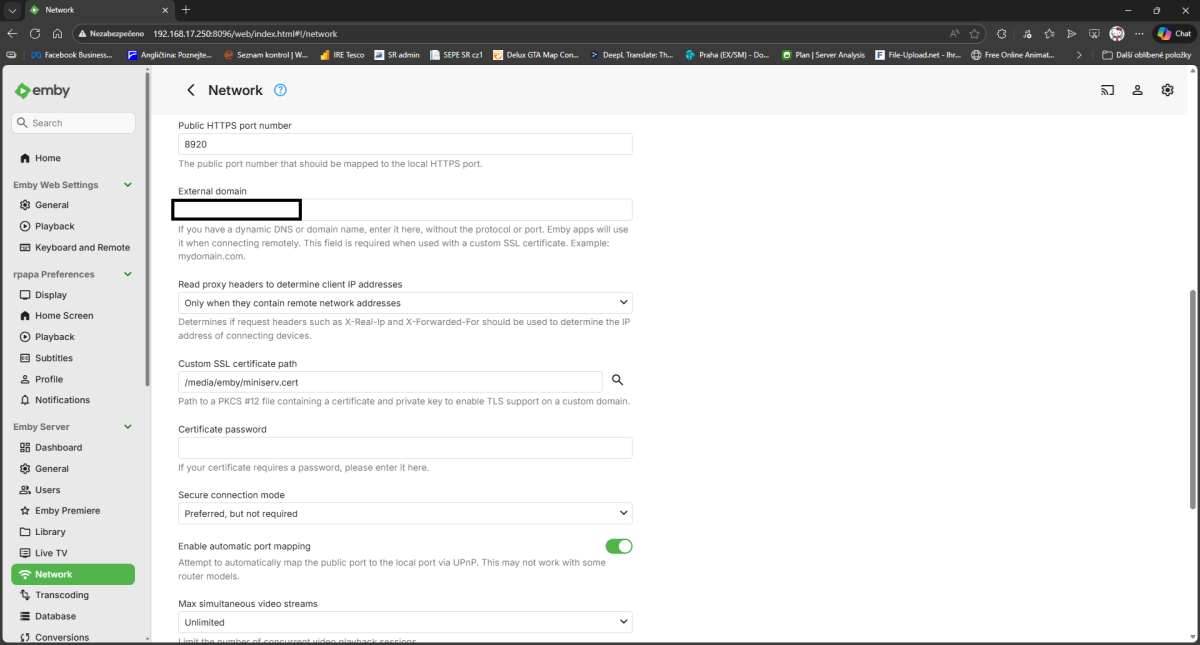
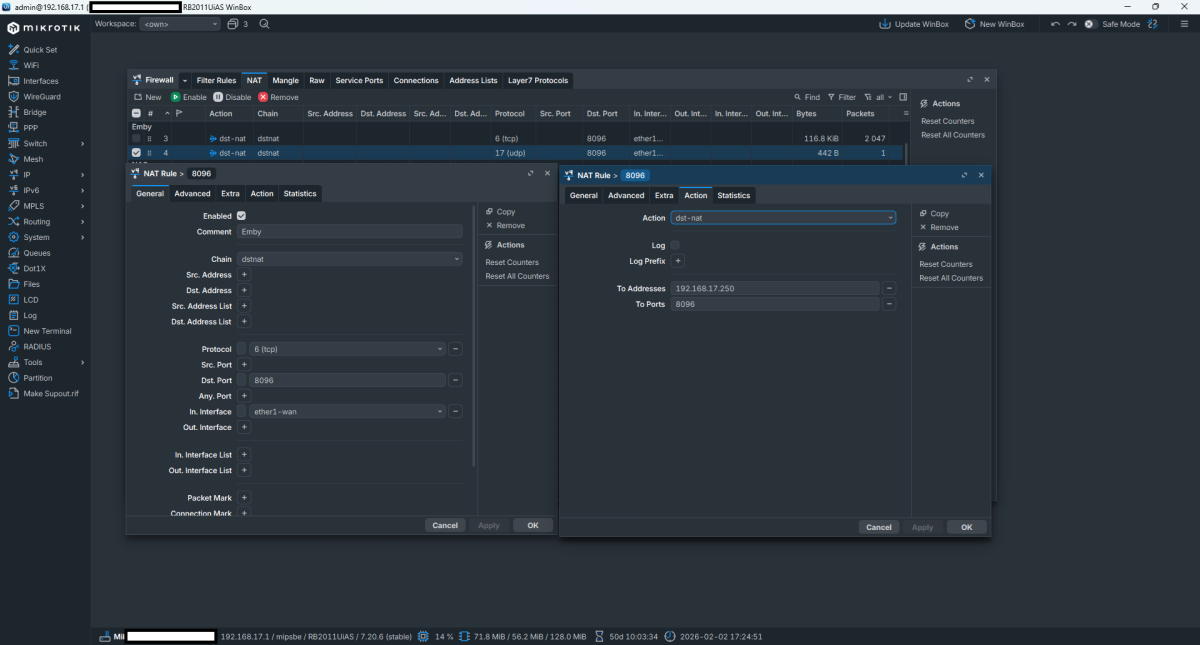 1 point
 -
I have been a big fan of Emby for the past three years. I installed it on my Synology NAS and I use it daily on my Fire TV. As a language learner, I love watching movies with dual subtitles because it helps me pick up a lot of vocabulary in a short time. I often pause when I need a moment to understand and learn new words in my target language. Before, my workflow was tedious: I had to extract subtitles from the movies, merge them on Windows, and then upload them again to Emby. It was very time consuming. So I developed a small plugin that makes the process instant, directly from Emby’s configuration page. At first, I tried to code everything by myself, but I must admit it was much easier with Claude You can try it here: https://github.com/smkerz/EmbySubtitleMerger/1 point
-
I will look into it.1 point
-
Thanks for the link, on my last search in Dezember I only found and followed this topic not knowing there is a second one specific for the Android App. I will have a look into the other topic.1 point
-
A problem has been seen on Emby for Android where for remote connections playback of flac files, only the first two tracks of the album fallback to transcoding and play ok - the third track does not play. This is being investigated on this topic: https://emby.media/community/index.php?/topic/145987-music-stops-playing-after-2-songs/ Update: The Emby for Android app (now at version 3.5.28) is not crashing when playing flac files. The current issue with remote connections playback of flac files, is that it is not switching to transcoded playback for album tracks after the second track1 point
-
Hi, yes we are looking into it. Thanks.1 point
-
Hello! Currently, when editing an item's metadata, genres must be added one by one. This process becomes tedious and slow when adding multiple genres or subgenres. I suggest allowing users to input multiple genres in a single line, separated by commas (e.g., Action, Adventure, Sci-Fi), so they are automatically recognized and added as individual tags upon saving. Thanks!"1 point
-
Hi, yes this is something we plan to look at improving. Thanks for the feedback.1 point
-
Hi, yes it can connect over the LAN via http.1 point
-
I've got all plugins up and running and it's all working great! However, as others have mentioned on this post, there seems to be a lot of themes in different languages. I'm finding that I have a lot in Spanish (not English). I assume there's no easy way to fix this apart from going through my libraries and manually replacing every theme I find in an incorrect language? Do we have any other options here? I assume we can't do much about it if the contributors are uploading dubbed videos, but it would be great if we could somehow choose a default theme language, so we're only uploading/downloading from that repository of themes. Otherwise, perhaps a way to report/flag an unsatisfactory theme items, then after so many reports from contributing users, it gets removed from the repository automatically? - Just throwing out some ideas to keep things tidy for everyone. Thanks for the work that's gone into this btw, it's a great feature to have!1 point
-
I have the emby app on the phone controlling what to play where, so the QR code would define the Album or Song or playlist and the device, where it would be played on, like shown on the http code in the 1st post.1 point
-
Hallo, ich würde gerne in der Ansicht (Filme, Serien) Liste eine Übersicht (Beschreibung) angezeigt bekommen. So wie bei allen andere Ansicht auch möglich ist. Danke Gruß Jenne1 point
-
This would be OK, but http would be more universal1 point
-
Sorry Luke, an Admin butchered the post I put in the "Maintenance Mode" thread....and put part of it here. Link: This was the top half of that post, giving an example of issues with Maintenance Mode and the rest was a suggestion for a feature change/request to Maintenance Mode. I don't know what happened to the rest of the post and I didn't save or screenshot it. Didn't know someone would do this to a post, they clearly didn't read it. My post in the maintenance mode thread is gone. So, now I have no reference. The below thread references the first issue I started having with Maintenance Mode....Page 2.... On 12/1/2025 at 5:00 PM, DMazer said: After doing some checking, I figured out, i can't be in maintenance mode to edit user data from that link. I always put my server in maintenance mode when I make updates or changes to the system. I would still prefer a global way to make these change and force them to stick to all profiles vs having to go into 20 profiles to make changes every time I do an update or change to the categories. Thank you all for your help. LUKE's COMMENT: HI, good catch about maintenance mode. We'll take a look at this. Thanks. Anyway, I think the meat of my request was to allow admins to do everything in "Maintenance Mode" and only not allow videos playback, keeping the banner notification as it currently has. -Derek1 point
-
Update to v1.1.0. UI and layout update: Better handling of multiple tags, Added - Dry-run toggle. Run the code without writing to database. See the results in Emby-log Test-button: Test your link and API keys directly from UI (no writing to Emby database). Download .dll https://github.com/soderlund91/AutoTag/releases/tag/v1.1.0.01 point
-
Yes you're right, I got default folder view now!, Apologies..I was checking in the Emby Web Settings, I realise it's user setting. That just leaves the folder metadata as the only bad apple.1 point
-
Difficult to know what's required vs what's configured. Drivepool default config is to balance across every disk in the pool equally BUT if you have started adding balancers (SSD Optimizer etc - which you should) then it's important you use the setting below - otherwise the scheduling of these balancers gets overwritten by the default one - probably not what you want. The other important thing to realise, is just because you have added a disk to the pool, it does not mean it is dedicated (it is a file based hidden structure as explained above). So you can continue to add normal files to it if you wish. It's a powerful (and imo reliable) piece of pooling software, but fully understanding what it's doing is sometimes not obvious.
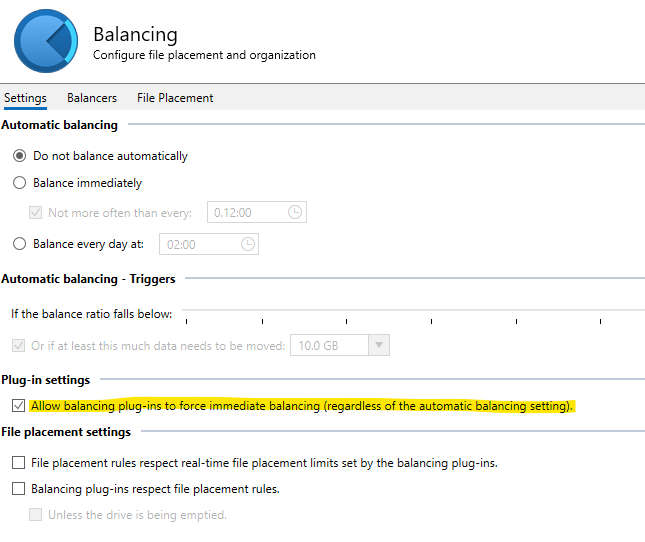 1 point
 -
Just corroborating statements from the emby team here... We were told on October 23rd of last year it would be "resolved in the next beta" after it started getting a decent bit traction on the forums and Reddit. Threats to report CVE and whatnot. Then we were told on November 29th that they "needed more time" After that on Dec 9, we were told it would be 1-2 builds away despite 3 beta builds coming out since then. Since then, no comments from the team regarding this critical security flaw in their paid software. This needs to be fixed by the next stable build at the very least. Ridiculous.1 point
-
It is per .db file and each .db file can have multiple connections up to a set maximum We have these databases: authentication.db, activitylog.db, users.db and library.db. The cache is defaulted as 128Mb per connection for the library.db and hard wired at 64Mb for each of the connections to the other db's We can have up to 5 connections for each of the library.db and authnetication.db and up to 3 connections for each of the remaining 2 databases. So with the defaults, the max cache Mb usage could be 640Mb for the library.db and 704Mb for the other 3 db files. So maximum1 point
-
Emby Server Beta 4.10.0.2 is working for me with Hardware Acceleration and Tone Mapping on Synology with QuickSync GeminiLake UHD Graphics 600 GPU1 point
-
I can't get ratings-sync to work right for me as the webpages won't send me an API key i can use for testing so it's hard for me to diagnose. I have changed the caching for the rotten tomatoes rating slightly so it should read it and change it if it has been updated. Can you please test if it worked? EmbyIcons.dll1 point
-
This hasn't aged well. 9 years, 16 pages and 129 likes. A classic example of NOT listening to your user feedback1 point
-
This thread kinda got offtopic. I just updated to 4.9.3.0 and yes, the default layout for all my users now is this ugly side scroll stuff. I can't find an option to change it back for all users on all devices -> Bad Update I now must tell every user how they can reverse it, as the side scroll layout is not only ugly but also quite unpractical on most devices... Is there a solution available to revert for all users?1 point
-
Hi all, FYI I made a fork of the original Duplicate Movie finder, with a better UI and improved duplicate detection. Please give it a try and let me know your opinion about it. snarkbe/emby-dupe-finder: This project is a simple web-based tool designed to help users identify duplicate movies in their Emby server libraries.1 point
-
It sometimes can, but it just depends on a lot of factors. There isn't a dedicated option in the web app to force a conversion to stereo. It sounds like this is something that could help here.1 point
-
I am in same boat. Got a new gaming laptop, and it ran great on that. Tried it on shield, and it wouldn't keep running. Will purchase lifetime and kill plex if it can run smoothly off my shield.1 point
-
Yea I am having the same issue. Constant crashing1 point
-
I've also noticed if you don't opt into the Contributors network, the plugin kind of ignores that setting and downloads it anyways. And to be honest there's a bunch of new videos that are in other languages, just copies of a trailer, etc.. And some are just totally off.. South Park would be a good example. The contributor's network has become kind of a mess lately, and I can't seem to unselect it. (as it appears at least from my end that it's ignoring the setting)1 point
-
Bump I'd like to be able to remove some unused tabs to. For me I'd remove Artists, Composers, Tags and Folders from the music top navigate bar. I find that Album Artists provides a better list for me considering I download albums of artists that I like and don't care too much about those that feature on the tracks. They'd be a few tabs I'd remove from TV and Movies to. I hope this is a feature at some point. I guess you'd add this as checkboxes in the Library settings. Thank you.1 point
-
0 points