Leaderboard




Popular Content
Showing content with the highest reputation on 02/01/26 in Posts
-
Home Screen Companion Plugin https://github.com/soderlund91/HomeScreenCompanion Below is a summary for this plugin, visit GitHub for latest release and full documentation. Home Screen Companion is a plugin for Emby Server that automatically manages home screen sections using tags and collections for your Movies and TV Shows — and keeps your home screen sections in sync across multiple users. It works by connecting one or more sources to a tag and/or collection in your Emby library. Sources can be external lists from Trakt, MDBList or TMDb, rules-based filters on your own library, AI-generated recommendations, or your existing local collections and playlists. Each source runs on a schedule, and the plugin makes sure your tags and collections always reflects the current state — adding and removing movies and series automatically. The plugin can then use the tags or collections to create a home section and give you a living and curated home screen experience. With Home screen companion you can also manage the home screen sections for all users - copy, manage and create home sections directly from selected source. No need to set it up for every individual user, just copy it from one user and you can have a server wide home screen! Important Requires minimum Emby server 4.10.0.10 Key Features Different source types — External List, Smart Playlist, AI List, Local Collection, Local Playlist Automatic tagging and collections — items are added and removed as lists change Advanced scheduling — annual, weekly, or specific date windows Per-entry home screen sections — automatically managed sections for any tag or collection Home screen sync — mirror one user's home screen layout to any number of other users Top-List — Create a "Top 10 movies of today", and the plugin will create a new home section for selected users with numbered posters Home screen sync — mirror one user's home screen layout to any number of other users Source Types External List Connect to curated lists on Trakt or MDBList. The plugin fetches the list on a schedule, matches items to your library by IMDB ID, and keeps tags and collections in sync automatically. Smart Playlist Build dynamic lists directly from your library using a flexible rule builder. No external service needed — the plugin scans your library and tags items that match your criteria. AI List Generate recommendations using AI. Write a natural language prompt and the plugin calls an AI model to produce a list of movies and shows, then matches them against your library. Local Collection and Local Playlist Tag items based on an existing Emby Collection. Combine with scheduling to create time-limited promotions of curated content — no external API needed. Tags The plugin take the source type you have and put a tag on Movies and Series. You can choose at what level to put the tag, either the Series, Seasons, or the episode. Collections Any source type can automatically maintain an Emby Collection alongside its tag. Playlist Any source type can automatically maintain an Emby Playlist for all or selected users. Scheduling Set up advanced rules when the tag or collection should be active. For example you only want to tag a Christmas list during December, or you only want your collection be available during Halloween. With the scheduler, tags and collections get added and removed automatically. Home screen Add a dedicated home screen section to any tag/collection entry. The plugin creates, updates, and removes the section automatically on each sync, no manual Emby configuration needed. Just select your source and enable the home screen option - and you will have this source as a row on your home screen for all selected users. Home Screen Sync - server wide home screen With this function you can easily copy a users full home screen sections to all other users. No need to set this up for every user now! Just configure the home screen sections and library order for one user, and you can have a server wide home screen that looks the same for all selected users in the blink of an eye. Top-List The plugin can create a "Top 10" style of home section for selected users. This can be done by either manually select what movies you want, or use existing tags to have a list that is auto-updated. Installation Download the latest .dll from the Releases page (GitHub). Place the .dll file in your Emby plugins folder. Restart Emby Server. Screenshots More screenshots in below spoiler5 points
-
Are you using one of the ARRRs (Sonarr, Radarr) by any chance ? Had the same issue with coverart and found out the culprit wasn't the Emby metadata fetcher.2 points
-
I would think it's because it's meant to be a home server and not a pirate Netflix service.2 points
-
Mostly that seems to be: - Release new feature that the Devs or "Commercial" Customers want - Spend multiple releases fixing regression issues caused by lack of proper testing process - Spend refactoring code for this weeks newest release of .NET2 points
-
Maybe I am just a bit of a control freak on this one. However it would be nice to have more granular control in this manner. Right now when it comes to download / syn it uses the setting in the transcoding section when it comes to using hardware acceleration or not. I would prefer to treat live tv and conversion jobs differently. For conversions i would prefer to not use hardware encoding but for live tv i would prefer to use hardware decoding and encoding. i suppose to better explain myself. I would like to see basically another copy of the transcoding page as a tab in download / syn or incorporated into the settings tab on download and syn. So that for example if i wanted to use hardware acceleration on live tv but yet wanted to only use cpu capabilities for syn jobs i would have that granular control.1 point
-
Yes, will do.1 point
-
@quickmic Can you add some kind of message after successfully deleting a Backup? -- sort of like you do when creating one, so we know it actually did the something. Can be at the bottom of your tdl.1 point
-
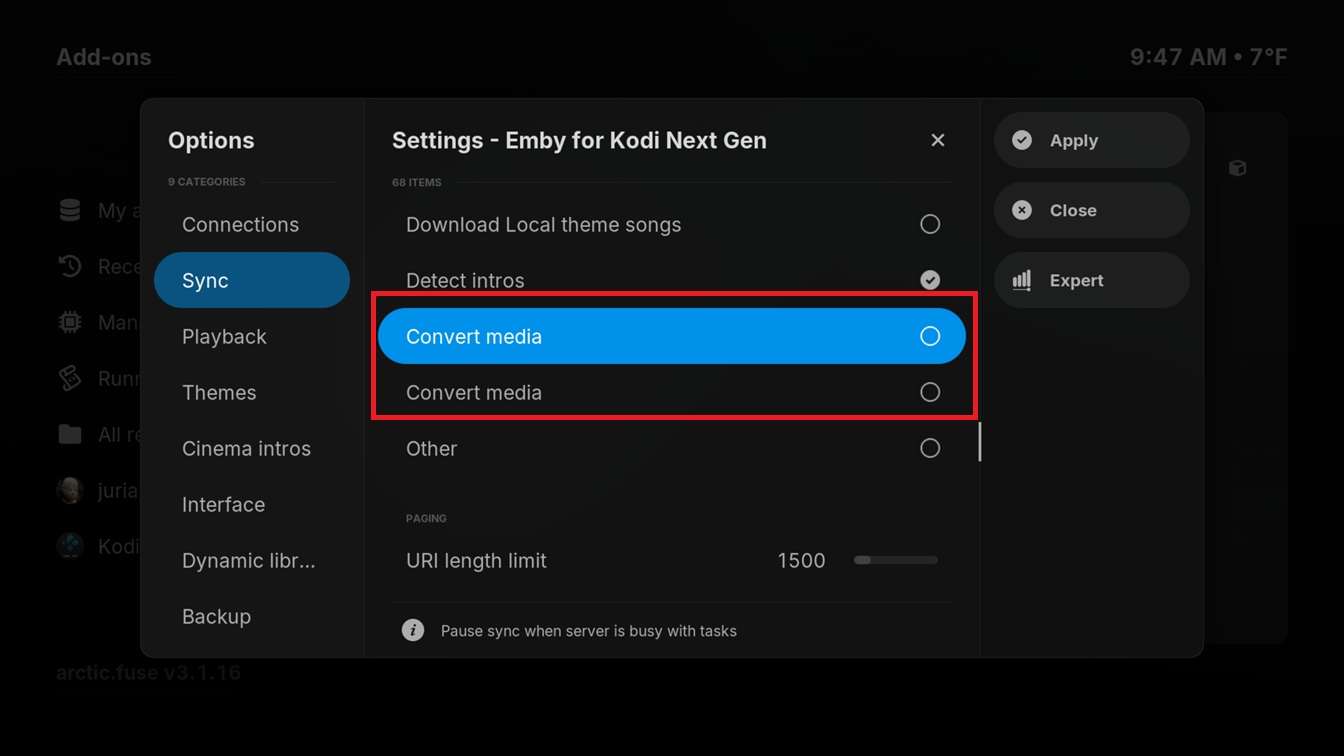
There is a duplicate setting Sync, though the description is different. v12.4.10 (though it may have been there before).
 1 point
 -
not pointless. can be used to at least educate people to not just leave admin open to web.. clearly seems people are still doing this.1 point
-
it doesnt just matter to me what you do. im telling you what is safe ATM. and again im fully for 2fa. @soki said they had their admin account got logged into. if you have had an unauthed login you would need to re-eval your security practices currently. and the current safest thing is to not allow admin remotely. can you answer why a vpn is not always possible? if you are hosting emby you can then easily host your own vpn for free.1 point
-
dont give give false narratives for the request. thats all we ask. i have also asked for 2fa. i just dont gaslight people for it1 point
-
thank you. At least i can only say my kodi settings are "forced only", language same as gui (its a CE setting i guess). Works on local, nativ non synced files, but the same file/episode does not start showing subs when its synced with emby / e4k. switching subs off and on during playback wil show it. at least tested with some internal subs...1 point
-
There is actually zero way in for admin if you don't allow admin login remotely...that's fact. Unless of course your local lan is compromised...time for you to get your security fixed1 point
-
works, thx. But the subtitle problem is still there, same as 12.3.8...1 point
-
Hi, i tried testing the latest testing version 12.4.9, but i got some sync problems.kodi.log Test System: 2x Windows PC with Kodi 21.3 64bit. Emby Server Beta 4.10.0.2 (witch causing the problems i guess....) After updateing to 12.4.9 i need to restart kodi to get the database reset query. After another restart E4K start syncing with the server. Persons, Tags and Studios works, but syncing stops at the 1. movie. Deleting the addon settings manualy, removing the databases, setting the addon to defaults does not help. Also after a factory reset 12.4.9 not showing me my Emby-Server by name, i had to add him manualy by ip adress. finaly i cant select some of the libraries, i can only select "all". Log with e4k debug below, cleaned from most person, studios, tags...1 point
-
I also find it a big problem that there is no search function for folders. It's such a shame. Seems like such a simple thing. It's the main reason I didn't upgrade to premiere and don't use emby anymore.1 point
-
Difficult to know what's required vs what's configured. Drivepool default config is to balance across every disk in the pool equally BUT if you have started adding balancers (SSD Optimizer etc - which you should) then it's important you use the setting below - otherwise the scheduling of these balancers gets overwritten by the default one - probably not what you want. The other important thing to realise, is just because you have added a disk to the pool, it does not mean it is dedicated (it is a file based hidden structure as explained above). So you can continue to add normal files to it if you wish. It's a powerful (and imo reliable) piece of pooling software, but fully understanding what it's doing is sometimes not obvious.
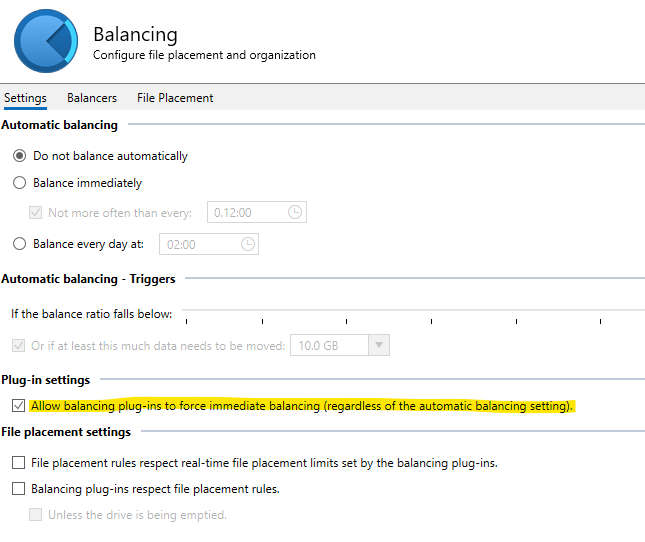 1 point
 -
Ok, checking. fyi, Multiversion episode works totally different, as Kodi has no support for that. Episode selection is done by the plugin (workaround), while for movies, the plugin uses Kodi's function. Also Kodi keeps track of each version individually, while Emby doesn't. Maybe the issue is related to that, could be also an issue with the start sync. btw. did you exit Kodi while the movies was pause or really stopped? That's a difference.1 point
-
We have this: I would like to see the ability to "Extract User Data from Backup from this (selected) directory." Because I use several servers (bata/Stable) and let some users use different ones, this would make it easier to copy their watched history when I upgrade them to a newer version (or beta). Of course, I know I can change the backup path to do this: But can you make it easier for us testers? Just select a different path to restore?
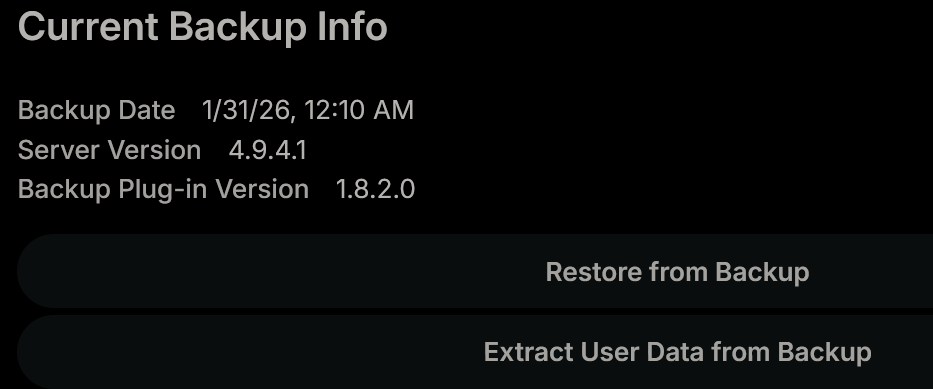 1 point
 -
The attached Power Script generates a CSV output file that can be dropped into the attached Excel file to generate numerous reports including: 1) Missing Movies from all Collections in Library (breaks this out into past, recent, and future releases) 2) Drift between Local Library Collections and TMDB (such as renames, splits, merges, etc.) 3) Metrics based on directory stucture (assumes format: Multiverse\Universe\Collection\Movie - but this can be easily adjusted) Foreach NFO file in your library: * Reports local meta data * Extracts TMDB ID and looks up meta data via TMDB API including release date, collection ID, name, and size Foreach Collection in your library: * Reports movie parts missing from library To start: 1) Add your TMDB API Key 2) Set the top directory in your movie library 3) Adjust (or disable) the directory path parsing to match your structure (assumes format: Multiverse\Universe\Collection\Movie) Note: if you're not sure how to do this, try dropping the script in AI and describe your file structure. It can help you adjust the code accordingly 4) Run the script from Terminal 5) Copy & paste into the Excel file (currently has example data in it to demonstrate the various pivots and graphs) I'll credit CoPilot with building this script, though it was obviously a collaborative effort. I've never coded in Power Script before (my coding days were mostly Linux), but got this humming in no time. Enjoy! LocalToTMDBCompare.ps1 SRC_Movies.xlsx1 point
-
plugin.service.emby-next-gen-12.4.8 Proofread a few translations again resource.language.zh_cn.zip1 point
-
As this is a first release, expect some bugs. I have tested it on my server and it works as expected. Any feedback is welcome!1 point
-
Liegt der Ordner Photo auf der Synoligy und darauf läuft auch dein Emby Server ? Und die wichtige Checkbox auch gesetzt ?
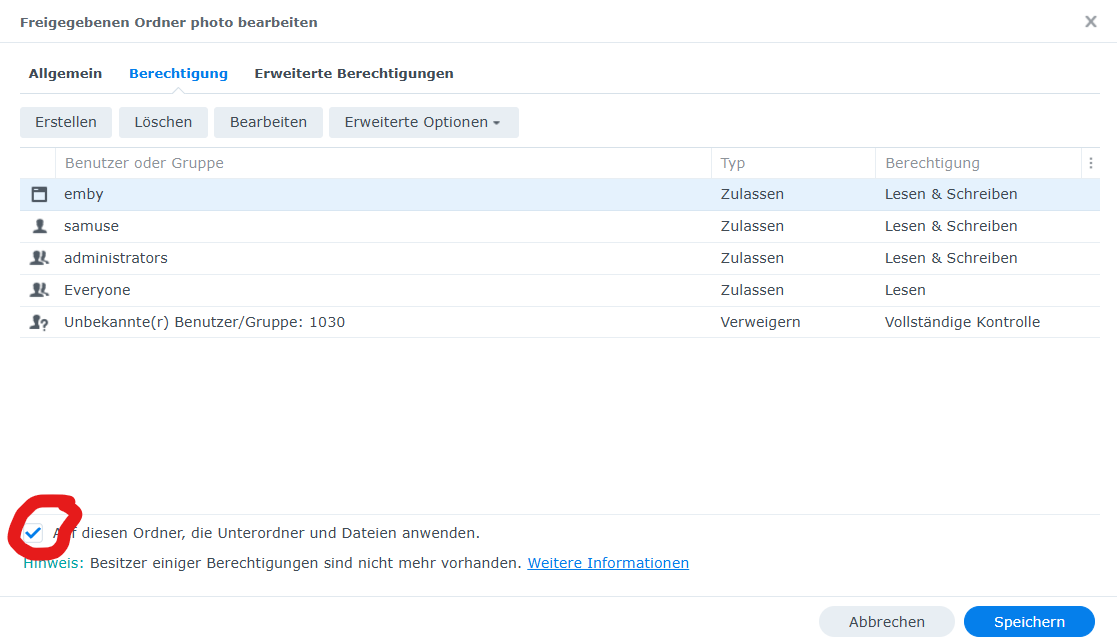 1 point
 -
From the V drive you can just move the extra Movies and TV folders into the top DVDs folder and then delete the extra DVDs folder. Then stop looking at your drives individually if you want to relax and be happy with drivepool.1 point
-
Just me being an idiot and looking after cooking food while uploading it. Fixed now.1 point
-
This is what you get on drive V. I don't know what you think is wrong in your setup...cant see anything Drive V is a virtual drive and is the sum of all drives added to the pool in stablebit drivepool. Files will be scattered around the drives with some here and some there depending on what you have selected in Drivepool ex.how the files should be duplicated or not. So now you have 2 drives added and with no duplication, about half will be on one drive and the other half on the other drive, and all files will be on V. With 2x duplication all files will be on all drives when you only have 2 disks. Remember, drive V is only the place where Drivepool will present your files as they should be seen. How the are seen/listed on the other disks (for you Z and Y) does not matter much as long as all files are seen on V. I dont have driveletters on my pooled drives(looks much cleaner), since I dont look at the other drives unless there is some trouble and it seldom is. Hasn'nt been much trouble to blame on Drivepool after my 14 years of using it.1 point
-
I'm a "beginner" myself when it comes to DrivePool – but first things first: it only really takes off when you have a good SSD integrated. Otherwise, this user here should be very knowledgeable: @rbjtech1 point
-
Thanks very much, Luke. As far as I understand it, the problems exist mostly for the 2023/2024 model updaters in some cases. And to be clear for the skimmers and headline readers, this is NOT a problem with EMBY, so a little bit OT here. I won't have a grudge if you want to delete the thread. I just thought if there are problems I should find them here too...but nobody so far. Since the poorhouse inmates with the cheap QNED-series like me get fixes and updates significantly later than the wealthy OLED owners, I think i'll wait a few weeks longer, because I haven't seen the x.80 and x.85 fixes for me, only for the OLEDs. AI and reddit is the reason for my question and told me as follows: -- "Users and experts confirm significant issues with the webOS 25 (V33.22.75) update, including app crashes due to memory leaks, removal of multichannel FLAC support, and system instability. Specific bugs affect the user interface, along with reported problems in Dolby Vision playback and HDMI-CEC control. A significant number of users have flagged problems post-update, especially with media playback and related features: Media Players and Servers (Plex, Emby, Kodi, Jellyfin): Multiple complaints about playback glitches, such as subtitles disappearing mid-content, crashes during prolonged playback, or failure to handle high-bitrate files properly. For instance, on the QNED87 series, some Kodi users note no video output (only audio) for 4K HDR files, while Full HD HDR works fine. Emby app UI issues like crashing stylesheets or navigation bugs have also been reported on webOS 25. Transcoding and subtitle rendering seem hit-or-miss, with some attributing it to memory management flaws introduced in the update. Audio Problems: Frequent dropouts or cutoffs, especially when connected to soundbars via HDMI-ARC or eARC. This appears common across series like G4 and others, often starting right after the webOS 25 upgrade. Some users fixed it by downgrading or waiting for patches like 33.22.85. Crashes and Stability: Random TV shutdowns, black screens, or full crashes during use. Memory issues are a recurring theme, with the update allegedly worsening resource handling. Streaming Apps and Other Features: Problems with Dolby Vision playback breaking, WiFi requiring repeated password entry, or general app instability. High-bitrate streaming from services or local servers often stutters or fails. Additionally, the update forces an unremovable Microsoft Copilot tile (which can only be hidden), irritating some users who see it as unwanted bloat. HDMI-ARC/eARC Specifics: Persistent bugs where the TV forgets connected devices, requiring re-detection. Version 33.22.75 likely includes this, as it was noted in builds up to 33.22.80, but 33.22.85 reportedly resolves it for many. These issues seem more prevalent in the initial webOS 25 rollout (around mid-2025), with Europe users echoing global complaints. The 1.5GB size aligns with major OS upgrades that overhaul the interface and add AI features, which some call "bloatware" rather than useful. YouTube creators have posted warnings about regretting the update due to broken features or new bugs." Thanks, sorry, or whatever...1 point
-
Please add a setting for subtitle opacity, as it looks so much better on HDR TVs. Otherwise it's much too bright and hurt your eyes.1 point
-
Awesome! Hopefully it comes to the stable branch soon!1 point
-
Hi. I am an Emby première user running it on a FreeBSD jail and I just would like to thank the maintainers of the FreeBSD version. Your work is much appreciated.1 point
-
I've decided to pull the trigger on new hardware. Once it's set up with Debian I'll start testing the new Linux beta. Looking forward to it1 point
-
While I don't use Emby Connect I don't believe this is true, there is both an HTTP and an HTTPS page for app.emby.media - most web browsers will automatically redirect to HTTPS, but you can definitely use the HTTP address to connect to an HTTP only instance assuming all remote access is setup correctly. Though of course I don't recommend connecting remotely via HTTP, but it does work. I'm not really clear on why you need 2 servers for this or what they have to do with each other if there's no remote access anyway? Not really sure what you're even trying to achieve here.1 point
-
I don't believe you can add a system internal user to a group. They are designed to have restricted service permissions only and so that no one could try and break into your NAS already knowing a logon account. I To check if the permissions are correct go to file station and right click on your media folder then properties and permissions. Are we sure that post isn't from someone using DSM 6? Under DSM 6 there was a local user emby and you could add it to any group you wanted including the administrators group. However, to add a user to the administrators account using ssh command line you need to do the following first Enable SSH on NAS: Log into DSM, go to Control Panel > Terminal & SNMP > Terminal tab, and check Enable SSH service (default port is 22). Open Terminal: Open Terminal or PowerShell if using Windows Run Command: Type ssh adminusername@IPaddress -p 22 (replace with your actual username and NAS IP). Authenticate: Type yes to accept the fingerprint, then enter your password. Root Privileges: To switch to root, type sudo -i and enter your password again. now just use the instructions in your screenshot from above.1 point
-
This hasn't aged well. 9 years, 16 pages and 129 likes. A classic example of NOT listening to your user feedback1 point
-
Playlists -> Like any other content. With the custom nodes. I'm confused.. Yes, yes and yes. Especially this question confuses me. You asking if progress is up-synced? This is one of the main functions of the plugin.1 point
-
Rather than having to click on an individual episode to see its Community Rating, it would be nice if the ratings were displayed on the episode list that appears when you click on a Season.
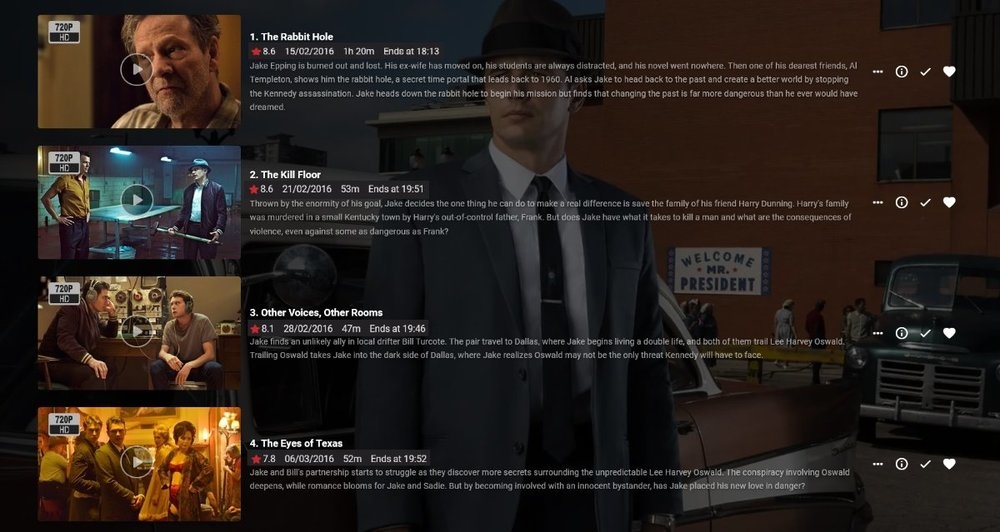 1 point
 -
hmm... ive just noticed a couple of ways that Emby 'misbehaves' with empty networks and empty genres, when episodes have a genre or network but the show does not. Having just retired i would like to give programming another shot so i'll give a plugin a go and perhaps extend the ways in which show metadata trickles down to episodes. I guess it nice to have to such flexibility at the episode level but for day to day i would prefer homogeneity or at least only having to manage in one place...plus i need a project.1 point
-
The general consensus seems to be that Bazarr offers high quality subtitle services. There are many discussions about Bazarr workarounds and such. I believe integrating the automatic and manual subtitle searching to send search commands directly to Bazarr would be a cleaner integration. This would also tie Bazarr right into the Emby apps through the existing subtitle search options. The remaining integration would be Bazarr -> Emby file notification. There are a few options for this: Custom post-processing: Instructions to set this up could be automatically documented on a per-server basis, generating a "custom post-processing" command string that plugs into Bazarr Unclear if the below works as intended (or at all) /usr/bin/curl -sG -X POST http://<HOST>:<PORT>/webhook/Library/Media/Scan?api_key=<API-KEY>&FolderPath={directory} Webhook: There is a webhook option, but I have not had luck finding good documentation Unclear if the below works as intended (or at all) http(s)://<HOST>:<PORT> Apprise: Looks like it needs apprise to also be installed and configured? Not ideal, as it requires another 3rd party system. Also does not seem to accept an API Key, so password is insecure emby://<USER>:<PASSWORD>@<HOST>:<PORT> Thanks1 point
-
I recently found a need to look up additional information on a director. I was hoping to look at the director's profile and see not only the movies I had in my collection but also a list of other movies that they have directed. This would be displayed below the library's current movies. ex: My movies: Movie 1, Movie 2 Other movies by this person: Movie 3, Movie4 ================ This could help one expand their library and to discover a missing gem.1 point
-
i mean building it in. but we dont know if emby is working on this or not. end of day though i would never enable 2fa for my regular users (more pain in the butt for them). not really needed (cant remove or add media or make changes). i would use for an admin account. but for me being admin i can currently just vpn to my server and manage locally.1 point
-
What I want to discuss? Easy why when I launch the Jellyfin app it launches instantaneously. When I choose a file to watch on the TV through Jelly fin it load easily in under a 10th of the time it does on Emby. While the Jellyfin app isn't all that pretty it just works.1 point
-
I stopped paying monthly for Emby for the exact same reason: it was the same shit storm, either Luke saying the said feature will be coming for years and it not coming. I already have Plex Pass but was keeping Emby too, but now the Jellyfin team has reworked some database optimisation and the performance has improved significantly. The power of open source clients and plugins has really been getting better lately. Why would one pay for a platform where things are not delivered even when they have a community which pays them? Also, I feel it’s better that the Jellyfin team rather doesn’t comment on anything and their progress is slow but transparent. Doesn’t hurt because the product is free. Feels like Luke is selling ETA more than features here, and if Luke is the only dev, then it clearly shows Emby shouldn’t ideally be an organisation and shouldn’t have that costly licence price. It’s sad to see emby , looking at the current progress of Jellyfin one day they are going to go far ahead as they gain a steady pace. I will keep trying Emby in between. Not being able to deliver a feature like Smart Playlist (an open source plugin can do this on Jellyfin) is an utter failure of Emby in 2025. Feel bad for people who are active subscribers of Emby.1 point
-
DING DING DING exactly1 point
-
Major achievements? Honestly, I’m struggling to find any. From a user perspective, 2025 has mostly felt like a year of dodging critical bugs while the features nobody asked for continued to underwhelm. What I’d like to see for 2026 is for the dev team to actually enroll in a Security 101 course. It’s becoming a bit pathetic how often fundamental security best practices are ignored or treated as "low priority" while the community is left to find and document the holes ourselves. For instance, we’re still dealing with: Unauthenticated Access to Private Data: We are literally on page 6 of a thread where anyone can access library images just by knowing an ID. No token, no login, no problem. The response time on fixing basic privacy leaks is glacial. Unauthenticated access to images by itemid Permissions Bypasses: Having "Critical Security Vulnerability" in a thread title regarding Live TV permission bypasses should usually warrant an immediate emergency patch, but here we are. Critical Security Vulnerability: Live TV Permission Bypass PIN Bypasses: The fact that a simple "Home" button press can bypass security PINs is a masterclass in "Security by Wishful Thinking." Security Issue: Using home button makes PIN bypass possible And then there is the "Universal" Android app. It’s truly a "major achievement" to spend years trying to replace the perfectly functional Android TV app with a bloated, stuttering "one size fits none" mobile port. It fails miserably at providing a smooth 10-foot experience, yet the devs seem hell-bent on sunsetting the one version that actually works for TV users. If the goal for 2025 was to prove that a paid product can have slower security responses and worse UI regressions than its free competitors, then mission accomplished. Ultimately, for 2026, the devs need to start concentrating on legitimate bugs and community concerns instead of @Luketreating this like his own personal pet project. This is a paid product with a community of users, not a private sandbox where critical security and usability issues can be hand-waved away just because they don't fit a specific internal vision. Fix the foundation before adding more "achievements" to the pile.1 point
-
Add structured eBook metadata fields to Emby so books can be indexed, searched, filtered, sorted, synced, and surfaced with the same quality as video and audio libraries. Problem Current handling of eBooks in Emby is limited. Important fields are missing or unindexed, which makes large libraries hard to organise. Users who migrate from Calibre or other managers lose rich metadata, reading progress, and annotations. Proposed solution Introduce native models, scanners, UI, and API support for the following fields. Core fields Title. Main identifier for the eBook. Used in listing and searching. Author/Editor. One or many. Essential for grouping and sorting. Language. For filtering and display. Series. Series name and number, sortable. File Format. EPUB, MOBI, PDF, AZW3, CBZ, etc. Drives renderer choice. Identifier. Unique ID next to ISBN, such as, DOI, UUID, or an internal GUID. File Path / Location. Absolute path for local and NAS items. Optional fields Publisher. Useful to separate commercial and indie content. Subject / Genre. Fiction, Non-fiction, Sci-Fi, Thriller, etc. Tags / Keywords. Freeform labels for flexible search and smart lists. Reading Progress. Per user last read location, bookmarks. DRM Status. Enum: Unknown, None, Present. Word Count / Page Count. For size filters. Rating. Per user and external ratings. Last Accessed / Last Read. Per user activity to support “Continue reading”. Annotations / Highlights. Per user notes and highlights, exportable. Data model Add a new BookItem entity that extends the existing BaseItem. Scalars: Title (string), Language (ISO 639-1), SeriesNumber (decimal), DateAdded (datetime), DatePublished (date), Format (enum), DrmStatus (enum), WordCount (int), PageCount (int), RatingExternal (float), RatingUser (float), LastAccessedUtc (datetime). Collections: Authors (list of person refs), Editors (list), Identifiers (list of type:value), Tags (list), Subjects (list). Per-user: ReadingProgress (location plus percent), Bookmarks (list), Annotations (list of location plus text and timestamp). Paths: Path (string), LibraryId (guid). Indexing and search Index Title, Authors, Series, Language, Publisher, Tags, Subjects, Identifiers. Sort keys: Title, Author, SeriesName+SeriesNumber, DatePublished, DateAdded, PageCount, WordCount, Rating. Ingestion and metadata Add an eBook library type in Library Setup with supported extensions and a priority order: EPUB, MOBI, AZW3, PDF, CBZ, CBR. Parse embedded EPUB OPF metadata, PDF XMP, and sidecar .opf files produced by Calibre. Optional metadata providers: Google Books, Open Library, ISBNdb, Goodreads export files. Providers should map cleanly to core fields and never overwrite user edits unless requested. Support Calibre migration: read Calibre library structure, .opf sidecars, and metadata.db when available in read-only mode. UI and UX Library views: Grid, list, and series views with badges for format, language, and DRM. Detail page: Title, series breadcrumb, authors, description, identifiers, subjects, tags, publisher, publication date, format, page count. Actions for “Read”, “Download”, “Mark as finished”, “Add bookmark”. Reader integration: For EPUB and PDF, an in-browser reader that persists per-user progress, bookmarks, and annotations. If a built-in reader is out of scope, expose progress endpoints so external readers can update state. Filters: Language, series, publisher, genre, tags, format, size, DRM, rating, date added, date published. Smart playlists and collections using the new fields. API contracts Extend the public API: GET /Items?IncludeItemTypes=Book with new query filters series, language, publisher, format, drmStatus, minPageCount, maxPageCount, subject, tag. GET /Users/{id}/Books/{itemId}/Progress and POST to update progress, bookmarks, and annotations. POST /Items/{itemId} allows updates to book metadata with field-level overwrite controls. WebSocket events for progress updates to sync multi-device reading. Permissions and privacy Store annotations and progress per user. Do not expose one user’s notes to others unless explicitly shared. Allow metadata locking at the item and field level. Migration and compatibility Backfill DateAdded from file system timestamps if no prior value exists. Detect duplicates by Identifier or by fuzzy match on Title, Author, Series, and Page Count. Do not break existing audio-book flows. Keep AudioBook separate from Book. Performance considerations Defer parsing heavy PDFs until requested or during low-priority background tasks. Cache OPF and XMP reads. Respect library scan schedules. Acceptance criteria A user can import a mixed EPUB, MOBI, and PDF library and see correct Title, Author, Language, Series, Format, Identifier, Path, Date Added, and Date Published without manual edits. A user can filter by Language and Series, sort by Date Published, and search by ISBN. Reading progress persists per user across devices for EPUB. Optional fields are editable in the UI and via API and are indexed for search. Export of per-user annotations to JSON is available. Nice to have, phase 2 OPDS server for books using the new metadata. Goodreads or Open Library sync for ratings and shelves. Calibre two-way sync for edits and progress.1 point
-
The simplest solution may be to catalog with Calibre, then each directory containing an ePub should contain a cover.jpg file and an xml metadata.opf file. All that would be needed is a plugin that can import this data without further cataloging by Emby.1 point
-
Author and File Format options are basic necessities for just any eBook collection! Series would follow pretty closely for anyone who collects books in a Series (which is very common). I'm really confused as to how the Book Library has existed as an option for as long as it has without even an Author option, or functional Metadata Downloaders. I tried migrating to Emby from PLEX many many years ago because I wanted my eBook accessible remotely on the same Media Server as my Movies and TV Shows, but I decided not to stick with it because it wasn't very functional. I transitioned to eBook reading in 2010 and haven't looked back, but have always been disappointed with eBooks exclusion from media center/managers. Books are the OG Media! Thanks to whomever is finally getting some work done on this project. I've reinstalled Emby from scratch and am playing with it again, but the Metadata system still needs some very simple things addressed. So I'm not all in yet.1 point
-
Emby is great, really great. However, the download function is really lacking a lot of love and attention. Every time I have to use it, it's a pain. Here's some thoughts and feedback, but don't take it the wrong way, I appreciate all the effort put into Emby, else I wouldn't have bought into it No size on device for downloaded items. No info on whether it was encoded or not. "Ready to download" with no option other than cancel. No force start? No restart? No ETA for downloads, no progress bar, no speed indicator, no total size for remaining/queued downloads. A pause button would be great too, or option to pause download while streaming. When initiating download of an item, no info is show. Would be nice with file size and remaining free space on download target. Also, when choosing a lower bitrate, an estimate of the encoded filesize would be extremely helpful. Convert progress on server is sometimes extremely slow, in the order of several days for one movie, even though there are hardware encoders (4K HDR seems troublesome). Convert media in server management show no info whatsoever. Nothing about why, what, who, how etc. Nothing. No ETA either. Which hardware encoder being used would also be nice. Downloads are not shown in server management. Neither are queued encodes for download. Would be nice so you can see if downloads are done soon so you can reboot. "Manage downloads" is a big mix of movies and TV show episodes, hence a pain to locate a single movie or episode you want to delete. No sort function, no added dates, no file sizes.. Nothing. Downloads can't be removed from the download folder, you have to go to "manage downloads" and find it on the non-sorted list of hundreds of items. Download queue can't be reorganized or changed. Want to prioritize one over others? Can't. I hope at least some of the observations can be implemented. Thank you for reading this far on my semi-rant1 point
-
I already reported about the image problem 4 years ago:1 point