Leaderboard




Popular Content
Showing content with the highest reputation on 01/28/26 in Posts
-
Thanks and after having another look, I found how to change the port number and I logged in ok to emby server, and have my media now showing on the tv2 points
-
Songs stop playing after 2 songs, I've tested this on two different phones using cellular data, both phones are Samsung, Galaxy 21 Ultra and 24 Ultra. I've trying uninstalling Emby and reinstalling, and I've tested on desktop, laptop and a Samsung Tab S9 tablet and no issue with playback. On the phones I've tested other albums and it doesn't always happen, last test was FLAC but in past I've had it happen on MP3 files, and I've had no issues with video playback on the phones also tested phones on Wi-Fi and still same issue. embyserver.txt ffmpeg-transcode-7c81627c-b5a3-436c-9f1d-7c878b250980_1.txt1 point
-
I believe a nice added feature is to have the ability to timeout partially watched shows automatically. Being able to set an expiration of resume point on titles. My kids love to watch videos but never seem to finish then, so they have a ton of titles that have resume points. What would be a nice addon would be the ability to either set the resume point to expire after X number of days. By default the resume point will be kept indefinitely. Adding in, let's say, "30" will then set all the resume points last set 30 days ago to expire and the resume point data be removed from the title for the user. This should be a global setting that applies to all users in the system. Wording of the feature can be different. Thanks, \ above11 point
-
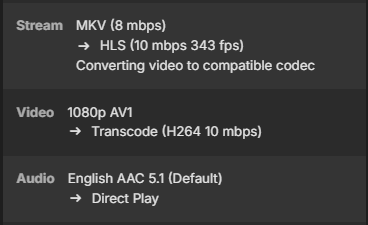
Emby for Android 3.5.28 has broken AV1 direct play on both my FireTV Cube 3rd Gen and my FireTV Television. AV1 directplay playback worked fine prior to this latest version being released. Now all Av1 playback claims the video codec is not supported. Emby for Android 3.5.28 + Emby Server 4.10.0.1 Anyone else confirm they are seeing the same? Thank you.
 1 point
 -
I got it working. Now I can update the Library options with the app also. Thanks for the directions.1 point
-
New version (1.7.1) up on yocksers/EmbyCredits Github. Added: Setting to enable thumbnails being shown with a snapshot of the video at the detection point. Play video at time stamp button. Changed: Moved OCR enhancement settings to their own tab as they are advanced settings that can change the detections a lot or even make them not work. Moved Notifications settings to their own tab. Settings are now in collapsible sections to make the settings page less cluttered and easier to navigate. Fixed: Scheduled task will no longer look for old chapter types and will now correctly skip videos with time stamps when the setting is enabled. Note: Emby seems to have changed chapter types in the last update so old detections had their chapter types changed and no longer valid, schedule task would wrongly pick those up before as having the correct time stamps. Known bugs: Intel QSV does not work, it will require an update of Embys FFMpeg to work, developers have noted that it's on it's way. Please use VAAPI instead. Thank you to @Neminemfor help with testing and bug hunting. If you use and like the plugin please consider donating a coffee at:https://buymeacoffee.com/yockser This is by no means necessary and i'm happy as long as people like the plugin.1 point
-
Yes this is possible since the first Version and the default in the latest Version. Line 409, in this Block you can also setup the sort order etc.1 point
-
This is an old post, but is the second hit when searching for the topic, so here we are: [Steps to Configure Default View (TV/Android/Roku)] Navigate to the specific library (e.g., TV Shows). Press the "*" button, navigate to the settings cog, or look for a "... " menu. Select "Set Default Tab" or "Default screen". Choose "Shows" (or "Folders") instead of "Suggestions". [Steps for Web/Desktop] Go to your user settings, then to "Home Screen". Adjust the settings for each library to define the default landing tab. These settings can often be configured per user and per device.1 point
-
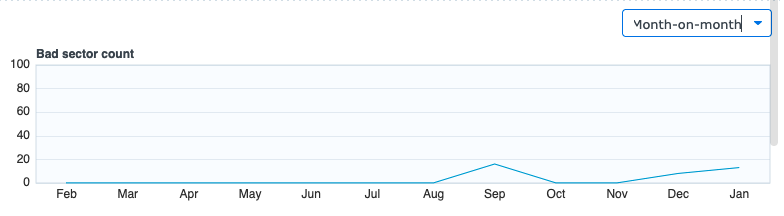
So I have an update. Ultimately I don't think this is an Emby issue but I figured I'd share the result of my research for others and maybe folks can provide some guidance here. I ran an experiment: Turned on Detect Intros Added a bunch of new media The result: Detection worked without a hitch. When looking at disk utilization from the NAS I observed the following: All drives except Drive 1 report 30-40% utilization. Drive 1 was at 85-95% utilization. When I ran the scan scheduled task again, it is hanging on the same episode as before. When looking at disk IOPS, Throughput, and Utilization from the NAS I observed the following: All drives except Drive 1 report zero utilization. Drive 1 is maxed at 100% utilization. All drives report zero throughput and zero IOPS. So there definitely seems to be something off with how this file is stored and accessed on the NAS. When attempting to move the file off my NAS I saw max utilization for that drive again. I deleted the file and put a fresh version on. Ran a scan and it worked without an issue. I did run SMART tests on all drives and they reported healthy. I do think I need to look at replacing this drive specifically. This all but confirms it:
 1 point
 -
Hi, are you playing from your own Emby Server, or someone else's server?1 point
-
Hi, please check out our quick start guide: Quick Start1 point
-
ok, anyways - thank you for your effort maybe this error is gone with future builds of ce-no, but their forum is read only for now. i have to try it on other devices too, i'm testing osmc vero v, am6b plus, sk1 and am9pro in a few days... cheerio1 point
-
Since I have your attention for a minute, can I suggest you take a look at integrating ffsubsync into emby? It is so easy to use, and can automatically sync subtitles with the audio track: ffsubsync FILENAME.mkv -i "UNSYNCED.srt" -o "SYNCED.eng.srt"1 point
-
You take for granted, that coreelec is bugfree and the plugin is the issue as it worked in 12.3.8. In 12.4.X are massive changes mainly giving Kodi more resources (cpu/yields) back. As a vague theory, this could raise side effects if the underlying Kodi is buggy. I can tell you there is at least one bug in coreelec. /usr/share/kodi/addons/service.coreelec.settings/service.py): waiting on thread 545821224352 This can be also the reason, Kodi is not stopping/restating properly. That's a hanging task from coreelec. Sorry to say, but currently I cannot confirm/reproduce that issue on any device.1 point
-
hi, here is the log file (with debug on) i tried to restart kodi and system froze again ===== 2026-01-28 18:01:42.011 T:1193 debug <general>: CLibInputKeyboard::ProcessKey - using delay: 400ms repeat: 80ms 2026-01-28 18:01:42.011 T:2019 debug <general>: Thread Timer 544679325088 terminating 2026-01-28 18:01:42.011 T:2020 debug <general>: Thread Timer start, auto delete: false 2026-01-28 18:01:42.283 T:1193 debug <general>: CLibInputKeyboard::ProcessKey - using delay: 400ms repeat: 80ms 2026-01-28 18:01:42.284 T:2020 debug <general>: Thread Timer 544679325088 terminating 2026-01-28 18:01:42.284 T:2021 debug <general>: Thread Timer start, auto delete: false 2026-01-28 18:01:42.551 T:1193 debug <general>: CLibInputKeyboard::ProcessKey - using delay: 400ms repeat: 80ms 2026-01-28 18:01:42.551 T:2021 debug <general>: Thread Timer 544679325088 terminating 2026-01-28 18:01:42.551 T:2022 debug <general>: Thread Timer start, auto delete: false ===== these entries are repeating and forcing the system to freeze, i guess... https://paste.coreelec.org/GrumpyDoped best regards kodi.log1 point
-
For now it's impossible. EmbyIcons was never designed to have ratings update like that, sorry. I will see what i can do but can't promise anything as it would be a big change to make.1 point
-
Bumping once again. Please add the country filtering feature. Is there any blocker that prevents the Emby dev team from doing this? Any information would be appreciated so that it feels less like shouting into a void1 point
-
This is first time it has happened (and i use this next episode all the time) but it can be recreated on this episode (episode 2 jumping to episode 3 repeatedly). Sure let me get the adb logcat tomorrow for you. Thanks for the quick reply. No this doesn't mean much to me tbh. I did move to Projectivity launcher recently - just curious if that is what might be causing this.1 point
-
it works fine, thank you for your support!1 point
-
Hey @Luke- Sorry missed your msg - I haven't run into any instances of this since 4.9.3. I will keep an eye out. I will update in a months time.1 point
-
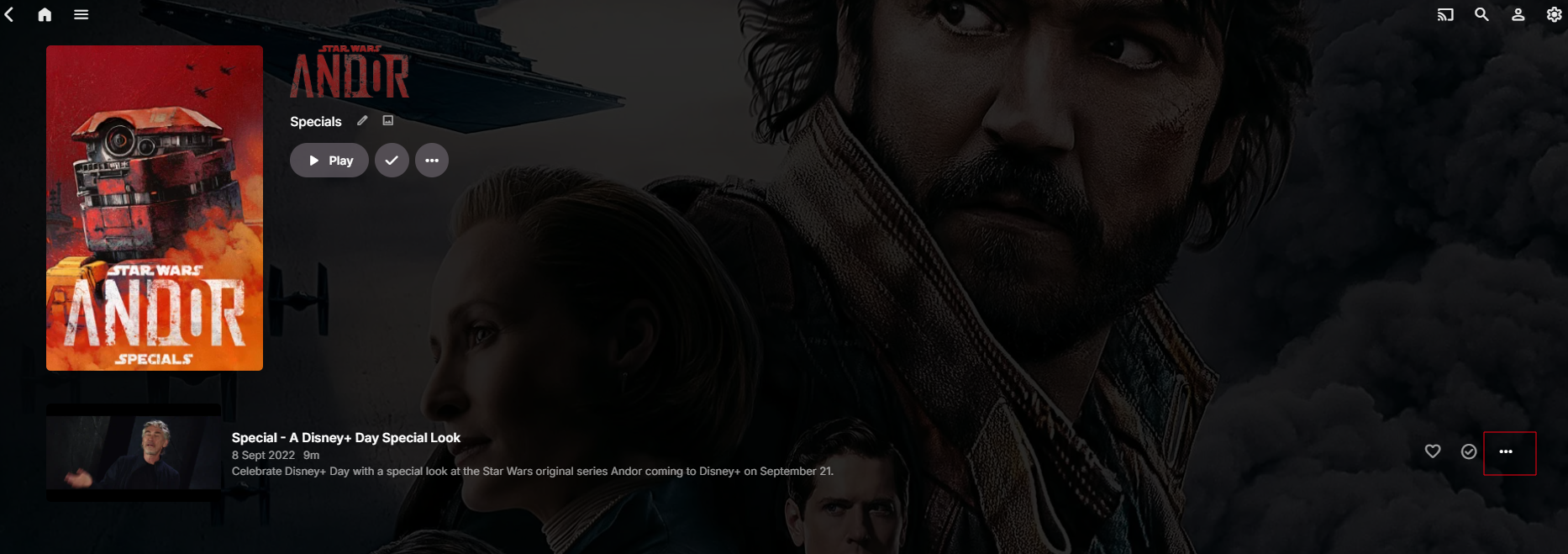
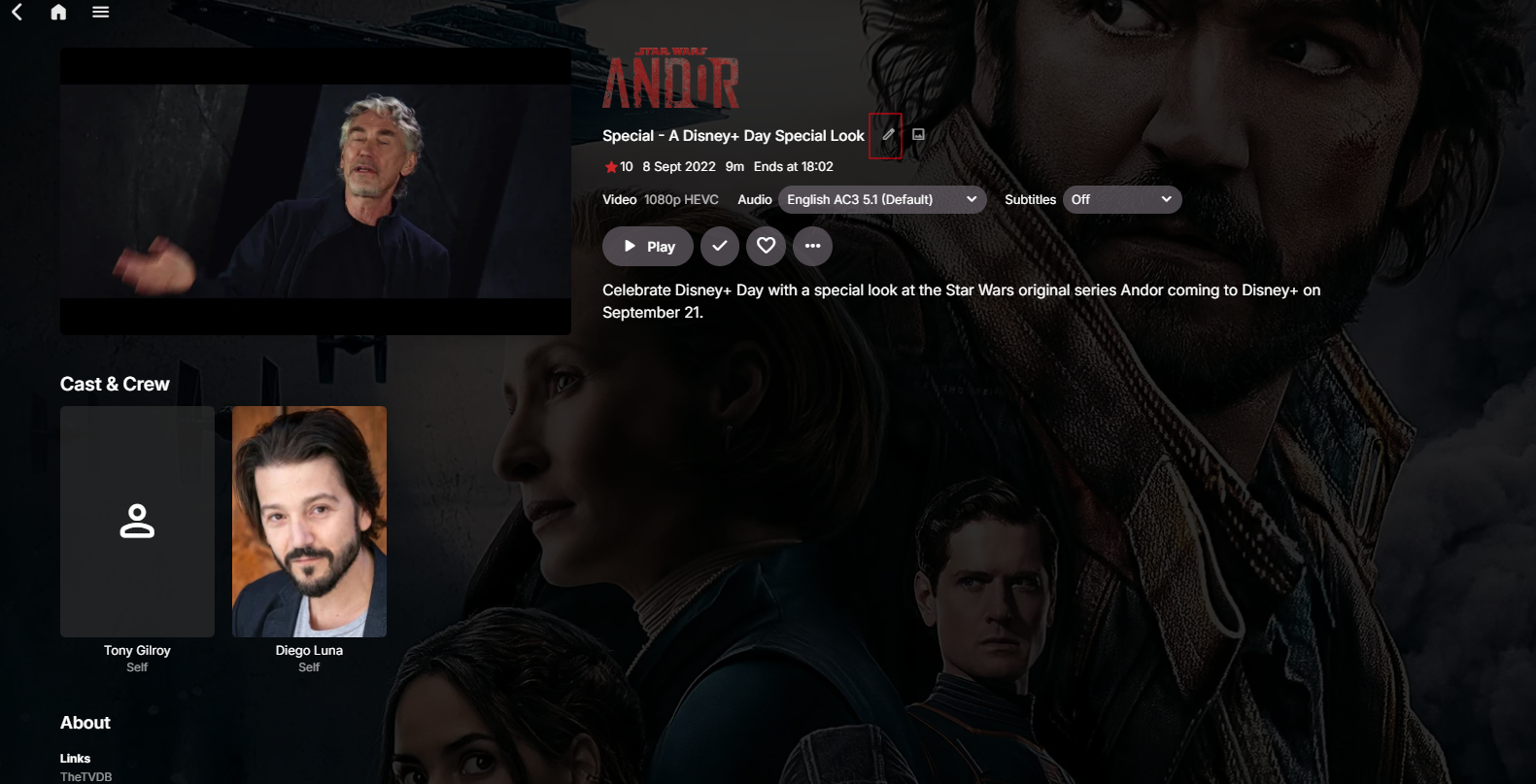
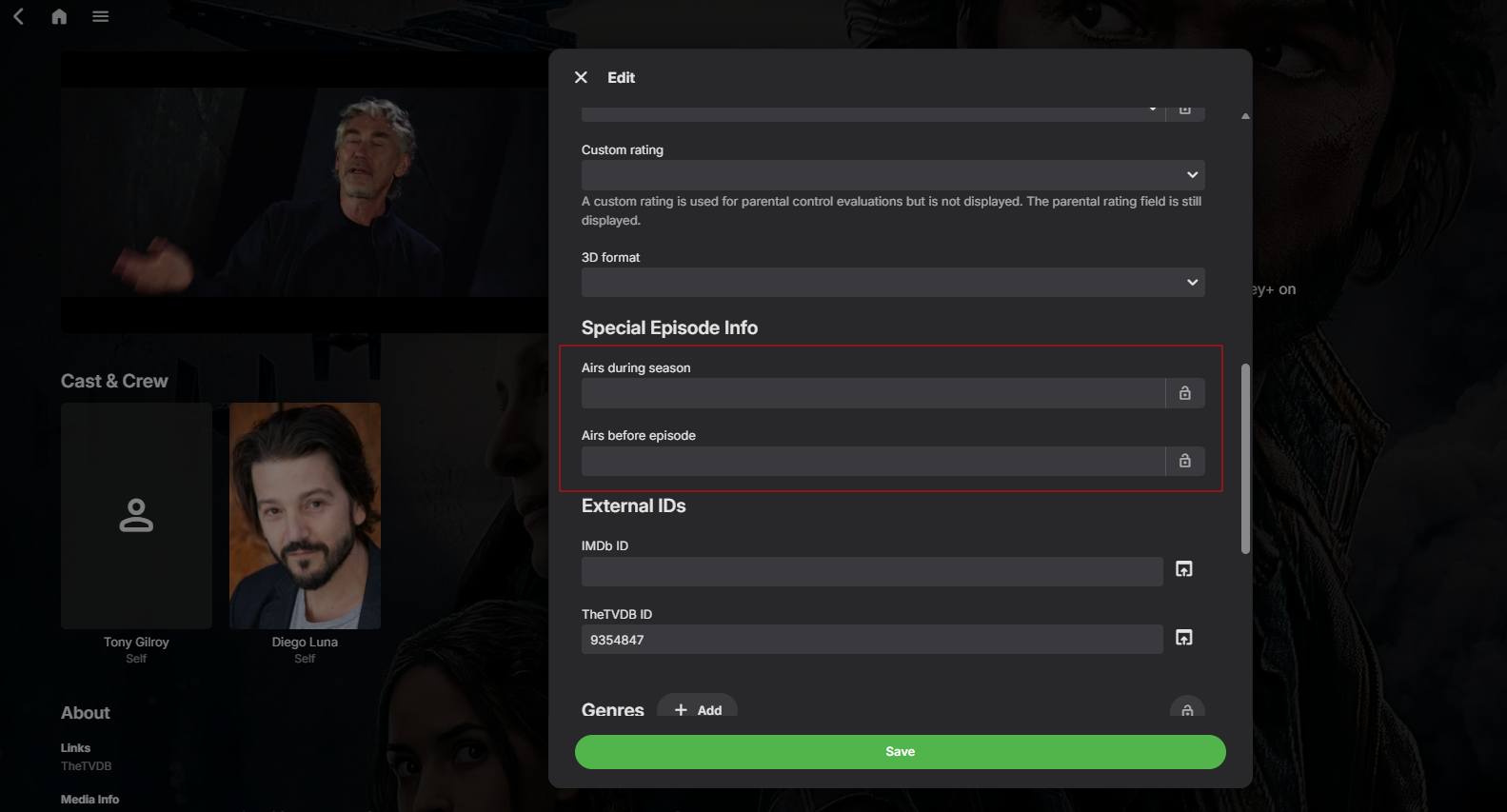
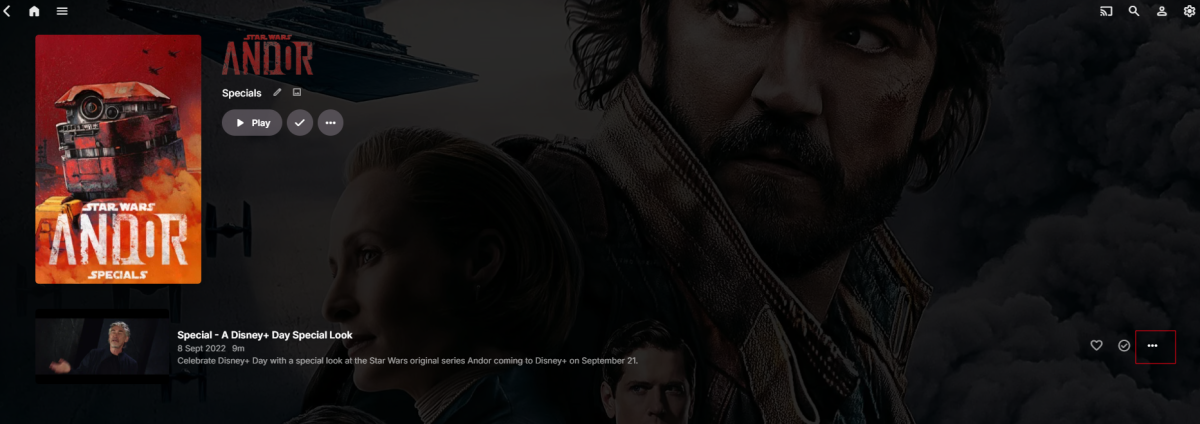
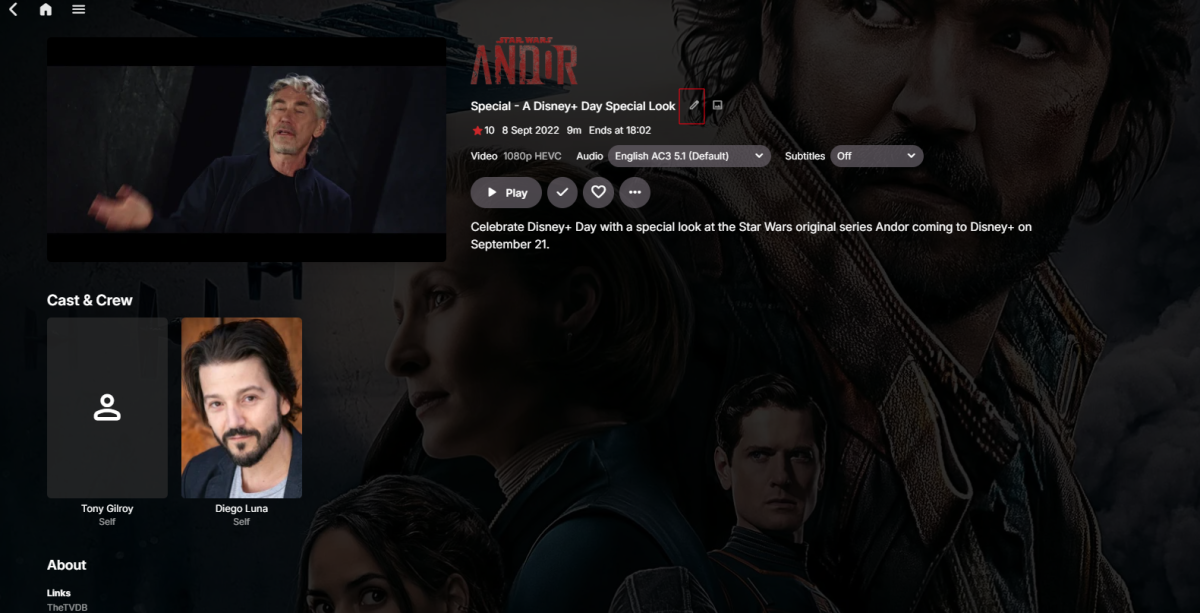
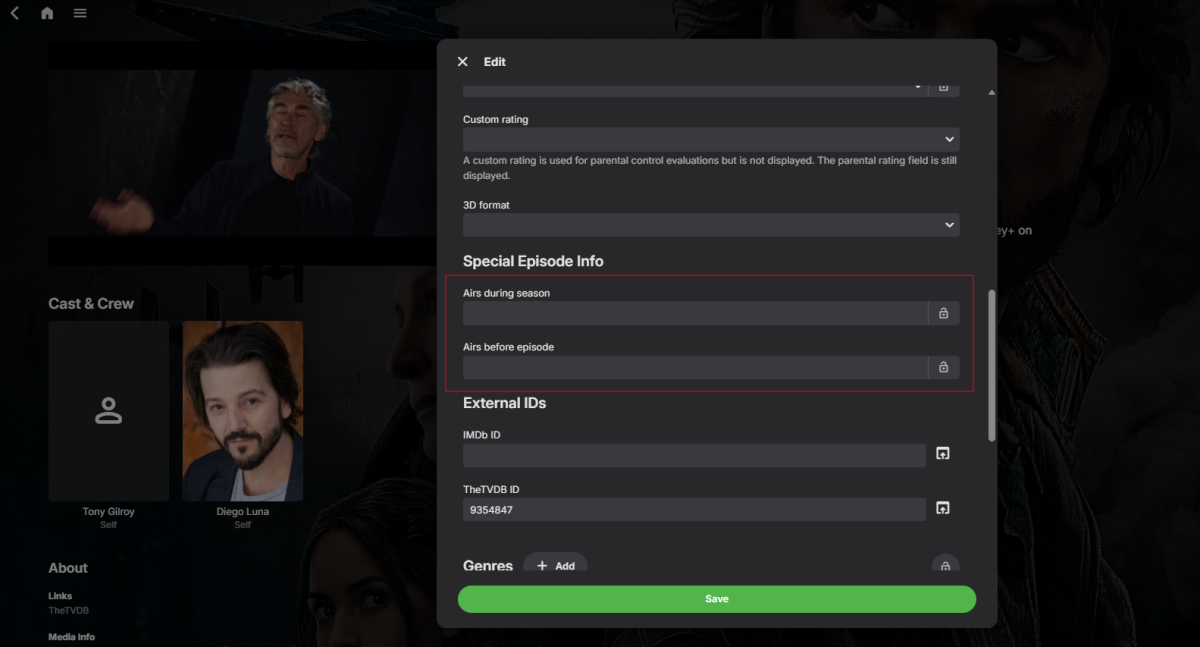
Can confirm that using "Special Episode Info" works perfectly to put specials between episodes: Good find @Neminem! Note that the "Special Episode Info" is only available for episodes that are marked "special", which works to fix this issue nicely but doesn't really solve the global issue when it comes to organising / sorting seasons in general. We maybe need something for that.
 1 point
 -
Update on this?1 point
-
The GPU version was removed because i found out it actually didn't use the GPU as intended as was in the end pointless. Please just use the normal version. Important note, i'm not the developer or maintainer of the Tesseract docker container.1 point
-
Not done yet but close and i still need to change the UI to make it more user-friendly and less cluttered. Soon.. Ish.
 1 point
 -
I advice against using the OCR enhancements at all. As said they were only added because they were requested.1 point
-
Sadly not much else than play around with the settings, it depends on a lot of things what are detected plus all the things people have requested can sometimes work against each other. So play around and see what works best for you. I personally disable all OCR Enhancements. Structure Detection. Adaptive Frame Rate. Scrolling Detection. Fuzy Matching Region of Interest (Should not be used by any one other than for trying to redetect in failed videos) Sharpening. Image Preprocessing. They are there because people asked for them but i find them not really useful tbh. With them disabled the Tesseract just does it things, the OCR enhancements are supposed to help the tesseract, think along the lines of giving it glasses, by enhancing the pictures it gets. User friendliness update is planned to make it all easier to control. For now i advice against using OCR enhancements if you don't know what they are.1 point
-
I've got a bunch of scanned images in compressed TIF format and it looks like Emby is having trouble seeing them - only showing a broken image where they should be in the browser.} The files were scanned uncompressed then bulk lossless compressed via a script in photoshop. I believe I used ZIP compression. Uncompressed TIF seem to show up fine. Here's a sample of what I'm seeing in my log when I try to get them running - this is on the newest stable version of Emby, but it's been an issue since I started using it - the most telling bit seems to be the repeated "AdobeDeflate compression support is not configured":1 point
-
OK so the bundled libtiff needs to be compiled with support for certain features. Hopefully it is easy enough to add libraries but it usually doesn't end up being that simple. We'll look into it. Thanks.1 point
-
Hi there, have you setup your own Emby Server ? Quick Start1 point
-
Emby for Android works! Thank you so much Emby Version: 3.5.28 com.mb.android1 point
-
A2169 (32 gb) thanks.1 point
-
No updater logs, @sa2000but I really do appreciate the info and your investigation. You are so awesome!1 point
-
Added ratings. Latest version in GH. Read the Readme carefully. You need TMDB and MDBList API keys. No fallback.
 1 point
 -
1 point
-
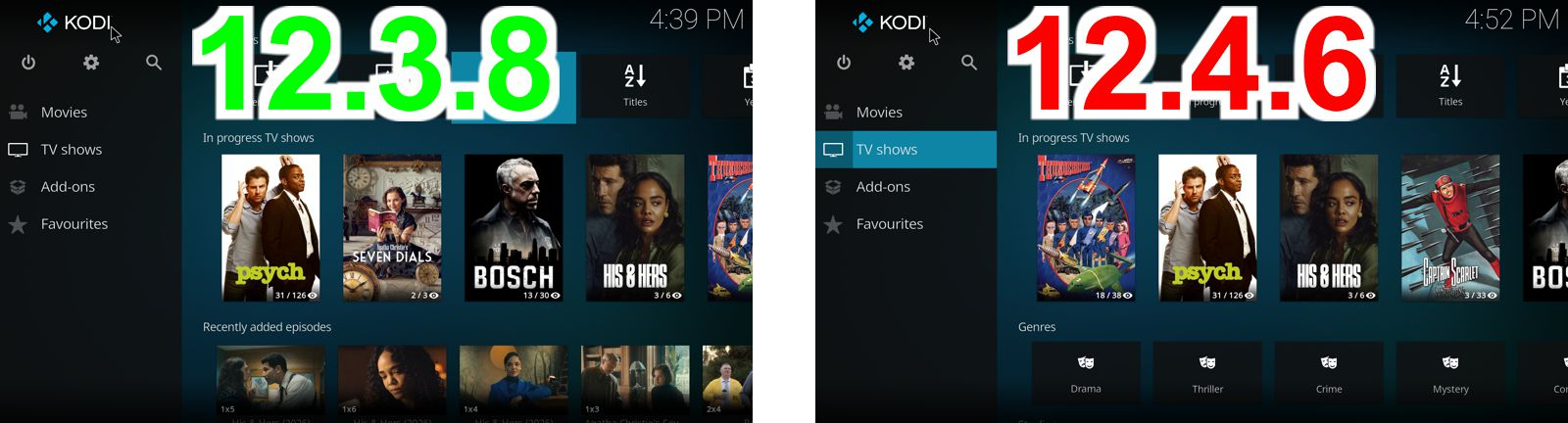
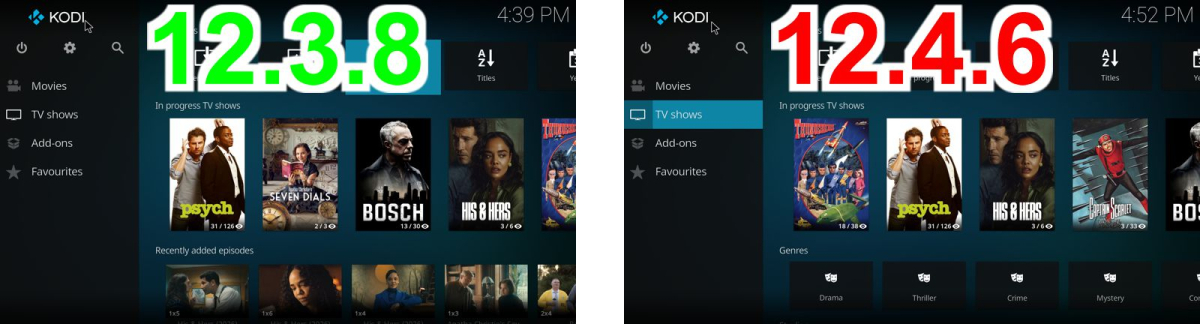
@quickmicI've updated from 12.3.8 to 12.4.6 and "Recently added episodes" under TV shows has disappeared. Using the default Kodi skin (Estuary)
 1 point
 -
You could also try this, on the item you want to move. That could also work.
 1 point
 -
I would like to try it out, but I am sort of in transit and have no server access. It would be nice if you can add a default option for the subs you want to show automatically and somehow make it stick for users. Of course, you may have users who speak different languages. Hmmm, is there a preferred language setting that can help customize the subtitles settings, per user? Wow, that gets complicated... Ha! Being able to set a default subtitle, helps users enjoy the content, without having to flip the sub on. For separate sub files, I think you already know, just add .default before the file name extension. This would be a nice feature, especially for TV episodes, because the pull down is hidden in the single episode page. Also, setting default would be nice when there is a forced subtitle, which only covers foreign language, in otherwise single language content. If the film is in English and a waiter in Paris speaks French, the forced subs might give only the French translation in English. Quite often, a few lines of foreign dialog are already burned into the media. Getting all the options for subtitles is way more complex than most people imagine. It's nice that you have done this code.1 point
-
@brothomWhether I log in via app or web interface, I see the same activity view in dashboard. I will soon enable the debug log protocol to see if it causes an error message. I use a reverse proxy with HTTPS. As I said, the previous version has everything logged cleanly.1 point
-
Hi, the plan is for this week. Thanks.1 point
-
Wasn't sure if any update has been provided. I am on Emby 4.10.0.01 beta and AppleTV app 2.0.3 (2) and can confirm this is still present. Not a major issue. Just a minor nuisance.1 point
-
You can do this now:1 point
-
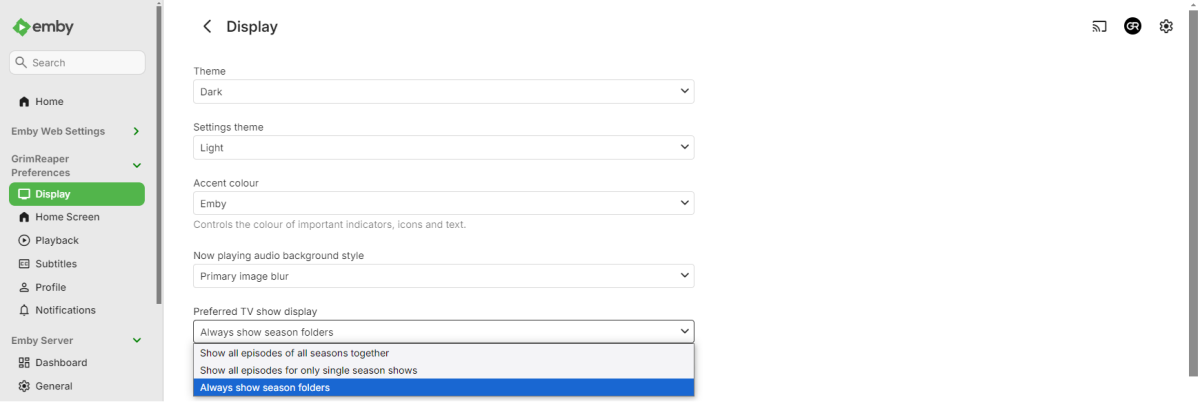
Moin moin, mit dem letzten Update auf die 4.9.3.0 scheint sich die Staffelanzeige verändert zu haben. Während man früher eine Auflistung aller Staffeln hatte, gibt es jetzt eine Combobox, aus der man die Staffel auswählen muss. Wie bekommt man die alte Anzeige zurück? Gruß Eddie1 point
-
Vielen Dank, das hat funktioniert. Gruß Eddie1 point
-
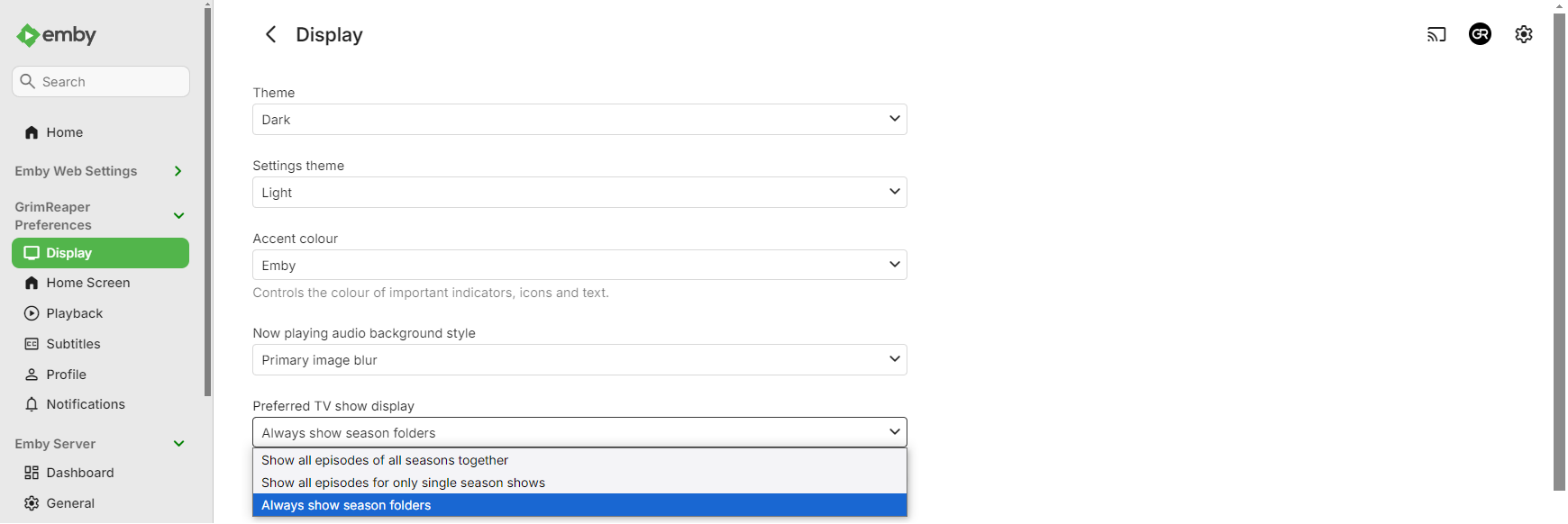
Select "Always show season folders" under your user's Display preferences.
 1 point
 -
yeah! however you want to call it. outcome should be clear.. and the same1 point
-
As a recent user who migrated from Plex a few weeks ago, I found this particular filter essential for managing my library. Given the existing robust filtering framework, it appears this enhancement could potentially be implemented without extensive development effort. Could you please share any available roadmap information regarding a projected timeline for this feature?"1 point
-
Necro-bumping this request as I could really use the ability to clear a resume point without having to resort to marking a movie watched, then marking as unwatched since this will trigger a "watched" status to be synced to my Trakt account which I then have to remember to remove, manually.1 point
-
Once you have the Playback reporting plugin installed set up the Notifications in Emby under the notifications menu in Emby. On the Notifications setting page look for the "Playback Reporting" section and enable the "New Media Report" notification and set up your preferred notification action, in your case email. On the Scheduled Tasks setup page in Emby check the "Playback Reporting" "New Media Notification" schedule is configured to run.1 point


.thumb.jpg.e4b3f560d4d2fdb208641063c1ac46f0.jpg)