Leaderboard




Popular Content
Showing content with the highest reputation on 01/15/26 in Posts
-
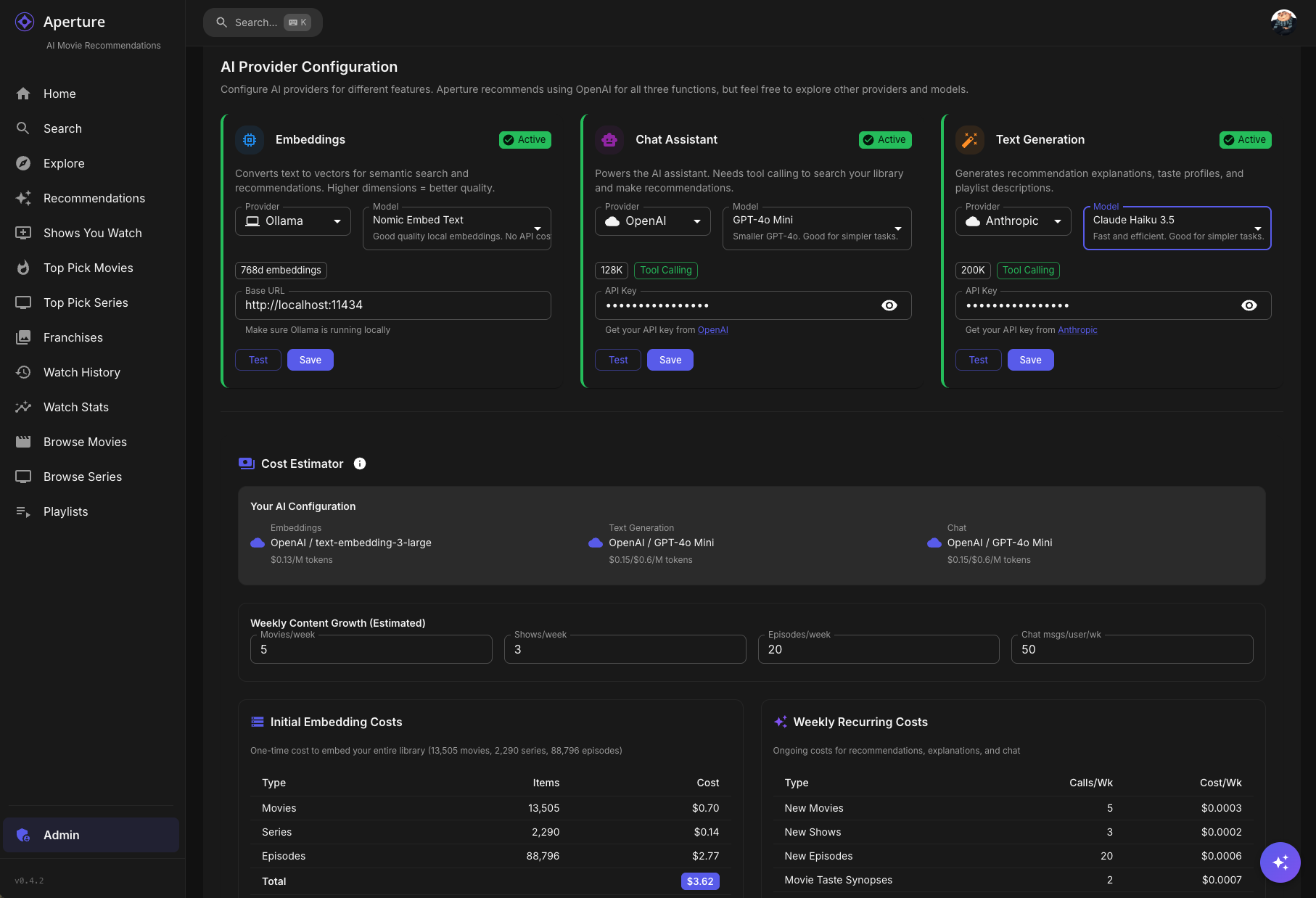
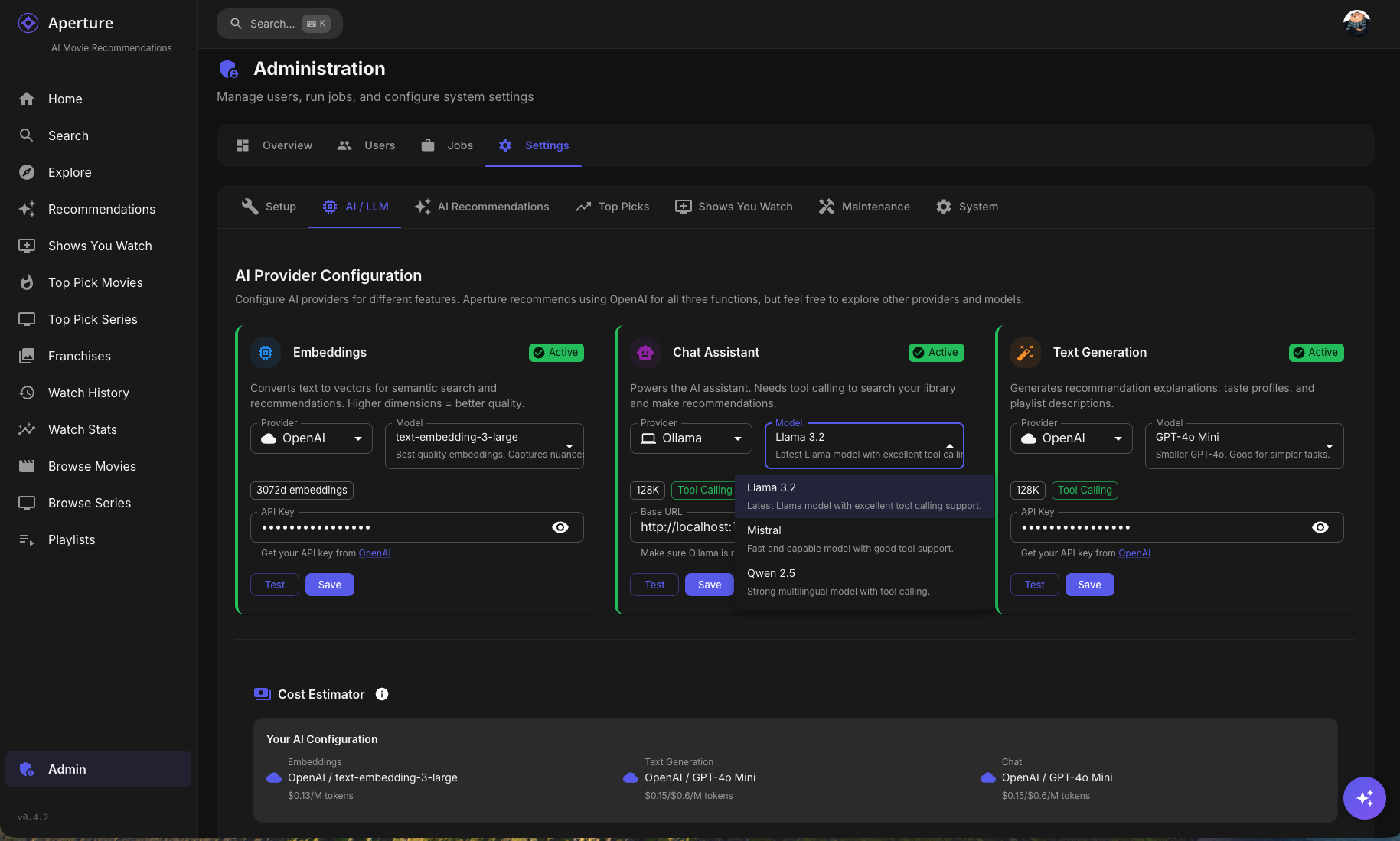
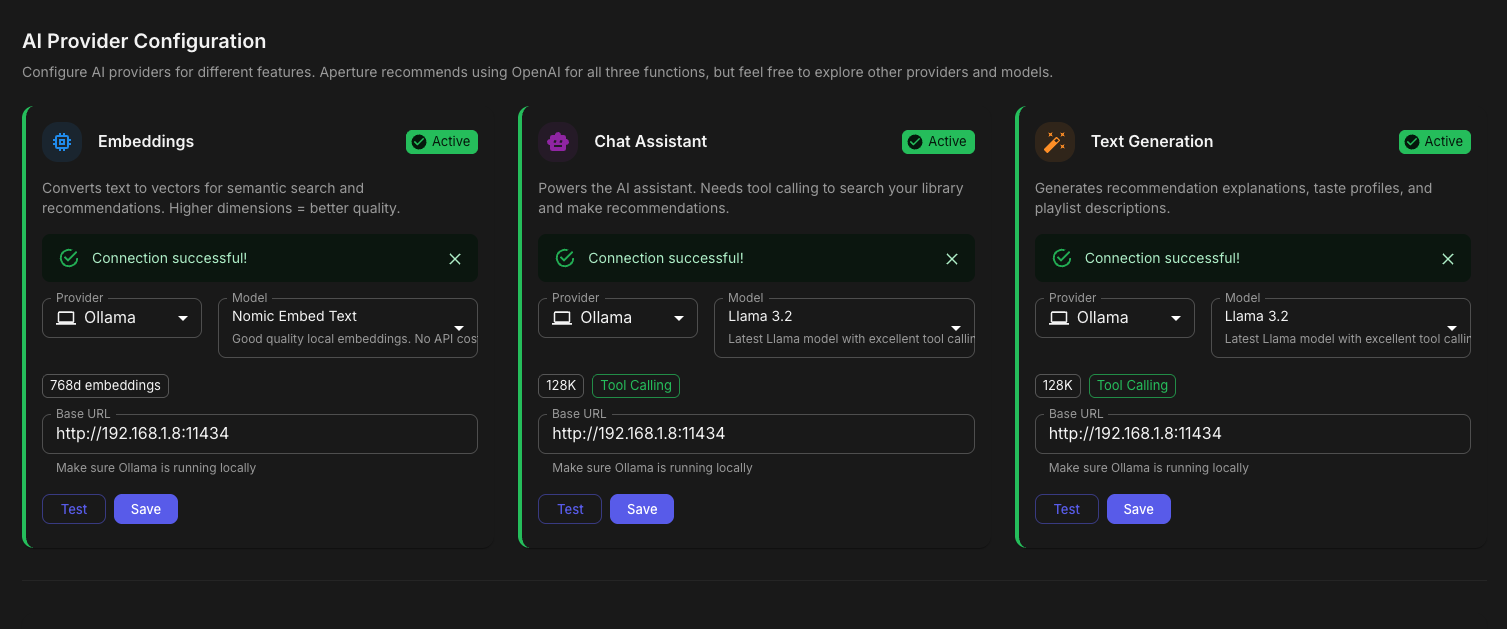
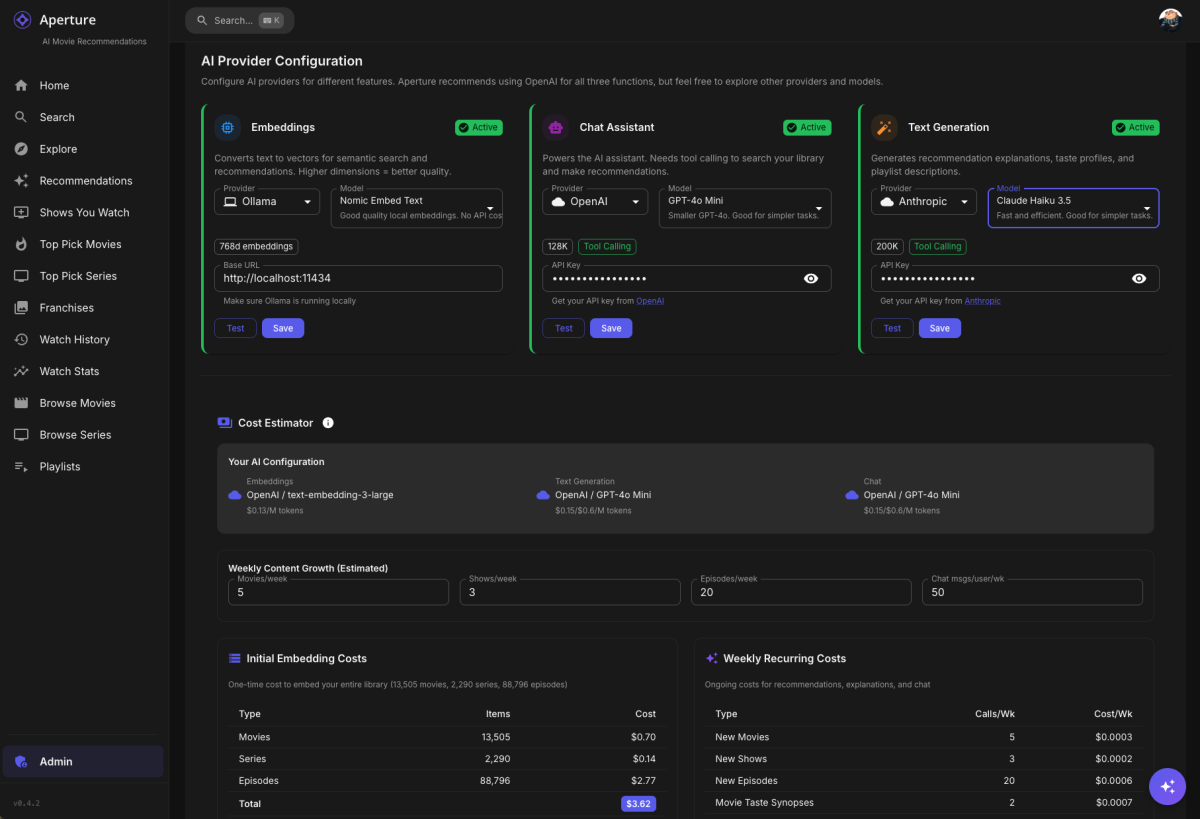
Aperture 0.4.2 Beta: Multi-LLM Support is Here! Hey everyone! I'm excited to share a beta release of Aperture 0.4.2 featuring multi-provider AI/LLM support. This has been one of the most requested features, and it's finally ready for testing! What's New? Multi-Provider AI Support You're no longer locked into OpenAI! Aperture now supports: OpenAI (recommended - GPT-4o, GPT-4o-mini, text-embedding-3-large, etc.) Anthropic (Claude 3.5 Sonnet, Claude 3 Haiku, etc.) Google (Gemini 1.5 Pro, Gemini 1.5 Flash) Groq (Llama 3, Mixtral - blazing fast inference) Ollama (run models locally - llama3, mistral, nomic-embed-text) LM Studio (local models with OpenAI-compatible API) Any OpenAI-compatible endpoint Per-Function Configuration The real power here is per-function provider selection. You can now mix and match: Function Use Case Example Setup Embeddings Semantic search, recommendations OpenAI text-embedding-3-large Chat AI Assistant with tool calling Anthropic Claude 3.5 Sonnet Text Generation Explanations, synopses Groq Llama 3 70B (fast & cheap) Want embeddings from OpenAI but chat from Anthropic? Go for it! Dynamic Cost Estimation The new AI / LLM Setup tab includes a cost estimator that: Pulls real-time pricing from providers Estimates costs based on your library size Factors in your content growth rate Shows $0.00 for self-hosted options (Ollama, LM Studio) Other Improvements Setup Wizard Overhaul - Now includes multi-provider configuration Admins can re-run setup - Click "Re-run Setup Wizard" anytime to reconfigure Capability Detection - Warns you if a provider doesn't support features like tool calling Automatic Migration - Existing OpenAI configs are automatically migrated How to Test Pull the beta image: docker pull ghcr.io/dgruhin-hrizn/aperture:llm Or update your docker-compose: services: aperture: image: ghcr.io/dgruhin-hrizn/aperture:llm # ... rest of config Important: This will run a database migration that updates your embedding model names. If you've been using OpenAI embeddings, they'll be migrated to the new format automatically. THIS COULD TAKE A FEW MINUTES, BE PATIENT. Aperture logs will show you progress. Known Issues / Feedback Wanted This is a beta, so please report any issues you find! Particularly interested in: Local LLM users - How's Ollama/LM Studio working for you? Non-OpenAI embeddings - Any quality differences you notice? Cost estimates - Are they accurate for your setup? UI/UX - Is the new AI Setup tab intuitive? Screenshots What's Next? Who knows? Ideas come to me daily, and your feedback is the roadmap. Thanks for testing! Drop your feedback below. Docker Image: ghcr.io/dgruhin-hrizn/aperture:llm Branch: feat-vercel-ai-sdk-multi-llm
 3 points
 -
LG, COME ON! Millions, if not bilions people are waiting!3 points
-
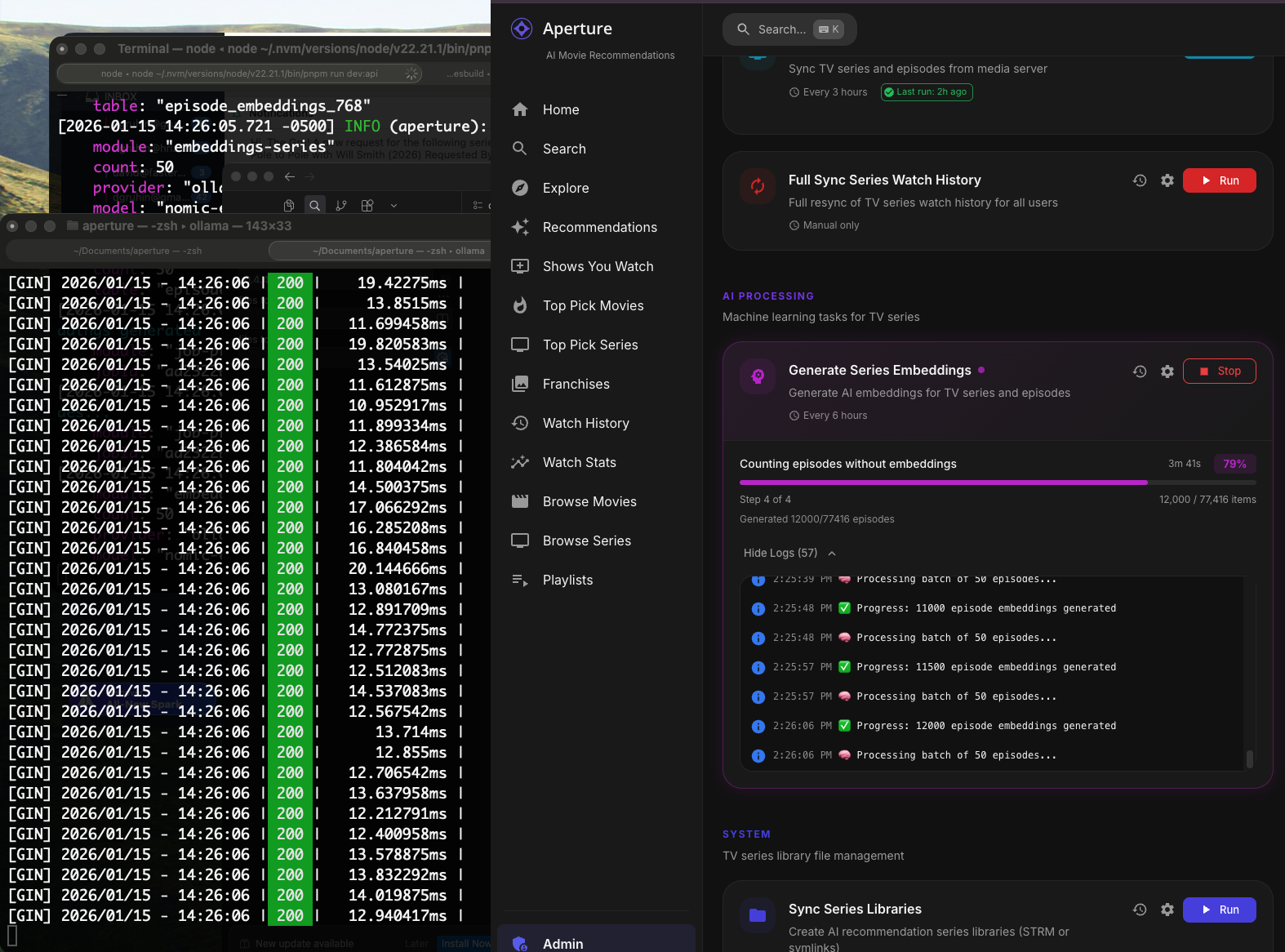
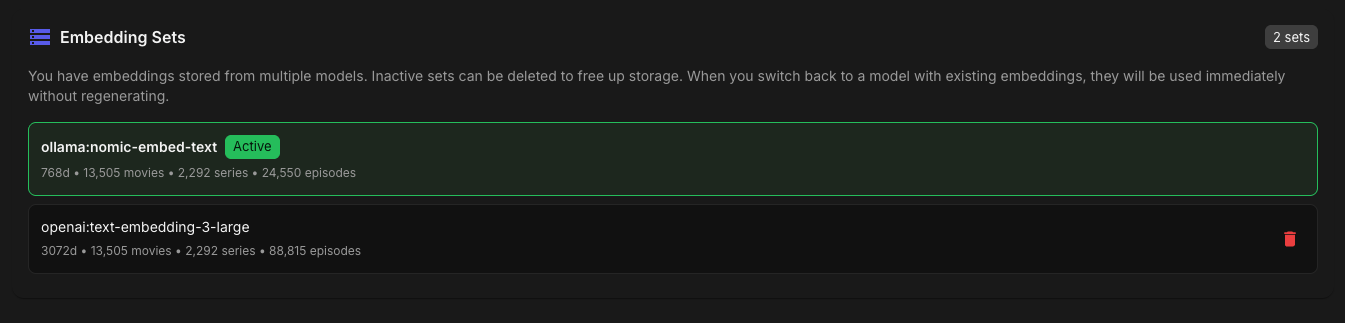
Well it's cooking through my episodes right now creating embeddings Aperture will now save embedding sets for easy switching between providers/models.
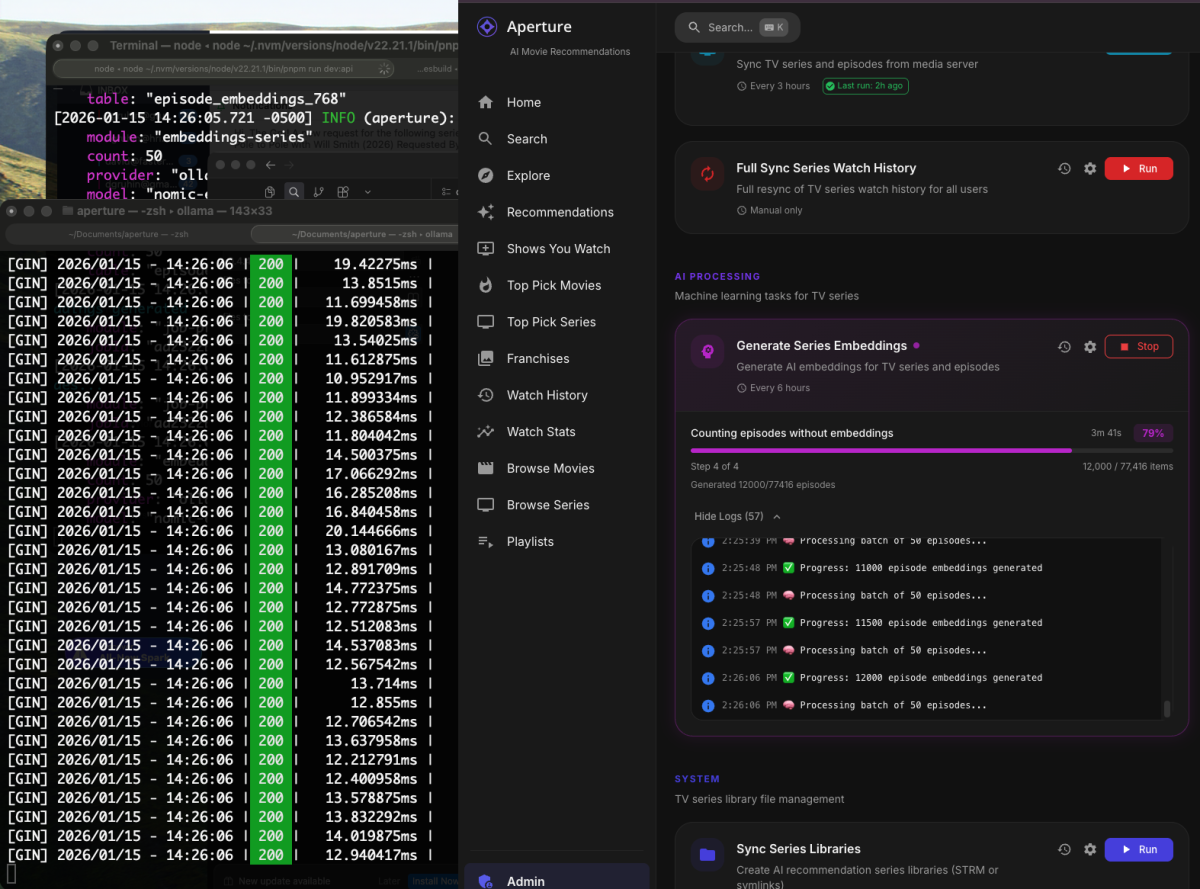
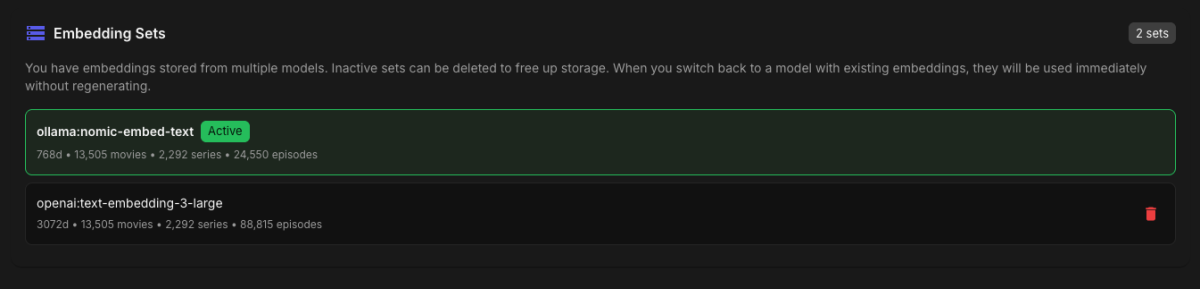 2 points
 -
Would be nice if the Emby team could also add exclude duplicates from continue watching and exclude duplicates from Recently released on the home screen @Luke2 points
-
Awesome! Glad it's working. I am going to merge this branch in to dev and then merge it to main and push a 0.4.4 release to the :latest tag once I am back from my wife's colonoscopy. The wifi here is terrible and I have no cell service in the building!2 points
-
Aperture 0.4.3-llm Beta - Multi-Provider AI Support Hey everyone! I'm excited to share a beta build with a major overhaul to how Aperture handles AI/LLM integration. This release migrates to the Vercel AI SDK v5 with full multi-provider support. What's New Multi-Provider AI Support You can now choose from multiple AI providers for each function: OpenAI (recommended) Anthropic (Claude) Google AI (Gemini) Groq DeepSeek Ollama (self-hosted) OpenAI-Compatible endpoints (LM Studio, LocalAI, etc.) Each AI function (Embeddings, Chat, Text Generation) can use a different provider - mix and match as you like! Multi-Dimension Embedding Support Switching embedding models no longer wipes your existing embeddings! The system now stores embeddings in dimension-specific tables, so you can: Keep your OpenAI embeddings while testing Ollama Switch between models without losing data Clean up old embeddings when you're ready via the Maintenance tab Improved Setup Wizard AI setup now works on fresh installs (previously failed because no auth existed yet) All 3 AI functions are now required during setup Existing configurations auto-populate when re-running the wizard Added exit button for admins to return to settings Ollama Improvements Added installation instructions directly in the UI Full list of recommended models for each function Fixed compatibility with AI SDK v5 using ai-sdk-ollama@2.2.0 Bug Fixes Chat Assistant: Fixed embedding lookups that broke after multi-dimension migration Similarity Graph: Added info button (ⓘ) on nodes to navigate to detail pages while preserving drill-down Create Playlist: Fixed button layout issues on desktop Legacy Embeddings: Added cleanup option in Maintenance tab Setup Wizard: Now properly loads existing settings from database How to Test Pull the beta Docker image: docker pull ghcr.io/dgruhin/aperture:llm Or update your docker-compose: image: ghcr.io/dgruhin/aperture:llm Beta Notes This is a beta build - backup your database before upgrading The multi-dimension embedding migration runs automatically on first start If you encounter issues, check the Maintenance tab for legacy embedding cleanup options Feedback Welcome! Please report any issues or feedback in this thread or open an issue on github. Specifically interested in: Ollama/local model experiences Any issues with the setup wizard Performance with different providers Thanks for testing! Note: This will be merged into a stable 0.4.3 release once testing is complete.2 points
-
I'm getting there
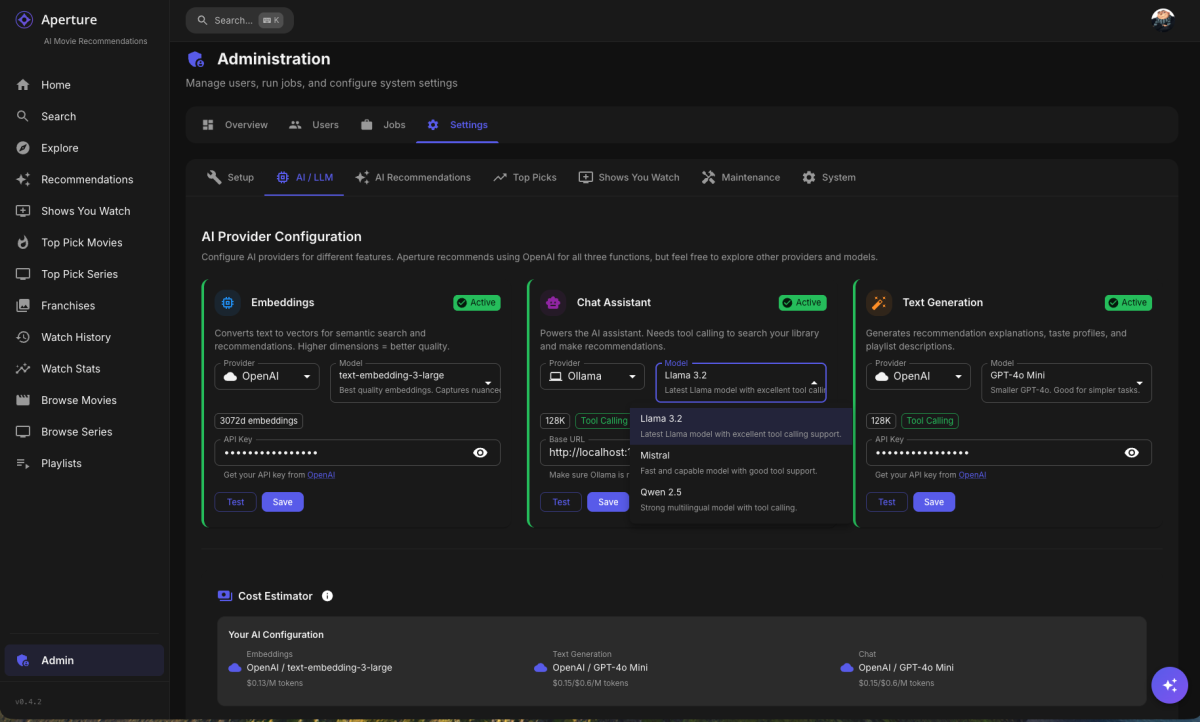 2 points
 -
have you experimented with ollama to see is self hosted models would work?2 points
-
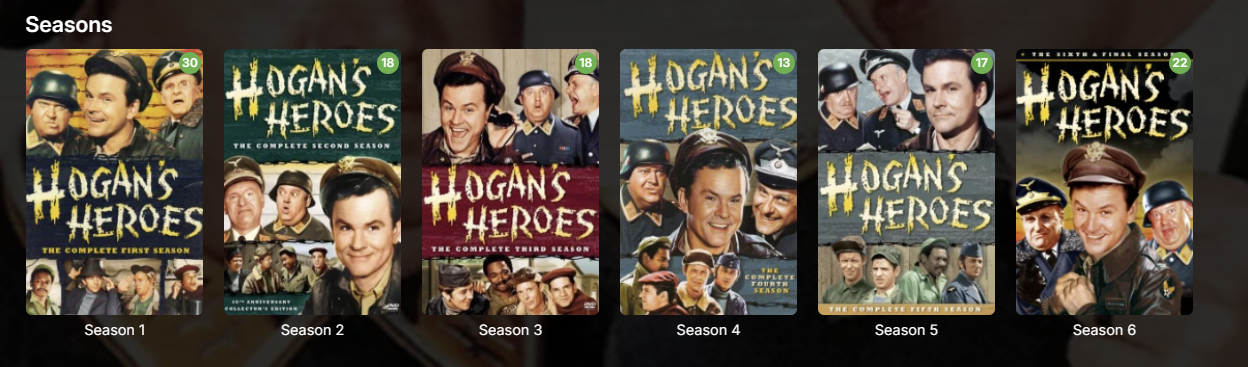
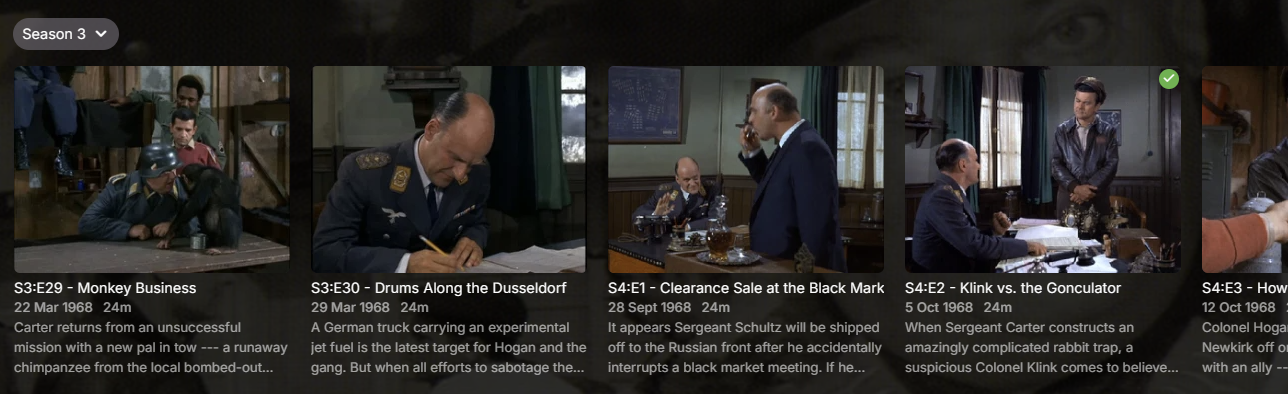
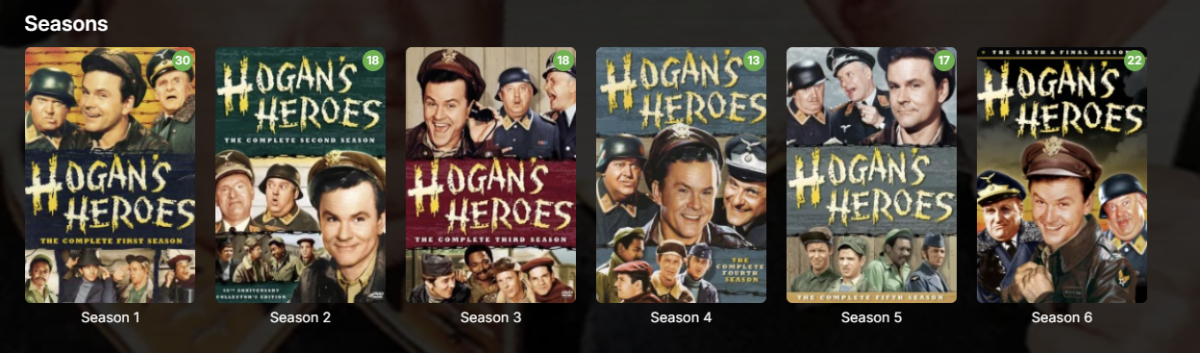
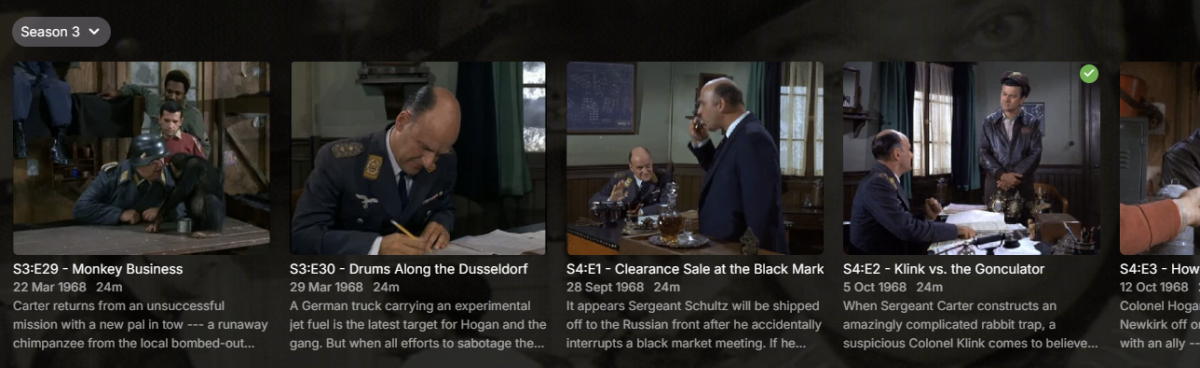
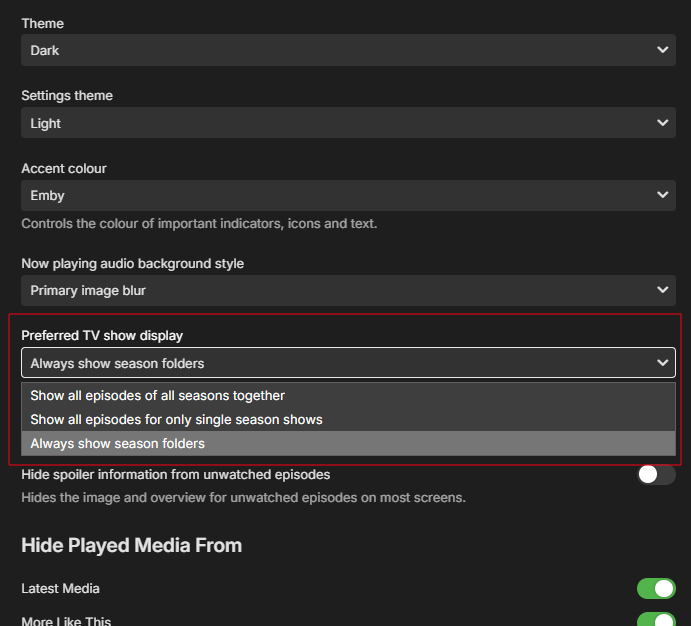
I'm not sure what kind of attitude that is. My streaming ecosystem is Emby and that's essentially all we use, so I couldn't give a rat's about what Netflix does. Clearly this attitude means you intentionally forced this behaviour on users for whatever reason, yet it's clearly missing from the release notes: Nowhere there does it say you've changed this behaviour and nowhere is it made easy to revert for all users, hence this thread. I fail to see how you feel this: is a better experience than this: Especially with that tiny Season 3 drop-down which is so easy to miss and obliterates the pretty season cover art many of us curate. It's worse with a mouse. If I want to look at all episodes in Season 4, in the old view, I click Season 4 then I can scroll with my mouse. I can't scroll with my mouse with this new behaviour and instead must click, click, click all the way to what I want. Considering how you seem to approach most feedback in these forums, I don't expect you to revert this unwelcome behaviour and will have to suck it up. I will, however, request you be more upfront next time and include major forced behavioural changes in the release notes so we're aware of it. Ideally, there should be a way for users (not Luke et al.) to apply our standard configuration to all users as well, without having to sign into each user account individually.
 2 points
 -
I'd really like to have 2 Factor Authentication added to the login screen. It's just this (optional) extra layer of security to help secure the server (which, especially if people use camera uploads) contains pretty private data. There are for every type of programming language quite a few libraries available, so implementation on a server shouldn't be too hard to realise1 point
-
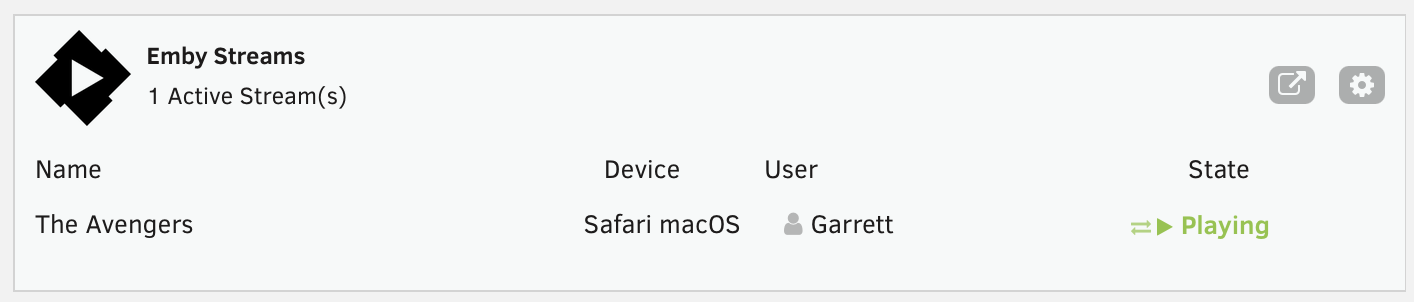
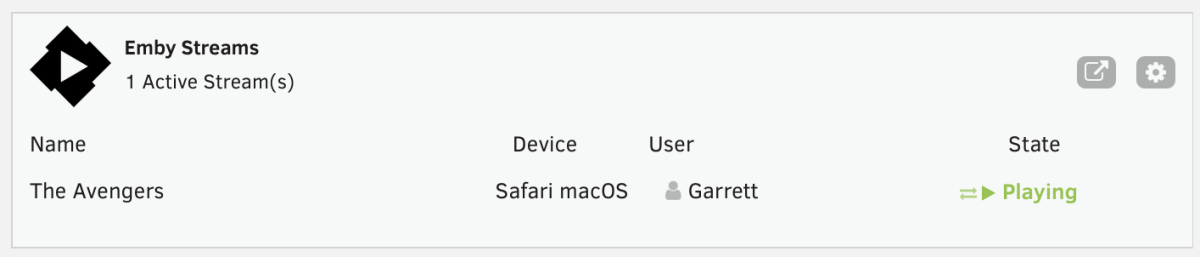
This is a simple Unraid plugin that adds a widget to the Unraid dashboard. The widget will show: All active streams The user streaming The device it is streaming on And the current state with icons indicating normal playback or transcoding. I don't have plans to really expand the feature set, except to maybe change the current state to the current streams timestamp or progress. Otherwise the current state really meets my needs but I'm open to feedback and suggestions. If I get enough feedback, I'll work on packaging it correctly and submitting to the Unraid Community Apps store. As of now, you manually install the plugin by going to Plugins > Install Plugin > and pasting the url for the plg file. You can click on the cog on the widget or in the installed plugins list, click the emby icon to go to the settings page. You'll need to enter the server ip, port, api key and choose a refresh rate. It currently defaults to 5 seconds. https://github.com/gthrift/unraid-embystreams/tree/main
 1 point
 -
I'm an avid user of the Missing Episodes feature. For those who don't know it, it can be found via Metadata Manager -> Views -> Missing Episodes. This section will then gather all the individual episodes that are missing from the shows on Emby. Before 4.9.3.0, we could use the "Lock this item to prevent future changes" function on tv shows, so that they wouldn't appear in the Missing Episodes section. Since 4.9.3.0, a bug has been fixed and now that functionality no longer works. Previous thread: .Considering I have many older digitized shows, of which I will probably never get the first seasons or only want the latest seasons or where the reporting (remote dataset) doesn't apply or is for another region. For example I have a boxset of "How It's Made", containing 5 seasons. Missing Episodes now reports I'm missing 25 seasons, about 800 episodes, greatly polluting this view. Not to mention other long running shows like South Park or Bold and the Beautiful. Can we have a functionality to "skip missing episodes for this show" (via a checkbox or so)?1 point
-
Emby Web app supports the Playback Speed feature which is awesome. Would love to have this feature in the Roku App as well. TIA1 point
-
I have now been running the beta for a week or so and the unresponsive remote issue has not happened even once. Thanks Emby. I hope this is not just false good behavior. I have, a couple of times, seen a different issue that is every bit as intermittent as the remote issue. What happens is that I return from playing something, it appears that what I was playing does not matter, and then quickly switch to a different library. The new library accesses with absolutely nothing displayed on the screen except a small amount of the top of the screen menu. If I exit and wait a few seconds and reenter the library displays normally. No amount of waiting or remote presses cause the screen to refresh when the problem shows itself but, every time but one, the library shows correctly after a slower exit and reenter. Only once did the problem not correct after an exit and reenter and that time I moved very fast so whatever resets may not have had time to do so. This will be hard to test but I will keep my eyes open for it and try to get a bit more info for you to mull over. Again the problem this thread was started for seems fixed. Thanks. Gee. It's fun breaking things. If you want you can break this issue out into a separate thread. I was just too lazy. BTW: I did see this once or twice when I was running the release client.1 point
-
It saves from having to install or enable other tools though openssl and telnet are still good to have.1 point
-
I didn't know that, thanks for the tip! I've always used telnet even on Windows.1 point
-
glad I could help:) I will get back to watching Barcelona now. Que te vaya bien amigo!1 point
-
You can also use the built-in tnc in PowerShell1 point
-
Assuming you're on PC and have Python installed... you just double click the file and in prompts you to choose the folder to scan. You pick i.e. TV Series folder and it scans all nfo files in this folder and it's subfolders and list all nfo files that have Sci-Fi genre set (it does not modify anything, it just print you a list in Terminal/PowerShell window with all nfo files. If you care to look for other genres you just have to change this part in the script to your liking TARGET_LINE = "<genre>Sci-Fi</genre>" Hope this helps. As I said, for my TV show library of around 16.000 files it took less than a minute to find all nfo with specified genre.1 point
-
That sounds a fairly typical 'save money now, put all your eggs in one basket, what could possibly go wrong' type scenario to me. Or am I being cynical.1 point
-
Come on people, it'll get here. Admittedly I've moved expectations from the end of the year (only 5 years ago remember) to the end of next year to the end of the decade, but its a comin'...1 point
-
fyi, 12.4.0 is still a public testing (experimental) version and has known bugs. I would wait for next 12.4.X releases.1 point
-
Sorry, I didn’t mean it that way — the translation to English failed. What a pity, How sad, because I really liked the options. I use Smarters IPTV, which automatically splits everything into series, movies, and TV from the full playlist.1 point
-
Aperture surfaces content in your Libraries you may enjoy. It does not recommend content you do not have, as it current can't help you "get" that content. The concept is to use your watch history, embeddings, and metadata to help you save time when trying to find something you could watch right then and there. The integrations with external APIs are used to enrich metadata for better matching results.1 point
-
This has been working well for me on latest LTS Ubuntu. Thanks to the team for all the work that has gone into this.1 point
-
I do, it's working. I do for all my movie.1 point
-
The 4.9.3 server release also has this now.1 point
-
This idea is pointless. Establishing an entire VPN tunnel using Emby players as a client and the server as the server is far more complicated than just using proper TLS with certificates. You gain literally no advantage by using a protocol like WG or IPSEC instead of TLS in this manner. Just implement proper 2FA using TOTP. It should take less than a day to implement this using widely available libraries and most users already use TOTP for other things. Passkeys would also be extremely easy to implement and use but have slightly lower adoption and user acceptance so far.1 point
-
If your TV havn't gotten or will never get the mentioned firmware you can fix it with a streaming box like the Nvidia Shield and watch from that connected to your TV instead. Another bonus from doing this is that you will get support for things like 7.1, atmos, TrueHD and so on if you have a surround receiver.1 point
-
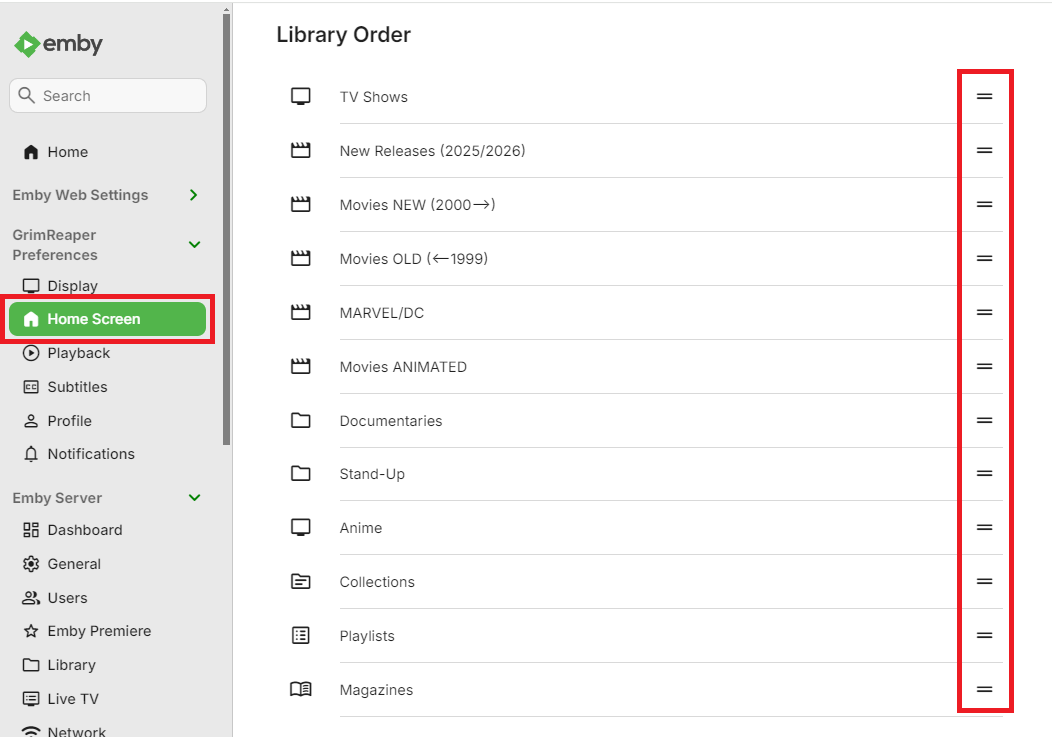
Drag & drop.
 1 point
 -
1 point
-
I can understand that, but having the option is super useful for some use cases...1 point
-
@rbjtech @Gilgamesh_48 @Spaceboymight have some ideas1 point
-
Just to chip in. I also noticed that problem that some empty genres are generated and even random episodes/series are played when right-clicking Play on that folder. It is probably because episodes within the series have that genre listed and not the series itself. To help my locate that files I wrote a python script that scans your library nfo and list all nfo's that has given genre. In my case, that was 'Sci-Fi'. I have also 'Science Fiction' and 'Sci-Fi & Fantasy' but the 'Sci-Fi' folder was empty but present. What I did was find the episodes with that tag and added 'Sci-Fi' to the series itself so it would not be empty. Still a bug, but worked around it. Here is the script.scifi.py1 point
-
I confirm that the emby android app 3.5.16 have no issue. I will try the beta android TV.1 point
-
@Abobader1 point
-
@Abobader1 point
-
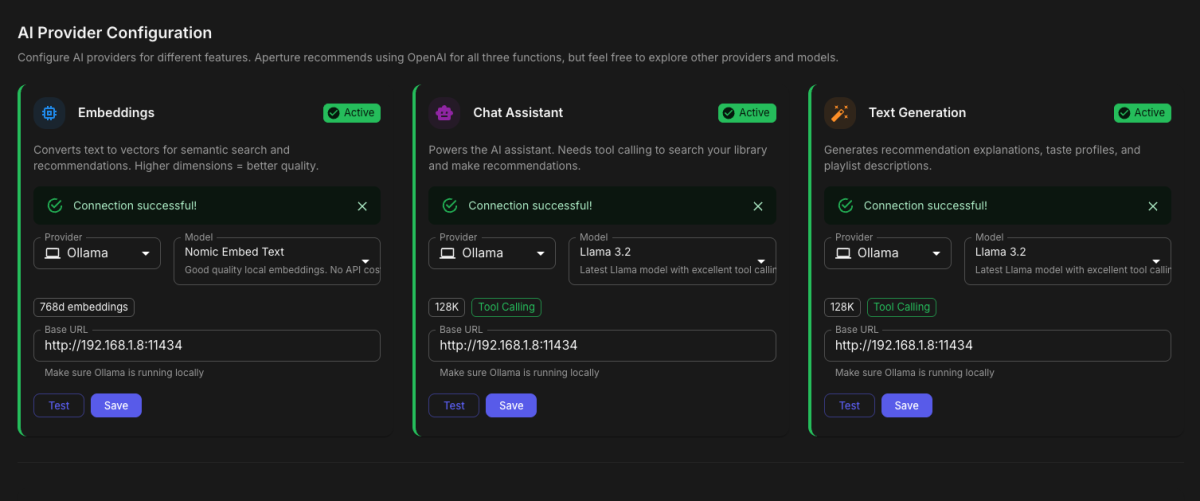
I setup Ollama on my unraid, and pulled in the models Run these on your Ollama server: # Chat/Text Generation models ollama pull llama3.2 ollama pull mistral ollama pull qwen2.5 # Embedding models ollama pull nomic-embed-text ollama pull mxbai-embed-large ollama pull all-minilm Or all at once: for model in llama3.2 mistral qwen2.5 nomic-embed-text mxbai-embed-large all-minilm; do ollama pull $model done
 1 point
 -
A center speaker is arguably the most important speaker in a surround setup, a bad center speaker can make dialog hard to impossible to hear clearly. Don't fall into the audiophile trap of "how the artist intended it"! Artists or music makers don't per say have a way they intend it and even if they did you would have replicate the precise equipment they had when mastering it. Look at a studio setup, there's usually just a couple of monitors for sound when they mix, no big speakers or anything like it. I used to work at a place that made guitar pedals (Carl Martin) and they had a studio that i often went to just to enjoy the recording. I was told by one of those working there that mastering was mostly about how different instruments and voices were meant to get to the fore/background and removing any unwanted sound. Of cause there was more to it than that but it was the most important. Side note, i absolutely loved their huge reel to reel recorder that they constantly had to repair. Dunno what but was something special about see that thing. Sorry if it sounded like a rant, i'm just tired of hearing the "as artists intended", specially when coming from people (i don't mean you by any means!) that listen to Spotify and/or think a thing like a special network switch will improve sound so i had to vent a little.1 point
-
It will never see the light of day we have been stringed along unfortunately. Wish it could have been released as open source so devs at jellyfin could implement it so I can say goodbye to emby but unfortunately stuck with emby as its best of ok bunch. Even if was paid plugin I think majority of us would gladly pay for it. Channels DVR is good but didnt like they dont have windows client so went back to emby.1 point
-
@GrimReaperI thought the setting was outside the premiere scope. I was under the impression that this was available to make server admins aware of default limit before subscribing. i.e. - "You're at a 5 max limit. You may want to consider becoming a Premiere member." @pwhodgesThe screenshot was a big help. That's exactly what I needed to see to understand. Thank you both for your help!1 point
-
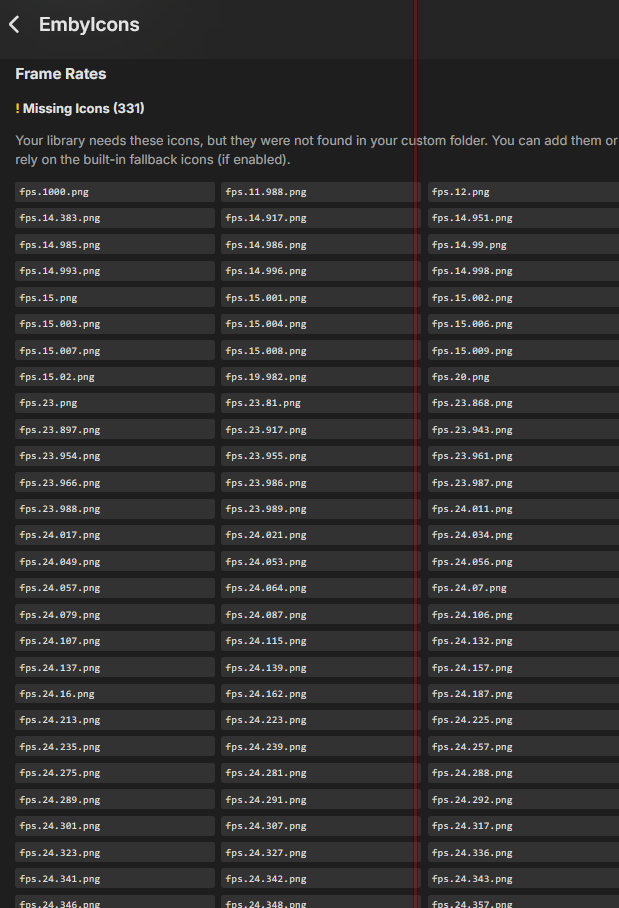
It works as advertised. However, it has now become a lesson in "be careful what you wish for": I figured I'd need maybe 5 or 10 more oddball icons... I knew I'd need at least the 15 fps one, but for the life of me I can't remember which videos have that (I think they're .FLVs). But 331? If there isn't one already, maybe we need a Frame Rate guess-timator like for Resolutions?
 1 point
 -
I changed the Local http port number from 8096 to 41738 and local https port number from 8920 to 497381 point
-
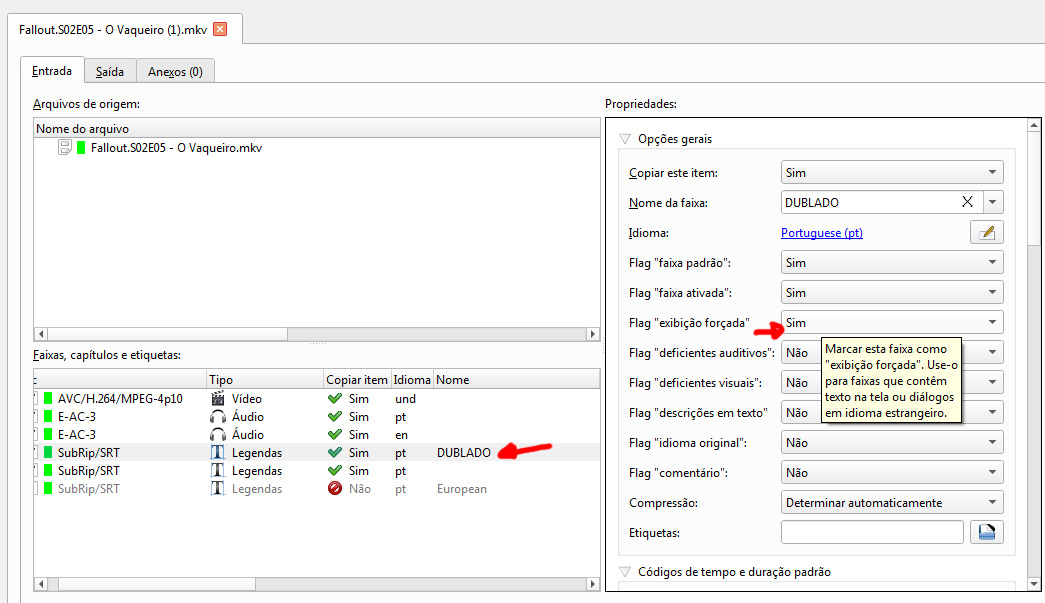
In this case, the video only has the full subtitles, not the forced subtitles, because it doesn't yet have the dubbed audio in Portuguese. The file is small because I couldn't upload the complete video due to the file size. But the subtitles are full. I only use forced subtitles for dubbed languages, when text appears on the screen like text messages, for example. Until the recent system update, I never had problems with the misconfiguration of accented characters in subtitles embedded in the video. In MKVTools itself, I already have the subtitle language selected, so for TV series I don't even use external subtitles, only the embedded subtitles, whether they are Full or Forced. The problem shouldn't be in how I assemble the files, since I've been doing it this way for years. It's in the character encoding in embedded subtitles. The problem occurs in both x264 and x265 MKV files, regardless of whether they contain both audio tracks (original and dubbed) or just one. Remember that the embedded subtitle file in the video is the same subtitle file (.srt) that is external. And the error only occurs in the embedded subtitle. Take the Fallout series as an example.
 1 point
 -
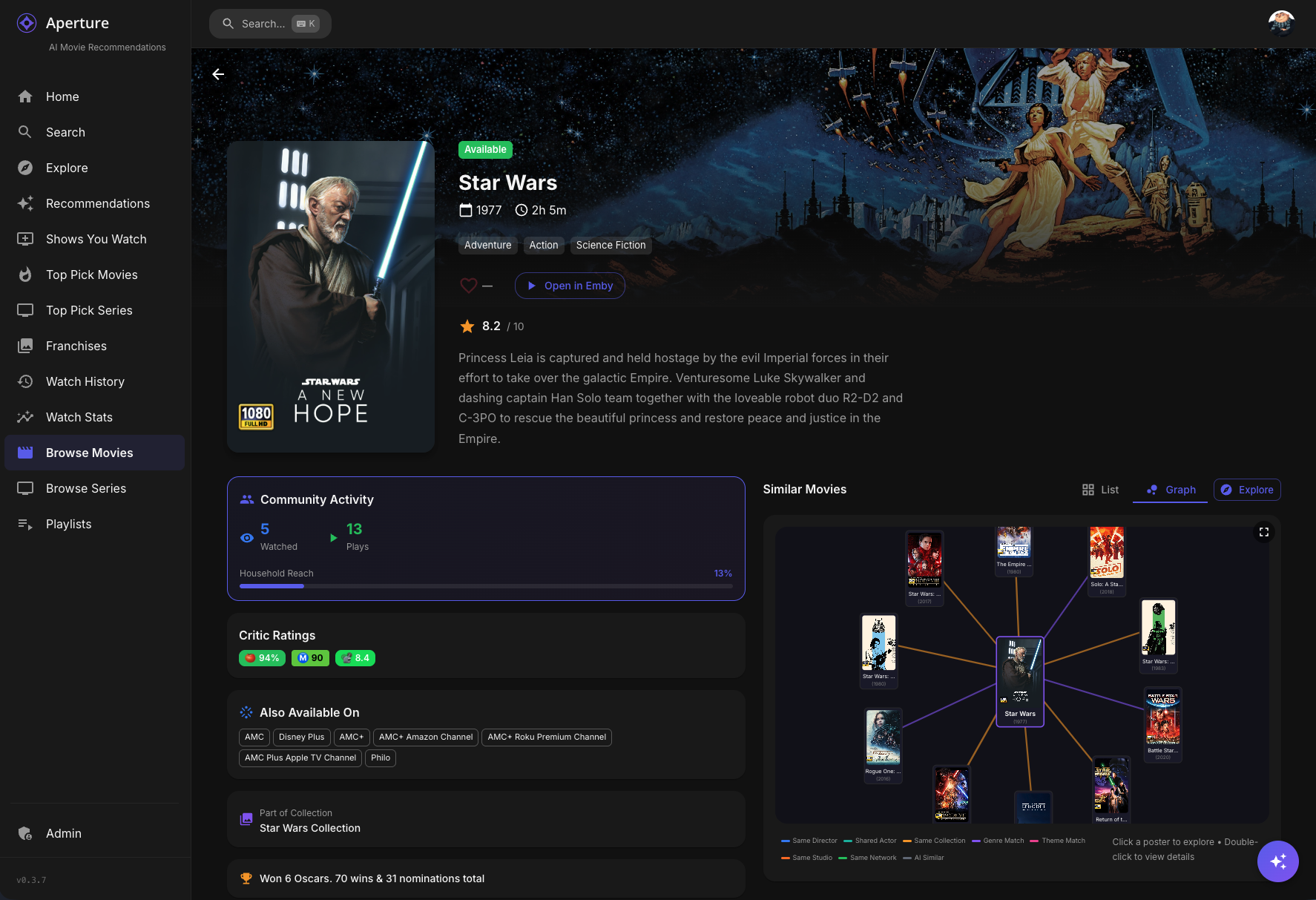
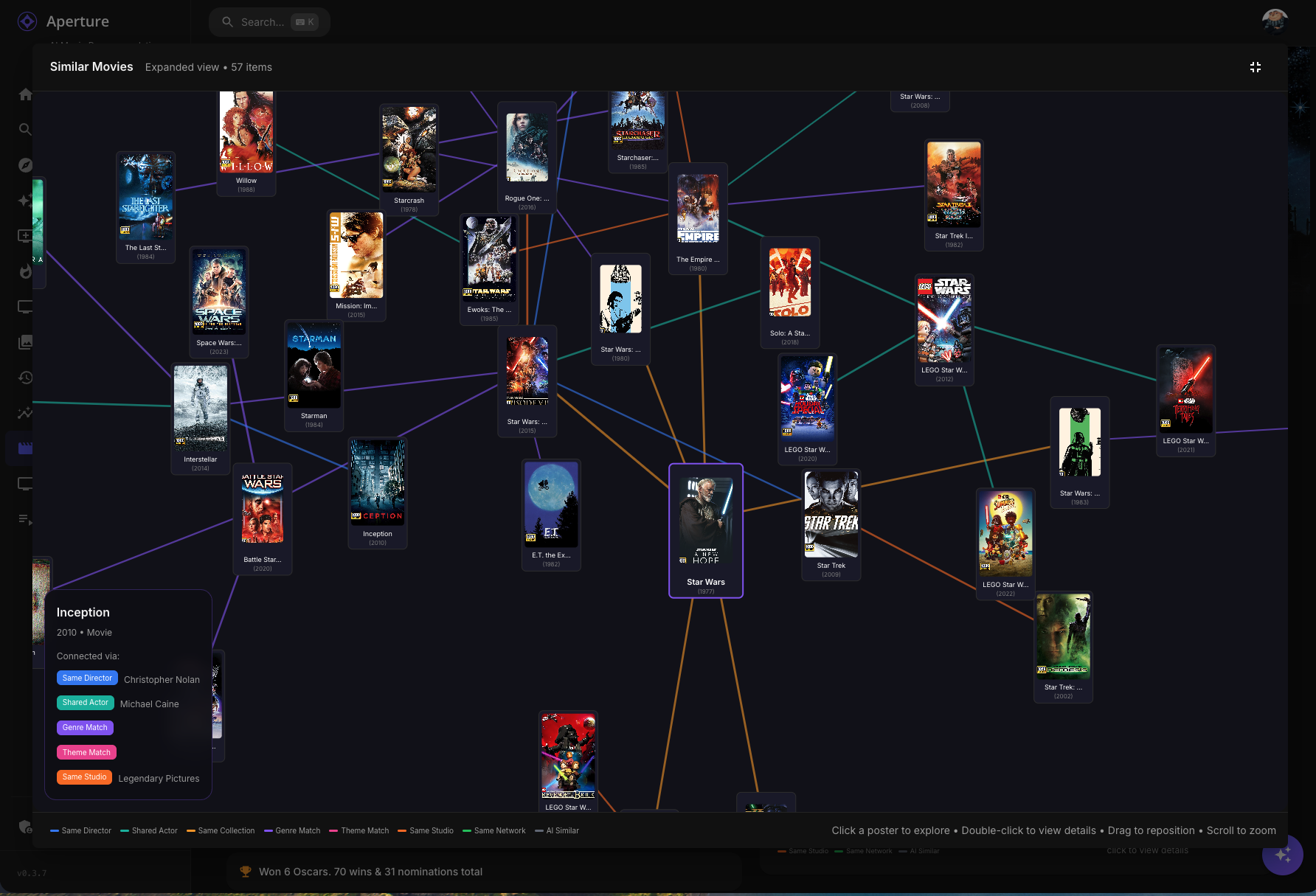
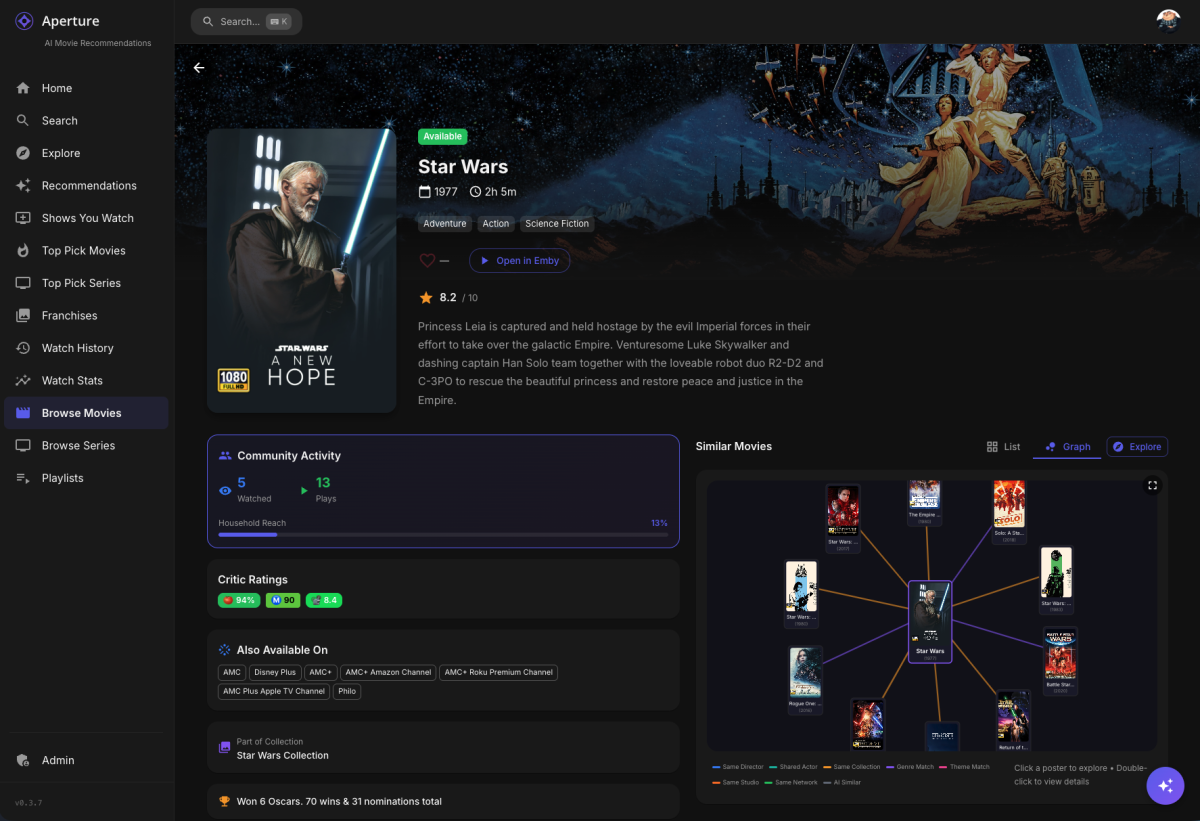
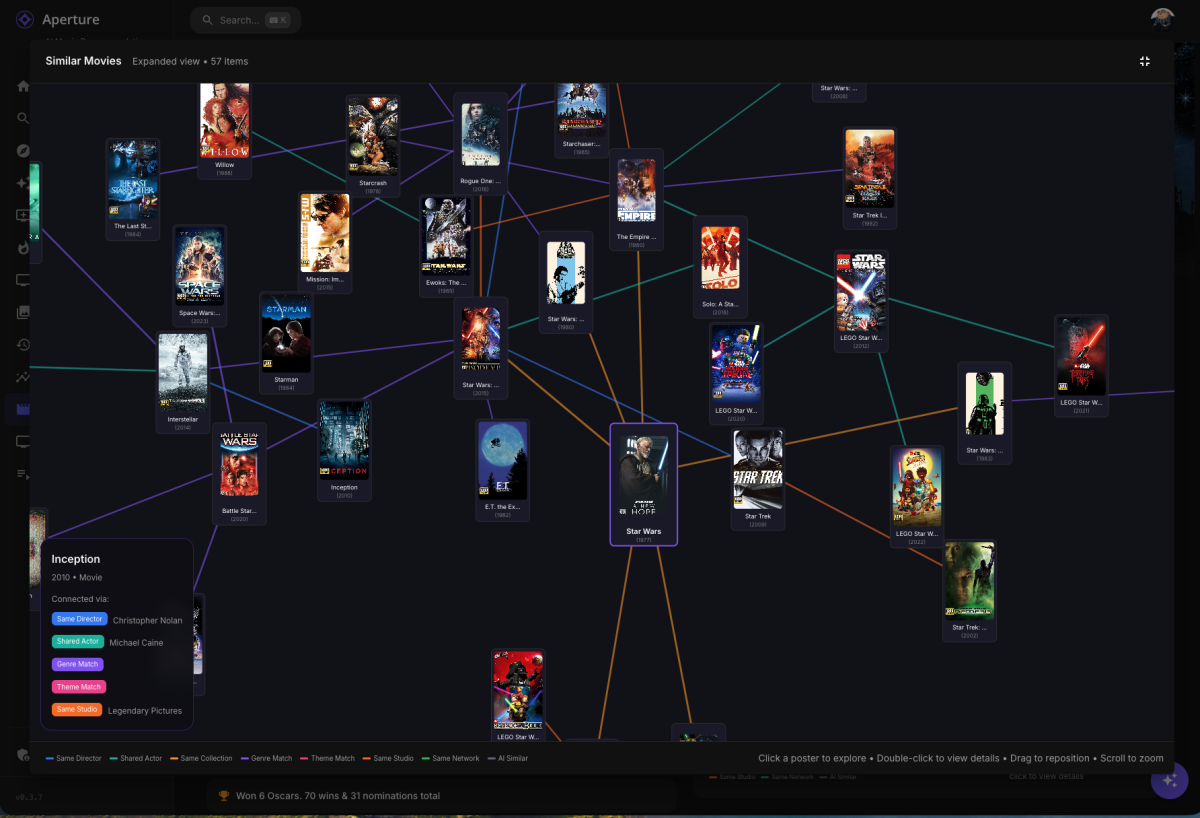
A little sneak peek into what's coming: Similarity Graphs
 1 point
 -
all of my users were changed to this stupid setting a few days back in the most recent server update. before that I did not even know it existed, so seems pretty intentional to me.1 point
-
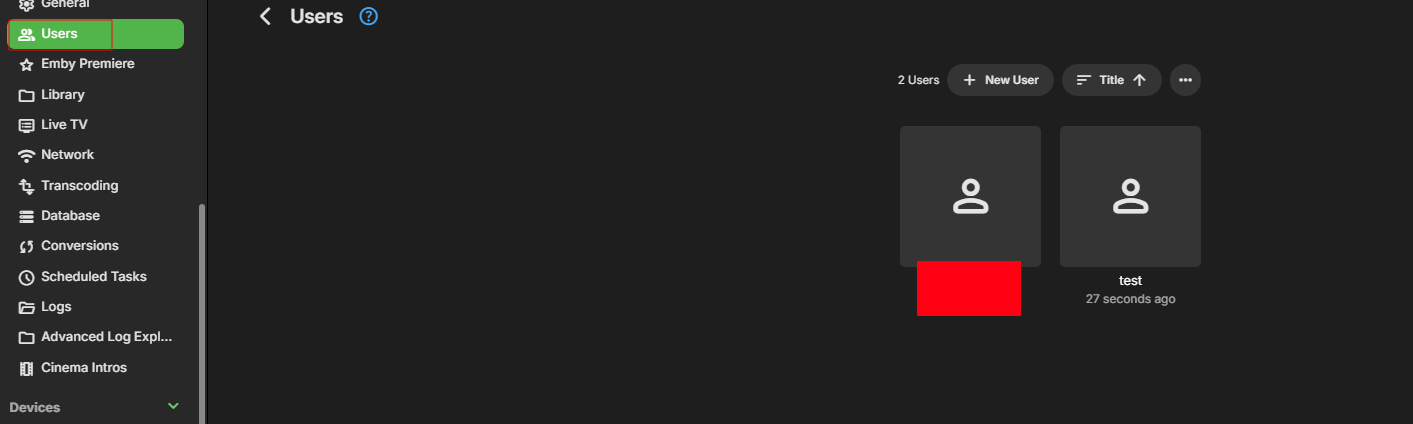
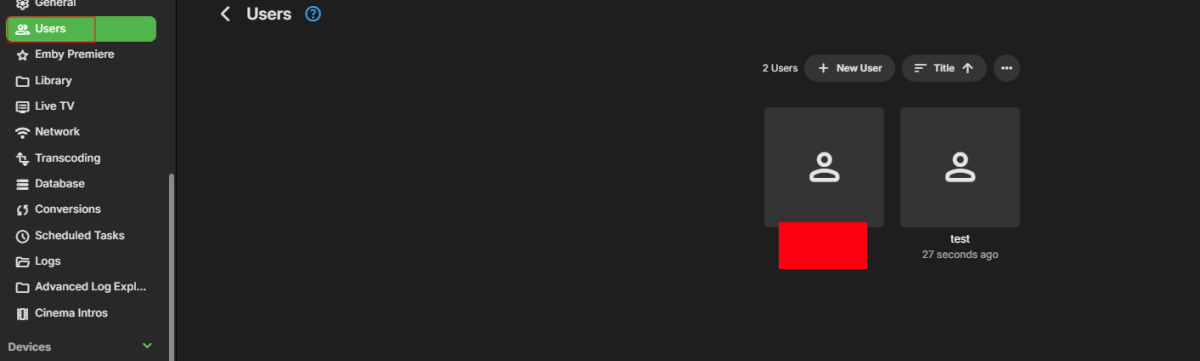
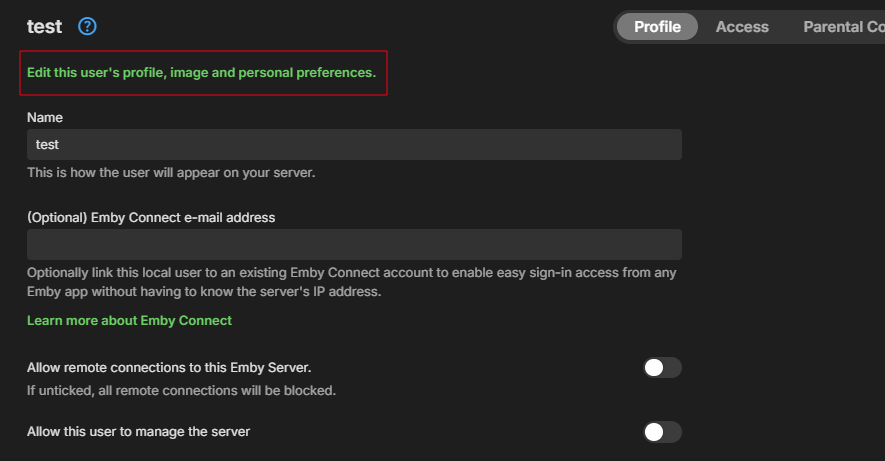
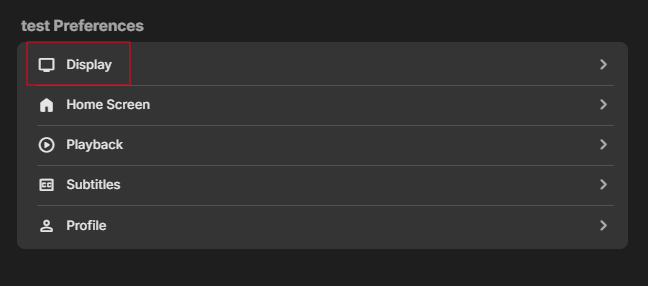
Yes go to users. Click on user to edit. Then click marked in red. Click marked in red. Click and select "Always show season folders". That it. Now rinse and repeat on all your users.
 1 point
 -
I have extended this work from @BillOatmanso that it also has a web interface that Emby can directly call on a schedule - so you can run it with a docker container and it will using the Emby schedule fetch the new M3U generated from the Xtream API. It's been converted to Go as it was easier for me for portability to have a single static binary (which is how it's built) in the docker container and it has a health check and a way to see the config from the web interface. I hope it's also useful. https://github.com/j2deen/M3UFromXtreamGo-2.0.0.0 Thanks, Jay1 point
-
Feature Request: Have User Groups and all settings applied at the Group Level That way you can just assign users to the appropriate Group and all settings will be inheritated.1 point
-
There is now a SportsDb plugin in the Emby plugin catalog. It works with the TV content type and file naming based on the recommended file names on the SportsDb event pages. In other words, click on an event and at the bottom you will see suggested file names. I believe the entire file name gets sent to SportsDb for the lookup, which means you'll need to strictly follow these conventions or it will be unlikely to match. Enjoy.1 point