
Leaderboard




Popular Content
Showing content with the highest reputation on 12/20/25 in Posts
-
I decided to release the plugin as everything should be working. Find it at:2 points
-
TheTVDB now supports more alternative orders than just Aired/Absolute/DVD. Can Emby query these additional orders and add them as options? Two examples of shows I've seen this used are Re:Zero which has a "Director's Cut" display order and Money Heist which has a "Netflix" order. https://thetvdb.com/series/re-zero-starting-life-in-another-world https://thetvdb.com/series/la-casa-de-papel1 point
-
Hi, Since I am using more and more TMDb, (since tvdb is more and more a mess), I am missing a very important feature. tvdb had the feature of grouping stuff into aired, DVD and absolute, which is supported by emby. TMDb had also this feature. See this example for "La casa de papel" (Money Heist, Haus des Geldes): The Original Order is allways the "aired order" of the original country. "La casa de papel" was originaly released by "Antena 3" and was taken over by Netflix, which results in different episodes ordering, which is a mess. They solved it in episode grouping. This feature is missing from emby, but it's integrated in their API and is allready supported in other apps, like kodi. At least, Banana a TMDb Mod claims it, that it's supported by Kodi: https://www.themoviedb.org/tv/71446-la-casa-de-papel/discuss/5e7032d84f9a99001152704f?page=1#5eb76872ca7ec6001f7c53cb Is it possible to add this feature into emby? It is the last scraping feature, I really really miss for TMDb on emby. It adds much flexibility and is overall a much better solution, than on tvdb with their aired, dvd and absolute order. Another great example is Dragonball Super: As you see, it adds much more flexibility for different regions over the world. It's in my own eyes a must have for emby!

 1 point
 -
@softworkz, First, I want to say that I genuinely appreciate you stepping in and trying to understand this. You are widely regarded as the sharpest technical minds here, which is exactly why I took your comments seriously and why I wanted to respond carefully rather than let this drift into frustration or misunderstanding. I do want to clarify intent up front. This was never meant to intentionally reopen an old issue or resurrect a sore spot. The IPv6 image problem was mentioned only to explain why, despite strongly preferring the Android TV app, I personally cannot use it. That was the entire purpose. It was context, not a request for help, and not an attempt to push for a fix. Since you understandably approached this from a problem solving angle, it is probably useful to explain why this has already been explored very thoroughly from the user side and where the actual hard stop is. From the user perspective, this setup has been pushed as far as it reasonably can be without modifying the client itself. The Emby Server is accessed via a hostname or domain, not a raw IP address. Public DNS is properly configured. Valid SSL certificates are in place, converted to PFX, and used by Emby. A reverse proxy using Nginx is correctly configured. The internal network supports dual stack IPv4 and IPv6. The issue only occurs for clients outside the LAN that receive a global IPv6 address from their ISP. Server connectivity, playback, metadata, and API calls all work correctly. Only artwork fails to load, and only in the Android TV app. At that point, this is no longer a DNS, routing, SSL, or general networking problem. To my knowledge, this issue was first documented publicly in 2020 in the following thread, and as you have since discovered, many similar reports and follow-up discussions have appeared over the years: https://emby.media/community/index.php?/topic/92697-images-fail-to-load-if-emby-server-local-ip-address-setting-is-set-to-ipv6-address/ In that thread, the root cause was identified as the image loading pipeline used by the Android TV app, specifically Glide. This was not speculation. It was backed by logs and later tied directly to an upstream Glide bug: https://github.com/bumptech/glide/issues/4369 That issue documents Glide failing to correctly handle IPv6 literals, particularly when ports are involved, even when accessed via hostnames. In other words, the failure occurs after DNS resolution, inside Glide’s URL parsing and request construction, not at the network layer. This is why suggestions such as switching to hostnames, changing routers, reverse proxies, or IPv4 availability elsewhere do not resolve the issue. None of those change the fact that Glide ultimately encounters an IPv6 endpoint it cannot process. A possible workaround was also discussed at the time and documented externally, for example here: https://www.programmersought.com/article/59101040107/ However, that workaround requires application level changes such as custom Glide model loaders, URL rewriting or interception, or patching Glide internals. All of those require modifying the image pipeline in the client itself. This aligns with what has been stated more recently by Emby staff, namely that fixing this would require rewriting how the Android TV app handles images and that this is not justifiable for that app. What is important to add, and why I am mentioning this now, is that this is not just a theoretical limitation. Another project actually took this path. In 2023, Jellyfin’s Android TV client replaced Glide entirely with Coil, as documented here: https://github.com/jellyfin/jellyfin-androidtv/pull/2889 That change removed Glide from the image pipeline and avoided the class of issues tied to its IPv6 handling. This demonstrates that the root problem is not an inherent Android TV limitation, but a consequence of the image library choice and the cost of modernizing that stack. I am not raising this to argue that Emby should have done the same. I fully understand the resource, maintenance, and product direction tradeoffs involved. I am mentioning it only to underline that the limitation is architectural and already well understood, not something that can be solved with configuration changes or workarounds at the network level. To bring this back to intent, I am not asking for this to be fixed. I am not trying to reopen an old bug. I am not tying this issue to the move toward the Universal app. I was only explaining why, for me, the Android TV app, which many of us agree offers the better TV experience, is not actually usable in practice. I do appreciate you engaging in good faith and trying to help. In this case, the limitation is already acknowledged, architectural, and historical. At this point it serves only as context for why “just use the TV app” is not always a viable answer. Thanks for taking the time to read and consider this.1 point
-
I'm guessing that was the reason it was done with X11 instead of wayland then as well, because of the lack of persistent window positions on wayland (which drives me mental lol)?1 point
-
As I hate to move back to Windows, I plan to write an app on Windows to monitor all changes and send them to Emby through API. It will cost some time. I will post it publicly after testing.1 point
-
On the side menu we are seeing some apps already moving away from that and our own users are probably split down the middle on liking/hating it on the TV form factor so I'm going to say the jury is still out on that one...1 point
-
Thanks a lot for your respond! This clarify me a lot of stuff. I'm actually manually changing all folders by adding the year, i'm not changing all the names in English, because i noticed that TVDB is very good at picking even strange title, i've try finding some scripts or app to do it not manually, but i can't find anything relative to naming folders, so, more than 600 folders to change, yeah! So for the rest, i would probably need to do some experiment with just some specific anime and see how Emby handle it. Because there are anime for what i've more variant of the same season, or more variant of the same movie, like director cut, TV version etc. At the same time, there are OVA, ONA, Specials, Movie, etc. Thanks again!1 point
-
We don’t have a full list but it has an updated Intel media driver so compatibility should be much higher now. We’ll be getting this out in a stable release update any day now. Thanks.1 point
-
Tested with everything possible that i have and other users on my server as well. It seems to work for everything and every one without any ill effects. I refined it a little and it seems to be (with a lack of better words) a bit faster at skipping with: Text to replace: -map_metadata -1 Replacement text: -map_metadata 0 -map_chapters 0 -max_muxing_queue_size 2048 ---- Text to replace: -avoid_negative_ts disabled Replacement text: -avoid_negative_ts make_zero Also works but with this it would be tricking the device to believe the new time you have skipped to is the start of the video so the progress bar resets to zero.1 point
-
For naming, just check the default name and season structure for the series on TVDB (if you set that as first choice, which I would recommend), and use that. Adding the date would avoid conflicts, especially with remakes (Rurouni Kenshin, Fruits Basket, etc, etc. The default name on TVBD will normally include the date in those instances. Specials, Season 0, and Extras, etc - those names and others are recognised by Emby and merged into one folder. If you want a separate folder to appear, for films/movies for example, you must use a name which is not recognised by Emby, and hope that the behaviour doesn't change in a future update. But for me, with a pretty large anime library, it works well enough. If the metadata for a special, including movies, has a season/episode insertion point defined, Emby will display it in that position as well as in whatever special folder it is in. A limitation at present is that not all sorting orders from TVDB or TMDB can be selected - most specifically I would like to use the Monogatari series book order - but I can't. My experience, and that of at least some others, is that using the specialised anime metadata sources made available by the "Anime" plugin, is often troublesome. For me, TVDB handles everything just fine, including some pretty rare items; in a handful of cases I've simply added missing information to TVDB myself - it's quite easy to do. Paul1 point
-
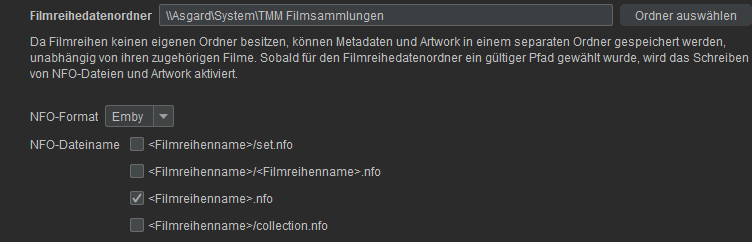
Dann leg mal ein Sammlungsbild in den 1. Film einer Reihe, z.B. Harry Potter und der Stein der Weisen und aktivieren die Option in der Bibliothek Filme. Ich glaube aber, dass Emby es bisher nicht unterstützt, lt: https://emby.media/support/articles/Movie-Naming.html gibt es keinen Namen für boxset, movieset, o.ä. Und im TMM aktivierst du ja nur das Schreiben einer *.nfo, aber ich weiß, er legt auch das Bild dazu ab.
 1 point
 -
I found a lot of covers did not show when they were cover.jpg but i copied all my cover.jpg with a batch cmd to folder.jpg and now 95% of the covers show.1 point
-
I will go out on a limb here since you have been so gracious to give us your time. I know it took awhile to write your post. Because we value that time I will respond to most of your points. Otherwise they may never get answered. Keep in mind, some of what you are asking cannot be answered directly. I am just a team member. I cannot speak for the entire team. I am just speaking for myself. The reason the star/options isn't being used for context is because at this point, quite honestly, IMO, no one has really complained about it. The app is developed to a far enough point now that those actions could now be considered. The other apps on Roku have updated to adopt the star/options button for context menus. We could do the same. I agree. What do you mean? Can you show where this is inconsistent? This will happen eventually. We will use the same star/options button as other apps. Indeed. We will eventually get to this point and it will happen just like context menus. Just cannot say when. We are working on updates. It is just hard to go into details without saying too much. Suffice to say, yes, we don't have one.. yet. Hmm. What is wrong with the logo? Merely on oversight on our part. We can add the other button, sure. This is by design. We can only offers options which we have framework built in the Roku app to support. People asked where are those options in the Roku app. We added them as stubs which reference back to the web app. The Roku is very limited in how large the app can be in size. We have to be very careful that the additions we make are worth the cost to include them. This is why some things may look jaggy or blurry with icons or images. We cannot afford the cost to include them at the full size because the bytes they consume could be used for actual code. There is a trade-off that must happen. We have tried to offer the best options most users would appreciate. We have both. In the settings under "Preferred TV show display". If you choose "Show all episodes of all seasons together" it will display all episodes in a row. It will also give you series tabs above the row. If you move to these tabs and press OK you can go to season view in vertical mode. If you move to those tabs and wait a bit the row at the bottom will adjust to match the season you are focused on. There are also "Show all episodes for only single season shows" and "Always show season folders" options too. You pick the one right for you. One of them can do both. I agree. The themes are not there because there is a complexity to adding them. The cost factor of do these include different images/icons which consume up bytes of space in the app package? We must be very careful how we spend those bytes. That is really the honest answer. If we do it now will that limit what we can do later. Then we have to remove old functionality to allow new. Or they would have to get dumbed way down once we get to a certain point. That is honestly why. If we get to a point where we can splurge on themes of course we would want to. That would be fun to make and fun to use. But it might blow the budget. That is why we have to be careful on how we approach everything on the Roku. This also factors into the image/icon budget thing. But most of the accent color is just that. Color changes. But one thing still takes new images to change color. We would have to change how that thing is built to make it able to just accept color changes. Then it wouldn't cost us anything but lines of code to add this feature. I am sorry on this one. The Roku interface doesn't include anyway to modify the offset. We are using the standard Roku video player to render the subtitles. Yes. We do eventually plan on this happening. It just doesn't have a timeline, but it is on our issue tracker as missing from the app. Yeah. The navigation uses the down keypress from the buttons to dismiss the OSD. If we were to change that and now have labels underneath it that you must navigate through it might cause people to become upset. Rather than change that trained behavior they were just added as icon buttons like the rest of them. It is just a design consideration we did to keep it simple. The "streaming cards" at the bottom of the web app. I know exactly what you mean. You are the first to question their absense in quite some time. They are on the issue tracker as missing from the Roku app. I can elevate the issue and raise it. This is one of the few missing things from the details view. You cannot change quality when the item is buffering. Once the item is playing the OSD is able to spawn and you can use the cog/gear and the video quality option. You can also access it from the settings. On the Roku many things are tracked when you start to play something back. There are lots of moving parts that get set in motion. If we allow you to reset all this as the playback is buffering there are so many ways things can do wrong. We tried to allow users to change subtitles/audio/quality before the stream starts and during buffering and it was just maddening to keep all those variables in sync. A serious headache mind trap of logic must be developed to do that. This is why so many other apps do not do that. The star button should open the settings on the home, library, and search screens. On the library screens it will also ask if you want to open application settings or set a default tab. The details screen is meant to lack those so you get to see the backdrop unobstructed by that overhang. The overhang has the buttons and tabs and such. I understand what you mean though. I also suffer the same and have to press back until the overhang appears then can press star. This was due to the simplicity of the Roku app. We aren't using the mini-keyboard. We use the full-size keyboard which allows style changes. So you can type a double quote. In order for search hints to appear we would need to have some area designed to contain them that you could focus on and select from. Rather than delve into that we chose to keep it very simple. The voice remote is fully functional on all the keyboards/pinpads. You do not have to type. You don't like the chunky/clunky segmented spinner? We have had that for so long. That sleek slender spinner is part of the Roku UI layer. They spinner changing is indicative of when the hand off to the video player has occured. The percentage buffered only appears when it takes longer than it should. If it takes longer than 5 seconds to start video the percentage buffered will show in the middle of the spinner. There are placeholders used on the grid. It allows loading these. But on the rows we do not know how many items are going to show ahead of time. With the grid you know on the first fetch you have 300 items out of 6000. So you know when loading more you can request 300 and show placeholders on those. But on the rows, it works differently. Each row title appears and then the entire row begins to fetch data top to bottom each row list. Then as the row has no data you see the row title disappear. The other rows move up to take its place. We do show placeholders. The first item in each row will be a loading spinner. That is until the row loads. The loading spinner is a single spot in the row because there is no concept of how many items will actually populate with data. It is very hard to next to impossible to change the code to do this without incurring time penalties. Time penalties are when you try to code around an issue. It adds overhead that must get executed. Then it might be slower to render having to wipe out all those placeholders and replace them. That is likely how it will get done. Exactly as you have described. 1. The crash should not be happening. It is probably some exception when a value is expected to be there but instead finds a null. There are a few spots where Roku says values will always be there. But we have found that isn't always true. This is probably one of those times. If after this happens you can immediately restart the app and send debug logs it will give us the reason. You can run the app in debug mode. It will just run a little slower since it is logging. A few hundred milliseconds slower. You may not even notice. Then when in that mode if you experience any crash, relaunch the app and immediately send a debug log. Then make a post on Emby forums in the Roku section mention you sent logs. The username that sent the logs and the time in EST. Then it will be possible to spot exactly where this is happening. Thanks. 2. We have fixed this bug. I know exactly the one you are talking about. The fix for that should already be in Beta or soon to be in Beta. I hope that answers your questions. Hopefully I do not get in trouble. I am just trying to keep the userbase from giving up hope on the Roku app. We are trying to do right by you guys. I do appreciate the post too. It is very hard for people to be critical when they don't want to be mean. I don't see it as mean. It is what it is. You don't have to be afraid of hurting our feelings or coming off the wrong way. You want a kick ass personal media player for your personal collection. You deserve it. We are trying to fill the goal. Without knowing where we are doing right, or doing wrong, or doing it different. We can only assume. Thanks for helping us and giving us clues. I do appreciate the time it took for you to make your post. If you find any other issue, complaints, or concerns please bring them up. Thanks again for your time. Merry Christmas and Happy Holidays. Stay safe.1 point
-
I know we have mentioned this in other topics since TMDB has language backdrop as there were removed from being a backdrop option. It would be nice to map the language backdrops to Thumb/Landscape image.1 point
-
@denz- That's the point I'm trying to get across. In series recordings, if there are no future episodes in the EPG it clears out the poster. Its not that big a deal...just would like a way to retain the poster if possible. There is no ability to manually edit or control the poster in Series recordings.1 point
-
Hey, I would like to request a better "Refresh Metadata" experience, especially when refreshing a whole library. My experience after starting the refresh is the following: The progress jumps to 90% very quick and the last 10% are slow (which is where the actual work happens i guess). Would be nice if you can rework the progress indicator to represent just the items that are refreshing (e.g. 1000 items -> 1 is fully done -> 0.1%) and also display the progress as a task in the dashboard (like the library scans). A cool extra thing would be the possibility to cancel a refresh task and notifications for started, done, aborted. Thanks for reading and please let me know if thats something you would like to change/implement.1 point
-
I was looking for this too! Just a heads up that on most of the TV apps, you have to actually be inside the video player to change this. If you bring up the on-screen menu while playing a movie and hit the 'CC/Subtitles' icon, there’s usually a 'Settings' or 'Offset' option there. It’s not a global setting in the main dashboard, which is why it’s so hard to find!1 point
-
What I meant is that Game Mode as a whole is not working in the Hyper-V VM. But meanwhile we got actual feedback from one of the private beta members. Current state is that it does actually run in Game Mode and also plays audio and (probably) even video, but the video is not visible. The new app has a secondary window for video rendering which gets synchronized to the main window normally, but that obviously doesn't work in Game Mode. There's likely no X11 environment in that case and I'm not sure whether there are ways to still do this. Without having a device (or emulator with Game Mode working), this is probably not solvable. What's definitely possible though, is to fallback to the HTML video player (like the web app is doing). in case of Game Mode. Well need to see...1 point
-
It went just fine. I just moved over to Cachyos though and having nothing but problems with file permissions haha.1 point
-
Scratch that, checking the “access devices by name” setting has resolved the issue.1 point
-
Sorry all for the radio silence, half year end for me with my real job so everything gets hectic! The source is self hosted files so shouldn't be having issues. It's not a third party source so to speak. Media fire are yet to respond to my ticket request to give an insight into why it's been rubbish of late. I'll let you know what they say1 point
-
Cool story bro. None of which has anything to do with this thread, but I’m sure it’ll definitely help someone… somewhere. Back on topic, This FR is about WebSocket keepalive, not new settings or features unrelated to session stability. The issue remains unchanged: sockets drop while users are actively watching, breaking admin control and remote commands. A proper keepalive interval (e.g. 30–45 seconds) would actually address the problem being discussed. Or implementing the “yes certainly” configurable setting that was mentioned.1 point
-
I have been using Plex for 6 years now and have even bought a lifetime Plex Pass for the Watch Together feature. I would switch to Emby if the tv app had the watch party feature1 point
-
We are working on it, but we don't know yet. We have a line of contact with the Vega developers and we may actually have to get some things added to the OS. So we have to go through this back and forth process with them, complete development, then submit it to them for review.1 point
-
Hi yes we are working on it. Thanks.1 point
-
1 point
-
I was simply trying to understand the level of development currently going on with the client. To answer your question, My initial impression of the client after 15 minutes of messing with it. Overall the app seems to be functional which is a good thing. I would like to see an overall less frustrating more polished client. One example, it took 3 tries to get library display setting done right because there are no limiters on button actions that kick you out of that menu. But really that is just an example for a task that I may never perform again, but still it detracts from the experience. The app doesn't feel intuitive, and doesn't seem follow recognized formulas for where things typically exist. After my initial look at the app, the impression is that it is a clunky and non-intuitive design, but it looks good and seems to function. What I would like to see is a beautiful, intuitive, and efficient UI that works and is fun to use. I know my limitations. So if you're looking for a list of things to change, I don't have that. Just an impression and an opinion. A good UI Architect could tell you what changes would help.1 point
-
No, doesn't matter. It's just that all participants will see the others' GH accounts, of course. No. It will always go through Xwayland. This won't change until the Wayland developers will change their position regarding programmatic window positioning and sizing (which is not possible on Wayland).1 point
-
How big is your to do list?1 point
-
@Lukeis there a way we can fund the work for this as a community? I'm pretty sure that there is enough interest in this that the community would come together to help pay for this feature. I know I personally would be willing to pay a decent sum to contribute towards the development costs for this. Plex has torched the last thing tying me to their software, and Emby is my next home for my friends and family. I've actually referred another friend of mine here and he plans to get premiere as well. Is there anything that we can do as a community to aid you in bringing this functionality to Emby?1 point
-
I think a user filter could make sense. Also when clicking on a user in user setup, being able to see this same information for that user. So almost like that screen becomes a dashboard for that one user and not just their permissions.1 point
-
Please add this feature, I beg you. Original airdate order is such a pain with animated shows.1 point






.thumb.png.1ddf135ad99a72646a26d671a28ffe35.png)









.thumb.jpg.ccf5fd5c50269f407148fbd429681c66.jpg)





.thumb.jpg.c75790b7d9d27e0415687d7d6d1197cf.jpg)
