Leaderboard




Popular Content
Showing content with the highest reputation on 12/19/25 in Posts
-
This should be a high priority item imo. Another Alternative would be OIDC support so we can force 2fa on our identity provider (Authentik,Authelia,Keycloak). Immich can do this even on the android app.On TV login could work via QR-Code similiar to youtube. Just throwing out ideas here.2 points
-
Thank, nice to hear you like it! There is only the Rotten Tomatoes as that is what Emby offers. Adding support for the popcorn meter in the plugin would afaik. require access to the Rotten Tomatoes API which costs money. The plugin: Rating Poster Database supports the popcorn meter if i remember right and is a well put together plugin.2 points
-
I'm saying go back to basics - use the emby guides to setup remote access - and once that is working, build/enhance and learn from that point on exactly what you are enhancing and why. Do not just blindly follow guides to implement something you do not properly understand and subsequently cannot resonably support yourself. Saying 'its broken - please fix' is not going to get you any support. If people see that you have attempted to find out/narrow down the problem, shown willing to listen & learn, provided examples, tested different scenerio's and fully provide info requested - THEN they may offer their free time and experience to assist.2 points
-
Are you showing threads in htop? That seems normal. Press shift+h to hide them. Hiding threads:
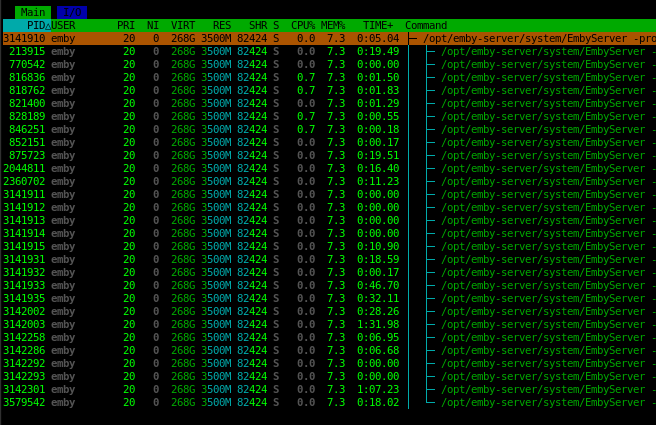
 2 points
 -
This topic has been discussed before, and I've chimed in before. Compressing and archiving the backup into a single file needs to be an option, if not the default behavior, especially when a single backup is hundreds of megabytes if not gigabytes on disk. Since the files are so small, they can take up much more disk space than their collective sizes because of sector size. If the file is 1KB, and a sector is 4KB, then you have a 4x increase in disk usage. If the backup solution requires they be uncompressed, then I'm afraid the backup solution needs to be reworked.2 points
-
Unless I'm being a bit blind (highly possible!), I'd love a way to hide a couple of the top green navigation items without hacking it in myself. For example, in Movies I don't want the 'Trailers' item to appear for any profile and for TV I don't need the 'Upcoming' nav link. Obviously not a major issue but thought it would be a nice thing to have, perhaps allowing them to be re-ordered like the home page items but again just a nice extra,1 point
-
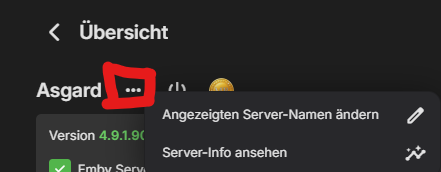
Das hat aber nichts mit dem Filmreihenordner zu tun, sondern mit der Namensgebung für einzelne Filme in der Emby, oder der ausgewählte Medienserver, die Metadaten erwartet. Du schreibst nicht unter was dein Emby Server läuft, auf Synology sind die Cover im Pfad: var/packages/EmbyServer/var/metadata zu finden. Sofern du das Speichern im Medienordner nicht aktiviert hast, kannst du die Location in den Einstellungen des Servers nachsehen via Server-Info ansehen.
 1 point
 -
Sorry for the late reply, thank you so much! I'll go through and do that. You guys have been super helpful thanks for reaching out to them and getting back with me! Edit: Will i need to do a "fake change" to force the save, or will it save even if 'no change' it detected?1 point
-
+2 i think im not home atm. cant vpn this second1 point
-
It would also be a big step forward to force you to set a password. If you really want a blank one you should have to tick a "Blank Password" box. Its super easy to leave a user without one set.1 point
-
Hello, First of all, thank you very much for your plugin. It looks really cool. I especially like the addition of the Rotten Tomatoes rating. What about the popcorn meter? Is it already there, or am I doing something wrong, because it's not showing up for me. Thanks for your help.1 point
-
Hey, I would like to request a better "Refresh Metadata" experience, especially when refreshing a whole library. My experience after starting the refresh is the following: The progress jumps to 90% very quick and the last 10% are slow (which is where the actual work happens i guess). Would be nice if you can rework the progress indicator to represent just the items that are refreshing (e.g. 1000 items -> 1 is fully done -> 0.1%) and also display the progress as a task in the dashboard (like the library scans). A cool extra thing would be the possibility to cancel a refresh task and notifications for started, done, aborted. Thanks for reading and please let me know if thats something you would like to change/implement.1 point
-
Thank You for stepping in. Confusing when they show up as if having different PID numbers. I would have expected a TID column!1 point
-
Ohhh hm, that ATV forum is full of topics about that ipv6 image problem...1 point
-
Have a look at this.1 point
-
I am feeling a bit better than usual today so I decided to do a little maintenance. One of the first things I wanted to do was cleanup my Next Up. I realized that my Next up was cluttered and displaying a LOT of shows I was not going watch any time soon. I found that there were nearly 20 such shows and doing them one at a time was going to be time consuming. So I multiselected the shows on Next Up and clicked the resulting three dot menu but the menu displayed did not include a "remove from next up" selection. I was kind of amazed by that and I feel it should have that ability. I decided to post here to advise that the option was missing and to suggest that it might be a good thing to add. I managed to remove all I wanted from Next Up by using multiselect on TV shows and sorting by date last played and the going through the first 20 or 30 shows and marking the ones I do not want in Next Up as totally unwatched. I would have preferred to simply remove them from next up but this worked OK this time. I think it would be best if Emby allowed "remove from next up" on multi-select from next up. But I am really just posting here to advise others what has happened. BTW: Server - Version 4.9.4.1 beta Also I use Windows 10 (Yes I know support has ended but I do not have enough $$$$ to buy a new server and the old one will not support Windows 11) The browser is Chrome. I get no errors at all.1 point
-
If you look at the log file for the startup of the library I suspect you will find the same as me. The one that works like the old view is Library Folder: Video offload, id: 351520: path: M:\Video offload Library: Music, id: 12, CollectionType: movies, CollapseSingleItemFolders: True The one that does not work is Configured paths: M:\Video Movies Library Folder: Video Movies, id: 540016: path: W:\Classic Movies Library: Wrestling, id: 842382, CollectionType: movies, CollapseSingleItemFolders: False CollapseSingleItemFolders seems to be the key. When true, It works as before. When false, it is the ugly mess it is now in folder view. This is not a setting you can set in the UI. No it is not the merge contents. It is just a carryover from the past. If carried over it works; if not it won't. Seems if the library was created with 4.8 or earlier (it might even have been earlier) you get the old behavior. For me the ones with CollapseSingleItemFolders: True started life back in a version that options.xml existed for each library and that has been a while since that was no longer used so it might even need to be earlier than 4.8. It is not the following setting. This does not impact that startup setting at all. My settings are identical for the one that is the old usable view and the one forced to the new folder view, with the only difference being the paths for the libraries and under what version the library was created.
 1 point
 -
Yeah, i thought it was normal.1 point
-
If I understood your request correctly, topic title should likely read "Option to use the movie db for thumbs", as TMDB is already included as image fetcher for fanart/backdrops?1 point
-
For me that comes across as TLDR. But I have noticed that many Roku users are very turned off by any complications. In fact I would have retired my Roku except there are a few apps I regularly use that are not available for Android including the NWSL app. You might have better luck if you posted a separate post for each issue as issues are mostly worked on one at a time.1 point
-
That update put all my collection posters back. Thanks!1 point
-
It went just fine. I just moved over to Cachyos though and having nothing but problems with file permissions haha.1 point
-
Great to hear, I sincerely hope so but I am skeptical. Let's see what becomes of this plan one year in the future.1 point
-
I hope the following comes across as feedback as opposed to criticism. I recognize the difficulty in maintaining an app across such a range of devices and ecosystems. But it was mentioned in this thread that the team relies on user feedback to improve the app, so I figured I’d outline what I’m seeing in the app. With that said… Roku’s own apps use the Star button to open context menus for interaction across the board. It’s used on the home screen and in the apps themselves. Other apps that don’t offer any user interaction, like Netflix and Hulu, I feel do so because they have an “algorithm knows best” mindset where they don’t actually want you to interact with the interface in any way other than pressing “Play” on whatever they feed you. But Emby is fundamentally contrary to that mindset; it’s explicitly a user-curated experience. There is no algorithm deciding what you should watch, so there’s a fundamental need to allow the user to manipulate the content in place of that algorithm. But it’s also strange to restrict interaction on a specific platform, especially when that platform has a dedicated “content interaction” button. The mobile apps and the web browser rely on context menus for interactivity, so why would the behavior differ for other platforms? And that ultimately brings me back to what I think is the main point of this thread, which is that the Roku app is not inline with other platforms in some ways that make it feel like it’s lagging behind. Here is a list of areas I’ve found that differ from other platforms: 1. A consistent loading icon across the board. 2. Context menus (though the Samsung app has no context menus as there is no dedicated button on the remote). 3. No side menu. 4. Logo on the initial splash screen when launching the app. 5. On an Episode Details screen, there is no “Go to Season” button that exists on other platforms. I use this to mark a full season as Played or Unplayed (the Roku app has a “Go to Series” button, but other platforms have both). 6. Very limited Settings menu (compared to Samsung app). A significant portion of the settings are behind a menu item that simply says “To adjust please use the user menu in the web app.” 7. When viewing episodes in a season, some platforms have the episodes displayed horizontally, while others have them displayed vertically. Not really a significant difference functionally, but still inconsistent. 8. No themes 9. Roku app doesn’t respect the “Accent Color” setting. I’ve found that other Roku apps have this feature, so it should be possible from a platform standpoint. 10. No “subtitle offset” option 11. No way to search for and download additional subtitles from the Internet 12. When watching content, pressing “down” on the d-pad simply brings up the progress bar, and pressing it again closes the progress bar. On other platform, there are 4 “tabs” below the progress bar that you can access with the d-pad: Info, Chapters, Cast & Crew, and Up Next; moving between these tabs automatically brings up their content without actually clicking on them. On Roku, these exist as separate icons to the right of the “Skip Back/Pause/Skip Forward” icons, and their content doesn’t load until you click the icon (and navigating to a different one requires backing out, then navigating, then clicking again). Not a significant difference in functionality, really, but it’s a difference that causes the Roku platform to feel out of date compared to other platforms. There are also some peculiarities that I’ve found across platforms that confuse me a bit: 1. On the mobile app, I can see technical details about a particular episode/movie file, like file size and bitrate, on the content’s Details page (below the Cast & Crew), but this information isn’t available on Roku or Samsung. The only way I can find the bitrate is to first start streaming the content and then enable “Stats for Nerds”. But for a server with a wide variety of file sizes and bitrates, this information can be helpful to know. 1b. Outside of the system-wide quality settings, I can’t find a way to change the streaming quality until the content has been started and loaded enough to where it actually starts playing (there’s no way to open the playback menu while the content is loading, so you must wait until it’s buffered enough to begin playing the actual content). I find that the “Auto” quality is over aggressive, so I choose to run at “Original” quality, but there are days when my internet is acting up, so it can be helpful to change the quality before launching the content. If my internet is struggling enough, it may never actually load the content before timing out, which makes for a frustrating experience. 1c. In instances where 1a occurs, I then need to go into the system menu to change the system-wide quality settings, but you have to go all the way back to the Home Screen to do so (the “Star” button only opens the Settings menu in the home screen and does nothing on any other page, and there is no side menu or setting button on the content Details screens). If you’d searched for the content, you then have to go through that process again after changing the streaming quality. 2. There’s no “recent searches”, which makes the process of 1c even more frustrating, as you then need to type everything out again, which is never a fun experience with a TV remote (though I do appreciate the Roku keyboard is a grid, as opposed to the one long line that it is on my Samsung’s Emby app). 3. The vast majority of the time, the “content loading” spinning icon (as opposed to the app’s chunky segmented icon) doesn’t have a progress percentage, but very rarely it does. I’ve seen this on both the Roku and the Samsung apps. On the mobile app, I’ve never seen a percentage. I don’t totally get why it’s only there occasionally (or rather, extremely rarely). 4. As I mentioned in a previous post, there aren’t any “placeholder” squares in most of the UI when loading content, which makes loading any pages feel clunky. This is especially true when it causes the UI to shift as content loads in, but this depends on the page that’s trying to load. If you look at Netflix, Hulu, Roku’s apps, etc., you’ll find that they all feature empty gray placeholders where content will eventually load. This results in a much more fluid loading experience and makes the loading seem faster (even if it’s not actually any different). Perception is a very powerful thing when it comes to loading screens. 5. If a side menu were added, I would configure it to have the following behavior, rather than the current behavior of prompting to exit the app/change server/sign out: 5a. If the “Horizontal Scroll Style” is set to “Fixed” (where rows become a continuous loop), pressing the “Back” button on the remote opens the side menu and places the cursor in it. 5b. If the “Horizontal Scroll Style” is set to “Float” (where rows have a distinct beginning and end, at which point the cursor stops), pressing the “Back” button takes the user to the very beginning of the row they are on. From there, pressing “Back” again or “Left” on the d-pad opens the side menu. I’ll admit that this is just intuition on my part, and that using “Back” to immediately open the side menu and places the cursor into it regardless of the “Horizontal Scroll Style” may feel more natural overall. I’ve also found a few bugs in the Roku app while using it: 1. When changing the video quality during video playback, the app will occasionally just crash outright as soon as the quality option is selected. 2. After searching for content and selecting a TV show, if you navigate down to the list of episodes, it’s impossible to navigate back up to the series details. The green highlight indicator will go up off-screen, and it seems like you can interact with the buttons, but you won’t be able to see what you’re doing because the display doesn’t reset at the top; it just stays stuck on the episode list. Once the cursor is up off screen, pressing “down” on the d-pad will cause the screen to “scroll” as if it were showing the Details portion of the screen. It’s really strange.1 point
-
Is there a way to enable users to create DVR recordings, but not allow them to delete ones, or only delete ones they created?1 point
-
Thanks Grimreaper... I was not aware of this plugin... ill take a look1 point
-
In the meantime, you can check out community-made plugin that should give you expanded control:1 point
-
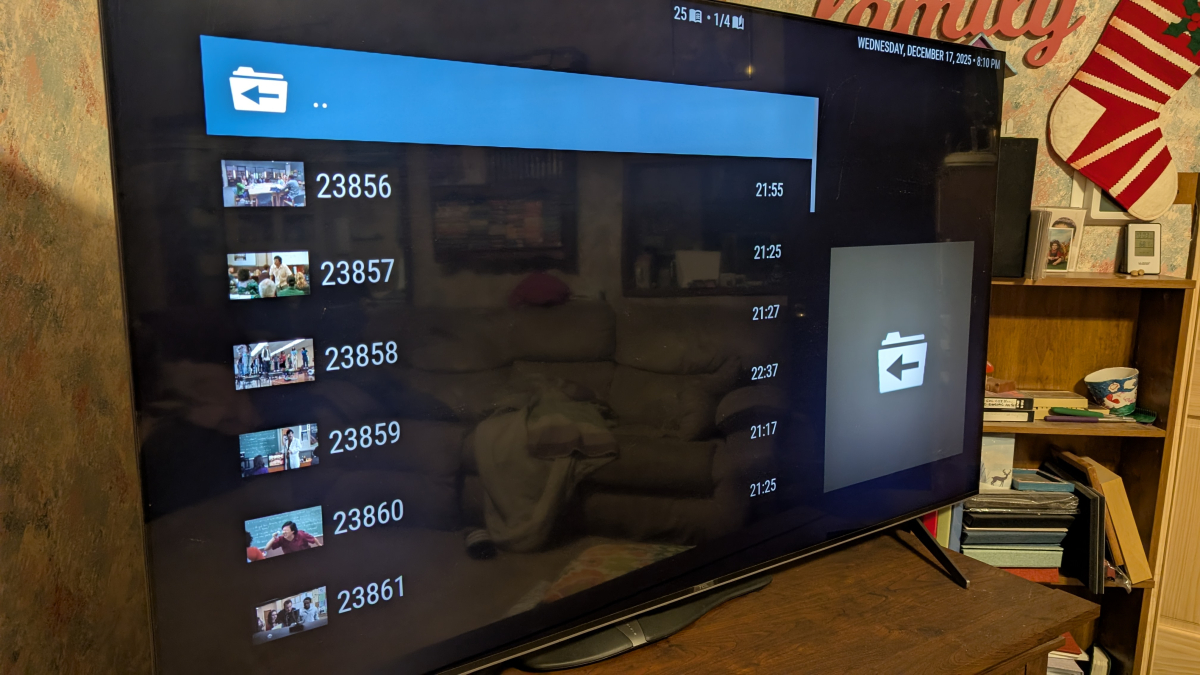
Just updated to 12.3.7. I was on 12.3.5. I started noticing this with one particular show on 12.3.5, and now it seems it's on many of them: This is from the Emby | TV listing (the menu entry is: emby_dynamic_mixedvideo_TV/series_series.xml) BUT... It displays the proper episode name and information when I look at it in Next Episodes (emby_nextepisodes_GUID). I don't know how long it's been doing this - we recently ran out of episodes on many of the shows we'd been watching, and I decided to look for a couple of new shows. This turned up then.
 1 point
 -
HI, yes it sounds like a good idea. Thanks for the feedback.1 point
-
We can't make any promises regarding SteamOS. I've been able to get a VM set up for SteamOS. It's been really painful to get it working, and still it can't do Game Mode, only desktop mode with KDE Plasma, but that appears to be working at least...1 point
-
Could we add a function of "Actor Management"? It should allow browsing all actors by their first letter and managing their corresponding information. Also, it should enable viewing all the movies an actor has participated in here.1 point
-
Could we bring back that summary at the end of a episode with details on next episode instead of just" keep watching and next episode" Could display summary, rating, and cast maybe all custom infos Could be even full screen with backdrop and we reduce the current playback in a small square like somes tv compagnies does1 point
-
I don't care. If someone puts gasoline in their diesel car despite the warning label, they will have to learn it the hard way.1 point
-
Not sure if this has been requested yet or not, I did a little searching before posting so forgive me if this has been requested already. A nice feature to have would be something along the lines of a Kids Mode, some changes that i would forsee in this mode are: Simplified Playback (Instead of selecting the item then having to hit the play button just have it so when an item is selected it just plays.) Simplified Menus (Instead of separating Movies and TV (yes i know if i change my libraries i could accomplish this) have it more along the lines of maybe Character selections (i.e. Mickey Mouse) without having to search Move the Series and Movies selection to a main screen (i.e. Currently to browse for a movie you have to select the movie library then select the movies tab.) The option could be, if you wanted movies you can just hit movies, then all of your kids movies are displayed. Infinite scroll (Self explanatory, but the ability to keep scrolling instead of having to hit pages would be helpful for this mode) If anyone else has ideas for this mode feel free to add on. Thanks!1 point
-
Also, It would be cool if we have various m3u lists and have the option to choose/assign each m3u list for each user.. Example. In user settings we can choose which library to give them for VOD so this shouldnt be hard enough to do it for live tv too no? USER 1 - Playlist 1 - Playlist 2 - Playlist 3 USER 2 - Playlist 3 USER 3 - Playlist 1 - Playlist 3 Etc etc.... *** Delete this message from another topic I opened because I posted it by accident there1 point
-
I'm about to go through the same. Appreciate the write up. Fingers crossed!1 point
-
Hi. I have one tv show (one piece) where the skip intro feature is not working well, while other tv shows work really good. So, it would be great if I could disable this feature for specific tv shows1 point
-
P.s. If someone will work on intro plugin, could also make smarter End Credits. In these days, they are starting way earlier. For example, Murderbot, episode ends already ~ 60-70 secs. before end. Some studios have even longer end credits.1 point
-
+1 please get this added ASAP. It's crazy it's been 7 years since this was initially requested.1 point
-
Hi, yes it's not a bad idea. Thanks.1 point
-
A fair point. Thanks, I didn't consider that Genre. The issue is Emby only implemented CreditStart in the enum options - ChapterInfo{ StartPositionTicks integer($int64) Name string ImageTag string MarkerType MarkerTypestring x-internal-ref-name: MediaBrowser.Model.Entities.MarkerType ($enum)(Chapter, IntroStart, IntroEnd, CreditsStart) ChapterIndex integer($int32) } .. the original Plugin had CreditEnd as well. Thus you could auto-skip to CreditEnd - and then carry on with Playback and naturally finish the post credit video and then roll onto the next item. I guess a lot of the work would be in the Emby clients - as currently Emby doesn't actually give you any 'skip' options for CreditStart - I believe it just brings up the 'Next Episode' at the time specified by CreditStart - no good for this scenerio. @LukeMaybe simply adding CreditEnd to the above values (and updating ChapterApi) would be a good first step, even if the values are not currently used. I see JF have taken it one step further as well - and now included Commercial Preview Recap Outro Intro In their Media Segments ...1 point
-
In case anyone search's this topic and finds this thread, I wanted to document my full workflow that worked flawlessly. This was for migrating Emby Server from running on Windows 11 to running in Docker on Ubuntu Server. My media paths changed but I have always had my Emby Server set to save metadata to NFOs in the media folders so the changed paths did not matter. Back up the original Emby Server Create a new backup location for the new server Copy the most recent "full" and "server database" backups of the old server, to the new backup location Do a fresh install of Emby Server in its new location. DO NOT restore anything Set up the Libraries for the new server; pointing them to the correct folder locations Click through each setting on the new server and update them to match the old server (network settings will likely be a new local IP address) Create users on the new server to match the old server. They do not have to match exactly but should be easily identifiable. Wait for Libraries to completely import and populate; "watched" statuses will be gone but do not panic Go to "Backup & Restore" and set the Backup Folder to the new backup location Current Backup Date should be the date of the most recent old server backup (that was copied into the new backup folder) Click "Extract Data From Backup", make sure the old user (left) matches the new user (right); click "Restore from Backup" The watched statuses on the new server should now match the watch statuses on the old server. I hope this helps. Edit: I recommend deleting the old server backup files/folders from the new back up location. That way when the new server does its first back up, it will due a full backup of the new server.1 point
-
The other services can easier control your viewing experience because they are in control of it through their central servers. We don't work like that. This is still a feature we are interested in but, given its complexity, we just haven't gotten there yet.1 point
-
Personally I'm interested in the opposite and that is turn intro skip on for just one/new selected series. I don't want to run this through my whole TV library when I don't need to.1 point









.thumb.jpg.ccf5fd5c50269f407148fbd429681c66.jpg)