Leaderboard




Popular Content
Showing content with the highest reputation on 12/13/25 in Posts
-
I just added the 2 versions of Chamber of Secrets and can confirm they do now share the same images. Looks like it was a bug which was fixed a while back. Thanks for the refreshing my memory @Happy2Play The only thing unique would be the nfo file then which isn't an issue since they all share the movie name already.3 points
-
I have added the intro skip backup and restore. !!!!! Please test on a test server !!!!!! From the testing i have done it works but i'm only one person. In other words, please consider this a beta! Also remember that new settings does not take effect before you press save!! I need to fix that as well. @FrostByteThe new names are in this as well, see if this works better. I will add a way to customize the names before taking it out of beta. MetaExtractor.dll3 points
-
While not wanting to prove Luke/Emby right or wrong (or anyone else for that matter) - here's a list of 20 not yet implemented music improvements that have been mentioned by myself and others previously. Its not in any specific order and its not an exhaustive list either... General/Overall Dedicated music app (e.g. similar to Plexamp or Symphonium) Music Playback Gapless Audio Playback Replay Gain Remember playlist position Music Curation Improved Artist/Composer separation (some steps have been taken recently) Sub-genres category nested under Genres Genres Artist row - ability to change to Genres AlbumArtist Artist Country designation (I have my own workaround) Decades grouping/sorting/filtering (Genres/Tags/Collections/Playlists are workarounds) Group by Album Release Type sections on Artist Album pages Add field for Disc Subtitles on Album detail pages Import ROONALBUMTAG embedded metadata into Album Tag field (coming soonish?) Sort by Album Count or Song Count for AlbumArtists/Artists/Composers Record Label tab/section (similar to Studios for Movies) Ability to add Artist/Album/Song Internal Links in Overview section Related Artists section on Artist detail pages (e.g. a manual More Like This section/row) Import Sort Titles from embedded metadata Music album roll-up for Smart Collections (fingers crossed for this) Nested levels for Collections (e.g. Master Collection, Sub Collection) Ability to hide/reorder menu tabs Based upon reading different forums (Emby, Roon, Plex, Reddit Musichoarder and others) there are 5 improvements that I think may give the most benefit for the most music fans and therefore the best 'bang for buck' for Emby... Without these playback functions Emby will not be considered a serious music player by serious music listeners: Gapless Audio Playback Replay Gain When music libraries start to become large, then having the ability to divide by further subsections is very useful. Many other music apps have this feature already, so ideally Emby needs it to remain competitive: Group by Album Release Type For all those who use Emby for music, everyone wants to organize their own library differently! Therefore it's impossible for Emby to please everyone! Emby is very curatable using Collections/Playlists/Genres/Tags, so perhaps these two general functions will allow for more specific semi-auto customization, however anyone wishes to do it: Import ROONALBUMTAG embedded metadata into Album Tag field Music album roll-up for Smart Collections These last 2 don't seem very interesting in themselves, but could be a way to create music collections for Labels, Decades, Countries, Sub-genres, or potentially any other collection/playlist/group that someone wants to create??? What are your most wanted? Is there anything important that I have missed!3 points
-
It should but there is a topic mentioning they are not. https://emby.media/community/index.php?/topic/138829-multiple-versions-in-the-same-folder-arent-sharing-assets2 points
-
This is quite a (unnecessarily) complex subject. When you take a closer look at a remote like the Windows Media Center models (plus all derived, similar, oem, and even very different models), then we can see that this isn't just like single input device. In fact these are composite devices which means like multiple devices combined in a single one. In case of those remotes, they have 3 HID devices (human input) and even more when you calso count the IR reveiver and transmitter featutes. One of those is a specialized keyboard input device. It is responsible for up-down-right-left movement of the input cursor and numeric key input. This one is bound to the app which is currently focused - that one will The next one is a media control device, which covers features llike start/stop, play, skip prev/next, ffwd, mute, volume-up/down - etc. Those buttons can have diffferent functionality, depending on wheher it'sconsidered to be local to you app when you don't handle them, the OS may do so (or not). This can be confusing sometimes. The third group is for everything else (guide, red, green,blue, etc..) With a browser-engine involved, which is also doing some button handling and the OS doing handling as well, things can become quite complicated and button presses may be handled from multiple sides. That's why one part has been disabled in the current stable and now re-enabled for Linux (A) and also for retesting the situation on Windows again (B).2 points
-
TheTVDB now supports more alternative orders than just Aired/Absolute/DVD. Can Emby query these additional orders and add them as options? Two examples of shows I've seen this used are Re:Zero which has a "Director's Cut" display order and Money Heist which has a "Netflix" order. https://thetvdb.com/series/re-zero-starting-life-in-another-world https://thetvdb.com/series/la-casa-de-papel1 point
-
With College Football and NFL seasons starting up in the States, a multi-screen option for Live TV would be a nice addition to the Emby feature set. I am thinking of what the WatchESPN app offers thru their Web Browser access. The ability to open a multi-screen window that breaks into four (4) screens that allows you to select streams (Live or Replay) for each and then go full screen. Audio is from whichever of the four screens you have as active. I can accomplish the same right now with the HDHomeRun Quick View TV app. I open multiple instances of the Windows app and then snap them to each corner on my 110" projector screen. Equivalent of four (4) 55" screens. Would be nice if this were a remote friendly option from within Emby Theater and the WebUI clients. I have only seen it in Web Browsers at the moment and not any of the Win10 UWP apps (FS GO, NBCSn, WatchESPN). But, Fox Sports Go just released a multi-screen solution for their Apple TV app. https://techcrunch.com/2016/08/26/fox-sports-go-hits-apple-tv-allows-viewing-of-four-games-at-once/1 point
-
I recently found a need to look up additional information on a director. I was hoping to look at the director's profile and see not only the movies I had in my collection but also a list of other movies that they have directed. This would be displayed below the library's current movies. ex: My movies: Movie 1, Movie 2 Other movies by this person: Movie 3, Movie4 ================ This could help one expand their library and to discover a missing gem.1 point
-
So it's all in one place for the Emby devs, here is a list of oft- and long-requested fixes and enhancements to how Emby handles Music libraries: 1. Ability to play/queue a single disc in a multi-disc album (one suggestion: make the "Disc [N]" clickable:) 2. Saved playlist cover images still just duplicate the first album cover 4 times, even after manually deleting and regenerating: 3. Replay gain: Discussed and requested for years 4. Persistent queue, so device focus switch or shutdown or just memory limits don't lose latest play queue: Ditto Luke bridled at a comment in an earlier thread that the Music module doesn't seem to be a priority for the Emby dev team. Here's the chance to prove him right!
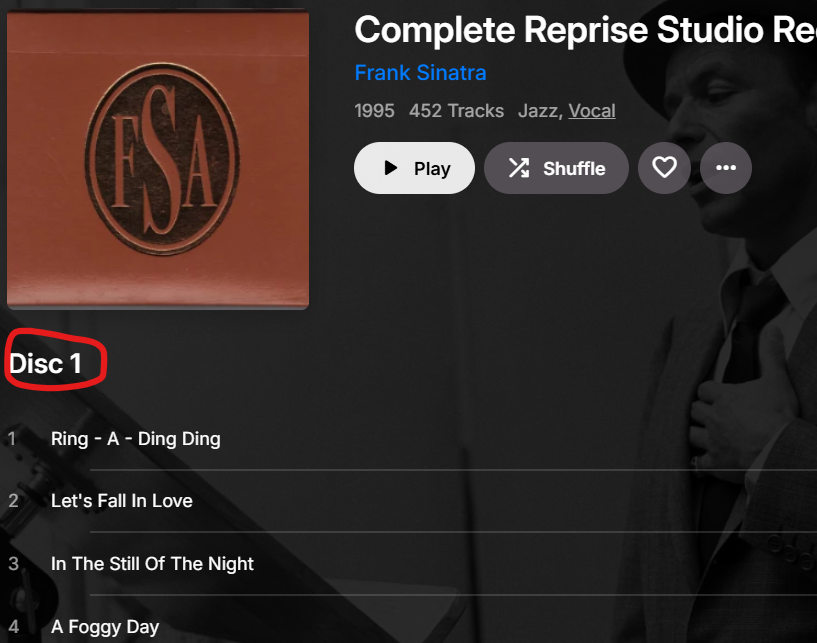
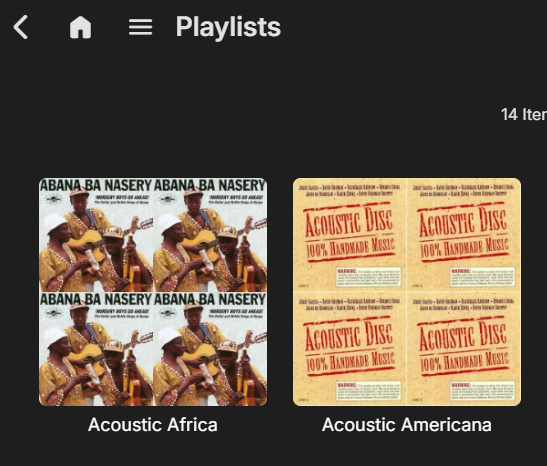 1 point
 -
I have same issues. I have more and more latest MKV media that is lagging during playback.1 point
-
Great, I'll test it out in a few days, too much happening right now.1 point
-
I've seen this option on other players, and it has come in handy many times. It's for when you're listening to an album / playlist, and you decide you're done for now, but you want the current song to finish. Sorry if this has been suggested before. I searched, I swear.1 point
-
In case this comes up with anyone else... Because it's far cheaper to buy a 10 TB hard drive than it is to store 10 TB in an online backup, I use Syncthing to sync my movies and television to another computer for backup. I looked into this and saw that Syncthing was holding onto the ".part" files that Linux creates when transferring a large file. Essentially, you start copying a 5 GB video file to the server and it creates something like "Movie Name.mkv.part" as it's transferring. When it's done, it removes the ".part" and leaves "Movie Name.mkv" in it's place. This never used to happen, so perhaps it's a bug with the latest Syncthing, but Syncthing tries to start syncing the file with the ".part" and throws an error that the file changed before the transfer was complete. It seems to hold onto the reference to "Movie Name.mkv.part" even though it eventually gets deleted. I had a bunch of these errors all of a sudden, so I'm not sure if the file is being properly locked while it's transferring, or Syncthing changed something, or what... What I've done is tell Syncthing to exclude "*.part" files from syncing and cleared up those old errors. If the problem keeps happening I'll update the post, but this seems logical as the cause for that stale file handle problem. If anyone else reports something, check into whether they use Syncthing. Thanks!1 point
-
The sign in button on https://emby.media/connect.html between premiere and support. My browsers (brave and firefox) were overriding the http://app.emby.media and making it https://app.emby.media. The the https url only loads the emby logo. http url loads the connect sign in page and I was able to successfully authenticate.1 point
-
The fix was to go to http://app.emby.media.1 point
-
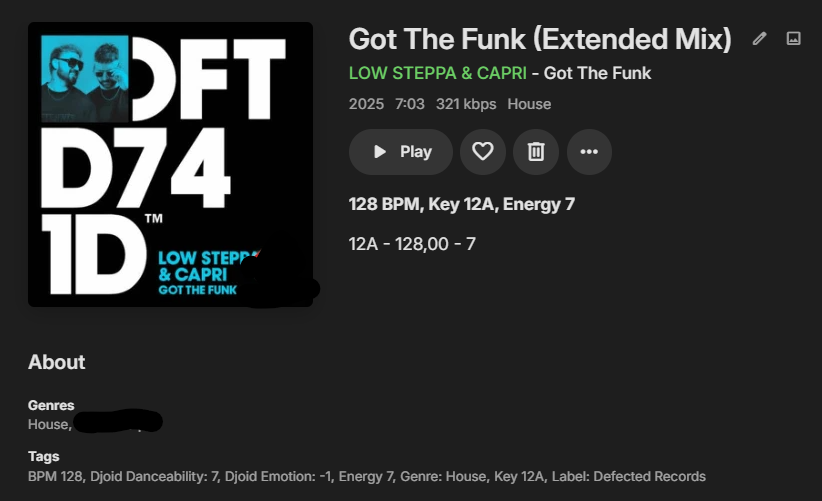
After scanning with the plugin, the tags appear as below
 1 point
 -
thank you. I see in the quickstart it needed to be http. My browser was making it https instead of http. Once i was use http everything loaded properly and worked.1 point
-
For anyone that might fine this useful in the future. I was using "Allow items with these tags" as I thought that was easier to manage, as an admin you usually give access. When checking on those users I then noticed none of them had access to the DVR recordings. It appears that DVR recordings have some hidden tags on them. So I then changed the tag restriction mode to "Block items with these tags". The DVR recordings were then made accessible to the user(s) and the tags that were restricted no longer appeared on the TV Guide.1 point
-
I just posted about this, so yes, I'd love to see this implemented.1 point
-
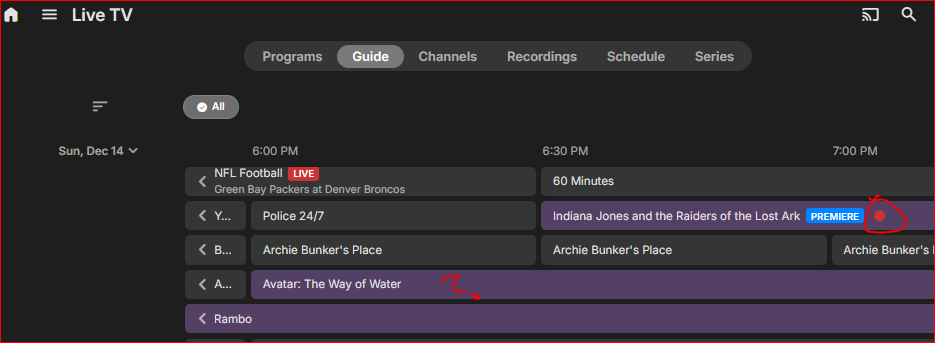
Another Live TV update issue: After opening a program and clicking record, the item in the guide does not always show it as set to record (in that guide viewing session). E.g., I marked both of these to record but only one shows (both show on the Schedule page):
 1 point
 -
Hi, there's already an open request for this or something functionally equivalent. Please join in and contribute to the existing discussion at:1 point
-
Will fix it later today1 point
-
Is the fact that playlists broke acknowledged by the dev team @Luke? I also have the same issue @guill69freported initially, namely that all my playlists correctly show total playtime but trying to play them gives I have inspected the playlists .m3u files and compared the entries to a newly created playlist with the same video. Both refer the same file, identical syntax. Old, now broken playlist: Newly created Playlist However the "included in" only shows the newly created playlist on the video...so something broke: Any advice how to fix this, eg. via shell? I am tired of always having to re-populate playlists because of some breakage or permission issues introduced...there should be an easy way to restore that. Nothing has changed on my filesystem or the root library. Thanks!

 1 point
 -
1 point
-
Hi SA2000. Seems like didn't crash soo far so maybe we live this like that but i would like to look for permanent solution eventually, for now is good, i will keep you posted if anything happen. thank u for you help and so much patience.1 point
-
Settings on LG web are sort of similar to Android and it has its own Settings under Emby for LG settings > Playback and features the same quality inputs. Setting them to the highest quality, immediately resolved the quality reduction. So this still fits in the same genre as the rest in this ticket where automatic settings kind of get in the way when it comes to weak servers (like mine).1 point
-
Like I said on android, apple and windows yes we can, and we already have the middleware to do that. You can't build your own middleware though for browser based playback. Every library that you see out there is ultimately just based on the html video element.1 point
-
I've been using Emby for music a lot more lately and top of the list for me is playlist position or just some form of resume. If I pause my music and the mobile app is closed due to the OS deciding it was time to clean up, whatever I was listening to is gone when I reopen it, whereas PowerAmp is always right where I left it. Or if I want to switch from listening to music to watch an episode while I eat food, having a way to get back to my music queue would solve the problem of switching to my browser or another device/app to watch that episode so I don't interrupt my music queue.1 point
-
Thanks for the quick update! I have installed the new version and tested it. I can confirm the issue is resolved. The "Pause" event is now correctly triggering the scrobble request to Trakt, and the progress bar on Trakt.tv stays in sync with my playback. Appreciate the fix.1 point
-
OK I just checked for real, I just clicked on the stats for nerds and though I couldn't tell, sure enough exoplayer is transcoding, saying "unsupported video" I'll have to check on the native player to see what that's doing.1 point
-
Hi, mind adding Brazil to the request?1 point
-
Hi, please try this build of the trakt plugin and let me know if it does this for you: Trakt.zip Thanks.1 point
-
Just reporting back on the wifes issue with this. All my I devices are on a different vlan to my server devices. There are the normal firewall rules to allow traffic - evident as this ipad always actually starts emaby and you can scroll around its just the media playback that had the spinnign circle......and it always plays back media after a restart. HOWEVER, I accidentally found that if i attach it to the wifi on the same lan as the server, then it always plays back instantly. I have other ipads and her iphone that ALWAYS work fine n the same VLAN config. I have no idea what is so special with this one - its the same Ios, the same emby app etc etc. For now, to keep her happy, I am moving leaving this to the main lan while I work on this some more.1 point
-
Give it to my roommate. If it's unbreakable he'll still manage to break it.1 point
-
Just a heads up for anyone following this. I had to readd and rescan all the media folders and i then had to create a new user for the media to show up on the home screen (for some reason it wouldnt let me do that on the original user) but everythings back up, now the joyus task of going through all the metadata and making sure its correct for each movie/tv show etc.....see you lads in a few months..... Once again thanks to @FrostByteand @jake and anyone else I missed who contributed to helping me sort this out1 point
-
Ohh okay thanks man, i will disable that. I found out that emby did not have any folder permissions on all three folders/movies. So i changed that manually and created a new scan on emby scheduled tasks. And now it works again, so the conclusion must be that when I moved the folders/movies over it took folder permissions with it! Thanks for your help and assistance guys1 point
-
Same for me: Jurassic park >>> search very slow "Jurassic park" >>> result instantly (less than 1 second)1 point
-
i can report same issue. Searching for: spider man takes forever (like 5minutes of spinning wheel) Searching for: "spider man" with parentheses is very fast, seconds.1 point
-
Working on it as we speak.1 point
-
It would be great to do a small enhancement to the tag in the client so that it could display Dpvi/HDR when the media is a dovi p8.1 media with hdr10+/hdr10 fallback and if the media is a dovi5 then display only dovi as no hdr there.. Should be easy to tune up1 point
-
Thank you this would be great for both video and audio1 point
-
This is another ardent request to have Emby write the active queue to a persistent memory location, at least when playing music. Many devices close Emby and lose the active play queue when the user switches focus to a different app for too long, when the device runs out of dynamic memory, or when simply too much time has elapsed. There are many good feature requests in this forum that would enhance Emby, but fixing this issue would address an actual problem that many users currently face every time they queue up more music than is played in one continuous session. Can you please bump this up the queue (no pun intended) of Emby issues to address?1 point
-
It's only a requirement if you set the folder structure option that way. If you just leave it at Other, then your files can be organized however you wish. There will just be no correlation to folders anymore so you will lose some features related to that.1 point
-
I am in same boat. Got a new gaming laptop, and it ran great on that. Tried it on shield, and it wouldn't keep running. Will purchase lifetime and kill plex if it can run smoothly off my shield.1 point
-
Yea I am having the same issue. Constant crashing1 point
-
Channels DVR is experimenting with Multiview1 point
-
Would really like a multiview for live tv!1 point
-
The 'forgot password' option on the login screen is intended for an admin to get back into a server they've locked themselves out of. Regular users are expected to speak with their server administrator to reset their passwords. I created a feature request last year asking for password reset via smtp/email; but like 99% of feature requests, it's gotten little attention.1 point
-
Resurrection of the dead post. Happening here1 point
-
Yup got that and makes perfect sense. But this request was made in 20161 point