Leaderboard




Popular Content
Showing content with the highest reputation on 12/09/25 in Posts
-
Learn more about Emby for Amazon Alexa. View the full article3 points
-
Hi, we are working on it. Thanks guys.3 points
-
With College Football and NFL seasons starting up in the States, a multi-screen option for Live TV would be a nice addition to the Emby feature set. I am thinking of what the WatchESPN app offers thru their Web Browser access. The ability to open a multi-screen window that breaks into four (4) screens that allows you to select streams (Live or Replay) for each and then go full screen. Audio is from whichever of the four screens you have as active. I can accomplish the same right now with the HDHomeRun Quick View TV app. I open multiple instances of the Windows app and then snap them to each corner on my 110" projector screen. Equivalent of four (4) 55" screens. Would be nice if this were a remote friendly option from within Emby Theater and the WebUI clients. I have only seen it in Web Browsers at the moment and not any of the Win10 UWP apps (FS GO, NBCSn, WatchESPN). But, Fox Sports Go just released a multi-screen solution for their Apple TV app. https://techcrunch.com/2016/08/26/fox-sports-go-hits-apple-tv-allows-viewing-of-four-games-at-once/2 points
-
Just for clarity, I can understand a request to disable local authentication for connect users and a request to disable the external web app login page for all users. Two different things and one might be easier to implement than the other. Which are you asking for? Not knowing the password is effectively the same as disabling local authentication.2 points
-
Have a look at this. YES !!! As Dev's will not force you to, because of reasons unknown.2 points
-
An app from an independent developer, called Multview, is now doing this for live antenna television channels on Android and Apple boxes. It works with HDHomeRun tuners for 2-4 screens (can toggle among them for full screen too). On the Apple player the app will even incorporate Plex streaming channels (if you have that); that is coming shortly to Android players. In the best world, it would be nice to see this within the Emby environment - even perhaps showing multiple Emby screens not just Live TV. Android Apple2 points
-
Found the problem, i compiled it as a debug version and not release version so all the debug messages are shown. Should be working now without the messages. Edit: To anyone reading this, i'm am not the developer or maintainer of this plugin. I just ran it through an AI to fix it, nothing more. SmartPlaylist.dll2 points
-
I'm a plex life time member, but I have been using Emby for over six years continuously, but there is a feature which I have always thought is missing in Emby which I would like and encourage the developer to consider including especially in this dispensation where families can social or commingle due to COVID 19. Today, I received a notification from Plex about it new feature titled Watch together you can read about it here https://support.plex.tv/articles/watch-together/ The feature allows friends and families at distance to watch same movies together instantly, you simply invite all your buddy, once they signed to the system which can be seeing in the server then play and pause as needed, this I think is cool feature should be added to emby. Let's here your though if Emby developer should consider adding this feature to our beloved Emby Media https://www.bing.com/news/search?q=Plex+Watch+Together&qpvt=plex+watch+together&FORM=EWRE1 point
-
Hey Everyone, My journey from Plex to Emby has been pretty smooth with the exception of setting up SSL encryption. There are lots of great posts on this forum and elsewhere on how to do this, and I consider myself pretty computer literate. But I'll be honest, this was a bit overwhelming for me as I have no experience at all in hosting web servers, DNS, or encryption certificates. After many hours, I've got it all working, so I thought I'd share what I've learned. I'm going to try to write this for the newbie, so don't be offended if it seems like I'm explaining lots of simple stuff. That's really what I needed a week ago, so maybe it'll help someone else in my shoes. Also, this is for Windows, although most of it applies to any OS. There's lots of text, but it's really very easy. Let me also say, I understand that a reverse proxy gives you lots of benefits and flexibility for securing your server. But that was a step too far for me. If you want a reverse proxy this post is not for you, but there are many posts in this forum to help you. If you want to access your Emby server from outside your home network you will want to require secure connection mode for all remote connections (see "Network" tab in Emby server configuration). To do this you need an SSL certificate. To get an SSL certificate you must have your own registered domain name. Here's a step-by-step. Domain Name Registration A domain name is the readable text part of a web address. So emby.media, or google.com, or media.yourdomain.net. Most home users don't have one, but you need one to get an encryption certificate. While (Edit:)There are many options for purchasing a domain (godaddy.com being very popular), I chose to buy my domain from domains.google. It cost me $12/year, and this is the only cost to getting your Emby server working with encryption. Go to https://domains.google, pick a domain, pay your money, and you're ready to go. For the rest of this discussion let's say you registered the domain name yourdomain.net. Now you need to associate your new domain with your home IP address. Most home users get their IP address assigned to them by their internet provider and it is "dynamic," meaning it can change. So you need to be able to tell your domain provider what your address is and update it when it changes. This can be done automatically, and is called dynamic DNS (DDNS). (Edit:) Before obtaining a domain, ensure the provider supports Dynamic DNS. Google domains supports this easily, here is the help page explaining how to set it up. Fortunately, my ASUS router has this capability built in so it was easy, but it's easy even if your router doesn't (follow google's directions). (Edit:) In case you have a static IP (obtained from your ISP), DDNS support is not mandatory. That's it for domain name registration. Now yourdomain.net points to your home network IP address. SSL Certificate Now you need to get an SSL certificate. This has the encryption keys you need, and must be issued by a recognized certificate authority or it gets blocked by your browser. Lets Encrypt will give you a free SSL certificate but it has to be renewed every 90 days. This was the part I was most confused by, but it's actually really easy. The part to understand is that Lets Encrypt must have some way of proving you own your domain name before they can issue you a certificate. There are two options, 1) they give you a little text file to place on your web server in a certain location. I don't have a web server so this is a no-go. 2) They give you a text string to add to your DNS registration in what is called a "TXT Record." You do this with google domains, it's very easy. To get a certificate you need an ACME client program that knows how to talk to the lets encrypt server. They recommend certbot, but it doesn't work in windows. Dig enough and you'll find ZeroSSL, they have a nice downloadable program that does it all and is really easy. Download here. Make a directory on your computer (I used c:\ZeroSSL). Put the le64 (or 32) exe in this directory. A single command will create your certificate. I think the easiest way to do this is create a text file in the same folder as the program, call it "get_cert.bat" and put the following three lines of text in the file. Edit the second line to have your actual domain name (instead of "yourdomain.net"), and to have your actual password for your PFX file (whatever you want it to be, just replace "yourpasswordhere" in the code below. @[member="Echo"] off le64 --key account.key --csr domain.csr --csr-key domain.key --crt certificate.csr --domains "yourdomain.net" --generate-missing --handle-as dns --export-pfx “yourpasswordhere” --live pause Save the text file as get_cert.BAT and then double click it to run. This runs the le64 program, creates the public/private key pair, asks lets encrypt to generate a certificate, saves that certificate, and converts it to a PFX file format that Emby requires. All in one command! When you run this, a command window will appear and you can see what it's doing. After a few seconds it'll pause and ask you to place the TXT record in your domain. It gives you a name and value, the name will be something like _acme-challenge.yourdomain.net, and the value will be a bunch of random letters and numbers. The program pauses here for you to put this into your domain. So now you just log in to your google domain again, go to "DNS" on the left menu, scroll all the way down and enter a "Custom Resource Record." The type is TXT, the name and value are what le64 gave you. Put them in, wait a few minutes for the change to take effect (took just a couple of minutes for me). Then go back to the command window where le64 is running and press enter to continue. It'll then verify your TXT record is there and issue your certificate. You'll find a file certificate.pfx in the le64 directory, that's it! Emby Setup Now log in to your Emby server setup. Go to "Network," in the field "External Domain" you put your domain name, so yourdomain.net or whatever you chose. For "Custom SSL certificate path," browse to the .pfx file that was created by the le64 program. In the "Certificate Password" field put whatever password you used in the .BAT file above when you created your certificate. Then for "Secure Connection Mode" I recommend you choose "Required for all remote connections." You also have to log in to your home router and forward port 8920 to the computer running your Emby server. I'm not going to give directions on how to do this, it depends on your router, but it's super easy. That's it. You need to restart your Emby Server, and then you're done! You can now access your server remotely and securely at https://yourdomain.net:8920. Certificate Renewal Now, I mentioned before that the Lets Encrypt certificates are only good for 90 days. So every 90 days you have to renew the certificate. Take that "get_cert.bat" file you made earlier and make a copy of it called renew_cert.bat. At the end of the second line, just add the text "--renew 20" (without the double quotes). When you are within 20 days of your expiration date run this file, it'll renew your certificate. I believe it'll ask you to place a new TXT record in your domain, so certificate renewal cannot be made fully automatic. You'll have to run it manually and add this TXT record into your google domain just like when you created the certificate in the first place. But it takes just a few minutes and then your certificate is renewed. You'll have to restart your Emby server for it to take. The file locations all stay the same, so you don't have to update anything in the Emby setup, just restart Emby. That's it! Well, I hope this helps someone. Sorry for the long post. I would have benefited from this level of detail a week ago, so maybe it'll be good for someone. If anyone sees something wrong here, feel free to correct me.1 point
-
It is really cool that Emby has the ability to support multiple versions of the same movie. It would be nice to have a setting on the client side to allow the user to set which version should be selected by default. This could be as simple a user-entered string, or it could be a list of detected strings to choose from. It could allow multiple entries and it would choose them in the order entered. On the Kodi side, it would also be nice to get the "Choose the Best Version for Me" option that the Emby app has.1 point
-
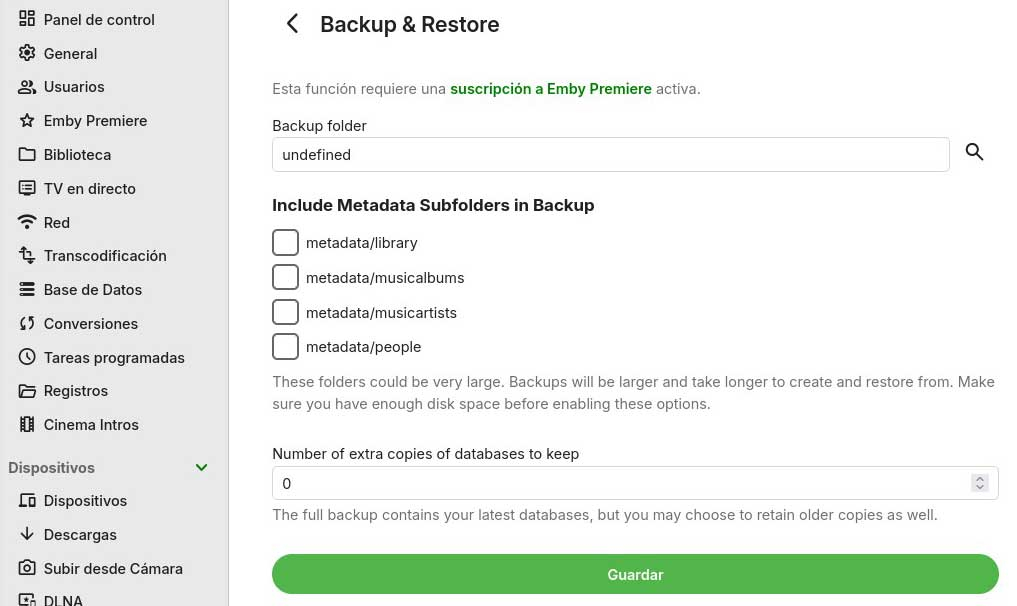
I already have the new version 4.9.1.90 and I see that these parts aren't translated. I don't know if it's just me or if they're not included in the release or whatever you're doing. I'm attaching a screenshot of more places within the server settings that also don't appear translated, even though everything else is supposed to be translated. I'll check a few more tomorrow.
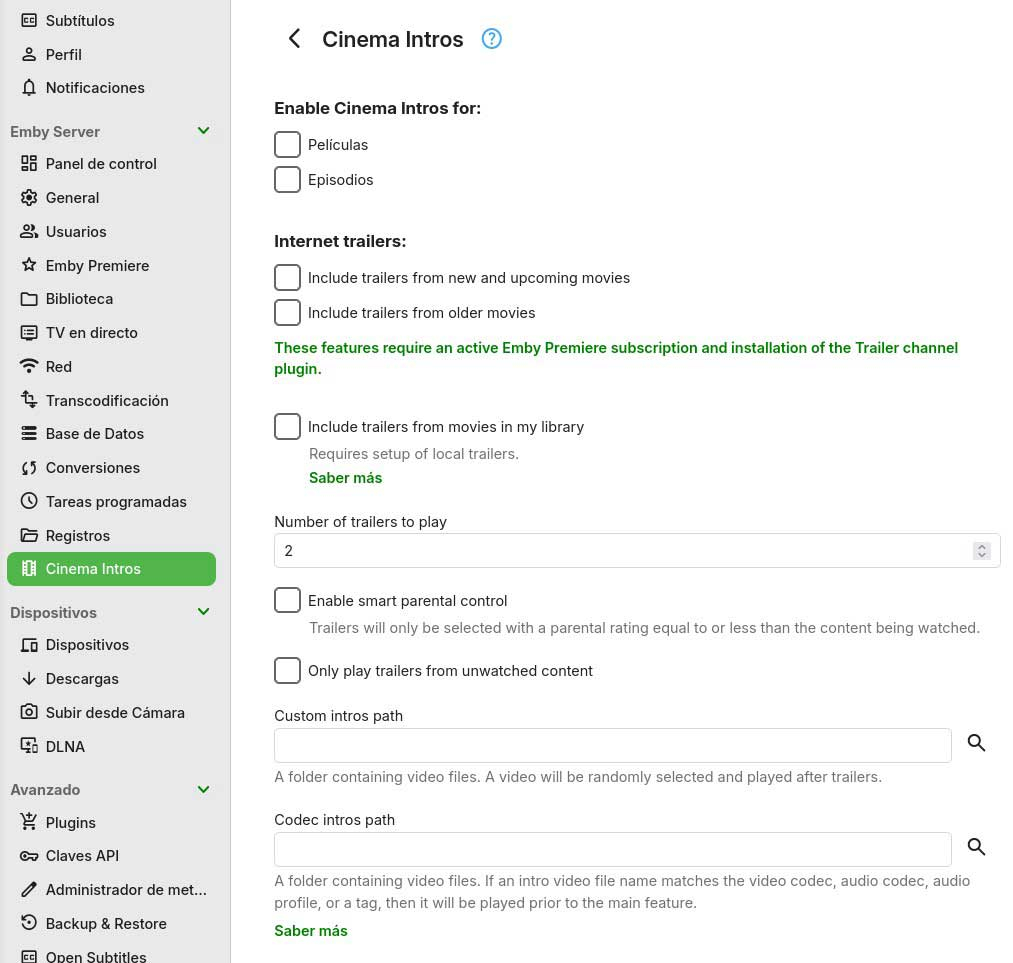
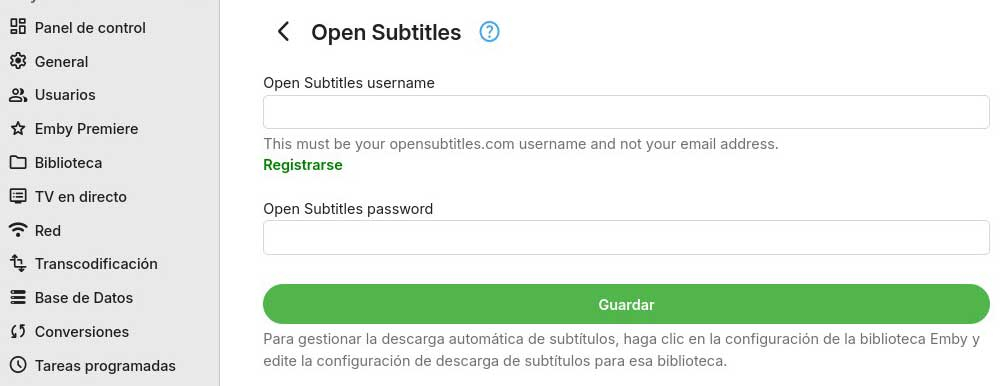
 1 point
 -
What I did was uninstall the server and reinstall it.1 point
-
Actually, it somehow seems to have fixed itself overnight. I don't know what I did to fix it, but I guess it's resolved.1 point
-
True, true.... When I get a chance I'll PM one of you with a download link to an archive & decryption key (for copyright reasons) from gdrive1 point
-
This is another ardent request to have Emby write the active queue to a persistent memory location, at least when playing music. Many devices close Emby and lose the active play queue when the user switches focus to a different app for too long, when the device runs out of dynamic memory, or when simply too much time has elapsed. There are many good feature requests in this forum that would enhance Emby, but fixing this issue would address an actual problem that many users currently face every time they queue up more music than is played in one continuous session. Can you please bump this up the queue (no pun intended) of Emby issues to address?1 point
-
ja es funktioniert danke1 point
-
Thanks much!!!1 point
-
@pigpog8Thanks for saying this is solved, and making me / my reply as the solution. But this will never end, there is always something to do to increase security. Right now we have only scratched the surface of it all. Take care and be safe1 point
-
I have attempted the installation (both DEB and Docker methods) on this specific OS, but I encountered various issues, including, but not limited to, hardware transcoding failure.1 point
-
Hi, is there anything else needed from my side? If not, could someone please take a look and respond? Thanks.1 point
-
From a library standpoint no you can't add a library to a Collection. You can only add individual/multi-select items to a collection. Currently there is no way to add a Collection to another Collection.1 point
-
Have you tried more than just playing 1 file ? There is only 1 file in your queue ! edit. If only 1 file in queue then how can you skip to next or previous?1 point
-
lol I know probably not the best. I actually am currently using a VPN (PIA) with wireguard to… obtain media to add to Emby. I’m using the split tunneling feature so that only my download program uses it, and everything else bypasses. Whenever I wasn’t using split tunneling, my server was not able to be access remotely even via Emby Connect. I’ll have to look into how to use it as a remote access client, I wasn’t aware that that was an option.1 point
-
For now, follow @jbirmingham40's recommendation for a temporary fix. It worked for me, I was able to download about 5-6 shows with 8 episodes each to a specific folder that VLC uses on my phone, currently watching through VLC. Then, when I get phone service again, I updated what I watched in Emby. Not the best solution, but works for me (especially since I'm also going on vacation soon).1 point
-
@pigpog8 I just read this in another topic. Where you said this. "Only myself and my wife have admin access" In this case you should create 2 new accounts, yours and wife's, and make then admin, and remove all admin rights for the old. That way you have admin rights at home ( Switching users ) and normal remote accounts. Normal accounts should also be used when watching media. Admin accounts should only be used as such, to admin.1 point
-
So make a a separate admin account (and as I read on the other posts you linked, don't name it admin lol), and remove admin access from my profile? And of course hide that account from everything, yes?1 point
-
TBH if that is in place you should be, ok. But If your user is also admin, then I would make a separat admin user, that only has access from your lan.1 point
-
Everything with a connection to the internet is at risk Its up to admins to see the risks and act accordantly. But to relay on Emby connect without a local password is a bad option. The internet is scanned every day for open routers / software / hardware. And if not secured will be under attack. Edit. And even if you feel secure today, you might not be tomorrow. I know this is sad, but the truth.1 point
-
Also look at this.1 point
-
Yep thats what I used to do too, after I found out that users without a password can just login directly without a password. Set them to an impossibly complicated password and disable password change. Regardless, maybe one of your users also has admin priviledges? Only admins should be able to create/update libraries.1 point
-
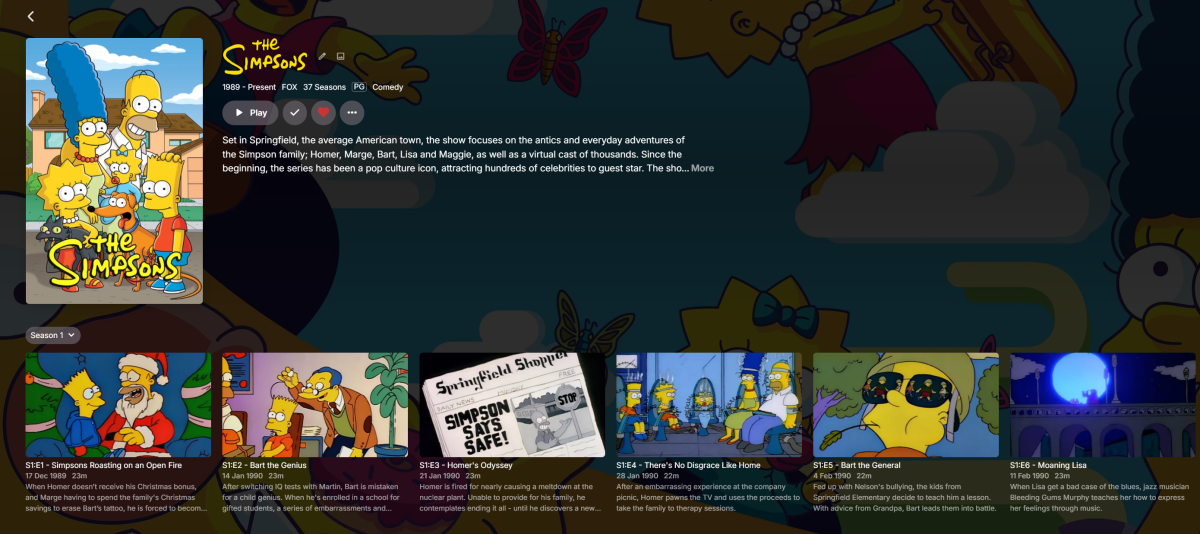
Thanks for this, the newer layout wasnt to my liking with the drop down menu
 1 point
 -
It is working now. Made a change last night and it's was too late to remember what I did. LOL! Thank you for your assistance as always.1 point
-
Thank you, that did the trick!1 point
-
Now for the embarrassing part - I'm always falling asleep watching something - then have a complete mind blank what i was watching the next day until the next episode is out and i realise im missing something. Would it be possible to add a 'recently watched' section where you can see all items you've recently viewed in order? Probably more applicable to TV I guess,1 point
-
Waking up the dead and adding +1 for a dedicated Recently Watched section. The main reason is per-user history as each user should be able to quickly reference what they were watching last without needing to dig through the libraries. As OP stated, It’s extremely useful when you stop a show, fall asleep during something, or simply forget the title you had on. While sorting by “date played” technically works, it’s a clunky workaround, especially on TV clients where navigation is slower and sorting options aren’t always obvious or convenient. A simple, native “Recently Watched” row or tab would make the experience much smoother and far more intuitive for everyday use. This feels like a small UI addition that could provide a big quality of life improvement for anyone with multiple users and/or multiple large libraries.1 point
-
I was referring to Plex. The poster mentioned the video played fine there, but the app doesn’t use AVPlayer unless you enable it. By default, it uses MPV unless you switch to the old video player. There is no auto setting like Emby.1 point
-
Thank you!! Works Great!!!1 point
-
HI, there is no reason to increase it when converting. I would suggest matching to preserve data.1 point
-
Hi, yes it will say QuickSync for all intel graphics.1 point
-
Hi, if you are asking about a plugin then I would suggest posting in the dedicated topic for the plugin to ensure that the developer will see it. Thanks.1 point
-
The client does You will have to wait on this FR. But could lend your support and like the request.1 point
-
I have tried a few different things as well, similar to what you have done, and I have gotten the same results as well. I've also tried putting 1 movie, scan library, then add 2nd movie, scan library then add 3rd movie and scan. The order presented would be 2nd Movie, 1st Movie, then 3rd Movie I have also tried giving each movie type it's own folder with the same graphic files for each and let Emby present 3 separate movies with the same name, then I would rename each movie as Movie - 4K Hybrid, Movie - 4K SDR and Movie - 1080, then I would do a manual "grouping" of the 3 movies, but there doesn't seem to be a reason for how it groups and displays. Drive\Movie - 4K Hybrid\Movie - 4K Hybrid.mkv Drive\Movie - 4K SDR\Movie - 4K SDR.mkv Drive\Movie - 4K 1080\Movie - 1080.mkv The other interesting thing I've noticed, is while watching the movie, it displays Movie - 4K SDR, but I'm watching the 4K Hybrid or 1080 version. Interesting for sure and I'm not sure what this really points to. It seems to be some sort of logic within the system that seems to dictate the order movies are presented either auto grouped or manual I just work within the current logic and just watch the movie I want in whatever order it presents to me. I'm glad this helped you out.1 point
-
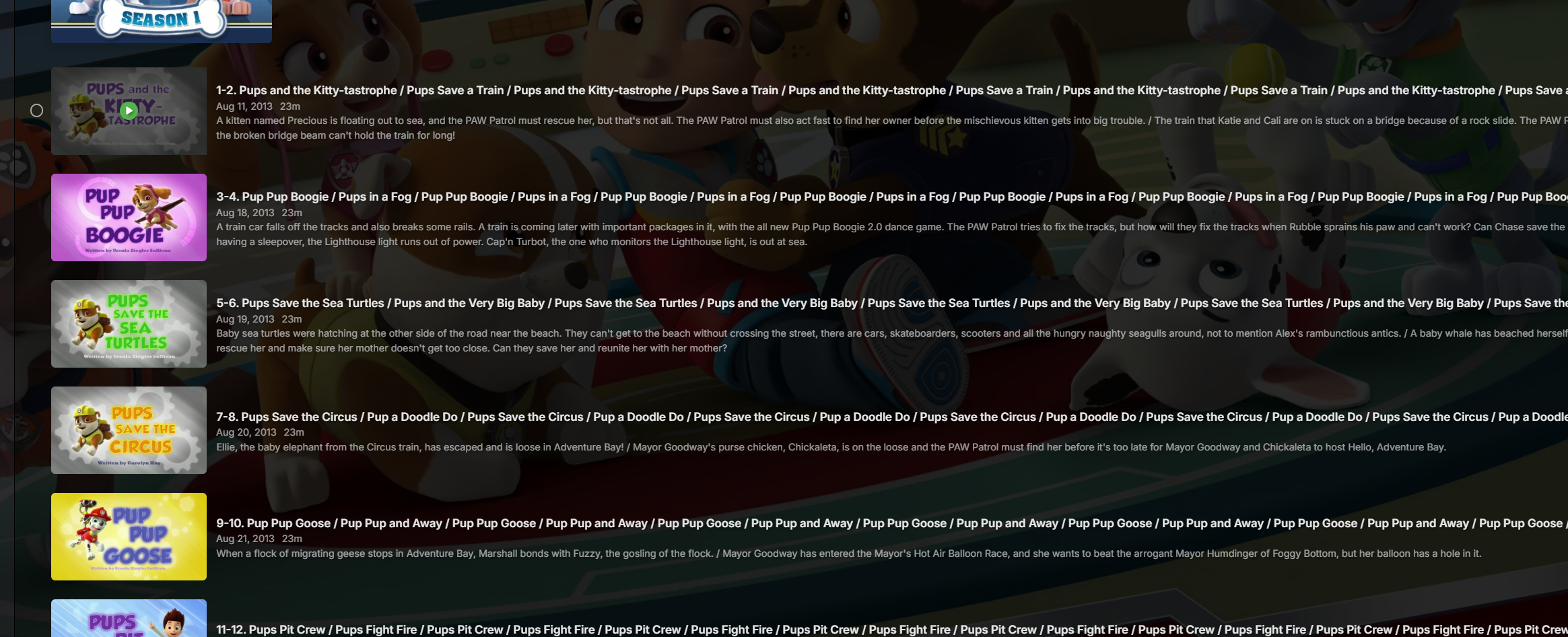
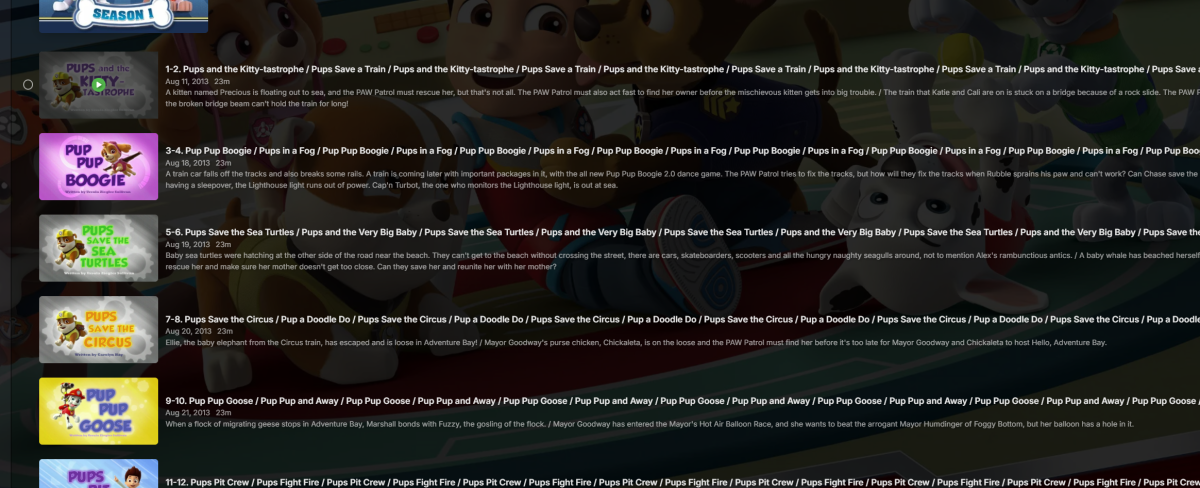
So, I'm actually getting the episode info from themoviedb first.... and I did find something interesting opening paw patrol in emby... I guess this could be the TheMovieDB's API issue and not TVDB? I remember having issues getting the order for one show so I think that's how I got the US order. Also I'll list my meta data options for TV Shows if that helps Series Metadata Downloaders TVDB - Movie DB - Open Movie DB Season Metadata Downloaders only TheMovieDb Episode Metadata Downloaders TheMovieDB - The TVDB - Open Movie DB
 1 point
 -
even better, solving now problems on my own: i create a new user account, taking as reference my own profile. With this new user i could delete the playlists. Then i switched back to my original account, the playlists are gone. I created then another one to test, and i am also able to delete it. Some thing maybe as gone wrong at last upgrade, anyway, problem solved. thanks!1 point
-
Yeah for now ill give Ugos a try, i hope for a native Emby package in the near future. Thanks @Blueskies2781 point
-
Okay, thank you! Changing the db cache size appears to have resolved the issue with Emby not working locally. Still couldn't connect remotely, though. Then installing the latest build seems to have resolved the issue with remote connections. I'll try to using ssl next.1 point
-
Can you add a feature to make a specific version as default option?1 point
-
Channels DVR is experimenting with Multiview1 point
-
But what about when they are the same and one is "Extended Version", "Directors Cut", "Theatrical Version", etc?1 point