Leaderboard




Popular Content
Showing content with the highest reputation on 11/14/25 in Posts
-
Whilst the Android app - and the web client have the ability to make a change via User / App Settings / Display / Auto open single items in folder view - the Android TV client does not. Another step in its degradation - but not the point I am making here. After making that 'open single items in folder view' change in the web client or Android app - you can indeed click through to the movie in its folder. But the movie at top level view in a folder - not all movies show PLAYED. Using the Play State filter for Played / Unplayed - does not work - as that top folder is a virtual image - it does not reflect reality. Metadata folders vs actual folders. So new movies added to folders within Movies Library under sub folders (genre etc) who - for us - for YEARS - have happily had this work perfectly - now have a folder with a bunch of movies added - that no longer show played / unplayed correctly. Try to mark a movie as PLAYED does not end up with the green tick. But some do have the green tick - these were movies which were added prior to 4.9.1.80. But that is not consistent. Many do not show PLAYED when they have been. Not only is my folder setup no longer as per previous server version - there is no consistency in working out what has happened to my (many thousands) movie library via 4.9.1.803 points
-
Having some form of Nested Collections would be great! I'd be quite happy with just two levels (e.g. Master Collection and Sub Collection). This would probably be enough to do 95% of the collection groupings I would like. I could then reduce 600+ current collections to about a dozen master ones and ideally see the sub collections within these. Showing/hiding the sub collections in certain views would also be great, but if this is a large technical hurdle to overcome, then at least having the nesting ability in some form or another would probably be better than nothing at all (e.g. show master collections, followed by sub collections). Play/shuffle from the sub collections, and not the master collections, would also be fine for me (though I get that this may not work for everyone). Would only 2 nested levels make the technical implementation any easier? How many levels does everyone who wants nested collections practically need? How many levels would suffice for the majority, as opposed to waiting a lifetime? Once the new smart features (views/collections/playlists/whatever) are available then I think my collections/playlists will increase greatly, so perhaps Nested Collections (in whatever guise Emby can easily implement) will be a good next step...3 points
-
That's what we were gunning for - excellent. Enjoy. Edit: @Lukewhy was item so aggressively downscaled for - not only LAN playback - but literally on localhost? Why did Auto come into play at all in this scenario?2 points
-
The video plays now if I set the streaming resolution to 4K instead of Auto as it used to be. It is not affected by the number of subtitles but I will remove the majority of them either way. Thank you @GrimReaper, @Lukeand @Neminem for your help!2 points
-
Well done. Now it's no more about audio - you have quality/bandwidth restriction in force: Increase in-app quality (OSD cog menu).2 points
-
Isn't it the first one?2 points
-
@LukeJust for your reference, now that the default search queries are fast enough, you should be able to add this functionality properly with these 2 SQLite features: https://www.sqlite.org/fts5.html#porter_tokenizer https://www.sqlite.org/spellfix1.html#configurable_edit_distance Should be relatively straightforward additions whenever you get around to it.2 points
-
You've grown up with watching live tv but on television only runs garbage? You have a big library but don't know what to watch next? Then this for you: "VirtualTV" - my new live tv plugin that allows you to create custom channels based on conditions of your Emby library content. What's missing: Maybe codec conditions Known problems: Needs Emby Premier to work (Playback) Emby's live tv and playback api is very limited, so i've had to make some detours to get things working. The plugin has two general playback modes: "continous" and "playlist" playback. With "continous" mode you can also choose between "live", which bahaves like real live tv or "archive", which plays the videos from the start. In "Continuous" mode multiple videos are queued and concatenated to one big file with the help of ffmpeg. To make this happen every video in the queue has to have some common features (video and audio codec). That's why it often happens that the video also has to be transcoded by ffmpeg. For transcoding the plugin relies on Emby's internal transcoding engine. If there's a problem, not uncommon with hardware acceleration enabled, the plugin also has a problem. Nothing i can do about it. The availability of subtitle tracks is mostly dependant of the Emby user playback settings. In continous playback mode only one (the default) subtitle track can be used and this one has to be burnded into the video (transcoding takes place). In "Playlist" playback mode the videos are pushed as a playlist to the Emby clients. It's like you would play your videos directly from your libraries. This way you get all the features you are used to. Audio and subtitle selection, pause, skipping around and similar things. "Native" playback method was created by the Emby Devs. Similar to Playlist playback it will play the real library videos, but with the big difference that playback is purely initiated by the client app, without any remote command execution. This is why it also works for Roku devices on a WAN network. And although the real videos are played, the whole thing is treated like live TV. This means that channel zapping is possible and no dialogs for playing the next episode are displayed. Unfortunately, the new playback method does not yet support all features. As the name "Archive" suggests, it will currently always start all videos from the beginning. In addition, only very few Emby apps automatically advance to the next video. If you want it to be improved even further, each of you should raise your voice in this thread. To get things started install the plugin via Emby's plugin catalog and restart Emby. Setup your channels with a name and number and choose your playback mode. In the channel conditions you'll have to select an Emby account. This account is used to get library access, respect parental rating, reading watched states and selecting the stream language. At least one textual input field of the conditions has to be filled to get some program data. Fields with an asterisk are either evaluated with an "AND" or "OR" condition among each other. Finally, if you've chosen "Continous Playback" for one of you channels, take a look at the transcoding settings. Save your channel line up and manually trigger a "Guide Refresh". Now have fun! Version History: After a plugin update, always clear your browser cache. If your settings still don't load in the config screen, you have to move the "VirtualTV.xml" out of ...\plugins\configurations and restart Emby. Start from scratch. 2.0.0.0 Unlimited number of channels; New playback method "Native (Archive)"; New security concept for the Export API 2.0.2.0 Performance improvements to Guide Refresh; Preview for Add/Edit Channels; Option to disable Program indicators 2.0.3.0 Fixed missing Playlist sort order for some Content Types; Added support for Seasons with Content Source Collections 2.1.0.0 Selectively enable channels for specific users; Create copies of existing channels; Ordered unwatched episode playback 2.1.5.0 Added option to (auto)enable channels on a specific date range; Bug fixing1 point
-
ability to be able to add a collection into another collection. ie: Spiderman Collection into a SuperHero Collection. like i could with mediabrowser with shortcuts. TIA1 point
-
Hello, I really enjoyed this app and upgraded to premium very quickly. First of all, I want to congratulate you on the design and features. I have a question: I manage my Emby automatically using radar and sonar. Would it be possible to add a notification service to Emby Watch so that I can be notified when a file downloads automatically?1 point
-
You may also want to do a factory reset on your router; he may have hacked that, too.1 point
-
This part on the Roku was never finished. The web app did not allow sorting the playlists at that time and we were told to wait. The sort button is just a stub presently. We must've forgotten to hide those stubbed buttons until they had code that reacted with them. The group button also shows up and should only show up with collections. I can add this to our tracker to finish the sort for playlists. Reference: Issue #1746: [DetailsListView] Finish adding sort ability to playlists (sort button is already showing up but does nothing) You should be able to play from any spot in the playlist by just moving the focus down to the item you wish to start with and pressing OK. Then choose play all from here. Or just press the Play button on the item and it should assume play all from here. Are you trying to play these from the grid or the details view? Can you show a screenshot so we know which screen you are doing this from? Thanks.1 point
-
No that’s the transcoding fallback.1 point
-
Would need some specific examples but yes TVDB and even TMDB have changed media id when they get removed from their database and readded. So this is really not anything specific to TMM. As I have seen it with Emby and MediaCenterMaster metadata as it is a Providerid change that we just have to live with.1 point
-
Hi. Most end users would have no idea what "transcode" means... and, thus, not know what the difference is between those options.1 point
-
Ohh I see @GrimReaperalready asked about this.1 point
-
Suggested already, although for DirectPlay it shouldn't matter - that's what we're after. is choking your machine:1 point
-
And the media file has 44 streams, 41-42 subtitle streams. I would make a copy of file and remove all subs not needed, using MKVToolNix. Then try with that.1 point
-
No need to apologize, I thank you for your help. No luck with v.128 either:
 1 point
 -
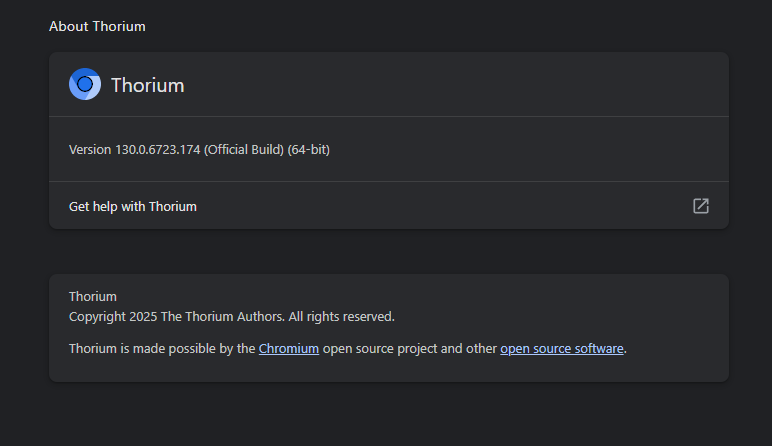
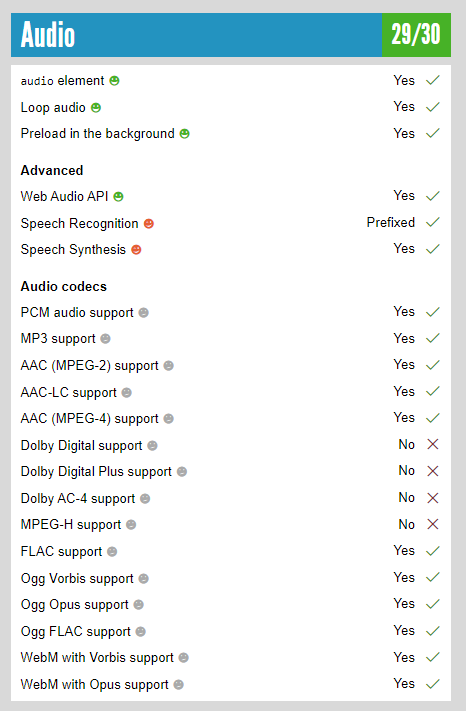
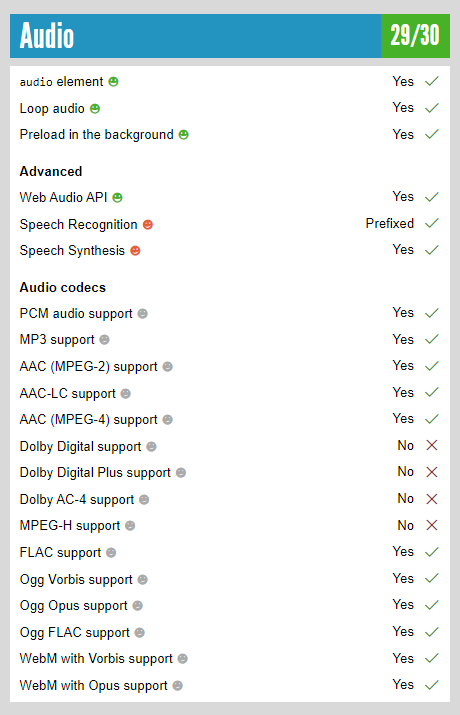
Audio results with Thorium_AVX2_130.0.6723.174 Thorium Settings/About version: HTML5 test site audio results:
 1 point
 -
It doesn't have the same name as the folder.1 point
-
These are the audio results for Thorium:
 1 point
 -
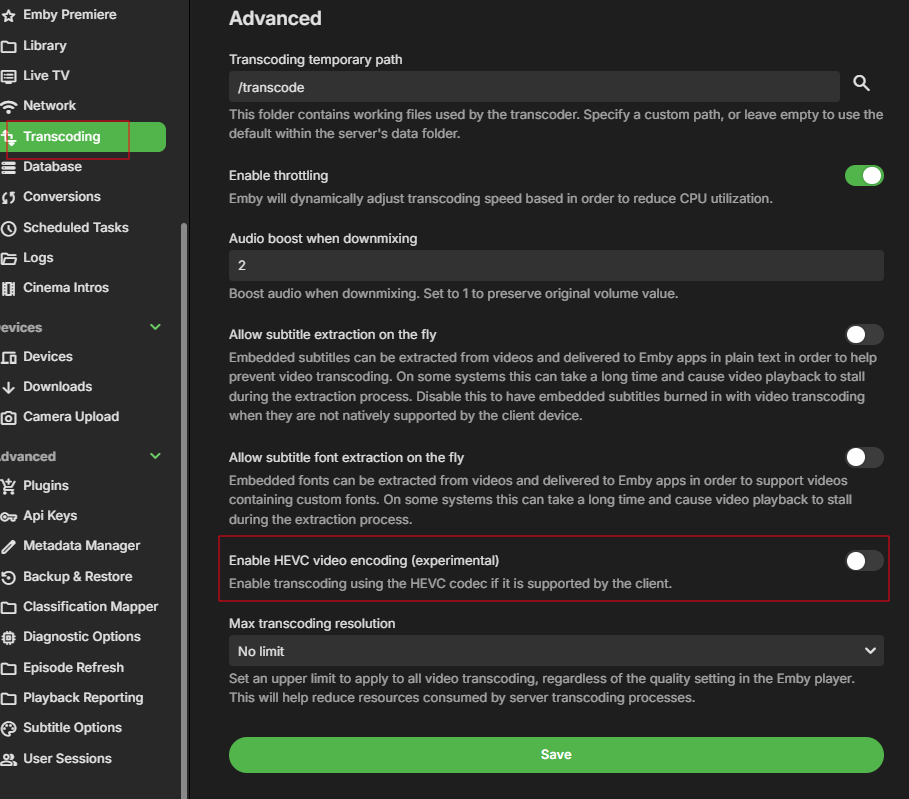
@NIIcKare you using the new experimental HEVC encoding. Stream #0:0 -> #0:0 (hevc (hevc_qsv) -> hevc (hevc_qsv)) Try without. Its still experimental.
 1 point
 -
THANK YOU ALL! Got it! I've done this MANY times... for some reason downloader (a browser on the shield) was taking me to the wrong place-- or maybe I was doing something differently. In any even I am up to date. THANK YOU AGAIN!1 point
-
1 point
-
Well HEVC is new and Experimental. Guess devs will need to answer
 1 point
 -
Can you share more details? was emby admin hacked? or another non admin user? while i agree 2fa would be nice... what happened in your situation? there are many ways of getting hacked... and its not always embys fault.1 point
-
This file doesn't play with emby at all. 1. It doesn't DirectPlay. 2. When trying to transcode I get the error "Wiedergabefehler. Derzeit sind keine kompatiblen Streams verfügbar. Bitte später erneut versuchen oder den Systemadministrator für weitere Informationen kontaktieren." 3. But this file plays via USB stick 4. And this file plays when I play it via DLNA. There are more files that have this behavior with Emby. But all of these files play with Jellyfin. Just DirectPlay. No need of transcoding.1 point
-
Right now converting media has 2 options, replace original file or move new file next to original. Both of those options assume emby has RW acccess to your media folder. I don't have RW access and I do not want to grant that either. So, I suggest custom path possibility.1 point
-
Also have you updated to Emby Server 4.9.1.90? has that helped?1 point
-
You're trying to play an item with unsupported audio (E-AC3): which causes transcoding: and I'd guess that excessive number of subs (40+): is choking your machine: Try playback in this browser (which is the only one I'm aware of that'd play E-AC3 natively) so you'd possibly get DirectPlay or get rid of all of those unnecessarily subtitles, see how does that compare. FYI: MS Edge natively supports AC3 but not E-AC3, Chrome doesn't support either. You can always check what does your browser support here (check under Video/Audio/Streaming sections).1 point
-
Hi Luke: I will I have some recordings scheduled for tommorow. Waiting to see how it goes. Thanks1 point
-
I had to remove one of the devices. Five devices are allowed and I had 6. I thought I had 5.1 point
-
Yes the delete dialog did appear and I confirmed the deletion. But... from a user point of view, when you are deleting a few songs and albums, after a while you tend not to read the deletion dialogs and I accept there may have been a chance I could of deleted a wrong album. But I would never have thought there would be a chance to delete my entire music collection. I just dont think EMBY should have the ability to delete your entire music collection. Just one click of the button and its all gone. Can I request you add a piece of code that checks for this: ---------------------------- If "the deletion folder" = "Library folder" display message "unable to delete this file" otherwise Delete folder ----------------------------- In my case the code would look like this and would follow the green highted code and therefore safeguard my entire music collection If "/Shared Musc/Music" = "/Shared Musc/Music" Display message "unable to delete this file" end of process otherwise Delete folder ----------------------------- Hope this all makes sense FYI - I'm thrilled to be able to use EMBY, its the best Media server out there by far, beautiful screens and a powerful server. I truely appreciate all the teams hard work that goes into it.1 point
-
In your transcoding settings, have you enable "Allow subtitle extraction on the fly"? If you have, try without. Paul1 point
-
OK we are looking into it. Thanks.1 point
-
I prefer Casa OS is "Docker for Dummies", like me! Point and click I looked at Zima OS and that is overkill for me.1 point
-
Thanks for your suggestion. I have added this in the "Troubleshooting Internal Connections" section within the Connecting from Client Apps support document.1 point
-
CasaOs inside Zorin 18. Your setup gave me a headache reading it. I'm very basic. The Beelink Me Mini came with Win11 home on the 65GB built in drive. I wiped it and tried TrueNas, hated it, and it also gave me a headache, then I found Casa Os and Zorin 18. This is just for Emby. I SMB stuff over the network off of my DS216play to the Me Mini when I need it. The three 4TB hard drives and the Me Mini are still under the costs of a bare bones NAS. I also don't need a raid. Stuff is manually backed up to a 24TB external Seagate. If I happen to leave some files I know where to go get them again. I want easy.1 point
-
Any word from the devs if this is going to be dealt with. Do we need to start a "Feature request" post for a legacy folder view so Emby can be usable again? We need to know, please1 point
-
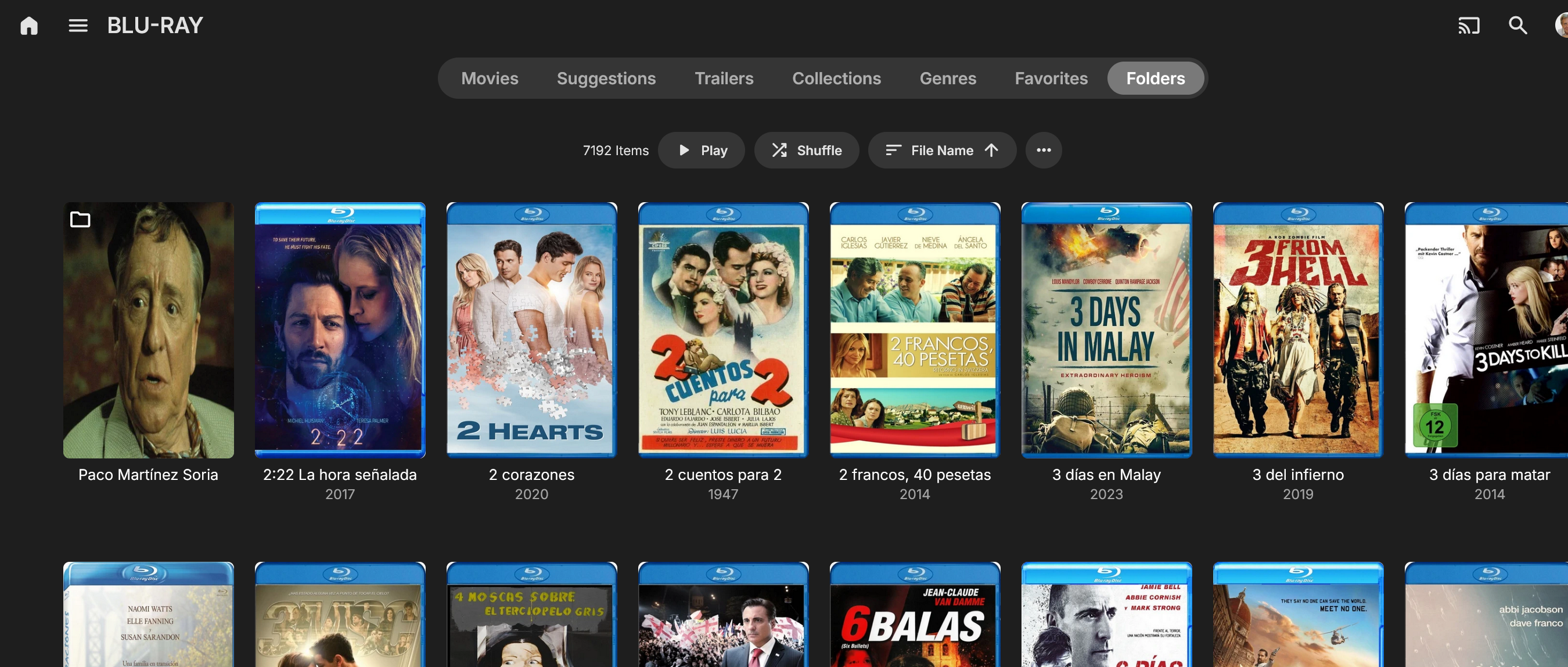
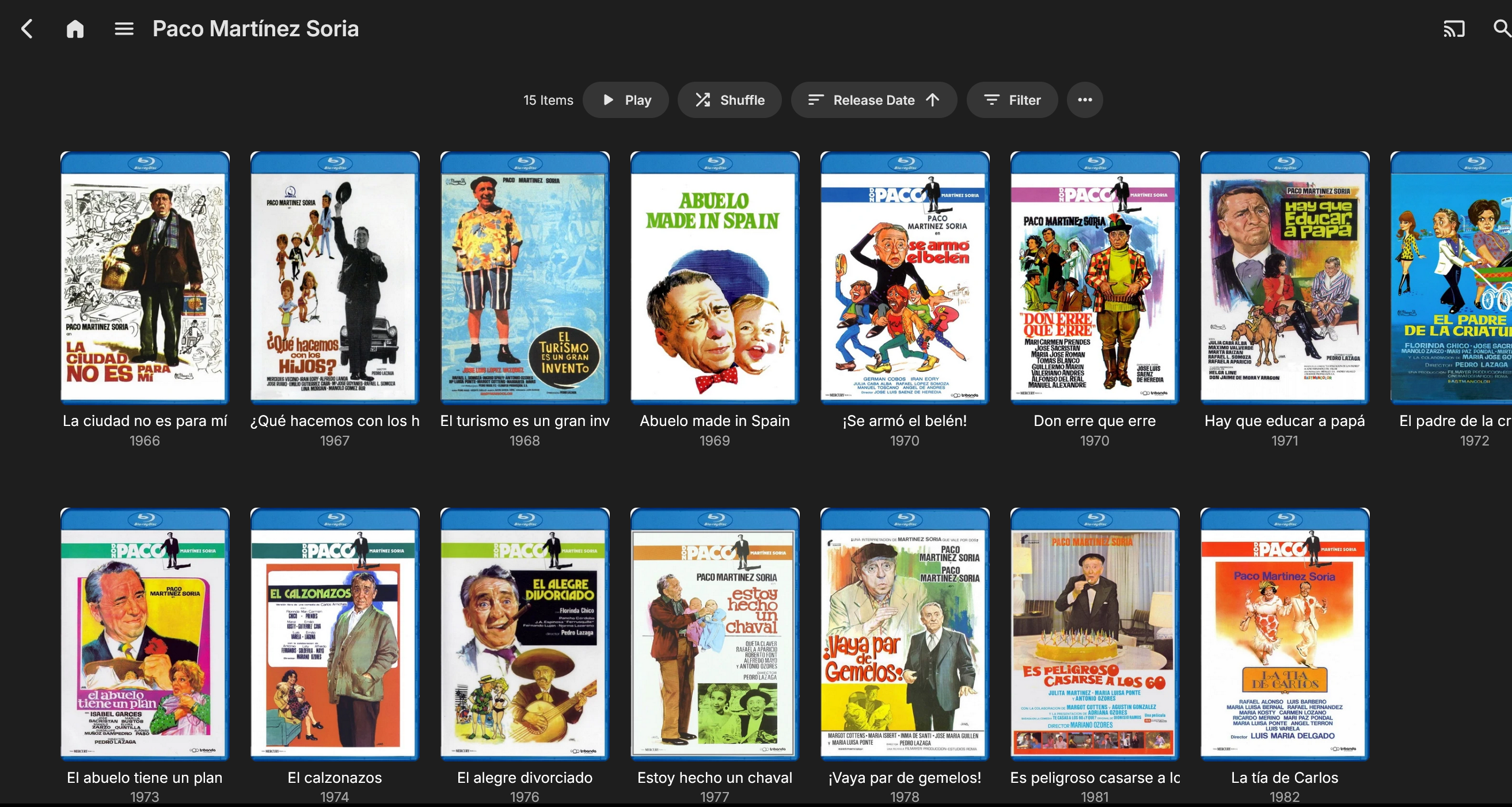
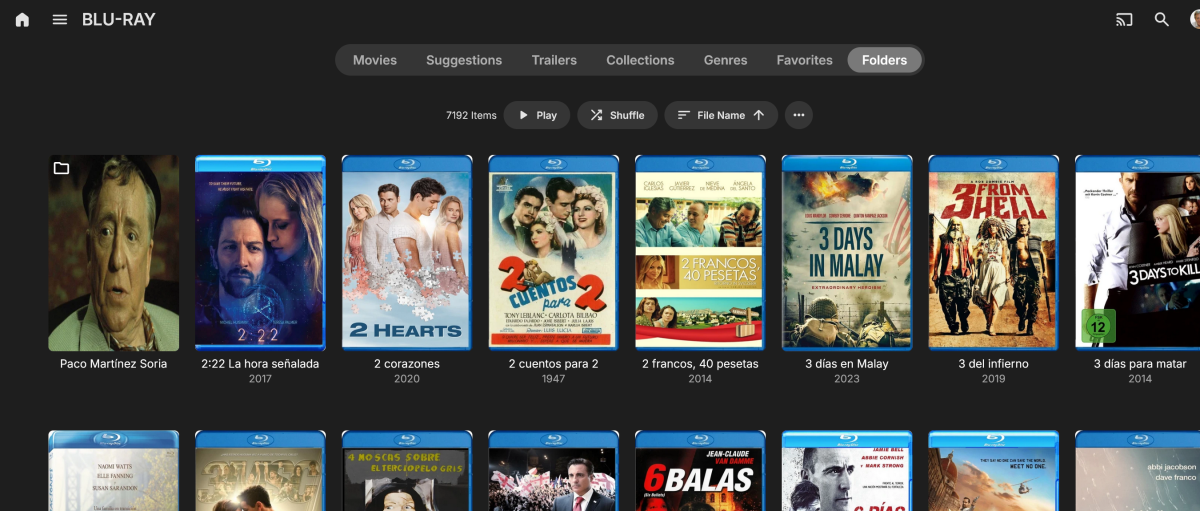
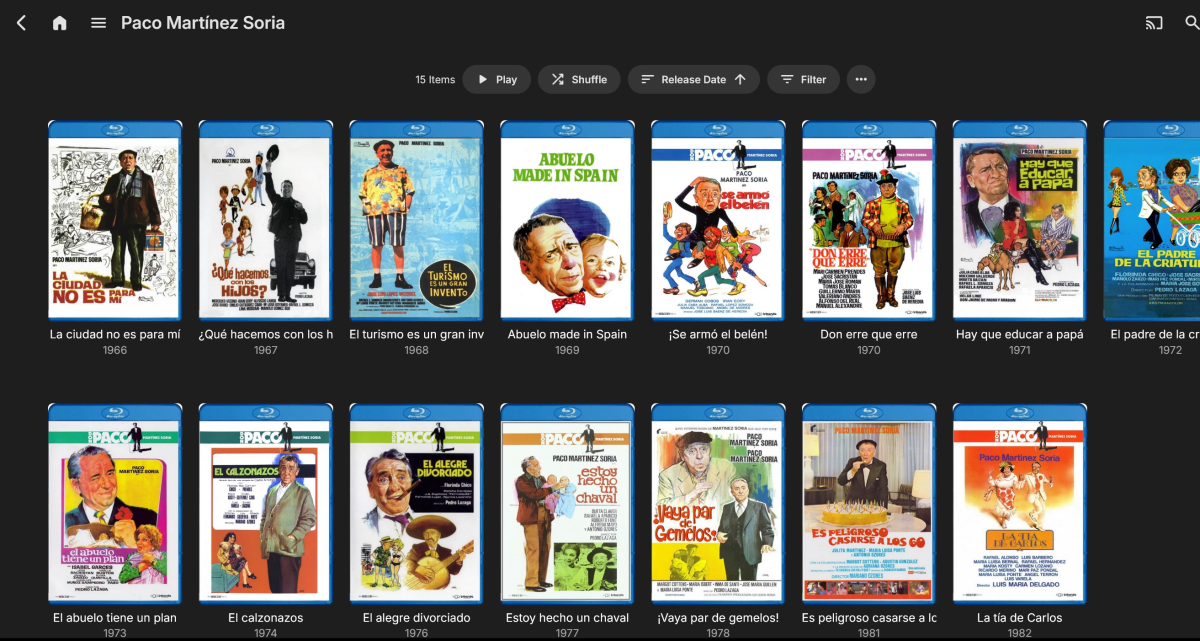
This might help explain the folder issue with version 4.9.1.80. With version 4.8.11.0, you could create a directory containing all the films of a particular actor, director, or genre, and within that directory, you could find the films related to that actor, as in the example I'm giving. In this case, the actor is Paco Martínez Soria, (first image) whose film automatically appears sorted at the top as a folder, while the other films as single movies. When I click on the Paco Martínez Soria folder, (second image) it displays all his movies, and I can choose which one I want to watch. With server version 4.9.1.80, this behavior is different and not possible. I've included a couple of images to help illustrate my point.
 1 point
 -
Haven't revisited this in some time, related discussion in another topic made me remember. Any movement on this, @Luke? If this: is the only concern, I reckon there's an easy compromise that I'm sure (mostly) everyone would agree on: make the ability to play/shuffle available only in the lowest/deepest collection, i.e. if no sub-collection - retain current behavior; if sub-collection present - hide play/shuffle on parent collection; ditto for sub-collection within sub-collection, however many layers you want to implement. There's no need to add/consider additional logic or necessity for further complexity, the only criteria should be: nested collection present yes/no? Play/shuffle available no/yes. And ultimately only collection containing items would be playable, just as it currently is. My 2c1 point
-
As the main slogan on Emby's official page states, manage your media, your way. Emby aims to be a media management platform that maximizes user freedom. I'm unsure if the “Tags tab” you mentioned was a typo, so I'll directly list the disadvantages of the Tags tab and Genre tab compared to the Folders tab. The Tags tab requires manually opening each movie to edit custom tags, while the Folder tab only needs placing movies into predefined folders—a difference in efficiency by orders of magnitude. Logically, the Genre tab is merely a system-automated category, not a user-customizable one, whereas the Folder tab fulfills user needs. The Genre tab has the following issues: 1. High organizational difficulty: When customizing film categories, you must manually inspect and annotate each movie individually to place it in the desired category. In contrast, the folder tab allows you to simply drag and drop movies into predefined category folders. 2. Some genres are irrelevant to users' interests. Take “TV Movie” as an example—frankly, most of my friends don't care about this category, and many major video platforms don't even list it. Yet it automatically appears in the Genre tab, cluttering the filtering process with redundant, useless categories. 3. The Genre tab relies on MediaInfo, while the Folder tab offers high flexibility and powerful organization capabilities. For instance, if I want to create a custom collection of a director's or actor's classics, or a collection with specific characteristics—like Snow White-themed movies spanning decades—TMDB can't provide such collections. However, custom folders can effortlessly group these logically coherent human-curated collections. ... P.S. Today's work has been quite busy, so I may have overlooked some points. If possible, I'll supplement these in a follow-up reply.
 1 point
 -
Sorry Luke, just to clarify, at some point are you planning on the possibility that version 4.9 will behave like 4.8 in regards to the problem some of us have with the folders issue, or those of us who need folders to work as usual, or will we have to stay on version 4.8?1 point
-
Update: I finally went back to the previous version 4.8.11.0, which is worth it because, aside from the folder issue, I also notice that the folder view isn't organized properly by year or release.1 point
-
I think for now, for those of us who value this type of folders organization we've used for years, it's best to restore a full backup (whoever has it) from a few days ago with the previous version of Emby Server and all its metadata, and disable the automatic update option. I've tried to get used to it but I miss the previous folder organization. The question is whether it's worth it to no longer have support for the previous version.1 point
-
Hi, are you still interested for this feature in for future updates? But this time for real. You've been telling us that for a 5 years straight. Can you at least give us ETA?1 point
-
Guess folder view was used in a way it shouldn't have been designed for. But guess everyone will have to wait for Lukes collapsed combine Movie/Show tab. As no matter how you look at it with the previous collapse switches being deprecated it will be more of a real folder view going forward.0 points
-
While I can see the potential value of this in certain situations, in the context of all media and all Emby users, those situations would be extremely rare - which makes designing a display for this very tricky. We can't reserve valuable screen real estate for something that is almost never there...0 points