Leaderboard




Popular Content
Showing content with the highest reputation on 11/11/25 in Posts
-
Hi, Thanks for the suggestions . I have started to impliment some of them before the posts above.from the initial feedbacks, and I will add as many as I can. Just be aware though that I really don't have much time at all, so it will happen when I can allocate time to it. Thanks.3 points
-
It's a great idea for the future. thanks !3 points
-
I confirm that updating to the latest version solved the issue. And yes, I had to sideload it Thank you all!2 points
-
Working on it, should be ready soon(ish).2 points
-
Yes, thank you. I had installed Pi Hole recently and it blocked the address mb3admin.com. My fault, sorry to bother you on a Saturday. I use Emby for all my TV, Movie and You Tube viewing. Its outstanding. I have Plex too but its annoying after they added all that streaming stuff. I'm looking forward to you next major release.2 points
-
FYI I have re-written the Corrupt Database article and now include Windows commands and mention also other platforms.2 points
-
Hah. I didn't know there are multiple apps as Play Store presented me with just one when I searched. After searching for "Emby" and "Emby for Android TV", I found there are two apps. I had "Emby for Android TV" installed which was the only app presented to me when I first installed it. It had broken thumbnails. But, when I installed "Emby" app, its look and feel are is more consistent with other platforms I have been using it on. Also, it has the THUMBNAILS!!! Thank you so much for the help!!2 points
-
Which is what I had said above already: But I'm glad to hear that it's resolved for you!2 points
-
What devices are available in the drop down? If the HDMI is there you can select it and that should enable the options to appear.2 points
-
2.1.28 is still in beta, try the link below for the apk https://emby.media/community/index.php?/topic/42240-emby-android-tv-release-notes-beta/1 point
-
On your Shield you will have to sideload 2.1.28g for now (until Google updates the store) or use the Emby for Android app 3.5.16.1 point
-
You're running fairly old version of the app. There was a fix for YT trailers in 2.2.7 Check the store for an update, but I suspect you may have to sideload it by using the instructions in the pinned posts because of the age of your TV. 2.2.7 (10/31/2025) Fixes for YouTube playback1 point
-
Then please improve it for everyones sake. If SMTP failing for whatever reason is a concern, you can always have it use the current system simultaneously: notify the user that they should contact their server administrator if they have not received a password reset email. For administrators resetting their passwords, send reset instructions via email while also writing them to the usual file on the server, in case that email isn't received, then notify the user they can find instructions in either place.1 point
-
Have you tried to remove the powerplug for 10 minutes and plug it in again?1 point
-
ah so you did i apologise for missing that part, thanks again for your help1 point
-
Well, we are talking about having the option to use SMTP as a reset, not make it mandatory and discontinued the other option. But your second statement make it even worst. Password reset is critical VS LDAP so have come LDAP be seen as something that need to be developed and supported but not this? If only emby was still open source, the community would have code that feature years already. It's not something we can do via plugins only.1 point
-
@LessajIs spot on i need to select a device to get the passthrough options, now its working fine and my receiver is displaying the correct surround formats . Having it set at default sound device means this setting is hidden.1 point
-
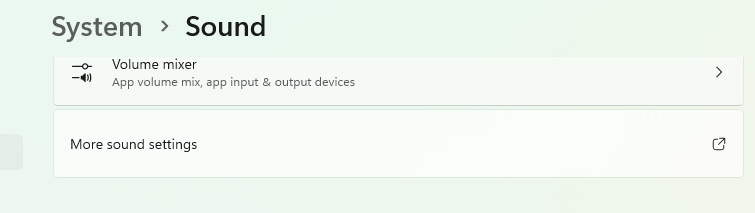
What do you mean by "not there"? What does the list show when opening? Also, at Windows settings, what do you see when you clilck on "More sound settings" in the playback list that you will see then? When you rtight-click your hdmi output there, do you see a "Configure Speakers" item? Also, double-click and show the 1s and 2nd tab pages.
 1 point
 -
I appreciate your honest assessment. But I also still want it fixed and supported going forward, so I am posting yet again. Until then, I'm also planning to revert back to 4.8 and stay there indefinitely. As I am unwilling to blow up my folder structure, the only workaround I have for my use case would be the long-awaited nested collection upgrade, along with a couple of new enhancements to customize precisely what titles and collections are allowed to appear on any given navigation tab (i.e. to control the designation of "Movies" vs "TV" vs anything else I want to enumerate within a library). However, even if all of those enhancements were implemented, it is painful to consider how much time it would take me to create a collection for every folder in my library, just to get them to group together and display the way they used to. And having to create so many collections simply to replace folders would honestly make the "Collections" tab worthless to me, also, without having more customization options there, too. Just to reiterate two points I have made previously: this issue is significant enough that I, along with a handful of other users, literally created forum accounts to report what we thought was a bug. Assuming that not everyone in this slightly more "old-school" cohort is not an early adopter, there will be more users stacking up over time who are unhappy with this change. Certainly the fact that none of us are beta testers would suggest that you're going to have more people upgrading late than early. this issue is relatively easy to fix, in that the only thing that needs to revert is a flag in the metadata settings. The 4.9 UI still works the way I want it to with a 4.8 database. So literally nothing has changed in terms of the UI coding--all that needs to be changed is within the metadata engine. It's not necessarily simple to deploy to the wild--there are going to be ramifications and some form of database rebuilding for certain users depending on whether they upgraded to 4.9 and clobbered the database, and so on. But providing a fix sooner rather than later could potentially help mitigate that impact and also give all of us a path forward. And there are lots of ways in which this could be fixed. A per-library toggle would be sufficient, with the risk that users might not understand it and could whack things from time to time (and it would slightly complicate release testing by adding yet another configuration option to verify). Less drastic would be to simply restore "Folder View" and instead create a separate "Filesystem View" for whatever users Luke was trying to accommodate with this change--he could even implement the new "folder" icons he had mentioned in a previous post. And then literally everyone would have the view that they want.1 point
-
Ok, thanks for answer!1 point
-
Hi, passthrough support has not been removed. Can you please show us a specific example ? How to Report a Problem Thanks.1 point
-
Hi i bought membership long time ago. Is this feature planned or alresdy being worked on to be integrated in emby server? Please let us know! Eta?? Thank you1 point
-
Those api endpoints relate to an unannounced feature so I wouldn't try to use them yet.1 point
-
Hi, we are rebooting our music brainz server. Please try again shortly. Thanks.1 point
-
Just an FYI. After doing some additional testing, I think I've found the issue. After changing the setting: Emby Server>Library>Documentaries>"Merge the contents of the top level folders when using folder view" and switch it "ON" the problem went away. I did need to run the "repair libraries" on E4K for the fix to work. Have a nice vacation.1 point
-
Technically, that's more a decode than a transcode, because PCM is "uncompressed". Note that you may need to set up the HDMI output for multi-channel and explicity select this output in the Emby app. Also try selectinng 5.1 there explicitly and enabled "exclusive audio" device access. If it stil doesn't work, please post the mpv log from an example playback where it doesn't work (Settings >> About >> Logs).1 point
-
Ok, tried with a personal Star Wars homemade film , so I can clearly see the difference. On the same TV : Emby for Android TV and Infuse on Apple TV = dark is perfectly Dark. Emby for Apple TV with MPV not totally dark as the two others. Hope it will be fixed to enjoy using the Emby for Apple TV app, although is not as good as the Android TV (missing subtitles options feature)1 point
-
BTW, passthrough doesn't mean pass-through in many cases and doesn't mean passthrough of the original format neither, if the format can't be passed through/bitstreamed. I'd be interested in a case apart: What would happen if an app like emby transcodes let's say AAC 5.1 into PCM 5.1: Would a TV per HDMI/EARC still only send 2.0 (like with nearly all TV models and internal audio our days) or the real deal. I want to know if this is only a handshake thingy. Did anyone try this? Long story short, I was curious and tried, it does not work. PCM x.1 Video files played internally on my TVs are still converted to DD and audio files are send as PCM 2.0. Bleeding hell, drop dead, all you TV manufacturers!1 point
-
I was wrong when I said: I still had HEVC VAAPI decoder enabled when I did the test. I repeated the tests with that disbaled and no VAAPI setting ticked, and I can see that hevc_qsv works fine on 4.8.11.0 This is now being looked into1 point
-
Thanks for adding the option to exit with the dedicated section and the related separate feature you've now added. I also wanted to point out another anomaly regarding the universal version you're supporting. When I go to watch a TV series and move to watch the first episode of a particular series, it often skips to the second episode, leaving the first episode "hidden" on the left side of the TV screen because it's not visible, and I have to manually move to the far left to select the first episode. Then there's always the issue of resume, which often doesn't go where it should go, and as I've already mentioned, by default it moves to "from the beginning," and this is truly unacceptable. I wonder why I constantly have to use an app that isn't native to TVs and that you want to force me to use on TVs despite knowing it's anything but "designed" for TVs. I'm sorry, I really believe in the Emby project; some good things have been done, but this universal app is a real disaster!1 point
-
Thanks for clarifying that, Luke! That makes sense — I figured Emby might not be officially listed yet. I’ve just seen a few users mention using third-party options like Scarlet or AltStore to sideload the app, so I was curious about how those setups hold up in practice. It’s good to know you’re open to researching those platforms in the future. For some iOS users, especially outside the U.S., having an alternative install option can make a big difference when dealing with App Store limitations. Appreciate the update — I’ll stick with the official version for now and keep an eye out for any future support through stores like Scarlet.1 point
-
Sorry, I didn't mention that I was connecting via Wi-Fi. I didn't think it was important (now I know). When I went to the "Network & internet > Wi-Fi" screen and checked the network type, it was set to Public. I changed it to Private, my client app instantly connected! Thanks pwhodges and Lessaj for your assistance. It is much appreciated! Pomah L.1 point
-
I need more testing, I think I tested the wrong file; I've some Imax and HDR versions for the same movie. the improvement is here, that's great1 point
-
The metadata and image fetchers getting randomly turned off during upgrade seems to be a fairly common bug, you're not the first of that's any consolation1 point
-
Hi Luke, Currently using Emby for Android beta 3.5.16. I don't know when AFR switching for 29.97fps was fixed, but it's now working. Thanks1 point
-
Just here to inform you that the issue seems fixed with tvOS26 and the app version with the new UI updates1 point
-
Yep, that was it Is was disabled, I don't know how it was able to work or if is was disabled during an update. Everything is working now. I re-enabled season metadata and season image fetchers Thank you!1 point
-
"...Certainly possible..." is nice to hear! Will this option be inside the next release? Thanks.1 point
-
Please upvote one of the existing FR instead, rather than creating a new one (they should probably also be merged because the request seems similar in both of them):1 point
-
Grazie mille! Thorium sembra star funzionando bene1 point
-
That fixed it! Thanks1 point
-
Just checking in on this. It is the last thing that keeps my Xbox One S systems from working really well. Any updates?1 point
-
This needs to be fixed on the Android TV app.1 point
-
OMG @LukeSo another nail in the coffin for the all migthy Android for TV app. This is in deed a sad day. I absolutely HATE the Universal android app usage on a handheld remote control.1 point
-
Not looking for enhancements, just want working trailers. The universal app is unpleasant to use. The Android TV app is snappy and far better imo.1 point
-
I setup a github action to use the existing build.sh to build tagged releases. Anyone is free to test out the release, as found here: https://github.com/sydlexius/Emby.SmartPlaylist.Plugin/releases/tag/v2.5.2.4862 Note that I am not a developer. I don't grok js, ts, or c#. If you experience an issue, you're welcome to share relevant log files or browser developer mode console output, but I can't promise I have any ability to fix it. Peter principal through the power of AI!1 point
-
If you’re new to the world of media servers, you might be wondering what they are, why people use them, and where Emby fits in. Whether you have a collection of movies, TV shows, music, personal videos, photos, or all of the above, a media server helps you take control of your entertainment. Let’s break it down. So, What Is a Media Server? A media server is simply a system that allows you to store your media in one place and access it from anywhere — your TV, phone, tablet, computer, or even while on the go. Instead of hunting through drives, folders, or different apps, a media server organizes and presents your library in a clean, familiar interface with artwork, descriptions, cast info, and more. Think of it as your personal streaming service that is built around your collection, not someone else’s. An important note and one we can not stress enough, is that Emby does NOT provide any movies, shows, channels or other media. Emby is only for organizing and streaming YOUR own content. Why Choose Emby? There may be several media server solutions out there, but Emby has a philosophy that sets it apart: Your Media. Your Way. With Emby, you are in control! Your library is yours, your privacy is yours, and your server is yours. No forced cloud accounts. No data harvesting. No locked-down ecosystem. Emby is built around choice and customization, allowing you to decide: Where your media is store How your library looks Who can access it What devices you stream to Whether you want to manage media manually or automatically All while keeping your experience intuitive and easy. Beautiful and Powerful Emby automatically fetches artwork, metadata, and episode information to make your library look amazing. The apps are clean, fast, and available across: Smart TVs Streaming boxes like Fire TV, Apple TV, Shield, Android TV Android, iOS, and tablets Game consoles Web browsers And with Emby Premiere, there's even more! You can unlock powerful features like: Offline downloads DVR with Live TV Advanced parental controls Hardware transcoding for smooth streaming Whether you're just starting or you're a longtime media enthusiast, Emby scales with you. This Is Just the Beginning Over the next few days, we’ll walk through: How to install Emby How to add your media Tips for organizing your library And how to stream anywhere So stay tuned — your personal media journey is just getting started. Your Media. Your Way. Welcome to Emby. View the full article1 point
-
EmbyWatch - A brilliant app built by a community user! One of the best things about the Emby community is the creativity that comes from it. Every so often, one of our users takes their love for media servers to the next level and builds something that makes life easier for the rest of us. Today, we’re excited to share EmbyWatch, a brand-new Android app developed by community member @asgard25It is an an incredible example of what happens when passion and innovation meet. A User-Built Tool, Made for Admins What makes this story special is that EmbyWatch wasn’t created by a company or a professional app studio. It was created by one of YOU! — just someone who wanted to make managing a server more intuitive and accessible from anywhere. Want to be even more impressed? This is only the second Android app that asgard25 has developed! EmbyWatch is designed to help server admins and advanced users keep track of what’s happening on their Emby setup in real time. It’s not about playback or browsing media, it’s about giving you the tools to monitor, manage, and control your server, all from your phone. Powerful Features at a Glance EmbyWatch brings a surprising amount of functionality for such a young app. Here’s what it can do: Real-time monitoring: See who’s watching what, where they’re streaming from, and how much bandwidth they’re using — all live. User management: View your users, check activity history, and even send messages directly to connected users. Device overview: Identify every connected client, from smart TVs to mobile apps, with connection times and device info. Library insights: Quickly review all your media libraries with detailed counts and metadata. Task control: Run or schedule maintenance tasks like library scans and metadata updates remotely. Plugin visibility: See your installed plugins and available updates. Logs and server details: Access logs, CPU load, uptime, and more — wherever you are. Notifications and widgets: Stay informed with live alerts and optional Android widgets for quick monitoring. For anyone managing a shared server, EmbyWatch feels like having a live dashboard in your pocket. A True Example of Community Ingenuity We love seeing users like asgard25 take their experience with Emby and turn it into something that benefits everyone. EmbyWatch really is a reflection of how open and flexible the Emby ecosystem can be when people put their ideas into action. This project shows exactly what makes our community special, a shared passion for improving and creating! So whether you’re managing your own home setup or running a multi-user server, EmbyWatch offers a simple, powerful way to stay connected to your system. Huge thanks to asgard25 for sharing EmbyWatch with the community and for showing what’s possible when creativity meets passion. We’re proud to see our users building tools like this that make Emby not just a media server, but a thriving ecosystem shaped by its fans. If you’re an admin or an advanced user, check out EmbyWatch on Google Play and see how it can make managing your server easier than ever. We can’t wait to see what asgard25 — and others in our amazing community — build next. View the full article1 point
-
Mom just complained about this again. I was rather hoping it had been done already. +1 (and another from mom!)1 point
-
Did this topic get resolved? I hadn't played with recording and so wasn't aware I was experiencing this same thing. and .. I did a quick search and found this, but there seemed not resolution here. So fiddling for a few seconds, I just resolved it for myself. I am using Emby in a container, and in my docker-compose file I set a host path to /recordings in my container. In the Emby config I have a Library "Recordings" - Mixed content /recordings and.. this was resulting in recordings being made. And the showed up on the main screen under the Library view. BUT.. in the Live TV menu, recordings was empty. I looked in the setup, Server->Live TV->Advanced and the Default recording folder setting was blank. I clicked the dropdown and only /recordings appeared. So I chose it. {Save} Then looked, and Boom! content shows on my Firestick and Webpage on the Live TV -> Recordings menu. So I set it back to blank by closing the blank row in the dropdown, and sure enough, no content showed again. So yeah, set it to the good value. So this is a bit interesting, but barely worth my continued attention as I resolved it in minutes.. it seems that the recording side of the Emby brain knew where to put new recordings, maybe because there was only one mixed content library named Recordings, and since the main page just shows libraries, the content was viewable, but the menu bar on Live TV looks specifically for the setting value. Fail to actually set it, and the menu choices shows blank. I don't know if that was the issue for others that experience this, there you go.1 point