Leaderboard




Popular Content
Showing content with the highest reputation on 11/08/25 in Posts
-
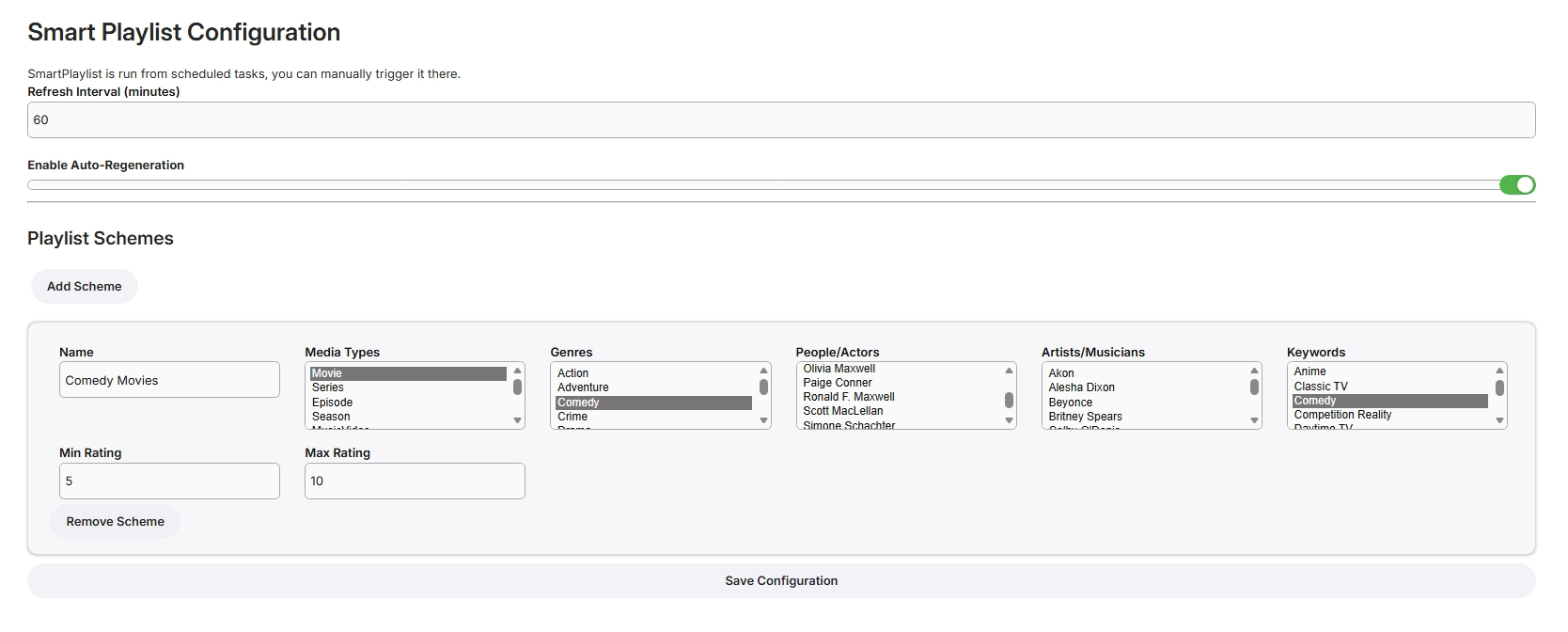
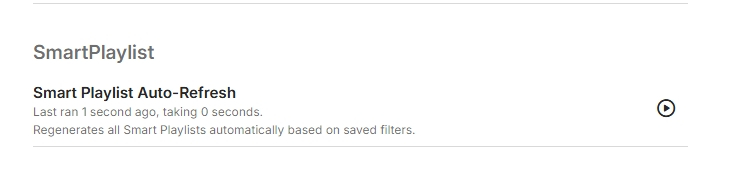
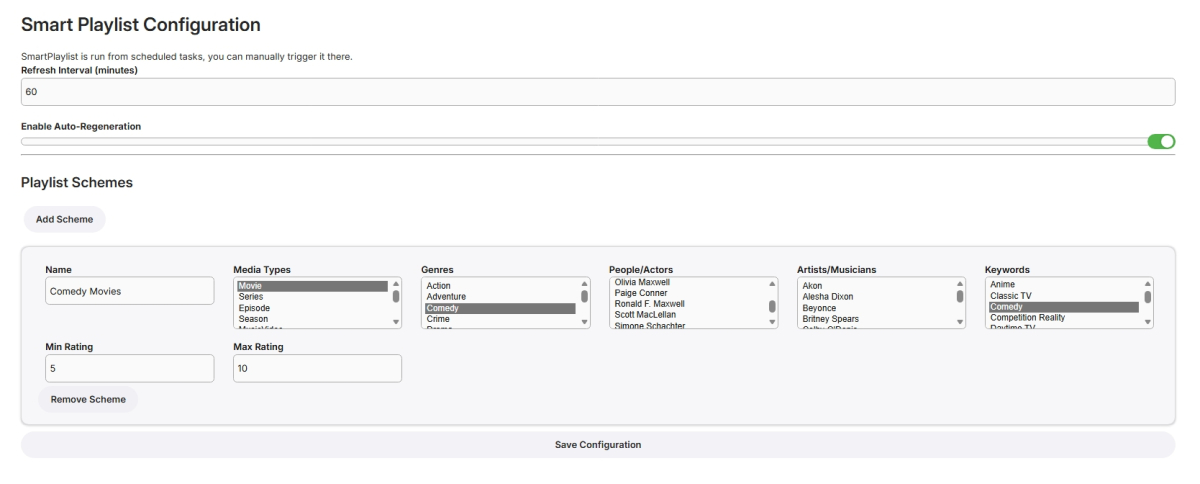
I have never used smart playlists so wasn't exactly sure what to build but here goes... Create Lists Here, add new schemes for more lists From scheduled Tasks Playlists are generated in the playlist library, only minimally tested! SmartPlaylistPlugin.dll
 2 points
 -
Have you tried using difefrent algorithm, i.e. Mobius and see how does it compare? Edit: Also, if you disable experimental HEVC encoding and transcode to AVC, are you getting same results?2 points
-
I am glad I found this thread. I was looking specifically for this. Has there been any indication that the option for Leagcy viewing will be restored in a future update. Seems like many users have relied on the same folder structure for years and years. Folders with a single movie were treated like a single item. Folders with multiple folders of single movies would be treated like a folder and sorted at the top. I even tried removing movies from folders and having them all sit together on the top level but the system still grouped them as a folder per movie (even when no folder was actually present). This display option is a move backwards with regards to organization.2 points
-
If you watch a movie and have to download a subtitle, often there is a required subset to make the playback with subtitle proper. The intention is now, that you setup the offset, but it will be kept per movie and downloaded subtitle (please note that new versions of a subtitlecould be downloaded). Expected function: Next time starting the same movie wiht the yame subtitle, the offset from last time is automatically applied.1 point
-
Colorwise based on tedhinklaters Finimalism JF theme, which I really like Lots of base code borrowed by the great @fillidill. Cannot thank him enough for the great base he set up with the Plex inspired Emby theme. A few things: I made this for myself in first place (FullHD Monitor), tested virtually up to 4K and it looked OK to me CSS is working with 4.9.1.80 stable, I will try to fix visual errors coming from changed CSS in future Emby updates The episode count icon is placed to be in line with the Coverart and EmbyIcons Plugins. If you don't use it, change line 341 For everything else, the code is provided as is due to the lack of time on my side. Please don't ask for any changes like the base colors, instead feel free to change the theme to your own delight and post the css here so that everyone can benefit from your work. In times of so much coding LLMs, changing the theme to your favor shouldn't be a big problem anymore (I also used it to clean up the code and remove doublettes). Bildschirmaufnahme 2025-10-02 212535.mp4 Download from here: https://github.com/v1rusnl/Embymalism1 point
-
Fixed for Library views and in Detail Screen. Fixed spacing Fixed. Now the activated items are blue Finimalism_Inspired_for_Emby_4.9_20251108_v2.txt1 point
-
Grazie mille! Thorium sembra star funzionando bene1 point
-
That fixed it! Thanks1 point
-
I'm still baffled by the lack of functionality in the download part of Emby. Just the bare minimum of pause, stop, restart, progression and ETA, speed, and maybe even changing download order if we're being fancy.1 point
-
good morning. its 9:25 no issues at all, emby still working since yesterday. Hopefully it stays so.1 point
-
I'm not playing from Emby on the laptop, I use the Windows Movie and Media app. When I play atmos, 5.1 and stereo titles in this manner, the soundbar shows "Atmos", "DOLBY Surround" and "EARC" respectively. Like you said, the display on the soundbar changes when it receives a bitstream. But on playing stereo titles, whether it is from Emby on the TV or via movies and Media app on the laptop, the soundbar shows EARC only. However for the AAC titles, when playing from the laptop, the soundbar changes to "Dolby Surround" and when playing from Emby it shows EARC. My settings are correct, laptop is connected to hdmi 2 port of the TV and the EARC is set to hdmi port 3 on the TV to which I've connected my soundbar.1 point
-
I am certainly happy to try and reach out to KSAZ-TV but not sure whether they would be willing to assist.1 point
-
Okay, I found the error. It was a homemade one. Emby was restarted every 10 minutes via a cron job that tests the mounting. Nevertheless, thank you very much for your support!1 point
-
Again for better understanding what I said before: It's irrelevant if the receiver can decode AAC or not because it won't receive AAC from any device with HDMI! That applies for all receivers, Soundbars and AVRs. It will always get another format, in most cases PCM or DD. Both can be 2 channel or multichannel and depends on devices and settings which are varying. In case a TV is involved as a player (or an app on a TV) you won't get PCM with more than 2 channels. In case another external player is involved (like a laptop) you will get real multichannel PCM up to 7.1 as a rule, if your settings are correct.1 point
-
The Emby for Android TV app looks, runs, and plays better and it should be updated. Even the movie thumbnails look better on Android TV app.. Why? I have no idea but they do.1 point
-
1 point
-
Actually, today I was (or rather, I tried to be) testing the other app on my two TVs. Honestly, it was impossible — the movies kept freezing constantly. I checked the option to force transcoding (I use AV1), and even then, it was still impossible to watch anything. On some videos, it even threw an error when starting and wouldn’t play at all. I understand that you want to make an all-in-one app — I guess it takes less time than maintaining two separate ones — and I also understand that it probably works fine on powerful TVs. But here in Latin America, there are many TVs that don’t have powerful processors, and even less RAM. I really hope the Android TV app doesn’t get removed, because otherwise, even though I’ve purchased the license, I’ll have to migrate to another platform — not because I dislike the new interface, but because I simply can’t use it.1 point
-
Yes, I agree, Emby Global is too basic for TVs, and above all, it's clear from a mile away that it wasn't created for TVs and remote controls.1 point
-
We need to start from a premise: I understand that it's necessary to create an app that runs "everywhere" for obvious reasons, likely to increase the audience, user base, and compatibility across multiple devices. But as things stand now, and based on what I'm seeing, I'm sorry to say, but we're just not there yet. The Android TV version isn't even remotely comparable to this one, and before complaining about these bad things I'm seeing, I tried it for at least two weeks. For example, let's talk about the playback bar, which is a carbon copy of the one on Netflix, etc. Fortunately, it still displays the remaining time and the end time of what you're watching (and I hope this data remains). Just to give you an idea, with a 77-inch TV, the characters for the remaining time and the end time are too small compared to everything else. If we look at the playback bar on the Android TV version, the characters are well-defined and have the right proportions for both the remaining time and the end time, and everything is clear, clean, and well-arranged. While in this "global Android" version, it's bordering on decency, small, and very poorly made... I also wrote this in the other post, but is it possible that to exit the app, the "sidebar of contents in the Emby catalog" always has to appear? But why, I wonder? But if I press back and want to exit, the app should let me exit. Period. You added that option where it asks me if I want to exit or not by activating the button, but it's a system that doesn't work well, it's horrible and not very intuitive. I know for sure that with a smartphone, tablet, or notebook, these problems don't exist because the touchscreen helps, but you have to understand that for some TV users, using this app is really difficult!!! Look at Emby Android TV, do you want to exit your app?? You click yes and it closes, and that's it!!! Guys, don't get offended, I could go on and on. The options that are there are always welcome, but they're so poorly placed that it's often difficult to understand how they actually work. If you want to continue with this global project that works everywhere, including TVs, go ahead, but please simplify and fix it because on TVs, the control system is truly awful and not very intuitive. I'll end here. I hate to say it again, but it's truly sad to see the Android TV version you abandoned a good nine months ago. It's so disappointing to see it go away like this. Good night, everyone. I hope someone gets some inspiration.1 point
-
Have done - not sure why you ask the question as whether I've used it or not, my immediate thoughts were why would you spend precious development time on an unsupported 3rd party plugin, when the 'Smart Views' core features promised in the last Beta was not delivered ? Logic suggests to me, it would be better to redirect that effort - unless the 'Smart Views' is way off, in which case fixing the Plugin could be justified as an interim fix. But as always, we simply don't know how long we need to wait for the Core feature - could be weeks, could be months and in some cases could be years away ...1 point
-
I'd rather Luke work on the Core Smart Views - all the time he is debugging this, he could be working on the core feature that does the same - just saying...1 point
-
That is my understanding, which is why I am bumping the interest in the topic to complete the start time offset. The start time offset is the critical functionality that allows for this type of simulated TV feature to work. Otherwise, it may as well just be a playlist.1 point
-
emby team is working really hard on this, apple tv is a new streaming device and the emby team needs a little time to get it working, plus no too many people owns apple tv1 point
-
Just as a note I figured this micro stutter problem out this weekend. The problem existed while playing subtitles on almost all files on AndroidTV with the latest Emby app. I have a Homatics 4k box, and I was using Kodi to get around it since I posted this topic. I tried extracting to .srt and it didnt do anything, I had the same issue. I found out that disabling drop shadow on the subtitles in the Emby App on the device got rid of the problem fully. Hopefully the team can look into fixing that.1 point