Leaderboard




Popular Content
Showing content with the highest reputation on 10/16/25 in Posts
-
EmbyWatch - A brilliant app built by a community user! One of the best things about the Emby community is the creativity that comes from it. Every so often, one of our users takes their love for media servers to the next level and builds something that makes life easier for the rest of us. Today, we’re excited to share EmbyWatch, a brand-new Android app developed by community member @asgard25It is an an incredible example of what happens when passion and innovation meet. A User-Built Tool, Made for Admins What makes this story special is that EmbyWatch wasn’t created by a company or a professional app studio. It was created by one of YOU! — just someone who wanted to make managing a server more intuitive and accessible from anywhere. Want to be even more impressed? This is only the second Android app that asgard25 has developed! EmbyWatch is designed to help server admins and advanced users keep track of what’s happening on their Emby setup in real time. It’s not about playback or browsing media, it’s about giving you the tools to monitor, manage, and control your server, all from your phone. Powerful Features at a Glance EmbyWatch brings a surprising amount of functionality for such a young app. Here’s what it can do: Real-time monitoring: See who’s watching what, where they’re streaming from, and how much bandwidth they’re using — all live. User management: View your users, check activity history, and even send messages directly to connected users. Device overview: Identify every connected client, from smart TVs to mobile apps, with connection times and device info. Library insights: Quickly review all your media libraries with detailed counts and metadata. Task control: Run or schedule maintenance tasks like library scans and metadata updates remotely. Plugin visibility: See your installed plugins and available updates. Logs and server details: Access logs, CPU load, uptime, and more — wherever you are. Notifications and widgets: Stay informed with live alerts and optional Android widgets for quick monitoring. For anyone managing a shared server, EmbyWatch feels like having a live dashboard in your pocket. A True Example of Community Ingenuity We love seeing users like asgard25 take their experience with Emby and turn it into something that benefits everyone. EmbyWatch really is a reflection of how open and flexible the Emby ecosystem can be when people put their ideas into action. This project shows exactly what makes our community special, a shared passion for improving and creating! So whether you’re managing your own home setup or running a multi-user server, EmbyWatch offers a simple, powerful way to stay connected to your system. Huge thanks to asgard25 for sharing EmbyWatch with the community and for showing what’s possible when creativity meets passion. We’re proud to see our users building tools like this that make Emby not just a media server, but a thriving ecosystem shaped by its fans. If you’re an admin or an advanced user, check out EmbyWatch on Google Play and see how it can make managing your server easier than ever. We can’t wait to see what asgard25 — and others in our amazing community — build next. View the full article3 points
-
Quick follow-up to confirm that the guide is still incorrect. Thanks for all of your effort here!2 points
-
1. sudo apt-get install cifs-utils 2. Make the mount folder, sudo mkdir /mnt/somename 3. Create a smb cred file. sudo nano /home/username/.smbcred In the file write, username=smbuser password=smbpassword ctrl + o (writes the data) ctrl + x ( exits nano) 4. sudo chmod 600 /home/username/.smbcred 5. sudo nano /etc/fstab 6. add your mount on a new line //smbshare/Mediafolder /mnt/somename cifs credentials=/home/username/.smbcred,defaults 0 0 7. sudo systemctl daemon-reload 8. sudo mount -a And your done. your share should be mounted. Sorry wrote this on an ipad if its hard to read2 points
-
Feature Request: Have User Groups and all settings applied at the Group Level That way you can just assign users to the appropriate Group and all settings will be inheritated.1 point
-
It is really cool that Emby has the ability to support multiple versions of the same movie. It would be nice to have a setting on the client side to allow the user to set which version should be selected by default. This could be as simple a user-entered string, or it could be a list of detected strings to choose from. It could allow multiple entries and it would choose them in the order entered. On the Kodi side, it would also be nice to get the "Choose the Best Version for Me" option that the Emby app has.1 point
-
Is there any way to revert to the colon? Prior to 4.9: 4.9:
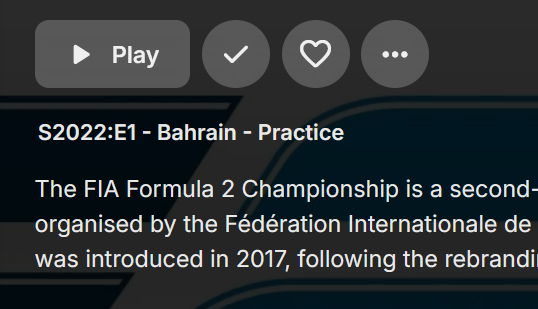
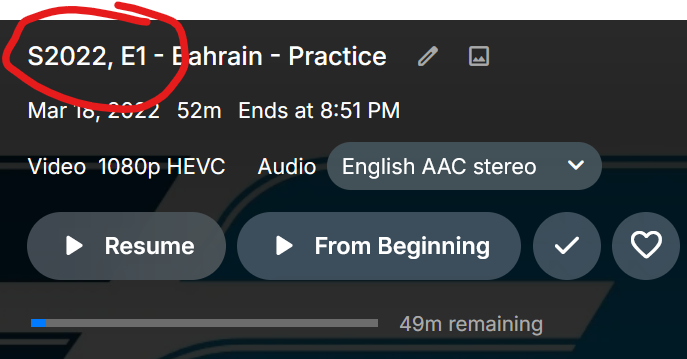 1 point
 -
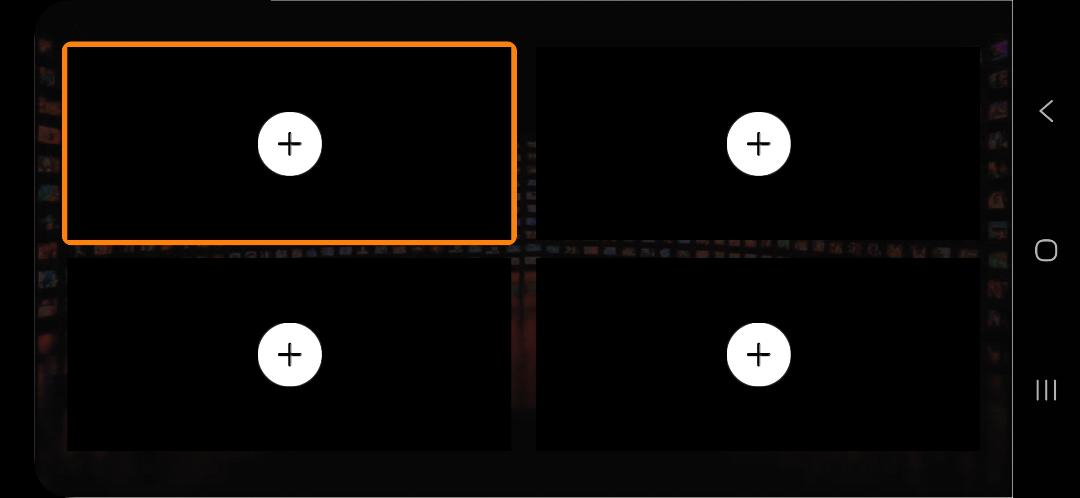
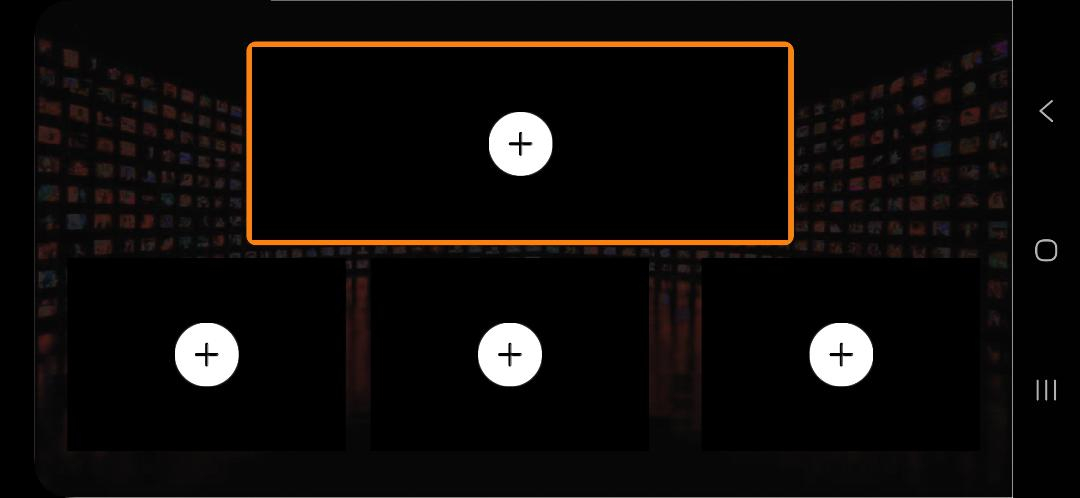
Can an Option for Multi-Screen be added so on a Football Sunday, fours screen could be seen at the same time? Then if wanted, one of the screens can be chosen as the full screen. I have attached photos of how some IPTV viewers offer this.
 1 point
 -
But it should resume after pausing so that needs to be looked at. Thanks.1 point
-
Sorry about that. Was trying things out to see what logs I could send you, and ended up checking further than originally intended.1 point
-
I'm delighted to report with this information you provided @sa2000my problem is now fixed. I did not realize that I needed to update the Samsung Tizen app to version 2.2.4 (it was the current version in the Samsung store). I had updated my server but my TV app was not current. I installed the new update and presto my issue that has plagued me for year is now fixed. Thank you team Emby and all who helped me with my large library of home videos. Appreciate the help and support. I'm ecstatic. Cheers Rob1 point
-
Google Books is certainly a possibility.1 point
-
Having read several of the threads on this issue and noting that Luke has already provided the general framework, it seems to me the best course of action is for the maintainer of the FreeNAS Emby App to get on this forum and PM Luke. Playing man in the middle on this is inefficient and must be frustrating.1 point
-
Really need release notes for this change. https://emby.media/support/articles/Excluding-Files-Folders.html1 point
-
To get it fixed, @Lukewill probably need a log of the detection and playback on the Gen 1 device.1 point
-
It looks like this is fixed now. Thank you!1 point
-
Still in need of a stop button on this screen.1 point
-
I'll give that a shot on the weekend.1 point
-
Yep that’s what I thought too, thanks for that info, so we can summarize something like this: Probably something with Fire OS 6. 4K Gen 1 is Fire OS 6 = DV not working 4K Gen 2 is Fire OS 8 = DV working 4K Max Gen 1 is Fire OS 7 = DV working 4K Max Gen 2 is Fire OS 8 = I got no information here about DV, but should be working just like your 4K Gen 2 with the same Fire OS 8.1 point
-
Tks, I thought that's the device you meant but wanted to check. I checked the 4K stick Gen 2 (AFTKM) - and that works fine, so it must be a Gen 1 issue (AFTMM)1 point
-
Fixed with a Microsoft Defender update. It was the Microsoft IIS components not NextPVR involved. Martin1 point
-
As far I can remember the active recordings were always right below the server details so it’s odd how come you don’t have it1 point
-
Fire Stick TV 4K 2018, is the first gen. They play DV, Netflix plays DV, force HDR mode displays DV. It supports DV8 https://developer.amazon.com/docs/device-specs/device-specifications-fire-tv-streaming-media-player.html?v=ftvstick4k1 point
-
I was tinkering with a Google Books plugin for books and audio books and it found all the metadata all of my comics, graphic novels, and manga. Over 200 of them. I know it does not help you now as I killed that project in frustration but that does tell you that where there is a will there is a way. My will was just not strong enough1 point
-
Will need a fresh set of diagnostics with the current versions of Emby Server and Emby for Samsung. The last fix in the samsung app relating to orientation was in version 2.2.1 The fixes in the server and samsung app addressed the issue where portrait home videos recorded on mobile phone were rotated 90 degrees So please have a sample test video that you can make available to us and enable debug logging on the emby server and ensure you are running on latest versions of Emby Server (4.9.1.80 if stable release, 4.9.2.4 if beta) and Emby for Samsung - latest is 2.2.4 - see https://emby.media/community/index.php?/topic/74969-samsung-tizen-smarttv-2015-present-beta-app-install-from-usb/ And please provide the test video (in zip file) and emby server log for the test. I can send you an upload link for the test file - when you can do this test Thanks1 point
-
J'abandonne.... J e repart sur la solution avec des ssd via usb.... Emby est une foutaise pour se connecter avec la smarttv1 point
-
It's still a problem for me with some, but not all, formats.1 point
-
HI, yes you need to have your emby server running as everything will run through that. So yes that means it needs to be accessible remotely for remote access.1 point
-
I'd used the wrong path to create the library, something like /share/Entertainment Center/Music/ and not /volume1/Entertainment Center/Music/. In my setup both work, the first one is for CIFS sharing. Once I switched the path everything worked without editing. Thanks for leading me to the solution.1 point
-
I have several ebook readers on my Shield and Emby does try to use one of them but the one it chooses is not one that works and I cannot find how to make Emby use another reader. I tried force stopping Emby and clearing all data but that made no difference and I still cannot use the reader I want. I know this is probably a "me" problem and not Emby's but I would sure be grateful if someone could direct me as to how to make Emby use a different reader. I suppose I need to work some to learn Android but I feel like the little boy in a Farside cartoon. He was sitting in the back of a class in school and raised his hand and said, "Mrs Brown, can I go home now, my brain is full." Learning Android might just cause my brain to explode.1 point
-
HI, we'll take a look at this. Thanks.1 point
-
delayed testing this. hotspot is too darn slow at my home. thanks for everyones help1 point
-
Hey @sh0rty I always knew who did that translation, but it never mattered who did it and this is not about blaming anybody. Half of the translation suggestions were on the side of what you chose. It's not a questions of who did what but a question of how this should be handled in Emby translations - a legitimate question and I think there's a common agreement. It's an emotional subject, that's why it has gotten blown up a bit more than it would have deserved, but that all. You have provided good feedback about our translation platform and contributed more than a thousand valuable translations withing those few months that the new platform is active. @K1ng_Learhas 9. So - no: there's no reason to replace you in the feedback group. I have full trust and am confident that you are the right member to have there. Thanks a lot for your contributions and stop taking it personal - it has never been about you1 point
-
Same here, back when I set mine up...CIFS wasn't even on my radar, lol! Since then, I'm more experienced in Linux. Thanks @Q-Droidfor sharing that!1 point
-
Might be related as there may be an overall problem with slowness doing some tasks in the last couple of betas. Only seems to be affecting some people though. https://emby.media/community/index.php?/topic/143370-emby-server-v4923-getsubviews-slow/1 point
-
Yes, as long as it's the same exact path used in emby library setup.1 point
-
That is my understanding, which is why I am bumping the interest in the topic to complete the start time offset. The start time offset is the critical functionality that allows for this type of simulated TV feature to work. Otherwise, it may as well just be a playlist.1 point
-
Correct. Not. Roku one wouldn't count (unless using LiveTV), iPad one would (unless Unlocked for Full playback only). Emby Premiere Feature Matrix Not the license - "slot" (out of 30 slots). Not currently. You can restrict user to specific devices (like web browsers only). HWA is a server Premiere feature, not clients' one, it does not count against device limit. Is there a limit to Emby Premiere?1 point
-
I'm afraid so.1 point
-
Continuing this thread, I'd like to see an option to allow NFO files (as well as BIF and images, etc.) to be saved in a location other than the media folders. For my own compulsive reasons (mostly to promote ease of finding files using alternative media players), I want the media folders to stay clean without a lot of superfluous files. So I prefer to only store video files within the media folders, and am willing to concede subtitle files as well, since they have utility as most other media players can pick them up. I really want to save NFO files because I've had very bad experiences where metadata refreshes within Emby have undone hours of configuration (I discovered too late that it's not enough to simply identify a title that Emby misidentified; if you don't lock in the metadata after manual identification, a refresh will destroy it). But I'd like to be able to allow the NFO files to live in a parallel location managed by Emby, and not in my media folders. It makes sense to do the same thing for images as well (this would also help prevent similar disasters when my custom image selections got blown out upon refresh when Emby again re-misidentified a title that wasn't locked). And doing the same for BIF files just seems like a natural progression to keep the original media folders clean. Ultimately, I have learned to not to ever refresh metadata, but my prior experiences, along with several comments relating to NFO files in this forum, really reinforce the idea that not having an NFO backup is a recipe for eventual doom. I'd just like to be able to do it neatly, without dumping the NFO files into the media folders, and to place them instead in a parallel structure, whether it's metadata, cache, or something new.1 point
-
1 point
-
On recent phones there is a nice ai search tool in gallery: you can search for people, pets, cars, documents etc. Is something like this planned into emby? Like for camera uploads for example. Or do we already having this?0 points
-
Hi, yes that it the current design.0 points