Leaderboard




Popular Content
Showing content with the highest reputation on 10/15/25 in Posts
-
EmbyWatch - A brilliant app built by a community user! One of the best things about the Emby community is the creativity that comes from it. Every so often, one of our users takes their love for media servers to the next level and builds something that makes life easier for the rest of us. Today, we’re excited to share EmbyWatch, a brand-new Android app developed by community member @asgard25It is an an incredible example of what happens when passion and innovation meet. A User-Built Tool, Made for Admins What makes this story special is that EmbyWatch wasn’t created by a company or a professional app studio. It was created by one of YOU! — just someone who wanted to make managing a server more intuitive and accessible from anywhere. Want to be even more impressed? This is only the second Android app that asgard25 has developed! EmbyWatch is designed to help server admins and advanced users keep track of what’s happening on their Emby setup in real time. It’s not about playback or browsing media, it’s about giving you the tools to monitor, manage, and control your server, all from your phone. Powerful Features at a Glance EmbyWatch brings a surprising amount of functionality for such a young app. Here’s what it can do: Real-time monitoring: See who’s watching what, where they’re streaming from, and how much bandwidth they’re using — all live. User management: View your users, check activity history, and even send messages directly to connected users. Device overview: Identify every connected client, from smart TVs to mobile apps, with connection times and device info. Library insights: Quickly review all your media libraries with detailed counts and metadata. Task control: Run or schedule maintenance tasks like library scans and metadata updates remotely. Plugin visibility: See your installed plugins and available updates. Logs and server details: Access logs, CPU load, uptime, and more — wherever you are. Notifications and widgets: Stay informed with live alerts and optional Android widgets for quick monitoring. For anyone managing a shared server, EmbyWatch feels like having a live dashboard in your pocket. A True Example of Community Ingenuity We love seeing users like asgard25 take their experience with Emby and turn it into something that benefits everyone. EmbyWatch really is a reflection of how open and flexible the Emby ecosystem can be when people put their ideas into action. This project shows exactly what makes our community special, a shared passion for improving and creating! So whether you’re managing your own home setup or running a multi-user server, EmbyWatch offers a simple, powerful way to stay connected to your system. Huge thanks to asgard25 for sharing EmbyWatch with the community and for showing what’s possible when creativity meets passion. We’re proud to see our users building tools like this that make Emby not just a media server, but a thriving ecosystem shaped by its fans. If you’re an admin or an advanced user, check out EmbyWatch on Google Play and see how it can make managing your server easier than ever. We can’t wait to see what asgard25 — and others in our amazing community — build next. View the full article6 points
-
Read this for more information https://forums.nextpvr.com/showthread.php?tid=66617&pid=604154#pid604154 Note sure if there is any impact on Emby itself but the nature of the bug it is possible. Thanks Microsoft2 points
-
Thank you that's helpful, it would have taken me a few tries to search for CIFS, probably would have tried SMB, Samba and even NetBIOS before that! lol!2 points
-
Use the forum search to look for CIFS. You'll find many threads and posts on the subject.2 points
-
I would. Many of the "easy" request like this actually involve a complete re-design of basic sub-systems that the user isn't aware of. Just such an effort has been started now. I can't say when it will translate to this option but it definitely will at some point.2 points
-
Form the log file, the video level is not supported https://webostv.developer.lge.com/develop/specifications/video-audio-40 This is causing transcoding, but your server can't keep up. If the speed is less than 1.0x then it is transcoding at a rate that is too slow for playback.


 2 points
 -
@LukeThe new way that you've developed for playing library items from VirtualTV as a live tv source is really great, but it's missing some features: The playback should auto advance to the next program in every available Emby app. There should be a way to start the current program from its live position instead of from the beginning. Ideally, the decision whether the program playback starts from the live position or from the beginning should not be a "static" channel setting in the plugin. Instead also the program itself should behave like a normal library item. That means that the program info dialog that we get from the EPG before playback and also the context menu should display a "Resume" and "Play From Beginning" button. Where "Resume" would start the program/library item from the live position and "Play From Beginning" from the start of course.1 point
-
Hi! I'm curious (will test a bit later) if Emby can utilize RK3568's HW capabilities for HW decode/encode of H264 and HEVC files. Will post here my updates and findings, in case anyone have more information as of now, please share it, I'd appreciate it. Thank you very much1 point
-
I'd like to see a feature where on a piece of content there was a button to report a playback error or such. I have a lot of content that I haven't watched that friends have requested - if there was a simple button they could click that pings me a message letting me know there's an issue with the file that'd be great.1 point
-
Correct. We are looking at it.1 point
-
Hi Luke I will try that and report back1 point
-
Hi, it's more a matter of connecting trakt. Running the scheduled task is not mandatory. It is only used to sync activity that happened in the past.1 point
-
Right now external app. We are currently planning out what the book reader functions in the native apps are going to be.1 point
-
Great thank you very much for the feedback! Seems to confirm my initial thoughts, I'll probably start setting it up soon.1 point
-
Yes, I’ve been using SMB mounts on Ubuntu to point to our Emby media for several years now. No. The biggest "issue" for me was getting it all set up in Linux (after moving Emby server from Windows). I have detailed notes, but I can’t find them now. It's been a while since I set it up, but IIRC, I had to search outside of Emby docs to find that info. Just did a quick search (I use DuckDuckGo) for "How to Mount a Samba Share in Linux"…many of the hits look familiar to what I remember.1 point
-
The OpenAPI specs are included in the SDK releases: https://github.com/MediaBrowser/Emby.SDK/releases Or directly here: https://github.com/MediaBrowser/Emby.SDK/tree/master/Resources/OpenApi (there's also a beta branch)1 point
-
We need neither colon nor comma. Just put a single space there and go on with life. Less useless punctuation = less visual clutter.1 point
-
No, that's outdated. It shouldn't even exist anymore. Full API documentattion is here: https://dev.emby.media/ And for beta: https://betadev.emby.media/1 point
-
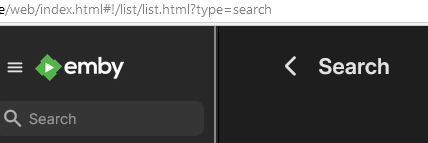
Please add the option to disable shortcuts (if customization of shortcuts requires too much work). It is very annoying. For example, `Ctrl+Alt+S` hijacks it from a browser extension - and it does not even offer something useful. It just ruins current page and display empty "Search" label without any functionality. Neither it does something, nor it focuses the search input. Emby 4.9.1.80
 1 point
 -
This is where Im dumbfounded. Emby was flawless up until when my modem and router got unplugged. Now I cant get remote setting to work. Like mentioned originally Ive tried every kind of IP remote address I can think of and the only time it works now is the Tailscale IP address. Ive tried PIA VPN address, the remote WAN address. I have port forwarding set up on my century link modem/router, google mesh router, and even PIA's port forwarding option. PIA has an OpenVPN setting and Wiregaurd setting. I've only used the Open VPN and haven't tried Wiregaurd. OpenVPN was working prior though. Should I start completely over? I really don't want to and not sure how if I do.1 point
-
That is my understanding, which is why I am bumping the interest in the topic to complete the start time offset. The start time offset is the critical functionality that allows for this type of simulated TV feature to work. Otherwise, it may as well just be a playlist.1 point
-
https://swagger.emby.media/openapi.json1 point
-
I believe we should have this now in most Emby apps. So the next step is the start time offset.1 point
-
HI, there is an api link at the bottom of the server dashboard.1 point
-
Hi, we are looking into this. Thanks.1 point
-
HI, currently the server does not record that flag, although it's a good idea to add.1 point
-
I ran into something similar and ended up setting up webhooks in Emby to trigger notifications. I'm using them with a cloud auto dialer to alert users by voice when new media drops. It took a bit of testing to get the payload right, but combining Emby events with external tools really opened things up for custom notifications. I didn't even have to mess with plugin development.1 point
-
I found out where my mistakes were coming from. It was all file structure on my end. Thanks for the help all! Neminem, I'm still learning mp3tag, thanks for the advice on that.1 point
-
Exactly, and that's why it would be great if you could edit this manually in the metadata.1 point
-
Thanks @hatharryI think this has solved a number of instances.....Will give it a proper test in coming days to see if there are any other issues with music playback.1 point
-
But Emby may have. They made changes after an exploit was discovered which was spoofing local access - i.e. you may now be having to do more for better security. Paul1 point
-
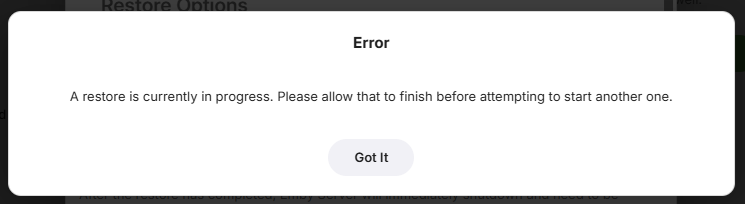
This has been done in the latest update to the Backup & Restore plugin - version 1.8.2
 1 point
 -
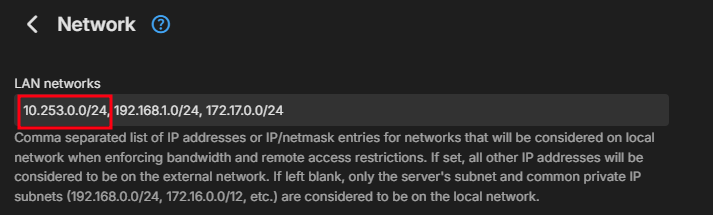
@bandit8623have you added you vpn ip range to you lan networks in emby? I hade to do that, to get it to work. I also needed to include Emby App to my vpn app's include list, when testing from my phone.
 1 point
 -
VPN connections tend to get their own unique IP address range, you need to set it up in Emby to be seen as a local address. This is for my VPN, it makes the VPN IP range be seen as local.1 point
-
then you are forceing vpn users to route all traffic through vpn. that really should not be needed. current vpn i can acces all my local systems , but cant via emby.... i dont have my vpn force all traffic through vpn as thats very inefficient1 point
-
@Lukethere is another problem with the IPTV plugin. It does not work for files. I used the url below and received the error message that "No Compatible Stream was Found." I tried several other file urls with no success. Vic \\MediaServer2\Media\Movies%201\Dean%20Martin\Five%20Card%20Stud%20(1968)\(Movie)%20Five%20Card%20Stud%20(1968,%20Dean%20Martin,%20Robert%20Mitchum).avi Added 10/14/2025 8:56 PM1 point
-
So that's it! It's solved, thank you very much!1 point
-
Well, oddly enough, nothing happened on my PC. But I just now tested on my Android tablet, and it did start playing the next episode.1 point
-
Hi this question has come up before and is always a possibility yes.1 point
-
Same client, same device. I started one restore going, navigated away, went back to the restore backup page and there was no indication a backup restore was in progress and I was able to start a restore from a different backup while the original request was still in progress.1 point
-
Hi Luke, Same here — I’ve run into the same issue after updating to 4.9.1.80. Before, in folder view, if a folder contained just one movie, clicking that folder would take me straight to the movie’s detail page. That was perfect, and I’ve used Emby this way for years. Now, even if there’s only one movie inside, Emby adds another subfolder (like A → B → movie), so I have to click through one more level. It makes browsing my library much less convenient. I’ve seen the suggested workaround, but honestly it feels a bit clunky and not what we really want. We just want the original simple folder behavior back — or at least a global option that lets users choose between the new and old style. It would be great if this setting could apply to Movies, TV Shows, Mixed Content libraries, and any other content type that uses folder view — so that the experience is consistent across all libraries. Please consider restoring or adding this option in a future update. The old folder view worked beautifully for many of us longtime users. Thanks a lot for listening and for all your hard work on Emby!1 point
-
aaahhh damn... parental controls... thank you for guiding me to find the cause1 point
-
Genau und von daher wäre es klasse wenn man das bei den Metadaten manuell editieren könnte1 point
-
Just thought this should be an official FR… Since there already seems to be support (and dislike) for this, please make it customizable (perhaps by a plugin) so the admin can control it. There should also be an individual user setting to enable/disable it. I think it should support: Tags to select an icon. A Regex on the program name (i.e. “^NFL” or “ NFL “ …) to choose an icon. Maybe something else? This way: It could be much more than just sports. The Nay-Sayers could leave it off. It could be a little fun and slightly stupid (like some say about me). Ref:1 point
-
I don't truly want to be an obstacle, so far the sake of understanding Luke's approach, please help me understand why a combo Movies/Shows is considered to be a solution to this problem. I have my folders organized broadly by my own genre-based categories. Top-level folders are "comedy/", "sf/", "action/", etc. I run a single mixed content library and have been steadily digitizing my video library and putting all content into Emby. It's nice to have everything all in one place, and the content is not just movies and tv shows. For example, a family member recently captured an entire live concert on their iPhone. I doubt if anyone will ever watch it again, much less all the way through. But someone captured it, it's data, and I keep everything. So rather than take up room on the phone, I throw it onto my server by neatly numbering some 20-odd video files to correspond to the sequential setlist, and place them into a folder "/music/concerts/<BAND_DATE_VENUE>". In Folder view, I create some nice graphics for the containing folders in the folder hierarchy, and I'm done. Emby can't find any metadata because it's not a legit piece of content, and I don't need to waste my time to set any metadata, because anyone who wants to watch it can find it easily by navigating through Folder View. The "Movies" tab looks at this content, and throws up 20 icons for the 20 files, because all it knows is that it's not in a "Season 1" folder, so it's got to be an important movie. Is there a way to flag it so it's not a movie? I don't need or want it to show up anywhere on either Movies or Shows. What do I do with Pixar shorts that show up as movies? In Folder View, they are easily found under "animation/Pixar/shorts/". But Emby thinks they are movies, and displays them in the "Movie" view, and not in a particularly organized fashion--they are simply mixed through the list where ever they happen to sort alphabetically based on my current filter. Oddly enough, I had manually added all of my Pixar content into a Collection and I thought this might have caused the Movies tab to group them together, but it doesn't. I'm not sure if this is a setting I need to enable. At any rate, the Pixar Collection looks great on the Collections tab, which is all I really want it to do. It seems your approach would cause me a great deal more work to have to figure out if there is a tvdb entry for a "Season" of Pixar shorts and force me to manipulate the filenames to get them to link up. A purist probably wouldn't even want them to appear under either Movies or Shows. Folder View is the one-size-fits-all approach that let's everyone with a non-flat file structure do what they want to do with the software. How exactly am I supposed to organize my content so that the combo Folder/TV replaces what I used to have with Folder View? I would normally be glad to experiment and try to figure these issues out on my own, but at this point, I am not willing to chance wrecking my metadata any further while I am stuck on the 4.9 build.1 point
-
Hey I was also having this problem. I got cloudflare all set up, worked in the browser and not the app. I have it set up as Https. I found the solution was to leave the port BLANK in the app and it worked right away. I think the port is already accounted for in the cloudflare tunnel.1 point
-
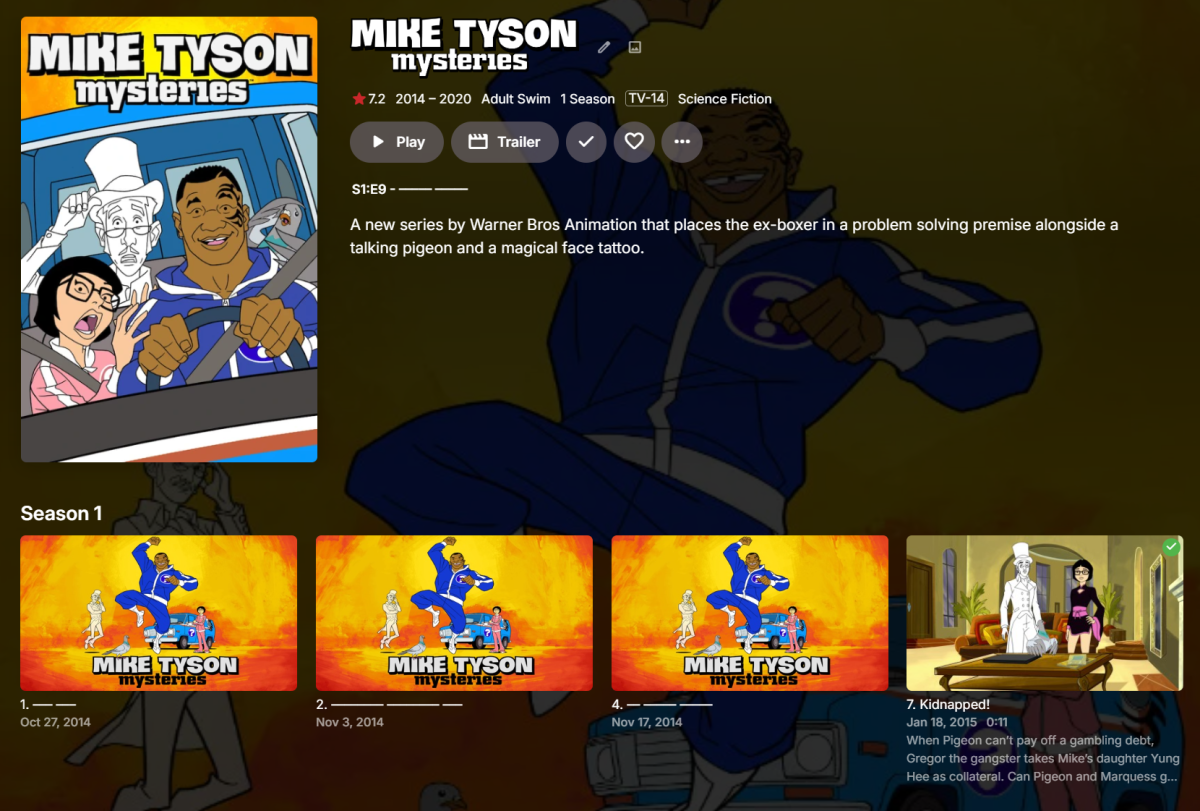
Hi, this will be in the 4.9 server release for the web app, and will be in the next update to many of our apps. It will come in the form of a user setting: And then you will screens like this: Of course it is not guaranteed to be applied everywhere, particularly when it comes to screens that are more intended for media management purposes than viewing. Enjoy.

 1 point
 -
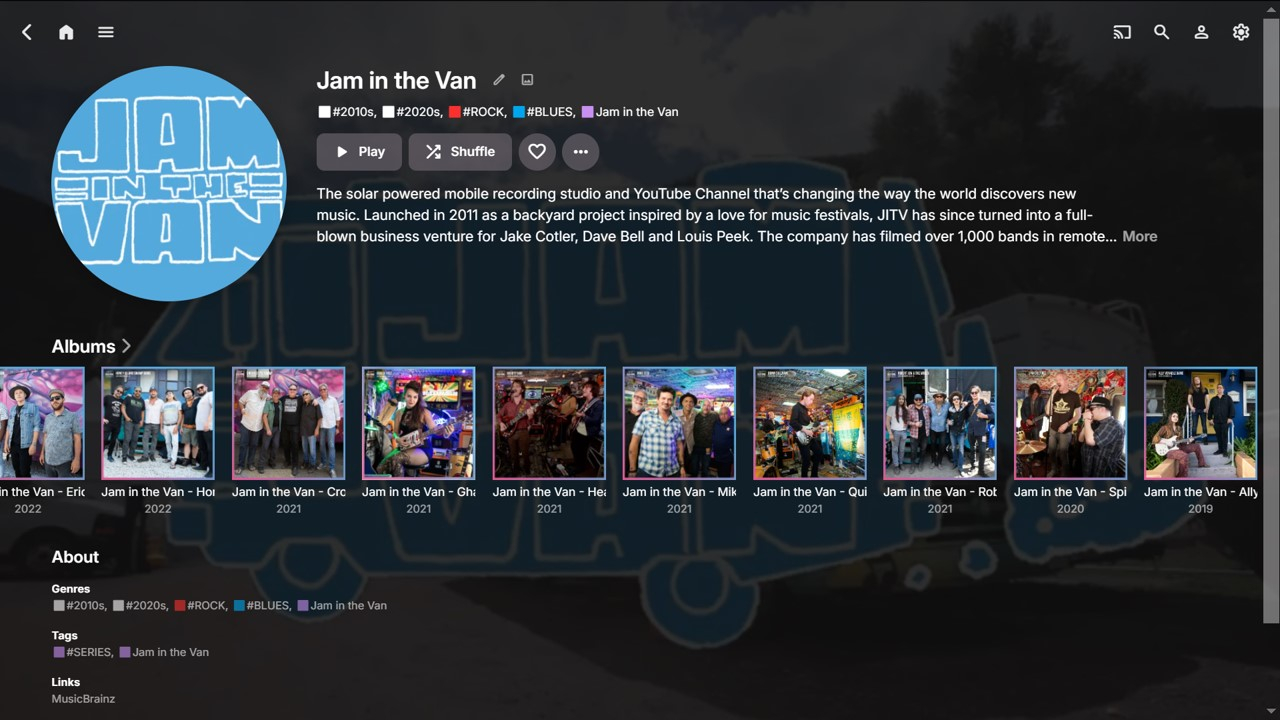
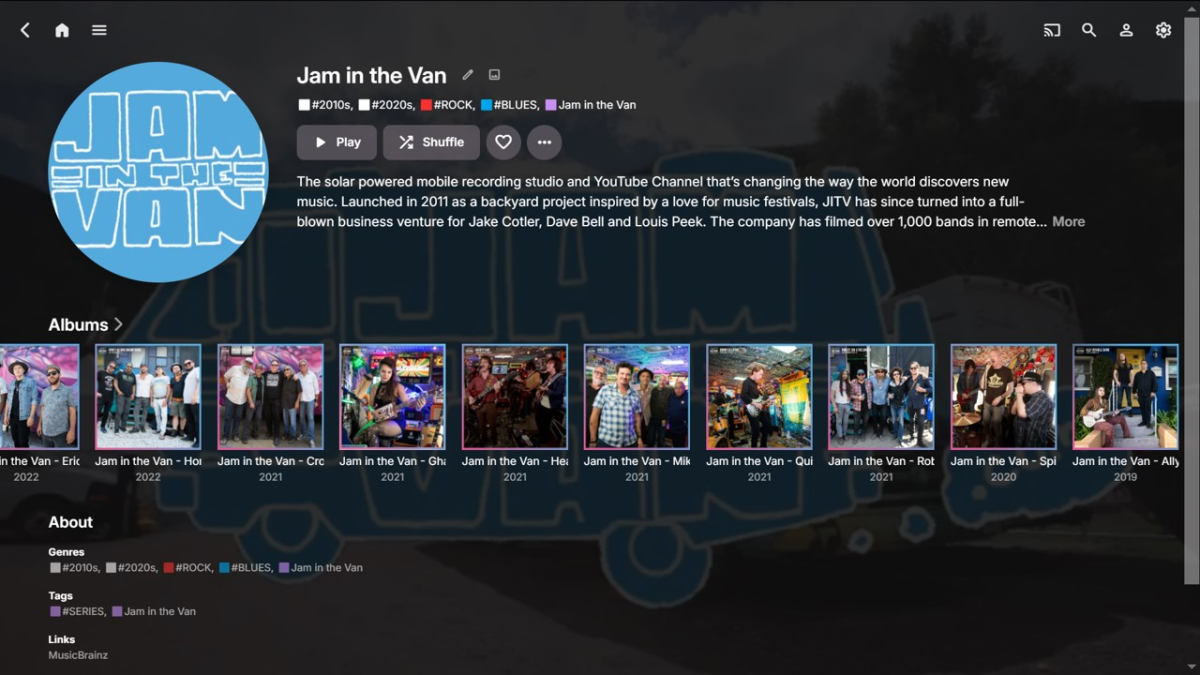
Wow, this IS an old Feature Request!!! No wonder I hadn’t seen it before, but also surprised it hasn’t had very much response! For anyone with a reasonable size media library the 'publisher' becomes more important as the collection grows and it makes increasing sense to group selected media items accordingly, as a sometimes preferred view, e.g.: Movies (Studio) TV Shows (Network) Music (Record Label) Audiobooks (Publisher) If Emby can have a dedicated “Studios” Tag for Movies, then why doesn’t it have an equivalent “Labels” Tag for Music??? This would likely be the way to do it consistently with the current UI and a good suggestion. Digressing... I have many groupings of Indie Labels and Sub-Labels of special Album series that I find useful to browse and play. Therefore, I’ve tried four different ways to do this within the current Emby fields. All have their pros and cons: Tags Collections Genres Album Artists Tags Albums can be tagged with a Label within Emby now, but cannot be imported from embedded metadata, unless using RoonTrackTag at a track level. RoonAlbumTag is not currently supported. Collections This is a nice way to add Label artwork and some overview info, but the Collection sits ‘outside’ the Music library, so therefore perhaps less useful for cross-referencing. Genres A Label Genre can be directly imported from embedded Genre metadata and the Genre view within Emby splits into the sub-sections of Artist, Album and Song. No overview though. (Yes, a Label is not technically a Genre). Album Artists Adding the Label as a secondary Album Artist gives all the benefits of the detailed Album Artist pages and the relevant Albums can still be listed under the primary Album Artist. (Yes, a Label is not technically an Album Artist.) (There are more pros and cons for each method, but this post will become too long! There may also be more ways that I haven’t thought of yet?) I’ve set up Label Tags, Label Genres and Label Album Artists for approx. 20 Labels of interest so far. Using these three methods combined gives very good cross-referencing within a music library, from multiple viewpoints. Here’s one example: (Note: MusicBrainz happens to list Jam in the Van as an Artist, hence the Link.) Emby already has great flexibility with the above-mentioned fields. Adding a dedicated Record Label tag would make Emby even better!!! Ideally it would import from “Label” and “Publisher” embedded metadata fields and perhaps also be able to utilize any relevant MusicBrainz APIs? (I would likely keep my set-up above for selected special series, but a dedicated Label Tag would be great for ALL my albums) Thanks for considering!
 1 point
 -
The next updates to most Emby apps should do this, outside of Roku.1 point
-
Si te interesa la característica, puedes mostrar su apoyo dando un 'like' a esta solicitud de características:1 point