Leaderboard




Popular Content
Showing content with the highest reputation on 10/13/25 in Posts
-
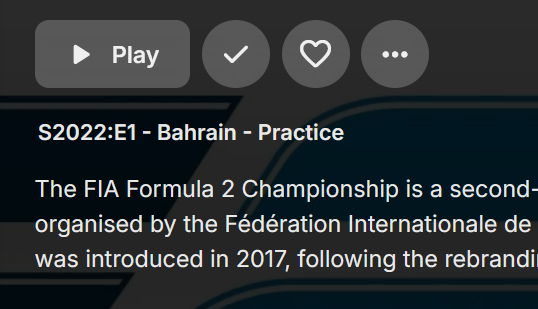
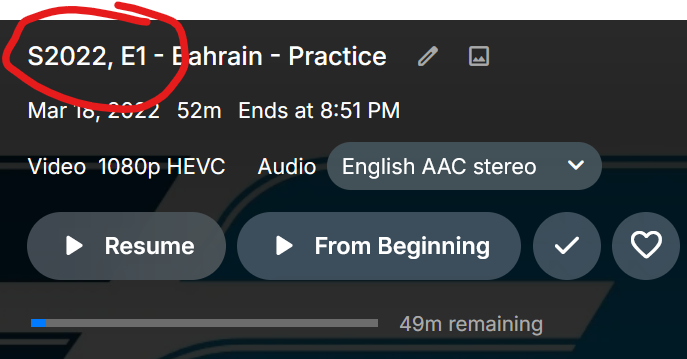
Is there any way to revert to the colon? Prior to 4.9: 4.9:
 3 points
 -
I'm absolutely loving Emby! I recently created some custom library images that display on my dashboard. I'd like to be able to remove the text labels that show up underneath these images since the images already have the name of the library. I realize I could remove these using custom css, but that would only work for the web app. I mostly use Emby on Roku, so I would like to be able to do this from the backend. Please see attached.
 3 points
 -
Hi, yes we are working on improving this. Thanks.2 points
-
It's here! Just appeared in v4.9. Very happy with this, thanks team :)2 points
-
@vincen This is what I got running the exodus-privacy report. Exodus-privacy is the default privacy checker that shows up on de-googled android app stores like aurora store & App Lounge. https://reports.exodus-privacy.eu.org/en/reports/661150/ No location permissions detected (it does grab your unique AD_ID identifier but that's anything using Google Firebase Analytics). But I don't see anything malicious. Personally, I mostly stick with just f-droid apps to avoid Google Firebase, but that's a luxury google android users won't be able to use much longer.2 points
-
The problem was that i had connected the remuxing to the audio only warning so when that was enabled warnings about remuxing would happen as well. Try this version. I've added a setting to enable/disable warnings on container change/remuxing. Audio only has been changed to "also warn on audio only transcoding". I also fixed some messages plus it no longer sends an empty message each time a message has to be sent. Hope it helps and thank you for reporting the problem! WatchingEye.dll2 points
-
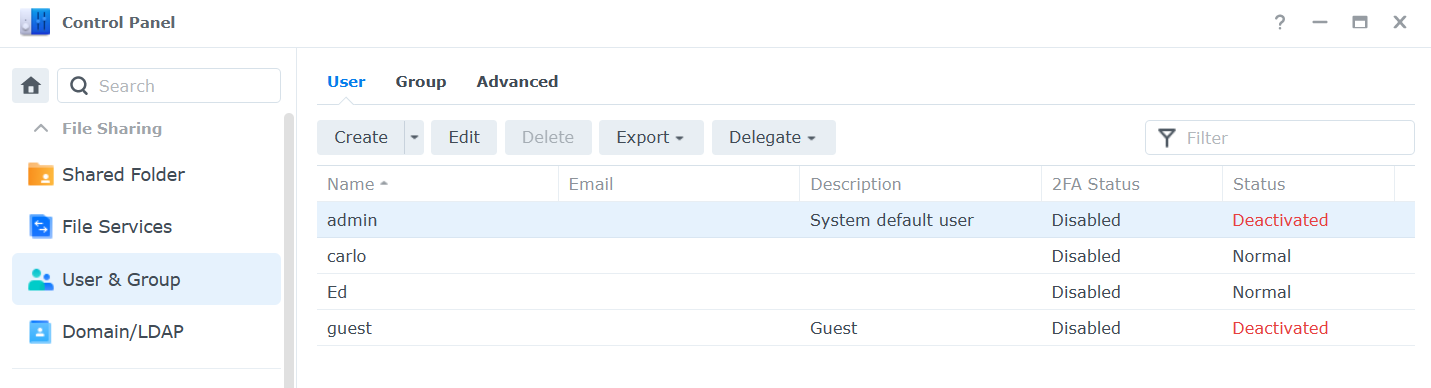
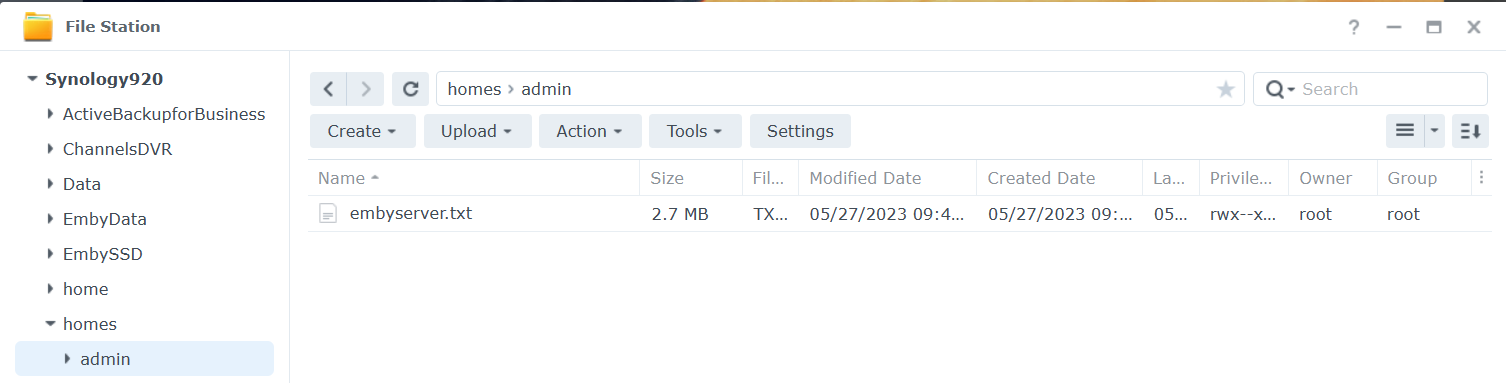
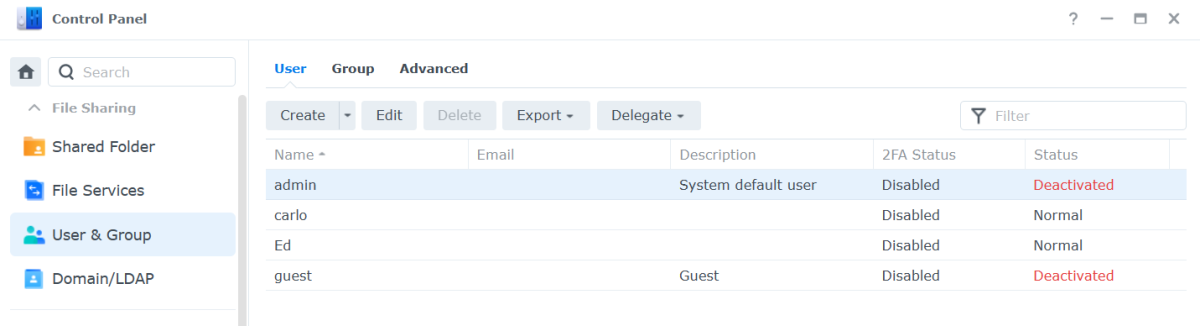
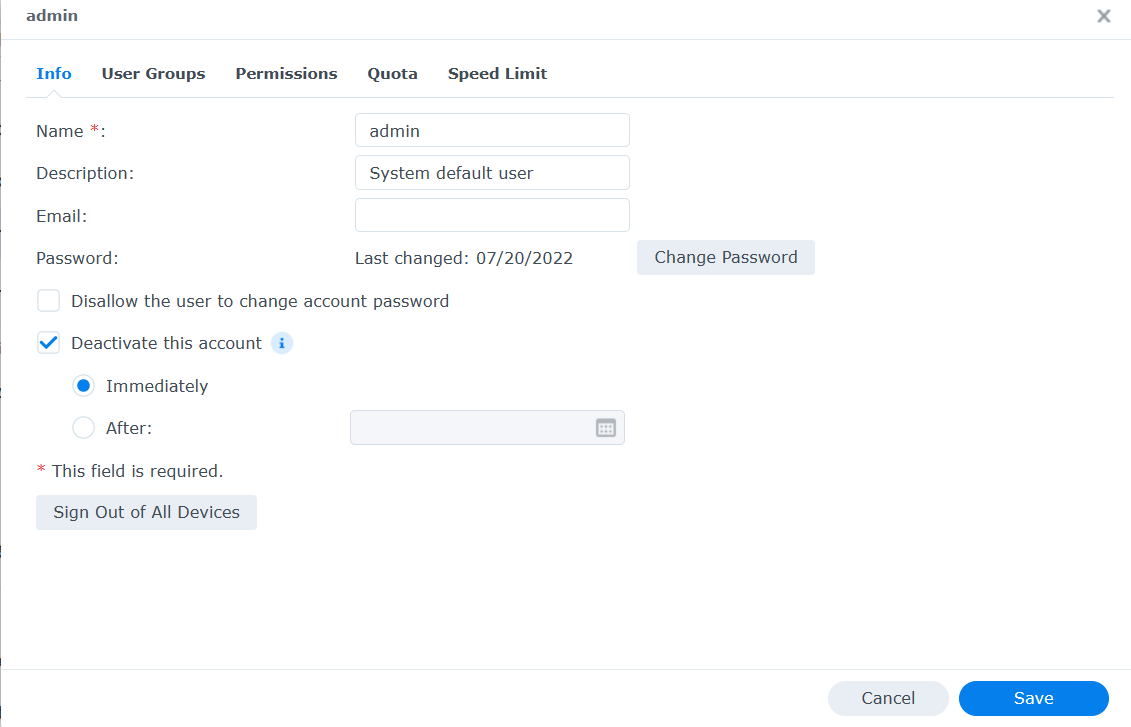
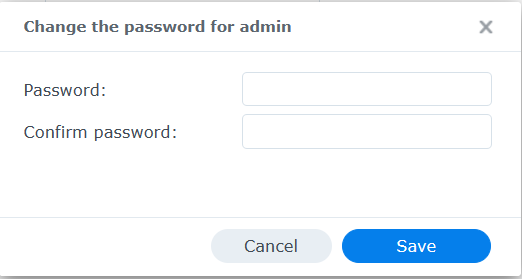
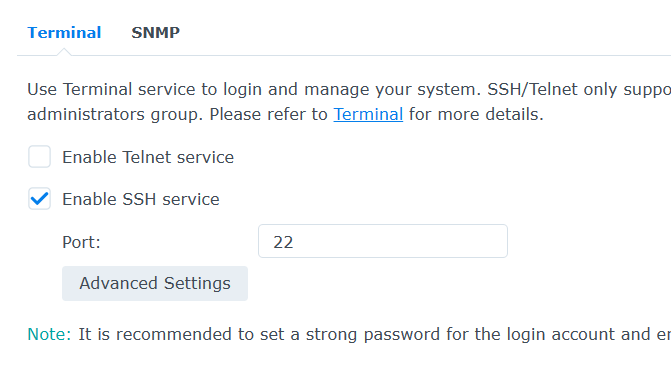
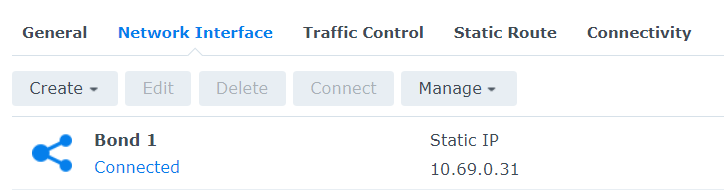
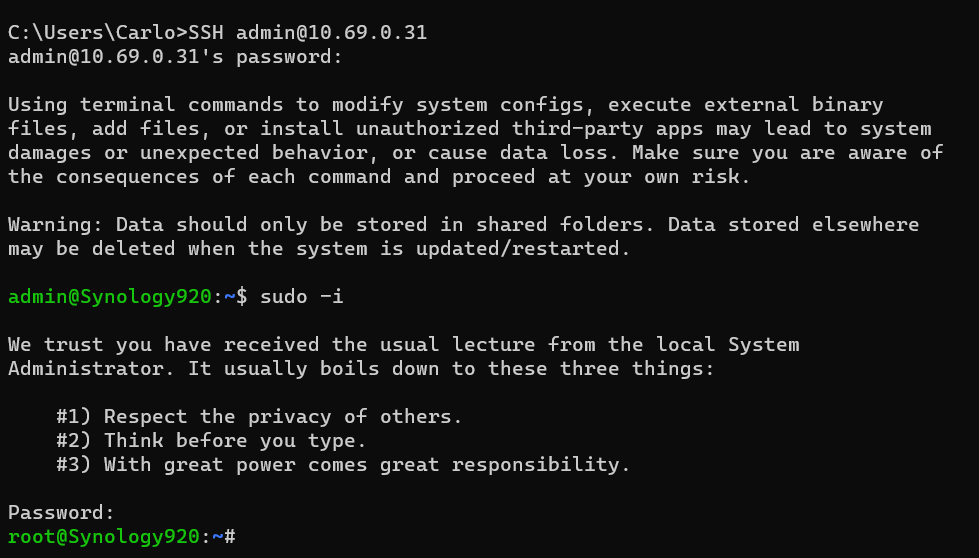
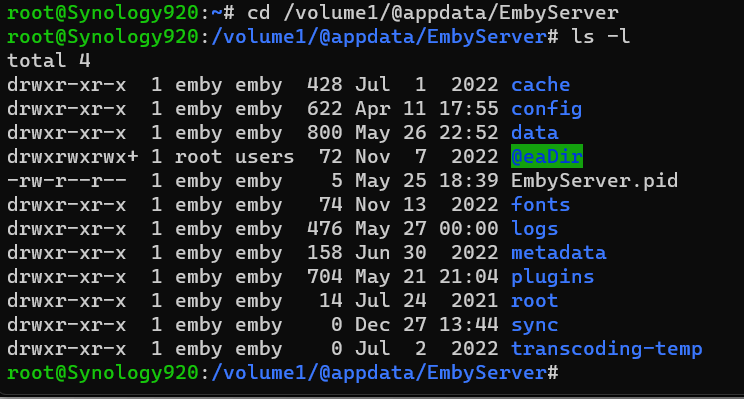
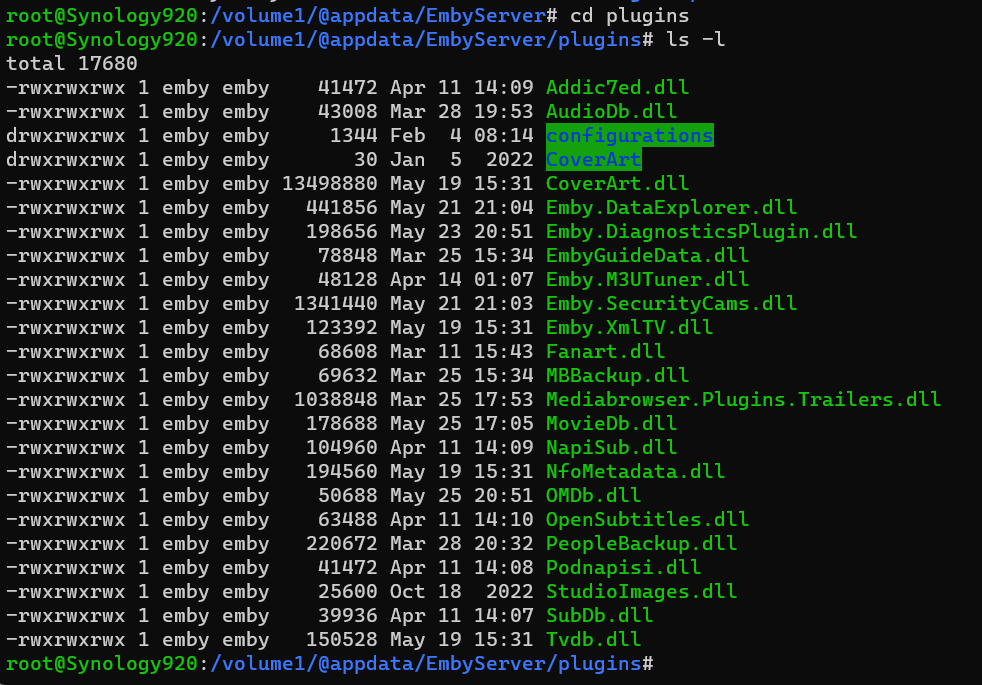
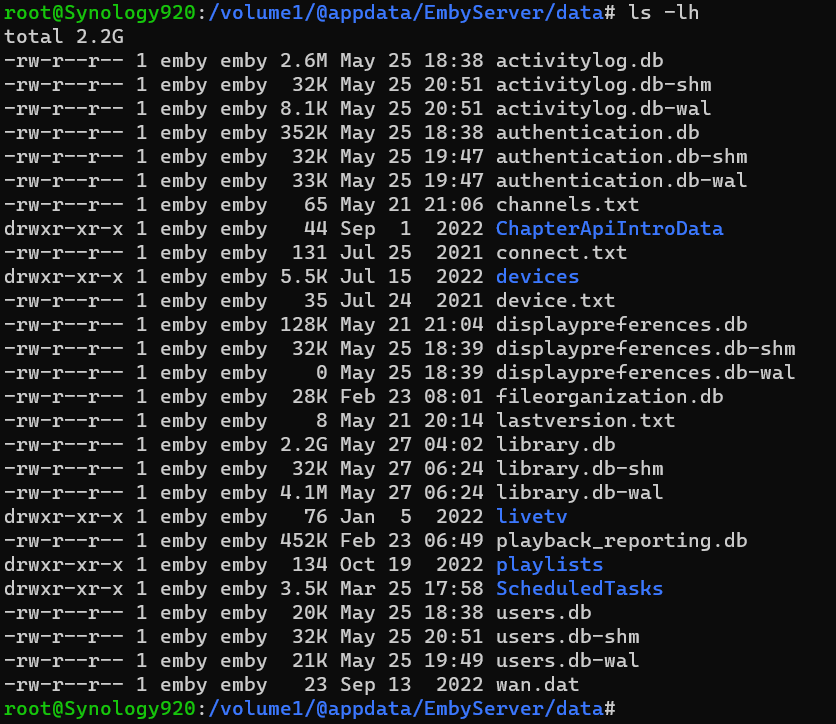
Open DSM as usual in a web browser. Once logged in Open Control Panel. Click on the Users & Groups menu on the left. Most likely the admin account will be deactivated. We are going to activate it for our use as well as change the password (if we do not remember it). Click on the admin username to highlight it, then click the edit tab. Click the box above next to "Deactivate this account" if needed so there is not a checkbox. If you do not remember the admin password, click the Change Password button above to get this: Type a secured password in both places and click the Save button. Use lower and uppercase letters, a number or two as well as a special character. Click the Save button on the user screen as well to save our changes and we should now have a valid activated admin account to use for SSH. Next, we need to enable SSH access to the NAS. We do this easily by clicking on the left menu "Terminal and SNMP" Make sure the checkbox is enabled for SSH and set the port to 22 if needed. Click the Apply button to save this info. You will need to know the IP address of your NAS. If you're not sure, click the Network menu item, then the Network tab for a similar screen to this: You might see a "bond" or individual NIC cards which isn't that important as we just need to know the IP address. We are now ready to SSH into our NAS. You can use a terminal from a Mac or Linux or a command shell on Windows 10 & 11. In Windows hold with Windows Key while pressing R Type cmd and click the OK button. From your shell or terminal type you will launch an SSH session with the following command. Change 10.69.0.31 to use the IP of your NAS. SSH admin@10.69.0.31 If this is the first time you have SSHed into your NAS you may be asked to save a secured encryption key or similar so answer by typing yes (3 letters), not just y. You will now be prompted to type your admin password. Type it and hit enter. Go Super User Once logged in type sudo -i Navigate to Emby Server App Location We can now navigate to the top level directory of our Emby Server using: cd /volume1/@appdata/EmbyServer we can view the directory using: ls -l Change Directory If we wanted to change directory to the plugins folder we could do this: cd plugins or cd /volume1/@appdata/EmbyServer/plugins List Directory's Files and Subdirectories To view items we can do ls -l Deleting/Removing File If there was a plugin name that is not wanted you could delete it using the rm name followed by the dll name (case matters). If you had 2 dlls you wanted to remove named helper.dll and EmbyHelper.dll you could remove these using: rm helper.dll rm EmbyHelper.dll If you had a file named EmbyScripterX.xml you wished to remove that was in the config folder you could change directory up to the parent from the plugins directory using: cd .. Then to the config directory with: cd config You could now view this directory contents with ls -l To delete the file mentioned above you would type: rm EmbyScripterX.xml If you had a file in the config directory name ReadyState.xml that you wanted to remove you would use: rm ReadyState.xml Listing the Data Directory and all your Emby Database Files If you wanted to see how big your database files are you could navigate back up to the parent and then to the data directory with: cd .. cd data or cd /volume1/@appdata/EmbyServer/data ls -lh (note we added an h to the above command line to give us human readable file sizes) If you had an Emby Server that starts and immediately stopped and wanted to see what the latest log file contains you could navigate to the logs directory with: cd .. cd logs or cd /volume1/@appdata/EmbyServer/logs ls -lh View the current Log File while Emby is Running You can display the whole file quickly using: tail -f embyserver.txt (ctrl-c to quit) Copy a File to a New Location You could also copy the log file to a location you can access easily in a browser using cp embyserver.txt /volume1/homes/admin Viewing the Admin Password Reset File Knowledge Base: https://emby.media/support/articles/Admin-Password-Reset.html cat /var/lib/emby/passwordreset.txt or cat /volume1/@appdata/EmbyServer/passwordreset.txt Finishing Up When you are finished close your SSH connection. Reverse the first couple steps we did by deactivating the admin account until we need it again. We can also turn off SSH again until we need it! I hope you found the tutorial and examples useful, Carlo
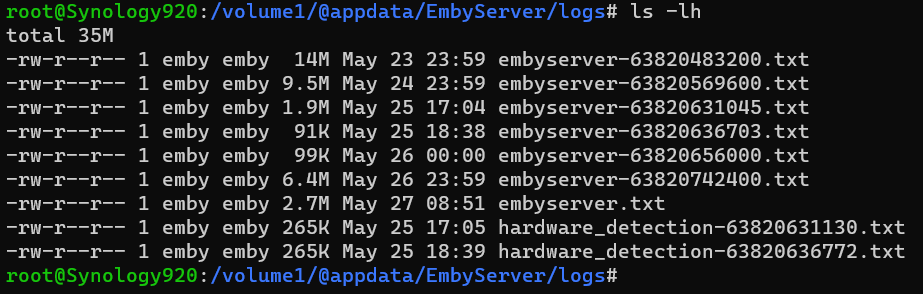
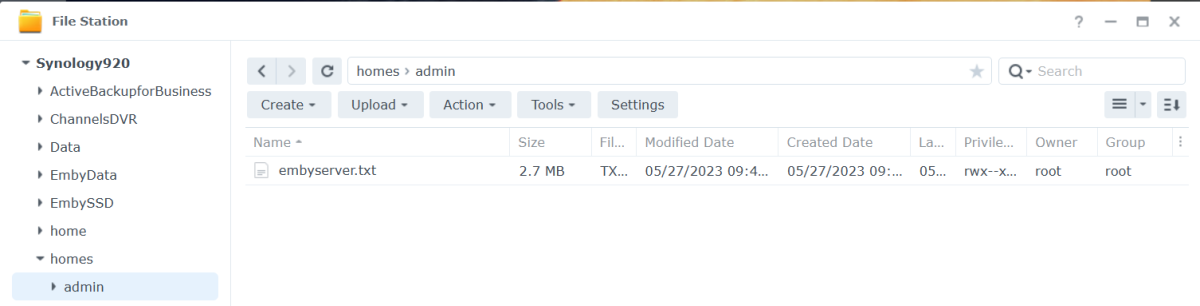 1 point
 -
Hello After the Version 4.9.1.80 auto update some really annoying changes happened. Before the upgrade emby was working fine... It deleted the content of my playlists. The playlists were there but when I clicked the playlist there were no items in them anymore. But that's not the important issue. The important issue is this: I created some libraries. All the libraries include folders of directors or genres of my choice. As an example let's say there was a library "Must Watch" which had the folders of "Quentin Tarantino" "Martin Scorsese" etc. All those director folders had the films in subfolders which included the subtitles and artwork. When I added my "Must Watch" library I made the setting on main screen to show the "Folder" view and when I clicked the folder in that librqary view I got the "Films" view directly. So when I clicked "Quentin Tarantino" the view was directly the films. But now when I click the film it opens the film in the folder view and I have to click that too in order to get the detail page. When I created the libraries I added folders of directors or genres into those libraries and the films were in subfolders in those director or genre folders. It will take a lot of time to recreate the hole thing. Any suggestions?1 point
-
I initiated a full scan and a metadata refresh, they should be finished by now, but the play lists have still not shown up. I'm not going to do anything further tonight, I'll see what the status is in the morning.1 point
-
Hi, we'll take a look at it. Thanks.1 point
-
Beta 4.9.2.2, Docker (Linux).1 point
-
Version 4.9.1.80 on Windows PC.1 point
-
+1 for seasonal/block programming! Erasztv does block programming and it’s a really nice feature.1 point
-
Yes sir, that fixed it. Thank you much!1 point
-
DAMNIT!!!!!!! I did it again. This hecking suuuuuuuuuuuuucks1 point
-
Will definitely try that next time I go to watch tv.1 point
-
Thanks, @Luke As an update: I downloaded a couple more SRTs anffmpeg-remux-fe3e0513-fad6-47ba-a593-82df8a2a08f0_1.txtembyserver.txtd was able to get one working. The rest still don't work. Not sure why one does and the others don't. Anyway, here are the logs, maybe (hopefully) something will jump out. Thanks for your time!1 point
-
Hi, @emby-newbyou’ll need try edit the server config file to undo the changes. You can find it by locating the server data folder: Emby Server Data Folder then going from the to/config/system.xml look for the EnableRemoteAccess node and set it to true. Then start the server. Please let us know if this helps. Thanks.1 point
-
I have now, I will do so now, thank you for the suggestion1 point
-
Have you run a full scan?1 point
-
You might have some TV shows that are using backdrops in the continue watching. That is not really a bug but how Emby works. I can enable icons for backdrops some what easy sadly that will cause all backdrops to have icons on them and not just in the continue watching. Edit: I was to quick there and it's not 100% correct what i wrote. If the thumb is missing Emby will revert to use backdrops. You can fix it by adding a thumb picture in the movies / TV shows that are missing the icons in Continue Watching. Sadly nothing else i can do.. Sorry!1 point
-
Visually yes, functionally no. As mentioned, you cannot identify/change things on a Folder as it is not the actual content.1 point
-
Right this makes the most sense. True but at the same time does not change anything for the Folder layer change on single items to be displayed like previous collapsed like Movie/Shows tabs.1 point
-
Right this makes the most sense.1 point
-
Hi there! It would be great if you could indicate the currently playing on the album track list (like it does on the play queue with the animated equaliser bars) This seems to be pretty common functionality and is means you don't have to scan through track names to work out how far through and album you are.
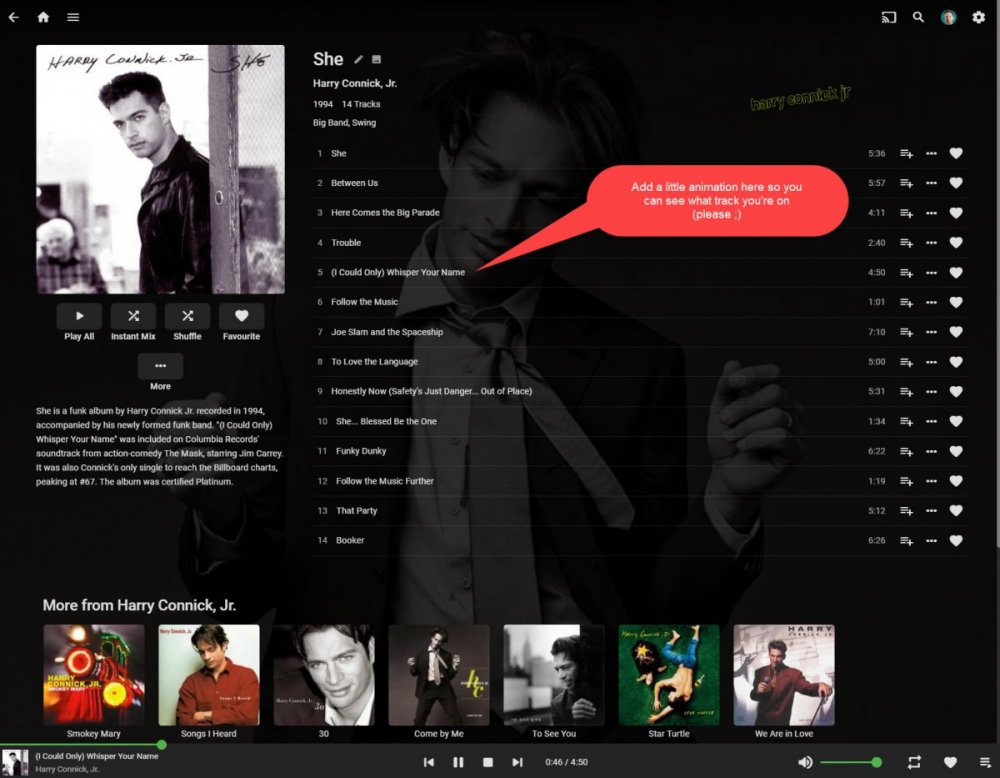 1 point
 -
As a follow up to this post; I downloaded the latest nightly build of TinyMediaManager 5 and the fix for cast and crew was in there. I rewrote all of my movies NFO files (approximately 2500 on a networked server) in the time it took me to go downstairs and make a sandwich and come back upstairs. So in summary, quick and easy and it will work for all platforms. Unfortunately this will only work for those that have their library set up as NFO file only metadata. I can't offer any insight on people who rely on scrapers.1 point
-
Because its not really a choice by emby. If you look at the meta suppliers like thetvdb, specials are all marked as Season 0, which is where they are expected to be. The stuff I posted lets you decide when and where they appear. Plex as far as I remember had no such functionality so rather than keeping your specials in one place you had to put them where you wanted them to show up - sort of. Emby gives you total control and the ability to show specials during seasons in broadcast order. It was s simple change and the only change I had to make to my files, it was somewhat concurrent with a change in naming specials from I think X00 to S00. Anyway, to me , the changes were well worth being able to have specials show or not show during seasons, and where they showed during the season.1 point
-
Thanks. Signing out didn't work. I completely uninstalled and reinstalled the app, and that seems to have solved the problem.1 point
-
Depends on the tool you are using to manage the database (I think) EDIT: Ahhhh I see by your first post that you are using DB Browser AI Says: To perform a recovery in DB Browser for SQLite, use the PRAGMA integrity_check command to diagnose the database, then export the database to an SQL file, and finally import the SQL file back to create a new, fixed database. Step 1: Check for corruption Open your .db file in DB Browser for SQLite. Navigate to the Execute SQL tab. Type PRAGMA integrity_check; and click the Play button to run the query. If errors are reported, proceed with the next step. Step 2: Export the database Go to File > Export > Database to SQL file. Choose the tables and options you want to export. Click OK to start the export process. This will create a .sql file containing the database structure and data. Step 3: Import the database Go to File > Import > Database from SQL file. Select the .sql file you just created. Click OK to begin the import process. This will create a new, recovered database file1 point
-
3. Changed how Skiasharp is used (the part that draws the icons onto the posters) should increase performance and memory usage as well. It should say "and lowers memory usage as well". Just so there are no confusion.1 point
-
this helped me1 point
-
Wow. What a cluster mess. I had to manually refresh metadata on all 30 of my playlists to restore the line items. The Emby app on my LG TV got nuked, I had to reinstall the client and set up login. Additionally everything feels more sluggish.1 point
-
I'm sorry, how complicated is it to create a flag/variable that records the final subtitle choice (including 'none') when an episode ends?! Then when playback of the subsequent episode begins, select the same subtitle option. In the rare cases when the subtitle options for two subsequent episodes aren't identical, then use overall default subtitles setting. Why isn't this a trivial code update?1 point
-
Tried pretty hard to avoid resetting the library database, but I was forced to downgrade to 4.8.11.0 and reset the library database. I was surprised; it was less painful than I thought it would be (so far.) followed these instructions to do the reset. https://emby.media/support/articles/Corrupt-Database.html Looks like it was successful but it's still scanning currently, my music collection has something like 20k tracks so it takes a few minutes. HS1 point
-
1 point
-
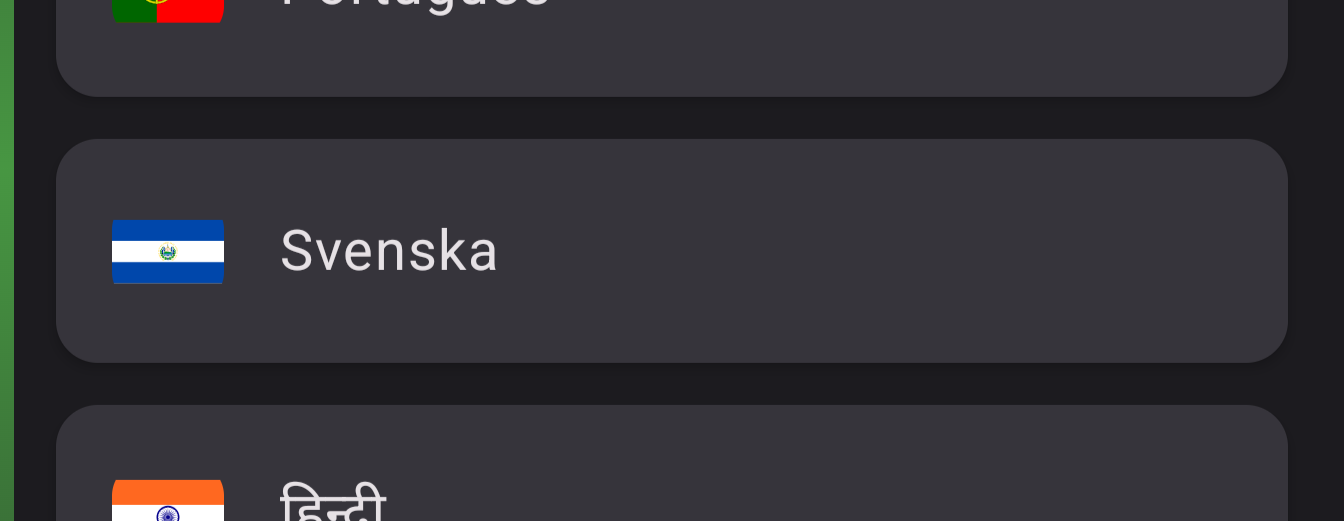
The flag for the Swedish language in the app has the flag of El Salvador. Probably because the country El Salvador = SV and Sweden = SE. But, Swedish/Svenska, the language = SV. So, country SE, language SV. The viewing history for each user show the history for some other user, not the selected one (I already bought premium). Like if I select myself I see history for one of my kids. Same on their users.
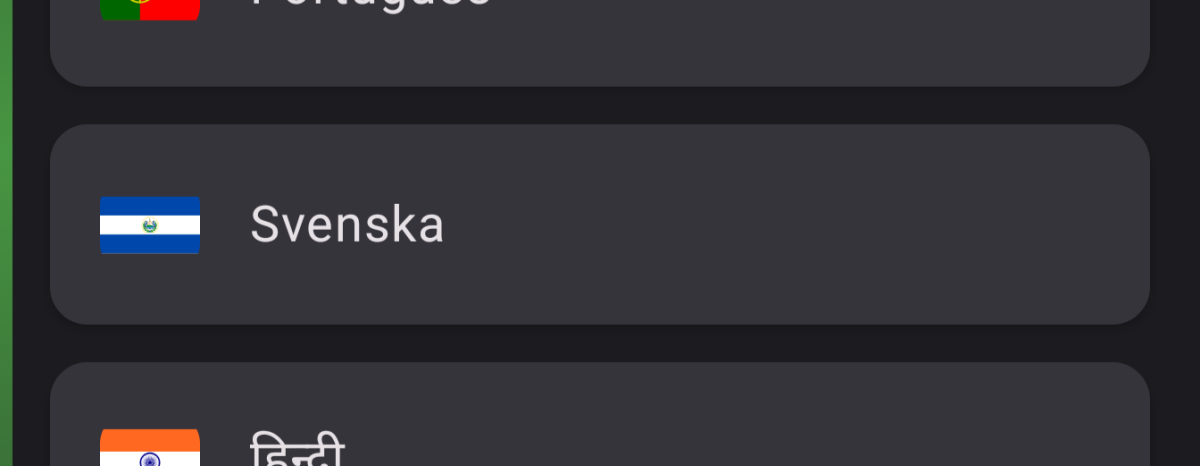 1 point
 -
Tested, but 4.9 is still beta. "latest" tag is still a 4.8 so even if you have a very high quality check, 4.9 is still not the productive version!1 point
-
1 point
-
As you wrote, language ist evolving. Evolution is a natural process. Forcing unnatural speech patterns upon others just for the sake of bring „woke“ (whatever that is supposed to mean nowadays) is the thing you described but have no idea of can be called a „moralische Modenschau“. You can use whatever weirdspeech you want, good luck teaching someone who struggles with German language the concept and application of your generic feminum. Ens ens ens. In contrast to your belief, left activists seem even more obsessesed with forcing those unnatural changes upon others. There have been cases where students received worse grades for not using gender newspeech in their homework. How is this not forced? Maybe some people make a fuzz and try to gaslight others into wrongthinking and using newspeech.1 point
-
Sorry but i dont get what gender appropriate language has to do with beeing political neutral. Also there are quiet many unprofessional (or not neutral) comments in this thread regarding gender appropriate language, like blaming people that use it to have some kind of agenda etc or that it is a "moralische Modenschau", whatever this is. Languages evolve, banning new concepts simply means fear of new things. I mean we could also switch over to using the general femininum if it suits anyone better (i would vote for that). It is not the case that somebody is forced in Germany to use it, so banning is makes no real sense. But it is always on the agenda of conservative german right wings, they really seem ti e obsessed with that topic. Not using it in Emby is totally okay. It is no really good readable etc. But making a fuzz of it like that seems a bit over dramatic.1 point
-
Only affects the web client but you have to edit the navdrawercontent.js to 1 instead of 0. But this has come up in a few topics now going back to 4.5.
 1 point
 -
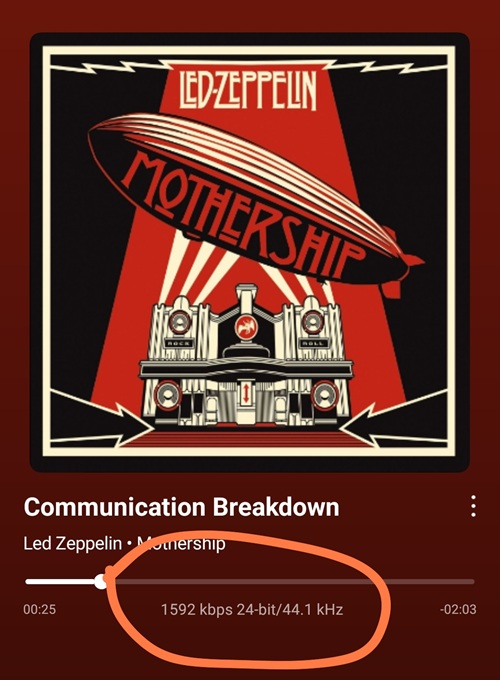
Adding the audio basic info on the front of player will be perfect like file format, bitrate, bit depth and sample rate (eg. FLAC - 1592kbps 24bit/44.1khz).
 1 point
 -
For the playlist issue, try refreshing the metadata on the playlist itself. That brought back the items that were missing from one of mine that had that issue as well.1 point
-
Hi, the app is in the store for TV devices. There is no sideloading required anymore.1 point
-
I believe the gist of this topic is that we prefer the 'individual recording view' to the 'matches everywhere' view. An option would be a reasonable compromise, methinks. Refer to the display in the Windows app, which remains unchanged (i.e. is NOT the 'matches everywhere' view).1 point
-
There actually is something for both of these issues. For #1: Use the D-pad and press left to go back 10 seconds or right to go forward 10 seconds. It will not bring up the OSD. You can press it repeatedly say 4x fast to move 40 seconds. For #2: Use the thumbnail scrubbing. You can visually see where you are. Press the fast-forward or rewind button on the Roku remote. The first press is 1x the second press 2x until you get to 4x them it loops back around. Using this method there will be visible screenshots of what will be on the screen at those moments. Because of this we do not actually have users requesting to gain focus onto the timeline directly to scrub. Were you not aware it worked this way? Can you show screenshots of what you mean? I think it mainly depends on what you have set for this setting. You can also press Play on the remote directly on something to play it. You do not have to enter the detail screen. If you show us screenshots of what you mean and where in the Roku app this happens I can better understand and perhaps we can solve this too. I know you aren't being indignant. You are being human and you have a need. You have to express that need somehow. Some people feel attacked when people ask for changes. We do not feel that way here. We understand that change is a part of evolution. We will evolve as people want things and time moves forward. We do not have plans to incorporate anything except "Your Media, Your Way!". If we are not doing that we are fail at our jobs. We do not plan on fail. We are just missing expectations. If we knew what those expectations were in the fist place we could do better. Hope you understand. We are human just like you and we actually want the same thing. A kick ass media player on the Roku for all our personal media collection. We are on your side.
 1 point
 -
Actually we spoke to Ugreen and they want to handle it themselves .They said they are going to build a native package, presumably by wrapping around our native debian package. That was months ago and I bugged them again about it a few weeks ago, but nothing yet.1 point
-
Thanks. Here is a vote for implementing a stack that supports QUIC. This feature of QUIC alone makes it worthwhile for Android Graceful handling of network switch events, for example, when a user transitions from a WiFi network to a cellular data network.1 point
-
@mailily031 If its not your own server, call the server owner. Emby do not host the servers, and do not supply media files. Quick Start1 point
-
In case anyone search's this topic and finds this thread, I wanted to document my full workflow that worked flawlessly. This was for migrating Emby Server from running on Windows 11 to running in Docker on Ubuntu Server. My media paths changed but I have always had my Emby Server set to save metadata to NFOs in the media folders so the changed paths did not matter. Back up the original Emby Server Create a new backup location for the new server Copy the most recent "full" and "server database" backups of the old server, to the new backup location Do a fresh install of Emby Server in its new location. DO NOT restore anything Set up the Libraries for the new server; pointing them to the correct folder locations Click through each setting on the new server and update them to match the old server (network settings will likely be a new local IP address) Create users on the new server to match the old server. They do not have to match exactly but should be easily identifiable. Wait for Libraries to completely import and populate; "watched" statuses will be gone but do not panic Go to "Backup & Restore" and set the Backup Folder to the new backup location Current Backup Date should be the date of the most recent old server backup (that was copied into the new backup folder) Click "Extract Data From Backup", make sure the old user (left) matches the new user (right); click "Restore from Backup" The watched statuses on the new server should now match the watch statuses on the old server. I hope this helps. Edit: I recommend deleting the old server backup files/folders from the new back up location. That way when the new server does its first back up, it will due a full backup of the new server.1 point


.thumb.png.1ddf135ad99a72646a26d671a28ffe35.png)