Leaderboard




Popular Content
Showing content with the highest reputation on 10/11/25 in Posts
-
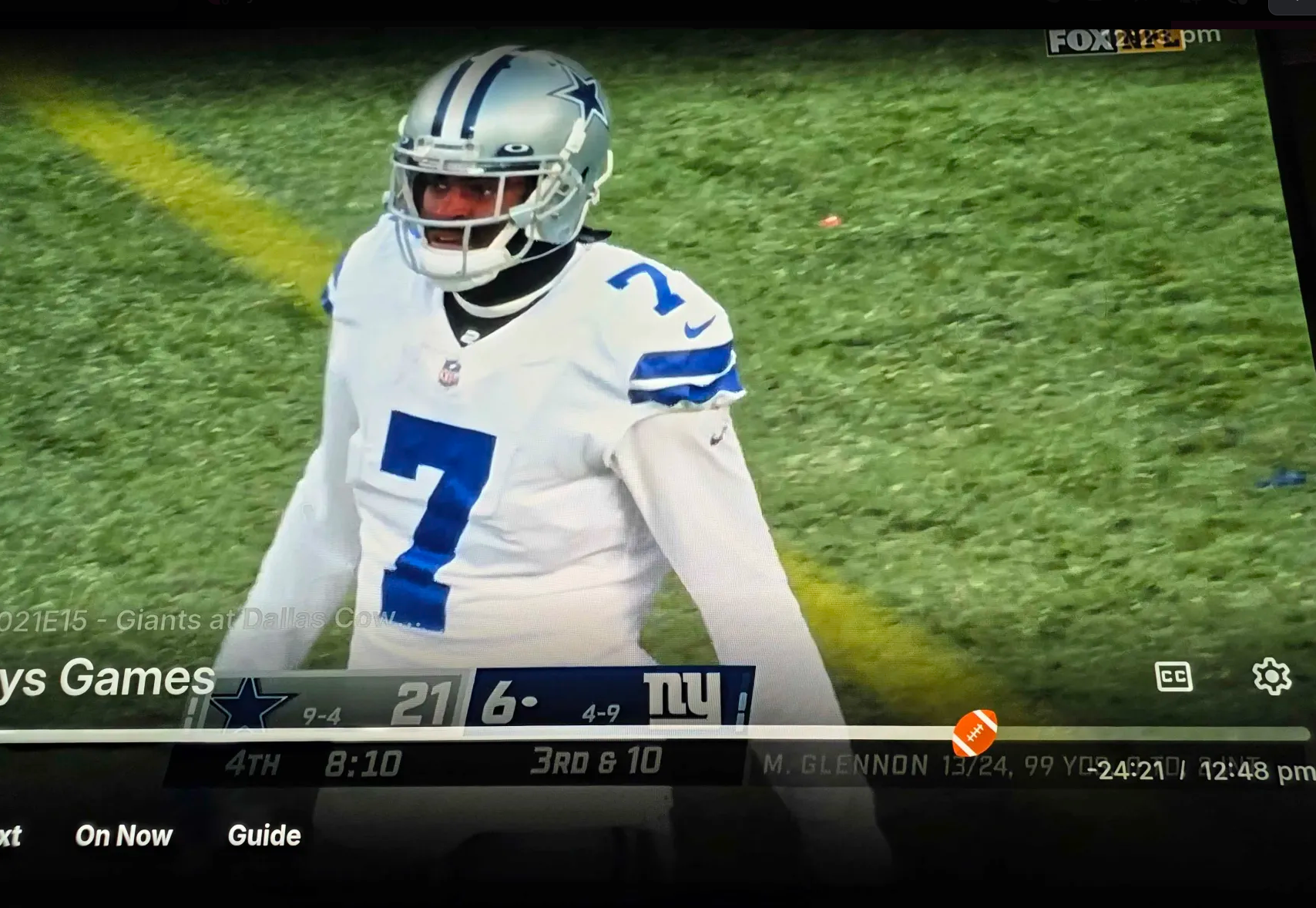
Making your own would be so fun. I'd love to have a little TARDIS as the icon when I watch doctor who for example, while I know a lot of people would NOT want that.4 points
-
As someone who is easily confused, constantly lost, grossly uninformed or just extremely under-skilled I have found myself oft to be a voice of dissent. More often than not loudly. I can honestly say I have never used, or really liked, the holiday themes but that has zero to do with Emby. It's just my personal taste. I am in Emby a lot and don't like the reminder of real life events if I am in the groove of the media. Maybe I want to back up 10 seconds cuz I was laughing so hard I missed the 2nd punchline in a joke or something and now I got reminded I need to buy a Christmas gift. To me it breaks what little immersion I can get from pancake content and immersion from pancakes is hard because of all the VR content I work with.... but I digress. I got sidetracked. My point was this, I am anti-holiday theming and yet I loved the fact they were there. While I never used them I made sure everyone on my server knew they could turn them on for their account (if they ever did I don't know) because they are fun. I hope we see more of these, Luke, and I hope y'all bring back the seasonal ones and more. Let's double back to those voices of dissent real quick. Sorry for over sharing but I will wrap this up quickly. Some of y'all that I'm friends with know I admin a very large Discord server that focuses on support for an app that I think just hit 2m downloads or is about to, I cant remember. I don't know the server size but there is like 9k active/online atm. I only bring this up because I want point out that I have experience being "that loud asshole" and I have experience dealing with them too. It's a unique perspective that I think allows me to point out 2 things: 1. Just because they are a loud asshole does not necessarily negate the point they are making (but more often than not they are just wrong, even at the core) 2. In retrospect, do they ever stop and say "Hmm, ya know... if the bug had not been there I never would have even known this feature was there as I don't watch sports. So what am I really mad at? A feature that ultimately wont effect me or a bug that I happened to run into? If the bug, then why? They almost all get fixed at some point so why am I mad at this bug and not others?" I mean, I know when I am "that asshole" once I am able to look at it objectively I often find my own shortcomings to be the root of my dissent and not some fun little feature or annoying bug. Anyway, I have rambled enough. Just hate to hear the team getting discouraged from fun things because of people who are really mad at themselves and not a little football icon. Love Emby!!!4 points
-
@Lyfesaverthanks for you rambling like it And yes the loudest are heard, and assault any one not having the same view of things. I feel its a shame that Emby did away with the seasonal themes, just because some loud enough said so. I still use the Emby for Android TV, since it still has that option to turn on. Tbh If people does not like something turn it off. I love this fun gimmick but is there a off button, or an opt-in button. I can't finde it, and that might be the issue, if its forces upon people that does not like it. And this is where the team lacks, they don't give us the option to turn on or off, Its forced upon us.3 points
-
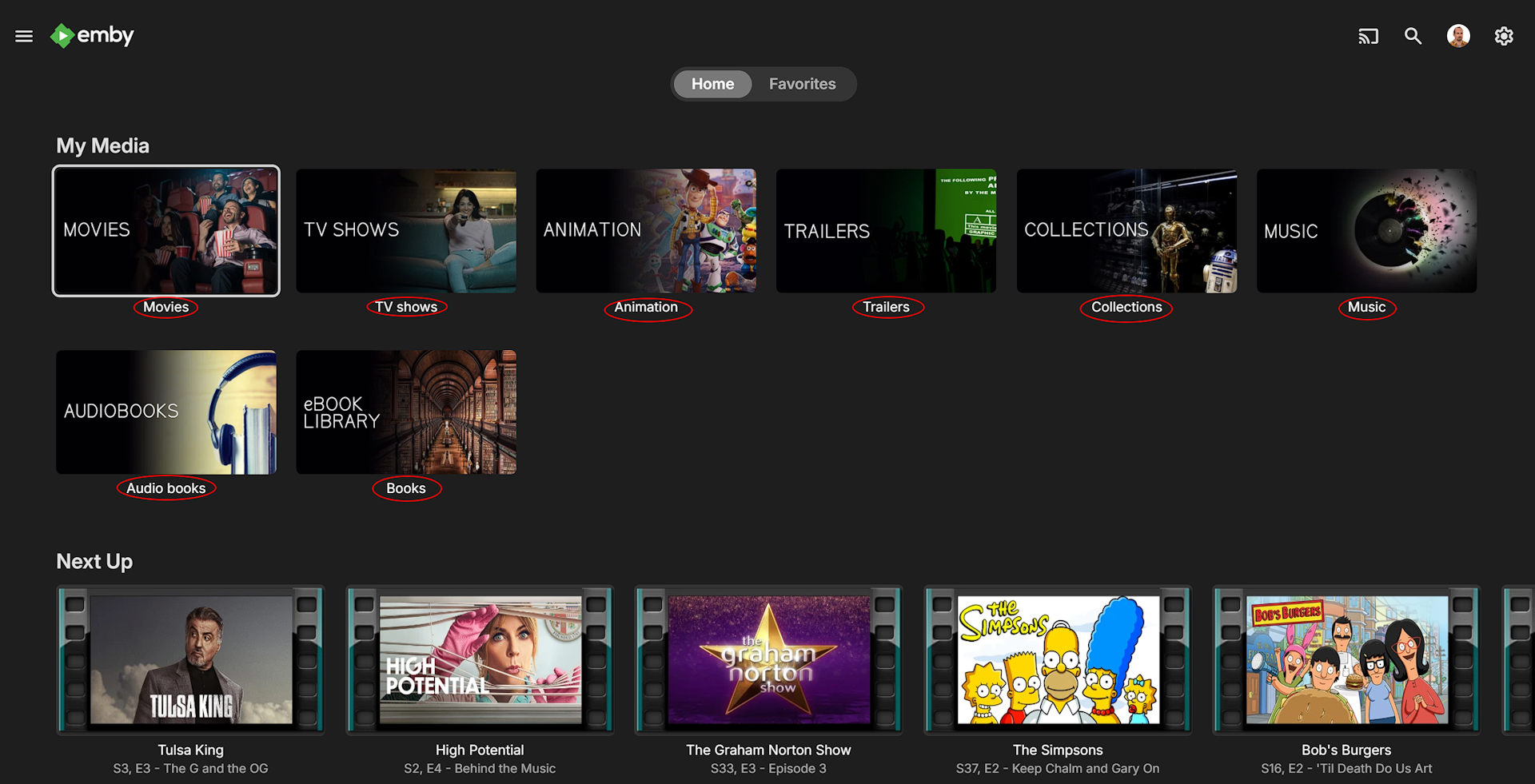
Can the hyperlinks for individual libraries be disabled somehow? They seem to completely redundant unless your artwork doesn't make it immediately clear what the library is. They are only selectable by using a mouse and if using a IR remote, that just skips icon to icon. I think it would just make for a cleaner look if you could toggle them off.
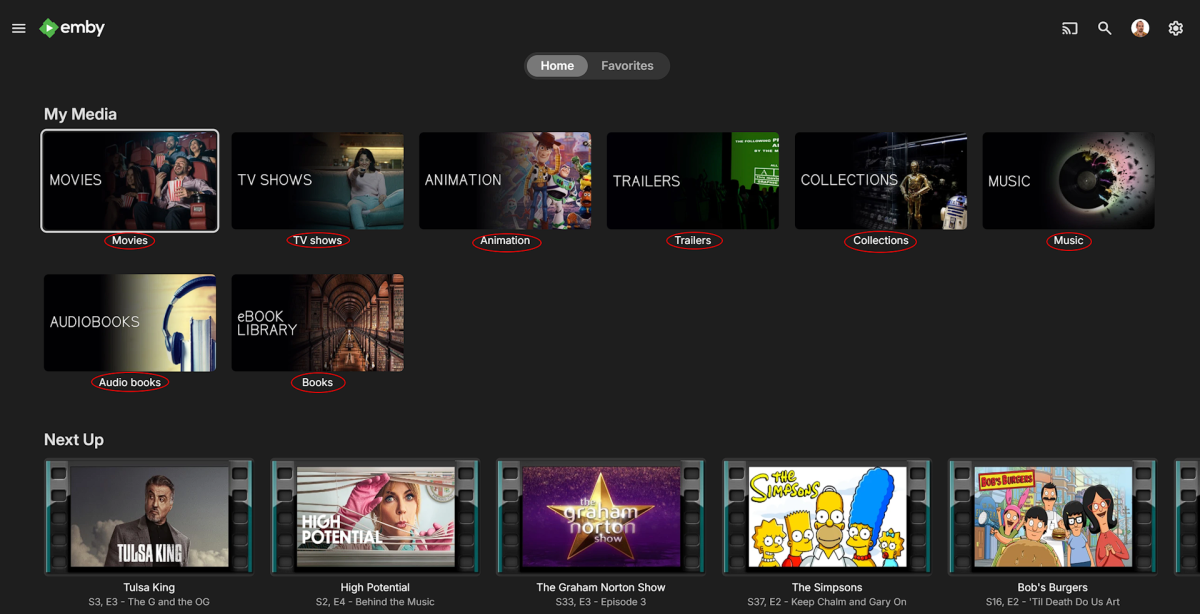 2 points
 -
Just thought this should be an official FR… Since there already seems to be support (and dislike) for this, please make it customizable (perhaps by a plugin) so the admin can control it. There should also be an individual user setting to enable/disable it. I think it should support: Tags to select an icon. A Regex on the program name (i.e. “^NFL” or “ NFL “ …) to choose an icon. Maybe something else? This way: It could be much more than just sports. The Nay-Sayers could leave it off. It could be a little fun and slightly stupid (like some say about me). Ref:2 points
-
El problema de Digi es que funciona bajo CGNAT y tus amigos no podran conectarse a tu servidor aunque tengas los puertos abiertos. para eso tendran que salirse de cgnat ( el coste es 1€ mas ) deberan llamar a Digi e informarse del numero de tf al que tienen que llamar . le daran una IP privada.2 points
-
Hi, I already use AI to discover new series and films. I have created a list of all my films and series and the metrics: genre, addiction factor, rating (1-10). The recommendations based on this data are great for me. So I thought it's a good idea to automate this process and also give family Members the possibility to use this too.2 points
-
Unless I'm being a bit blind (highly possible!), I'd love a way to hide a couple of the top green navigation items without hacking it in myself. For example, in Movies I don't want the 'Trailers' item to appear for any profile and for TV I don't need the 'Upcoming' nav link. Obviously not a major issue but thought it would be a nice thing to have, perhaps allowing them to be re-ordered like the home page items but again just a nice extra,1 point
-
Colorwise based on tedhinklaters Finimalism JF theme, which I really like Lots of base code borrowed by the great @fillidill. Cannot thank him enough for the great base he set up with the Plex inspired Emby theme. A few things: I made this for myself in first place (FullHD Monitor), tested virtually up to 4K and it looked OK to me CSS is working with 4.9.1.80 stable, I will try to fix visual errors coming from changed CSS in future Emby updates The episode count icon is placed to be in line with the Coverart and EmbyIcons Plugins. If you don't use it, change line 341 For everything else, the code is provided as is due to the lack of time on my side. Please don't ask for any changes like the base colors, instead feel free to change the theme to your own delight and post the css here so that everyone can benefit from your work. In times of so much coding LLMs, changing the theme to your favor shouldn't be a big problem anymore (I also used it to clean up the code and remove doublettes). Bildschirmaufnahme 2025-10-02 212535.mp4 Download from here: https://github.com/v1rusnl/Embymalism1 point
-
I just installed this plugin and subscribed to the Patreon, great work this is a really cool feature! I just wish there was a way to feature these collections on the home screen so my users could see them.1 point
-
I'm not aware of way to install old versions from app central, that doesn't mean there isn't though.1 point
-
You're right, Luke. I'll try to investigate whether the problem is with Raidrive (WebDAV) or something else. Thanks so much for your help.1 point
-
Hola a todos, Si está usando Emby en una Raspberry Pi (o cualquier otro sistema Linux) con discotecas duros externos formateados en exFAT y no podéis borrar archivos (error de "Acceso denegado"), esta es la solución definitiva que conseguí. El sistema de archivos exFAT no permite los permisos de Linux. Por eso, aunque usa comandos como sudo chmod 775, los cambios no se aplican y Emby no tiene permiso para escribir o borrar. El problema real está en modo el sistema "monta" el disco duro por defecto. La Solución: Montaje Permanente con fstab La solución es decidir al sistema que siempre monte los discos duros con los permisos correctos. Para ello, editaremos el archivo fstab. Paso 1: Identificar tus discotecas duras Primero, necesidades el identificador único (UUID) de cada uno de tus discotecas. Abre una terminal y ejecuta: sudo blkid Busca tus discotecas en la lista y copia el valor UUID="..." de cada uno. Por ejemplo: UUID="1EE5-89A0". Paso 2: Crear los Puntos de Montaje (si no existen) Asegurate de que las alfombras donde se montarán los discotecas existen. Reemplaza /media/pi/MiDisco con tu ruta real. Si tus alfombras tienen espacios, usa comillas. sudo mkdir "/media/pi/Mi Disco 1" sudo mkdir "/media/pi/Mi Disco 2" Paso 3: Editar el archivo fstab Abre el archivo de configuración con el editor nano: sudo nano /etc/fstab Ve hasta el final del archivo y añade una línea por cada uno de tus discotecas, usando la siguiente plantilla. MUY IMPORTANTE: Reemplaza UUID_DE_TU_DISCO con el UUID que copia en el paso 1. Reemplaza /media/pi/Mi\040Disco\0401 con la ruta a tu alfombra. ¡Cada espacio en la ruta debe ser reemplazado por \040! Asegurate de que el uid y gid coinciden con tu usuario. En Raspberry Pi OS suelen ser 1000 para el usuario pi. # Discos duros para Emby UUID=UUID_DE_TU_DISCO /media/pi/Mi\040Disco\0401 exfat defaults,uid=1000,gid=1000,fmask=0002,dmask=0002 0 2 UUID=OTRO_UUID /media/pi/Mi\040Disco\0402 exfat defaults,uid=1000,gid=1000,fmask=0002,dmask=0002 0 2 La clave está en fmask=0002 y dmask=0002, que otorgan permisos de escritura al grupo, permiso que Emby funcione. Cuando termina, pulsa Ctrl + X, luego Y (o S), y Enter para guardar. Paso 4: Aplicar los cambios Primero, desmonta los discos si están montados: sudo umount "/media/pi/Mi Disco 1" Luego, aplica la nueva configuración de fstab sin reiniciar: sudo mount -a Si este comando no devuelve ningún error, ¡lo ha entendido! Ya puedes ir a Emby y borrar archivos. Para confirmar que todo es permanente, reinicia tu Raspberry Pi con sudo reboot. Espero que esto ayude a otros usuarios. Hecho y traducido con IA, puede haber errores, comprueba y hazlo con cautela. ------ Hello everyone, If you're using Emby on a Raspberry Pi (or any other Linux system) with external hard drives formatted in exFAT and you can't delete files ("Access Denied" error), this is the definitive solution I found. The exFAT file system doesn't allow Linux permissions. Therefore, even if you use commands like sudo chmod 775, the changes aren't applied and Emby doesn't have write or delete permissions. The real problem is how the system "mounts" the hard drive by default. The Solution: Permanent Mounting with fstab The solution is to tell the system to always mount hard drives with the correct permissions. To do this, we'll edit the fstab file. Step 1: Identify Your Hard Drives First, you need the unique identifier (UUID) for each of your drives. Open a terminal and run: sudo blkid Find your drives in the list and copy the UUID="..." value for each one. For example: UUID="1EE5-89A0". Step 2: Create Mount Points (if they don't exist) Make sure the mounts where the drives will be mounted exist. Replace /media/pi/MyDisk with your actual path. If your mounts have spaces, use quotes. sudo mkdir "/media/pi/MyDisk 1" sudo mkdir "/media/pi/MyDisk 2" Step 3: Edit the fstab file Open the configuration file with the nano editor: sudo nano /etc/fstab Go to the end of the file and add a line for each of your drives, using the following template. VERY IMPORTANT: Replace UUID_OF_YOUR_DISK with the UUID you copied in step 1. Replace /media/pi/My\040Disk\0401 with the path to your disk. Each space in the path must be replaced with \040! Make sure the uid and gid match your user. On Raspberry Pi OS, they are usually 1000 for the pi user. # Hard drives for Emby UUID=YOUR_DRIVE_UUID /media/pi/My\040Disk\0401 exfat defaults,uid=1000,gid=1000,fmask=0002,dmask=0002 0 2 UUID=OTHER_UUID /media/pi/My\040Disk\0402 exfat defaults,uid=1000,gid=1000,fmask=0002,dmask=0002 0 2 The key is fmask=0002 and dmask=0002, which grant write permissions to the group, allowing Emby to run. When finished, press Ctrl + X, then Y (or S), and Enter to save. Step 4: Apply the Changes First, unmount the disks if they are mounted: sudo umount "/media/pi/MyDisk1" Then, apply the new fstab settings without rebooting: sudo mount -a If this command doesn't return any errors, you've got it! You can now go to Emby and delete files. To confirm that everything is permanent, reboot your Raspberry Pi with sudo reboot. I hope this helps other users. Made and translated with AI, there may be errors, please check and do so with caution.1 point
-
I'll do that and get back to you1 point
-
@LukeI can confirm deleting the studio removes the matches so it does seem to be matching based on studio. Thanks1 point
-
Would love this feature..I watch everything with English subs and 1.5x playback. It remembers the subs by default but not the playback speed. It’s annoying to have to go to the menu and select the speed for every single episode,1 point
-
I would like to chime in that I have always longed for greater customization of poster images. This is specific to the "home videos" libraries. There are 2 types of problems I run into: 1) Poster/primary images that fail to extract in ffmpeg because the video runtime is >10sec. Currently while setting up image fetching during library setup, Emby's dropdown menu allows for only 2 parameters thumbnails every 10 seconds, or at chapter markers . Suggestion: Add an option for 2, 5,...(n) seconds to allow poster/primary image generation for videos with a runtime of >10 seconds. 2) Or other occasions the video length is not an issue but Emby will select an unsatisfactory image (blurry, it's a closeup of some weird-O's face, shows only the intro logo, etc.). This can happen ofter and creating your own custom poster via a screenshot for each video is a pain for the aforementioned reasons. Currently, you have to delete the image, and then refresh image or metadata. And this cam allow for a situation where you get the same unsatisfactory image over and over again. Suggestion: In webview, under "edit image" add an option under the 3 dot menu "fetch new image." Emby would then randomly fetch an image from a different frame than what is currently displayed. For a user that does not want random, they could instead opt to finetune the timestamp/frame number that was chosen during the library setup.1 point
-
Thanks, I found it after updating the app. Since it was in the server's change log I thought I would see this in the server settings. Putting that in the server change log is confusing in my opinion.1 point
-
Hi Luke, Thanks for the support... Long story short: Unbeknown to me, Zoneminder had an issue saving to the dedicated CCTV HDD in the server, so it started saving recordings to the root HDD. Emby would occasionally just stop working, this was due to the root HDD filling up. While trying to figure out the Zoneminder issue (why it's now saving to a different place) I was going in and manually deleting the CCTV recordings. Did this a few times, then decided to stop Zoneminder from running to save the hassle fo the drive filling up every other day or so. Forgetting about stopping ZM, I updated Ubuntu and rebooted the machine, and of course, Zoneminder defaulted back to running after the reboot.. filling up the root drive again. The strange issue I had at the start of this topic was that normally when I cleared out the rogue files, Emby would just work again as per normal, but strangely on this occasion it gave the issues stated above. Even stranger, I just tried again last night and the green button worked, so I re-created my personal account, and then the server sprang back into life as per normal, with all other user accounts, media libraries, and playlists still in place, etc.. So, I'm now in the process of replacing the CCTV dedicated drive, so all should be back to normal! Thanks again, sorry it took me a while to figure it out, but I appreciate your assistance! Cheers, Scott.1 point
-
This is awesome: HAHAHA way to go I always enjoy the little things
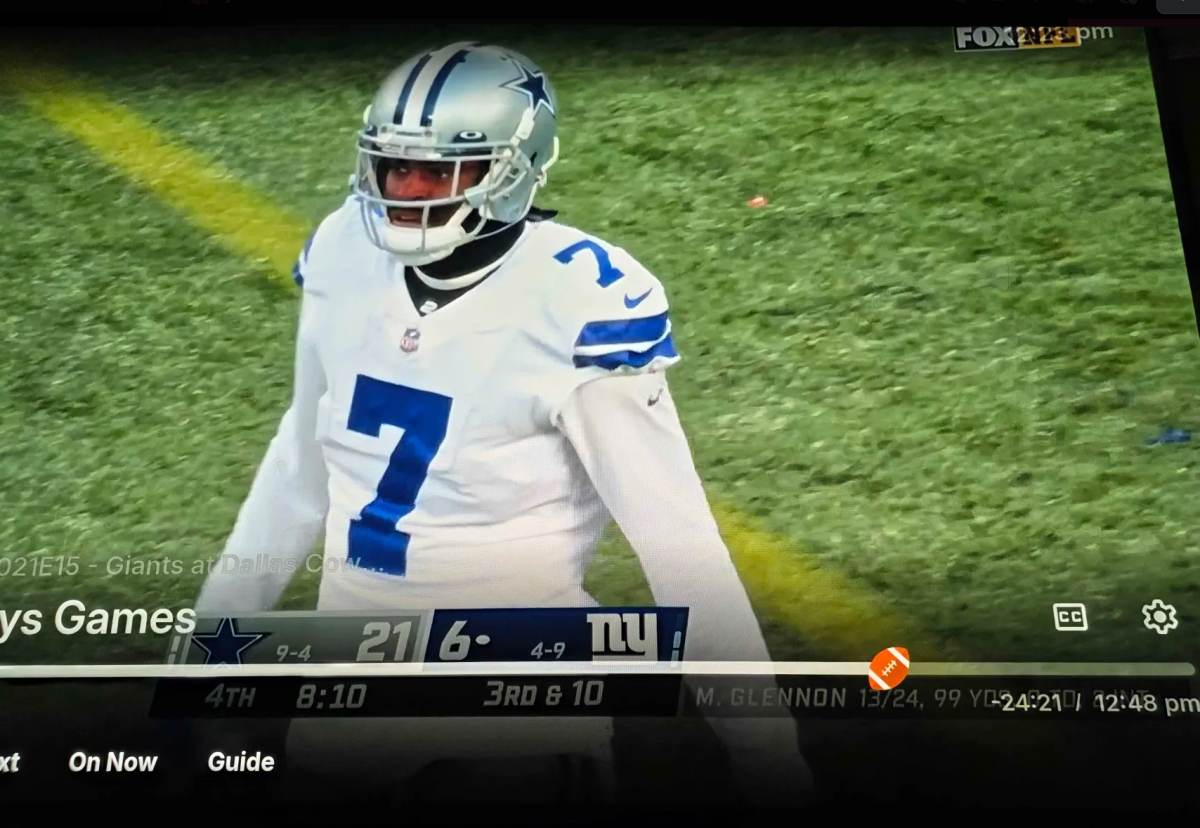 1 point
 -
Basically the idea is to expand on the current options to either use the metadata folder only (default behavior), store images, BIF files, NFO files, etc. next to media and optionally whether or not to copy that back to the metadata folder (essentially using the metadata folder as a read cache). The current options/behaviors could be put into a drop down menu along with the aditional options. The first additional option would be an inverse of the current option to make a copy of images to the metadata folder. Basically the metadata folder will be the primary location to write and read images etc. from, but any changes will still be copied over to the media folders. This makes the metadata folder the "source of truth" and prevents any unwanted alterations/deletions/corruption of images occuring externally as emby could just replace them from the metadata folder. On the initial library creation or new library addition do a one-time copy of images/etc. from the media folder to the metadata folder. Afterwards any further changes will then go from the metadata folder to the library folder and any external alterations will be overwritten by emby unless the item is deleted/renamed, etc. The second option I propose would basically use the metadata folder as a write cache, but still use the media folders as the primary location to read from. Like the first option, the metadata folder becomes the "source of truth" for any changes, but reads should still happen from the library folders. I'll admit this one may be a bit more niche than the first option, but I still see some utility to this assuming it wouldn't cause too much additional complexity or conflicts. These options would expand on the existing ones to allow better fine tuning of performance, data flow, and consistency for different storage setups whether it be separate NAS & Emby server, or a single machine with a mix storage that is pooled, tiered, or split into separate arrays, volumes, etc. I personally use Stablebit Drivepool on my server and have a mix of HDD's and SSD's and NVME drives in various pools and subpools. I think they would also be useful for others like myself that are running multiple Emby instances pointed to the same library folders for separation, testing, or a variety of other reasons.
 1 point
 -
Continuing this thread, I'd like to see an option to allow NFO files (as well as BIF and images, etc.) to be saved in a location other than the media folders. For my own compulsive reasons (mostly to promote ease of finding files using alternative media players), I want the media folders to stay clean without a lot of superfluous files. So I prefer to only store video files within the media folders, and am willing to concede subtitle files as well, since they have utility as most other media players can pick them up. I really want to save NFO files because I've had very bad experiences where metadata refreshes within Emby have undone hours of configuration (I discovered too late that it's not enough to simply identify a title that Emby misidentified; if you don't lock in the metadata after manual identification, a refresh will destroy it). But I'd like to be able to allow the NFO files to live in a parallel location managed by Emby, and not in my media folders. It makes sense to do the same thing for images as well (this would also help prevent similar disasters when my custom image selections got blown out upon refresh when Emby again re-misidentified a title that wasn't locked). And doing the same for BIF files just seems like a natural progression to keep the original media folders clean. Ultimately, I have learned to not to ever refresh metadata, but my prior experiences, along with several comments relating to NFO files in this forum, really reinforce the idea that not having an NFO backup is a recipe for eventual doom. I'd just like to be able to do it neatly, without dumping the NFO files into the media folders, and to place them instead in a parallel structure, whether it's metadata, cache, or something new.1 point
-
Appreciate the help @GrimReaper1 point
-
Refreshing the metadata while choosing the options to look for missing metadata and replacing images does the trick.1 point
-
This issue has been completely resolved as of a couple weeks ago. I'm not sure how or why but everything is showing up as it should again and I didn't change anything. There were physical changes in the dark theme such as the scrolling alphabet being on the right side, text labels too small to read even in 1080p on a 50" screen. There was something that changed the GUI. Now everything is back to how it was. On default settings icons are large again and labels are legible from far away. I still have no idea what caused the issue, what caused it be fixed, but it's back to how it always used to be. Grandma is very happy.
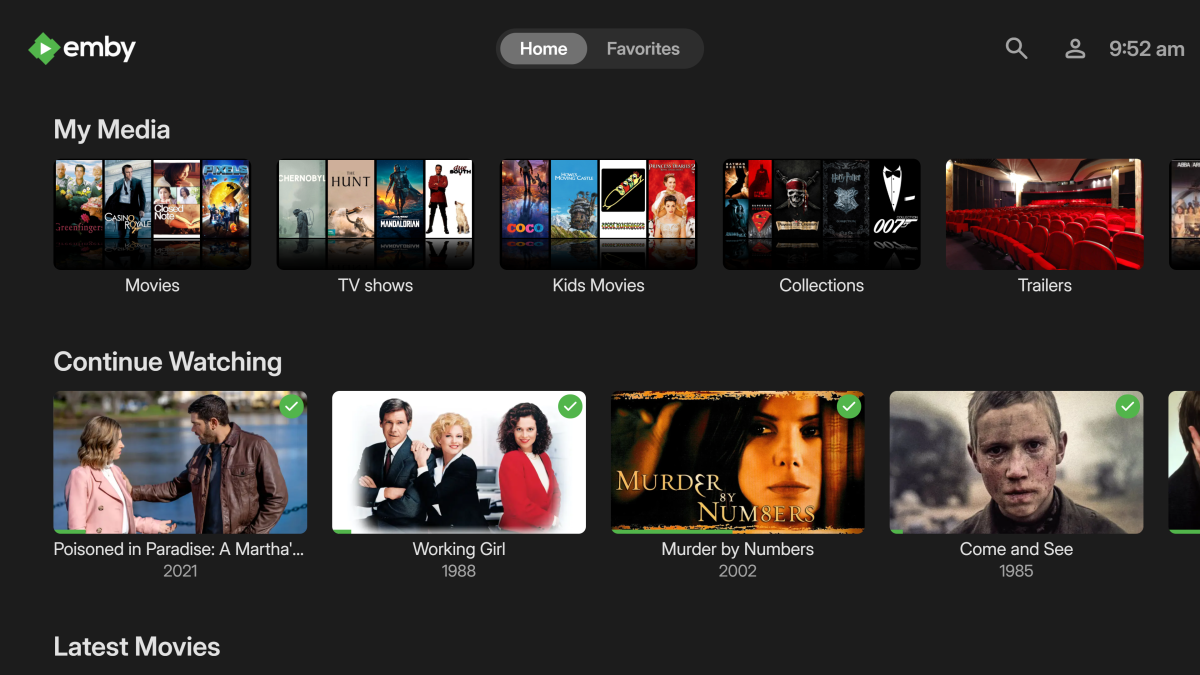 1 point
 -
No, I don't think that's the same. I'm not talking screensaver. The picture I provided is the normal background when playing music. I just want the OSD to autohide like it does when watching a movie and maybe just show the track time left. @ebrI totally forgot ATV does that, but it wasn't on that list either. I guess I'll ask a mod to add it.1 point
-
Same as this, or you want a custom thing like Android TV has?1 point
-
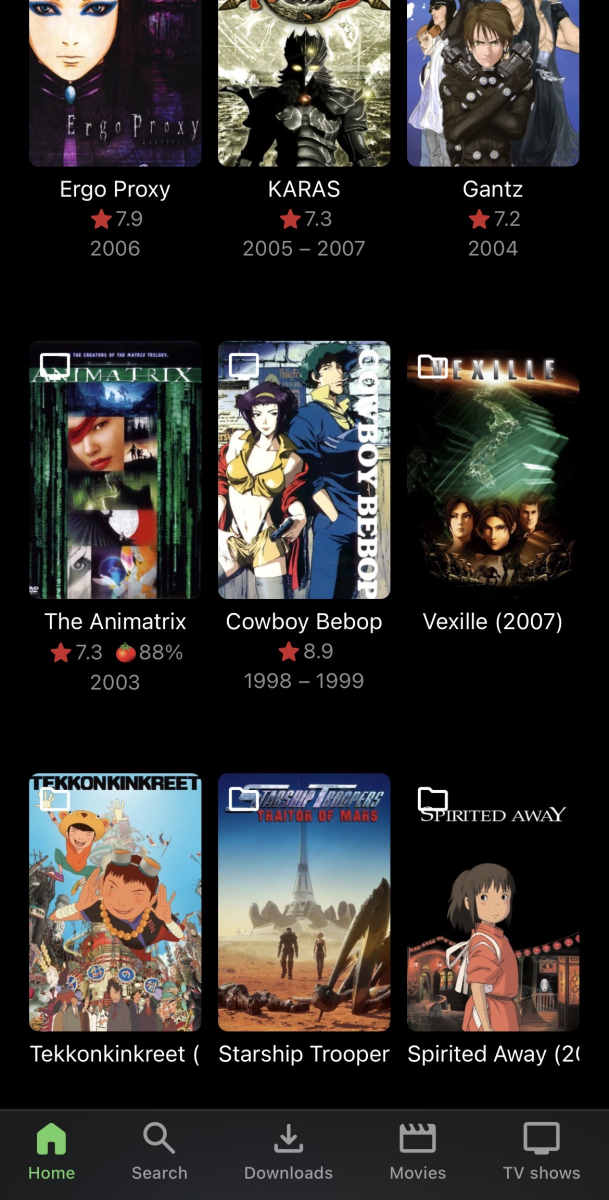
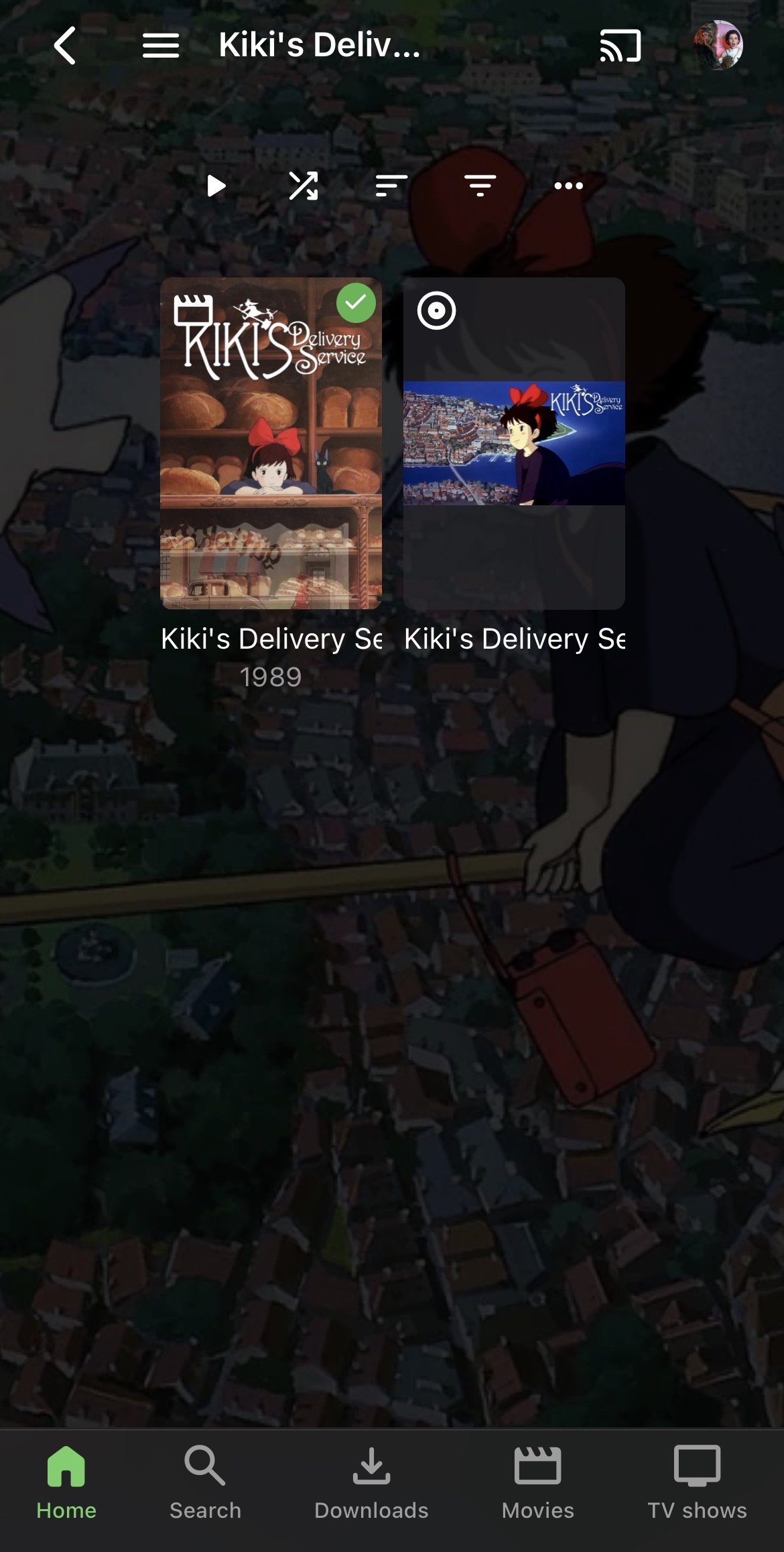
I think what it needs is an “All” tab that it defaults to. I get the reasoning for making the folder view more accurate but it seems a bit broken to me. For example I have a mixed folder for Anime, and in the folder view the series will still display IMDb rating and year, as it used to, but the movies don’t, so they won’t air by release date. Also the movies that have a theme mp3 show as a separate file for the movies
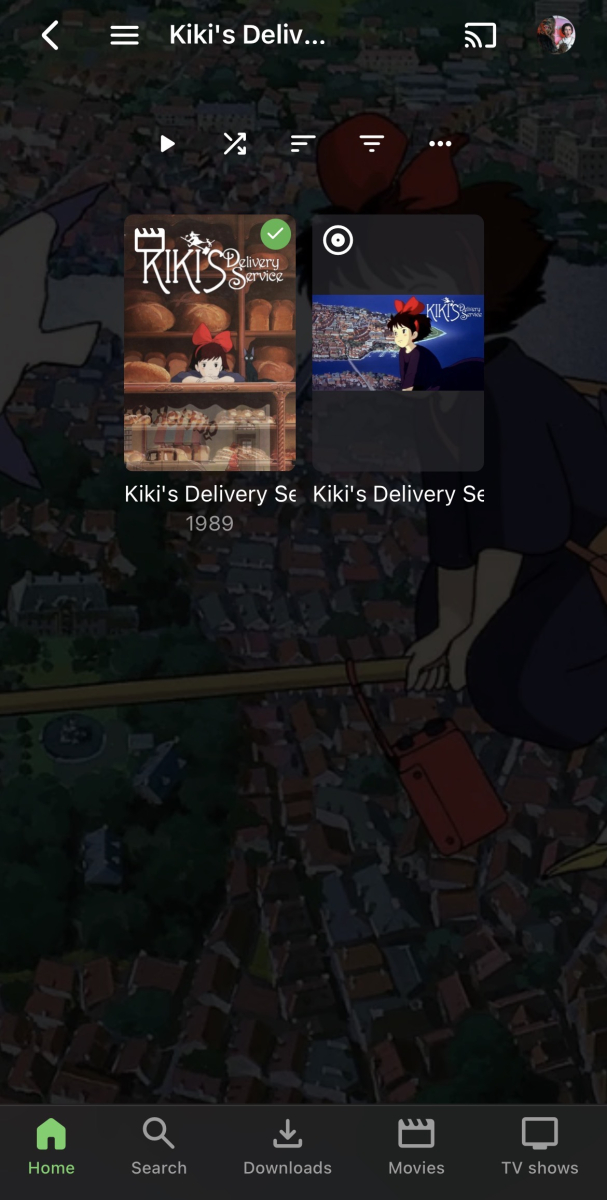
 1 point
 -
I loaded 4.9.1.80 under DSM 7.2.2, I don't think it will really matter the order though from the comments I've been reading.1 point
-
Absolutely love it. Only thing that would make it better is if people could add their own! (And maybe certain people could disable it)1 point
-
Yes, that's what I have. No issues from day 1 of release of DSM 7.3. Since, upgrading to DSM 7.3 I've updated from 4.9.1.80 to 4.9.2.2 beta, but neither has had any issues.1 point
-
@Lukewhat about the possibility to edit my startpost by myself. Dont get the reason to limit that anyway. I mean i run a forum myself, and we are also limiting the edit capabilities to reduce spam, but only for persons like one time posters, and not für long time members with many posts.1 point
-
Hi, there's already an open request for this or something functionally equivalent. Please join in and contribute to the existing discussion at:1 point
-
I don't truly want to be an obstacle, so far the sake of understanding Luke's approach, please help me understand why a combo Movies/Shows is considered to be a solution to this problem. I have my folders organized broadly by my own genre-based categories. Top-level folders are "comedy/", "sf/", "action/", etc. I run a single mixed content library and have been steadily digitizing my video library and putting all content into Emby. It's nice to have everything all in one place, and the content is not just movies and tv shows. For example, a family member recently captured an entire live concert on their iPhone. I doubt if anyone will ever watch it again, much less all the way through. But someone captured it, it's data, and I keep everything. So rather than take up room on the phone, I throw it onto my server by neatly numbering some 20-odd video files to correspond to the sequential setlist, and place them into a folder "/music/concerts/<BAND_DATE_VENUE>". In Folder view, I create some nice graphics for the containing folders in the folder hierarchy, and I'm done. Emby can't find any metadata because it's not a legit piece of content, and I don't need to waste my time to set any metadata, because anyone who wants to watch it can find it easily by navigating through Folder View. The "Movies" tab looks at this content, and throws up 20 icons for the 20 files, because all it knows is that it's not in a "Season 1" folder, so it's got to be an important movie. Is there a way to flag it so it's not a movie? I don't need or want it to show up anywhere on either Movies or Shows. What do I do with Pixar shorts that show up as movies? In Folder View, they are easily found under "animation/Pixar/shorts/". But Emby thinks they are movies, and displays them in the "Movie" view, and not in a particularly organized fashion--they are simply mixed through the list where ever they happen to sort alphabetically based on my current filter. Oddly enough, I had manually added all of my Pixar content into a Collection and I thought this might have caused the Movies tab to group them together, but it doesn't. I'm not sure if this is a setting I need to enable. At any rate, the Pixar Collection looks great on the Collections tab, which is all I really want it to do. It seems your approach would cause me a great deal more work to have to figure out if there is a tvdb entry for a "Season" of Pixar shorts and force me to manipulate the filenames to get them to link up. A purist probably wouldn't even want them to appear under either Movies or Shows. Folder View is the one-size-fits-all approach that let's everyone with a non-flat file structure do what they want to do with the software. How exactly am I supposed to organize my content so that the combo Folder/TV replaces what I used to have with Folder View? I would normally be glad to experiment and try to figure these issues out on my own, but at this point, I am not willing to chance wrecking my metadata any further while I am stuck on the 4.9 build.1 point
-
I readily admit that I may be missing something, but merging Shows and Movies into a single tab is not the same thing as restoring Folder View. At least, not if you don't automatically group into collections. I can't speak much as to what the auto-collection setting does, since I have it turned off and use folders to categorize my mixed content library, and add titles to collections manually, based on how I want them to appear. "Folder View" is an organized hierarchy based on the underlying folder structure. As I understand it, "Movies" pulls out everything at any folder level that isn't identified as a TV Series and dumps it out as a top-level title. "Shows" does the same thing but will only include tv series. If you have previously relied on Folder View to establish a content hierarchy, and are not automatically grouping everything into Collections, "Movies" and "TV" are both very large and unwieldly lists of titles. It would not have the implicit grouping/categorization of the underlying Folder structure that a previously quiet subset of us users used to rely on. Combining Movies/Shows tabs is a great idea. I know I'm probably more thickheaded than most in my use of Emby, but I don't know why there are content types at all. Why not have everything be mixed content? Who consumes media in this bifurcated way anymore? You login to any streaming provider, and all their content is right there, grouped into various categories that the provider felt was worthwhile for navigation. But for emphasis-- a combined Movies/Shows tab does not replace Folder View. If you have your folders organized by genera/director/year or any other logical grouping within which you want to present your titles, it will be incredibly burdensome to recreate the same view using the Movies/Shows tab, whether combined or separate. And virtually impossible if you have further logical subgroupings of nested folders.1 point
-
And could it be possible to have an option that would behave like the previous legacy version in the emby server options? I really miss how it used to work.1 point
-
I think these are great ideas. The server doesn't currently track this sort of information so all of that would have to be expanded upon first before it could be added to the api.1 point
-
v0.0.4 online on Github - See plot overview when clicking the logoart - decreased the item pool to choose from to 100 Aufzeichnung 2025-10-10 180010.mp41 point
-
There's no one size fits all answer and too many factors will determine how much space you'll need for Emby. If you want to avoid a system hang due to filling up the root partition my suggestion is to add a 10GB /var partition which is where most of the Emby configuration and runtime data goes as well as that for other applications and services you might be running. Depending on what else you're running this might not be enough. I have a modest size media library and my emby home (/var/lib/emby) directory is 6.5GB which also contains the cache and metadata files (defaults).1 point
-
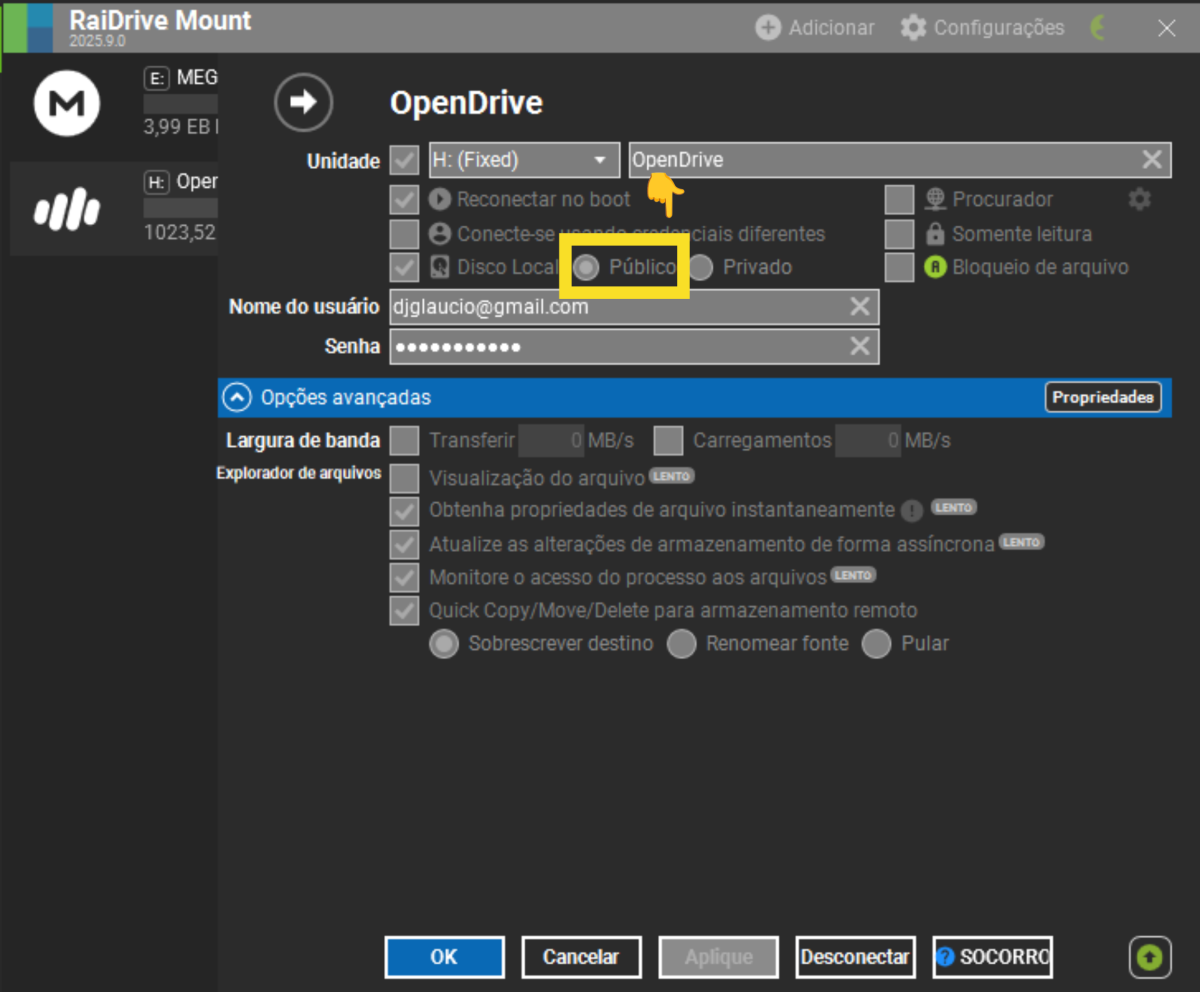
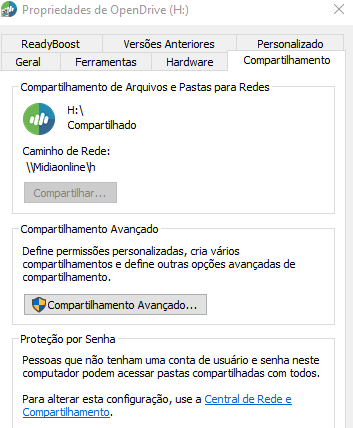
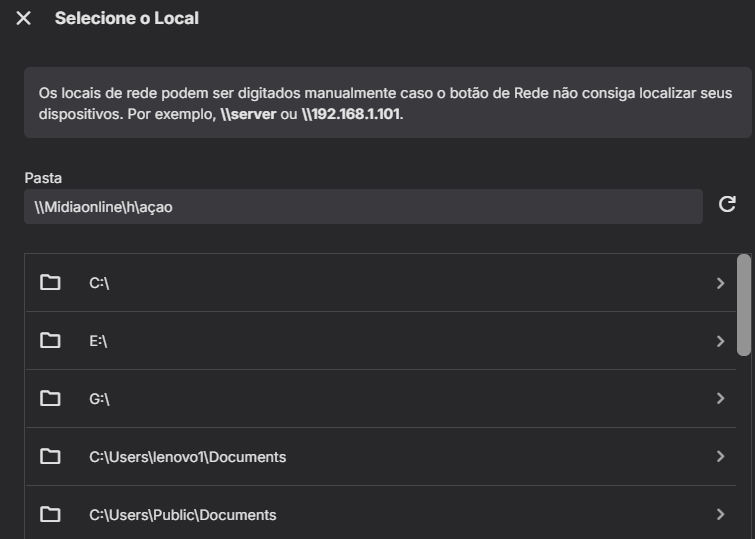
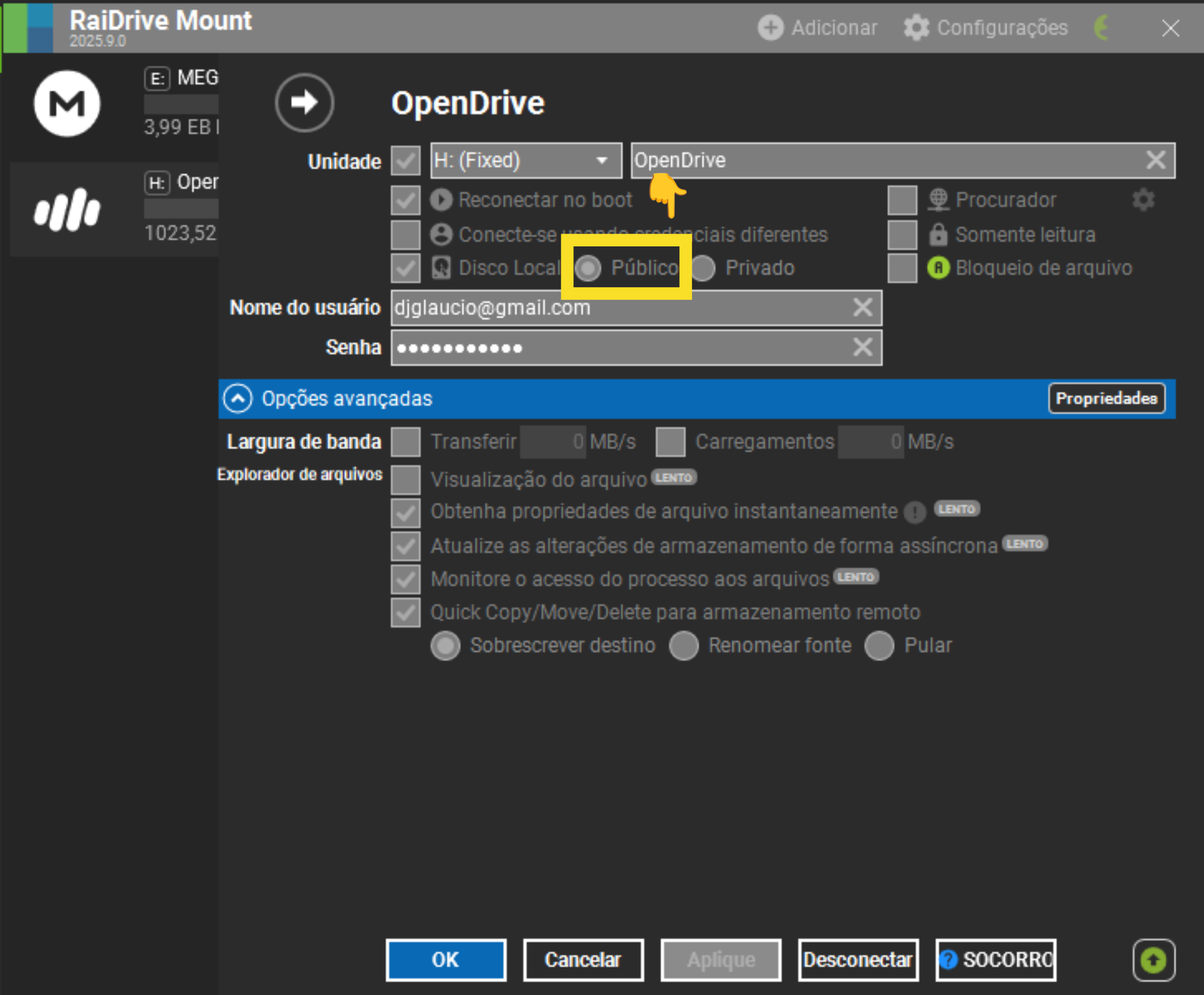
resolvido 1-ao criar unidade mapeada no raidrive(plano individual=pode editar) no serviço Opendrive("Unlimited" a partir de US$ 9,95 por mês) a unidade mapeada deve ser(Publica) foto abaixo 2- compartilhar unidade criada (raidrive/opendrive)(H) na rede.Uso windows 10=(CONCEDER ACESSO TOTAL)foto abaixo 3-detalhe importante: para o emby encontrar a pasta que voce quer incluir na biblioteca na unidade mapeada e compartilhada,criei a pasta "açao" na unidade (h) 4-agora o mais importante o caminho a ser digitado direto pra pasta(açao)=\\Midiaonline\h\açao (foto abaixo)
.thumb.png.190ddb094c15243bdfcfecba1d84416d.png)
 1 point
 -
Wait so now official releases aren’t deemed stable? Wtf1 point
-
actually now that i recall, i did add some detection for mkv a long time ago even though there was no browser that was known to respond to it. so if what you're saying is true, then i guess we got lucky and the way they implemented it matches how we're checking for it.1 point
-
So since the video is being direct streamed due to unsupported container (MKV), it is delivered to the client in the form of MPEGTS segments. MPEGTS does not support FLAC, hence the transcoding to AAC. The good news here is that FINALLY firefox has implemented MKV support for H264/HEVC* after almost a decade.... MKV Support hasn't made its way to stable quite yet, but in nightly I am able to direct play FLAC audio in firefox nightly.1 point
-
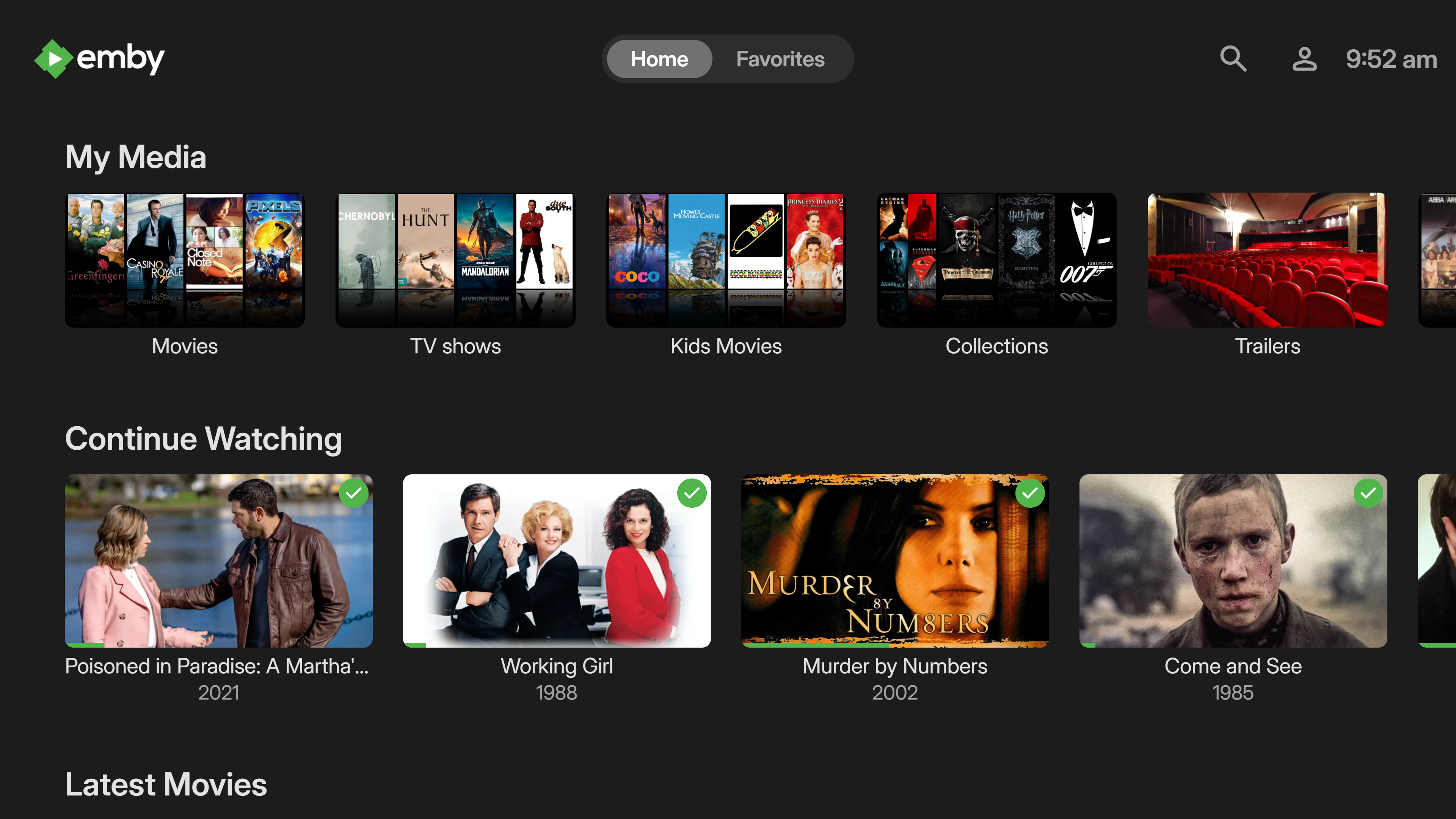
More items in the Latest row(s) would be nice. I just added a bunch of new TV shows / series and 16 isn't enough. If I click on Latest TV, it goes to Suggestions, which is useless, I would like more Latest TV not Continue Watching or Latest Episodes. I can sort TV by date added but that doesn't show new series added to existing ones (series 5 of The Expanse) for example. Similar for Movies please.1 point
-
I realized someone else already beat me in posting this issue. We can close this thread and continue on the other one since it was opened first. Although this more recent thread is also ultimately the same issue and has more development feedback:1 point
-
Added blur zoom to background instead of annoying infinite zoom in <-> zoom out + minor cosmetics Finimalism_Inspired_for_Emby_4.9_20251005.txt1 point
-
The current behavior writes to the media folder first, then caches a copy to the metadata folder, basically just using the metadata folder as a read cache. As an example, with the existing option if I make change to a poster next to the media the version in the metadata folder gets updated with that image. The first option I suggested reads/writes from/to the metadata folder as the primary location, but also writes a copy to the media folder. In this situation the metadata folder would be acting as a write cache as well as read cache. As an example, if the poster stored next to the media gets changed, that change is not seen by emby and will later be overwritten by a libary scan/scheduled task, etc with the poster from the metadata folder. This prevents any unwanted changes being permanently made to images stored next to media by another emby instance, other software monitoring media folders, accidental deletion, etc.1 point
-
The possibility to add sections to the home screen, as well as sorting the entries (as fpund in a different request), is a must nowadays I believe... the flexibility to customize the interface. Are there any news on this request, 4 years later, please? Related topics:1 point
-
Welcome to another of Emby's 'how can this possibly take so long' threads...1 point
-
I also would like to hide tabs from the music library, for example, I want to hide the "Favorites" and "Album Artists" tabs.1 point

























.png.105feae0bd10a42402e30b7d626f09a9.png)