Leaderboard




Popular Content
Showing content with the highest reputation on 08/22/25 in Posts
-
Once again, thank you very much for what you wrote! I'll try to summarize the situation: a malware (?) managed to connect to my IP address using the port opened by/for Emby: 8096. Then, from Emby's login screen, it connected all my users except admin because these users didn't have passwords configured for local access to the Emby server. Thank you for confirming my understanding.2 points
-
That a really great write up2 points
-
I've posted this before, adding here for reference. General good practices for securing your Emby server. 1. Enable TLS/HTTPS 2. Use a reverse proxy if you can and know how to do it. If you don't know how look into Caddy and use a reverse proxy. 3. Force all users to have passwords. 4. Don't allow remote access for Admin accounts. If you do then make sure the passwords are strong. 5. Don't show users on the remote login page. 6. Don't show admin users on any login page. 7. Don't use the name Admin for your main admin user.2 points
-
Aha! Yes, somehow they figured out your user names and logged in without password. So at least you have one action item to correct this but don't know yet how they got the names. You can use these commands from Windows Powershell to quickly generate random strings for passwords. You can choose with or without symbols and change the length of "30" to anything you want. The "-" is part of the join command, not a bullet. -join ((48..57) + (65..90) + (97..122) | Get-Random -Count 30 | % {[char]$_}) -join ((33..126) | Get-Random -Count 30 | % {[char]$_})2 points
-
If everything comes back clean after you isolate and scan then go to Emby Server settings -> Users. Change the view to table and enable all fields. If any of your users don't have a password that is a problem. If they always use Emby Connect you can consider changing all of their local passwords to long random strings. You can also disable their ability to change password on your server which shouldn't matter because they use Connect. If they do have local passwords then figuring out how they authenticated is still a priority.2 points
-
General info: I re-wrote the complete audio/musicvideo sync for proper playlists support. As this function is not really integrated in Kodi (m3u only with very limited metadata support), the plugin will use a complete different approach to handle it. Also I fixed several bugs in the music part of the code. That's the reason why the next version takes a while and I hope I can release it in the next days when my internal tests are completed.2 points
-
I'd really like to have 2 Factor Authentication added to the login screen. It's just this (optional) extra layer of security to help secure the server (which, especially if people use camera uploads) contains pretty private data. There are for every type of programming language quite a few libraries available, so implementation on a server shouldn't be too hard to realise1 point
-
I'm a plex life time member, but I have been using Emby for over six years continuously, but there is a feature which I have always thought is missing in Emby which I would like and encourage the developer to consider including especially in this dispensation where families can social or commingle due to COVID 19. Today, I received a notification from Plex about it new feature titled Watch together you can read about it here https://support.plex.tv/articles/watch-together/ The feature allows friends and families at distance to watch same movies together instantly, you simply invite all your buddy, once they signed to the system which can be seeing in the server then play and pause as needed, this I think is cool feature should be added to emby. Let's here your though if Emby developer should consider adding this feature to our beloved Emby Media https://www.bing.com/news/search?q=Plex+Watch+Together&qpvt=plex+watch+together&FORM=EWRE1 point
-
Since we can now detect end credits, or manually add them in other cases, it would be nice to see this, rather than an automatic percentage/time remaining, trigger the "next episode" popup and decide whether an episode is resumable or not. Even better if it could expand to movies for the latter point.1 point
-
FFmpeg 8.0 added support for the Whisper filter that is able to detect and transcribe speech https://www.phoronix.com/news/FFmpeg-Lands-Whisper1 point
-
Could be- but just generally having a long embedded name in the metadata is more the problem I think. So probably what might be better is to not display the embedded name of the video stream, and just stick with the file name? Or maybe the Emby metadata title. I have noticed sometimes the metadata names can get really long. It's obnoxious enough I was actually looking at writing something to scrub the embedded name in the video stream and just set it to be the same as the file name, but anyway...1 point
-
Why not though? I'm just trying to understand the rationale behind having it time out in the first place as I personally find it rather annoying.1 point
-
https://www.techradar.com/televisions/lg-removes-dts-audio-from-its-2025-tvs-heres-what-that-means-in-practice1 point
-
It will be on the beta channel first in the near future, and then make it's way to stable. Thanks.1 point
-
Yes, they should be. I might have suggested a built-in checker a while back, around the time of the breach, to identify and warn of settings that deviated from or were in conflict with these. But other things have higher priority.1 point
-
OK, so I used the option for placement DURING playback, and was able to move it to the bottom - the setting however is not intuitive, just shows percentages, noone would guess that tne of those settings would move it to the bottom of the screen, certainly not me. So this seems to have been solved! TY1 point
-
Hi, yes no it works. I Used the same UID like the folders on NAS. THX1 point
-
tbh, I'm still not sure why these are not the default settings during the install wizard...1 point
-
I concur with this request, and I further suggest that this be implemented in a "tiered" system, similar to the "cascading" model of CSS. Base-level: Default to some Emby vanilla "sensible" layout--whatever it does now. Second-level: Give the admin the option to configure a library as he chooses and then "push" that organization, manually, to all new or existing users, or both; OR to a specific user or device. A "pull" option might be good too: "Reset my home/library/folder view settings to server defaults" or something. Third-level: device-specific overrides, such as system language, or sidebar expand/contract based on viewport size, etc., override whatever is pushed. Or there could be a toggle for this. Top-level: Individual user customizations, such as sort/filter, thumbnail size, etc., finally override whatever was last pushed from the admin. Obviously there is no clean & simple solution for everyone, and obviously each user will still need to do a bit of configuration per device... but personally I get tired of (for instance) switching from "Primary" to "Thumb" image across dozens of folders and a big handful of devices. Thanks.1 point
-
Thank you very much for your help!1 point
-
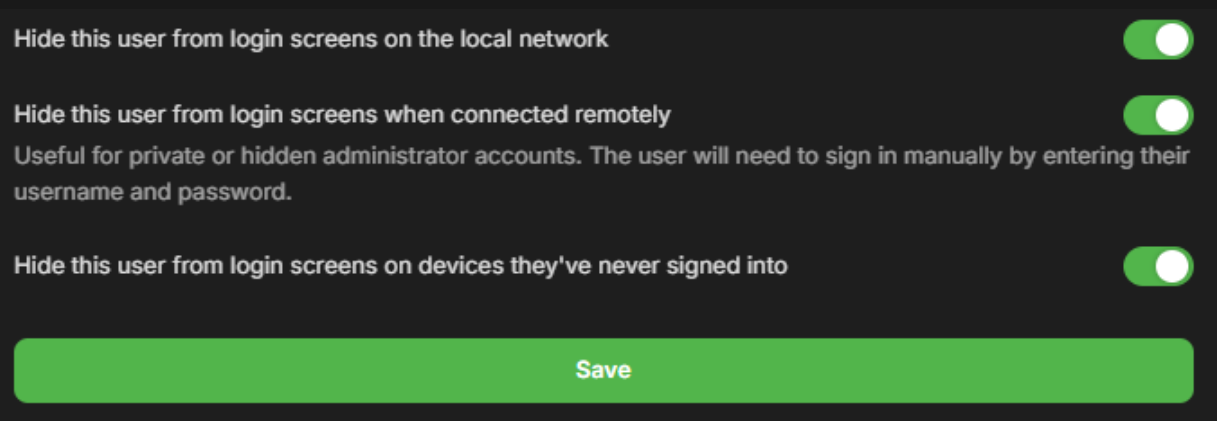
For other users who have the same problem. Q-Droid and Neminem found the solution. I will resume here in this post what to do. 1. Set a password for all users, even if they use Emby Connect. 2. Put this in your users' profile settings. And please also check the post above of Q-Droid about "General good practices for securing your Emby server".
 1 point
 -
Bot or script kiddy ( that had fun. ) In case you are scared, you have good reason !! if they wanted it really annoy you they would have enabled deletion of media. And deleted all your media . Be happy it was only a scare1 point
-
Yes that would be the short of it Edit : Malware : NO. Sorry but !! Admin error. So happy it was only a scare to learn from1 point
-
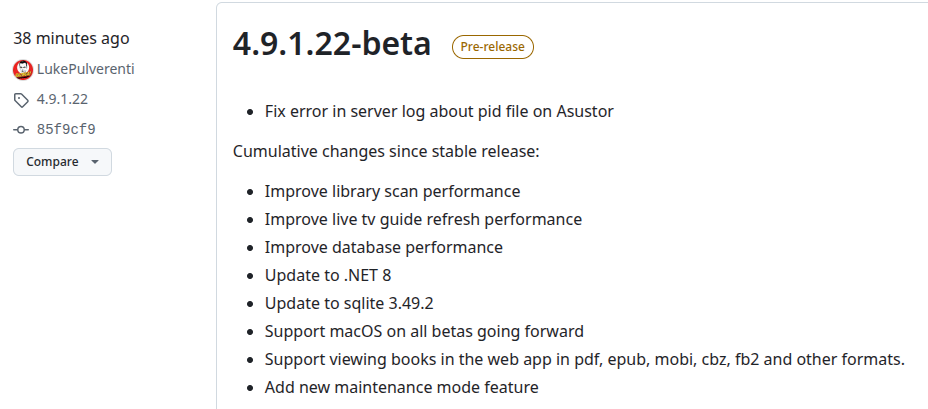
Wow, that's spooky - I literally thought it would be a good idea - told it was already a thing - it's taken over nearly 9 years (!) but this is great news and exactly what I want This is my twopence and use case:- -------------- "I would love a way to put my Emby Server in to a kind of 'Maintenance Mode' so that my server will be 'out of action' for a while. The User can 'see' the server, and 'log in' as normal, but not be able to 'play' anything because of this 'maintenance mode'. IMPORTANT - If I stop the server, then people's TVs or Apps complain and kick them out and they have to go through the hassle of logging in again. THIS IS DIFFERENT - this will not 'fail' but just not allow them to play anything. The reason for this request is so that I can keep using my server for number crunching or transcoding or whatever but not overload it with extra CPU playing Emby media." -------------- Excellent work Emby Team so how I do I get notified of when this is in a Beta version, or should I just set a reminder for a month? UPDATE - just seen this ... I will bookmark and search for 'Maintenance' in Uptime Kuma https://github.com/MediaBrowser/Emby.Releases/releases UPDATE 2 - seriously - I've just refreshed that page and the latest beta version has the mode OK, so I think I will wait for it to hit Stable then I can use it. Once again, thanks for this. It will be SO useful. Regards, Paully
 1 point
 -
Focus on stopping the intrusion and isolating the network and systems before you spend time making changes to setup options. Make a note of what those settings are now for future reference but first and foremost make sure your environment is not actively compromised. I don't know how inbound Emby Connect sessions are logged and the server log you uploaded has entries that might have originated from python scripting. That would explain the speed but not the successful authentication.1 point
-
Also for good measure check your router and disable upnp. If that plugin is enabled in Emby, and uninstall it. Change your admin user to a new admin account without remote access enabled. The new admin account should not indicate that its an admin account. also enable all the below, since that would be shown to anyone coming across emby login page.
 1 point
 -
@godvadrhm, considering you're also using the app and apple tv the stutter must come from buffering. Does it also display a "buffer icon" when it's stuttering? If that's the case and both plex and emby have this issue, there must be something going on, on your network. Can you please also provide the logs of the Emby Server during the stutter. You can find those in %appdata%\Emby-Server\programdata\logs on Windows. For other systems please1 point
-
Try adding Recursive=true to the API query. It's needed when you are doing the query from the root, rather than a specific library or folder (i.e. without a parent id).1 point
-
It was my profession for 45 years, and I'd say that in many respects you make your own luck... But you do you - good luck! Paul1 point
-
forgot to quote yall to notify you that I made these. hope you enjoy them!1 point
-
Just started using colllections myself lol, I had that category hidden for the longest time. Made a collection header image icon and figured I'd post it in this thread. I made anime and playlists images too because I saw that they were requested there are two versions of each. one with a gradient background: and one with a simple gray background: SimpleEmbyIcons.zip

 1 point
 -
No, I'm local to the emby server and trying to manage it. My friends don't have permission to manage the server, but I guess that is in the user playback settings; I was thinking it was a server setting, but now I realize it was for my own playback. OK, I see there's a bitrate limit in the network section - I haven't been there since I setup the server, which was before I started letting friends connect, so I'll set that limit. That should solve my problem...1 point
-
awesome!!! Thanks a ton!1 point
-
+1 this1 point
-
Standard HEVC/h265 only has 2 profile tiers Main and High. Main 10 just means it's 10-bit. AVC/h264 has High, Main, Baseline and extended I believe. There might be others, but those are the ones you will most likely see in mediainfo. I would check out the wiki pages if you want to get an in depth understanding of the differences.1 point
-
Hi, I just want to report back that the problem just disappeared and is working perfectly fine. I'm still unsure why it happened but it just fixed itself.1 point
-
Or just divide it by 30.1 point
-
Here: https://emby.media/terms.html1 point
-
In this installment of our Emby Community Spotlight series, we're highlighting three new users with completely different builds. One leverages serious archival storage and years of media curation; another keeps things lean and affordable; and a third takes a no-nonsense approach with hand-me-down hardware. Each setup proves that no matter your budget or complexity, Emby can be tailored to fit your needs! User 1: 3.3 Million Entries, 400TB of Storage, and a Custom-Tuned Library OS: Windows Server 2025 CPU: Intel i7-7700 RAM: 48GB GPU: NVIDIA GTX 1660 (transcoding) Storage: 64GB NVMe (OS) 500GB NVMe (cache & image storage) 50TB local RAID (primary library) Four Synology NAS units (~400TB raw capacity) Transcode Cache: SATA SSDs in RAID 0 Media: Films by decade TV series split into "Running" and "Archived" libraries Separate volumes for music, audiobooks, ebooks, photos, YouTube downloads Comic book library (50TB) stored on a separate Emby instance Clients: Nvidia Shield TV Nokia Box 8000 Apple TV 4 Multiple Smart TVs (LG & Samsung) Android beamers iPhones, iPads, Android phones & tablets across multiple countries User 2: A Low-Cost, Low-Fuss Setup That Gets the Job Done Server: OrangePi 5+ 256GB eMMC 8-core CPU 16GB RAM Storage: Synology DS224+ with 2x8TB WD Red Other Infrastructure: System76 Meerkat (handles web/misc services) Ubiquiti UCG Ultra router External backup drive Clients: Android phones (various Pixel models) Android tablet Roku Chromecast Web browsers User 3: Old PC, New Life OS: (Windows 11 Pro) CPU: Intel i5-9400 (Quick Sync for transcoding) RAM: 32GB DDR4 Storage: 10TB Toshiba N300 4TB WD Red (2019) 3TB WD Red (2016, pending replacement) 1TB WD770 NVMe 1TB Kingston NVMe (used for cache and transcoding) Clients: TCL 4K Android TV LG 4K webOS Android phones and tablets Roku Xbox Series X Want to Share Your Emby Setup? From server racks to single-board computers, the Emby community is full of creative solutions. If you’re running Emby on something interesting, or even something ordinary, and want to be featured in a future spotlight, join the Emby Community Forums and share your setup. You might see your system in Volume 5! View the full article1 point
-
this doesnt address a banner to let users know when the down window will be.1 point
-
These look great! In addition to collections, playlists would be good too.1 point
-
Love the simplicity of this and how it matches the default theme. Is it possible to add collections as well?1 point
-
Not sure if there are actually many people using emby that also read a lot of books. However with Ebooks being a hot thing right now this idea popped into my head. I have a lot of ebooks which I generally keep on my normal PC. However this way it has no back-ups cause I only back-up my server to an external location. So I was thinking about switching them to my server and then I thought I can also put them in the emby folder. The request may be a bit out of the ordinary since emby is more for playing files and things rather than reading, but could a reader be implemented at some point in the future? A book library and an implemented reader, specially for mobile devices I guess (phone/tablet), but perhaps for browser/theater? Would help me get rid of yet another app and have all my "media" in the same place Edit: If you liked this also take a look here for ebook expansion https://emby.media/community/index.php?/topic/80398-book-serverreader-incorporation-suggestion/1 point
-
can you add Anime please.1 point
-
Aufzeichnung 2025-04-01 110551.mp4 Example in Emby (first static, video on hover) not implemented here1 point
-
I hate to be that guy, but.... "Are we there yet?" This would be the killer feature that would allow me to use Emby more freely.1 point
-
One issue is that on a remote connection this can add loading time to the list screens.1 point
-
Hello, I think it would be great to have a HA option to have 2 emby server totally redundancy. What do you think about that?1 point
-
One of the nice things about MBC is that empty TV folders (after the latest show is deleted) are hidden. This makes Emby look very smart. I know @@ebr wants to get rid of this feature from MBC as he sees that this is better as a server feature that can be applied to all clients. I agree. So what does it take to get this useful feature into the Emby server? I'm hoping that asking nicely is enough, I'm also hoping that enough other users consider this feature useful enough ot include in the server. How about it, @@Luke?1 point
-
On the local server sign in screen, you can only use credentials for a user on your server. That's not an Emby Connect login screen. On the Emby Connect login screen, you can only use Emby Connect credentials. The vast majority of password trouble we see is simply just confusion between the two methods.1 point