
Leaderboard




Popular Content
Showing content with the highest reputation on 08/08/25 in Posts
-
A big thank you to the EMBY team...!!! Awesome support!!! It's working again, have a great weekend! Best regards2 points
-
An official "back hack" would be good, perhaps by having a checkbox in settings that will force skip-intro to skip a further 10s and then auto skip back 10s so we don't have to do it manually each time? It's quite 'hacky' I know, but would be a slightly friction-less experience for those of us that experience the sync issues.2 points
-
Most users won't know about this option as it is hidden away. Most users (excluding admin) will just search, they won't know that they could search just one library. I think this should have been placed in the search screen and be able to filter from there2 points
-
I have a new beta version if you guys are willing to test. I added a Troubleshooter/diagnostic tool. This can be used to see what episodes are the reason som overlays might not be shown. Have to admit i'm debating with my self if this should even be added as it feels a little outside the plugin some how. -- WARNING! WARNING! WARNING!! --- --- This is beta and should be used in a test environment!! --- EmbyIcons.dll2 points
-
Raising this from the dead to add another yes please vote.2 points
-
The current behavior writes to the media folder first, then caches a copy to the metadata folder, basically just using the metadata folder as a read cache. As an example, with the existing option if I make change to a poster next to the media the version in the metadata folder gets updated with that image. The first option I suggested reads/writes from/to the metadata folder as the primary location, but also writes a copy to the media folder. In this situation the metadata folder would be acting as a write cache as well as read cache. As an example, if the poster stored next to the media gets changed, that change is not seen by emby and will later be overwritten by a libary scan/scheduled task, etc with the poster from the metadata folder. This prevents any unwanted changes being permanently made to images stored next to media by another emby instance, other software monitoring media folders, accidental deletion, etc.1 point
-
Thanks for your replies. GrimReaper, thanks for the suggestion. It's not exactly what I want (I think a custom classification would fit better in the custom parental controls), but if that's the only solution, I'll try to go with it. Thanks, Luke, for your reply, but the drop-down list actually corresponds to the standard list for the specified language, not the list of values existing in the library (with Classification Mapper, I was able to create new entries and assign them to movies, but the values I created don't appear in the parental control drop-down list, nor in the custom parental control drop-down list). Anyway, thanks for Emby, an excellent tool.1 point
-
Typical. It was doing this last night, go to check the version number this morning as requested and everything is fine. Sigh. Sorry for the trouble.1 point
-
ok that wasn't so hard. I'm on fire now scrolling down1 point
-
I had to uninstall the app and reinstall it from the App Store. It works fine now, both “download” and “download to”. when it wasn’t working. The “download” option would slide up and give me the option to change the quality. But hitting the download button at the bottom didn’t do anything. As in the UI wouldn’t change and the download wouldn’t start or be added to the queue. but if I clicked “download to” it would add it to the queue but got stuck on ready to transfer.1 point
-
I actually figured it out. I redownloaded every show that was not showing up. Now, everything is working. Really strange.1 point
-
https://emby.media/community/index.php?/forum/102-emby-server/1 point
-
OK I installed the Emby for Android app and the dropdown menu works,so I'm baffled as to why it doesn't work on the Android TV app.1 point
-
Ok, I'll try to get to it whenever I can get some free time.1 point
-
I don't have an ETA, but we are working hard on it.1 point
-
Chuwi is a well known Chinese brand, like Beelink, Orico, etc. They have been around forever. As for firmware/bios updates, you rarely need them.1 point
-
1 point
-
Moving to feature requests.1 point
-
Hi. We are looking into an issue with our email right now. Thanks for your patience.1 point
-
If you ask me I would stick with known brands even if you get an off lease or refurb from ebay. What's a Chuwi and what kind of support or firmware updates would you be able to get for this? What happens when something gets weird and you Google for help/advice to get thousands of results for HP, Dell, Acer, Asus, etc. but none for Chuwi?1 point
-
Thank you Luke was immediately able to re-install coverart.1 point
-
For that level of control, you'd be better using tag-based access control IMHO.1 point
-
No this won't work using Ubuntu 24.04, this is because the ABIs used by Emby are linking with older versions which is the reason why I used Ubuntu 16 as base image, I suspect Emby is built against Ubuntu 16 image as well, which is why this one works. @zofielIf you don't feel like building it all yourself, you can just use the automatically built images that include the latest dependencies that makes the new processors supports, image is `rajiska/emby-n150-fixed:latest` (you can replace `latest` with whatever version you want, starting at 4.9.0.0), dockerhub repo. You can find the build happening on Github, automated by Github Actions, which I have setup as this processor issue has been known since at least December 2024, and yet no fixes came out.1 point
-
Found this thread and disabling all tonemapping stopped the problem. No stuttering and CPU is at 10%. Seems to have been a problem for a long time. No fix?1 point
-
Good idea! Giving my +1 too (again, hehe)1 point
-
I'm sorry, this morning reviewed the web ui and he problem started to happen on it too. Reviewing the logs I could see a dns issue on the server. I'm sorry for that1 point
-
Another year and I am just visiting my mother again. Reminded about how nice it would be to run emby on her TVs and show her the family videos.1 point
-
Decision on what library can or cant be searched is on emby admin user and server it self. Basic user on system should not have this option at all, this is again wrong direction for this feature. Right direction would be that emby admin controls it, and if admin wants he could enable this feature for user/s. Way too many important stuff over the years in emby system is thrown on "per user", way too many, emby admin has less and less control each day.1 point
-
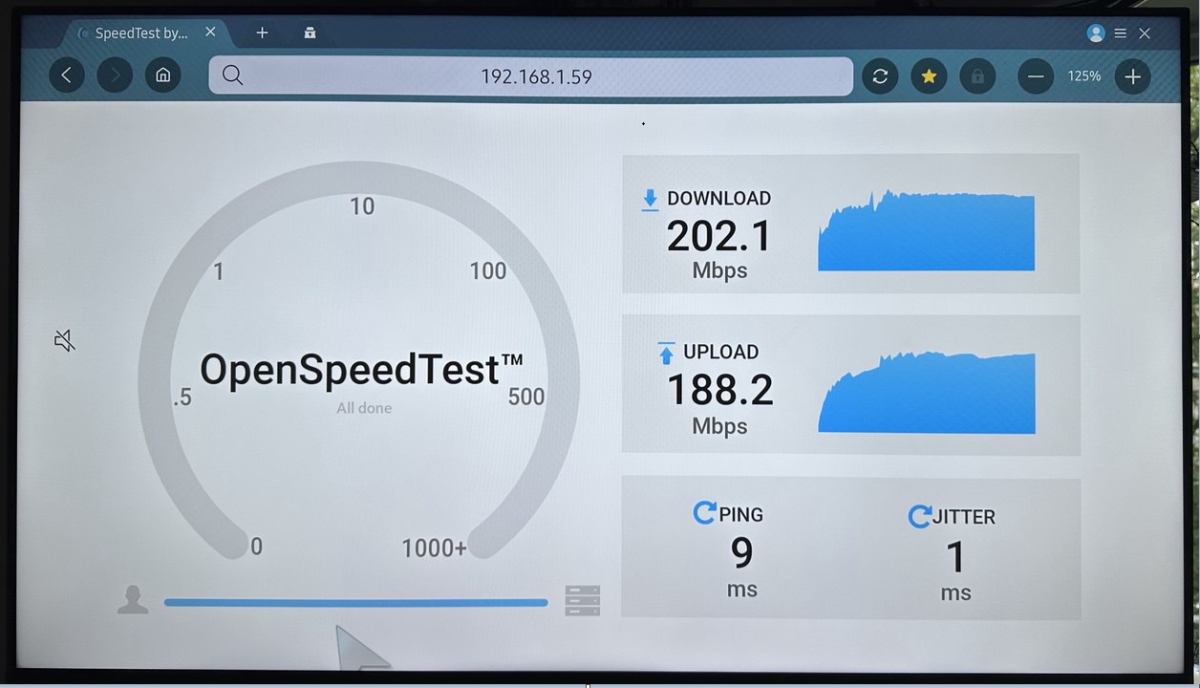
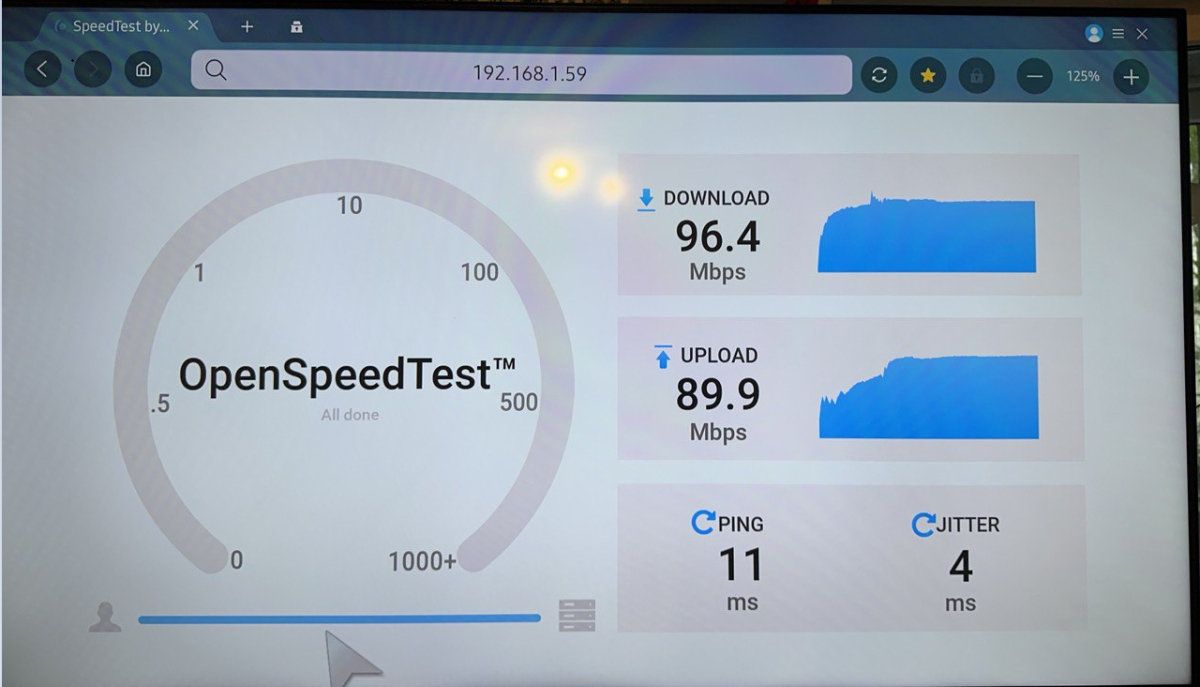
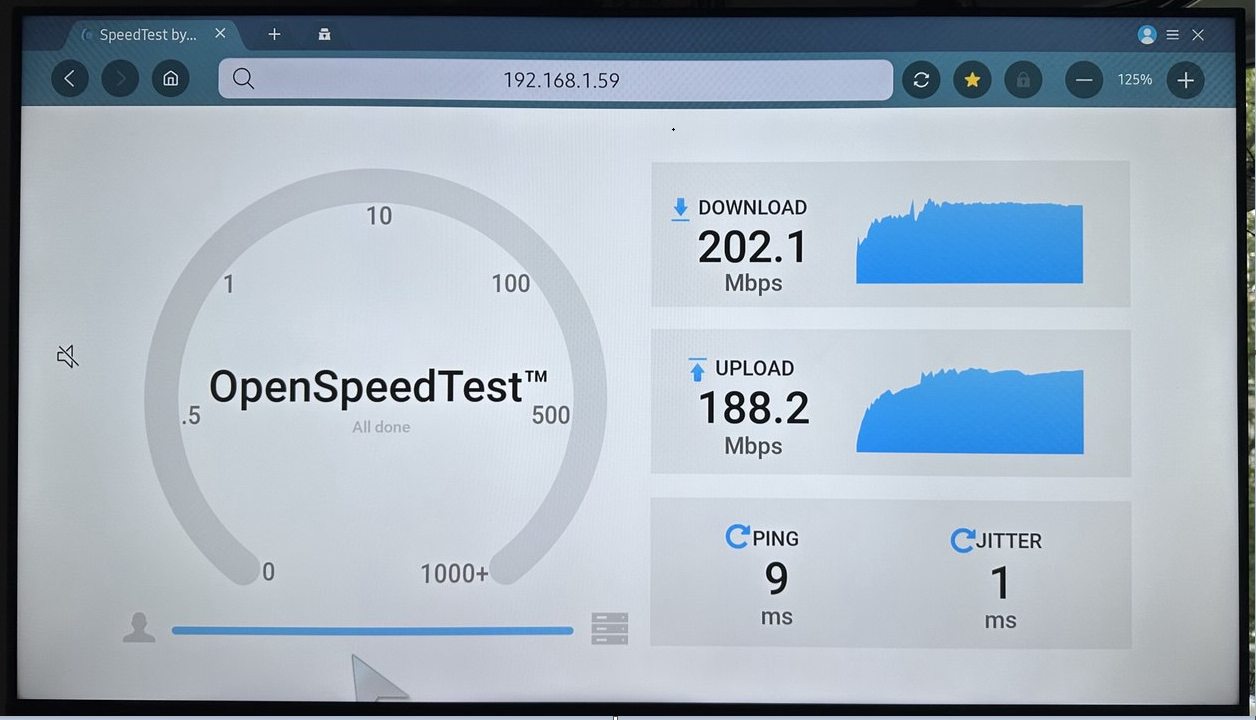
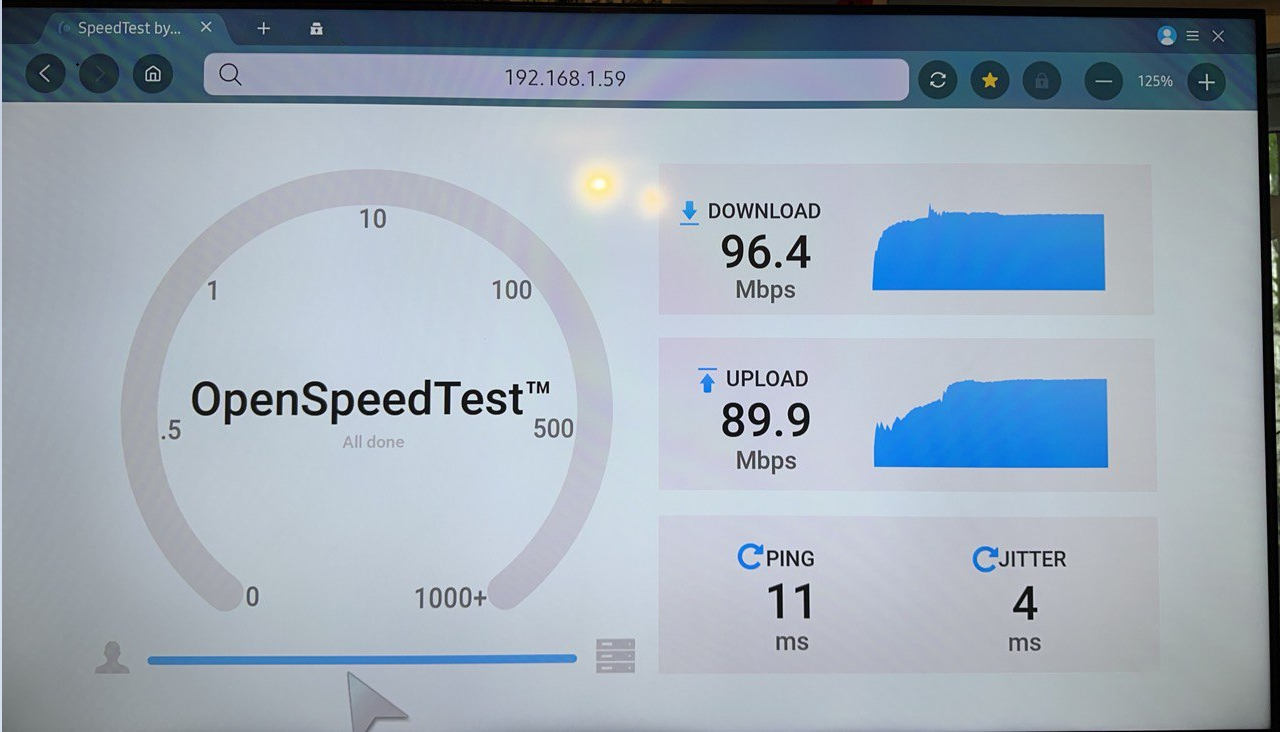
hi there! While I was waiting for Wi-Fi bridge delivery, I decided to take a look into something like HTTP-based speed test and found this one https://openspeedtest.com/ -it's very easy to use HTML5-based on-premise speedtest which doesn't require own client like iperf. so I started the server-side at my home server (Intel GE NIC) and used Samsung Browser at TV and got this: this is TV's internal Wi-Fi. Despite these results, it was impossible to watch Snatch in directplay mode with a 96Mbps bitrate - Emby regularly spun a blue circle for 2-3 seconds each. yesterday Buddy 6 SE was delivered. well, I have to say, that my TV has only fastethernet port =( this is test via Buddy so the result was predictable. but be that as it may, watching the Snatch has become much better and now it's not a blue circle, but just a half-second lag. Of course, it's still impossible to watch, but the experience was bought for only $100. now it's limit of FE port. conclusion: the problem most likely lies in the TV's Wi-Fi adapter buffer, its driver or the features of the Tizen OS. it's a pity, of course, that instead of just a software debug, we caught it by sorting through the customer's hardware, but nevertheless. we can close the topic here - I can do further hardware sorting myself and without the participation of developers. P.S. in the next topic I will write about the terrible search and result selection function, perhaps it will be possible to do without replacing the hardware.
 1 point
 -
Maybe @Abobadercan see if those users actually got created.1 point
-
Is it possible to add a tag to multiple movies at the same time? The only way I see to do tags right now is to find the movie -> edit info -> scroll ALLLL the way down -> add the tag you want -> save... Is there a way to do this to a selection of movies at the same time?1 point
-
Count me in making tagging function more user-friendly. I'm coder, so, please allow me help out.1 point
-
What username and password are you trying to login with? What I mean is, where did those credentials come from?1 point
-
Thank you @Luke!1 point
-
Not 100% what's being asked her, but here is a feature request to add the clickable headers back to TV mode. This would bring TV mode back in line with features that is available in Desktop and Mobile modes. Doesn't fix the issue of scrolling through huge cast list, but maybe a clickable header can be added to allow a vertical view of the cast list.1 point
-
As a side note.. When I restarted the server, I was using the Chrome browser - there the issue was resolved. However, when viewed from the new Comet browser (i.e., by Perplexity.ai), the issue would not resolve until I cleared the image cache. That was the browser I was using when this issue first came to my attention - so it might have been a browser issue all along. Just thought I should mention it.1 point
-
Yeah the search feature is lagging a lot behind today's standards. As usual no communication from the team.1 point
-
como has visto anteriormente no podia descargar nada y te explico que fue lo que realice para ver si tu puede solucionar tu problema 1.- borre la app de emby, (borra primero datos el cache y los datos, forza la detención, y desinstala la app) y procede a borrar todas las carpetas creadas en tu dispositivo 2.- descargue la mas actaul 3.- otorga los permisos y asi lo solucione (esto es para la app android)1 point
-
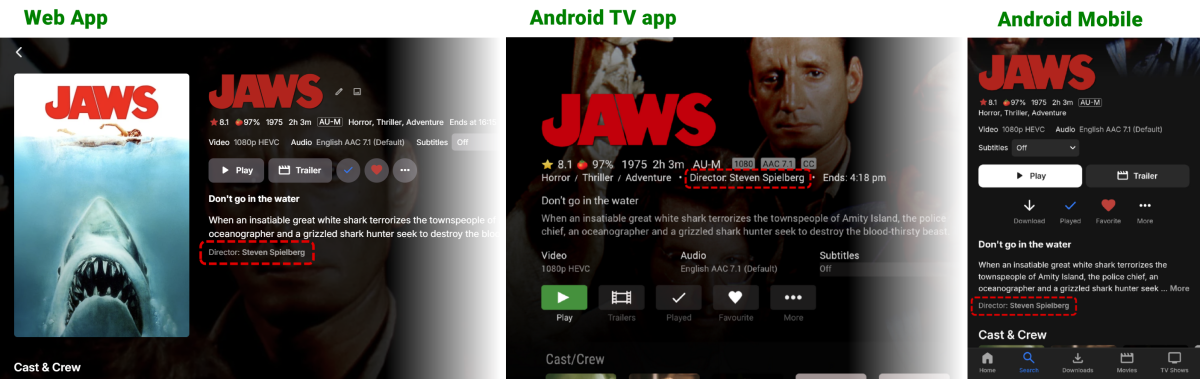
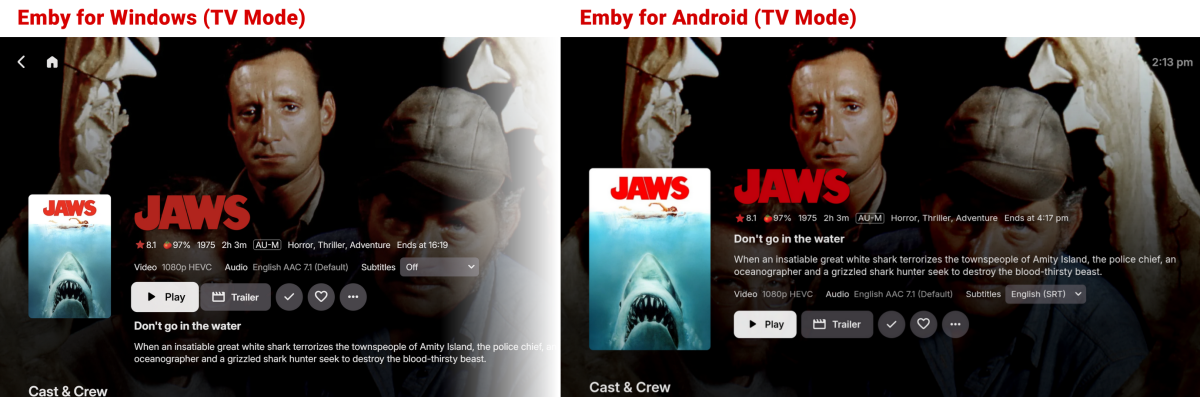
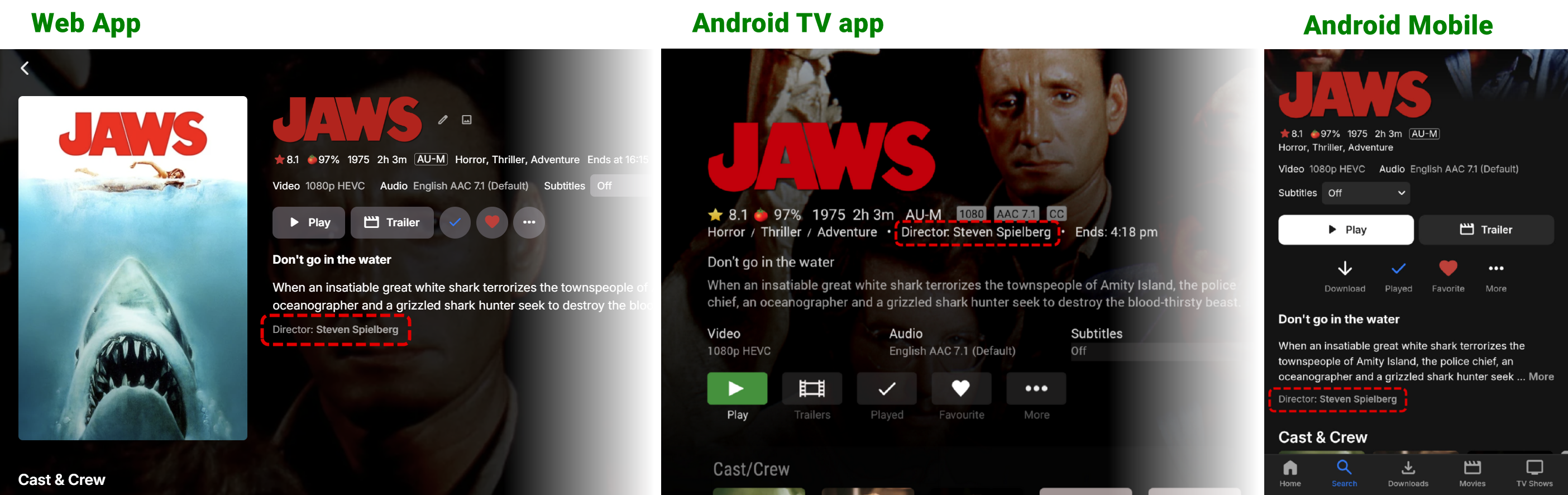
@Lukeas noted by others, the newest app layouts are inconsistent with the long standing ones. Example of existing apps where the Director is clearly shown, and often clickable (minus ATV app) Example of new app layouts where the Director is notably missing from the same screens. The ask is that for both Android and Windows (TV Mode) - the Director is displayed AND clickable allowing for a quick "jump to" page Thanks.
 1 point
 -
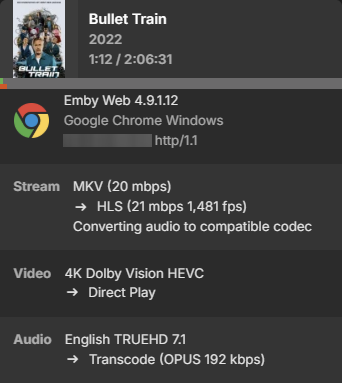
Works flawless by using these hls parameters: AudioCodec=opus,aac&SegmentContainer=m4s
 1 point
 -
4.9. For movie’s. 4.8 already can merge TV shows1 point
-
I've just signed up this forum just to support this idea because I use VLC on my PC and Emby on iPad and I don't want to see black outline. I am so used to not seeing an outline. I love the app by the way.1 point
-
In case anyone cares, I did a new install of the same version emby, on a new server, with same media drives, and now preview bifs work great on old and new series folders. Oh well ...1 point


























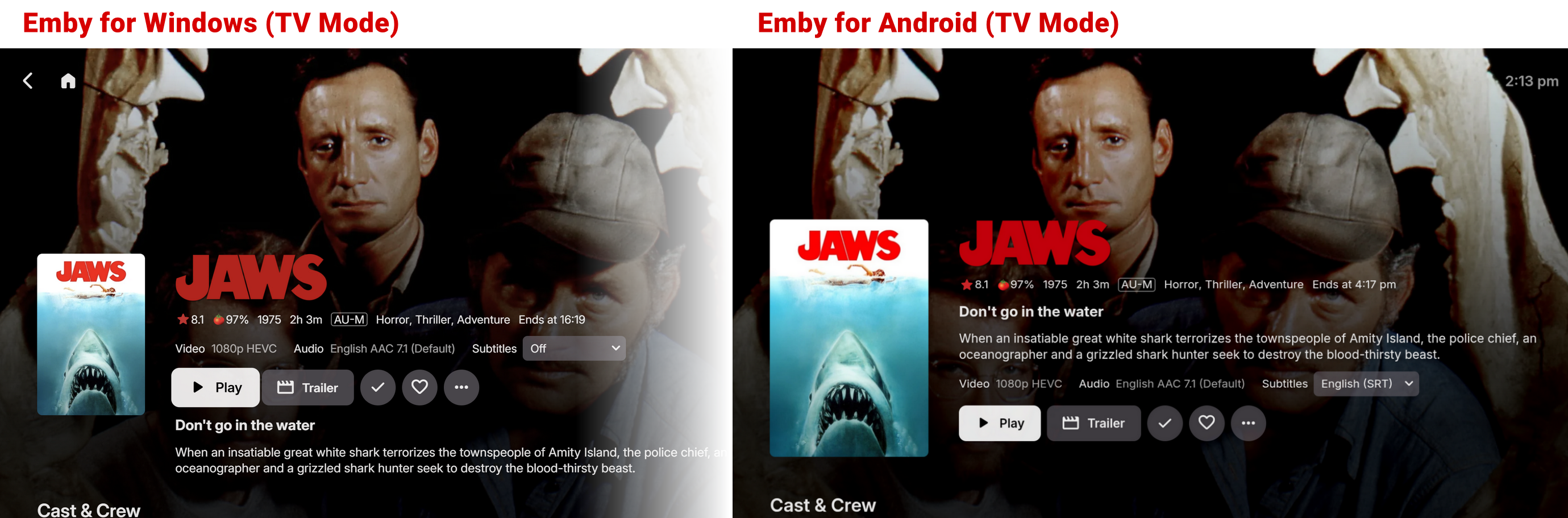
.thumb.jpg.ccf5fd5c50269f407148fbd429681c66.jpg)

