Leaderboard




Popular Content
Showing content with the highest reputation on 07/26/25 in Posts
-
My Windows Firewall fell over this week after years of 'normal operation'...no inbound rules were working... A quick google suggests there have been some recent general firewall / windows update problems. After jiggling about with the rule set leaving it where i started and rebooting .windows firewall fixed itself. I mention it incase anyone else saw something similar / knowsmore about it? Windows 10.3 points
-
I found out that the "import collection information" toggle switch in library settings stays hidden until you check and uncheck the TMDB provider under Movie Metadata Downloaders. This is problematic because by default, TMDB is enabled for Movie libraries. New users will not see this and assume automatic collections aren't working because they don't see this toggle (happened to me, lol) Attached is GIF demonstrating this behavior
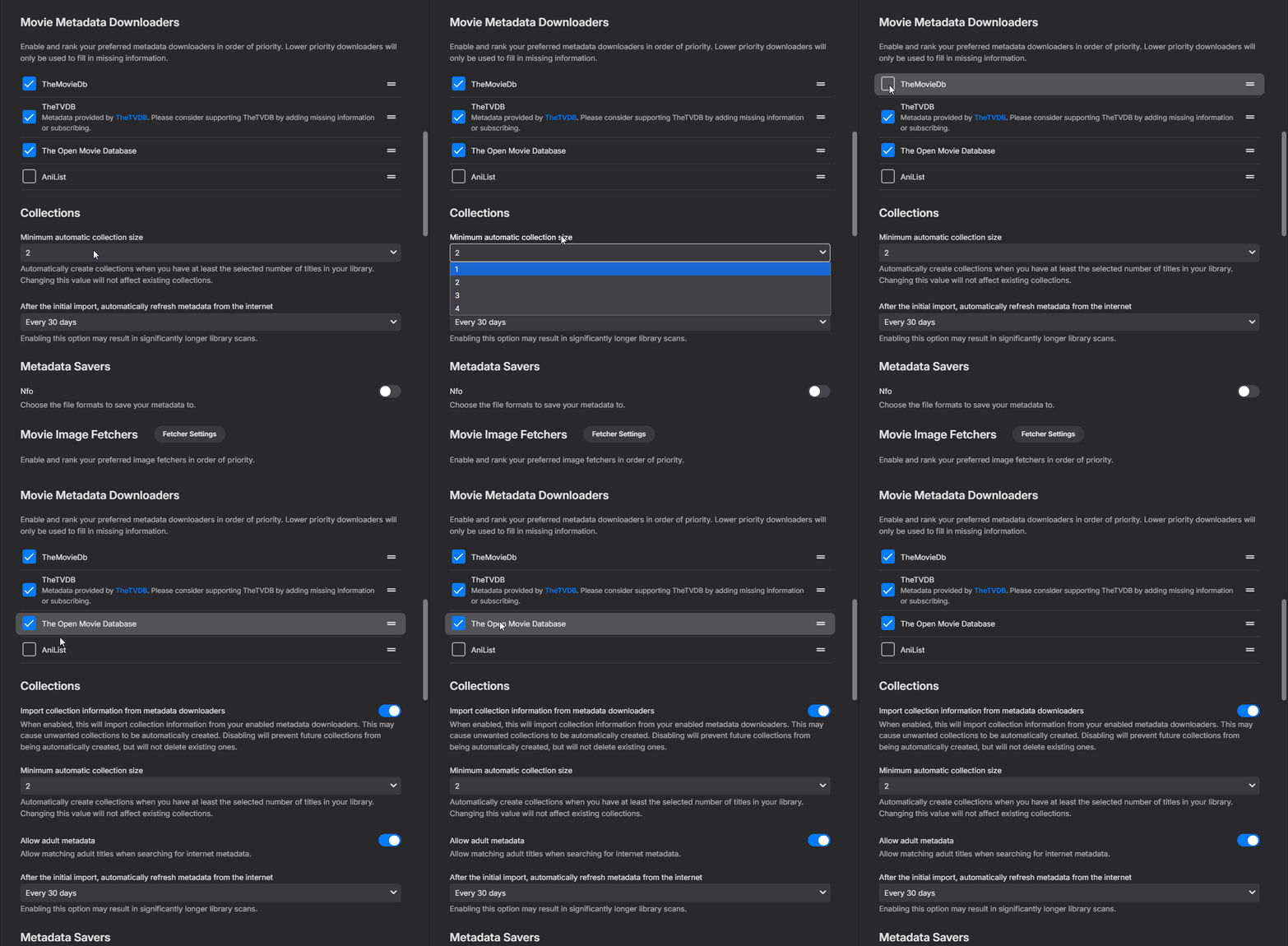 2 points
 -
The new version 5 is up! Download it here or on Githib - EmbyIcons. Added: 1. Icon manager, a tool to see what icons are missing for your videos, it is located in the settings. 2. Profiles to control how each library should look. 3. Setting to use built in icons, custom with built in icons as fallback or only custom icons. This was made to make it all easier for new users and users. 4. Added controllable priorities to icons so the order that the icons are shown can be controlled. Changed: 1. Moved the icon type selector to the Alignment and Layout to clean up the settings. You can now disable icon types by selecting disable in the drop downs instead. 2. Various small code improvements. Bugs: The folder view selector for the icons folder does not go away when pressing ok. Temp fix: Just press next to it or on the X. I just noticed that before i gathered it all into the release. If there are any problems then please don't hesitate to report them to me!! @CummingCowGirl This version should work for you as well as long as you use the built in icons. If you need some more then contact me and i will add them in the next release. EmbyIcons.dll IconExamples.zip2 points
-
You do not really have to worry about backing up your existing Emby setup as, if you use the same drives in the pool, nothing gets erased when you create the pool. Each drive gets a new directory called something like "PoolPart........," and you can just move the original data on the drive into the new directory and it will magically appear in DrivePool's new drive letter. So all you then have to do is add the new location to your Emby library. I recommend that you do not delete the old directory until the new one is fully updated. That way the metadata and everything else gets into Emby without Emby forgetting the original data. DrivePool also has a redundancy feature that creates a duplicate of every file you choose so a disk crash will not lose any protected data. But remember that the duplication feature is NOT a backup in that if you delete a file from the pool both the original and the redundant copy gets deleted. That is redundancy does not equal backup. BTW: I find using DrivePool and migration to it to be easier if you store images and metadata alongside the media. That rebuilds everything a lot faster than if you use Emby's library defaults. The best place to find out details of DrivePool's usage is on the StabilBit;s web site and its attached forums. That is where I got all the info I needed when I first moved to using DrivePool. The directions there are all I needed to get everything going. Note: DrivePool does NOT erase anything from the drives added to the pool and all files are stored exactly as they are in Windows so, if you ever decide to move away from DrivePool. all your files will exist in readable form in the PoolPart.... directory on each drive. Note 2: I have found the people over at StableBit to be every bit as helpful as the people here. They are very easy to deal with. Note 3: I only use the redundancy feature for data that is not easily recreated as data that is made redundant uses twice the space of the data itself. Two copies are kept in the pool but in using DrivePool you only see one. I hope that helps at least a bit.2 points
-
I do not know about anybody else but I find that a decent Windows computer running DrivePool and just a few other necessary programs is about perfect for my Emby server. But I do not think my use situation is like many others as I have zero remote users and I am the only user in my home so, as long as you don't count my dog, I have only one user. I do not really trust drives that are only accessible over the network so I combine my drives on the server computer. I am at 81 tb and climbing. A number of my current drives are in the 4-6 tb range and, when they reach their expiration date I replace them with 10-12 tb drives. DrivePool makes adding or changing drives easy and almost painless. I "think" a small majority of users with a lot of storage use some kind of NAS device but that seems unneeded for me. I do know there are several people on here that have a LOT more storage than I do and some of those use DrivePool to manage their storage.2 points
-
It'd be great if server admins could generate a QR code for a user to scan with their app to connect to a server, without using EmbyConnect.1 point
-
I believe a nice added feature is to have the ability to timeout partially watched shows automatically. Being able to set an expiration of resume point on titles. My kids love to watch videos but never seem to finish then, so they have a ton of titles that have resume points. What would be a nice addon would be the ability to either set the resume point to expire after X number of days. By default the resume point will be kept indefinitely. Adding in, let's say, "30" will then set all the resume points last set 30 days ago to expire and the resume point data be removed from the title for the user. This should be a global setting that applies to all users in the system. Wording of the feature can be different. Thanks, \ above11 point
-
Could you allow users to customize the order of movies in collections instead of only having it by alphabetical or by release date? Example: I want to have a collection of Batman movies, both animated and motion pictures but want the motion pictures together followed by all the animated ones. With the current order options, this isn't possible. Thanks!1 point
-
So I just recently posted a step-by-step guide to setting up SSL encryption with Emby using a Lets Encrypt certificate and a tool from ZeroSSL. Here is that post. Well, it's been working just fine, but I wanted to find a solution that would be maintenance free, meaning I don't want to have to manually renew my certificate every three months! Well, here's a guide to setting up Emby with Caddy, which is a reverse proxy that automatically manages getting and renewing certificates. Mostly this comes from other posts scattered around the forum, so I don't take any credit. But perhaps it'll be helpful to someone to have it all in one place. I'll try and explain a few concepts and give detailed enough directions on how to set this up that a non-expert (which is what I consider myself to be) can easily get this working. It really is very simple, but my post will probably be pretty lengthy because I'll try and explain as I go. I'm running on Windows, but this should work in other OS's also as all the tools are available across different platforms. Reverse Proxy Basics First, I think it's worth giving a little reverse proxy background. I didn't have any idea what one was before starting this process. Here's my layman's description. Assuming you're home network is typical, you have one publicly routable IP address assigned to your home router by your internet provider. Behind your home router you may have a home network with several computers, phones, tablets, printers, and other devices, each assigned a private IP address. Traffic that stays completely inside your home network does not need to be encrypted because it is protected by your router (which is also a firewall). A reverse proxy acts as the gateway from the public internet to servers you're running on your home network. All connections into your home network are made to the reverse proxy, and it then redirects traffic to the server on your home network. The advantage in this case is that the reverse proxy handles SSL encryption to whatever client is connecting to it from the public internet. But it can then redirect traffic unencrypted to your Emby server, which is safe because it's all internal to your private network. So Emby doesn't need to know how to do encryption, because encryption is completely handled by the reverse proxy, and it is transparent to Emby. I will say that I was initially pretty intimidated by the idea of setting up my own reverse proxy. NGINX is a very popular free reverse proxy, but looking through config files and options left me very uncomfortable, it all seemed very complicated. I'll be presenting this guide using Caddy, which is SUPER easy to use and set up, and is also free/open source. And it has the huge advantage of automatically managing SSL certificates. Domain Name Registration In order to get an SSL certificate you have to have your own domain name. See my previous post for more detail here, I'm not going to repeat it. I do recommend https://domains.google for your domain, it was affordable, it can easily handle Dynamic DNS for you, and it's easy to set up. So for this example, let's say you registered mydomain.net. This is what's called a second level domain (.net is the top level and mydomain is the second level). I would also suggest that you set up a CNAME record to a subdomain like media.mydomain.net, you'll see why later. A CNAME record just points to the same IP address as your main domain registration, so it's sorta like an alias. Router Setup Now, you'll need to decide which computer is going to run your Caddy reverse proxy. I run it on the same computer that runs my Emby server. It's also my HTPC connected to my TV. It's always on so it works well. Make sure it has a fixed IP address on your home network, either by making it static or by setting up a manual assignment in your router's DHCP server. Then in your router, forward ports 80 and 443 to the computer in your home network that will be running the reverse proxy server. Port 80 is the default for HTTP, 443 is the default for HTTPS. You do not want to forward any other ports, don't forward 8096 or 8920. Install Caddy, the reverse proxy server Go download Caddy from their website, https://caddyserver.com/v1/ I'm using V1 of their server, they have a V2 in beta but I prefer the stable release. When you go to download, you can choose plug-ins (click the "add plug-ins" link before downloading). I'd suggest getting it with hook.service at the very bottom of the list, this lets you run Caddy as a service, I'll mention this later. You need to create a folder on your server where you will put Caddy, I used c:\Caddy. Then unzip your installer into this folder, there is just one executable called caddy.exe. You also need to make a text file in this folder with your caddy configuration info. I called mine caddyfile.txt. Here's a copy of mine, you can just copy/paste into a text file and save as caddyfile.txt. This is the entire configuration file! media.mydomain.net { gzip timeouts none proxy / 10.0.0.100:8096 { transparent websocket } } Now, in place of media.mydomain.net, you need to put your own domain name. And in place of 10.0.0.100 you need to put the local IP address of your Emby server (which also needs to be static). What this setup does is tell Caddy to redirect any incoming traffic to media.mydomain.net, to your emby server on port 8096. Caddy will be listening only on port 80 (HTTP) and 443 (HTTPS), but anything that comes in on port 80 automatically gets redirected to port 443 (encrypted). So it only accepts encrypted traffic. Now you just run Caddy. You can start a cmd window and type the command manually, but its much easier to make a batch file with the command so you can just double-click to run. So copy the following text into notepad and save as Run_Caddy.bat, in your c:\caddy folder. cd c:\caddy caddy -agree -email "myemail@email.com" -conf "c:\caddy\caddyfile.txt" Again, you need to replace myemail@email.com with your own email address. If you didn't use c:\caddy, then make sure you replace this with your actual path. The -agree means you agree to Lets Encrypt terms of service and the email is needed to get your automatic SSL certificates. OK, if you've followed along so far, just double-click on your Run_Caddy.bat file and it'll run. The first time you will see it go get your encryption certificates automatically, and then start your reverse proxy server for media.mydomain.net. It will automatically renew these certificates for you also, with no intervention on your part. Of course Caddy has to be running to work, so don't close this window. You could add a shortcut to this Batch file in your windows Startup folder so it runs automatically whenever you login. Or later I'll mention how to run Caddy as a service so it starts automatically and runs hidden (which I like much better since it's running on my HTPC). Emby Setup Ok, last step. Go to your Emby server configuration, under Network. Keep local HTTP as 8096 and local HTTPS as 8920. Be sure to check "Allow remote connections to this Emby server." Change public HTTP port to 80 and public HTTPS port to 443. Under external domain put in media.mydomain.net (substitute with your actual domain name of course). You don't need anything for certificates. Then for Secure Connection Mode, choose "Handled by reverse proxy." Uncheck enable automatic port mapping, because you've already set up port forwarding in your router to your Caddy server. That's it, you're all done. Now, here's what you just did. Emby only listens on port 8096 and 8920, which are not forwarded by your router, so you cannot bypass Caddy and directly connect to Emby from the public internet (that's good, because Emby doesn't have an encryption certificate). When you put in the public port numbers and external domain that's just so Emby can tell your apps which port to connect to when outside of your home network. Remember that these ports actually go to your Caddy reverse proxy, not to Emby. The reverse proxy handles encryption and redirects the traffic to your Emby server at port 8096. Easy! You don't install certificates in Emby because Caddy is handling all encryption. Now test it out! So get on a computer outside of your home network, open a web browser, and in the address field just type media.mydomain.net. It'll try and go to http://media.mydomain.net which connects to Caddy. Caddy will redirect automatically to encrypted https://media.mydomain.net, and this gets automatically re-routed internally by Caddy to your Emby server. Notice you don't need to remember or type a port number because it's using the default http and https port number to connect to Caddy. Basically it's all transparent to your users, they just type in the domain and Emby just works! This got major bonus points by my wife because she never could remember the port number before. If you're setting up an iOS or Android app, just bypass Emby Connect, put in https://media.mydomain.net as the address, and 443 as the port number. That's it. All connections to Emby are encrypted and you can access with a much easier to remember domain name. For the Advanced User - Running Caddy as a Service If you want, you can also run Caddy as a service, it'll start automatically with your computer even if you're not logged in, and it will be invisible, so no annoying command window always there. If you downloaded Caddy with the hook.service plug-in then it's easy. First open a CMD window, change to your caddy directory (cd c:\caddy) and run this command to install the service. You have to run these commands as an administrator, so when you run CMD, right click and choose "Run as Administrator." caddy -service install -agree -email "myemail@email.com" -conf "c:\caddyfile.txt" -log "c:\caddylog.txt" You'll notice it's the same as what you ran before to start Caddy, but with -service install added, and with -log c:\caddylog.txt added. If you click run, type "services" and start the Services control panel, you'll now see Caddy listed as a service but it will not be running. Now run the command: caddy -service start That's it. In the Services control panel you'll see that the Caddy service is running. You only have to do this once, when you reboot it'll automatically start the service again for you. You can look at the caddylog.txt file to see the running status, and you can always check the Services control panel to verify it's running. For the Advanced User - Running multiple servers At my house I also have several outside security cameras hooked up to a Network Video Recorder (NVR) that I want to be able to access from outside the network. There is a web interface to this NVR, but it only supports SSL with a self-signed certificate, so all modern browsers throw an error. But with Caddy, I can easily add that NVR server also. The NVR doesn't have to support encryption, because Caddy handles it all transparently. I just added another CNAME record for cameras.mydomain.net in my domain registration and added another section to my caddyfile.txt file as follows: media.mydomain.net { gzip timeouts none proxy / 10.0.0.100:8096 { transparent websocket } } cameras.mydomain.net { gzip timeouts none proxy / 10.0.0.110:80 { transparent websocket } } Now you can see that if I go to cameras.mydomain.net it gets redirected to my NVR on port 80 (internal IP 10.0.0.110), and if I go to media.mydomain.net it gets redirected to my Emby server (internal IP 10.0.0.100). Pretty awesome, and now I have encryption for my NVR cameras! You could do the same thing for a Plex server (if you're unfortunate enough to still need one), or any other personal server you're running on your home network that you want to access from outside with encryption and an easy-to-remember name. Conclusions Well, that's it. Wow that ended up being a long post, sorry about that. But hopefully it helps someone on the path to fully encrypted external Emby access! If anyone notices something wrong or incomplete please reply!1 point
-
Using the web app in Firefox and Edge on Windows, I open an album artist, click the item's play button on several songs. After a few, the wrong song start playing. You can even click the item's play button a few times and each time a different song will play. Playing from an item's more menu seems to be reliable:
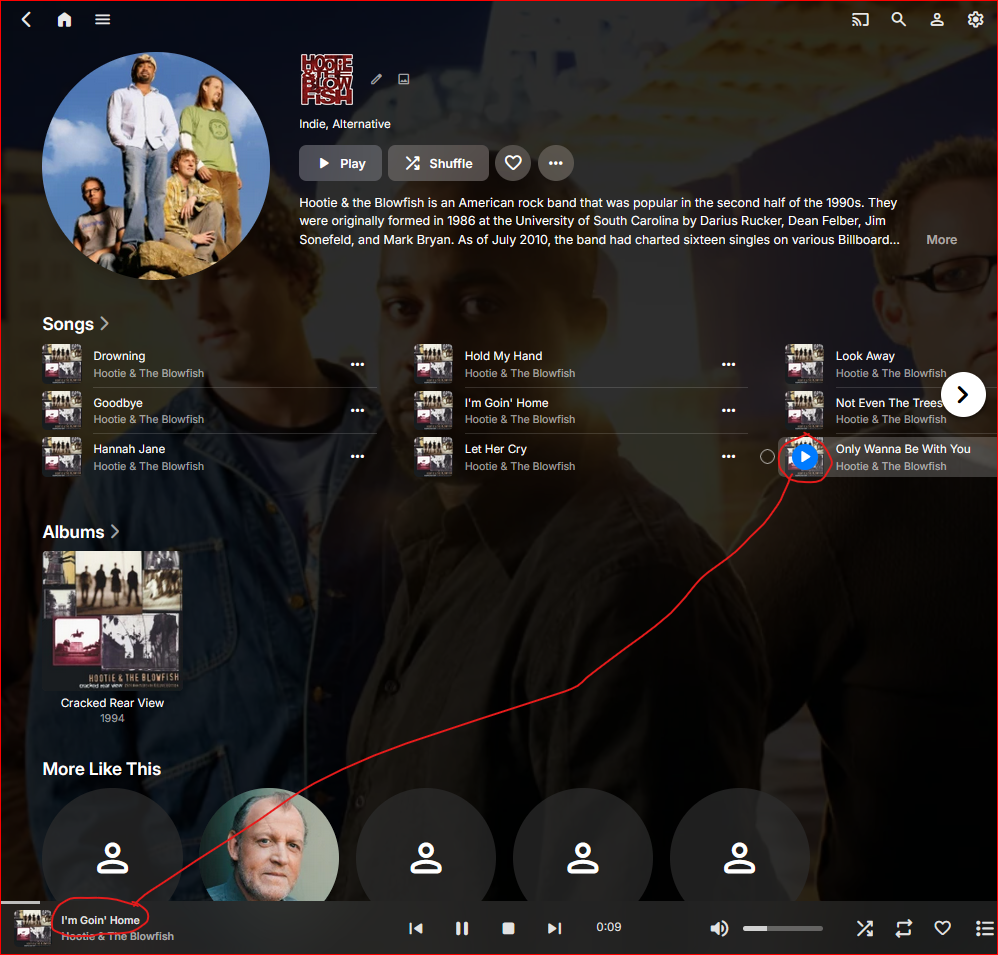
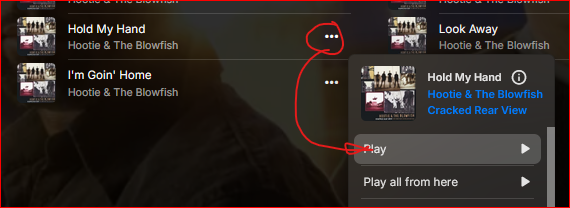 1 point
 -
Hi, we are looking into it. Thanks.1 point
-
Issue has been fixed. It was the reverse proxy through Cosmos. I missed setting up the proper settings in Emby itself. Resolved following the "emby setup" portion of the following guide:1 point
-
Hi, we are currently working on the build process for it. Thanks.1 point
-
Great! I will give it a try tonight. Thanks again.1 point
-
Don't see a problem in having it also inside the continue watching thumbs. Actually I find it very useful and stringent. Thanks for your work!1 point
-
@sh0rty I removed the bit in the code that disabled the thumbs and banners. Problem now (i think) is that with that simple change the icons get shown on the continue watching as well. Is that something you would think should stay or shall they be removed from that is possible? I ask because you made the request so up to you. Edit: Actually never mind all that, doesn't seem like there would be a way to not have it on the continue watching as well. At any rate, just need to add a way to enable and disable it to the settings and such, will take a day or two and you should have banner and thumb support.1 point
-
Never thought about that tbh. as i always just used posters. Can absolutely look into that for next version!1 point
-
thanks for looking, i guess i will pin my hopes on improving recognition of the skill name instead1 point
-
Fixed. It should now correctly automatically update when a new version number is detected. Or just use shift - ctrl - R EmbyIcons.dll1 point
-
Great work again works well - ok I have some icons missing which I didn’t know before lol time to ignore them thanks for your work1 point
-
Loving the updates! Especially the multiple profiles!1 point
-
Sounds like a browser caching problem which shouldn't happen as the version number does it so the server refreshes the cache when it sees a different number. Try shift -- ctrl - R1 point
-
Nevermind, it was a cache issue.1 point
-
The latest builds are now available on the downloads page. I've only just transitioned to using my NAS to run my Emby server, I'd been using a NUC for years which always just auto-updated.1 point
-
Thanks Luke for checking back. It seems to have resolved after deleting the transcode files. The emby log didn't get generated at the time because the disk didn't have space for it. Things have been good for the past week again, so unless it starts to fill up with temp transcodes again, I think I'm back to running smoothly again. Thanks! Greg1 point
-
FYI closing and reopening the library settings hides the options again. But only see this behavior in beta 4.9.1.11. And it is really about any change to downloaders in my test. But manually unhiding field via console or css shows the field enabled.1 point
-
Yes. I checked. There isn't any database lock anymore. FYI when the @brothom told about I did a clean installation and enabled port mapping that's where it disappeared I think.1 point
-
Or we simply continue to use Audiobookshelf, which fits like a glove for this purpose. After all these years of hoping, I no longer see Emby developing into an equivalent of ABS regarding Audiobooks.1 point
-
@Luke and his team might have more accurate numbers but it's safe to say there are thousands, maybe tens of thousands of Emby servers running on Linux alongside the *arrs and other media and file management applications moving files with Emby RTM detecting the moves as expected. It's known that network and FUSE filesystems don't support inotify so those can be excluded from the equation. The remaining kernel based filesystems function normally and Emby RTM detects the changes. I don't need to experiment because I can see the activity on my system and in my logs. Series that are currently airing release their episodes incrementally, a new one or two weekly. I can see when the downloads complete, files are moved, then Emby detection and within two minutes the intake begins. Sometimes I don't get a full season and try a few episodes first, then get the rest later. Same behavior with Emby RTM.1 point
-
Thank you! I've been considering my options and have been leaning more toward DrivePool as I look into this. The thing that's slowing me down is, now that I've treated Emby to, say, 40TB with drives & DrivePool, how do I back that up?! Also, probably easier, I'd need to find housing for more than the two drives that I now have. (2 internal drives, 2 identical external drives for backup.) That's why I asked how you deal with what must be a lot of harddrives in the pool. Thanks again.1 point
-
Hi @Lukeit also said "No items found" I tried adding the movie library again pointing to the same path and it seemed like everything loaded in... albeit with two Movie libraries. I tried deleting one of them and it didn't delete it, but rather made both of them similarly unusable. So I restarted and deleted both Movies libraries and I'm just adding the library again by scratch. Not a huge deal, but I'm still not sure what happened in the first place.1 point
-
Seeing the same thing via webui on 4.8.11.0 and 4.9.1.11 and Emby Windows Beta 2.234.2.01 point
-
hi, now it works, i've not changed anything, some kind of magic1 point
-
I'll have to re-visit this when it occurs again. The issue seemed to arise from the type of audio the content was using. I ended up getting around this by getting a different version of it. I still have issues both with audio and video (some stutters or playing at very low framerate) but I am always able to solve it by getting different versions with different encoding for audio / video.1 point
-
Hi, the plan is to expand the multi-version feature to also be able to accommodate multi-editions.1 point
-
Question is what are you doing different than others from Sonarr or Sabnzbd community who has this problem? For example realtime monitor the path which is the TV folder of your EMBU output with time stamps Now in your case edit this line to exact path of your actual tv folder in emby, set terminal output to 20000 lines because it can be big. Download tv episode of the series that you already have from the season you already have which means that tv series folder and season subfolder were already present without creation and upload the log file of the ouput, its confirmed with 8 emby/sab users.1 point
-
Hi, we'll take a look at it. Thanks.1 point
-
No, should be: /usr/local/bin/comskip --ini=”/etc/comskip.ini" “{path}”1 point
-
Nope. My files are moved and they are all detected. What are you doing differently and what filesystem type are you using?1 point
-
As per post #1 - 'Please create an option to hide the new sidebar by default.' And be able to save the dashboard colour without having to do it every day.1 point
-
I used it for ass (well tried and failed because it never applied to ass no matter what option I selected) cause there was issue on lg c8. Issue was resolved not long ago. Although there's still a little bug but at least, the subs properly play without hiding some. If you look at the video, you will see there's a scene that is done twice. It's very short on that video though, I'll try to get another shot. But it's unrelated to ocr itself, it's related to transcoding. I'll start another thread with all the bug I havr with transcoding. I have various. And maybe one with the ocr skip bug.1 point
-
Just cleaned up my Mums continue watching which is used as a family melting pot during get togethers...50+ items on contiue watching that was started YEARS ago. I agree the timeout threshold would need to be different for different libraries. New TV seasons sometime take years to arrive, but a movie that hasnt been resumed in a 2 weeks isnt going to be for me. Perhaps need to ask ourselves if the removal of clutter is worth the coding/design complexity..as long as most recent things are higher/first in the list...does it really matter to anyone other than people with OCD...not sure myself.1 point
-
It is currently enabled, but I haven't touch that setting in a very long time. I did "play" with it in the past because I didn't want transcoding / burnin when having ASS subs so I though it would do exactly what it says but it never changed anything. Maybe something finally started working out of nowhere and now it's doing OCR. I'll try without. Ok so when I disable this, I know get the burnin. That was why. Now it seems the OCR feature cause a weird problem when pausing or skipping ahead. Outside of the sub getting out of sync, there's a replay that occur. I captured it, it's subtle that time because I probably didn't pause long enough PXL_20250725_145025362.mp4 edit: I also remember while I'm trying to get the lease transcoding possible (outside of possible quality loss). There's a bug where when it's transcoding the video, at the end, it cut 5 minutes or so before EOF. I have to restart playback and skip to the that part to see it. I made another thread about that already1 point
-
Another day, another article mentioning Jellyfin and Plex, and only Jellyfin and Plex- https://www.pcmag.com/opinions/buy-or-bootleg-save-your-favorite-streaming-media-by-any-means-necessary Maybe its time to introduce something new and innovative, like say the best Live TV implementation, or maybe just catch up, like a standalone music player, or that Watch Together thing...1 point
-
Yeah, I hope LTT/Linus will try out Emby as well. When he, towards the end, said that he hadn't tried it out cause it costs money.. Duuude! You make millions of YT, you can afford a few bucks. You can even compare the free Emby to Premiere.1 point
-
I have it running side by side, but to me it feels like an old version of Emby when I switched over from PLEX in 2017. They added new features quicker than Emby like tonemapping and other things, but it seems to me the only do it to fill the checkbox. Everything feels slower. The clients aren't as polished or don't even exist. I wasn't happy when Emby decided to go close source but so far it wasn't negative for me. I'm a little worried that Jellyfin takes the spotlight now, even from the popular Plex. On the other hand I was surprised how many people mentioned Emby under LTT's latest video, where they barely mentioned it. What do you think?1 point
-
You have to correct why your shares are disappearing/going offline and the will fix RTM as the network connection will be available. I will honestly admit i dont know where to look. As i mentioned in the initial post this has been running for several years now. I have done no changes in either my Synology or Windows pc where Emby server is running. Have you tried \\IP Address\share folder instead of \\hostname\share? As to the answer right above in this post, Nothing has been changed it has always been the hostname. But i can ofc try to change it to the IP to test it.1 point
-
1 point
-
Could be many reasons. Here are four. Removing / Rebuilding libraries Adding Hardware System Updates on the server machine If you live in the desert like I do, dusting.1 point
-
This community is here to help you. Here are some guidelines on what information you should supply when reporting issues. Make sure to check out our Knowledge Base for more useful information. Reporting Emby Issues Please create a topic in the community. Describe the problem in your own words, including what you're trying to accomplish, and where you're getting stuck. Please mention some specific examples. In your description, be very specific about the steps you took and what happened with the system. Describe it like you are talking to a blind person - because you are. We cannot see what you did or what happened so be as specific as possible. If you saw error messages, please tell us what they were. If the problem is difficult to explain, please include screenshots that demonstrate the issue. Please attach the server log from the time frame the activity occurred. See the section below titled Emby Server Logs. Please supply the full and complete log file in txt format. Please don't zip or compress, and avoid attempting to extract relevant sections. Everything is relevant to us. If a server transcoding log (ffmpeg log) was also generated during playback (in the server logs folder), please attach that as well. If you are using the Roku or Android TV specific app, please also follow the instructions below to send a log from the app. Emby Server Logs Logs can be accessed directly within the server's web interface by navigating to Logs under Emby Server sidebar section. If you're having difficulty using the web interface, log files can be found in the logs subfolder of the Emby Server Data Folder . Note: Be aware that these log files would not be sanitized if obtained directly from the logs folder and should not be uploaded in the forums. If there is an error downloading the logs through the Emby Web interface for Settings / Logs, please enable debug logging, repeat the attempt to download the logs and report the problem in the forum indicating the logs download issue. The raw logs can then be forwarded to a member of the Emby Team when requested. Emby for Android TV/Fire TV and Emby for Roku Logs These apps have the option to send an app log to us electronically. You enter the settings page and turn on the "Debug Options". Now there will be a new tile on your home page settings row (or menu option on the user menu at the top) labelled "Send Log". Reproduce your problem and then use this button to send the log. Then add the following information to your report in the forum: Exactly what you were doing and what happened. Include the name of whatever you played if it is a playback problem The time you sent the log (in Eastern Time please - UTC -5) The name of the Emby user on the local server that was logged in at the time How to Post Log Files You can simply drag a file onto your post to attach it. Alternatively, you can upload your log file to Paste2 or a DropBox account and then post the link in your topic. Please avoid linking us to log files that require us to sign into a website. If the problem is occurring in the Emby Web app, please remove any custom CSS you may have created and see if the issue remains after that.1 point