Leaderboard




Popular Content
Showing content with the highest reputation on 07/12/25 in Posts
-
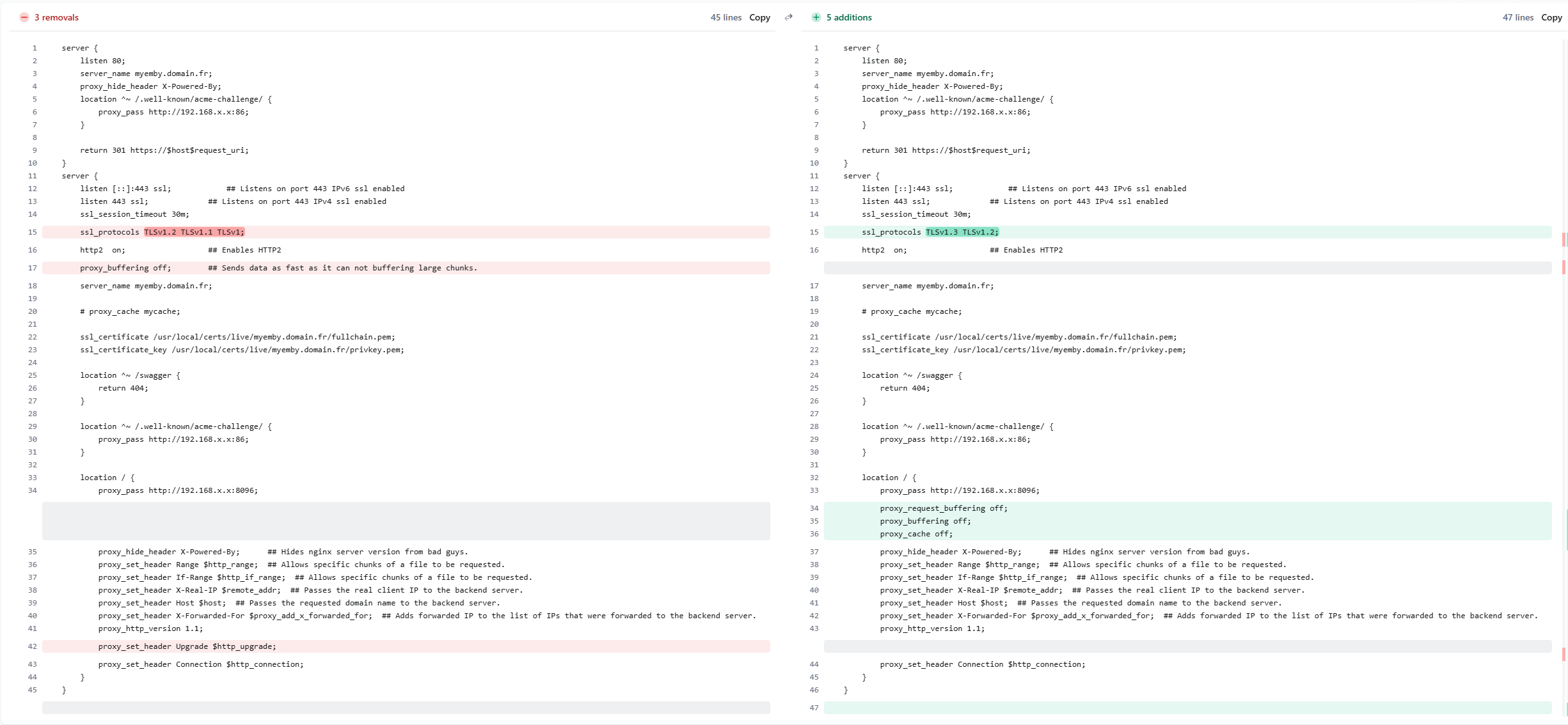
hi, Yep, let me elaborate: First of all, after reading some documentation about TLS & nginx, I updated line 15 the versions. Then, I decided to use some LLMs to question what could be the issue and if I missed anything else (I don't like it but I was not sure what I was searching). And, after some minutes of prompting, LLM advised me to add some buffering properties inside the location. Then I moved the line 17 to the location block and added 2 other properties like advised by the AI. To be honest I'm not sure if it is the TLS update or buffering update that fixed my issue, but I noticed a performance increased after this update, and mostly the VLC issue that is now finally fixed I also removed http_upgrade and added a proxy_cache off options for other reason, (but it could also affect it).
 2 points
 -
Oh dear.2 points
-
First, I want to say that from my understanding, the decision to remove clickable headers from TV mode was made in response to feedback regarding navigation issues—specifically the aggravation that some had having to click up and down too many times. I used those clickable headers quite often, and their removal from TV Mode did not make me happy. At this point I would like to apologize again for the way I previously expressed that unhappiness. My tone in past posts was not appropriate, and I regret being a jerk to the Dev Team in the past about this topic. That being said: Back to my request: I prefer to use a remote control, when navigating Emby which works best in TV mode. I know that clickable headers are still usable in desktop and mobile modes, but using a remote in those modes is frustrating. Emby frequently loses focus, and the experience of having to tab endlessly to regain focus is annoying. (If you know, you know) This leaves me stuck between two choices: using desktop/mobile mode for clickable headers with poor remote functionality, or using TV mode with better remote control support but without the clickable headers. For the past year I've using desktop mode with a mouse, and I really miss easy navigation I had with my remote. I respectfully request that clickable headers be reintroduced to TV mode, but with a toggle option in the settings. This way, users who do not want them can disable the feature, and those of us who used them/don't mind the extra clicks can re-enable it. Even if this option is disabled by default and has to be enabled in the menu setting, having the ability to turn clickable headers back on in TV mode would make a huge difference for me and likely for others in a similar position. Please consider reintroducing clickable headers back into TV Mode in some way: Thanks1 point
-
Can we get admin settings to have universal settings for every device. So if I want my movies to show as thumbnails on every device I set that in my admin panel. Same with how the home page display looks and the theme is. So all settings are all universal and not having to change them every single time.1 point
-
I would try host network anyway even with those fields disappearing. that just means you have to configure that on the host system.1 point
-
HI, do you have the truenas container set to host or bridge networking mode? host mode will make it a lot easier to get this function working.1 point
-
How did you create it? If you created it in Emby then that’s normal. You’ll need to grant them access to it.1 point
-
All the colors you could want.1 point
-
I'm finalizing the background for the score as we speak. You can remove the imdb.png from the icons folder and it will just show the score, you can also change it to some other logo.1 point
-
Also helped me with a slow display for Artists, Composers etc. Thanks1 point
-
Hi, thanks for the reply. LG OLED B9 (65B97LA) Thanks.1 point
-
Yes there was recently an update available through the TOS application manager that I was about to execute successfully1 point
-
VPN’s generally create more problems than the cure.. If your looking for securing you emby-server Upgrade to win 11 (or Linux) . Get and use a TSL(SSL) Trusted Certificate. Don’t open common ports (80,443,8096,8920) Don't use 'emby' anywhere in your domain name Use a high #port (generally any one 16k <> 64k most hackers give up scanning at some point) Use a ddns (or get your own domain) NOW COMBINE them with a ‘Reverse proxy’ (via nginx, caddy, etc.) Research first… HTH.1 point
-
For what it's worth, the fault does not exist in the emby for android tv app. The guide works perfectly when used in the way shown in the video1 point
-
@Luke- Profound apologies. Problem solved. Multiple devices out of sync in differing time servers. My bad.1 point
-
https://emby.media/support/articles/Quick-Start.html1 point
-
@ISeeTWizard I've started working on something i hope will end up looking like this: I just made this in paint as an example. My idea is that people can choose between this and maybe a star plus choose their own color for it. As you made the request i'm asking you what you think of the idea.. Other people are ofc. also welcome to come with comments and ideas on it.1 point
-
Actually i noticed that this is not reliable it keeps jumping between 1 and 0 every few calls. to fix this i've filtered the api session out of the result. i attempted this with the -1 in the vlaue template but this isnt working great. You will need the name you gave to the api key in emby; be aware its case sensitive. in the example below my api key is called "Home Assistant" sensor: - platform: rest name: Emby Active Sessions unique_id: sensor.emby_active_sessions resource: "http://<embyserver>:<port>/emby/Sessions?ActiveWithinSeconds=60&api_key=<APIKEY>" value_template: "{{ value_json | rejectattr('Client', 'equalto', 'Home Assistant')| list | length }}" scan_interval: 301 point
-
Hi, we’re looking into it. Thanks.1 point
-
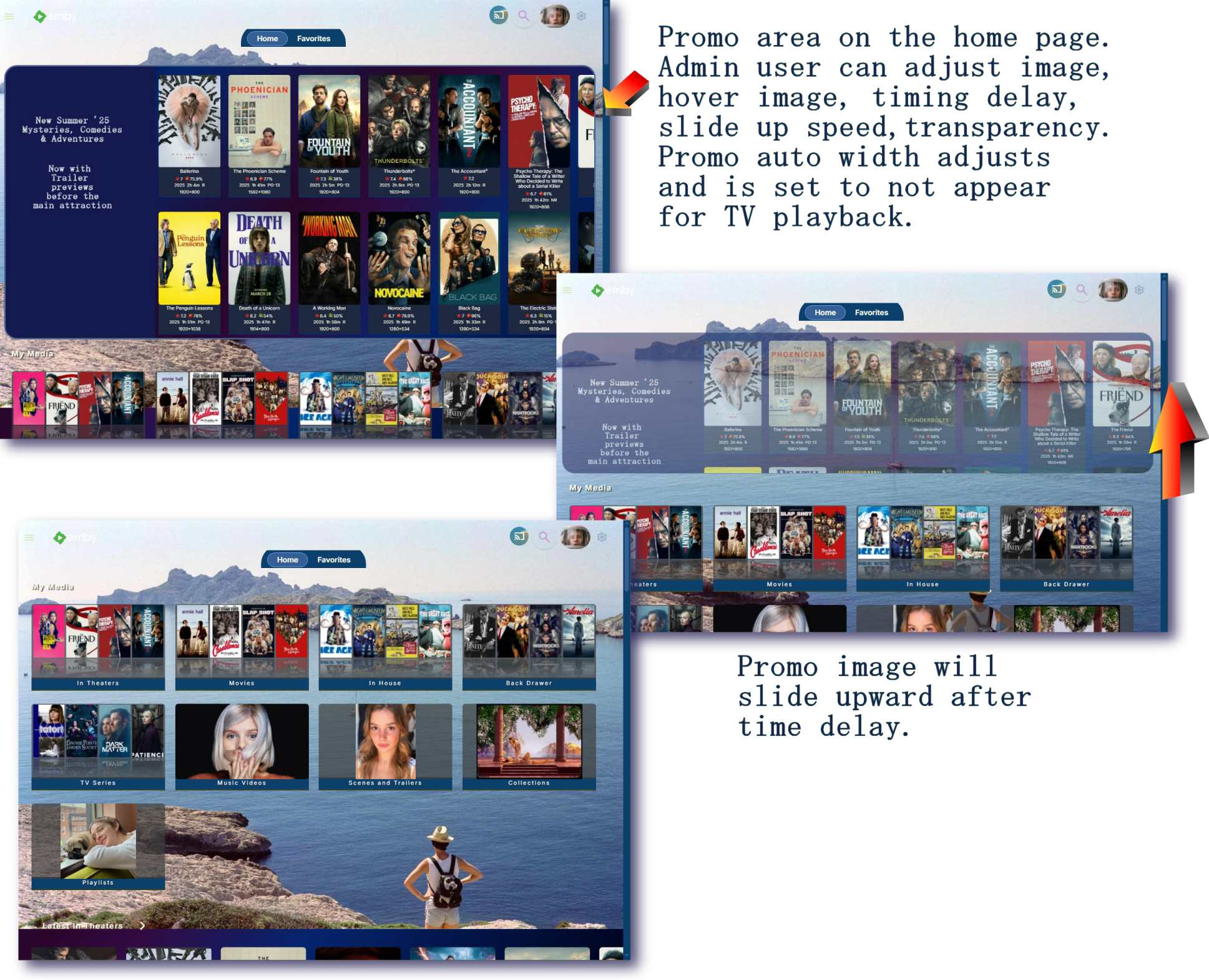
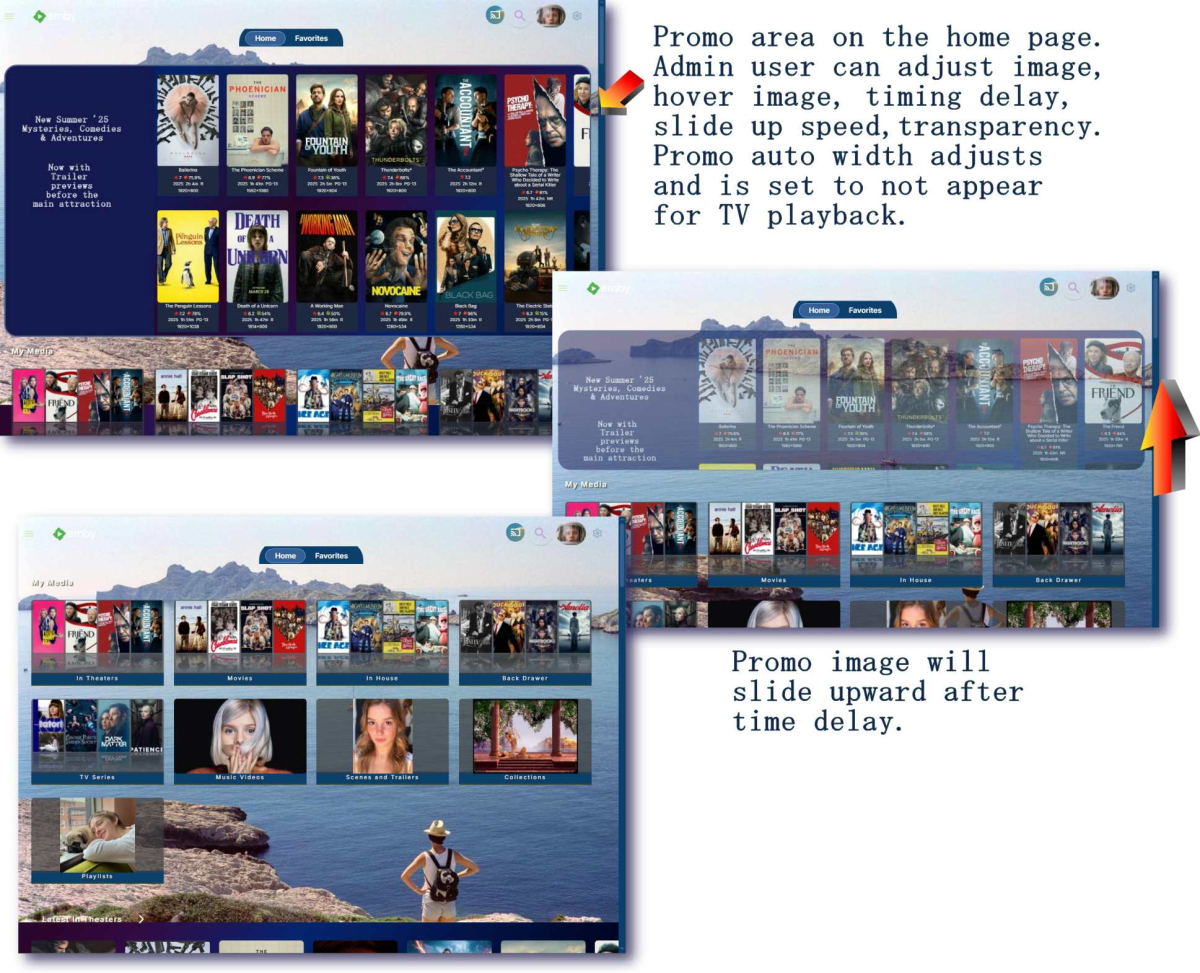
Screenshot montage of promo image slide up feature.
 1 point
 -
Hi! I have the standard Android app on my TCL Google TV and there doesn't seem to be a way to directly play a IPTV channel without having to hit the middle button on my remote twice. Once to get this modal popup which provides useful info on the given show I want to see, but honestly I don't need to see it at this moment, I would rather it just tune to that channel. Anyway to avoid/disable this behavior so it behaves a bit more like Tivimate and lets me access this higher depth DVR as an OPTION, but not the DEFAULT? Thanks so much!1 point
-
After many trial-and-error I've finally been able to get it working by rebuilding the `intel-media-driver` library with the latest version, the hard part was compiling this with dependencies having compatible ABI as the ones running on the Emby image (thanks closed source), which I found with image `ubuntu:18.04`. Sharing here to everyone who was stuck like me. To get this working you need to make your custom image of the emby image with the updated dependencies. The following steps took me 15 minutes to build on a 20 cores CPU, the build process will take longer with less cores (therefore, much longer on a N150 if you're compiling directly there). 1) Create an empty folder with a file `Dockerfile` file with the following content FROM ubuntu:18.04 AS builder WORKDIR /workspace RUN apt-get update && \ apt-get install -y \ build-essential \ git \ cmake \ automake \ autoconf \ libtool \ m4 \ pkg-config \ libdrm-dev RUN mkdir build build/usr build/lib # Libva RUN \ git clone https://github.com/intel/libva.git && \ cd libva && \ git checkout 2.22.0 && \ ./autogen.sh --prefix=/workspace/build/usr --libdir=/workspace/build/lib && \ make -j$(nproc) && \ make install && \ cd - # Gmmlib RUN \ git clone https://github.com/intel/gmmlib.git && \ cd gmmlib && \ git checkout intel-gmmlib-22.7.2 && \ mkdir build && \ cd build && \ cmake -DCMAKE_INSTALL_PREFIX=/workspace/build/usr -DCMAKE_POLICY_VERSION_MINIMUM=3.5 -DCMAKE_INSTALL_LIBDIR=/workspace/build/lib -DCMAKE_BUILD_TYPE=ReleaseInternal .. && \ make -j$(nproc) && \ make install && \ cd ../../ # Media Driver RUN \ git clone https://github.com/intel/media-driver.git && \ cd media-driver && \ mkdir build && \ cd build && \ export PKG_CONFIG_PATH=/workspace/build/lib/pkgconfig && \ cmake -DCMAKE_LIBRARY_PATH=/workspace/build/lib -DCMAKE_INSTALL_PREFIX=/workspace/build/usr -DCMAKE_INSTALL_LIBDIR=/workspace/build/lib .. && \ make -j$(nproc) && \ make install RUN find /workspace/build -name "*.so" -exec strip --strip-unneeded {} \; FROM emby/embyserver:4.9.1.0 AS emby COPY --from=builder /workspace/build/lib /lib 2) Build the image using `docker build -t emby-n150-fixed .` This will take a while, the more CPU cores you have the shorter (took me about 30 minutes with 20 cores) 3) Check that this is working by running `docker run --rm -it --device /dev/dri:/dev/dri --entrypoint vainfo emby-n150-fixed`, if this returns something as follows, then it worked: Trying display: drm libva info: VA-API version 1.22.0 libva info: Trying to open /lib/dri/iHD_drv_video.so libva info: Found init function __vaDriverInit_1_22 libva info: va_openDriver() returns 0 vainfo: VA-API version: 1.22 (libva 2.22.0) vainfo: Driver version: Intel iHD driver for Intel(R) Gen Graphics - 25.2.5 (4b3a078bd) vainfo: Supported profile and entrypoints VAProfileNone : VAEntrypointVideoProc VAProfileNone : VAEntrypointStats VAProfileMPEG2Simple : VAEntrypointVLD VAProfileMPEG2Simple : VAEntrypointEncSlice VAProfileMPEG2Main : VAEntrypointVLD VAProfileMPEG2Main : VAEntrypointEncSlice VAProfileH264Main : VAEntrypointVLD VAProfileH264Main : VAEntrypointEncSlice VAProfileH264Main : VAEntrypointFEI VAProfileH264Main : VAEntrypointEncSliceLP VAProfileH264High : VAEntrypointVLD VAProfileH264High : VAEntrypointEncSlice VAProfileH264High : VAEntrypointFEI VAProfileH264High : VAEntrypointEncSliceLP VAProfileVC1Simple : VAEntrypointVLD VAProfileVC1Main : VAEntrypointVLD VAProfileVC1Advanced : VAEntrypointVLD VAProfileJPEGBaseline : VAEntrypointVLD VAProfileJPEGBaseline : VAEntrypointEncPicture VAProfileH264ConstrainedBaseline: VAEntrypointVLD VAProfileH264ConstrainedBaseline: VAEntrypointEncSlice VAProfileH264ConstrainedBaseline: VAEntrypointFEI VAProfileH264ConstrainedBaseline: VAEntrypointEncSliceLP VAProfileVP8Version0_3 : VAEntrypointVLD VAProfileHEVCMain : VAEntrypointVLD VAProfileHEVCMain : VAEntrypointEncSlice VAProfileHEVCMain : VAEntrypointFEI VAProfileHEVCMain : VAEntrypointEncSliceLP VAProfileHEVCMain10 : VAEntrypointVLD VAProfileHEVCMain10 : VAEntrypointEncSlice VAProfileHEVCMain10 : VAEntrypointEncSliceLP VAProfileVP9Profile0 : VAEntrypointVLD VAProfileVP9Profile0 : VAEntrypointEncSliceLP VAProfileVP9Profile1 : VAEntrypointVLD VAProfileVP9Profile1 : VAEntrypointEncSliceLP VAProfileVP9Profile2 : VAEntrypointVLD VAProfileVP9Profile2 : VAEntrypointEncSliceLP VAProfileVP9Profile3 : VAEntrypointVLD VAProfileVP9Profile3 : VAEntrypointEncSliceLP VAProfileHEVCMain12 : VAEntrypointVLD VAProfileHEVCMain12 : VAEntrypointEncSlice VAProfileHEVCMain422_10 : VAEntrypointVLD VAProfileHEVCMain422_10 : VAEntrypointEncSlice VAProfileHEVCMain422_12 : VAEntrypointVLD VAProfileHEVCMain422_12 : VAEntrypointEncSlice VAProfileHEVCMain444 : VAEntrypointVLD VAProfileHEVCMain444 : VAEntrypointEncSliceLP VAProfileHEVCMain444_10 : VAEntrypointVLD VAProfileHEVCMain444_10 : VAEntrypointEncSliceLP VAProfileHEVCMain444_12 : VAEntrypointVLD VAProfileHEVCSccMain : VAEntrypointVLD VAProfileHEVCSccMain : VAEntrypointEncSliceLP VAProfileHEVCSccMain10 : VAEntrypointVLD VAProfileHEVCSccMain10 : VAEntrypointEncSliceLP VAProfileHEVCSccMain444 : VAEntrypointVLD VAProfileHEVCSccMain444 : VAEntrypointEncSliceLP VAProfileAV1Profile0 : VAEntrypointVLD VAProfileHEVCSccMain444_10 : VAEntrypointVLD VAProfileHEVCSccMain444_10 : VAEntrypointEncSliceLP You can compare and run the same command on the emby image, you should have a bunch of errors instead. 4) (OPTIONAL) For your convenience, I uploaded the image on DockerHub if you want an easy way to see if it works, use the image rajiska/emby-n150-fixed:4.9.1.0, though I'd recommend to build the image yourself1 point
-
Luke -- Just for a follow-up -- I saw that my Firestick Android version of the Emby App updated sometime overnight to 3.4.74, and the "Date Added" choice is now back in the sort pulldowns and is working just fine now. Thanks! Dave1 point
-
Coming from VideoStation, a big disappointment is that Emby does not remember already used tags. So if I have a library with 100 movies with tag: horror, I have to type in the whole word "horror" every time I want to add the tag. There is no list of previously used tags I can simply click and choose from. That slows down the process significantly, especially with multiple tags in a movie, and also is a risk of messing up the tags with typos.1 point