Leaderboard




Popular Content
Showing content with the highest reputation on 07/08/25 in Posts
-
I built a tool for my own use to create better playlists for background viewing, and it's evolved a bit since then. I'm sharing it in case anyone else finds it useful. It's called MixerBee, and it can create interleaved TV mixes, movie playlists from filters, schedule them to update automatically and more. It also has an optional AI feature. The project is on GitHub if you want to give it a try. https://github.com/tophers/MixerBee2 points
-
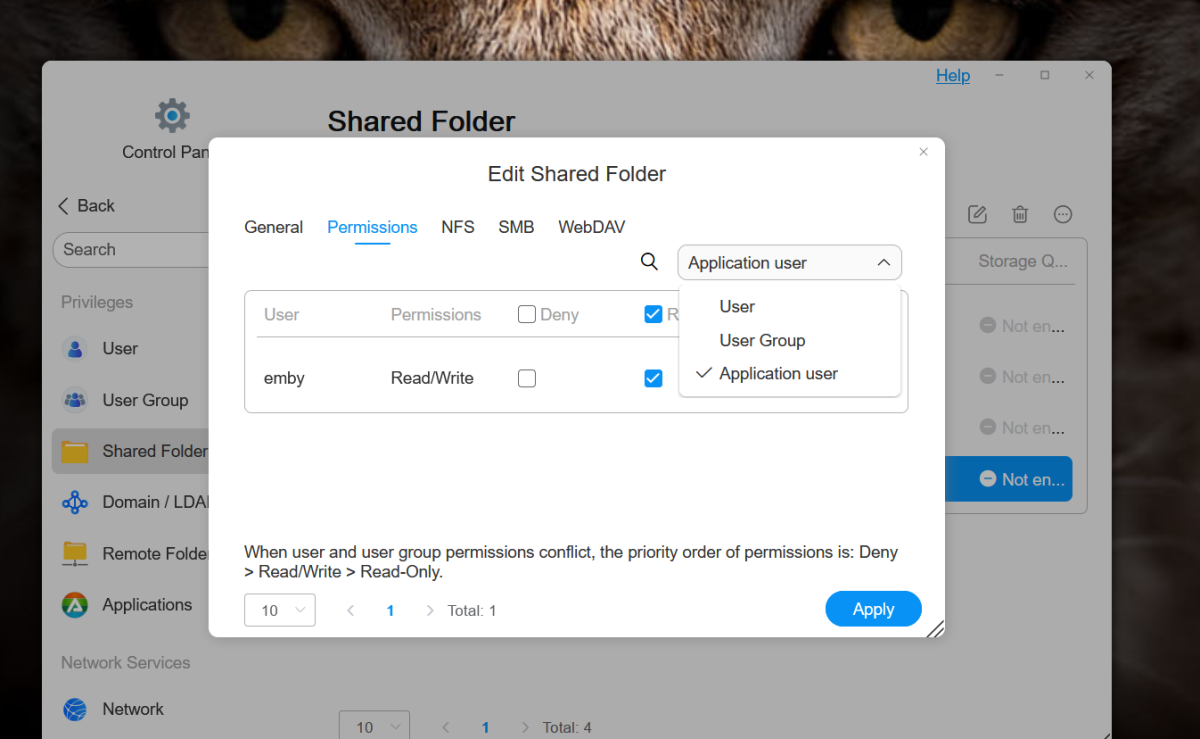
Aha found it! ... finally .... I was creating Shared Folders and manually creating users and giving them access etc ... wouldn't map the folder in Emby. Tried Groups, and adding users to groups, then giving the group access - still no go. Even reset the NAS and trying again - still no go. And then I noticed that after Users and Groups in the permissions drop-down for the Shared Folder was Application User ... and emby was in there. Just gave it read/write access and BAM! In and could see the content! So, if you get stuck like this, that's how you fix it
 2 points
 -
Occasionally I will try to sync/download a title and it will just sit on "Ready to transfer" on the client after the server has either converted the media or immediately if no conversion was requested. So far this appears to happen on a minority of titles. Primarily I see this when using the new Windows client from the Microsoft store. If I attempt to download the same file using the same settings from an Android client it appears to download without any issue. In the example below I originally attempted to sync the base/main file using 20mb conversion settings. After that did not work I started a manual conversion of the title with the following options: place the conversion in the same folder as the original media, changed the container from mkv to mp4, h264 to h265. I then started a download in original quality of that converted item which also didn't transfer: Attempting to sync - Pirates of the Carribean: Curse of the Black Pearl When checking the transfer in BITS Manager I see the transfer but it doesn't show any files: I then started a download of a different item and that downloaded fine: Probably included in logs but the server is running on Ubuntu 24.04 and client device is Windows 11 24H2. At least from what I remember when an item fails to sync on the Windows client I have not yet been able to successfully sync later in the future. Not even after effectively creating a new file through the conversion process. Somewhat of a separate issue but I also have the issue where multiple downloads will get created for one single sync task: Screenshot from above was when connected to the same network as the server. This gets especially bad when on slow remote network like from a hotel. I've seen over 5 jobs created for the same task and as more fire up the original sync gets slower or I just have to kill it EmbyClient.txt embyserver.txt
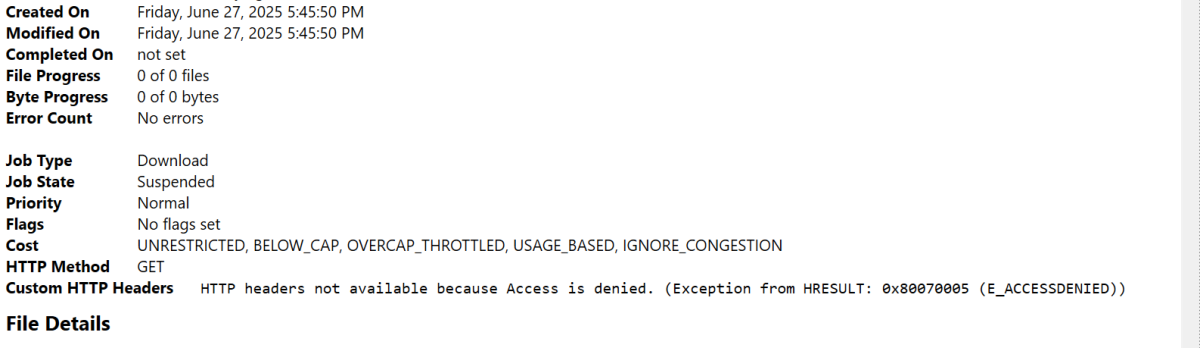
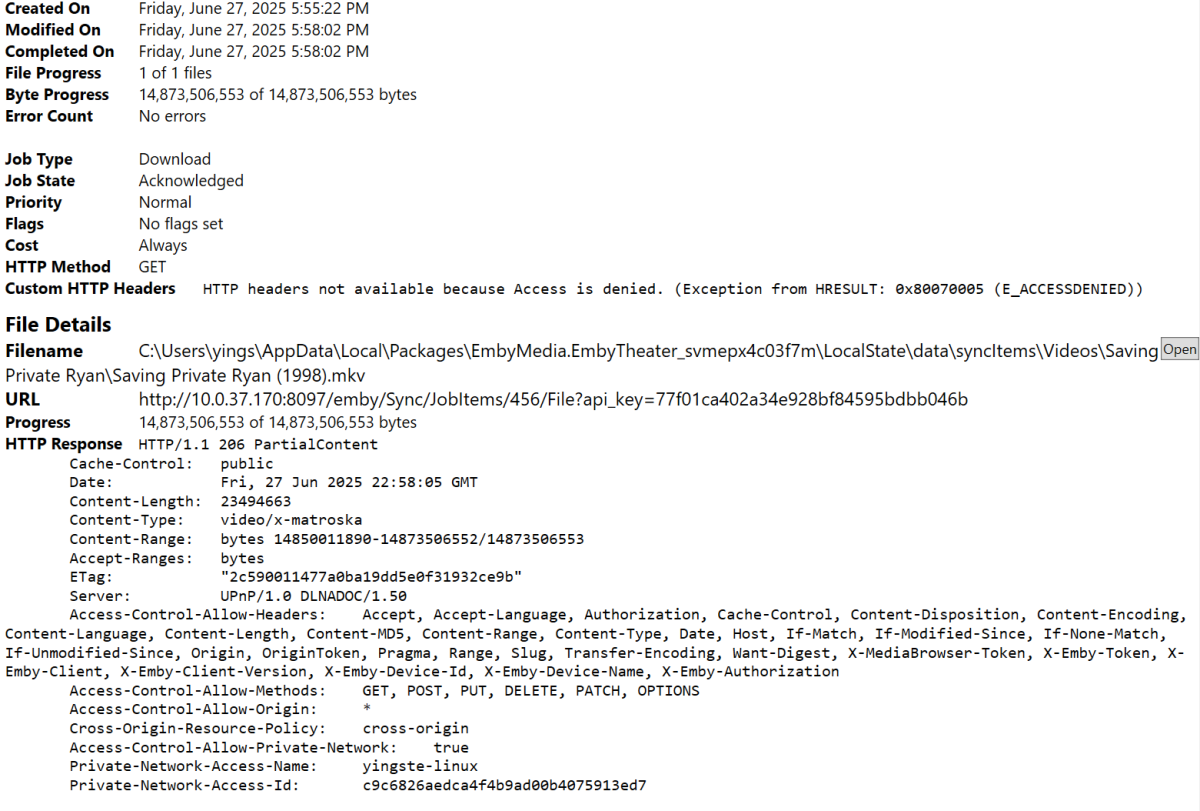
 1 point
 -
I'd put my hope into this over any official Emby app for music playback. It's very early and has no official release yet but it's gotten my hopes up for a dedicated music solution.1 point
-
+1 for 2FA for the admin account1 point
-
Hi, Will do. I'm about to step out so it will be the following day before I get to do this.1 point
-
And another great reason to keep 4.9 in beta! C'mon @Lukeand @ebr! "Support date played as a selectable field in poster view"1 point
-
Hi Luke Thanks for the response. An idea - I suppose would require a lot of re-wiring - is if the metadata-folder could follow the drive, so one metadata folder per drive. Perhaps this would kill some performance but gain in flexibility.1 point
-
HI, yes these are supported and work just fine. I know there are improvements to this in the upcoming 4.9 server release. Thanks.1 point
-
ADM Plugin does not scrape anything, it accesses a flatfile database which is huge. I still have all the data, all I have done at the moment is turned the server off. Currently I have very little time on my hands to do much of anything computer related. However I am open to ideas, so it could possibly be re-instated in the not so distant future. All I have to do is comply legally by making absolutely sure no minors can access the data. For me that's a bit of a challenge, the current server would need some changes as well as the plugin.1 point
-
Ahh okay. Well at any rate she plugged it in at her place and it all works. So idk why my test run didn't work but it's all good now. She's going to get another roku to leave at the apartment so we don't have to deal with this again. Thank you all for the help, much appreciate.1 point
-
@LukeI've noticed this happens a lot more when going from one device to another. Like, pausing it on my TV and then try to resume on the iPad.1 point
-
Thanks all. I changed the permission as indicated and scanning worked. When looking for that permission it wasn't obvious where it was located on the Synology. I took a while to find it.1 point
-
@FrostBytesince user was able to add libraries the issue now is the actual folder permissions correct?1 point
-
Real Setups. Real Users. No Fluff. Welcome to the first installment of our Emby Community Spotlight — a series where we highlight the unique and diverse ways people around the world are using Emby every day. From globe-trotting servers to enterprise-grade home labs, Emby users continue to push the boundaries of what a personal media server can be. Today we are focusing on users who use Windows or Windows servers as the base for their servers! Here are three very different and impressive setups that showcase the flexibility and reach of Emby. 1. A Portable Powerhouse That Travels the World This user lives a truly mobile life, relocating across countries every couple of years. Despite the challenges of frequent international travel, they manage to bring their Emby server (along with their entire media, gaming, and work setup) in just two suitcases and two carry-ons. OS: Windows 11 Pro Case: XTIA Proto L v2 CPU: AMD Ryzen 7 5700X3D GPU: NVIDIA RTX 3090 RAM: 32GB Storage: 80TB Clients: 2x NVIDIA Shield TVs TV/Sound: LG C2 OLED + Vizio All-In-One Soundbar Router: ASUS ROG AX11000 This setup has successfully traveled routes like Sri Lanka → Philippines → Singapore → UK → Saudi Arabia. The server doubles as a workstation and gaming rig. Truly a server built for work, play, and portability. Super impressive! 2. An Overbuilt Beast with Room to Grow Built for endurance, performance, and multi-purpose use, this next user has created a server that handles everything they can throw at it! OS: Windows Server 2022 Form Factor: 4U rackmount with 24-drive backplane CPU: AMD EPYC 7F52 Motherboard: Supermicro H11SSL-I RAM: 512GB ECC DDR4 Storage: 8x 18TB SATA HDDs (pooled via StableBit DrivePool) 2x 2TB NVMe SSDs (write cache) GPU: NVIDIA Quadro P2200 Clients: Fire TV Sticks, Samsung Smart TVs, iOS/Android devices, browser After 8 years of using Emby, this setup reflects confidence, stability, and the desire to build once and build well. Live TV via HDHomeRun was described as effortless, and streaming performance is as smooth as it gets. 3. A Well-Rounded Home Media Hub This setup strikes the perfect balance between performance and practicality. Used primarily in-home across multiple client devices, it serves a large personal media collection with plenty of horsepower under the hood. OS: Windows 11 (24H2) CPU: AMD Ryzen 7 5800X3D Motherboard: Gigabyte X570 AORUS Ultra RAM: 64GB G.Skill DDR4 @ 3600 MHz GPU: EVGA RTX 3090 FTW3 Ultra Storage: 40TB HDDs + 7TB NVMe SSDs Clients: 5 in-home devices, occasional remote access via Tailscale Library: ~2,000 movies, 800,000 photos, 30,000 personal videos, 50,000 songs This server doubles as a central storage hub and personal archive, with exceptional performance for both local and occasional remote streaming. Have a Setup Worth Sharing? We will be featuring more community builds in this ongoing series shortly! Whether you’re running Emby on a mini PC, cloud server, or something no one’s thought of yet, we want to hear from you. Join the forum conversation and submit your setup to be included in a future spotlight. View the full article1 point
-
Hi all. I'll share my setup, but unable to take some pictures since it's a too much of a mess ! The streaming server consists of a mid tower that is filled with : - B450 AORUS motherboard - AMD Ryzen 5 3400G - 8 GB of RAM (I know it's not that much but is enough for now) - Windows 10 Home x64 - 128 GB SSD for the OS - 240 GB SSD for the Emby programs, database and metadata - 500 GB 2-1/2 HDD for library - documentaries - 2 TB 3-1/2 HDD for Nextcloud replication - 1.5 TB 3-1/2 HDD for photos storage - 2 TB 2-1/2 HDD for some TV Shows - 2 TB 3-1/2 HDD for TV Shows - 4 TB 3-1/2 HDD for movies This server also hosts PicApport instance (for browsing photos). I installed a "storage server" in a hp microserver G7 - OpenMediVault installed on an USB key - 2 TB 3-1/2 HDD - 2 x 3TB 3-1/2HDD - 4 TB 3-1/2 HDD - 10 TB 3-1/2 HDD All is power-backuped with a 750W UPS. Outside home I have a "downloading and encoding server" with : - 4 TB HDD for storage - 960 GB SSD for temp files and OS - Windows Server 2016 - AMD Ryzen 7 5800X - 32 GB RAM All my downloads are re-encoded in VP9 (1850 kbps video, he-AAC 5.1 sound) and sound is normalized. I create 2 versions of each download. A "web" version that fits in around 2 Mbps and a "heavier" version with h264 or h265 video and several audio tracks including DTS or AC3 original ones (ie : the heavier version is filled with 4 audio tracks if there's a FR en EN track ) Doing this prevents in 99% of times video transcoding. I also have a hosted "reverse proxy". It allows to not expose 8096, 80 and 443 ports of my internet connection. The clients are : - web app (most of the clients) - Fire TV : 3 at home : bedroom with a projector, home cinem room with a projector and a 5.1 sound system, guest house - Smart TV : Philips 60" - Android App : around 10 since my setup is shared with some friends and family members - iOS App What is unique and why I choosed Emby, is that it allows the sharing of my library with friends and family and all is self hosted (or at least self hostable) ! I bought the premiere lifetime and all I can say is : It worth it !!!!1 point
-
Could be a number of things, sure the icons are in the icons folder? Like for example h265.png. Try enable and disable settings, this might help if it's a version mismatch. If all fails then send me a log with debug enabled and I will look at it. We will make it work somehow1 point
-
Sorry..I didn't notice the email. I assume you mean these:






 1 point
 -
Got hardware acceleration working for a non-Docker Emby install on Ubuntu 25.04 (LXC Inside Proxmox) using this: apt update && apt upgrade -y && apt install vainfo intel-media-va-driver -y cp -r /usr/lib/x86_64-linux-gnu/* /opt/emby-server/extra/lib/ mv /opt/emby-server/lib/libstdc++.so.6 /tmp/libstdc++.so.6.bk && cp /usr/lib/x86_64-linux-gnu/libstdc++.so.6 /opt/emby-server/lib/libstdc++.so.6 # Finally to check if it worked root@emby:~# /opt/emby-server/bin/emby-vainfo Trying display: drm libva info: VA-API version 1.22.0 libva info: Trying to open /opt/emby-server/extra/lib/dri/iHD_drv_video.so libva info: Found init function __vaDriverInit_1_22 libva info: va_openDriver() returns 0 vainfo: VA-API version: 1.22 (libva 2.17.1) vainfo: Driver version: Intel iHD driver for Intel(R) Gen Graphics - 25.1.2 () vainfo: Supported profile and entrypoints VAProfileNone : VAEntrypointVideoProc VAProfileNone : VAEntrypointStats VAProfileMPEG2Simple : VAEntrypointVLD VAProfileMPEG2Main : VAEntrypointVLD VAProfileH264Main : VAEntrypointVLD VAProfileH264Main : VAEntrypointEncSliceLP VAProfileH264High : VAEntrypointVLD VAProfileH264High : VAEntrypointEncSliceLP VAProfileJPEGBaseline : VAEntrypointVLD VAProfileJPEGBaseline : VAEntrypointEncPicture VAProfileH264ConstrainedBaseline: VAEntrypointVLD VAProfileH264ConstrainedBaseline: VAEntrypointEncSliceLP VAProfileVP8Version0_3 : VAEntrypointVLD VAProfileHEVCMain : VAEntrypointVLD VAProfileHEVCMain : VAEntrypointEncSliceLP VAProfileHEVCMain10 : VAEntrypointVLD VAProfileHEVCMain10 : VAEntrypointEncSliceLP VAProfileVP9Profile0 : VAEntrypointVLD VAProfileVP9Profile0 : VAEntrypointEncSliceLP VAProfileVP9Profile1 : VAEntrypointVLD VAProfileVP9Profile1 : VAEntrypointEncSliceLP VAProfileVP9Profile2 : VAEntrypointVLD VAProfileVP9Profile2 : VAEntrypointEncSliceLP VAProfileVP9Profile3 : VAEntrypointVLD VAProfileVP9Profile3 : VAEntrypointEncSliceLP VAProfileHEVCMain12 : VAEntrypointVLD VAProfileHEVCMain422_10 : VAEntrypointVLD VAProfileHEVCMain422_12 : VAEntrypointVLD VAProfileHEVCMain444 : VAEntrypointVLD VAProfileHEVCMain444 : VAEntrypointEncSliceLP VAProfileHEVCMain444_10 : VAEntrypointVLD VAProfileHEVCMain444_10 : VAEntrypointEncSliceLP VAProfileHEVCMain444_12 : VAEntrypointVLD VAProfileHEVCSccMain : VAEntrypointVLD VAProfileHEVCSccMain : VAEntrypointEncSliceLP VAProfileHEVCSccMain10 : VAEntrypointVLD VAProfileHEVCSccMain10 : VAEntrypointEncSliceLP VAProfileHEVCSccMain444 : VAEntrypointVLD VAProfileHEVCSccMain444 : VAEntrypointEncSliceLP VAProfileHEVCSccMain444_10 : VAEntrypointVLD VAProfileHEVCSccMain444_10 : VAEntrypointEncSliceLP1 point
-
Hi, Happy to open the share with my config: Rack server (processor Intel(R) Xeon(R) Gold 6130 CPU @ 2.10GHz, 64 cores, 128G of RAM) with up to 38 drives in it (so far "only" filled with 32 drives) running Debian 12 installed in a datacenter. Full IPv4/6 access. Medias storage and metadatas storage on ZFS volumes (storage space used for medias around 220To right now). Separate storage for medias and metadatas, and separate raid for OS. Stream to bunch of different devices. 2 pictures (one during installation in rack, and one during a reorganisation of the rack). The emby server is the machine with blue locker on drawers. Vincèn1 point
-
Hi, no ETA but we are working on it. Thanks.1 point
-
Hey Luke, Do you know when this will be applied?1 point
-
To Emby dev: Please note that logs posted here publicly still contain information that should be redacted (as it's already done with x_secret_x). In the log above, we have the server public IP address of the server in the content of the HTML page returned by Cloudflare for Open Subtitles (difficult to clean as we don't know the content of the page, so I suggest filtering out anything resembling an IP address) : <span class="hidden" id="cf-footer-ip">xxx.xx.xxx.xxx</span> We also have a user's public IP address: Its username: And its access id - I don't know if this is important and if it allows authentication on the server. - : Here we also have an email address: There's also the server URL in the PDF title and header, but I imagine this is a user error.0 points
-
When you do a log out, the api key in that url will be invalidated.0 points