Leaderboard


Popular Content
Showing content with the highest reputation on 07/04/25 in Posts
-
I'll be able to do that in about 2 weeks. I'm flying out of country so I'll do that on my return. Out of that for me, no other problem. I see another person replying that it lag in difficult scene or blink. I had that only once in an anime opening song. I think it was the animation that wasn't going through that did the blink. But no lag. Also, the load delay he talk about, I had that in the past but no more since the new update. For me, the subtitle load way faster, it load instantly in fact.2 points
-
Perfect! That was the solution for two new users. Both were sorta stuck in that loop and it resolved that issue for both users. Thank-you so much. Brilliant. I also watched the process for installing the Emby app on an Android TV that was attached to an RV using Starlink for Internet access. QR code instead of passwords was very helpful - no passwords to muck up. It worked flawlessly! I'm so impressed. Well done. Mostly I don't expect this kinda stuff to work. Very cool folks, very cool indeed. Thanks so much.2 points
-
Here is the latest list of versions for Emby software across the server and clients. Emby Server Stable: v4.9.5.0 (2026/05/18) Release Notes Beta: v4.10.0.14 (2026/06/04) Release Notes For other platforms, please refer to the download page. Emby for Android TV Google Devices Stable: v2.1.23 (2025/12/27) Beta: v2.1.46 (2026/04/15) Amazon Devices Stable: v2.1.23 (2025/12/27) Beta: v2.1.46 (2026/04/15) Stable Release Notes Beta Release Notes Universal Android app Stable: v3.5.16 (2026/01/26) Beta: v3.5.36 (2026/05/10) Release Notes Download the latest Beta here. Emby for Kodi See here for the latest information. Emby for Roku Stable: v4.1.63 (2026/05/04) Release Notes Beta: v4.1.64 (2026/05/13) Release Notes Emby for Windows (Windows Store for PC & Xbox One) Stable Release Notes Beta release notes Emby for Linux Beta Release Notes Emby for Samsung Smart TV (Orsay) E-series to H-series TVs only Release Notes Emby Theatre for Samsung Smart TV (Tizen) Release Notes Emby Theatre for LG Smart TV Stable: 1.0.50 (2026/01/19) Emby for iOS Stable: v2.2.53 (2026/05/16) Stable Release Notes Beta: v2.2.52 (2025/04/11) Beta Release Notes Emby for Apple TV Stable: v2.0.3 (2025/12/26) Announcement Beta: v2.0.6 (2026/04/11) Release Notes Emby for tvOS (Apple TV) Stable: 2.1.6 (2022/12/23) Release Notes - TBA Beta: 1.5.1 (10) (2021/03/02) Beta Release Notes Emby For MacOS Stable: 2.1.6 (2022/05/09) Details here. I will keep this post up-to-date as much as possible, but please send me a PM about anything I haven't updated, or is missing. Special thanks to @Borskfor supplying a lot of the updated information. Thanks.1 point
-
A masonry view to reduce unnecessary waste of page space.

 1 point
 -
I built a tool for my own use to create better playlists for background viewing, and it's evolved a bit since then. I'm sharing it in case anyone else finds it useful. It's called MixerBee, and it can create interleaved TV mixes, movie playlists from filters, schedule them to update automatically and more. It also has an optional AI feature. The project is on GitHub if you want to give it a try. https://github.com/tophers/MixerBee1 point
-
The Tag setting seems to do nothing when generating the images. I setup the tag "IMAX" in EmbyIcons setting and pushed the file IMAX.png into the icon folder, but The icon is not shown on the cover for the specific movies. tag.png for the preview is working though. Cleared Browser cache end even deleted contents in enhanced-images folder in image cache. Log is attached. Movies that should show IMAX logo are Blood & Sinners + Tron Legacy in log. embyserver (1).txt1 point
-
Updating this from discussion here Basically - if a channel already exists in their database, then they would add it to lineups that have it missing If a channel is not in their database, then they may consider a request from us if the station is a full-power station. But, either way, the normal process for channels to be added to their database, is for the station itself to ask them to do that. They would probably need to pay Gracenote for that. The missing 29.x channels from WTHV-LD appear, according to Wikipedia to be low-power stations1 point
-
That will be difficult - because I can see wikipedia saying they are not full-power stations If they are full power and we have evidence to back us that they are, then I could try and ask Gracenote and see if they would add. What they have stated, is that for channels that are not in their database, it would be up to the station to request the channels to be added in Gracenote lineups. You could try and get in touch with the company that owns WTHV-LD and ask them if they could look into getting their channels added to the Gracenote database.1 point
-
It's already there, yay!1 point
-
Thanks, I'll check it. I think I know what's wrong, currently I'm not at home, please wait for one or two weeks. I'll include a fix in next version.1 point
-
@visproduction 1) removed subs, problem still there. 3) I mean that resume always worked ALWAYS... even after many days... let me say... so many days that the GUI becomes full of items (children are used to start something then stop and jump elsewhere) Now does not work anymore on the movies where also FF\REW fail, even after 5 minutes from the stop to resume. 2) will do later today1 point
-
The channel has now been added by Gracenote and is available in the OTA lineup for Zip 51041 KTIVDT6 4.6 OUTLAW If it is not showing now in the current guide in Live TV settings and you can establish when the last guide refresh, best is to wait 24 hours from that time and then see if it shows in the refresh after that. There is a 24 hour http requests cache in Emby Server. Try to refresh the guide and see if the channel appears. If not try again later / tomorrow as there is a 24 hour http request caching period in Emby Server (since the last guide refresh)1 point
-
Moreover, I am not a frequent user of fast forward... so even if I NEVER noticed such issues before, I can not guarantee 100%... but... for sure I user every day "resume playing". I am used to watch a movie maybe in 3 o 4 days... so I stop the play during lunch on the tables and I resume playing the day after in the evening from the Android TV and it always worked, but no more now and I did not changed ANTYTHING, but... experiencing such issues... I upgraded Emby server to the latest version (it runs on Ubuntu). @visproductionmany thanks for the help, but... using the test files the clip with the rabbit... just to be clear... these run fine. P.S.: I see that: if I play the movie from a smartphone connected to the home WiFI... I can not FF\REW\resume, the same device connected to my home via VPN and a very very poor mobile network... then it works... It is simple... over poor bandwidht the server re-encode, with home WiFI it dooes not re-encode. But it happens also with nVidia Shield wired to the emby server @ 1 Gbps Tell me exactly what I have to do for the test and I will do.1 point
-
@visproduction tested some videos where I can not FF\REW\etc. with FFMPEG and all of them are error free1 point
-
So It seems to have fixed itself, I wonder if it was some server lag or something, so sorry for bugging you1 point
-
The LSIO image uses PUID/PGID and the official Emby image uses UID/GID/GIDLIST. The posted example is for the official Emby image.1 point
-
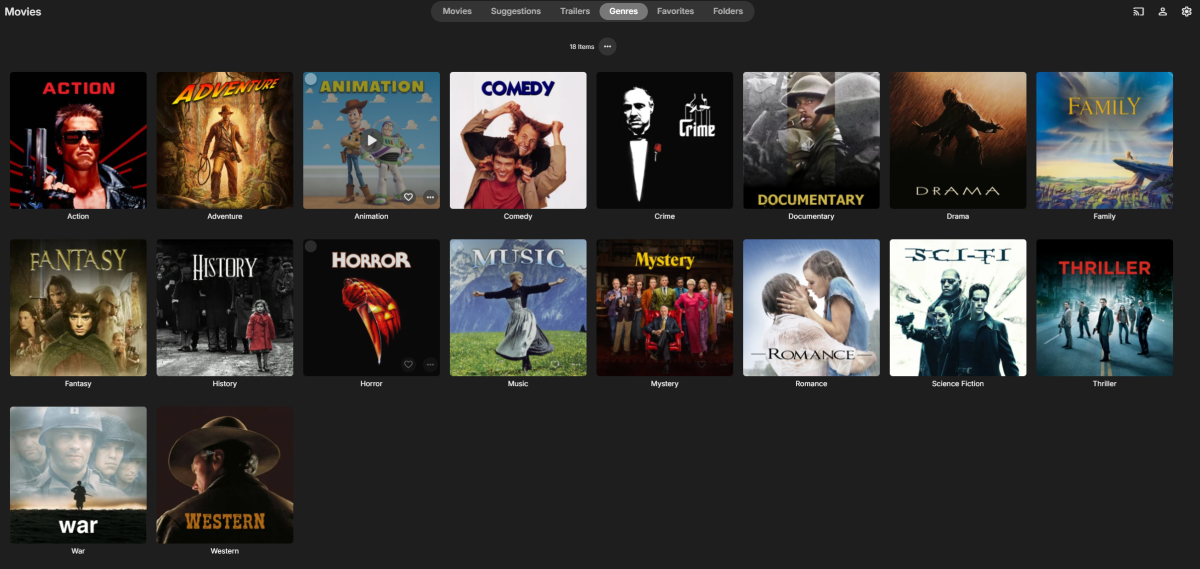
Hello everyone! I've been an Emby user for several years but am new to the community. This weekend, I had some free time and created custom movie-themed genre cover art. I thought others might find them useful, so wanted to share them with you all. Enjoy! Download: https://drive.google.com/drive/folders/1AVi_I9ACdHcSyiIbc1wcI7xdB3dNsGgN?usp=sharing Preview:
 1 point
 -
@visproduction Most problably I am missing some technical details how this process works. So let me ask... at the and of the story, when I watch a movie by using Emby App on Adroid or Android TV... who is decoding and playing the moview? Is it Emby app or what? Anyway I can confirm: I have 12 TB of movies and NEVER NEVER in years had such problems... I am experiencing such issue in the last months.1 point
-
Here you have the same error with DB 128mb, diagnostic plugin unninstalled and 2 reboots. Ed: I tried updating the android app 3.4.75 and nothing change ffmpeg-transcode-580edb51-1b34-4d21-9285-c54ee039c6bf_1.txt embyserver (21).txt1 point
-
Short lived. Still having issues1 point
-
I have tested a little and find that subtitles unfortunately often “blink” on simple subtitles and lag on more difficult scenes. Everything happens after I wait the few seconds for the subtitles to load correctly, as I described above. That is, I am waiting for the next patch.1 point
-
I found this: Arch Linux's default systemd service file for Emby uses ProtectSystem=full and ProtectHome=yes and other sandboxing options. You can relax or customize the systemd sandbox for Emby. Edit the service files: Run: sudo systemctl edit emby-server Add an [Service] override: [Service] ProtectSystem=off ProtectHome=off Save and reload: Use at your own risk as i don't have much, if any, knowledge of Arch.1 point
-
Thanks Luke!! Keep up the good work, I'm totally in love with Emby server side!!1 point
-
Not sure where you're at with this updated guide, but a heartfelt thanks for being a great contributor to the community. I'm a recent Plex refugee and am very excited to try and get secure remote play working on Windows 11 for 10+ family members without buying domains and whatnot, or requiring them to TailScale/WG to the house.1 point
-
Adding another piece to the story... If I try to resume a movie, it always starts again from the beginning: yesterday I stopped to play a movie... in the Emby menu it is displayed as continue watching, but restart from the beginning. Edit: I understood that in some cases FF\RW\resume work and looking at the NERD STATS I can say that when the stream is transcoded, then FF\RW\resume work. The problem is that in almost 90% of the cases, it goes with direct playing without trasncoding. So 2 workaround found: 1) set the quality in the app a step lower than the direct playing bitrate... this force the server to trasncode, or 2) there is a setting in the app that correct playback and also this force the trascoding The problem is that both 1) and 2) are settings specific for that playback session. Just changing the movie needs to re apply the settings. Is there any way to force always transcoding in the server?1 point
-
I honestly just notice the screensaver was running so I though it was when the screensaver started (which can be configured). Would be nice to have a setting like the screensaver to set a delay or disable that feature. I often pause and resume and right now, having to re-enter the code then go back to what I was watching, navigate then started, it's tedious1 point
-
Just wanted to add that I am seeing the same symptoms as @Kcircuitwhere the TV will only display the Ready to Cast logo and play the audio of the live TV stream, but no video. Also I see no information about the current stream showing on the phone Dashboard. In my case, the server is on Windows 10 and the phone is an iPhone. It has been this way for a while, perhaps since the whole Chromecast expired certificates fiasco or shortly after. Chromecast on Plex for live TV has been toast ever since they redesigned their phone app, so I recently switched back to Emby. I have not tried playing any recordings or movies yet, but for debugging I ran: avahi-browse -rt _googlecast._tcp from an Ubuntu box on my network and it returned ve=05 which is Cast v5 (historically Chromecast Audio) according to this site. Perhaps to fix the issue they had to move the cast version forward, but this device is definitely not audio-only. I use ffmpeg to transcode my live TV before it reaches the server, so all the video is as follows: Output #0, mpegts, to 'pipe:1': encoder : Lavf61.1.100 Stream #0:0: Video: h264, yuv420p(tv, bt709, progressive), 1280x720 [SAR 1:1 DAR 16:9], q=2-31, 29.97 fps, 90k tbn encoder : Lavc61.3.100 libx264 Stream #0:1(und): Audio: aac (LC), 48000 Hz, stereo, fltp, 320 kb/s encoder : Lavc61.3.100 aac The H264 codec is set to high profile, level 4.1. Don't know if it makes a difference, but I can tweak any of these values if needed.1 point
-
The issue with 12.5.7 is still happening. Just updated Emby on an old ipad and now it crashes on launch. I should have known better than to update the app without checking the forums first, the dev teams here seem to do this kind of bug introduction more than now. I learned my lesson, never update the emby until lots of other people have and never update even then unless you search for your OS version in the forums. I won't make this mistake again. Thanks Devs.1 point
-
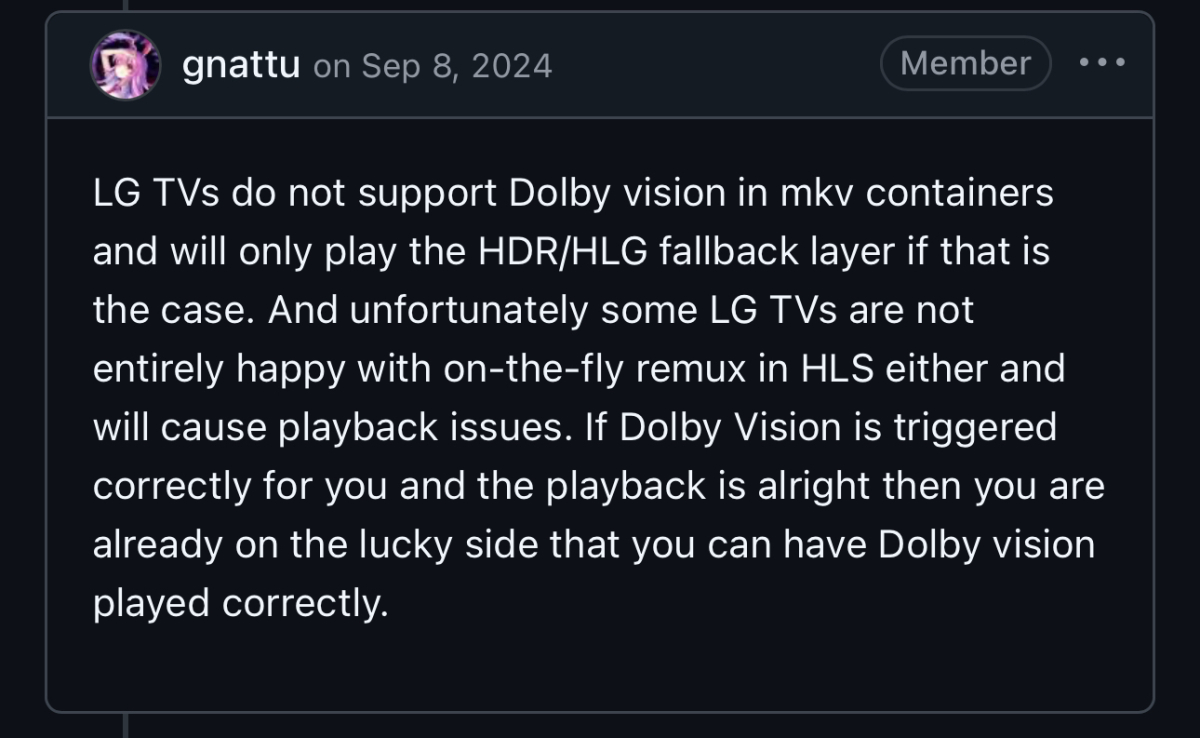
@LukeWhen playing a DV profile video in .mkv container, LG tv cannot play the tone mapping so you get the purple/green screen with Emby. Jellyfin remux to mp4 container but has a bug where if playback is paused and resumed, I’ve had it crash the server. Been Running both Emby and Jellyfin for testing. Posted under Jellyfin GitHub issue #12609.
 1 point
 -
Yeah I saw this post but there is not news except for the recruitment of testers since last september. How is that project going ?1 point
-
ha ha @Lukethis what you get when you give users options1 point
-
Some shows have specials that are supposed to air in between other episodes. Even with Metadata, TVDB and the like, sometimes these specials are not put where they are supposed to be. Your only option at that point would be to relabel each episode's metadata episode number to account for the specials in their place. This is time consuming, a little annoying and could cause potential issues. My suggestion is this: I have a series, where it has an episode 21.5 - it was a Webisode that showcases crucial plot details of the next episode. Having to go back to the Specials folder to watch it after watching Episode 21 isn't horrible, but is kind of a meh experience. Now, if I could Edit it's meta data to be "Season 1 - Episode 21.5" and it'd squeeze itself in, that'd be nice, no? Another example is Macross 7. It had 3 "Encore" episodes that got released after the show finished. These episodes are intended to be viewed at a certain point, but were cut due to time constraints. They're relegated to the Specials folder as well. Now in this particular series, you';re supposed to watch them after episode 37. So to make things cleaner, I could label them each Episode 37.1, Episode 37.2, Episode 37.3 - and they'd shove themselves in between episode 37 and episode 38. It'd just make things more consistent.1 point
-
I have previously asked for this. please support. +1, Star based ratings system is much needed.1 point
-
Hi, thanks for the feedback ! Yes we can look auto-scrolling to ensure the now playing track is visible. Most of these other features will be satisfied in future updates once we have smart playlist features.1 point










_svg.thumb.png.85e4ee6291ddd76347269c05175b5dda.png)