Leaderboard




Popular Content
Showing content with the highest reputation on 06/23/25 in Posts
-
That solved it. And it's not too bad of a situation, only 419 subtitle files. That obviously means I had a permission issue for a while, but it's not so many that I won't be able to manually move them to where they belong. I still think this should be something as simple as telling emby to move all subs to the media folder. In keeping with the permission idiom, reason I couldn't find them earlier is that they are in a root owned directory, therefore you have to have rights to even look in there. Duh. As always Grim, you are a big help and I appreciate it.2 points
-
POSTERS "Posters" is in an Alpha stage of development. (was excited to share with the community, but there will be some fun things to fix) It is an application written in Javascript which will connect to Emby and display the a poster for the media item currently playing on a device. This app is hosted in the web browser. It can be run on Raspberry Pi, stuck to the back of an old computer monitor, mounted on the Wall. It can be opened in Chrome using 'Kiosk' mode, and the display set to portrait. More Raspi integration terminal commands to come. (Anyone with Raspi knowledge? It's time to shine!) It uses https://animate.style/ animations, so there is, literally, an bunch of possibilities in layout, and animations to make the posters app unique to each users tastes... More to come. How to use: Unzip the folder to the desktop (anywhere) Right click "index.html" Open in your favorite browser Discover your server Login Start to play a movie on one of your emby ready devices Watch the posters come alive TODO: A Landscape view Configuration options Terminal Commands for Raspberry Pi (kiosk browser, start in portrait, load html on start) Fix multiple streams cause images to reload. Maybe this is a good thing, we just have to slow it down. Take advantage of all the different animations available in animatecss libraries November 3 1. Added full screen capabilities, 2. landscape mode, 3. hidden fly-out nav for future options. November 2 1. First Upload DOWNLOAD: PosterApp_v0.22.zip1 point
-
1. In the KB article Trailers … The section Trailer for TV Shows has a botched example. Home Alone is a movie and shouldn't be mentioned. I think it was just supposed to have "/My Show (2020)" at the level where Home Alone currently is, and /trailers should be one below that. 2. In the KB article TV Naming … This article says "Note: tmdbid is the preferred tag to use for most uses". Why is it preferred, especially for TV shows? If it is preferred, then why is TVdb the default provider for TV libraries? Would it be better to recommend tvdb/tvdbid for TV shows and tmdb/tmdbid for movies? In the section Multi-Episode Files, the following two examples are redundant and can be removed: show name S01E02-E05 episode name.ext show name S01E02-X05 episode name.ext Where it says "Please see Ordering TV Show Special/Extras to learn how to place these specials in the proper timeline", the currently unlinked text "Ordering TV Show Special/Extras" should be linked to /support/articles/Ordering-TV-Specials.html1 point
-
Take your time! No need to rush...1 point
-
We should import the one based on the library language settings, but I think last I looked at this, ffprobe only produces one title rather than all of them. So it needs to report them all and then Emby can cycle through them and pick the most appropriate one.1 point
-
It's not; for any external subtitle, item Edit Subtitles dialog will show full path for particular subs, wherever they're saved, either with media or in server's metadata folder, you can check it for whatever item you tried to play there with SMplayer.1 point
-
Will have to test it tomorrow, getting dinner ready for the kids.1 point
-
Hi. I'd like to request a crucial usability improvement for the Emby app on LG TVs, specifically concerning navigation with the Magic Remote's pointer or a connected mouse. Currently, when Browse horizontally through libraries, categories, or lists (e.g., scrolling through movies or episodes), there are no on-screen left/right arrow buttons that can be directly clicked with the Magic Remote's pointer. This makes horizontal navigation much less intuitive and efficient, as users are forced to rely solely on the physical arrow keys on the remote or the scroll wheel for vertical movement. Adding visible, clickable left and right arrow icons on the screen—similar to how horizontal scrolling works in the Emby web app or other streaming services on LG TVs—would significantly enhance the user experience. It would allow users to leverage the precise and comfortable pointer functionality of the Magic Remote for all aspects of navigation, making Browse much smoother and more enjoyable.1 point
-
Not yet but I will have to rely on that, thank you anyway for all your help. Have a good week.1 point
-
That is strange. Well that is what betas are for. Thanks, i will look into it!1 point
-
Just in case, try this version: Also i'm an idiot.. Forgot to actually add the code i made to make the rating show without the icon. The icon name should be tmdb.jpg (or png and so on)... Will add that code a little later. EmbyIcons.dll1 point
-
I really need it, the current version of emby does not support the gpu of the n150 processor. I installed the latest ffmpeg in the system and it works fine.1 point
-
Update: Gracenote have responded saying that these WYCU-LD channels are not in their database and cannot therefore be added to the lineup for zip code 03603. I have now raised "new channel" requests for each of these for their consideration.1 point
-
because surely Emby is a private media server for yourself and maybe a small number of friends/family. If your users don't know how to contact you any other way, then clearly they shouldn't be accessing your server (or you shouldn't be running a commercial server)1 point
-
great. The http requests caching in Emby Server appears to be at least 24 hours on the lineup requests. Well - they have indicated that KTIV-DT6 is not in their database and so I had to raise a new channel request which is currently being looked into1 point
-
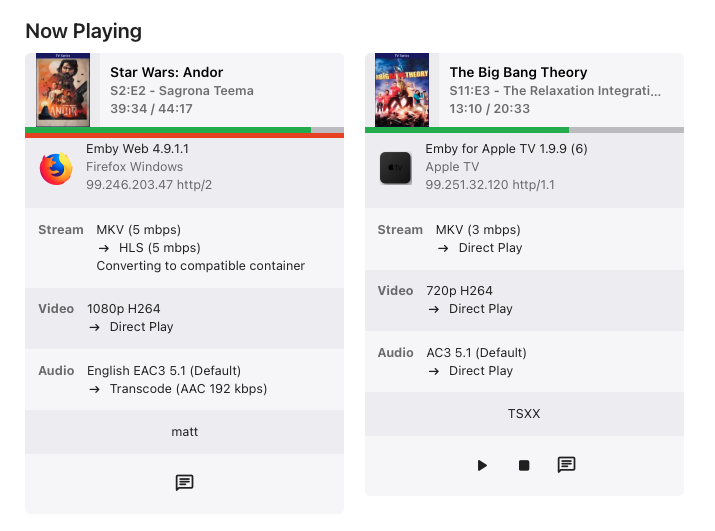
I updated the AppleTVs and I have not seen one of their live streams "stick" yet. The attached images is pre-recorded content. One is via a browser the other via an AppleTV. Neither are being played at the moment and update bar confirms there is no streaming. embyserver-17.txt embyserver-63886233600.txt
 1 point
 -
Buongiorno, ho risolto effettuando il port forwarding su Router. Grazie1 point
-
I haven't had time to play with this for some time now, and it seems like the issue has just fixed itself? Maybe some internal state that needed some time to get renewed. Anyway, its working again1 point
-
Hmm, I am 90% sure that the version was 2.1.17g earlier and figured the reason to be that the application version was different now. Finally, I managed to fix the issue by clearing the all the app data (Nvidia Shield) and re-configuring the Emby app. So, now it works as it should. I do not know what caused the issue. Anyway, thank you for the reply!1 point
-
To clarity to this. What PtpSteve has indicated is correct and works, however it's a combination of problem/feature request/workaround?. When using a Synology NAS with Emby, music Playlists work a bit 'uniquely'. In my case I installed the Emby 'Synology version', and care needs to be taken to ensure that the shared folder has the correct permissions in Synology. This needs to be done in the 'Control Panel', within 'Shared Folders' and then permissions. Note that within 'Permissions' that you need to look for Emby in the 'System Internal User' group and enable the read permissions. This is different if you are using a containerized install of Emby. In Emby you then need to set the Music Library folder to the shared music folder: Folder: /volume1/music (This is the Synology default) (Optional) Shared network folder: \\Snas\music\ (Where Snas is the name of the server) - I have no idea if this is necessary or even required ? At this point, music plays correctly from: Synology AudioStation Synology MediaServer Windows - Any music player Linkplay - Network DLNA music streamers from the Synology MediaServer Emby - Any client device So here's where things start going a bit awry with 'Playlists' Test 1: Absolute reference - Windows file structure If I create a M3U playlist (\\Snas\music\playlist\test.m3u) in a 'playlist' folder in the shared music folder using the following pathing: \\Snas\music\ArtistA\Album01\Track01.mp3 \\Snas\music\ArtistA\Album01\Track02.mp3 \\Snas\music\ArtistB\Album01\Track01.mp3 The playlist is recognised as a playlist and works with: Synology AudioStation Synology MediaServer Windows - Foobar2000 / Windows Media Player Legacy Linkplay - Network UPNP/DLNA music streamers from the Synology MediaServer It does not work with Emby, and although the playlist is shown on the client device, it's 'empty'. Test 2: Relative reference - Windows file structure Taking the same example above and using 'relative pathing' in the same M3U file has the following results: ..\ArtistA\Album01\Track01.mp3 ..\ArtistA\Album01\Track02.mp3 ..\ArtistB\Album01\Track01.mp3 The playlist is recognised as a playlist and works with: Synology AudioStation Synology MediaServer Windows - Foobar2000 / Windows Media Player Legacy Linkplay - Network UPNP/DLNA music streamers from the Synology MediaServer It does not work with Emby, and although the playlist is shown on the client device, it's 'empty'. Test 3: Relative reference - Unix file structure Taking the same example above and using 'relative pathing' AND Unix pathing (ie. substitute '/' for '\') in the same M3U file has the following results: ../ArtistA/Album01/Track01.mp3 ../ArtistA/Album01/Track02.mp3 ../ArtistB/Album01/Track01.mp3 The playlist is recognised as a playlist and works with: Synology AudioStation Synology MediaServer Windows - Foobar2000 / Windows Media Player Legacy Linkplay - Network UPNP/DLNA music streamers from the Synology MediaServer Does work with Emby Clients It seems that the Synology, Windows and Linkplay clients can substitute '/' for '\' during their reading of the M3U files and seem to quite capable of recognizing the server file system and it's requirements and then parsing the M3U file accordingly. It seems however that Emby is not able to provide this for it's clients, and hence is causing a fair bit of confusion. This is not really a 'fault' of Emby as it's technically correct, but rather that the norm has moved and it seems most other systems quite happily parse the M3U file. This lack of M3U Windows/Unix file parsing merely makes playlists on Emby a pain to use, as the following steps are needed: 1. Create playlist on your favorite Windows editor (This creates a \\Snas\music\ArtistA\Album01\Track01.mp3 format) in the \\Snas\music\playlist\ folder. 2. Use a text editor to substitute all '\\Snas\music' for a '..' 3. Use a text editor to substitute all '\' for a '/' It would be great if Emby could also recognize the formats in the Test 1 and Test 2 examples above, as it would make maintaining Playlists a HUGE amount easier from different client devices on different systems.1 point
-
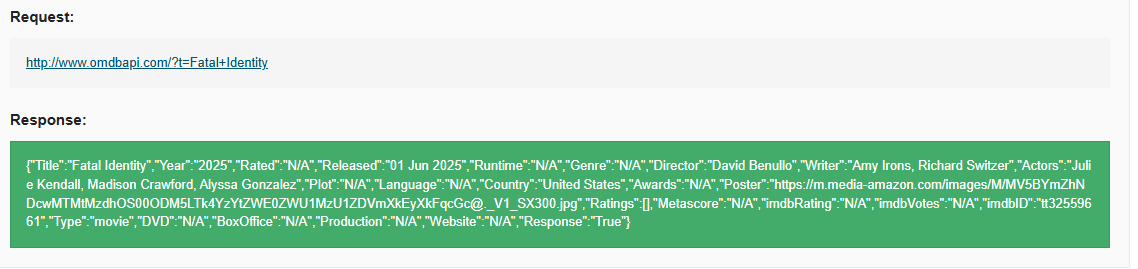
Yes it's new... and I understand when a new movie comes out (especially non-theatrical movies) it can take some time to get into their systems... I wasn't sure about IMDB and that using their ID would or wouldn't work...the poster was there and the description. Good to know. I've manually added it myself. I was just wondering why when I put the IMDB ID absolutely nothing showed.... Now I know why. Thanks1 point
-
It won't, nested season folders are recommended (though not mandatory) structure.1 point
-
CHSN 14.5 now has guide data. As expected, Outlaw 4.6 does not.1 point
-
Hopefully @sa2000can take a look1 point
-
Doesn't appear to exist on TMDB or TVDB yet. You will need to ensure you have OMDB enable on the library for it to fetch what little data they do have. Fatal Identity — The Movie Database (TMDB) Fatal Identity - TheTVDB.com To a point all that exists is Cast/Crew same as shown on IMDB but OMDB will not list all cast. OMDB As mentioned IMDB is never used directly as they want too much to use their api. The id will be queried per your Library metadata order. AWS Marketplace: IMDb Essential Metadata for Movies/TV/OTT (Bulk data) So currently one would have to manually apply info until someone added this to TMDB/TVDB. Watch Fatal Identity (2025) - Free Movies | Tubi
 1 point
 -
Hi , My name is Amir and I'll be happy to help with hebrew language as spoken in Israel.1 point
-
Hi Seanbuff My Port Mapping was off, so Enable automatic port mapping changed some other stuff and it working now Thank you for helping.1 point
-
This is not just a preference setting, more precisely, it should be to enhance the viewing experience! Additionally, I have seen other posts mentioning that they will be updated in the future. Hope to speed up the update!!! Many people expect it.1 point
-
Would love to see this feature as well. I know Trakt has a rewatch feature for VIPs and I believe that when using this, Jellyfin shows those series under their continue watching section as if they haven't been watched yet, so that might be a good place to start for inspiration. Marking a series/season as unwatched is potentially a solution if it was possible to NOT sync unwatches to Trakt and ONLY sync watches, but as far as I can tell, we do not have that ability. For those that track everything within emby, this is a nice to have but not really needed, but those of us using external services like trakt to track play states, the ability to rewatch is essential to a good user experience.1 point
-
Right now there are two ways collections are displayed: 1. they are not displayed and the contents are displayed just as if the collection did not exist. 2. the collections are displayed and the contents are hidden unless you enter the collection. I suggest there should be two other display options. 1. The collection is displayed inline with the movies and the contents are also displayed in line. 2. both the collection and its contents are hidden unless it is navigated to in the collection menu. Also these options should be selectable by collection and there should be a library default. The default for the library default should be exactly as it currently is. This would give greater flexibility and it would be possible to have some large collections that are displayed inline without the hassle of having to use search. As an example we could have a "John Wayne" collection that would display inline with movies and it would contain all John Wayne movies. When you are browsing for a movie to watch it would show up just like collections do now but it would not hide the contents from regular browsing. This would give greater flexibility to how libraries get displayed and make browsing more fun and easier for those of us that often enter a library with no idea of what we really want to watch.1 point
-
adding to this. i can message users as admin. but why cant users message the admin? just saying this would be great. Thx0 points