Leaderboard




Popular Content
Showing content with the highest reputation on 06/18/25 in Posts
-
That would also restrict you to web browser access only as embys apps do not support http basic_auth (.htaccess). Embys total silence on this issue isn't exactly encouraging for anyone reading along. It's a pretty prominent topic being closely followed among the self-hosted coms; with JF suffering a similar vulnerability. (being built off the same core code)2 points
-
Is he trolling? Responses are so meh. Lets not forget this is still a paid for product. The competition all already have this ability. It's like yea we know. It'll someday be in a beta in a galaxy far far away. Pretty poor approach to those who have been using Emby for some time. I don't think that we're asking for a lot here. Had there been an actual attempt to show that it is actually being worked on. I think we would all be happy. It's now been months and very little attempt shown we're being heard. A member has even complied a docker image. Having us beg for this is wild.2 points
-
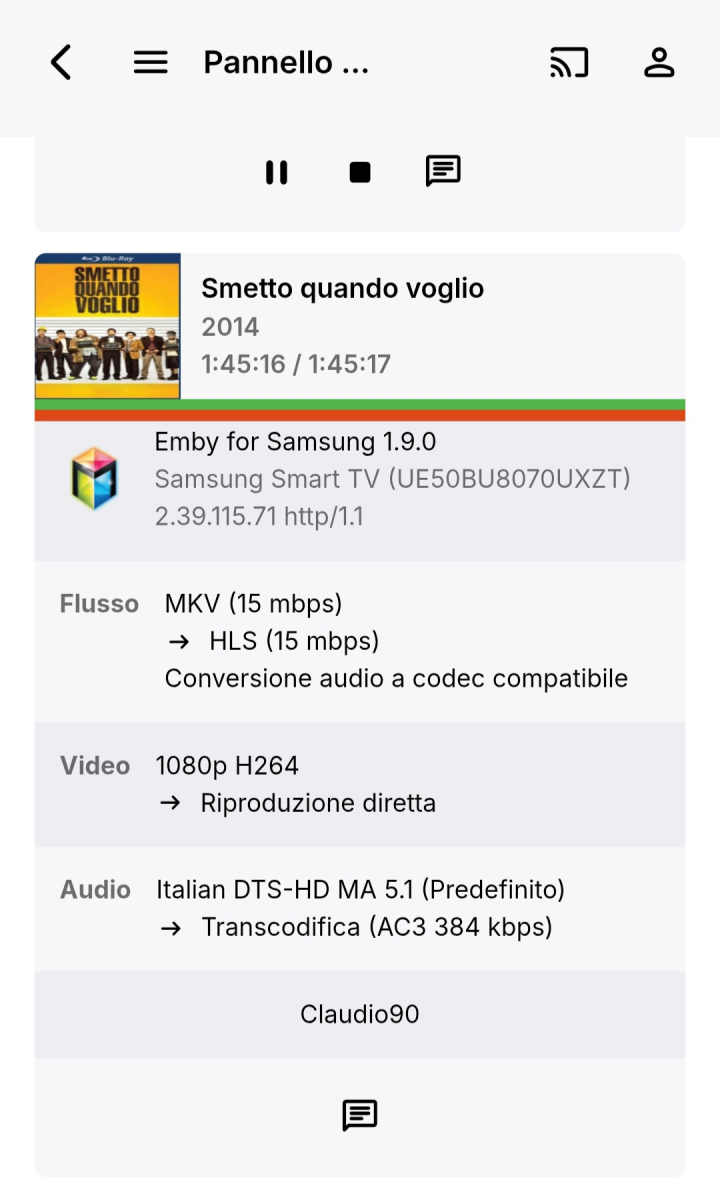
Greetings to all. Any news about this bug? Still present in emby: 4.8.11.0 In the screenshot attached the user its not streaming that video since 2 days and its stuck on the dashboard and counted as 1 streaming for that user. If i set the limit to 1 simultaneous for that user it cannot stream anymore until I restart the emby server. This is not a Samsung TV bug, the problem happen on various devices, browser included. @Lukeif you need anything that can help solving this. Logs or any other things I can share in private via mail, chat or where you want. (This problem has been going on for several years and solving it would be a great achievement for everyone) The only workaround that works is to make a cron job that restarts the emby server every X hours to clean those streams
 1 point
 -
Yeah I saw this post but there is not news except for the recruitment of testers since last september. How is that project going ?1 point
-
that may be the thing ! I have manually upgraded the synology package, and now the TV-app seems to play music correctly. you guys should really upgrade the synology repository otherwise quite a lots of user may encounter troubles as I've done. Or be more specific on the need to keep server and client version in concordance. thanks to all for helping me in this journey.1 point
-
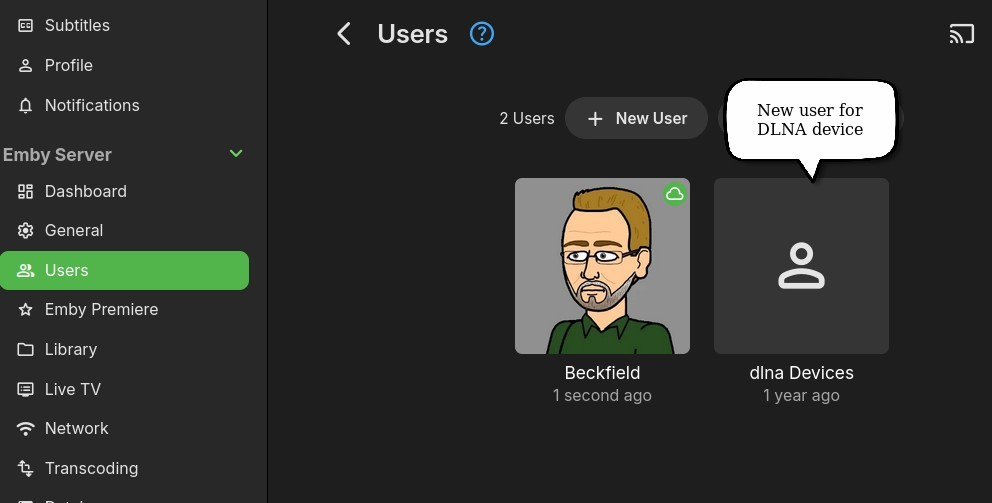
One thing not covered in that process write-up: @Luketold me the following: Pursuant to that, in addition to the custom DLNA profile, I created a new User on my Emby server: When creating that user, I think I left every setting at the default on the first tab (Profile), other than giving it a name. The important stuff is on the "Access" tab, where you select the libraries this user will have access to. Then I used this user to connect the DLNA device to the Emby server. This is what will determine which libraries are displayed on your DLNA device.
 1 point
 -
so i changed the Truenas ssl port to 444 and Emby was able to activate.1 point
-
OK thank you. I'll let her know.1 point
-
For a reverse proxy to properly "fix" this issue it would have to be configured to recognize emby's auth headers to work with client apps (as well as other configuration to properly allow/block the correct paths based on those headers, etc.). I'm not even sure this would be possible, and if it is it would definitely be complex to say the least. I've only vaguely been revisiting this idea again recently. As far as JF, they still have a similar issue, however the way itemid's are assigned seem to make it slightly less problematic than emby.1 point
-
HI, it is on the to do list for the near future to stay tuned. Thanks.1 point
-
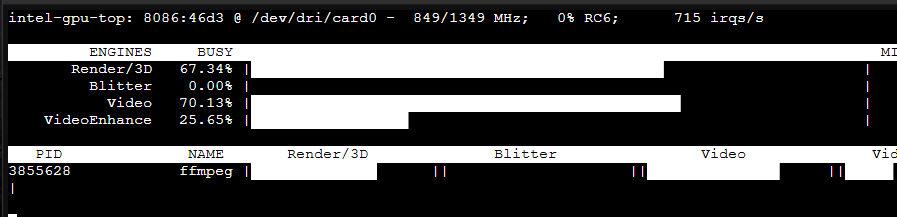
Thanks a lot! Just gave this a quick spin. I have an N355 and all is well now. Docker inside an LXC on Proxmox, and actually got video transcoding.
 1 point
 -
Looks like this one.1 point
-
Cheers. Working great. Thank you for implementing this change.1 point
-
Haha yep got it now, it was me being stupid. I was signing into http but it's got SSL so I should have been using https. But when I did that, I got more errors... because I was using port 80 in the app server settings and I needed to be on 443. Such a small thing, but now it works perfectly again. Hopefully this helps somebody else in the future!1 point
-
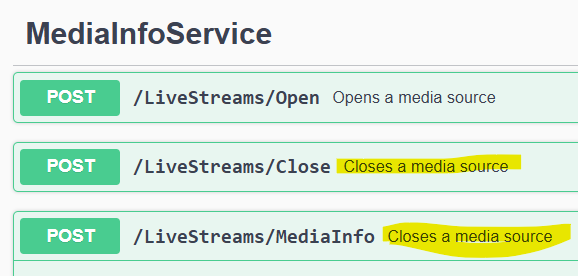
Copy paste issue for the description.
 1 point
 -
We could always add a library option for this.1 point
-
Internally we have MinDateCreated and MaxDateCreated, however these are not exposed through the api. We can add this on the beta channel for the next build. So I would do /Items?IncludeItemTypes=Movie&MinDateCreated=xxx, where the date is formatted in iso format.1 point
-
Thank you so much.1 point
-
Just popping in to say tested latest v12 with Kodi v22 nightly. All working well. Good stuff. Might be nice if you included the file source URL in the 1st post. Took me a while to work that one out https://kodi.emby.media1 point
-
Any updates on this by chance? This issue with abandoned streams getting stuck on multiple devices seems to be getting worse lately, at least for me. I'm continually having to either restart my server or if that doesn't seem to work, I have to disable the user account and reenable. Roku's and Samsung seem to be the worst lately. Thanks!!1 point
-
OK yes there's room for improvement there. Thanks.1 point
-
After many trial-and-error I've finally been able to get it working by rebuilding the `intel-media-driver` library with the latest version, the hard part was compiling this with dependencies having compatible ABI as the ones running on the Emby image (thanks closed source), which I found with image `ubuntu:18.04`. Sharing here to everyone who was stuck like me. To get this working you need to make your custom image of the emby image with the updated dependencies. The following steps took me 15 minutes to build on a 20 cores CPU, the build process will take longer with less cores (therefore, much longer on a N150 if you're compiling directly there). 1) Create an empty folder with a file `Dockerfile` file with the following content FROM ubuntu:18.04 AS builder WORKDIR /workspace RUN apt-get update && \ apt-get install -y \ build-essential \ git \ cmake \ automake \ autoconf \ libtool \ m4 \ pkg-config \ libdrm-dev RUN mkdir build build/usr build/lib # Libva RUN \ git clone https://github.com/intel/libva.git && \ cd libva && \ git checkout 2.22.0 && \ ./autogen.sh --prefix=/workspace/build/usr --libdir=/workspace/build/lib && \ make -j$(nproc) && \ make install && \ cd - # Gmmlib RUN \ git clone https://github.com/intel/gmmlib.git && \ cd gmmlib && \ git checkout intel-gmmlib-22.7.2 && \ mkdir build && \ cd build && \ cmake -DCMAKE_INSTALL_PREFIX=/workspace/build/usr -DCMAKE_POLICY_VERSION_MINIMUM=3.5 -DCMAKE_INSTALL_LIBDIR=/workspace/build/lib -DCMAKE_BUILD_TYPE=ReleaseInternal .. && \ make -j$(nproc) && \ make install && \ cd ../../ # Media Driver RUN \ git clone https://github.com/intel/media-driver.git && \ cd media-driver && \ mkdir build && \ cd build && \ export PKG_CONFIG_PATH=/workspace/build/lib/pkgconfig && \ cmake -DCMAKE_LIBRARY_PATH=/workspace/build/lib -DCMAKE_INSTALL_PREFIX=/workspace/build/usr -DCMAKE_INSTALL_LIBDIR=/workspace/build/lib .. && \ make -j$(nproc) && \ make install RUN find /workspace/build -name "*.so" -exec strip --strip-unneeded {} \; FROM emby/embyserver:4.9.1.0 AS emby COPY --from=builder /workspace/build/lib /lib 2) Build the image using `docker build -t emby-n150-fixed .` This will take a while, the more CPU cores you have the shorter (took me about 30 minutes with 20 cores) 3) Check that this is working by running `docker run --rm -it --device /dev/dri:/dev/dri --entrypoint vainfo emby-n150-fixed`, if this returns something as follows, then it worked: Trying display: drm libva info: VA-API version 1.22.0 libva info: Trying to open /lib/dri/iHD_drv_video.so libva info: Found init function __vaDriverInit_1_22 libva info: va_openDriver() returns 0 vainfo: VA-API version: 1.22 (libva 2.22.0) vainfo: Driver version: Intel iHD driver for Intel(R) Gen Graphics - 25.2.5 (4b3a078bd) vainfo: Supported profile and entrypoints VAProfileNone : VAEntrypointVideoProc VAProfileNone : VAEntrypointStats VAProfileMPEG2Simple : VAEntrypointVLD VAProfileMPEG2Simple : VAEntrypointEncSlice VAProfileMPEG2Main : VAEntrypointVLD VAProfileMPEG2Main : VAEntrypointEncSlice VAProfileH264Main : VAEntrypointVLD VAProfileH264Main : VAEntrypointEncSlice VAProfileH264Main : VAEntrypointFEI VAProfileH264Main : VAEntrypointEncSliceLP VAProfileH264High : VAEntrypointVLD VAProfileH264High : VAEntrypointEncSlice VAProfileH264High : VAEntrypointFEI VAProfileH264High : VAEntrypointEncSliceLP VAProfileVC1Simple : VAEntrypointVLD VAProfileVC1Main : VAEntrypointVLD VAProfileVC1Advanced : VAEntrypointVLD VAProfileJPEGBaseline : VAEntrypointVLD VAProfileJPEGBaseline : VAEntrypointEncPicture VAProfileH264ConstrainedBaseline: VAEntrypointVLD VAProfileH264ConstrainedBaseline: VAEntrypointEncSlice VAProfileH264ConstrainedBaseline: VAEntrypointFEI VAProfileH264ConstrainedBaseline: VAEntrypointEncSliceLP VAProfileVP8Version0_3 : VAEntrypointVLD VAProfileHEVCMain : VAEntrypointVLD VAProfileHEVCMain : VAEntrypointEncSlice VAProfileHEVCMain : VAEntrypointFEI VAProfileHEVCMain : VAEntrypointEncSliceLP VAProfileHEVCMain10 : VAEntrypointVLD VAProfileHEVCMain10 : VAEntrypointEncSlice VAProfileHEVCMain10 : VAEntrypointEncSliceLP VAProfileVP9Profile0 : VAEntrypointVLD VAProfileVP9Profile0 : VAEntrypointEncSliceLP VAProfileVP9Profile1 : VAEntrypointVLD VAProfileVP9Profile1 : VAEntrypointEncSliceLP VAProfileVP9Profile2 : VAEntrypointVLD VAProfileVP9Profile2 : VAEntrypointEncSliceLP VAProfileVP9Profile3 : VAEntrypointVLD VAProfileVP9Profile3 : VAEntrypointEncSliceLP VAProfileHEVCMain12 : VAEntrypointVLD VAProfileHEVCMain12 : VAEntrypointEncSlice VAProfileHEVCMain422_10 : VAEntrypointVLD VAProfileHEVCMain422_10 : VAEntrypointEncSlice VAProfileHEVCMain422_12 : VAEntrypointVLD VAProfileHEVCMain422_12 : VAEntrypointEncSlice VAProfileHEVCMain444 : VAEntrypointVLD VAProfileHEVCMain444 : VAEntrypointEncSliceLP VAProfileHEVCMain444_10 : VAEntrypointVLD VAProfileHEVCMain444_10 : VAEntrypointEncSliceLP VAProfileHEVCMain444_12 : VAEntrypointVLD VAProfileHEVCSccMain : VAEntrypointVLD VAProfileHEVCSccMain : VAEntrypointEncSliceLP VAProfileHEVCSccMain10 : VAEntrypointVLD VAProfileHEVCSccMain10 : VAEntrypointEncSliceLP VAProfileHEVCSccMain444 : VAEntrypointVLD VAProfileHEVCSccMain444 : VAEntrypointEncSliceLP VAProfileAV1Profile0 : VAEntrypointVLD VAProfileHEVCSccMain444_10 : VAEntrypointVLD VAProfileHEVCSccMain444_10 : VAEntrypointEncSliceLP You can compare and run the same command on the emby image, you should have a bunch of errors instead. 4) (OPTIONAL) For your convenience, I uploaded the image on DockerHub if you want an easy way to see if it works, use the image rajiska/emby-n150-fixed:4.9.1.0, though I'd recommend to build the image yourself1 point