Leaderboard




Popular Content
Showing content with the highest reputation on 06/13/25 in Posts
-
Hi It would be helpful to me and perhaps others if the IPTC description could be shown when viewing photos. Thanks really enjoy Emby and you have helped me a lot so I have signed up to Premiere. John1 point
-
It was a nice to have in 20181 point
-
They fixed it with version 3.4.74 Dave1 point
-
Hi, the owner of the server you are connecting to has limited your ability to play content. You will need to ask them about this.1 point
-
I figured it out. I'm stupid. At some point, I put in a .ignore file in the TV folder causing the entire directory to be ignored. Removed that and everything started working okay. Sorry, for taking up your time and thank you for the assistance.1 point
-
It automatically filled in the server's host name for that field. And that's what would show when I launched the app. I just changed it to "test" and relaunched the app... and it went right to my username/password without displaying the server name first and logged in. It works fine now! Thanks for your help.1 point
-
Hello, I do have the Emby app for android. I'm watching one of the movies that my Sister said was stopping and playing, and so far (into the half hour mark), I only saw it stop and play once at the beginning of the movie. I turned off my WiFi to make sure I was using both Emby and Tailscale. I also played the movie from my computer to make sure the issue isn't with the file itself, and it so far is playing normally.1 point
-
H.265 is the standard, also known as HEVC (High Efficiency Video Coding) x265 is the open source software to encode to H.265.1 point
-
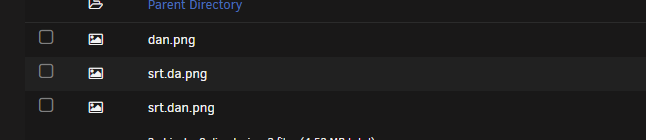
This is Fantastic have been looking for this for a while THANK YOU ::) I can't get subtitles to show up, I have the images srt.dan.png and srt.da.png in the folder but icon do not show up for subtitles, they do show up for audio I have downloaded the version from Github, but some options seem to be missing, I can't choose languages for audio and subtitles the option is not there some guidance is appreciated Just took some time Also a feature Request make overlays work on Collections as well if all the files match
 1 point
 -
That worked for me with chrome1 point
-
I'll add that to the list of things to double check, but my emby server is under a completely different host name when exposed to family by remote1 point
-
This has been fixed when upgrading from 4.8.11.0 to 4.9.1.1-beta. Thanks1 point
-
Yes, the license they use on their (free) client is approved using your server license. There is a limit on how many but it's a decent amount. See the premier license pages for full details. As Luke says, there are lots of clients but they all have different capabilities vs the hardware that is being used to playback. Yes Kodi is one of the most capable clients (ie could direct play the 4K HDR with HD Audio for example) IF a) you have the upload bandwidth b) the client had the download bandwidth to stream the file and c) the client was capable of playing 4K HDR and HD Audio. Otherwise Emby would transcode it to play. As you has ascertained, browsers are one of the worst options because they do not even play hevc unless you have add-on's installed. Yes, but this is easily overcome (google it), 4K transcoding (+tonemapping) is heavy on resource - so depending on what Nvidia card it is - then you may be limited to only 5 or 6 4k sessions anyway before you max the memory on the card (that is the usual limitation). Yes, but this is usually not wise, as if any one of the dependencies fail, then it will not play at all. With transcoding as an option, then at least it will play. To conclude :- Playing back a 4K native UHD Disk (known as a Remux) is VERY demanding on remote systems as the bandwidth requirement is very high (70-100Mbit/sec typically) and also HDR or Dolby Vision + HD Audio codec support (TrueHD or DTS-HD) is needed on the client. Unless you and the client have all those available with capacity to spare, it will highly likely be transcoded - then requiring GPU to reduce the bandwidth (transcode to 4k if you are lucky, or down to 1080p or worse), GPU to tonemap (HDR>SDR) and reduce the HD Audio to compressed Audio. The better option - is to simply have a lower quality version that is '4K streaming' quality - ie about 20-30Mbit with Dolby Digital+ Audio. That is far more likely to stream ok - as this is what the commercial streamers use.1 point
-
Danke ja und man lernt immer noch was dazu. Spitze1 point
-
I am also interested in this because my son got an Quest 3.1 point
-
Hi, if you have Emby Premiere, then yes. We have apps for pretty much whatever device they want to use. Not that I'm aware of. You can do this with user permissions, but it will cause them to get an error message when they try to play something that requires transcoding.1 point
-
Just a heads up, your integrated graphics are far superior to your video card in regards to transcode speed and quality. Intel Quicksync is the king when it comes to these things. If you do insist on using a graphics card I would suggest you just get an Arc A310 or A380 and ditch the ancient Polaris space heater.1 point
-
Ok understood, thanks it worked1 point
-
A few years ago I left Plex and fully embraced Emby, until now. Plex has this feature and it is near unreal to me that Emby refuses to implement it. Oddly Plex does not have the concept of favorites but I have now learned of other great Plex features that will keep me away from Emby until these other features become part of Emby. - Plex can automatically skip credits, and of course intros, Emby only does intros. - The ability to maintain playback speed. - Subtitle auto-sync Plex as a company is gross, I mostly cannot stand them and their price skyrocketed but for now I will use them. Over the years I have turned well more than 50 people into Premier Emby users, I think I set up near all of their Emby servers. Before I do again I will have to ask them if they care about the features I mentioned above.1 point
-
OOOH i look forward to that!! For the time being i've enabled the intergrated gpu on CPU in BIOS to get it to work. as a workaround for time being. So GPU is priority but anything it cant do, it dumps it to the CPU to do. Thank you!1 point
-
There is no longer an open problem. I used a service technician and they fixed the issue, it just took awhile because I had to wait until their availability to service my issue and install a new router. Thanks to the feedback on here I also ended up also using "no-ip" so I will hopefully no longer run into this issue again, as it was very frustrating, but this is now solved. Thanks everyone for your assistance, the issue is now resolved.1 point
-
Thank you for your help. It was your request for the test file on the SSD that showed me the issue. When I went to copy the file from the NAS it was only transferring at 6 kbps and going to take 2 days. I was more focused on the server setup and did not think to check the speed between the devices. Thank you for taking time to help.1 point
-
Did you try this?1 point
-
AFAIK, if you get stuck in old ET app splash screen (while trying to connect to the local server), it's mostly caused by some server related (either prime check or else) the only proper way to fix it is, wait for @Luketo fix it, and wait a few minutes ~ hours after it's fixed, and you can login back again (happens twice on my end sofar this past few years, same problem, same solution i think)1 point
-
Attached is another updated version for testing. Some slight performance improvements (still needs GPU for real time performance). LiveVideoTranslation.dll1 point
-
I can confirm this is exactly what happened to me as well. Couldn’t update the emby connect email address unless I removed the current one, saved, then added the new email, and saved again.1 point
-
Got stuck on this before—put some 3DS games on the server, but nothing showed up. Turns out the files needed to be in a specific folder structure and properly named, not just dumped anywhere. Also, using Blueberry-AI for managing all the game ROMs helped a lot. It kept everything organized and made it way easier to spot what was missing or misplaced.1 point
-
Quick update, did not have time to test more thoroughly, back at it now and it seems to update but getting strange behavior with default shield launcher, it duplicates and triples the shows on play next (or continue watching channel) so I decided to test on a different launcher (projectivity) and default watch next is wonky but the emby continue watching channel works pretty much perfectly. ON a side note: is “emby for android” app you recommend for android tv ? (Not the emby for android tv app)1 point
-
I just have to say THANK YOU for this plugin! I've only just switched to Emby from Plex after many years and throughout that time I've mentioned to my gf how much I want to be able to make my own TV channels that run constantly and this is absolutely perfect. I'll be sure to add feedback to this thread as I continue to use VirtualTV. On a tangentially related note - does anyone have a good source for bumpers or commercials? I'm using archive.org and it's great however there are many instances where multiple bumpers are contained in one file which isn't ideal. ffmpeg would be an option and I should def get some experience with it but if anyone has any other sources I'm all ears.1 point
-
Often times when I see "Reason for transcodng: Media bitrate exceeds limit." in the info I wonder, what kind of internet connection do they have? I know this can cover multiple scenarios like bandwidth limit set for user, server, client side quality setting, as well as AUTO bandwidth detection... Can you PLEASE add to the dashboard the returned client bandwidth capabilities? The value you are getting from the client that tells emby its bandwidth abilities. While you are at it tighten up the spaces between lines on the transcode items, and align the results to the right instead of center.. MAYBE SOMETHING LIKE THIS :1 point
-
I don't have an ETA, sorry.0 points
-
x265/h265 is HEVC, it goes by many names for some reason0 points
-
HI, yes they are probably having a temporary issue. Please give it a try again later. Thanks.0 points