Leaderboard




Popular Content
Showing content with the highest reputation on 06/12/25 in Posts
-
The whole, oh, we can't secure images because of people that want to use a caching service seems like a bad reason for not securing images. By default, it should be secured. If, a user wants to take advantage of something that requires a decreased level of security, then they should be required opt out of security and not the other way around.5 points
-
hey emby team after some time looking for a good alternative to plex i finally found this and after trying it out i realized this is the best media server alternative to plex out there it just works and it works really well with cloudflare and tunneling plex doesn’t support that nearly as well and the transcoding here is way better and faster too i've had zero problems and i’m even using the beta versions to try out the newest stuff also emby feels way less bloated than plex no annoying ads no weird features i don’t care about just a clean setup that does what i need and does it well i like how i have more control over things in emby the settings are actually useful and it’s easier to manage users and libraries plus emby doesn’t try to lock everything behind a subscription like plex does with even basic features just wanted to say thanks this is exactly what i’ve been looking for2 points
-
Correct that Jellyfin plugin is currently only able to view the enhanced homescreen on the we clients. I agree that any implementation of this would need client support. Android TV being my preferred client.2 points
-
I will think twice about buying a samsung tv in the future. It is concerning to hear how samsung handles support on their platform. my next tv will need to be on an open platform like android. I am happy that the update is now active and I hope to start using Emby so that I can dump plex. Thank you.2 points
-
New PUBLIC TESTING version available 12.1.0: Delta changelog 11.2.1 -> 12.1.0 Kodi 21 and 22 support sort iconnodes fix node labels when label is a number improve incremental sync performance fix minor incremental sync issues add dynamic nodes option to disable local trailers (default off, cause it's slow) fix dynamic node multi-favorites update Chinese langague file, thanks wabisabi926 fix Kodi favorites when quotes used in names add transcoding options by resolution support davs native content support webdav protocol as internal webservice (which is now default) hide dummy sources from views fix minor server login issue fix minor watch together bug lower progress updates to 50 seconds (less server traffic) add multiversion selection option in context menu for episodes and musicvideos add time sync check < year 2000 add support musicvideo links for songs based on MusicBrainzId, Fallback -> Artists/Title (default on) fix c22 in database in movies table -> filepath re-download userimage when deleted from temp folder fix song remove sync issue (edge case) fix updates for downloaded content use xbmcvfs wherever possible (Kodi's virtual file system) fix folder views fix dynamic tag node for picture rewrite backup function, it's possible to restore between major releases fix cinema intros, skip youtube trailers fix cinema intros, playback progress issue improve tvtunes integration support livetv remote playback improve remote playback performance for dynamic content fix remote playback disconnects minor http server communication improvements for async requests set custom resume points Comment: Transencoding with newer ffmpeg only works when "http" is selected as webservice mode I created a pull request to fix the issue for webdav -> https://github.com/xbmc/xbmc/pull/26784 Kodi 22: This version changed something in the multiversion tagging. Maybe this change will be reverted in next versions as it seems to be done by accident. If so, it will break the movie content playback again. Kodi 22 is currently pre Alpha! This version requires a complete resync.2 points
-
Be able to create playlist based on a certain criteria, like genre and or year, in order to create a dynamic playlist that it refreshes automatically when new content is added. This way you can for example, create a tv comedy playlist from the 90's, or a new sci-fi Movies playlist. Some other criteria for rules could be the rating, watched/unwantched, score, tags, language, audio codec, etc The possibilities could be endless1 point
-
I've spent months evolving my Emby setup to a state where it is able to reliably play live TV streams from an IPTV provider. Sharing my findings here to help the community and gather feedback in case I can make things even better in the future. Up until I added hls-proxy to the mix I was attempting to use Threadfin as a buffer. It helped stabilize things slightly but issues were still present. Emby clients would randomly seem to drop their channel streams and fall back to the previous screen in the app, it was more prevalent with remote clients than with local, but all clients (web/android/roku) experienced the issues. Clients have no playback issues with local, or remote episode/movie media files. The IPTV service provider I use allows 5 concurrent connections to their service. However, I have noticed that I cannot rely on Emby to enforce this limit. If I set "simultaneous stream limit" to 5 in Emby it will eventually end up in a state where no channels can be played even though there are no active streams (verified by looking at the status page of hls-proxy). I don't know why this happens and I can't seem to correlate it to anything specific. After adding hls-proxy to my setup, I will sometimes see Emby make a secondary connection to the same stream even though a second user has not tuned to that channel, but I'm not sure if that has anything to do with the problem. The workaround I've put in place for this is to set the "maxStreamsPerClientDefault" in hls-proxy to 5, and set "simultaneous stream limit" on the TV source in Emby to 0. I've also configured a cron job to restart my Emby server early each morning to clear out any stuck tuners that might exist. When I set up hls-proxy I noticed a couple things. My provider publishes 5 .ts files in the m3u playlist for a channel. If Emby is able to see a list of 5 .ts files, it will read them but start playback in the client at what I believe is the 3rd or 4th file in the list. This means that Emby is only leaving a 1 or 2 file buffer between the playback position in the client and the stream coming from the provider. If the provider experiences a delay in publishing the latest .ts files for the stream to their servers/CDN, the client will overrun the buffer and this may be why the client stops playback at seemingly random times. I was able to configure hls-proxy to show Emby only 2 of the 5 files at the start of playback which seems to start the client playback at file 1 when starting a stream. When it requests the playlist a 2nd time from hls-proxy the first 2, and next 3 pieces are in the playlist for Emby to fetch. At this point hls-proxy already has another 2-3 .ts files in the buffer that haven't been advertised to Emby yet, so not only does the client have a bit of a buffer to work with inside the Emby server, the Emby server has a 2-3 segment buffer in hls-proxy that it can draw from in the event that hls-proxy needs to retry fetching the stream due to a publishing delay or a temporary error on the server side. The only time a stream drops now if if hls-proxy encounters a provider side error that it can't overcome in a reasonable amount of time. Since Emby is still communicating with hls-proxy when this happens, the stream will freeze, and can recover if hls-proxy is able to retry the connection and fetch files before the retry limits or timeouts are consumed. Some notes on how I'm using these apps. I've tested hls-proxy both in front of, and behind Threadfin with the same result on Linux and Windows. Threadfin - used currently with the buffer disabled so the m3u URLs from the provider are passed to the client. I use it strictly to groom/curate the incoming M3U/XMLTV links from the provider. hls-proxy - Used as a debugging platform and a buffer in-between Emby and the provider. This allows me to get a peek at what is happening between the provider and the Emby server. If there are any errors from the provider side I can see it in the logs. You can view streams directly in their web interface. It also has options available to aggregate provider accounts based on the syntax of the URLs they use to serve content. If you have many single line accounts with the same provider hls-proxy can aggregate them into a pooled resource.1 point
-
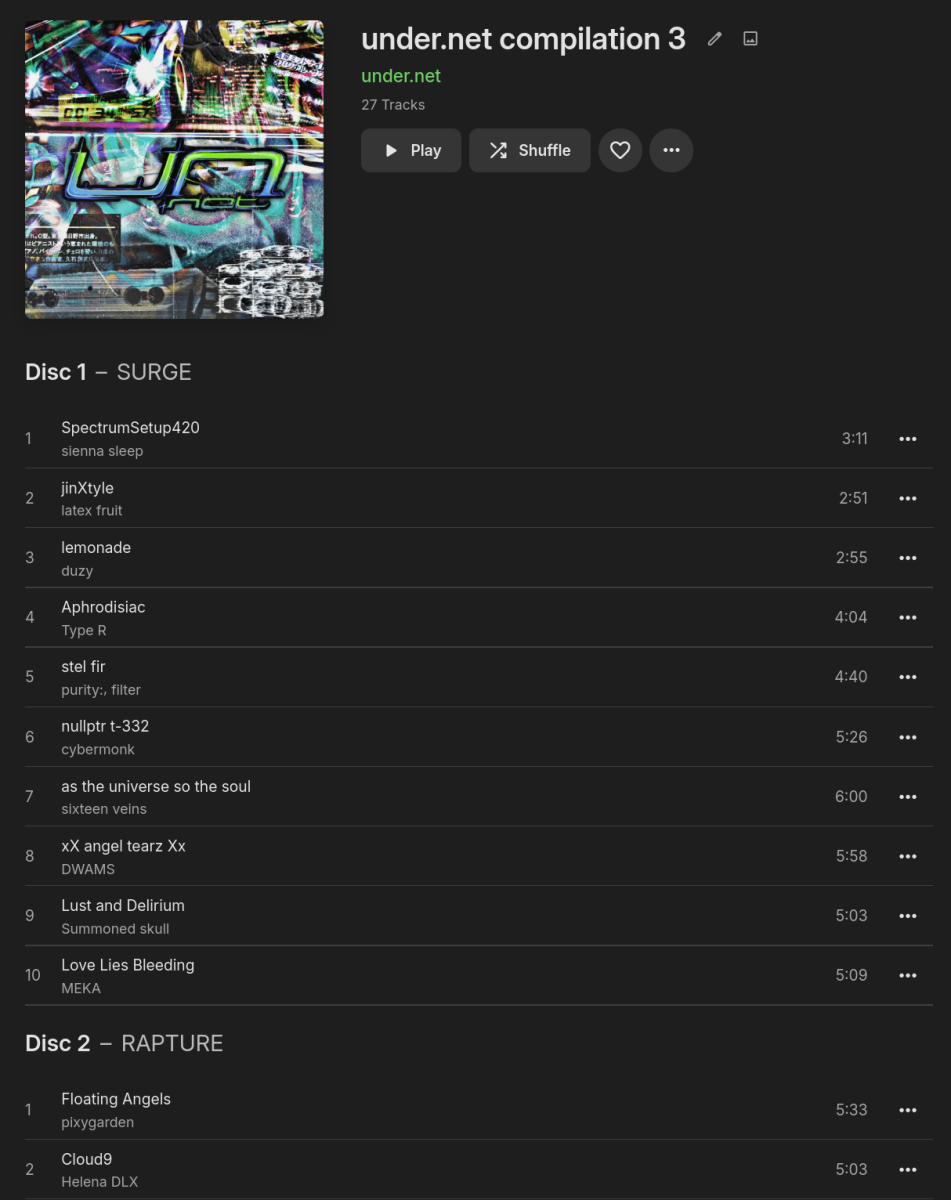
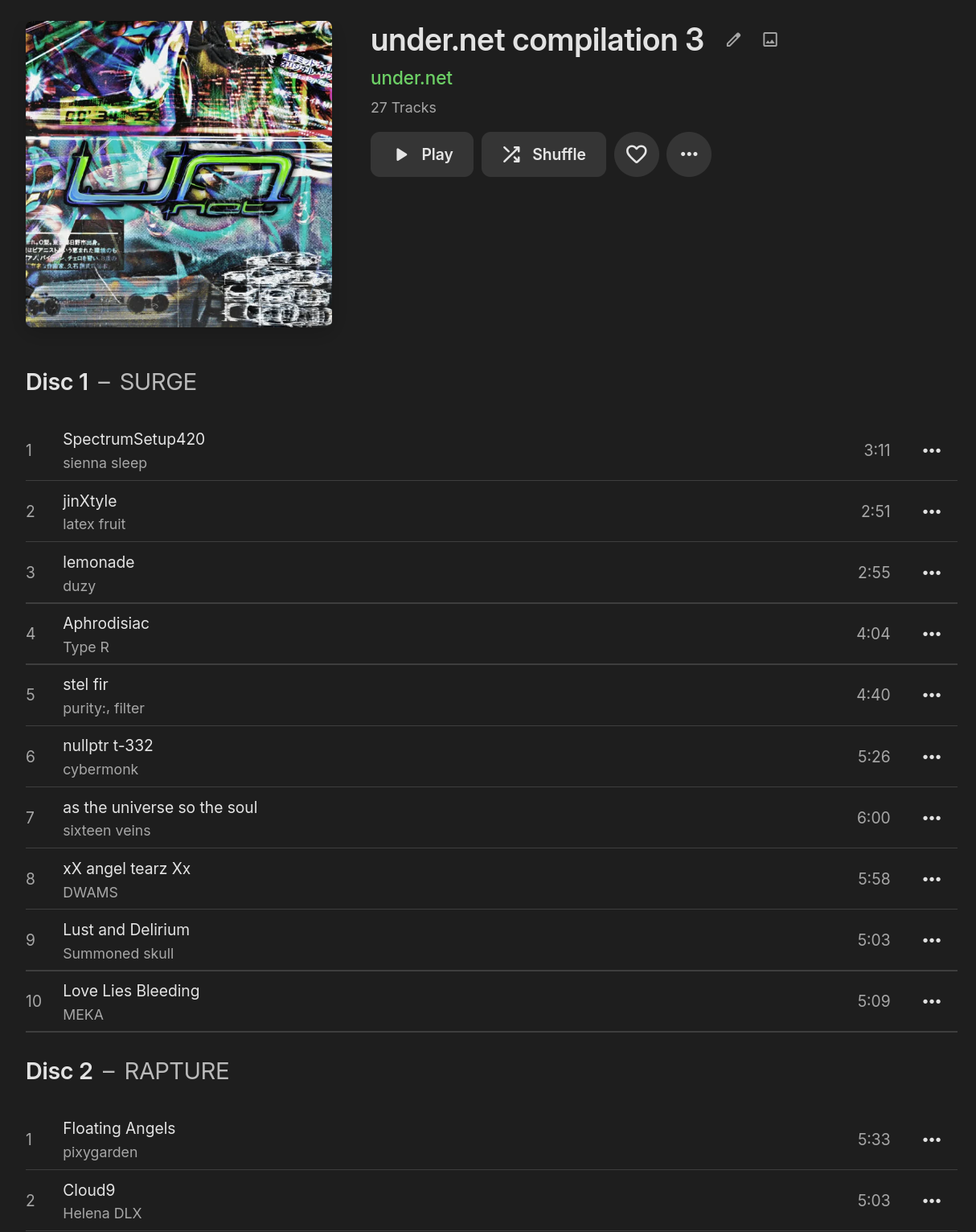
The ID3 specification includes a frame called TSST (Set subtitle), defined as TSST The 'Set subtitle' frame is intended for the subtitle of the part of a set this track belongs to. right below the frame used for disc number, TPOS (Part of a set): TPOS The 'Part of a set' frame is a numeric string that describes which part of a set the audio came from. This frame is used if the source described in the "TALB" frame is divided into several mediums, e.g. a double CD. The value MAY be extended with a "/" character and a numeric string containing the total number of parts in the set. E.g. "1/2". Other tag formats seem so have this kind of field to, quoting https://www.blisshq.com/music-library-management-blog/2018/03/27/lamentable-state-disc-title-support/ I'd propose displaying the disc (sub)titles (in this example: "SURGE", "RAPTURE" and "SHIMMER") something like this: My example is definitely not the most "real-world" one (I added the tags myself as the original album, as downloaded from Bandcamp, consists of multiple albums, each representing a disc), but there's definitely more use cases, as seen in this screenshot of the implementation in Navidrome: https://github.com/navidrome/navidrome/issues/272#issuecomment-627497195
 1 point
 -
i got emby setup to my server and i was able to stream to my local devices on my network. but i cannot stream outside my home. i looked into this and my ip address is dynamic so i cant use a direct connection for emby to connect to external ip address. so i dug deeper and found emby connect. i created a account and all it has listed is: add server and sign in with emby connect. i click the sign in with emby connect button. it then takes me to a area where i fill in my username and password i created. as soon as i click the sign in button, it just takes me to previous screen with nothing changed. if i go home and add my server using the add server button, it only allows me to add it via the local ip address. which i am able to add it but when added and i sign into emby connect, it shows my local ip aka the one i created at home but cant connect to it. what am i doing wrong?1 point
-
HI, we're hoping to have a stable 4.9.x release in the very near future. Thanks.1 point
-
Ok, so I found the issue. It appears to be a problem with my network connection. When going over the physical connections I discovered that I had the DS1821+ connected on two LAN ports. Originally I had planned to use port aggregation on both Diskstations, but decided to wait and forgot to unplug the LAN cable. After doing this and restarting the HP400, DS1821+, and DS920+ I was able to get better results. I ran openspeedtest installed on each NAS from the HP400 and got just under the 1000 Mbps connection expected between the devices. I also created a test folder on the HP400 and added it to the library. Emby on DS920+ with files on DS920+ - Test file played at ~250-260 fps Emby on DS920+ with files on DS1821+ - Test file played at ~235-250 fps (NAS LAN Tx 55-70 MB/s) Emby on HP400 with files on HP400 - Test file played at ~540-580 fps Emby on HP400 with files on DS1821+ - Test file played at ~235-260 fps (NAS LAN Tx 55-70 MB/s)1 point
-
You'll need to provide more details on the formats used, but I suspect if you are trying to direct play from an ISO container or maybe a transport stream (m2ts etc) then the CPU is needed to extract the data into a suitable container in the first instance. With an MKV, it is already in a suitable container to then process via the GPU.1 point
-
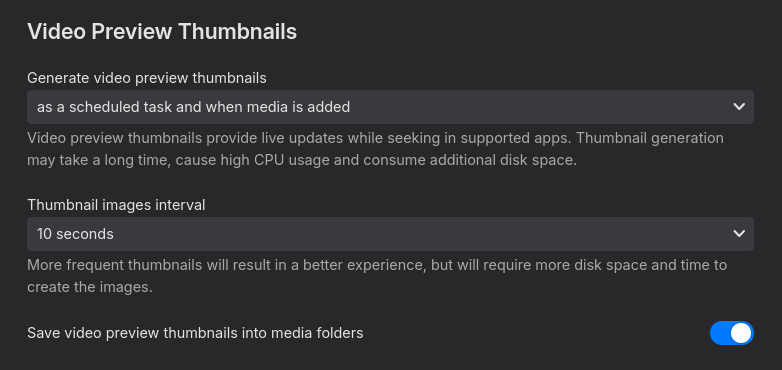
i changed the "generate video preview thumbnails" to as a scheduled task only which should do the trick for future films. tried to refresh the metadata but did not help. i tried to delete the .bif file and start the video preview thumbnail extraction but all thumbnails on this film are black now. edit: you are right, refresh metadata did the trick if you delete the .bif file first. thank you very much
 1 point
 -
Do you have emby premier enabled on the Windows machine ? Hardware acceleration (GPU) is only available for Premier - ie may be trying to use CPU ? An intel 12700/UHD770 is more than capble of multiple 4K transcodes - so it is not a GPU hardware limitation.1 point
-
Not positive but thought Refresh metadata did that. What is your library "Video Preview Thumbnails" settings?1 point
-
If you create a local test library on the HP400 (local disk), and put a few test files on that and try playback - do they play direct ?1 point
-
Just wanted to add that I've started using Emby again and the problem NO LONGER appears. Same movie files, same Chromecasts, same TVs and phones, videos no longer skipping every second.1 point
-
Another +1 for an app. The browser "works", but on my U6NAU model it goes into "pointer mode" and you can't scroll left or right, making it near-unusable.1 point
-
A Kodi thing, it's globally adjustable in https://kodi.wiki/view/Advancedsettings.xml -> playcountminimumpercent, ignorepercentatend, ignoresecondsatstart I already had a poc totally disabling the resumepoints in Kodi, which means the resumepoints must be set by the plugin for every content (even not Emby content) to make it work. It wasn't too reliable and I removed it (also needed admin previlegies on Emby to read the library settings), however, it's on the long term Agenda but needs a lot of work.1 point
-
Ok I did it and I think it was successfull - i decided to go the full mile thoguh (felt at least following the instructions to detail can't hurt) so i figured out htat chain.pem = certificate bundle whereas the chain-only.pem lacks a certificate (so it's not part of the bundle) i uploaded/converted those three (key, cert, and the chain.pem, and then just added them to Emby, all is good!1 point
-
Thanks that worked1 point
-
Yes, first thanks for adding support for all of these. To be 100% compabile the edition tag would be really nice to add too. Much thanks in advance.1 point
-
There are plenty of open source libraries out there for TOTP and probably even PassKeys. It's not like they have to start from scratch. Your comment on admin your users is a bit naive. No matter how careful you are, if you have users, you have zero control (or maybe very little control) over what they choose as a password. Maybe they re-use passwords (I used to, and still have a lot of old passwords that are reused, and I am a network Engineer). Sites get hacked all the time. My mom has access to my Emby server. As much as I want to trust that she would never do something stupid....well....we all have parents, so enough said. Not to say the 2fa is the gold standard in security, but it is (in my opinion) the very minimum you need in an application to consider it as a secure web app. For now, I am considering moving my server to only be accessible via my Tailscale account (VPN), but that will remove anyone who uses a Roku (currently my father in law and sister in law), as I don't think there is a Roku app for Tailscale. I have done little research though. I am unsure if AppleTV has Tailscale since I have never used one.1 point
-
I see the items in Emby for Android under Downloads, and there are more than fifty, but I can't seem to find the actual files. The screen says they are stored in: /storage/emulated/0/Android/data/com.mb.android/files/Download/Music/Artist/Album/Song.mp3 but I can't browse to that location. I also don't see a Music folder under Download.1 point
-
Ok I will try in a bit and post the results. Thank you!1 point
-
Hey, Plugin update to 2.1.0.0. You now have 3 options to order items within collections: None - Default setting. ACdb does not touch how collections are sorted. Sort Name - Alphabetical sorting. Forced every time the collection syncs. Premier Date - (oldest first): Forced every time the collection syncs. Newest First (For supporters only): Please read on... I would love to give more control over this, but API can only order by sort name and premier date. I made Newest First for supporters only since this can affect your library in unexpected ways unless you pay attention. It's my favorite way to sort since I like to see my most newly added stuff first in collections, but it does affect how these items sort outside of collections. You can always turn it off if it's not for you and the sort names will reset back to what they were.1 point
-
I just discovered thas thread and will be removing my photo and home video libraries until this has been addressed. It was convenient being able to share photos with family because of the tv app support but I will be looking at migrating this functionality over to Immich as I am already using it for personal use. Personal photos and videos are the most sensitive information I have and expect the highest level of security. If someone unauthorized wanted to view my Linux iso collection it would be annoying but an accepted level of risk, personal photos absolutely not.1 point
-
It would be great if Emby had a similar plug to Sonic Sage in Plexamp that allowed AI to build playlists of your music with simple prompts: Sonic Sage1 point
-
OK it’s fine. We had to submit 4.9 stable to asustor altar to resolve a compatibility problem so hopefully it won’t be too long until we release for everyone.1 point
-
Any updates on this?1 point
-
Even after years, unfortunately still no update, is anything planned? Thanks for the workaround with Jellyfin, that's what I'll have to do now.1 point
-
HI, we'll take a look at this issue. Thanks for reporting.1 point
-
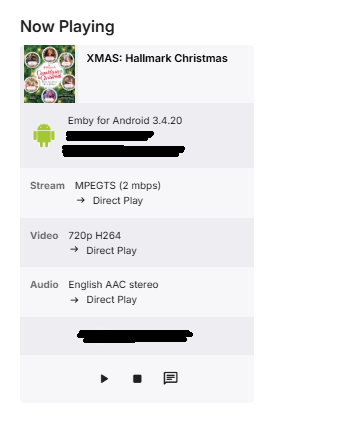
Please god implement a global pause timeout feature. My mother is limited to one active stream, and literally every single day I have to tell her to go to her tablet an close the dang app so she can watch tv in her day room. No i will not "just up her stream limit", a simple plugin or update for pause timeouts would fix this completely. How much do i have to pay... seriously., please make pause timeouts a thing.
 1 point
 -
Hi, there's already an open request for this or something functionally equivalent. Please join in and contribute to the existing discussion at:1 point
-
Saw the word "Plex"; and disengaged. If I wanted Plex, I'd use Plex. There were reasons I came to Emby and been here since the MediaBrowser days even.0 points
-
slowly coming up on a decade from the first request... don't hold your breath for this one..0 points














.thumb.png.f4cb0545e98b51fd9b00e427622ab761.png)