Leaderboard




Popular Content
Showing content with the highest reputation on 06/08/25 in Posts
-
I found the issue. My router was blocking the mb3admin.com URL. I “unblocked” it and the feature is active now.3 points
-
Thanks paul. So solved2 points
-
Really hoping for an update on smart playlists in 4.9 or even better yet some engagement or limited beta that canvases for input. My worry is that after this long wait the implementation isn't what users have been asking for.2 points
-
@@Luke stated in a previous post (https://emby.media/community/index.php?/topic/49933-replaygain-music-support/) adding support for this could easily be done for at least the theater client seeing as the player used already supports replaygain. I'm making this feature request in hopes that this support is added, as I have no dev experience myself1 point
-
It didn't matter how many times I refreshed it yesterday it didn't help. Today however it resolved the problem! So it's now sorted, thanks.1 point
-
HI, we'd probably have to look at a specific example to be sure, but I think I recall a change related to this made on the beta channel.1 point
-
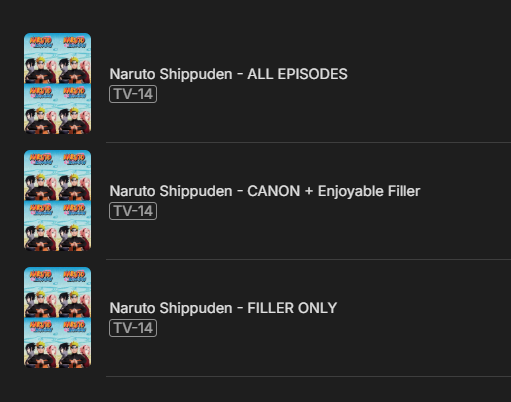
I wanted to share a little script I whipped up that some of you might find useful for organizing your anime collections in Emby. If you're like me and appreciate having clear distinctions between canon and filler episodes, this tool can help you automate the process! This Python script will automatically create three collections for a specified anime series: [Series Name] - CANON ONLY: Contains only the episodes considered part of the main storyline. [Series Name] - FILLER ONLY: Gathers all the non-canon filler episodes. [Series Name] - ALL EPISODES: A complete collection of all episodes. How it Works (Briefly): The script connects to your Emby server using its API, identifies episodes within a given series ID, and then categorizes them based on a pre-defined list of filler episodes (which you can either hardcode or pull from an external source like https://github.com/xsunzukz/anime-filler-episodes-api). Finally, it creates the three collections for easy browsing/watching. For me I renamed the Canon one since I pulled from a Reddit Post discussing Enjoyable Filler https://github.com/bpwhelan/Emby-Filler-Collections/tree/main
 1 point
 -
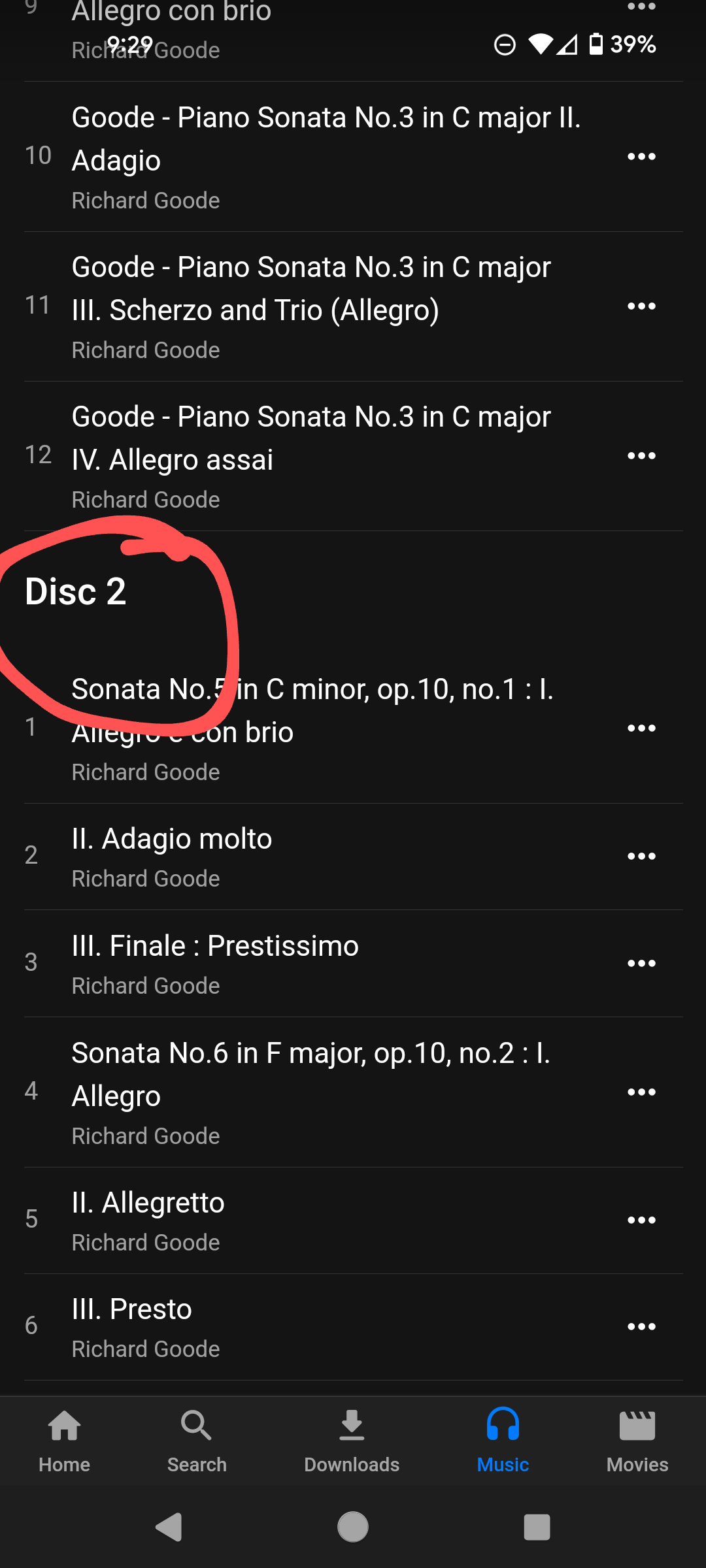
Emby currently offers no convenient way to play a single disc from within a multi-disc release. For example, it is impossible to select just Disc 2 from the 10 disc set below, either to play only Disc 2 and stop, or to add only Disc 2 to the Play Queue. It would be much more user friendly if each header text "Disc [n]" were right-clickable like any single disc is, and referred just to the tracks in that disc (i.e. until the next "Disc [n+1]" or the end, whichever comes first). Hard to implement?
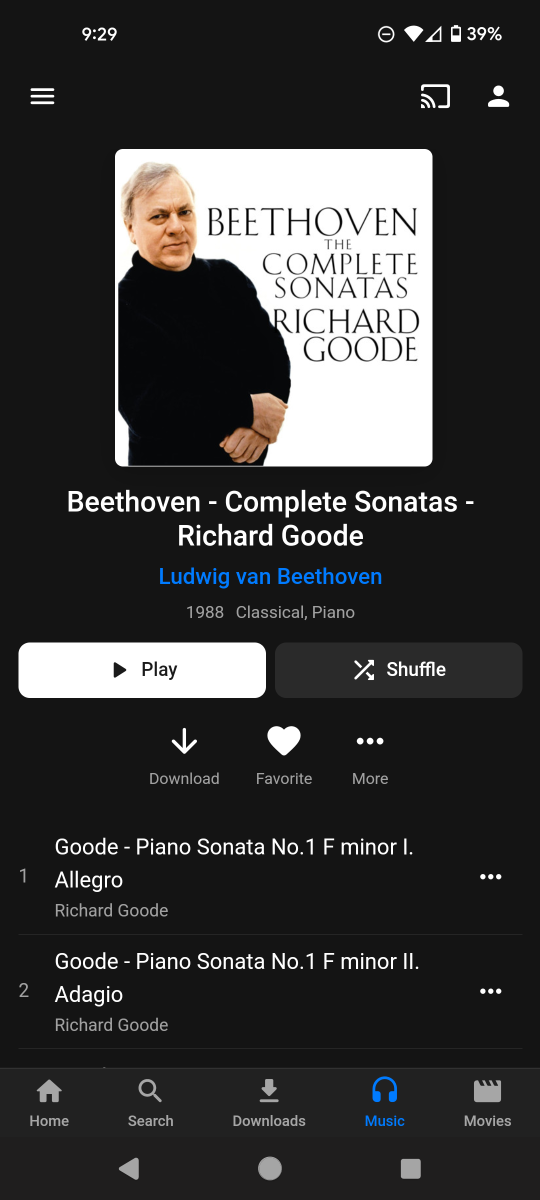
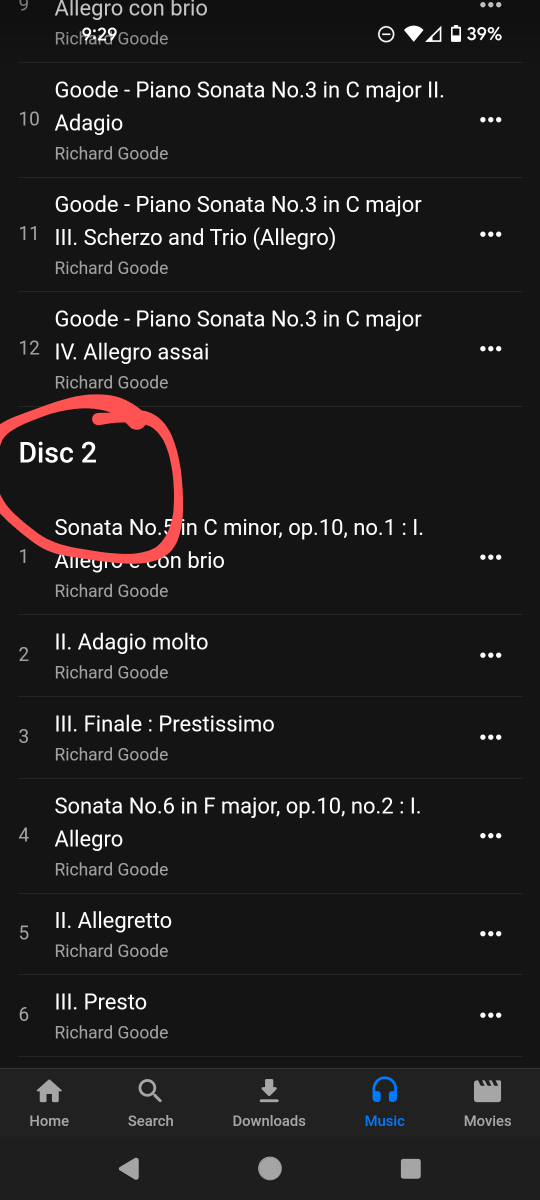 1 point
 -
As noted above and elsewhere, for multiple reasons it would be fine if a multi disc album were considered as a single album in Emby, except for the playability-of-a-single-disc problem. This long-standing frustration - which can't be that hard to address? - is one of the reasons it's not evident that improving Music library functionality is a priority for the Emby devs.1 point
-
Hi, we'll take a look at this. Thanks for reporting.1 point
-
Are you sure of this? I haven't tried it in the AndroidTV app yet since I noticed the issue, but the error is coming from ffmpeg on the server when it tries to transcode the AC4 audio, for me. I assume it's the stations that have changed their broadcast and not the difference in the Emby apps. Edit to add: Working atsc3 channel ffprobe http://hdhr:5004/tuner1/v111.1 ffprobe version 5.1-emby_2023_06_25 Copyright (c) 2007-2022 the FFmpeg developers and softworkz for Emby LLC built with gcc 10.3.0 (crosstool-NG 1.25.0) Input #0, mpegts, from 'http://hdhr:5004/tuner1/v111.1': Duration: N/A, start: 25073.790356, bitrate: N/A Program 3 Stream #0:0[0x31]: Video: hevc (Main 10) ([36][0][0][0] / 0x0024), yuv420p10le(tv, bt709), 1280x720 [SAR 1:1 DAR 16:9], Level 120, 59.94 fps, 59.94 tbr, 90k tbn, Start-Time 25073.807s Stream #0:1[0x32](eng): Audio: ac4 (AC-4 / 0x342D4341), 46034 Hz, 5.1(side), fltp, Start-Time 25073.790s Stream #0:2[0x39]: Data: bin_data (STPP / 0x50505453), Start-Time 25079.796s Stream #0:3[0x33](spa): Audio: ac4 (AC-4 / 0x342D4341), 46034 Hz, stereo, fltp, Start-Time 25073.790s Unsupported codec with id 98314 for input stream 2 Not working channel: ffprobe http://hdhr:5004/tuner1/v144.1 ffprobe version 5.1-emby_2023_06_25 Copyright (c) 2007-2022 the FFmpeg developers and softworkz for Emby LLC built with gcc 10.3.0 (crosstool-NG 1.25.0) Assertion 0 failed at libavcodec/ac4dec.c:4186 Aborted (core dumped) sample.ts is taken from the not-working channel. sample.ts1 point
-
I cringe when I see queries that look like your example. Surely there has to be a better approach to what that query is doing. This would be in the dev's hands. How many media items do you have? How big are your DB files? You could try a vacuum cycle to optimize as much as it can. Unless something has changed recently the analyze row limit is 1000. Your setting of 10000 will be ignored and capped to the limit. You have two paths which could affect UI performance and response time. Cache and metadata should be on your fastest/lowest latency storage when you're storing metadata separate from the media. The type of storage behind /mnt/data/emby is unknown to us in this case. This is assuming the Emby server config and data are also on your fastest storage.1 point
-
@justinrhsorry for delay in picking this up. I can see that the 48.7 channel is missing from the lineup for your zip code. This will be referred to Gracenote1 point
-
Yes, sometimes the MusicBrainz IDs can override any customization in Emby you are trying to do. It may be worth experimenting a bit more??? I've discovered that in the past with other things and have had to delete the MusicBrainz info. I also understand the "nitpicky" stuff and spend way too long on it myself!!! I'll be interested to know how you get on... P.S. Another idea... Perhaps you could make copies of the two remastered albums as totally separate albums (with or without MusicBrainz IDs). That way you could keep them in the boxset and have them individually as separate albums well - with the appropriate individual titles, artwork.1 point
-
I'm not seeing any new 2025 Freestyle for sale around here. I did find the 2025 4K Laser Projectors are ready for pre-order now though. The LPs will be in the Premium1 group it looks like.1 point
-
I was looking for it in the wrong place, forcing remux of mpeg-ts fixed the issue!1 point
-
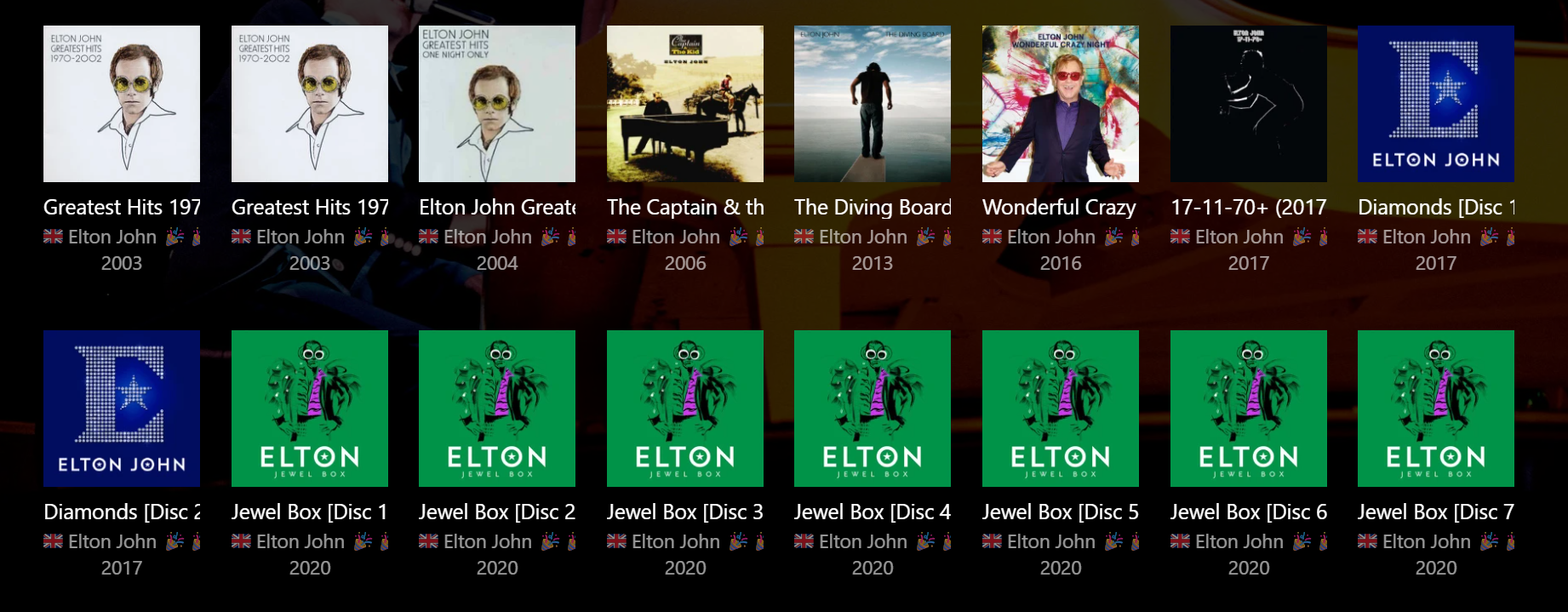
@doxxmulder Hi, if you are looking for a "workaround" then it is possible to separate a multi-disc album into individual 'albums' by changing the Album Title to incorporate the Disc Number, e.g. Title [Disc 1], Title [Disc 2], etc. This gives the following result (real example): An advantage is you have the individual discs separated for easy selection and individual playback, but the disadvantage is they are now separate albums that take up a lot of space in any of the list views. It also affects your overall item (album) count. If you implement this, you can still keep the individual disc numbers in the Discnumber field, as they were originally. If you want to do this, I'd also suggest making the changes to your embedded metadata with a tagging program (e.g. Mp3tag) rather than just within Emby, because any Library Rescan will potentially revert to the original embedded metadata and you will lose your changes. If you only have a "handful" of albums to change, it shouldn't take long to do this. I'm actually going the other way now and combining the single discs back into one parent album. (But I have 1000s!) However, there are still other disadvantages... For better multi-disc music management there are at least three considerations: Group Album vs Individual Disc artwork Group Album vs Individual Disc titles Group Album vs individual Disc playback Without these 3 areas being improved together, then I think there are always going to be pros and cons for Group Album versus Individual Disc implementation. There's an interesting discussion here about disc titles that I really should contribute to: https://emby.media/community/index.php?/topic/67584-disc-labels-for-music-and-audiobooks/ There's also other topics scattered about elsewhere, but I haven't seen anything yet that offers a good solution for all three considerations combined. Hopefully the Emby brains trust will get to it one day...
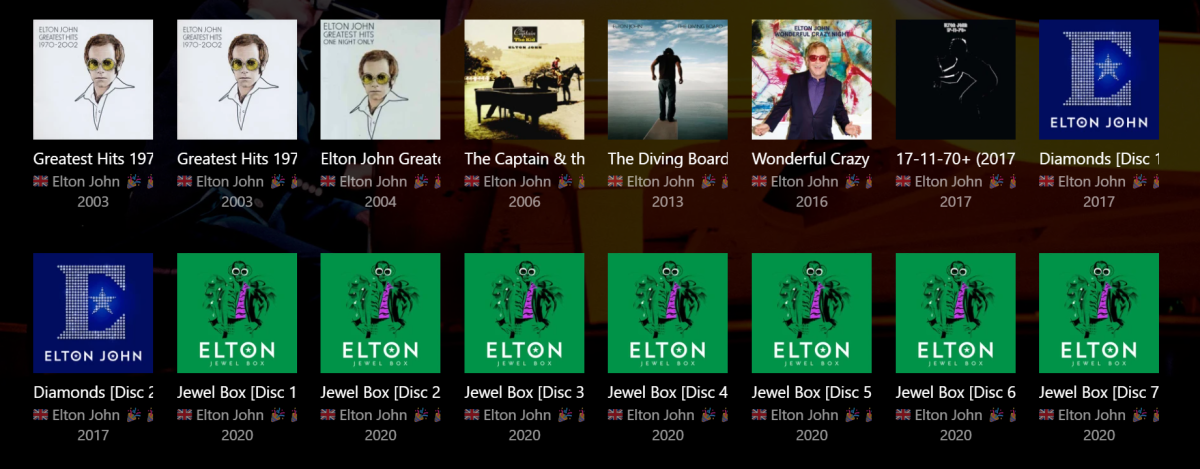 1 point
 -
@hdsuisseyour English is great. I agree that "Continue Playing" should be optional. I can't do it right now, but later in the year when I have more time, I will add a settings page. Vic1 point
-
This type of request is normal to have a long duration, because the MP4 (also applies to mkv) is being streamed directly, so it's reporting the entire duration of the request, this would have been played for ~28 seconds.1 point
-
I'm interested in the solution for the Intel N150 processor too. This is mid-year of 2025, and the transcoding still is not working.1 point
-
Still the same problem as described in original post with Emby for AppleTV 1.9.9 (6)1 point
-
What exactly does this do?1 point
-
This would be a nice feature1 point
-
Resuming last used playlist would be also very nice. Het hervatten van de laatst beluisterde afspeellijst zou ook echt heel mooi zijn1 point
-
For everyone having a similar issue. I start my emby server automatically after every reboot with a scheduled task while no user is logged in. You have to untick this in your scheduled task so your process is not killed after x (3 in my case) days:
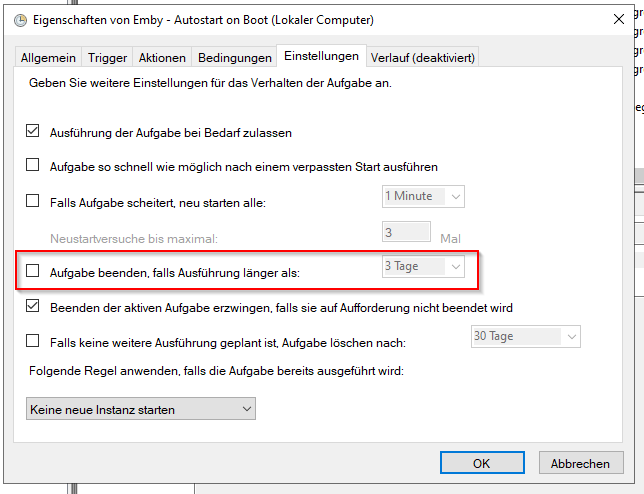 1 point
 -
Thank you for the quick response. I was still working on outlining the issue and providing the relevant report details, but I had inadvertently hit Ctrl+Enter while still writing up the post.1 point
-
my boss is sending us home ahead of the coworker that had the heart attack. i ill be home tomorrow morning to try out all the stuff suggested here. ill report back one i have tried them.1 point
-
any update on getting Emby to work on the Switch or now Switch 2? iPad died and sWitch2 came out so seemed like a better option as similar pricing. But didn't realize my Emby wouldn't work which really sucks.1 point
-
Cool looking forward to1 point
-
Ah, there it is. Sorry, coming from Plex I was accustomed to the icon. Thank you.1 point
-
Release 20250506: Fix compliance issues with MDNS handling causing spurious traffic and other issues. Configure UPNP to announce services using the primary IPv4 and primary IPv6 address only. Add signal strength/quality to the channel scan results. ATSC3 models: Fix problem where ATSC 3.0 channels found on one physical channel could false-detect on the next physical channel. ATSC3 models: Fix problem where incorrect parental rating could be applied on ATSC 3.0 channels. ATSC3 models: Fix issue in multi-representation support that was preventing a 4K test broadcast from playing. ATSC3 models: Add support for ATSC 3.0 content that identifies as Dolby Vision. HDFX/HDVR/HHDD models: Improve handling of a failing hard drive. TECH5: Auto-restart demodulation when needed on older ATSC1-only models. TECH5/4K-DEV models: Fix problem with ATSC 3.0 “forward” output format where power-save mode could activate stopping operation Firmware Changelog – Silicondust1 point
-
Ich habe es durch eine neuinstallation behoben.1 point
-
As an update, the issue appears to have spontaneously fixed itself, during a period when the Emby was on but not in use.1 point
-
We are now 15 months into the 4.9 development cycle. The 4.8 development cycle lasted 22 months. When 4.8 was released the Emby team hinted at smaller more frequent releases but only time will tell. There are some key features promised as part of 4.9 that we have yet to see so I suspect it will be some time before a stable 4.9 is released.1 point
-
Logs attached. Rebooted Emby, started HEVC channel WLOS 113.1 at 19:20:07.818. Played for 5 minutes. Good picture quality, but NO sound. ETA: I tried to send logs from the app, but I don't see "Debug Options" as described in the link you posted. embyserver.txt hardware_detection-63884661008.txt1 point
-
Awesome to hear! Thanks! Was such a dumb mistake that caused the slowness. Had it set to PNG highest quality for testing purpose ages ago and forgot to change it back to jpeg. There are also some small bug fixes but nothing people will notice most likely.1 point
-
CoverArt and Iconic do not. EmbyKometa don't know but I'd assume it also doesn't. Poster Overlay likely does, though that's only assumption based on plugin description.1 point
-
I honestly don't know what do you mean by that, as most/all? do, as far as my understanding of "automation" goes. CoverArt does, Iconic uses vector icons, don't know for Poster Overlays and EmbyKometa as not using; you can always post a question in respective plugin/tool topic.1 point
-
+1 for default aspect ratio1 point
-
Just wanted to pitch in my support for the idea. I recently bought a car with Android Automotive, but no Android Auto or CarPlay. Having Emby on Android Automotive would be a killer feature for me, especially since Android Automotive lets you watch videos while parked. I imagine this will also be a more in-demand feature over time, as more vehicle manufacturers move towards Android Automotive (like Ford, General Motors, Polestar, Hyundai, to name a few). I don't expect a ton of progress to have been made on this in such a short time, but would love to know if there's any update.1 point
-
OK. Didn't now that. The "device" (my Samsung TV) plays all media just fine when playing the media via USB stick. Only when using emby some media doesn't play. I'm having problems to transcode the media files. Probably some software is missing on my Linux Mint pc. 1. I have to find out why transcoding ios not working. Probably some software is missing on my Linux Mint pc. Regarding DLNA: DLNA would be a solution. I already installed miniDLNA on my Linux Mint pc. And miniDLNA was running on my pc. But my Samsung TV didn't get access to the media files on my pc via DLNA. Don't know why. What do you mean with DLNA custom Samsung profile? 2. Converting is no option. 3. No other TV neccessary! Most media files are playing. Before buying another TV I would by a fire tv stick or something like that1 point
-
It occured to me while ripping an audiobook today that many (audio)books that have "books", or "parts", or whatever separating them have subtitles for those parts. For example, Fellowship of the Ring: Book I - Return of the Shadow. And then it occured to me that, in lieu of playlists, I have combined my Star Wars, Pirates of the Caribbean, and Harry Potter soundtrack albums together into franchise-inclusive albums instead of having, say, eight Harry Potter albums or ten Star Wars albums. But though I separated each source album in the combined one by "Disc Number", it would be better if I could label them. So I request the ability to attach a label each "disc", for audiobook and/or music libraries.1 point
-
I use emby to listen to the radio a lot and the screen is simply an empty black screen when playing. So i think the screen is off when it actually isnt. With video this is normal as you want to see the video. However with radio there is nothing there. With other software if its tv it doesnt show anything but with radio, ie no video, it does show a logo. perhaps a check if no video show a logo? Also when you press play and pause it correctly stops and then plays. If you go away and come back it starts off at the last pause point, which is correct but this could be playing radio from several hours ago so a button to go "live" to "catch up" to the latest playing/correct time would be good. There are already fast forward 10 second and rewind 10 second so another button with fast forward to current live playing would make sense.1 point
-
I recently discovered that m3u files with only radio streams can be added as m3u tuners within live TV, they work with no problems, however, they get mixed up with true live tv streams, therefore, they should be added a separate item in the library, the idea is this: 1) Live TV tuner setup lack an option to add a name to the tuner so far: 2) If adding a name is not an option, then somehow emby should separate the stream by adding another item here: 3) Or, when we setup the tuner by adding the name, another library item should appear next to the live tv one: This is how playback looks so far, it needs to display the logo of the radio station but I ignore how to do that!, I hope someone here help me to achieve that...: You may be wondering why I don't use the tunein plugin, the answer is, favorites can't be accessed directly from an item on the main screen, they can be added of course, but I have to look up the station manually every time I want to listen to it, search doesn't work with voice either; I already sent a message to the developer but I haven't received any response, I guess I never will...1 point
-
@Gilgamesh_48 Suit yourself, post 100 replies if you want. This thread was mine to get help, yet you’ve hijacked it now. I am unfollowing this thread now. Have fun ‘helping’, but remember helping is not about how many posts you do or replies, its actually about helping , and when a new member specifically requests you stop, you stop, cause that’s helping to do, that’s respect too. Goodbye and enjoy your thread @Gilgamesh_480 points