Leaderboard




Popular Content
Showing content with the highest reputation on 05/30/25 in Posts
-
Erik, from an expectation management perspective, the most important thing you can do right now is to restore trust through radical transparency. The situation, as it stands, doesn’t inspire confidence and hasn't for years, but there are some practical steps you can take immediately to start turning that around: Clarify the Beta Timeline People are asking because they care. Avoiding the topic fuels speculation and often negativity no matter how many bugs you squash and how hard the team has worked. If the current beta cycle has a projected end date, share it, even if it's subject to change. What I've learned over the years about SDLC is that it's all about adapting (Agile), but to keep your community and users happy, it also requires to have to have some visibility. Communicate clearly: “The current beta cycle is expected to run until [date], with reviews at each sprint to validate readiness for release.” The Emby team took the first step towards this years ago with the open beta programme, maybe it's time for the next step. Share the Roadmap Does TV-Next have a delivery roadmap? If not, maybe it's time to draft one. It doesn't need to be a rigid Gantt chart, just a high-level view of milestones, sprint goals, and feature releases. If you do have one, make it public (or at least customer-facing). Transparency breeds confidence, and Agile lives, no, thrives on that openness. People understand delays, but they crave honesty and progress tracking, especially for a much anticipated add-on like this. If you're facing blockers or scope creep, say so. Turn the community into your allies by showing them the plan and how you’re adjusting as needed. This can be a limited audience, you do not have to announce this to the whole world. Also, this isn’t about promising perfection. It’s about continuous delivery, fast meaningful feedback, course correction, and keeping your community, which is already very dedicated as a lot have been around here for a decade or more, happy. TL;DR: Set a target end date for the beta phase Publish a delivery roadmap with major milestones Communicate often, adjust openly, and be transparent about what’s next That’s how you manage expectations and keep people engaged.3 points
-
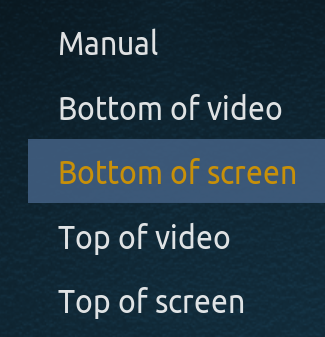
I would like to have the option to display subtitles outside the "video frame" at the bottom of the screen, regardless of movie format. Currently Plex, Jellyfin and also KODI offer this possibility, with Emby being the only left out, and the only reason I am not using Emby as my primary media server. Kodi does have the best implementation options: The forum discussion for reference:
 2 points
 -
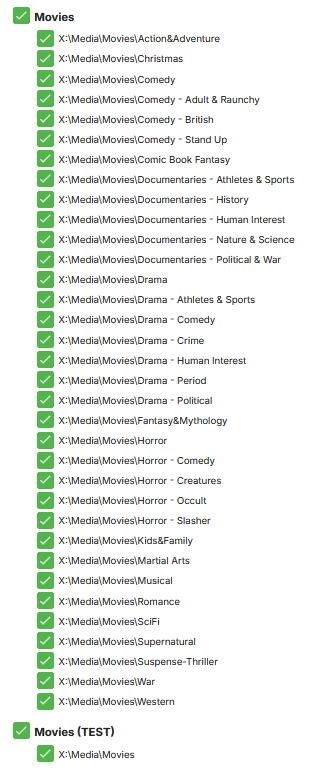
This was done so that some of my users do not see specific genres. I have some users who do not like war, i have others who dont like kids movies. with my setup this way I can go into my users access permissions and check off what they want and dont want.
 2 points
 -
I didn't know it was time for our ~quarterly revolt. Let me go grab my pitchfork!2 points
-
Me too, except not only have I been waiting almost 5 years from it being promised as right around the corner it has actually been completed and functioning for over a year. It is like everything around here, don't consider it happening unless it has already happened.2 points
-
I wish they did since I have local trailers for all my TV shows and movies.2 points
-
It would be nice if it were possibly to play audio only, especially on phones (and in the background). For example if I have a comedian standup movie, it would be great if I can just listen to it on my phone in the background.1 point
-
I am looking for a tool to use on windows that will search my movies for missing parts of the series, so i can add to complete a collection1 point
-
Semantics? Softworkz has been using the completed TVNext for at least a year according to him and I have no reason to doubt what he says. He even told me that the reason not to include it in emby was not on him and also made no sense to him. Whether true or not I think I remember something about the core of emby being rewritten and thus the completed module TVNext no longer worked correctly so then it has to be updated and that is the hold up. If that is correct then what I said is true, TVNext was completed and compatible but not included. If this is correct you are technically true here to but functionally you are gaslighting. This is the problem for the emby team...no one believes what you say anymore. You are like the Democrat Party, our eyes see something different from what you say. Emby has been broken in the web app for me since last Feb and it is not getting corrected because I have to wait for the new beta, but 16 months? Really? I apologize for busting your chops. I have nothing against any of you, I am just frustrated from having smoke blown in my face for 5 years on this issue. The reason I came to emby and the reason I bought Premiere was for the promise of LiveTV actually functioning properly right around the corner back in the fall of 2020. I have concluded there is a "Decider", as in KING here and all of you have to haul the water and suffer the consequences for him but whoever he is he has absolutely no clue how to run a business. Once again, I will reiterate. I love emby and I use it every day in some capacity but my frustration is in not being able to use it the way I want, they way that I was told it would be soon all those years ago. I just don't post much here anymore because the only thing I really care about is TVNext and I am worn out on purposely vague promises. Being vague is a form of lying people whether you admit it to yourselves or not.1 point
-
I tend to disagree there, have lost track how many topics troubleshooted due to complex library structure failing because of some TV show naming and breaking parser; personally, using #-A-Z folder structure and have added each subfolder as library path separately instead of root - and would always recommend it: keep it as simple as possible. Better to once lose 5-10 minutes for initial setup than hours/days for troubleshooting later.1 point
-
Suggested previously: Wild guess would be no 8K displays attached to those clients.1 point
-
Is 80Mbps the client max I would assume you have to manually apply the highest quality setting in the client as I don't believe any are defaulted that high. &VideoBitrate=79743984&AudioBitrate=256016 &TranscodeReasons=ContainerBitrateExceedsLimit But yes as Grim mentioned this hardware isn't really capable of transcoding this media. Did you set the client this low? Emby Windows 2.234.2.0 &VideoBitrate=272000&AudioBitrate=1280001 point
-
Hi All, Recently purchased premiere and I am so happy with it. I was wondering if there can be an option to add our fonts that we like in *.ttf / *.otf . I am using Shield 2019 Pro and system default CC style subtitles are really boring . There is neither numbering in the font size and only limited fonts are available. If these options would be present, I would not hesitate to buy a lifetime premiere membership as it would be absolutely impeccable. Many thanks in advance for your consideration.1 point
-
Oh, you are right, it was the MP3 tagging problem. Thanks for the pointer.1 point
-
Hi, it looks like you may need to set the Album Artist to be the same for all of the Songs of the Album. Probably Various Artists would be suitable for your example. There is more info from Emby here: https://emby.media/support/articles/Music-Naming.html You could do this just within Emby, but I'd recommend using a tagging program such as Mp3tag (or similar) to update your embedded metadata in the music files and then rescan the parent folders to import the changes.1 point
-
+1 for feature request to be able to play video as audio only (to save data when mobile). For those who don't know, there is a setting in the android (and presumably iPhone) app to enable you to leave the screen or lock the screen and still play audio. But your device is technically still streaming full video, even if it's not showing.1 point
-
Yes, bad encoding could be the issue. But since Jellyfin can play same problem files without transcoding on the same TV - I figured it should be fixable. Check your PM1 point
-
i just upgraded to emby 4.9.1 beta, with plugin 11.2.29 - it seems that dynamic node folder view is not working - it shows an empty folder with ".." - here is some debug info, let me know if a more complete log is required 2025-05-30 03:40:25.989 T:26312 debug <general>: EMBY.hooks.webservice: THREAD: --->[ worker_Query ] 2025-05-30 03:40:25.989 T:26312 debug <general>: EMBY.hooks.webservice: Incoming Data: EVENT service;7;?mode=browse&id=7075&parentid=7075&libraryid=7075&content=Folder&server=[REDACTED]&query=Folder;resume:false 2025-05-30 03:40:25.989 T:26312 info <general>: EMBY.helper.pluginmenu: Browse: Id: 7075 / Query: Folder / ParentId: 7075 / LibraryId: 7075 / Content: Folder / WindowId: 10025 / ServerId: [REDACTED] / ContentSupported: 2025-05-30 03:40:25.989 T:26312 debug <general>: EMBY.helper.pluginmenu: WindowIdCheck: False 2025-05-30 03:40:25.989 T:31988 debug <general>: EMBY.emby.api: THREAD: --->[ load Items ] 2025-05-30 03:40:25.995 T:31988 debug <general>: EMBY.emby.api: THREAD: ---<[ load Items ] Limit: 100000 / ReceivedItems: 2 2025-05-30 03:40:25.996 T:32272 debug <general>: EMBY.emby.api: THREAD: --->[ load Items ] 2025-05-30 03:40:26.001 T:32272 debug <general>: EMBY.emby.api: THREAD: ---<[ load Items ] Limit: 5000 / ReceivedItems: 2 2025-05-30 03:40:26.002 T:31960 debug <general>: EMBY.emby.api: THREAD: --->[ load Items ] 2025-05-30 03:40:26.007 T:31960 debug <general>: EMBY.emby.api: THREAD: ---<[ load Items ] Limit: 5000 / ReceivedItems: 2 2025-05-30 03:40:26.008 T:15460 debug <general>: EMBY.emby.api: THREAD: --->[ load Items ] 2025-05-30 03:40:26.013 T:15460 debug <general>: EMBY.emby.api: THREAD: ---<[ load Items ] Limit: 5000 / ReceivedItems: 2 2025-05-30 03:40:26.014 T:22556 debug <general>: EMBY.emby.api: THREAD: --->[ load Items ] 2025-05-30 03:40:26.021 T:22556 debug <general>: EMBY.emby.api: THREAD: ---<[ load Items ] Limit: 1000 / ReceivedItems: 2 2025-05-30 03:40:26.022 T:23816 debug <general>: EMBY.emby.api: THREAD: --->[ load Items ] 2025-05-30 03:40:26.027 T:23816 debug <general>: EMBY.emby.api: THREAD: ---<[ load Items ] Limit: 1000 / ReceivedItems: 2 2025-05-30 03:40:26.028 T:21844 debug <general>: EMBY.emby.api: THREAD: --->[ load Items ] 2025-05-30 03:40:26.035 T:21844 debug <general>: EMBY.emby.api: THREAD: ---<[ load Items ] Limit: 10000 / ReceivedItems: 2 2025-05-30 03:40:26.035 T:22232 debug <general>: EMBY.emby.api: THREAD: --->[ load Items ] 2025-05-30 03:40:26.042 T:22232 debug <general>: EMBY.emby.api: THREAD: ---<[ load Items ] Limit: 5000 / ReceivedItems: 2 2025-05-30 03:40:26.042 T:25724 debug <general>: EMBY.emby.api: THREAD: --->[ load Items ] 2025-05-30 03:40:26.048 T:25724 debug <general>: EMBY.emby.api: THREAD: ---<[ load Items ] Limit: 5000 / ReceivedItems: 2 2025-05-30 03:40:26.048 T:31768 debug <general>: EMBY.emby.api: THREAD: --->[ load Items ] 2025-05-30 03:40:26.054 T:31768 debug <general>: EMBY.emby.api: THREAD: ---<[ load Items ] Limit: 20000 / ReceivedItems: 2 2025-05-30 03:40:26.055 T:29444 debug <general>: EMBY.emby.api: THREAD: --->[ load Items ] 2025-05-30 03:40:26.057 T:31656 debug <general>: ------ Window Init (DialogBusy.xml) ------ 2025-05-30 03:40:26.059 T:31656 debug <general>: ------ Window Deinit (DialogBusy.xml) ------ 2025-05-30 03:40:26.061 T:29444 debug <general>: EMBY.emby.api: THREAD: ---<[ load Items ] Limit: 5000 / ReceivedItems: 2 2025-05-30 03:40:26.061 T:27456 debug <general>: EMBY.emby.api: THREAD: --->[ load Items ] 2025-05-30 03:40:26.067 T:27456 debug <general>: EMBY.emby.api: THREAD: ---<[ load Items ] Limit: 1000 / ReceivedItems: 2 2025-05-30 03:40:26.067 T:29752 debug <general>: EMBY.emby.api: THREAD: --->[ load Items ] 2025-05-30 03:40:26.073 T:29752 debug <general>: EMBY.emby.api: THREAD: ---<[ load Items ] Limit: 5000 / ReceivedItems: 2 2025-05-30 03:40:26.073 T:7988 debug <general>: EMBY.emby.api: THREAD: --->[ load Items ] 2025-05-30 03:40:26.079 T:7988 debug <general>: EMBY.emby.api: THREAD: ---<[ load Items ] Limit: 1000 / ReceivedItems: 2 2025-05-30 03:40:26.080 T:17072 debug <general>: EMBY.emby.api: THREAD: --->[ load Item by Ids ] 2025-05-30 03:40:26.088 T:17072 debug <general>: EMBY.emby.api: THREAD: ---<[ load Item by Ids ] 2025-05-30 03:40:26.088 T:26312 debug <general>: EMBY.helper.pluginmenu: Dynamic nodes: addDirectoryItems 2025-05-30 03:40:26.088 T:26312 debug <general>: EMBY.helper.pluginmenu: Dynamic nodes: addSortMethod Folder / Folder 2025-05-30 03:40:26.088 T:26312 debug <general>: EMBY.helper.pluginmenu: Dynamic nodes: endOfDirectory 2025-05-30 03:40:26.088 T:26312 debug <general>: EMBY.hooks.webservice: THREAD: ---<[ worker_Query ] event browse 2025-05-30 03:40:26.088 T:584 debug <general>: CPythonInvoker(19, C:\Users\DaPharSyde\AppData\Roaming\Kodi\addons\plugin.service.emby-next-gen\service.py): script successfully run 2025-05-30 03:40:26.088 T:584 debug <general>: CPythonInvoker::onExecutionDone(19, C:\Users\DaPharSyde\AppData\Roaming\Kodi\addons\plugin.service.emby-next-gen\service.py) 2025-05-30 03:40:26.089 T:29836 debug <general>: Thread waiting 29836 terminating 2025-05-30 03:40:26.090 T:27608 debug <general>: Thread BackgroundLoader start, auto delete: false 2025-05-30 03:40:26.091 T:27608 debug <general>: Thread BackgroundLoader 27608 terminating 2025-05-30 03:40:26.091 T:31656 debug <general>: CDirectoryProvider[plugin://script.embuary.helper/?info=jumptoletter&showall=false&reload=0]: refreshing.. 2025-05-30 03:40:26.091 T:25800 debug <general>: CScriptRunner: running add-on script Embuary Helper('plugin://script.embuary.helper/', '8', '?info=jumptoletter&showall=false&reload=0') 2025-05-30 03:40:26.091 T:1920 debug <general>: Thread LanguageInvoker start, auto delete: false 2025-05-30 03:40:26.092 T:1920 debug <general>: initializing python engine. 2025-05-30 03:40:26.092 T:1920 debug <general>: CPythonInvoker(20, C:\Users\DaPharSyde\AppData\Roaming\Kodi\addons\script.embuary.helper\plugin.py): start processing 2025-05-30 03:40:26.149 T:584 debug <general>: Python interpreter stopped 2025-05-30 03:40:26.149 T:584 debug <general>: Thread LanguageInvoker 584 terminating1 point
-
After seeing that the install on Windows worked fine, I decided to delete the NAS install, including the database, and set it up again from scratch. Emby is now showing the genre on all tracks and everything works as expected. Hopefully there was just some random corruption and it will be OK now. It was not readily apparent how to delete the database files. What I did was follow the instructions in this thread: https://emby.media/community/index.php?/topic/120043-i-have-hosed-my-emby-on-synology-how-to-resetremove-etc/ ...but I couldn't remove /volume1/@appdata/EmbyServer as I didn't have permissions even as admin. I finally used the command: bash sudo rm -rf /volume1/@appdata/EmbyServer which got rid of it. Be really careful with that command because if you make a mistake with it, it could definitely trash your system.1 point
-
No, in fact what we need is to be able to have collections inside collections. I'll give you an example: PARENT (TOP) COLLECTION: Star Wars (This can be the miscellaneous collection that include movies,comics, videogames, soundtracks, books, etc) <- Ideally this one is the one that must appear into "Collections" as is today. - Book Children Collection: Star Wars New Republic Era <- Ideally this one must be a "books only" collection just visible in books section. - Book Saga Collection: The Thrawn Trilogy by Timothy Zahn <- If we differentiate in books only section collections and sagas (two tabs), this must appear in "Sagas Tab" Book 1:Heir to the Empire Book 2:Dark Force Rising Book 3:The Last Command - Book Saga Collection: The Jedi Academy Trilogy by Kevin J. Anderson<- If we differentiate in books only section collections and sagas (two tabs), this must appear in "Sagas Tab" Book1: Jedi Search Book 2: Dark Apprentice Books 3: Champions of the Force (Whole timeline. https://screenrant.com/star-wars-legends-books-chronological-order/) Hope now it's more clear, I've used the example of Star Wars but there's a lot of other examples for books. Thanks
 1 point
 -
Holy crap there it is. Thank you so much. I'm going to check this out1 point
-
It’s called connect1 point
-
@LukeI haven't seen it in since a few days after my last post. Not sure if you guys patched something, but appreciate you following up with me.1 point
-
An issue I have run into that is closely related to this is downloads of multiple versions. I have a show that has 2 different versions, one English and the other Japanese. I had to do different versions because the shows were cut differently for each language, and there is no dual audio versions because of this. When my people download from the server, sometimes it does English, and other times it does Japanese. This poses a problem because most of my people download in the mornings and take it to work since they have no data. It's frustrating that when I choose English from the dropdown, and then select download, it auto picks the version instead of using the one I was already on. Is there any way, or plans, to choose what version to download? I get why it would auto select the best based on quality, but the versions I have are for language and not quality. Thanks for all of your hard work and dedication team!! Keep it up! Moved to Emby from Plex a few years back and it has been the best thing ever! (Aside from downloading different versions of the same show)1 point
-
yes, but it doesn't change anything. Thanks anyway Oh, wonderful. Thanks1 point
-
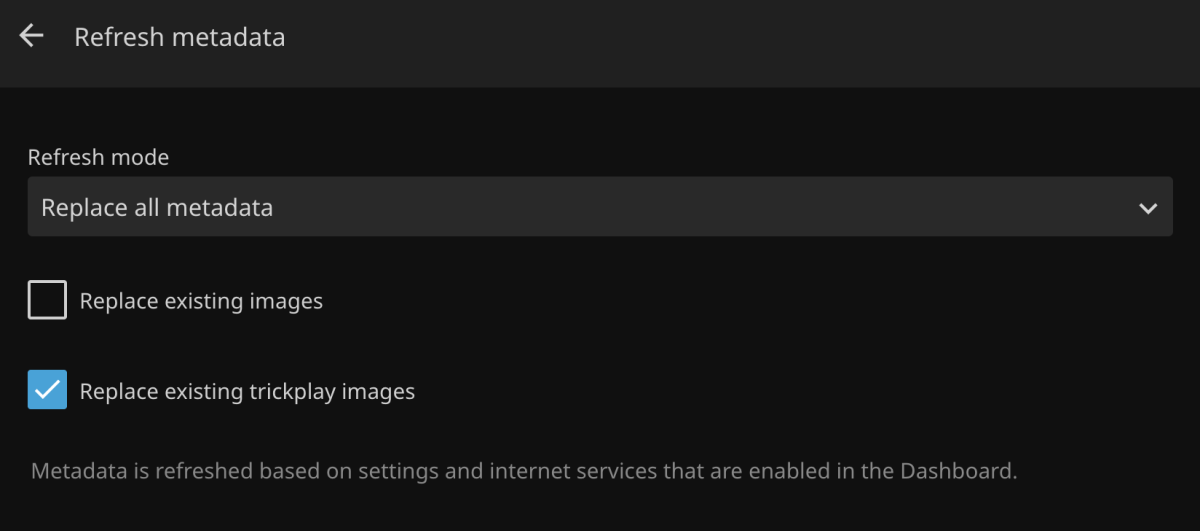
Refreshing metadata should include the option to regenerate seek/index images. Currently you have to find and delete the bif files manually. With Jellyfin, all you have to do is check a box in the UI: https://i.ibb.co/Tq5LznF/jellyfin-refresh-md.png
 1 point
 -
Hi, yes we can add this. Thanks for the feedback.1 point
-
Sometimes clients (such as mobile apps, web apps, or Emby clients on other devices) may cache old login information. If you've changed passwords, this can cause an authentication error. 192.168.100.1 192.168.1.11 point
-
Yeah, noticed that in your screenshot earlier but it was irrelevant to the issue at hand so I left it be, for the moment. Exactly so it wouldn't (though it shouldn't, but ghosts in the machine can manifest anytime), effectively decoupling that folder from any associations it might've possibly maintained, not knowing what was the end/final status of those items, episodes or movies, per server log. Though, with your folder structure/library paths, it likely might've remained in place, as you're actually adding those genre subfolders separately as library paths (btw, wise choice) instead of just adding X:\Movies root as library path and therefore introducing additional layer of complexity. Glad you've sorted it out.1 point
-
absolutely! happy to help!1 point
-
Without debug log, it's somewhat hard to figure out what was occuring and which steps you exactly took while the scan was running, as within same log covering relatively short interval (~50ish mins), several items were both an Episode and a Movie: Two of the movies are definitely problematic, either due to their titles or incorrect NFOs attached: 1. X:\Media\Movies\Horror\House of 1000 Corpses (2003)\House of 1000 Corpses (2003) [tmdbid=2662] and 2. X:\Media\Movies\Horror\Salò, or the 120 Days of Sodom (1976)\Salò, or the 120 Days of Sodom (1976) [tmdbid=5336] Personally, at current stage, I'd: 1) Remove Movies (TEST) library (cancel library scan that'll run automatically) 2) Move Horror folder out of your movies root 3) Remove X:\Media\Movies\Horror as a Movies library path 4) Run Scan media library task to clear the db 5) Search/remove all instances of tvshow.nfo and season.nfo (if any) from Horror folder 6) Once 4) is completed, move X:\Media\Movies\Horror with one-two movies within back to movies root 7) Add X:\Media\Movies\Horror as a Movies library path again 8.) Run Scan media library 9) If that single/those two movies identifiy as it/they should (as a movie), continue adding movies in batches (10-20-50) and running library scan (if RTM disabled) while paying particular attention to movies listed above - if it breaks at any point, you'd narrow down potential suspects and can look into filenaming/title and/or item's NFO, as per above.1 point
-
HI, the 4.8 server added quite a bit of new features, and in some cases may not perform as quickly as 4.7, particularly with music. This has been resolved as part of the upcoming 4.9 release. Thanks.1 point
-
Hi, this has been revamped as part of the upcoming 4.9 server release, so once you have that, then you'll see quite a bit more content here. Thanks.1 point
-
When it comes to managing and streaming your personal media collection, Emby stands out as a favorite among home media enthusiasts. Whether you're a cord-cutter, a collector, or just someone who wants full control over your content, Emby delivers. But don’t just take our word for it — recently we took a look around the Emby Community Forums, Reddit, and other media server discussions to find out what users love most. Here are the features Emby users say they can’t live without: 1. Active Development and Plugin Ecosystem The Emby dev team has built a strong reputation for listening to users and delivering consistent improvements. Feature requests are often acknowledged in forums, and updates come regularly. The Emby Plugin Catalog includes tools for metadata management, intro skipping, trakt.tv syncing, theme music, and more — making it easy to expand your setup. 2. Emphasis on Privacy and Local Control Unlike some competitors, Emby doesn’t force users into cloud integration or tracking services. Features like Trakt and others are optional, and you’re never required to give up control of your data. This focus on local-first architecture makes Emby a great option for privacy-conscious users who want full control over their media experience. 3. Customization and Theming From custom libraries to visual themes, Emby offers a highly customizable user interface. Users can choose how metadata is displayed, organize content into rich collections, or apply unique visual themes and CSS tweaks. For families or multi-user households, Emby also supports user profiles with individual settings and parental controls. 4. Direct Play and Efficient Transcoding Emby is built to take full advantage of Direct Play, reducing the need for CPU-intensive transcoding. For devices that require conversion, transcoding is efficient and can be customized for quality and bitrate. If you’re running a hardware-accelerated setup with Intel Quick Sync, NVIDIA NVENC, or AMD VCE, Emby can offload transcoding for better performance. 5. Live TV & DVR Integration One of Emby's most appreciated features is its native support for Live TV and DVR. Whether you're using a TV tuner or loading an M3U playlist from an IPTV provider, Emby makes it easy to stream live television directly from your server. With season pass recording, time-based scheduling, and automatic commercial skipping (with optional plugins), Emby turns your home server into a powerful personal PVR. Bonus: Multi-Platform Support From Android TV, Apple TV, and Firestick, to iOS, macOS, Windows, and even Linux, Emby has apps for nearly every device. And with Emby Theater, you get a lean-back experience optimized for the big screen. Final Thoughts What makes Emby stand out isn't just its feature list — it's the freedom and flexibility it offers to its users. Whether you’re building a streaming server for your family, archiving physical media, or curating a collection for your home theater, Emby puts you in charge. Ready to try it yourself? Download Emby Server and see why so many users are making the switch. View the full article1 point
-
1 point
-
Local trailers do not show in Trailers tab. Does your user have Trailers (or all channels) access permission (edit user>Access tab>scroll all the way to the bottom) enabled?1 point
-
I have a large collection of anime, and I can't recall a single case in which the main subs (usually default, because the default audio is usually Japanese) don't include the content of forced subs (in the cases where they are present, which is by no means a given). Oh, and there is a GUI for doing bulk edits of the flags without rewriting the whole file, in mkv files at least, so the forced flag is rather easily removed. Paul1 point
-
It is clear that (a) there is no authority which defines the handling of forced subtitles, and (b) different media suppliers, streaming platforms, and players handle them differently. Historically (early DVD) forced subtitles started as individual flagged lines within a single subtitle stream which were shown even if the rest of the stream was turned off - and DVD ripping programs would make two files from the one subtitle stream to enable selection of complete (including the forced lines) or just the forced subtitles. Netflix rules require that all forced subtitle contents must be included in the main subtitle files, so that they are still shown when another subtitle stream is selected; it is assumed that only one subtitle stream is used at a time. Some streaming platforms expect forced subtitles to be burned in to the video - that at least forces them to be shown! I've even seen a requirement that they are all capitals. Basically, the use of a forced flag is a snare and a delusion - it is as easy to simply select the subtitle stream you want, or to set it as default so that it plays automatically. An additional confusion is caused by the fact that Handbrake (at least when using the GUI) automatically adds the forced flag when you select the default flag. This creates a situation, for instance, in which some programs - MPV in my experience - won't play the subtitles correctly if there is more than one subtitle stream and one has both default and forced flags. My policy is therefore to remove all forced flags, because they create unwanted issues and add no value. Paul1 point
-
Emby for Apple TV 1.9.9 has been released. Here are the highlights: Support playback correction in the video player Support sleep timer in the audio player Support subtitle offset in the video player Support new youtube trailer playback (in the 4.9 server) Fix home top tabs not being translated View the full article1 point
-
Hello Luke, while you're at it and looking in to this, can you also add a UI toggle for this display that goes back to a request I had some years ago regarding the Android TV presentation where we don't have the album art hugely overlaying the background artist image? I had previously asked for a toggle switch where we can emphasize the background art and reduce the size of the album cover art and move it from center of screen to be down lower with the player controls (either bottom left or bottom right corner of the screen). For those of use who primarily depend on the music player while viewing from a big screen living room experience this presents a much better UI/UX. When I'm on my phone, and listing to music rarely is the Emby interface even visible. The phone screen either goes blank to save battery or I'm browsing internet and doing so other task. So I'm not really looking at Emby. But when in the living room and listening to music, I'm either looking at the Emby interface and more interested in the artist background images cycling or have switched to either a family slide show or brought up ProjectM visualizations (as a separate app) to fill the screen. This last point was another request from years ago where we could have an interface to ProjectM inside of Emby so that we could see the artist/song information inside of ProjectM while Emby is playing music. The functionality that I'm looking for in Emby was present as late as version 2.0.33g of Android TV but was removed when the great merger of Android and AndroidTV began. Can we just get a toggle switch inside of the Android version that is more TV display friendly and emphasizes whole wide screen images (like backdrop/backgrounds) than album cover art? It is good to have album cover art but I'd like to have a choice of whether or not is the most prominent thing on the screen. This functionality and UI/UX goes back to even the old Media Browser inside of Windows Media Center days...please bring that back. It was the best thing about Emby both then and now. And again, I'll put in a plug for better/tighter integration with ProjectM visualizations before I go... Thx again1 point
-
What about the remote's right arrow triggering the next song in the playlist? I could see that being tricky. However, I do list having an easy way to skip the current song. Also, is there currently an issue with the background and artist art clashing? A workaround could be for me to just use the plain black background so the artist art isn't affected. But that's boring.1 point
-
Hi. We thank you for participating in beta testing for the server. It should not be unexpected for issues to occur with pre-release versions. [my emphasis] That is not a fair statement. It may be fair to say that you may not have been able to take advantage of some of the upgrades (although I imagine you actually have just not some of the features you want). For everyone that uses Live TV, it is a big deal, but it is true that this is a minority of our users and the things we are working on for 4.9 will impact most Emby users and they have been slated for a long time as well.1 point
-
Here I post all new icons from the original thread (they were cut off for some people including myself after an update). I apologize if something gets lost in the fray so feel free to remind me if I miss one that you had. I've tried to touch them up a bit and decided that for this updated posting, all images will not contain text (this was a frequent enough request that I decided to start from there). I am glad to add text of course. So here goes the first lot of images for you.





 1 point
 -
Just have to necro this. I have uninstalled the trailer plugin do to , bad / low quality picture and sound. But I can guess why this is still present in my movie library. I DO NOT want this if its uninstalled. At the lease show my own "good quality" local media trailers. Emby knows I have them, I can play them from movie detail screen.
 1 point