Leaderboard




Popular Content
Showing content with the highest reputation on 05/19/25 in Posts
-
Some times I forget where are all the settings are and 'are they related to this or that?', 'user level or system level (or both!)?' I'd like to be able to search for a setting then go to that section. Right now I'm trying to find the poster stuff and can't find it. I thought "I'll click this magnifying glass here in Settings!" but no, that searches my libraries. (This would seem to be a problem within itself - context, context!)
 4 points
 -
I literally just posted this as a feature request. I thought I searched for this on the forum, but I swear this didn't appear. I am adding my +1 to this as well.3 points
-
This is an older thread, but I'd also like the option for more steps. I'm probably an outlier, but 5% increments would be nice.2 points
-
Bardzo dziękuję za pomoc.1 point
-
Version 13.0.0 Notes: This is a major release with many new settings and changes to defaults, be sure to fully read this changelog, you can reconfigure as before if needed. Please remember to leave an updated textual review on the Play Store. Your feedback is essential for improving the app’s ranking and securing Symfonium’s future. Added: Added numerous new settings for the compact player to fully leverage Symfonium’s customization capabilities (Including swipe to skip), and updated the default settings to be more modern. Please note that default settings have changed—you may need to reconfigure them to your preference. Added support for custom fonts. (You can use any font available on Google Fonts if your device has Play Services.) Added many new settings for album, artist, genre, and playlist detail pages and updated the default settings. (You may need to reconfigure your detail page settings.) Added new Now Playing buttons and a gesture to switch between cover art and lyrics in the expanded player. Added new style options for the list top button row and updated the default settings. (You may need to reconfigure this setting if you previously hid those buttons.) Added a new optional secondary shortcut row on the home screen. Added new style options for home shortcut buttons. Added swipe-to-refresh on the home page to easily reload random list content. Added color customization options for home row header text and divider lines. Added a global source filter and “Play on” (Cast) as available home shortcuts. Added overscan settings for Android TV builds. Added tooltips on long press for icons without text labels. Added scale factor to rating bar and waveforms in the expanded player. Added new specific shuffle and repeat mode button type for the expanded player, that will change color when active instead of filled icons. Changed: Improved Smart Fades now deliver smoother, more natural transitions across a wider range of tracks, almost like the app knows what you want. Your previous compact player settings have been reset to accommodate all the new options. You can reconfigure to your previous configuration if wanted. Your previous detail page settings have been reset to support all the options. You can reconfigure to your previous configuration if wanted. The option to hide the top button bar in lists has been updated to offer different styles. You can reconfigure to your previous configuration if wanted. Changed the default values of several settings. You may need to reconfigure options like “Hide top filter button” and “Hide Cast button” under Settings > Interface > Advanced. Support OpenSubsonic album version by concatenating the value to the album name. Fixed: Improved handling to prevent external apps that attempt to skip ads from randomly skipping tracks when returning to the app. Fixed an issue where some OGG files could not be played. Fixed ArtistInfo folder nfo scrapping. Improved some unicode sort cases when disabling the option “Use ASCII sort”. Properly sync Jellyfin album Overviews. Fixed CUE sheet parsing sometimes leading to invalid positions. Fixed support for Internet Radio with basic auth in the URL. https://support.symfonium.app/t/version-13-0-0-released/84881 point
-
It's not our choice. We declare port 8920 in the app manifest and therefore QNAP wants to use it. If we take 8920 out of the manifest then it will use 8096, but then the server will be denied permission to use 8920 if you try to setup SSL after that.1 point
-
OK VBR means Variable Bit Rate. The test would just be between two medias that have the identical bit rate and codecs to see if this is causing the click. Two medias with variable bit rates may start at a different bitrate. The change in codec or bitrates is what the online discussions seemed to think was the cause of the clicks on Apple software. If you don't think it's a worthwhile test, fine, then don't do it. I am not sure what you mean by "impossible". The above request to do the how to report a media playback issue would help.1 point
-
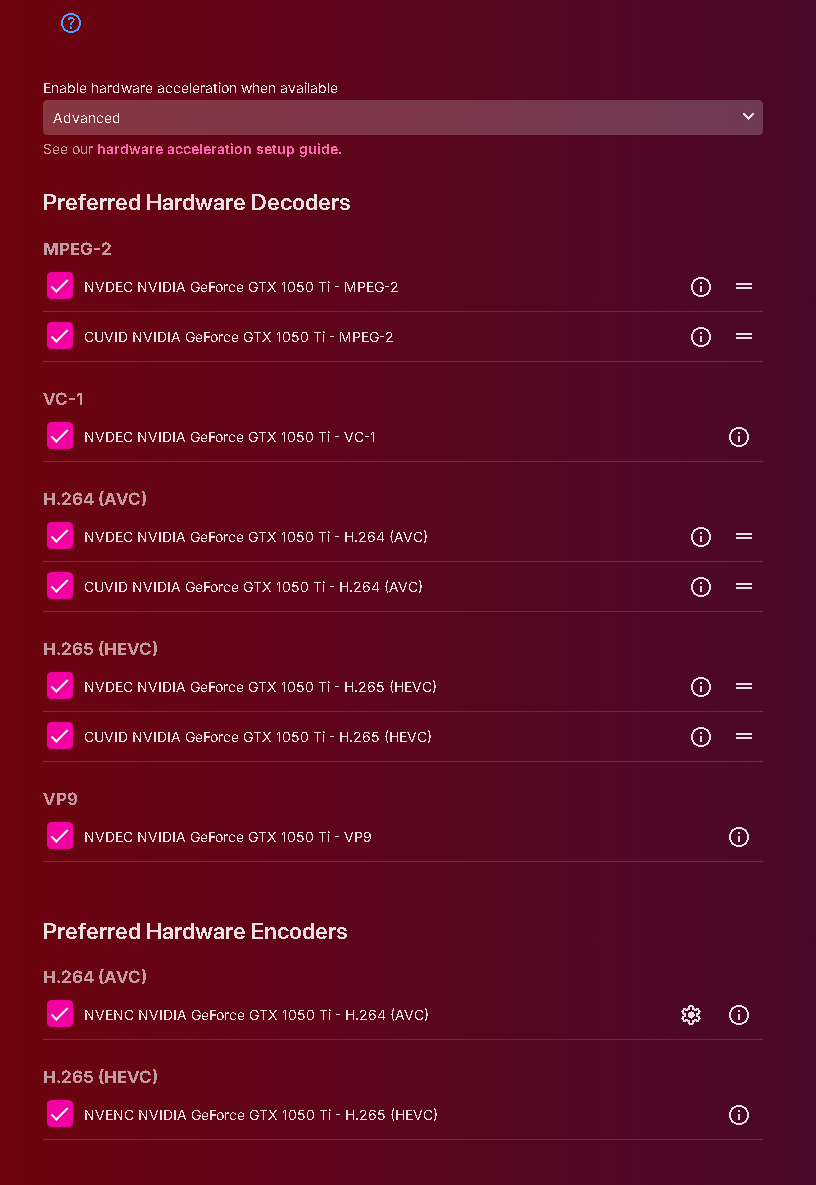
I know this is an old post and I am honestly not trying to hijack it. I just wanted to add a comment for anyone who is trying to do this with an nvidia gpu. It took me a while to find the correct links/process to get this to work but in short I followed the process on this link first to get my gpu working with an ubuntu 24.04 LXC container on a Proxmox 8.4.1 VE host. Note: Post actually references Plex but I was focusing on just getting my GPU to work. Github Gist NVIDIA Proxmox + LXC ( I did not need to follow the "Python/cuDNN" section) My lxc conf file ended looking like this: arch: amd64 cores: 40 features: mount=nfs,nesting=1 hostname: emby-pvr lock: backup memory: 65535 mp0: disk0:110/vm-110-disk-0.raw,mp=/opt/emby-server/data,backup=1,size=64G net0: name=eth0,bridge=vmbr1,firewall=1,hwaddr=BC:24:11:86:02:9C,ip=dhcp,type=veth net1: name=eth1,bridge=vmbr2,hwaddr=BC:24:11:C2:8D:27,ip=192.168.131.225/24,type=veth ostype: ubuntu rootfs: local-admin:110/vm-110-disk-0.raw,size=32G swap: 2048 unprivileged: 0 lxc.idmap: g 0 100000 44 lxc.idmap: g 44 44 1 lxc.idmap: g 45 100045 63 lxc.idmap: g 108 104 1 lxc.idmap: g 109 100109 65427 lxc.idmap: u 0 100000 65536 lxc.cgroup.devices.allow: c 195:* rwm lxc.cgroup.devices.allow: c 509:* rwm lxc.cgroup.devices.allow: c 238:* rwm lxc.mount.entry: /dev/nvidia0 dev/nvidia0 none bind,optional,create=file lxc.mount.entry: /dev/nvidiactl dev/nvidiactl none bind,optional,create=file lxc.mount.entry: /dev/nvidia-uvm dev/nvidia-uvm none bind,optional,create=file lxc.mount.entry: /dev/nvidia-modeset dev/nvidia-modeset none bind,optional,create=file lxc.mount.entry: /dev/nvidia-uvm-tools dev/nvidia-uvm-tools none bind,optional,create=file lxc.mount.entry: /dev/nvidia-uvm-tools dev/nvidia-caps/nvidia-cap1 none bind,optional,create=file lxc.mount.entry: /dev/nvidia-uvm-tools dev/nvidia-caps/nvidia-cap2 none bind,optional,create=file (mp0 mountpoint is only there because I wanted to store my emby data in a different location) After I got that process completed, I installed emby and I was good to go so I thought I would share in case anyone else who is trying to use an Nvidia card comes across this post:
 1 point
 -
sure, i could do that, but on my NAS, i should be able to open the correct url by default when I launch the server app.1 point
-
I can't think of any security risk for this utility and if your system is not multi-user then you have even less to worry about. The restriction is not the intel_gpu_top itself but likely the kernel perf_events security and access control. If set_uid gets it working for you then you'll just have to remember to set again after an update.1 point
-
The Emby server is exposed through a router (with port forwarding) and the router has a WAN with a public static IP. I registered a domain and use the certbot utility to generate the Let's Encrypt certificate (authorized with acme txt record in dns) I will try zerossl and let you know if it works. Thanks1 point
-
No that was the first time I've noticed it like that. It's fixed now thanks to the suggestion above.1 point
-
Hi there, let's look at an example. Please attach the information requested in how to report a media playback issue. Thanks!1 point
-
IncludeUnaired, IncludeSpecials, StartIndex, Limit, ParentId (to limit to a specific series or library).1 point
-
@spearoid The big disadvantage of mirroring is that the video is no longer displayed according to the dimensions of the external screen. Instead it's confined to the dimensions of the device's screen rendered onto the external screen. If the phone is portrait and the external screen is a typical computer monitor, the mirrored display won't take up much space on the external screen. Are you saying you want that?1 point
-
When connected to an external display, Emby uses Presentation mode for playback. Presentation mode does not handle touch events on the display. Right now there's no way to disable this. But It's possible to add a setting in the app to control this behavior, i.e. continue to mirror instead of switching to presentation mode.1 point
-
what? I have a bunch of them, no really I do. Not sure what your point is, do you force your views on your kids too? Not sure where this came from, how weird to ask a question like that and assume before getting my answer that I dont so if I did not have kids I would not be eligible to be involved in your eyes? wow No that is not the case, Emby created a tool. They control the tool, not how users want to use it, that is why if someone ever does get caught using Emby to share their media library and fined Emby will not be liable, Emby does not control its users. I do not need to be part of the problem or solution, you have a very black and white way of looking at things, not sure how well that works out for you in the real but life is never just black|white there are always shades. Back on Topic: To fix the user delete requests and new users not knowing what Emby is, in my opinion Emby can try a few things: Decouple Emby account from the app (deprecate Emby Connect) Allow users to delete their own accounts Make the wording on the sign up page clearer1 point