Leaderboard




Popular Content
Showing content with the highest reputation on 05/18/25 in Posts
-
Update: I uninstalled emby from docker and installed it through SPK manual installation. Everything works fine now. I also believe it's permissions related but I'm not sure what else I could've changed.2 points
-
Hi, The current implementation of Emby search is very basic. Based on what I can tell, it only matches exact strings in the same exact order. Example: "Mission: Impossible" In this example the following queries will return a positive match Possible Impossible Mission Mission: Impossible And the following queries will not return anything at all (The worst offenders are highlighted) Mission Impossible Missoin: Imposible Imposible Impossible Mission Mission : Impossible Mission Impossible Another example would be "Mr. Robot" where if the dot is missing, nothing is returned or in general terms any variation of any string that is not an exact match will not return anything at all. Let's not even attempt to try a title like "Agents of S.H.I.E.L.D.". This makes the search difficult to use and at times even frustrating. As the examples above show, the major theme is special characters and punctuation and they can probably be bypassed by just ignoring them, which might or might not cause other problems in the process. This problem also affects titles that have letters with diacritical marks or glyphs such as "Amélie" and "Æon Flux", if you can't type them exactly, you can't find them. In my opinion a better attempt would be to use a difference string matching algorithm such as Levenshtein distance, you can then define an acceptable threshold and return the closest matches. I found a couple of C# projects that implement this and might be useful as a starting point. FuzzyWuzzy, a port of Python project in C#. https://github.com/BoomTownRoi/BoomTown.FuzzySharp FuzzyString. Has some additional string comparison algorithms too. https://github.com/kdjones/fuzzystring Thanks.1 point
-
It's working perfectly now! Thanks again!1 point
-
A simple reboot fixed it. Sorry to bother.1 point
-
@yockerThis is perfect! Exactly what I was hoping for! Working great on stable release for me.1 point
-
Something else - on this option, would it be possible to set a flag (or add it as automatic logic) that if say there is more than 10% of the content to be deleted, it would skip? Today I had the issue that my upstream M3U provider had a temporary issue, which resulted in an empty (or near empty) M3U being downloaded. The script processed it, decided that lots of stuff was gone and proceeded with deleting all the .strm on disk (as it is instructed to do so, per this option). In this scenario, it would have been nice for the plugin to realize that maybe something is off and would have skipped it? Clean Out/Remove Old (obsolete) entries from the output directory. This option cleans up the output directory removing any files or folders that are not in the m3u files / previous output files that are no longer valid / files ignored or have changed etc on this processing run. It is useful if you want to remove any files that are no longer in the m3u files and keep the directories current. Keeps the output directory clean and up to date with the m3u files. Remove Obsolete Files and Folders (Warning: Deletes anything not in the m3u files)1 point
-
Jep it was a test to see what would happen, if 1 episode had missing subs1 point
-
Ah. The icons only shows if all episodes have for example english audio and/or subtitles.. If just one is missing it won't be shown Good point though, must remember to put that in the readme.1 point
-
I'm an idiot, TV show posters doesn't look for external subtitles still.. Fixing!1 point
-
Np mate Will give it a go in 15 min.1 point
-
Damn auto correct1 point
-
Yeah sorry, was my phone not liking me writing non before the other text1 point
-
Great. The instructions you did earlier were for "shared folder" permissions only. There are also folder and file permissions at the system level which probably didn't get set. The spk will set those permissions correctly and normally people only need to do the shared folder permissions.1 point
-
1 point
-
Will test it a little later1 point
-
@Neminem Speak of the devil.. Try this one please. Tell me if there are any problems. It will need a refresh of the meta data on the show before an icon is shown, also remember to enable the setting for it. Edit: Forgot to say, it will only show an icon if ALL episodes have audio or subtitles of a language. EmbyIcons.dll1 point
-
@SammyAre all of your drives formatted as NTFS? I'm assuming your pool show as good with no drives missing. Do you have stablebit scanner? If so have your drives been scanned since updating/reinstalling? As for the permissions, I would make sure you take ownership of all file and folders, and apply any changes recursively to all files and folders and enable inheritance. Make sure nothing in a subfolder has different permissions than what you set. If I remember correctly there is guidance somewhere on their site or forum to fully reset the permissions on a pool that might help too.1 point
-
@Flionerare you able to try the native package on the host machine directly to see how things compare?1 point
-
@yockermay also have some tips.1 point
-
Hi, it's on our to do list for the near future. Thanks.1 point
-
OK -- well, I found the problem. I guess a previous OS update changed the local network access rights for Emby. For anyone else who might have this problem check: Settings->Privacy and Security->Local Network. Thanks and sorry for the turbulence.1 point
-
There are options that control the display of posters on details screens. Explore your user settings. Also, please be civil and be respectful with your posts.1 point
-
I solve the issue yesterday for @kkwok1 point
-
Using edge worked fine. Also tried in Arc browser (chromium based). Didn't work. Calendar also works now. Thank you. As an idea... What if you just made backing up a scheduled task and have the backup land in the same folder as Emby's backups? That way it wouldn't matter what browser was used. Well, I am just guessing anyway. I have no idea how feasible any of that is. Also, would it be simpler to only backup the channel names, numbers, and rules used to make them. Then just let the channels rebuild themselves after a restore. That way if you have added new media since that backup was taken, it will just automatically be included in the restore.1 point
-
Great news everyone. Emby for Samsung 2.1.0 has launched in the Samsung app store for most 2023-2025 devices. Older devices are still in Samsung review. Stay tuned to the blog for the release announcement. Thanks !1 point
-
Great news everyone. Emby for Samsung 2.1.0 has launched in the Samsung app store for most 2023-2025 devices. Older devices are still in Samsung review. Stay tuned to the blog for the release announcement. Thanks !1 point
-
Great news everyone. Emby for Samsung 2.1.0 has launched in the Samsung app store for most 2023-2025 devices. Older devices are still in Samsung review. Stay tuned to the blog for the release announcement. Thanks !1 point
-
Hi @gong700yes we are monitoring this feature request for community feedback, just as we do all other feature requests. Thanks !1 point
-
1 point
-
It works!!! i randomly asked google to pause it just for kicks and its working now! thankyou for the work you guys did to fix the problem!1 point
-
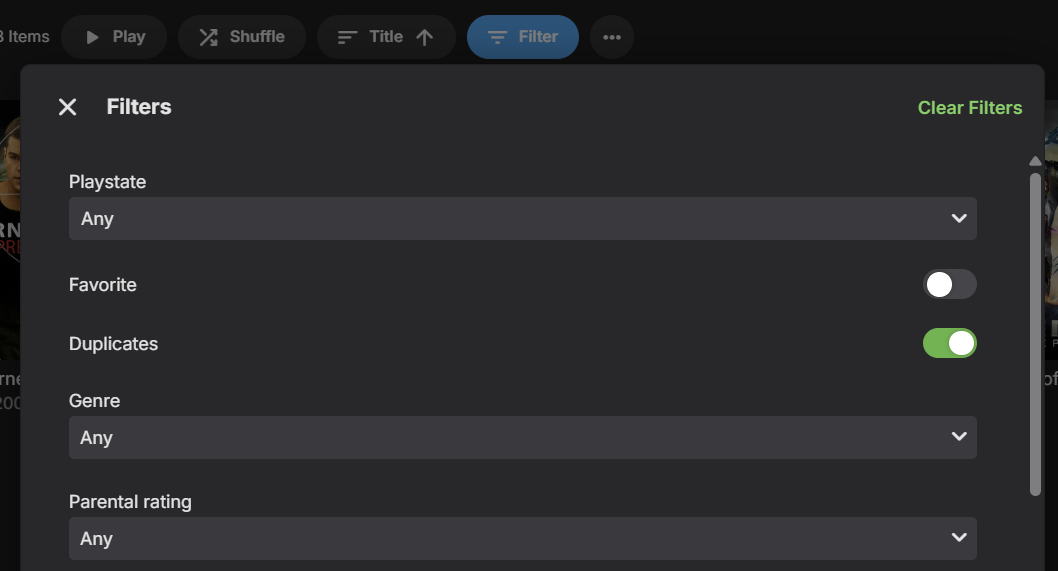
A new Duplicates filter for Movies and Episodes will be in Emby Server 4.9:
 1 point
 -
I have multiple versions of all my movies; there's at least two versions, one in H264 and one in H265. I'd like for emby's version selection dropdown to be able to order the versions alphabetically, so I can work out which order I want them to play, and which one to be at the top (eg. by numbering them). I understand emby will select the ones based on which will have the least impact on the server to transcode, I just don't see it working the way it's implemented. I'd rather have a large H264-Remux playing, even if e.g. DTS needs to be transcoded, than having the server transcode a whole H.265 file of a lower size. That's what the selection algorithm regularly does though. Is it possible to add this feature / maybe select the way the files should be ordered in the settings?1 point
-
Ok, so..basically. If I have a copy of a movie in both 1080p as well as 2160p and the versions are linked together, I would like for there to be a pop up to ask which version to play when selecting the play button. I feel that this would help deal with multiple possible issues when EMBY doesn’t select the proper file by default. Especially 4K movies over remote connection. I have EMBY trying to play 4K HDR movies on my 1080p non HDR tv. I also have it selecting 1080p version when watching on my 4K HDR tv. It only happens on occasion, but it is rather annoying. Especially for those who are less tech savvy and don’t realize that they need to make a change before playing the movie. This way the file can be chosen every time and you won’t accidentally play a 4K HDR movie on a 1080p tv. You would also know to select 1080p instead of 4K when remote streaming. Especially if the movie needs to be transcoded for any reason due to tone mapping. This would also give you the ability to remove the drop down menu to select version before playing the movie. Make it automated. Press play, pop up..Select version 1080p or 2160p. hopefully you get the idea. I really hope that this is something that you will be able to implement. It sounds like it should be fairly easy to accomplish. thank you!!1 point