Leaderboard




Popular Content
Showing content with the highest reputation on 05/12/25 in Posts
-
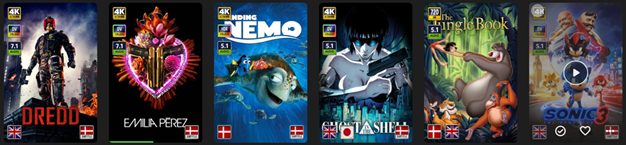
EmbyIcons, in catalog under general. Source code at: yocksers/EmbyIcons: Displays icons on posters in Emby depending on audio and subtitle languages. EmbyIcons enhances your Emby Server by overlaying informational icons directly onto media posters. Display language, codecs, resolution, ratings, and more at a glance with fully customizable profiles for different libraries. Features Extensive Icon Support: Audio/subtitle languages, original language, audio channels, codecs (audio & video), HDR/Dolby Vision, resolution, frame rate, aspect ratio, parental ratings, community ratings (IMDb, Rotten Tomatoes, MDBList audience scores), custom tags, and favorite counts Multi-Profile System: Create distinct profiles and assign them to different libraries for complete customization Flexible Layout Control: Position icons in any corner with custom priority ordering and horizontal/vertical stacking Series & Collection Aggregation: Smart detection shows icons only when all episodes/items share the same property (with Lite Mode option for faster scans) Profile Import/Export: Backup and share your profile configurations Icon Manager: Identify used, unused, and missing icons in your collection Series Troubleshooter: Find episodes with inconsistent properties causing missing icons MDBList Integration: Display Rotten Tomatoes audience scores with a free API key Live Preview: See layout changes in real-time before saving Advanced Settings: Fine-tune cache sizes, performance, and memory usage Icon Naming Convention Place your icon images in a folder on your server. Recommended: ~100x100px PNG with transparency. Supported formats: .png, .jpg, .webp, .gif, .bmp. Icons use the format: prefix.name.png (case-insensitive) Prefix Type Example lang Audio Language lang.english.png sub Subtitle Language sub.german.png og Original Language og.japanese.png ch Audio Channels ch.7.1.png, ch.stereo.png ac Audio Codec ac.dts.png, ac.eac3.png vc Video Codec vc.hevc.png, vc.av1.png hdr Video Format hdr.dv.png, hdr.hdr.png res Resolution res.4k.png, res.1080p.png fps Frame Rate fps.24.png, fps.60.png ar Aspect Ratio ar.16x9.png, ar.2.39x1.png pr Parental Rating pr.pg-13.png, pr.tv-ma.png tag Custom Tag tag.3d.png, tag.directors-cut.png rating Community Rating rating.imdb.png (none) Rotten Tomatoes t.tomato.png, t.splat.png (none) Popcorn-O-Meter t.popcorn.png, t.spilledpopcorn.png, t.fresh.png (none) Favorite Count heart.png Note: Rotten Tomatoes Popcorn-O-Meter requires a free MDBList API key configured in Advanced Settings. Configuration Overview Settings Tab Global Settings: Set icon folder path, loading mode (Hybrid recommended), output format, quality, and logging Profile Management: Create, rename, delete, export, and import profiles Per-Profile Settings: Assign profiles to libraries Enable/disable icon types with custom alignment (corner), priority, and layout (horizontal/vertical) Configure TV show/collection aggregation (Lite Mode, exclude Specials season, etc.) Customize rating score background (shape, color, opacity) Adjust icon size Icon Manager Tab Scan your library to identify missing, found, and unused icons. Perfect for organizing your icon collection. Troubleshooter Tab Series Troubleshooter: Find episodes with inconsistent properties (resolution, codec, etc.) that prevent series-level icons Aspect Ratio Calculator: Get the exact icon filename for custom aspect ratios Advanced Tab Fine-tune cache sizes, expiration times, concurrency, and MDBList API key. Default values work for most users.
 2 points
 -
I ran through a few of my media files through the Emby Android app. Dolby Digital 5.1 - Yes Dolby Atmos TrueHD - Yes Dolby Atmos DD +- Yes DTS-HD MA - Yes DTS:X - Yes (emby shows DTS-HD MA but AV receiver shows DTS:X) AAC 5.1 - Yes If I missed something off let me know.2 points
-
Emby Windows & Emby Xbox A new stable version 2.234.0.0 is available now. Please go to the Microsoft Store and check for updates. Changes 2.234.0 [Xbox] Fix rate switching when current rate is > 60Hz [Win] Fix rate switching when current rate is > 120Hz [Win] Provide opt-out for hard refresh-rate limiting [Win] Try fix horizontal scrolling issues [Win] Sync: Fix display order of downloaded items [Win] Displaysettings: Always show sound scheme selection [Win] AudioPlkayer: Fix audio playback resume at position [Win] Sound Effects: Avoid doubled sound on Enter key [Win] Try fix hang on start [Win] Adjust "Don't revert display mode" feature when initial switch is hard limited 2.222.0 [Win] Don't wait for push channel creation on startup [Xbox] Enable HEVC Playback [Xbox] The EmbyPlus app is discontinued. EmbyPlus users will automatically transition to the regular app (2.222.0), which is now equal to the Plus app 2.221.0 [Win] Wintheme: Fix toggle button background [Win] Fix inconsistent refresh rate changes when hard-limiting [Win] AudioPlkayer: Fix exception when repeating a single song1 point
-
I'm a plex life time member, but I have been using Emby for over six years continuously, but there is a feature which I have always thought is missing in Emby which I would like and encourage the developer to consider including especially in this dispensation where families can social or commingle due to COVID 19. Today, I received a notification from Plex about it new feature titled Watch together you can read about it here https://support.plex.tv/articles/watch-together/ The feature allows friends and families at distance to watch same movies together instantly, you simply invite all your buddy, once they signed to the system which can be seeing in the server then play and pause as needed, this I think is cool feature should be added to emby. Let's here your though if Emby developer should consider adding this feature to our beloved Emby Media https://www.bing.com/news/search?q=Plex+Watch+Together&qpvt=plex+watch+together&FORM=EWRE1 point
-
Having just lost all of my previous Introskip data from the old Plugin due to a corrupt db, needing me to create a new TV library (subsequently needing hours/days worth of re-detection using the Core Introskip) - would it be possible to include the Introskip 'hidden' chapter markers in the standard metadata/nfo emby processes ? ie 1. Save the Introskip MarkerType=IntroStart,EndEnd and CreditStart in the episode NFO file. 2. On a episode/show/library import - just read the NFO as you do now, and if the data is present, then use that in the Chapter Table instead of re-detecting it. 3. Ideally allow us to see/edit that data in the standard metadata editor for that episode, but the main concern is the ability to recreate it without the need for the emby db/chapter table / ItemId dependency. Thanks.1 point
-
Will do. If I see it again...After I saw it I rebooted Roku... All of this time since using Emby what I usually see is NO backdrop at all between episodes when watching a tv show from a created playlist... I do see the backdrop if watching a series from the TV show folder. I assume that's normal for whatever reason and it doesn't bother me if that's the case... so that's why I was shocked not only to briefly see a backdrop, but the wrong one. And it made me wonder since I had recently added that series if I should rescan the TV show library (just to be safe) so I did that. So far since doing that I'm seeing the blank screen between episodes again on the playlist...1 point
-
Correct. It would be better to have the clients detect the devices rather than the server, but we haven't added that yet.1 point
-
its all good1 point
-
Appreciate it1 point
-
I've downloaded the new release and can confirm from my testing it has been fixed. Thank you1 point
-
Again this forum rocks. Lot's of ideas. Happy2Play, I like your workaround. Thanks All!!1 point
-
Blank screen
 1 point
 -
Audiobookshelf for Docker was easy enough to implement that it convinced me to migrate my Emby install to Docker. That being said, ABS now has a Windows install. So even if Docker was a hurdle at one point, it no longer is.1 point
-
Okay... occasionally, I do bother to confirm that the Play Queue still shows (horizontally scrolling) embedded chapters separately from (vertically scrolling) split tracks. And it still has not been fixed. Case in point. Occasionally, I check to see if Emby is progressing in usable audiobook functionality beyond the barest of barebones. They are not, and the evidence is heavily in favor that they will not. I will continue to keep checking, but only out of curiosity.1 point
-
IOk well I solved that quickly. It was my simrig's USB hub causing some kind of issue again. Unplugged it and problem solved. I really need an on/off switch for that thing.1 point
-
New version up with some fixes inc. working in the beta and not having to restart the server for new settings to work. Enjoy!1 point
-
Refresh rate limit enforcement option works great! Thank you guys!1 point
-
Emby server died at 6:51am today, and not any other time during the day. I suspect it is due to the scan Attached log for that period.embyserver-63882644158.txt. To check if it is definitely related to the scan - I'll change the schedule from 5am daily to 6am and see if the crash moves to an hour later.
 1 point
 -
As said by @pwhodgesabove: So, in your case it would look something like: 1. IT (1990) Stephen King's It (1990) [tvdbid=113981] \Season 1 \Stephen King's It S01E01-E02.mkv 2. King Solomon's Mines (2004) King Solomon's Mines (2004) [tvdbid=322889] \Season 1 \King Solomon's Mines S01E01-E02.mkv ProviderIds in folder names are optional but help pinpoint exact series. Assumption is you have TVDB as top-preferred meta-provider. Edit: If you prefer TMDB as highest-priority fetcher: 1. IT (1990) Stephen King's It (1990) [tmdbid=19614] \Season 1 \Stephen King's It S01E01-E02.mkv 2. King Solomon's Mines (2004) King Solomon's Mines (2004) [tmdbid=19699] \Season 1 \King Solomon's Mines S01E01-E02.mkv1 point
-
He doesn't want to re-order the cast within the row. He wants to re-order the rows themselves on the detail page.1 point
-
Many Thanks!! The app grows stronger day by day and it's great!1 point
-
Yes, and how do you reorder the cast and the spec's features?1 point
-
Those media names contain no episode information, so how is Emby meant to know it's a series? If, for instance, you have both episodes of King Solomon's Mines (2004) in one file, then the filename should still include the episode information - e.g.: "s01e01-e02", and preferably be in a season 1 folder (which also helps Emby recognise a series); same for IT (1990). Show us the complete folder structure and file names for one of these series and we should be able to work it out for you. In the case of IT (1990), I note that TVDB uses the name "Stephen King's IT", and, in the web interface at least, fails to find just IT; but using [tvdbid=113981] should sort that. Paul1 point
-
Hi, not exactly but we plan to add more home screen options in future updates. Thanks.1 point
-
Hi, thanks for sharing.1 point
-
Hi, there is an option in library settings to not merge series together.1 point
-
Hi, it’s something we’re interested in for future updates. Thanks.1 point
-
The receiver looks the same like the original Microsoft one with the Philips chipset (actually a "transceiver", it can also send IR commands). I'm pretty sure that it's an OEM version of it and that it works at least with all MS remotes and IR keyboards. If it doesn't work with the MS receiver, then I'd say "no" - unless it was an Acer PC. Yet, that's probably the only way to find out..1 point
-
Don't know what it is with modern society - rush, rush, rush...1 point
-
Victoire !!! Le problème semble résolu Le problème devait venir de google... Merci a vous1 point
-
Yeah I appracate the reply and your time, I gave up on using IPTV to much hassle I decided to use VirtualTV instead, I Enjoy building my own channels using my own media witch is vast and honestly it is much better for me to watch and it works great.1 point
-
Confirm fixed and working correctly on latest Emby for Android. Thanks!1 point
-
I have took a look at that, it was only working if the url had /tvshow/ in it, I will release an update as soon as i cant test the changes. My server is busy at the moment so i cannot restart it to load the new DLL yet.1 point
-
That didn’t work, but I reinstalled Emby server and now it works!1 point
-
I did try to reproduce the issue a day or two later, but wasn't able to. AFAIK, there're no logs for the client side of the app, right? (The app settings show the server logs, but client(?) logs are empty.) I'd be more inclined to agree, if the phone had been unable to access other devices within the same network, but that wasn't the case. Looks like there's not much more that can be done about this here. There're cases where the client-side app has behaved in ways that seem like it just crashed. It'll be streaming music, and then it just stops, as if the user had closed the app. I've seen that happen sometimes while playing music from a playlist, maybe a few hours into it. No idea of how to reproduce the issue, though.1 point
-
It's ok now, just re-started the server. I think it was a Samsung T.V. oroblem. I DK1 point
-
I can say so far grouping for movies is working fairly well in the beta. Maybe a few things that need to be ironed out, but otherwise it's a huge quality of life upgrade overall.1 point
-
A fair point. Thanks, I didn't consider that Genre. The issue is Emby only implemented CreditStart in the enum options - ChapterInfo{ StartPositionTicks integer($int64) Name string ImageTag string MarkerType MarkerTypestring x-internal-ref-name: MediaBrowser.Model.Entities.MarkerType ($enum)(Chapter, IntroStart, IntroEnd, CreditsStart) ChapterIndex integer($int32) } .. the original Plugin had CreditEnd as well. Thus you could auto-skip to CreditEnd - and then carry on with Playback and naturally finish the post credit video and then roll onto the next item. I guess a lot of the work would be in the Emby clients - as currently Emby doesn't actually give you any 'skip' options for CreditStart - I believe it just brings up the 'Next Episode' at the time specified by CreditStart - no good for this scenerio. @LukeMaybe simply adding CreditEnd to the above values (and updating ChapterApi) would be a good first step, even if the values are not currently used. I see JF have taken it one step further as well - and now included Commercial Preview Recap Outro Intro In their Media Segments ...1 point
-
Emby for Amazon Fire TV 3.4.65 has been released. Here are the highlights: The download feature is back ! Improve performance Fixes for gamepad input Add playback option to disable direct play of various formats Add option to configure to login as specific user on startup Fix video rotation on Fire TV devices when direct playing Add convert unsupported audio option Play vtt subtitles directly without conversion from the server Support playback correction Add a-z picker to add to collection/playlist Fixes for closed caption rendering Fixes related to autoplay episodes options Add video screen up action option to control up button press behavior Add option to control video player long press action View the full article1 point