Leaderboard




Popular Content
Showing content with the highest reputation on 05/06/25 in Posts
-
The TV app uses the Tizen player and thus will be restricted to what is specified in the video specifications chart of your user's manual for direct playing. However, it "should" play just about everything else transcoded. Things like TrueHD, DTS, PGS subtitles, will all get transcoded. The only Dolby formats Tizen supports is AC3 and DD+ (with or without Atmos). I myself prefer to keep a compatibility audio and subtitle track for all my movies and select them before clicking play in order to avoid transcoding. Example chart for 2023, there should be others for subtitles, music, etc in the same section of the manual. https://developer.samsung.com/smarttv/develop/specifications/media-specifications/2023-tv-video-specifications.html2 points
-
Not sure if this is the right spot where to request this. .. Nevertheless can we please add the feature for embyserver. Pretty much ro setup a pause timeout limit . so if a user put a video/movie on pause for more than xyz timeout limit would kick them back to the video/movie home page... Thanks Sent from my LG-US996 using Tapatalk1 point
-
In mixed content it is the naming conventions that determine if a video is detected as a movie or episode of a series.1 point
-
No known issues. You just have to follow naming guidelines a bit more strictly.1 point
-
Yes. I believe Google changed something due to users "having problems" downloading DNG's. (although getting them using Takeout is simple.....)1 point
-
If you remove the library altogether and then add it back again, I think that will do what you want.1 point
-
When the server accepts the camera upload, we will probably need more logging there to determine what's going on.1 point
-
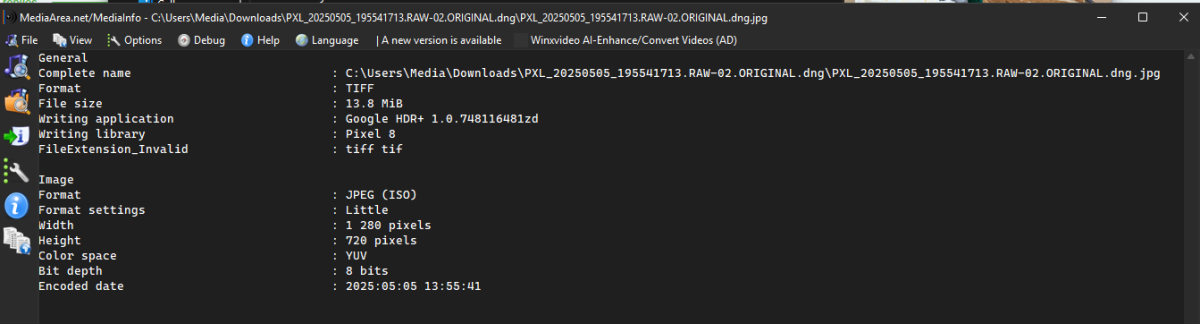
What do you mean? Here is the fake jpg.
 1 point
 -
Thanks, I'll check that setting and see if that helps.1 point
-
Hi, sorry, my mistake. This option has been added for the upcoming 4.9 server release. Thanks.1 point
-
Hi, yes we're looking into it. Thanks.1 point
-
Thanks for following up.1 point
-
Same Problem here since the newest iOS App. The Problem only appears when one episode ends and the next one automatically starts. When hitting the play next button, it works. Also when choosing the next episode manually. It doesn't matter if it's a new series or something I already watched without any problems.1 point
-
Start simple then move to the next step after each is working. That Virtual Server List image doesn't look quite right. For a basic setup the public and private ports should match: 8096 public -> 8096 private, same for 8920 -> 8920. 1. Check with canyouseeme.org. Does the detected IP address on the site match your router WAN IP? - If not then check with your ISP to see if they're using CGNAT. - If they don't use CGNAT make sure you don't have double-NAT. Like your own router behind the ISP router. 2. If the WAN IP is good then forward port 8096 WAN/public to 8096 LAN/private server IP. - Check connection from a browser to emby using http://WAN IP:8096. - Some routers don't allow NAT loopback/hairpinning. You can always try a mobile browser not connected to the LAN or WiFi. - If it doesn't work keep at it until you can get it working. 3. Get DNS setup to resolve to your WAN IP, not LAN. - Check connection again from a browser to emby using http://DNS name:8096. - If DNS doesn't work but IP does then get the name to IP resolution working before moving on. - Setting up URL redirects from the DNS provider can cause problems with Emby apps. Probably should avoid if you can. 4. Check connection from browser to emby using https://LAN IP:8920. - It should connect but throw a site/certificate error - Not Secure. You can click through to connect. - If it doesn't connect then check your certificate file to make sure it and the password are correct and emby can access the file. - Keep at it until you can get it working. 5. Forward router port 8920 WAN/public to 8920 LAN/private server IP. - Check connection from a browser to emby using https://DNS name:8920. - Some routers don't allow NAT loopback/hairpinning. You can always try a mobile browser not connected to the LAN or WiFi. - Keep at it until you can get it working. 6. Check the emby dashboard and make sure the access (LAN/WAN) details are correct. - Adjust as needed. 7. Close/remove the 8096 port forwarding on your router, you don't need it for WAN access. 8. If it's working now then scrap all of it and setup a reverse proxy. Just kidding...but not really. Consider that your next project. Caddy is popular and easy to setup with Emby.1 point
-
Yes it is set to Private1 point
-
Hi, in the near future we'll have a new ffmpeg build so please stay tuned for that. Thanks.1 point
-
Great! I just added some items to the library, so I'll check it shortly and grab logs. Thank you!1 point
-
HI, we'll take a look at it. Thanks for reporting.1 point
-
Dear SoftWorkz, Installed and tested 2.228 (and earlier versions earlier): my horizontal scrolling seems to be fixed....I cannot replicate it anymore: great ! Awaiting the fixes for the RC issues, probably in the core of Emby ? Great work guess!. grtz. Peter1 point
-
Nice work, thanks.1 point
-
Since I posted I discovered a few things (iPadOS)… Going to Settings > playback on the Emby app and locking the screen orientation to landscape locks the screen to landscape when playing a video. Older app releases followed the iPad’s Lock Screen setting. But it seems that there’s a bug when displaying the library. Stage Manager enabled: If Stage Manager is enabled, If anything is played, stoped and the back arrow is tapped to go back to the library it shrinks the display. Must be minimized and launched again to have it in full screen. Even using the “…” menu at the top and choosing “enter full screen” does not work. This repeats after playing a video and going back to the library. ~~~~~~~~~ Stage Manager disabled: Playing videos locks them to landscape if the playback is locked to landscape in settings. However, the screen rotates to portrait when going back to the library. I hope this helps speed up fixing the problem. Thanks1 point
-
Welcome to another of Emby's 'how can this possibly take so long' threads...1 point
-
I renew the question. Is this possible in Emby? Perhaps natively in all clients in the future? A native integration without messing with server files would be an advantage to competitors. All big streaming providers use a spotlight since it shows the newest additions at a glance for users. MakD/Jellyfin-Media-Bar: A Jellyfin Featured Content Bar to show off your media collection Spotlight.mp41 point
-
Just for example, my Nextcloud is also MY personal Server, but the option of MFA is available. So yes there is more about security and not only MFA but stop telling people there is so much more to care about to make the server secure, just give them the option for MFA. If they don't enable it or can setup the requirements to make it work it is not your fault but this discussion would have an end after 7 years. Thanks1 point
-
An update to the Emby Open Library plugin has gone out to support lookups using either ISBN or the Open Library Work Id. The Work Id should help make matching easier, although you can still lookup using ISBN. Here is clarification on the differences between Open Library works and editions: https://openlibrary.org/help/faq/editing#work-edition1 point
-
.com is the current version - you should not be using .org any more. Check that you have set up the login in Emby for .com using your username (not email address as I first wrote here) - the wrong name will fail silently. Paul1 point
-
Thanks! You guys rock :)1 point
-
Support for opensubtitles.com has been added on the 4.8 beta channel:1 point