
Leaderboard




Popular Content
Showing content with the highest reputation on 05/04/25 in Posts
-
Android Automotive. Not to be confused with Android Auto. "As compared to Android Auto, Android Automotive is a full operating system that can power the entire experience when driving. It’s installed on the head unit available in the cabin, so it’s in charge of everything from the moment you turn on the engine to the one when you leave the car. -AutoEvolution.com" I have Android Automotive in my Polestar 2. And while its not as popular as Android Auto yet, its pretty impressive. Its gaining more traction too. I hear GMC, Cadillac and many others are using it now too. Emby, please add a compatible app for Android Automotive in the google play store. Are there any plans for this?1 point
-
... as I was tired of manually grouping all my movie versions into groups after each recreation of the db, I created a plugin to help with that. The use case is having movies, that belong together spread around and not being able to easily match the emby naming conventions, but still having the desire to present them as one item with multiple versions. The plugin works similar to the auto boxsets, but does the "movie versions grouping" - it will group all movies based on their TMDB id into one item, regardless of where they're placed and how they're named. I made that for myself - however, if anybody is interested, attached is a plugin that solves this issue. Attached version is for current 3.6.0.49 beta Server, do NOT use it with stable release! Plugin is alpha state, you should only use it, if you are willing to backup your db (there is no way to revert the changes otherwise!) and manually put the dll in the server plugin directory. Do not use it in your production environment before having tested in a test environment that you're fine with what it does - seriously! ;-). Note: There is a known bug in the web GUI presentation which is described here, which needs to be fixed on emby side. Edit: the mentioned display bug in BoxSets is fixed in Emby now, thanks Luke. AutoCollections-for3-6-0-49-betaServer.zip AutoCollections-for3-6-0-75-betaServer.zip AutoCollections-for-4.1.0.15-betaServer.zip AutoCollections-for-4.2.0.17-betaServer.zip (4.6.0.10 and before) 4.6.4.0 and above (does not require beta server as version number has been surpassed) AutoCollections-for-4.6.0.22-betaServer.zip Note: Original version will cause issue with other new plugins like Top Picks. Updates by community members: v.1.0.0.4 New update thanks to @Cheesegeezer Looks like we've managed to update the plugin, to be current Emby Server 4.7.7 (minimum). Some Changes to be aware of Automatic Library scan and updates are disabled, too many things are triggering library scans at the moment and entering into an endless loop which will crash the server. Moved to a Scheduled task now. Fully Locked item Metadata can be ignored in the Plugin Settings for grouping. (Partial field may have worked before but you need to Lock the item itself now) ".strm" files are ignored from any processing New plugin Graphics with a big nod to MikePlanet This is always Mikes plugin and the work he has done is fantastic. - We only did essential maintenance to keep this alive for you peeps. AutoCollections_1.0.0.4.zip v1.0.0.5 Removed Top Pick Items from the available item list re introduced the auto scanning... this will take place 1 min after an item event is detected re introduced auto run after a library scan tested against top pick plugin and there is no endless looping... but please test fixed the locked items bug. Good luck and let me know how the testing goes. AutoCollections.v1.0.0.5.zip v.1.0.0.9 New update thanks to @Hoptional Added option whether to Merge items across different libraries Compatible with nested folder structures, the "Top Picks", and the "New Releases" plugin Improved logging AutoCollections_1.0.0.9-libraryoption.dll1 point
-
I found that when I hit the back arrow(at the top left corner) from the playing screen back to Emby, it keeps bringing me to portrait position even when I use an iPad in landscape mode. It’s so annoying that I have to rotate the iPad to portrait and back to landscape again to go back to landscape mode.1 point
-
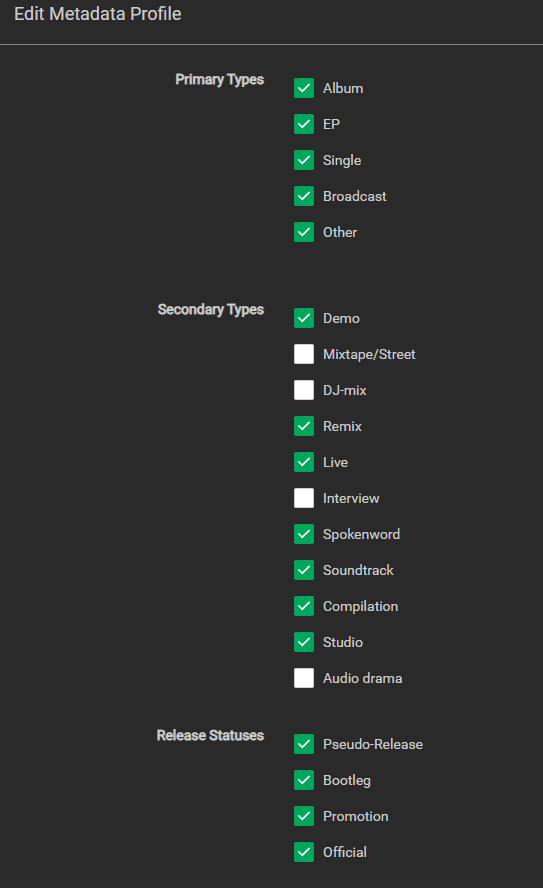
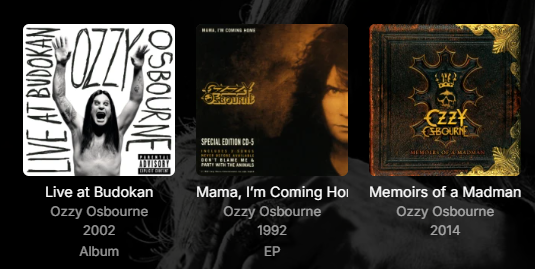
Lidarr has the ability to add album type to music album folder name. In Lidarr Profiles Metadata you can choose the following options: This allows you to append Album type to folder name. Example: Ozzy Osbourne - [1991] Mama, I’m Coming Home (Single) [FLAC] It would be fantastic if Emby could recognize the album type in ( ) and add it to tag for album metadata. Then when Emby displays artists albums it could display Album Type Tag. Example, Notice the first two with tag added:
 1 point
 -
I've reverted to using the android app, works well except the phone screen must stay on, I use a wireless charger at home and I found a device that allows you to have the charger and glasses plugged in at the same time.1 point
-
@chinswainApologies I'm a little late to respond But although loads and plays, you lose all controls and have to reboot the device to exit, shame would love to watch my content on my glasses. Bob1 point
-
Hello, Finally, I didn't need to configure specific port numbers. Enabling hostNetwork in the settings did the trick for me, so I just left everything else as-is! Hope this helps someone ...1 point
-
The problem was i having was: * HTPC reboot (for Windows maintenance or whatever) and Emby client wouldn’t auto login * Shield reboot and Emby client wouldn’t auto login * If I pause a 4K movie during play, and then menu to return to the Emby menus, Emby usually freezes and crashes. If it doesn’t lockup the Shield (requiring pulling the power plug), it crashes Emby and requires a relaunch. And the Emby client wouldn’t auto login. Hopefully it was the startup setting that got turned off unknowingly and it will auto login from now on.1 point
-
Not sure if this thread ever got solved properly, but on your emby home page, under the ain't "my media" portion, there is a downloads section if you have any movies downloaded. Click the little gear for setting g next to the word downloads....then again the three dots and delete.1 point
-
It's not really required these days as the majority of themes are already normalised server side. It was an early days feature that some original users still use. If you're finding the volumes are ok then just leave it off. Glad you're sorted!1 point
-
Visprodution. He's trying to use the Emby app on the Firestick. Having the app on the TV will not help the Firestick connect.1 point
-
Hello! I haven't used the app for a long time, but it finally worked. Synchronization goes without errors or problems. Thank you.1 point
-
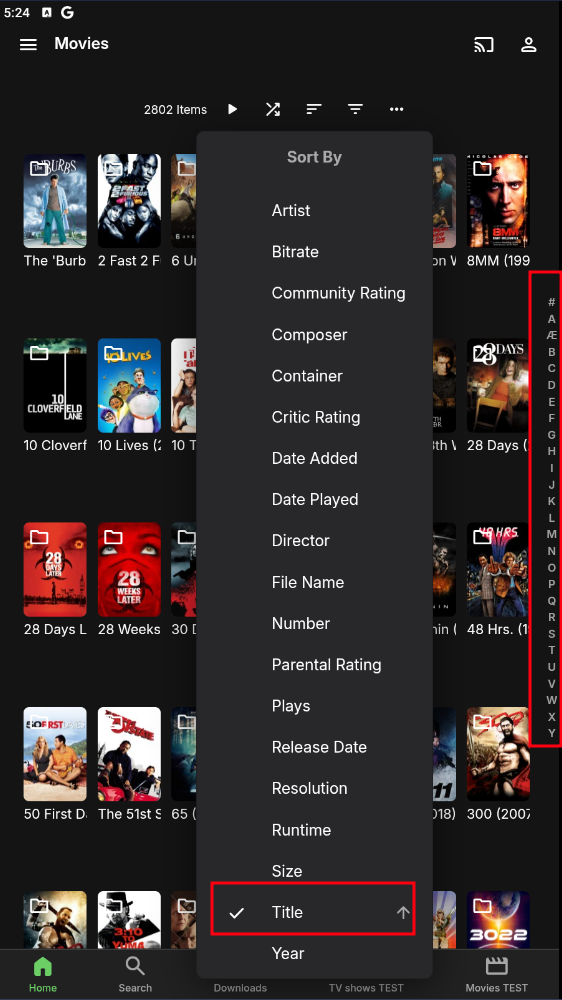
Sort by Title and it should work.
 1 point
 -
OK - after 4 hours I wanted to gave up but I tested the 4k videos in the browser and here it worked. So I checked my TV and found out that it was connected to the 2.4GHz Wifi instaed of my 5GHz- now the movies are running normally grmpf1 point
-
i went to bed and let it load all night and when i got up this morning, all my media was loaded in. so, i guess it just needed alot more time? well thanks for your help guys!1 point
-
Seems to work. Don't know why this hasn't worked the first time.1 point
-
I thought that was addressed in 4.8+ release: What server version you're running? Edit: BTW, renaming all those folders should be a trivial task, using any batch-renaming tool of your preference (like this one).1 point
-
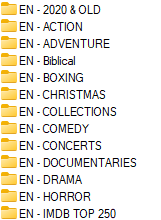
I think @mickle026is right here, they look like the same Group Titles that I have in mine, so are more like categories the provider has set. @BigIrnif you follow what was recommended it will put all the movies into the root of the folder, for me the list is just too big and I prefer to pick and choose which film 'category' I import into my library.
 1 point
 -
I suppose so, though a more flexible option would be nice. It is an edge-case like I said, most people probably aren't using it this way. I guess I'll either have to delete the dates for all the videos, or decide on an arbitrary number order. The reason I was using sort order to begin with was that it's more flexible, so if a video comes out later on about an earlier topic, they can just be sorted together by title. Giving them a rigid number order would make this impossible unless I start numbering videos in tens to leave wiggle room for rearranging them.1 point
-
That was dump from my side I thought that was include wow such an idiot mistake sorry about that1 point
-
Yea it's come up before. It's definitely possible.1 point
-
Hi, we are working on getting it caught up !1 point
-
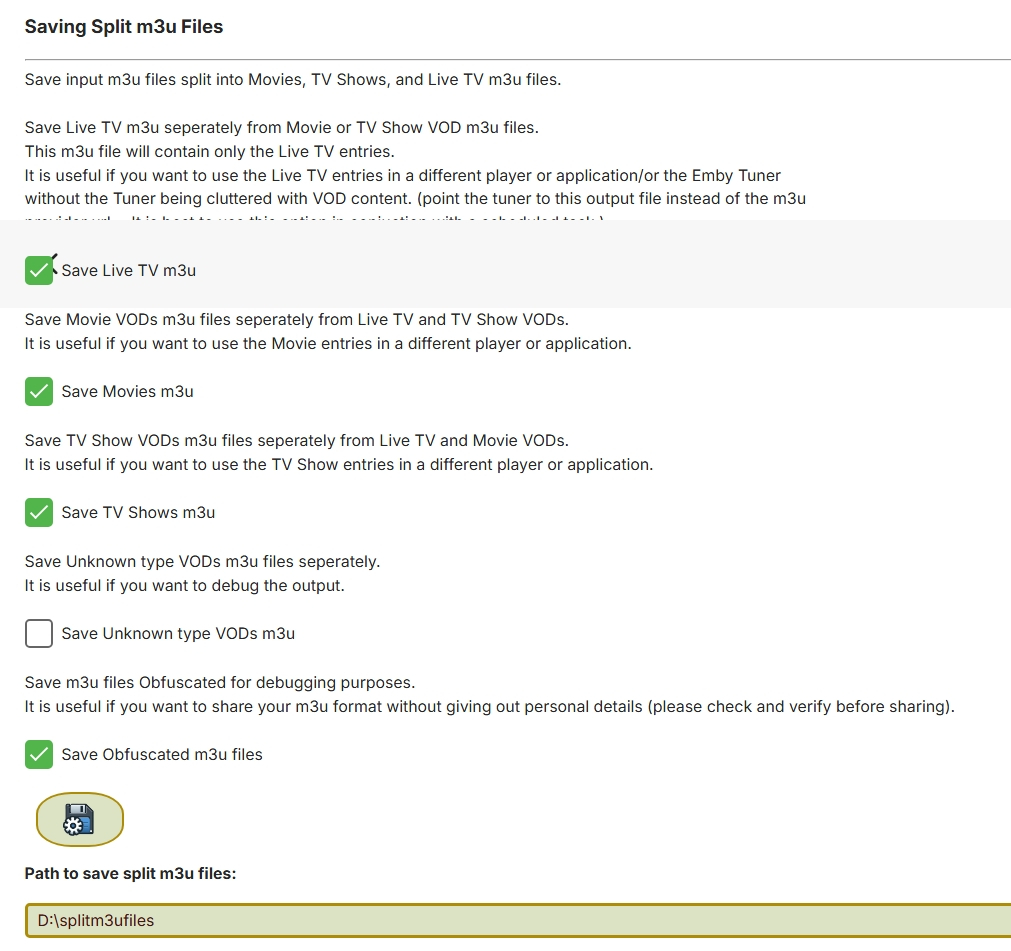
Are you sure this is not a group-title in your m3u file? the log you posted does not show any of the m3u elements being read so I cannot tell. but with group-title being unchecked, it should create one so my suspicion is this is group-title in your m3u file and your provider has used genres there. Try "Don't Create a group title folder" in the screenshot above and see if its the same Can you send me a copy of your m3u via pm. Obfuscated is fine. Select obfuscated output and a type and it'll create it for you in your split strm directory Screenshot below shows how to do this If you have Extra Verbose logging on, Constructed Folder Name [2]: groupTitle= if this is a genre then turn on "Don't create a Group Title Folder"
 1 point
 -
You need to download the .deb installer before you can install it... wget https://github.com/MediaBrowser/Emby.Releases/releases/download/4.8.11.0/emby-server-deb_4.8.11.0_amd64.deb Then you can install it while in the same directory... sudo dpkg -i emby-server-deb_4.8.11.0_amd64.deb1 point
-
I successfully got Emby moved over to docker/containers. Runs even faster in a container than with the local install! In regards to remapping the Media Libraries, you don't have to completely delete and recreate the libraries, you can just add the updated path as a new library source and then remove the old one. Once Emby finishes scanning you'lll be good to go! Thanks Luke for the help as always!1 point
-
Re: Duplicate:1 point
-
What is your login behavior set to in the app startup settings? What is "resets itself"? If you re-install or clear data on the app, the login info will be lost. Also, if you select "logout" from the menu, the login info will be deleted.1 point
-
Hi, I second the motion raised by user24 that user should be gibvven the ability to choose in what order things do appear in Emby/Artist or Emby/Album artist. Personnally, I would like to display albums first.. Personnally, I listen mostly to full albums and not tracks (almost mandatory when you listen to classical music). So I really would like to see this feature added in Emby. Even though I think I will have to wait because from what I see Emby is leaned more towards Movies/Series than towards music alone Regards.1 point
-
@radeonHi, just a quick question or an idea, maybe you could put the movies in the plugin section into a collapsable object. actually i have to scroll down over 6K movies to get to the settings Just an option for people with many movies. Thanks for your great work1 point
-
Welcome to another of Emby's 'how can this possibly take so long' threads...1 point
-
Only been using the new app 2 days and feels like my thumb is training for the olympics!1 point
-
@mwongjayThis has begun erroring again as of 4/29. No other changes to the server since (besides new media). 2025-05-01 18:44:43.554 Info EmbyDeviceLocations.ScheduledTasks: Starting User Device Activity Sync 2025-05-01 18:44:43.558 Info App: Sqlite: 11 - database corruption at line 71062 of [831d0fb283] 2025-05-01 18:44:43.558 Info App: Sqlite: 11 - statement aborts at 26: [SELECT Id, Type, Name, COALESCE(ShortOverview, Overview) as COverview, DateCreatedMs, InternalUserId from ActivityLog WHERE DateCreatedMs > 1745347159475 AND ActivityLog.Type in ('Aut 2025-05-01 18:44:43.558 Error TaskManager: Error *** Error Report *** Version: 4.8.11.0 Command line: /system/EmbyServer.dll -programdata /config -ffdetect /bin/ffdetect -ffmpeg /bin/ffmpeg -ffprobe /bin/ffprobe -restartexitcode 3 Operating system: Linux version 6.1.0-18-amd64 (debian-kernel@lists.debian.org) (gcc-12 (Debian 12.2.0-14) 12.2.0, GNU ld (GNU Binutils for Debian) 2.40) #1 SMP PREEMPT Framework: .NET 6.0.36 OS/Process: x64/x64 Runtime: system/System.Private.CoreLib.dll Processor count: 12 Data path: /config Application path: /system SQLitePCL.pretty.SQLiteException: Corrupt: database disk image is malformed SQLitePCL.pretty.SQLiteException: Exception of type 'SQLitePCL.pretty.SQLiteException' was thrown. at SQLitePCL.pretty.SQLiteException.CheckOk(sqlite3 db, Int32 rc) at SQLitePCL.pretty.StatementImpl.MoveNext() at EmbyDeviceLocations.Data.SqliteExtensions.ExecuteQuery(IStatement This)+MoveNext() at EmbyDeviceLocations.Data.ActivityLogRepository.GetActivityLogs(Int64 minDateCreatedToFetch, ActivityLogFilter filter, EmbyActivityLogType[] activityLogTypes) at EmbyDeviceLocations.Services.LocationService.SyncUserDeviceActivity(IProgress`1 progress, CancellationToken cancellationToken) at EmbyDeviceLocations.ScheduledTasks.SyncDeviceActivityTask.<>c__DisplayClass11_0.<Execute>b__0() at System.Threading.ExecutionContext.RunFromThreadPoolDispatchLoop(Thread threadPoolThread, ExecutionContext executionContext, ContextCallback callback, Object state) --- End of stack trace from previous location --- at System.Threading.Tasks.Task.ExecuteWithThreadLocal(Task& currentTaskSlot, Thread threadPoolThread) --- End of stack trace from previous location --- at EmbyDeviceLocations.ScheduledTasks.SyncDeviceActivityTask.Execute(CancellationToken cancellationToken, IProgress`1 progress) at Emby.Server.Implementations.ScheduledTasks.ScheduledTaskWorker.ExecuteInternal(TaskOptions options) Source: SQLitePCL.pretty TargetSite: Void CheckOk(SQLitePCLEx.sqlite3, Int32)1 point
-
+1 Been waiting for this feature for ages. There's an audio delay when using Bluetooth speakers and like many before me have said, it would be very useful to be able to adjust the audio delay. Any chance we could get an update on this?1 point
-
The Emby server provides this data only at the episode/item level, so that's what the plugin offers for icons.1 point
-
Something in the metadata changed sufficiently enough such that the two are not using the same user data anymore.1 point
-
Exactly that. I feel like Emby development, in terms of features, has really stalled...1 point
-
Automatically merging movies by Movie Db Id will be a built-in feature in the upcoming Emby Server 4.9 release. Thanks.1 point
-
Hi, I don't have an ETA but this question has come up before and yes it's certainly doable.1 point
-
Hi All, I get a lot of repeat questions that I thought an FAQ might cover off so here goes: Q: What are the Media Theme Video and Music Plugins? A: These plugins download extra metadata to your Movie and TV shows which ultimate enriches the library experience whilst browsing your collection. They do not control any part of the media playback and simply download the theme media, putting it in the correct place within your media collections. What and where the media is played back is controlled by the client you are using and it's greatly advisable that you check with the client as to what functionality you will get before buying the plugins. Q: Where can I buy them? A: Either individually though the emby plugin catalog or as a bulk buy via my website https://www.ballingtons.com/products Q: OK, so I have them installed, what should I do next? A: Run the scheduled tasks! Depending on which plugins you have installed, you will have some download tasks under your scheduled tasks within the emby dashboard. Run them up and theme media will start to download. Q: I don't seem to have as many themes downloaded as I was hoping? A: The plugins have load balancing within them so it can take a few runs over a few days to get all available for your collection. Not all movies or shows in your collection will have themes but the library is always getting bigger. Q: What do I need to do if a new TV show or Movie is added to my collection? A: Nothing! The particular theme plugins for that type will automatically detect the new addition and scan for themes straight away. If one isn't available right then, as long as you have the scheduled task scheduled to run periodically, it will hopefully be picked up in the future. Q: I'm having a problem with one of the plugins, what should I do? A: Get in touch! I'd always suggest dropping a post on one of the support threads for the plugin you're having issue with. If i'm not available, someone else will likely be and can often help if the issue is something simple. Always try and post fresh debug logs (Enable debug logging, restart emby, run the plugin with the issue, wait for it to complete the scheduled task) or if you're worried about sensitive data, feel free to drop me a PM with you log and licence info. Q: The plugins have stopped working, now what? A: Report it to me via one of the support threads. From time to time, there are some breaking changes to emby or the host which require a rework of my plugins to get them up and running again, it's just a fact of life. I am a long standing member of emby and have been around for years with no intention of leaving yet. My personal work has taken me away from emby more than I would ideally like but I'm definitely not going anywhere soon. Emby is still central to my media setup and I personally use my own plugins so take it as a good thing that from a selfish perspective, I want these plugins to stay working as much as you do. If they're broken, I'll always do my best to fix them. Q: What emby clients work with the theme media metadata downloaded? A: The clients are always changing and being updated so it's tough to keep on top of which ones are doing what. Before buying the plugins, it's always advisable to make use of the trial or just manually place some theme media in the right locations to give it a test and make sure you're happy with what you're going to get. If you don't check this out and you're not happy with what you've got then not a lot can be done. Due to the nature of the plugins and the fact they're delivering meta data, no refunds can be given and you have already got the functionality they offer by downloading the theme media. Q: Can I change the location the media is downloaded to? A: No. The media needs to be stored in the correct places to be detected by the emby server, If I change the place, the theme media will no longer be found by emby server. Q: Where is the location the media is downloaded to? A: See the Emby support article here: https://support.emby.media/support/solutions/articles/44001159179 I'm sure there are plenty more FAQ's but that's my start for now.1 point






















