Leaderboard




Popular Content
Showing content with the highest reputation on 05/02/25 in Posts
-
Only been using the new app 2 days and feels like my thumb is training for the olympics!2 points
-
Why? emby has not raised their prices recently or announced any increase coming soon... So why should emby discount there superior product because the opposition is loosing ground? and [Plex] stripping there user out of there Cs$H? <=> counterproductive... ...?2 points
-
Looking forward to this option. I'm currently using the Emby for Android TV version because of this.2 points
-
Moving the issue from this thread, here is a formal request to add to all Emby apps the ability to adjust / sync the audio playback / delay, in the same way it apparently is currently possible to do in Emby Theater.1 point
-
I delete my episodes after I'm done watching them, but doing so removes the next episode from continue watching, as if emby no longer remembers I watched it. I used to manage this by just remarking the previous episode as player, but you can no longer do that with the changes to how previous episodes are managed. I know changes are coming to filters, so maybe *soon* we can make continue watching a 'show me the next episode for all shows where the next episode is not s1e1' but is there any way to achieve this now? It's fairly annoying to deal with, although benign. Even an 'add to continue watching' similar to how we can remove from continue watching would be a great step in the right direction. Thanks guys, keep up the great work1 point
-
It could rotate or something, like in the theater Of coarse it would have to be able to be turned off I suppose for people who don't like the idea.1 point
-
Not sure if this is the right spot where to request this. .. Nevertheless can we please add the feature for embyserver. Pretty much ro setup a pause timeout limit . so if a user put a video/movie on pause for more than xyz timeout limit would kick them back to the video/movie home page... Thanks Sent from my LG-US996 using Tapatalk1 point
-
I just noticed that when i click the watch trailer button on a movie, it plays a nice 1080p video, but the videos in cinema intros are all terrible quality. unwatchable. not to mention the languages are all over the place. would be nice to implement a way to filter these trailer selections somewhere. language and exclude any 480p or x quality trailers.1 point
-
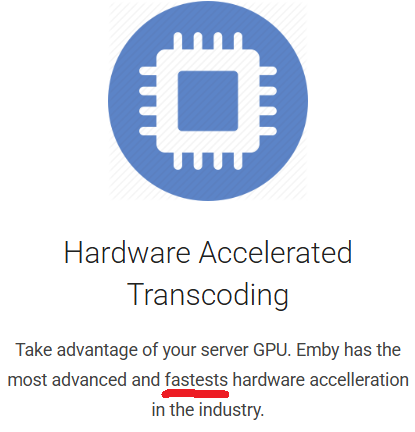
There doesn't seem to be any direct way to report web site errors so I'll post here. There is a typo on the Premier page of the Emby web site. https://emby.media/premiere.html Under Hardware Accelerated Transcoding fastests should be fastest. Also, there is only one L in acceleration. I request that it be fixed.
 1 point
 -
I found that when I hit the back arrow(at the top left corner) from the playing screen back to Emby, it keeps bringing me to portrait position even when I use an iPad in landscape mode. It’s so annoying that I have to rotate the iPad to portrait and back to landscape again to go back to landscape mode.1 point
-
Oh I see it now. I misunderstood. Sorry, was trying to help!1 point
-
Ok, thank you so much. I'll ask.1 point
-
UPDATE: I sudo remove the app on the server and reinstalled, it gave new network settings that I left this time. Everything seems to work ok now. Very strange that it was working for some and not others before with the network settings. Anyway seems to be ok now so must have been port related I think1 point
-
The DNLA media server NAS plays video on it. However, it does not scale the frame sizes correctly. Was hoping your server would work (. The TV is a long-lived TV. Doesn't want to break1 point
-
I renew the question. Is this possible in Emby? Perhaps natively in all clients in the future? A native integration without messing with server files would be an advantage to competitors. All big streaming providers use a spotlight since it shows the newest additions at a glance for users. MakD/Jellyfin-Media-Bar: A Jellyfin Featured Content Bar to show off your media collection Spotlight.mp41 point
-
You must have had use tmbd api turned on, and populating the genres, I have added a check to null it if the checkbox is not selected. VODtoSTRMscheduledTask.dll1 point
-
You are correct. Found the configuration on web settings. Thank you for your support.1 point
-
Fixed in most recent update. Thanks!1 point
-
I created an account just to reply to this. I had no idea about the reverse proxy on qnap or how it worked, but this saved me soooooooooooooo much time and stress! Thank you so much! This was by far the easiest way to use QNAPs native SSL cert. Now I don't have to worry about manually renewing the ssl cert on Emby every 3 months! Thank you!1 point
-
@Lukeoops, thanks I'll try to track it down1 point
-
As I recall, Yes, Emby can be used in split-screen mode.1 point
-
Hi. Luke. Indeed solved. Removed two rss feeds and the podcasts are there again Thanks1 point
-
Just for example, my Nextcloud is also MY personal Server, but the option of MFA is available. So yes there is more about security and not only MFA but stop telling people there is so much more to care about to make the server secure, just give them the option for MFA. If they don't enable it or can setup the requirements to make it work it is not your fault but this discussion would have an end after 7 years. Thanks1 point
-
Just as a point of fact - all of those are centrally-managed services. Emby is YOUR personal server and keeping it that way does require you to take more responsibility for your own service running on your own network. You can not allow Admin access externally if you wish or implement other security measures that will allow it within your security profile. Of course, this is still something we have on our list - it just isn't as simple as what you make it out to be...1 point
-
Hi, yes this has come up before and it makes sense. Thanks.1 point
-
OK,I get It,thank you.1 point
-
1 point
-
Emby for Amazon Fire TV 3.4.65 has been released. Here are the highlights: The download feature is back ! Improve performance Fixes for gamepad input Add playback option to disable direct play of various formats Add option to configure to login as specific user on startup Fix video rotation on Fire TV devices when direct playing Add convert unsupported audio option Play vtt subtitles directly without conversion from the server Support playback correction Add a-z picker to add to collection/playlist Fixes for closed caption rendering Fixes related to autoplay episodes options Add video screen up action option to control up button press behavior Add option to control video player long press action View the full article1 point
-
I am surprised that they don't address 2FA here...Admin(Luke) doesn't care that hackers broke in and he can easily delete the entire Emby server, for example a movie, a serial....I see that we live in prehistoric times and poorer than google.com...A great shame!!!!!! Why don't we add Google Authenticator to Emby?!?!?! The whole world is dangerous because of hackers.....I think Luke doesn't like 2FA and wants to open...Who knows...1 point
-
Hi, this is resolved in the next update to Emby for Apple TV. Thanks.1 point
-
Come on, Emby team—why is two-factor authentication (2FA) still not implemented? This is a must-have feature, not a luxury. In 2025, it's shocking that a media server platform like Emby still doesn’t support basic security tools like 2FA. Your users have been asking for this for over seven years, and yet there’s been no serious progress or clear communication about it. Security should be a priority, not an afterthought—especially for systems that many of us expose to the public internet. Please take this seriously and let the community know when we can expect 2FA support.1 point
-
This works for HD trailers from the trailer button on each media page: Turn on .nfo files in local directories. If you have not had this turned on, you may need to reload the media again to get the .nfo files into the local directories. Find the <trailer>plugin://... line in all .nfo files Replace </trailer> with this at the end of each <trailer> line: ?iv_load_policy=3</trailer> So the trailer lines change from the old version to a new version: Example is 'Mickey 17' (2025) <trailer>plugin://plugin.video.youtube/play/?video_id=osYpGSz_0i4</trailer> <trailer>plugin://plugin.video.youtube/play/?video_id=tA1s65o_kYM</trailer> <trailer>plugin://plugin.video.youtube/play/?video_id=osYpGSz_0i4?iv_load_policy=3</trailer> <trailer>plugin://plugin.video.youtube/play/?video_id=tA1s65o_kYM?iv_load_policy=3</trailer> You can do this by finding all the .nfo files. Windows let's you do this using Windows Explorer, search for: *.nfo -"<trailer>". Open all these .nfo files in a good text editor like edit+, or your favorite, full featured, text editor. Step #2 above... search and replace through all the open .nfo files. If you do it correctly, you should be able to change 1000+ media trailers to HD trailers, (if a HD quality trailer is available), with a couple of minutes work. Enjoy.1 point
-
Emby for Apple TV 1.9.8 has been released. Here are the highlights: Fix video player back button behavior when paused Fix movie trailers tab only showing one item View the full article1 point
-
HI, we'll take another look at this. Thanks.1 point
-
If you’re looking to switch from Plex to Emby, you’re not alone. Many users are making the transition to Emby for its advanced customization options, better privacy controls, and flexibility. While moving your media library might seem daunting, this guide will walk you through the entire process, ensuring a smooth migration without losing your watch history and you'll be up and running before you know it! Why Switch from Plex to Emby? Before we dive into the migration process, let’s highlight some key reasons why users prefer Emby over Plex: Greater Customization: Emby allows for more granular control over metadata, streaming quality, and transcoding. Privacy-Focused: Unlike Plex, Emby does not require an internet connection for local streaming. Better Integration with IPTV & Live TV: Emby offers superior support for IPTV playlists and tuners like HDHomeRun. Self-Hosting Benefits: You maintain full control over your server and user data. Now that you know why Emby is a great alternative, let’s get started with the migration process. Step 1: Install Emby Server First, download and install Emby Server on your preferred device: Visit Emby’s official website and download the server software for your OS. Follow the installation instructions and set up your admin account. Once installed, access the Emby dashboard via your web browser. Typically at http://localhost:8096 Step 2: Prepping Your Media Files to move to Emby Ensure your media files are well-organized before adding them to Emby. The ideal folder structure should be: /Media /Movies /MovieName (Year)/MovieName (Year).ext /TV Shows /ShowName/Season X/ShowName - SXXEXX.ext If your Plex media is stored in a different location, move or copy it to your preferred location for Emby. Keeping the same structure ensures a smoother migration. Emby's media scanners will do a great job if not all of your movies or shows are organized in this fashion, but it definitely helps to have an organized and well structured media folder. Step 3: Set Up Your Libraries in Emby Now, it’s time to add your media to Emby: Open the Emby Server Dashboard. Navigate to Library > Add Media Library. Choose the appropriate content type (Movies, TV Shows, Music, etc.). Select the folder where your media is stored. Choose metadata providers (TheMovieDB, TheTVDB, etc.). Click Save and allow Emby to scan your library. Step 4: Importing Watch History from Plex (Optional) Emby doesn’t directly have a built-in tool for importing watch history from Plex, but you can use Trakt to sync your progress. Install and setup Trakt Scrobbler in Plex and sync your watch history. Link your Trakt account in Emby, allowing it to import your watch history. Run a scheduled task for importing playstates from Trakt. This should only have to be done once. Step 5: Configure Emby for Optimal Performance To get the best experience, here are some begging tweaks to Emby’s settings that will help get the most out of your new media server: Sign up for Emby Premiere: While not required, Emby Premiere offers many benefits like hardware transcoding, offline downloads, Live TV DVR and more! Enable Hardware Transcoding: Navigate to Dashboard > Transcoding and enable hardware acceleration for smoother playback. Set Up Remote Access: Under Network, configure remote access settings if you want to stream outside your home network. Fine-Tune Metadata Fetchers: Go to Library > Metadata and choose the best providers for accurate metadata. Step 6: Install Emby Apps & Start Streaming Emby is available on multiple platforms, including Android, iOS, Apple TV, Roku, Fire TV, and more. Download the Emby client app for your devices and start enjoying your media. Final Thoughts Migrating from Plex to Emby doesn’t have to be complicated. By following this step-by-step guide, you can transition smoothly while preserving your media organization and watch history. Emby offers a flexible and customizable media server experience, making it a fantastic choice for those who want more control over their media. Are you ready to make the switch? Try Emby today and take your media streaming experience to the next level! As always, you will find unrivaled support from our users and staff over at the Emby Forums if you run into any issues or have any questions about this process. View the full article1 point
-
Read here:1 point
-
Hello, I would love to be able to multi select live tv channels in the set up screen and drag and drop several channels at the same time to modify the sort order. For example: Original list of channels: Channel A Channel B Channel C Channel D Channel E Channel F Channel G Ability to select channels D, E and G at the same time and drag and drop them after channel B for the following result: Channel A Channel B Channel D Channel E Channel G Channel C Channel F Thanks for your consideration!1 point
-
I would like to see a search bar added to EPG Mapping. When using a list with 1000 channels it takes 20 times as long to scroll through and search for channels instead of typing in a search bar.1 point
-
I have a few user who happen to leave movies on pause for hours or over night and i am trying to minimize use of resources for no reason. Sent from my LG-US996 using Tapatalk1 point
-
Hello, Perhaps I am not the first one to ask this question but it will be very cool if this feature could be implemented. I have 2 servers one at home and the other at work. ( and soon a third one...) So I have a movies library called movies on each server. I would like to see all the movies from a single 'virtual server location' when I use the app (ios or android ) where I will see only one movies library containing movies informations from the movie library at work and the movie library at home. It's an aggregation of movies informations from the movie library at work and the movie library at home. In fact when a user have multiple servers it will be perfect if another choice in the server list called "all servers" for example appears automatically with a merge of media informations from librairies with the same name on different servers.0 points
-
Hackers paid Luke not to implement two-factor authentication because of Emby... Why did it take so long - 7 years? It's really a shame that we live in 2025 without 2FA...I applaud Facebook, Instagram, Google, Twitter, etc. have 2FA...0 points
-
Over a month ago, Plex announced they were raising the price of Plex pass to $250 (lifetime), but you could also purchase a remote access for $20 a month. Apparently not everyone got the message, as there are multiple posts on Reddit that mentioned the Play Pass and not too many people are happy about it. This might be the time to possible lower the price on Emby premiere for a couple of days. On a side note, on the Emby premiere page, someone might want to make a spelling correction https://emby.media/premiere.html Hardware Accelerated Transcoding Take advantage of your server GPU. Emby has the most advanced and fastests hardware accelleration in the industry.0 points