Leaderboard




Popular Content
Showing content with the highest reputation on 04/17/25 in Posts
-
The first 9.2+ Hotfix will deploy in the next week as 33.2.0.322 with the following changes: First HotFix (33.2.0.322 deployed 4/xx/2025) : Fixes night mode being skipped when DAP is ON. Fixes Dolby Vision content stutters when frame match feature is enabled. Fixes Match Content Audio Resolution for USB DAC Adds back HQS / Maxrate option for USB audio. USB TV Tuner fix with Live Channel app. Fixes playback issues in Plex when using AAC 5.1 audio. Please sign up here: https://docs.google.com/forms/d/e/1FAIpQLSe4uJtVvcML84AbTpbL2iW-oesJ51HKR5vddlpKh0rVEl-25g/viewform?usp=pp_url&entry.1352533101=DONTDELETE- Caveats of the HotFix process: 1. There is no way to roll back from the HotFix. 2. The HotFix is per public release build. If you sign up for this HotFix, you will receive all updates to it until the next public release and that's it. If you want to partake in future HotFixes, you'll need to join them as they appear. 3. There is no way to leave the HotFix process once you join it but you can ignore updates to the HotFix images if you don't want to install them. 4. When the next public release drops, you will receive it like usual. 5. HotFix images are not Google certified. The next official release will have all certifications. The negative side affect we've noticed from this so far are listed below and others may appear as time goes on: a. You won't be able to install or update Disney+ from the Playstore if you haven't installed it yet or do a Factory reset on this image. b. HD Homerun DRM channels will not work. This thread is not for asking questions like the following and any questions like this will be deleted.: 1. Why isn't xyz included in this hotfix. 2. When will this be released as an official release. https://www.nvidia.com/en-us/geforce/forums/shield-tv/9/563132/shield-experience-upgrade-92-hotfix-image/2 points
-
You've grown up with watching live tv but on television only runs garbage? You have a big library but don't know what to watch next? Then this for you: "VirtualTV" - my new live tv plugin that allows you to create custom channels based on conditions of your Emby library content. What's missing: Maybe codec conditions Known problems: Needs Emby Premier to work (Playback) Emby's live tv and playback api is very limited, so i've had to make some detours to get things working. The plugin has two general playback modes: "continous" and "playlist" playback. With "continous" mode you can also choose between "live", which bahaves like real live tv or "archive", which plays the videos from the start. In "Continuous" mode multiple videos are queued and concatenated to one big file with the help of ffmpeg. To make this happen every video in the queue has to have some common features (video and audio codec). That's why it often happens that the video also has to be transcoded by ffmpeg. For transcoding the plugin relies on Emby's internal transcoding engine. If there's a problem, not uncommon with hardware acceleration enabled, the plugin also has a problem. Nothing i can do about it. The availability of subtitle tracks is mostly dependant of the Emby user playback settings. In continous playback mode only one (the default) subtitle track can be used and this one has to be burnded into the video (transcoding takes place). In "Playlist" playback mode the videos are pushed as a playlist to the Emby clients. It's like you would play your videos directly from your libraries. This way you get all the features you are used to. Audio and subtitle selection, pause, skipping around and similar things. "Native" playback method was created by the Emby Devs. Similar to Playlist playback it will play the real library videos, but with the big difference that playback is purely initiated by the client app, without any remote command execution. This is why it also works for Roku devices on a WAN network. And although the real videos are played, the whole thing is treated like live TV. This means that channel zapping is possible and no dialogs for playing the next episode are displayed. Unfortunately, the new playback method does not yet support all features. As the name "Archive" suggests, it will currently always start all videos from the beginning. In addition, only very few Emby apps automatically advance to the next video. If you want it to be improved even further, each of you should raise your voice in this thread. To get things started install the plugin via Emby's plugin catalog and restart Emby. Setup your channels with a name and number and choose your playback mode. In the channel conditions you'll have to select an Emby account. This account is used to get library access, respect parental rating, reading watched states and selecting the stream language. At least one textual input field of the conditions has to be filled to get some program data. Fields with an asterisk are either evaluated with an "AND" or "OR" condition among each other. Finally, if you've chosen "Continous Playback" for one of you channels, take a look at the transcoding settings. Save your channel line up and manually trigger a "Guide Refresh". Now have fun! Version History: After a plugin update, always clear your browser cache. If your settings still don't load in the config screen, you have to move the "VirtualTV.xml" out of ...\plugins\configurations and restart Emby. Start from scratch. 2.0.0.0 Unlimited number of channels; New playback method "Native (Archive)"; New security concept for the Export API 2.0.2.0 Performance improvements to Guide Refresh; Preview for Add/Edit Channels; Option to disable Program indicators 2.0.3.0 Fixed missing Playlist sort order for some Content Types; Added support for Seasons with Content Source Collections 2.1.0.0 Selectively enable channels for specific users; Create copies of existing channels; Ordered unwatched episode playback 2.1.5.0 Added option to (auto)enable channels on a specific date range; Bug fixing1 point
-
While being able to logically move media from one library to another would be a nice first step. Ultimately it would be nice for the move to physically move the media from one folder to another (since doing a logical move for a bunch of media from say, kids to not-kids, and vice versa will make physical locations pretty confusing). Trying to avoid having to drop into the cli to do it... I don't mind, pure convenience factor, just thought I'd throw it on the queue. Thanks Latest ATV update is sick, btw. Well done.1 point
-
Nice! One thing that I haven't completely confirmed, is that it doesn't appear to do all this extra index building when accessing from the web interface (windows 11). Seems to be exclusive to the Roku App (so far).1 point
-
Using ffmpeg, I updated the end point of the last chapter for the offending episodes by subtracting 83ms. They all successfully pulled the chapter images. Seems it was likely choking on the end point of the last chapter for those few episodes.1 point
-
Hi, If you go to App Settings (within the app) -> Downloads, you can choose a custom download location that's accessible to the Files app.1 point
-
hm... ok I've been talking to a few people recently who, like me, have said goodbye to Emby Premiere and the app. And the way things are going here, we won't be the only ones. That would have been a great option, with the information instead of the slogans.1 point
-
One thought I had was it being a rounding issue when converting frames to seconds (or vicevesa). As it turns out, the video is 23.98 fps. If you add 1 frame (displayed twice), the end time becomes 43:36.655 seconds, which to a computer is out of bounds if ffprobe is reporting it as 43:36.650 and dropping the trailing 0 (it appears from the other numbers it is using 3 digits of precision). However, the end of the chapter is 2616.572, so there shouldn't be an extra frame unless it is a "starts at 0" vs "starts at 1" issue in the chapter image extraction routines. (2/23.98) + 36.572 = 36.655
 1 point
 -
@pwhodgesThank you, I did not look for that on the client. I just tested and that option does allow the ASS/SSA subs to display. There is a significant performance hit to my setup, as the Emby server is older and the transcode load makes the file unwatchable due to constant stops. But that seems to only really be at the beginning of the first time burning them in. I'll play with it some more, but it looks like for these subs in my use case, making a standard subrip .srt file, will quell the child user rebellion . Again, thanks, Paul and @ebr.1 point
-
This is not a server option, but an option in the Emby client for the Roku, to request that the server burns in ASS subs. Paul1 point
-
Oh it worked!! Many thanks, Sheldon x)1 point
-
Your problem isn't Emby, it's "the thing that's adding media" when it creates files and directories with its ownership and permissions. And you haven't shared what type of filesystem your media is on. Is it a native *nix (POSIX) filesystem or other, like NTFS over SMB/CIFS? The post from @TMCsw shows how make Emby create files and dirs that others can access. You still need to make sure "others" are creating files and dirs that Emby can access. The Linux permissions thread has multiple ways of handling this but that thread is way too long by now for it to be helpful. If on a POSIX filesystem you have the option of using ACLs to permanently set the ownership and permissions needed for mult-user access to the media. If on SMB/CIFS then mount and SMB options can do the same. This is one of the ways: https://emby.media/support/articles/Linux-Unix-Permissions.html1 point
-
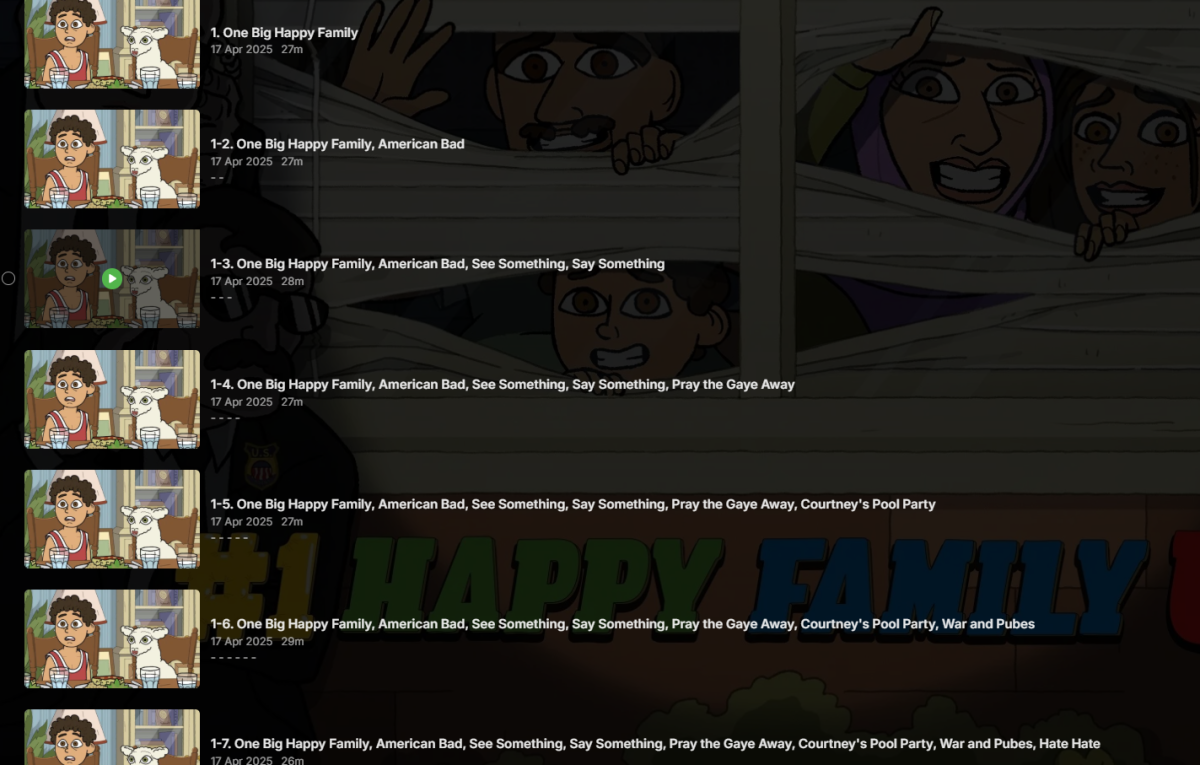
This is a fun one. The TV show #1 Happy Family USA (2025) [TvdbId=429874] Episodes are combined, in a cascading loop. I think I know why, Is it because of the #1 name - S01E08 That will combine episode 1 through 2 then 3 then 4 etc.
 1 point
 -
Not only TVDB, it's still incomplete with the other online providers as well (Episode titles, thumbnails, overviews...), guess it'll be updated over time.1 point
-
I've sent a PM @Abobader1 point
-
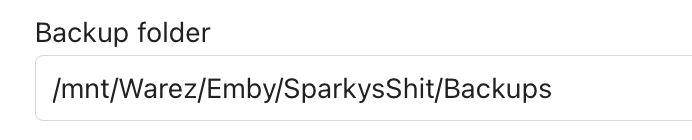
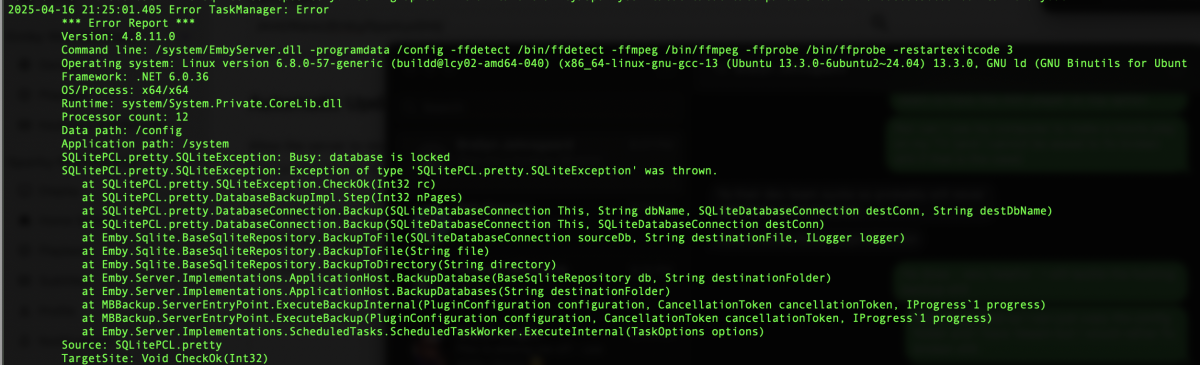
Was still failing - it was not a critical thing cause I have Veeam, but FML, I needed to have this solved. Running Version 4.8.11.0 on Compose. Bakcups go to: That directory shares back over SMB through the fstab mount. Was still getting this error: Notice that it is trying to use a cache folder that is also on an fstab share. So, given I increased the space of my Docker host, I set it to use the default cache location (removed the cache folder setting) and BLAMMO - the gosh darn thing works... So, it seems that I have a weee bit of an issue with the cache directory... I will remember that for the future... Odd, but solved. Yippee!

 1 point
 -
You can add extra folder / drives to the same library1 point
-
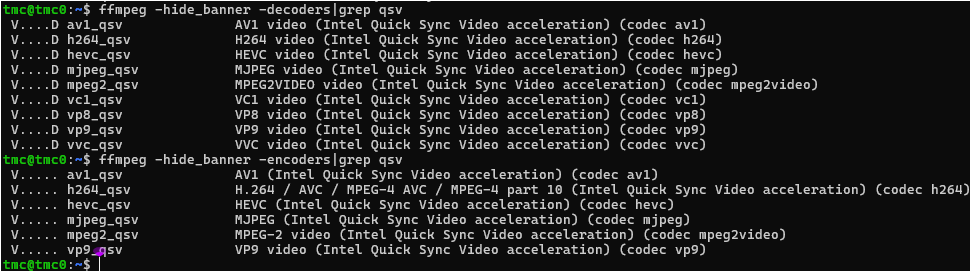
UPDATE: Appears this low powered CPU/iGPU may have more ‘Guts’ than I expected… …After: Downloading MediaStack.tar.gz from VPL GPU Runtime 2025Q1 Release - 25.1.4 (Latest) extracting and installing... (edit: forgot rebooting) ...Then recompiling ffmpeg from the latest ffmpeg-snapshot with the newer VPL stuff I now see the following: It would seem that it has HW support for both decoding/encoding of av1 and decoding of vvc via QSV. Although I have not found the correct command line to make av1 work (or from the error output it may be still a work in progress) most others I’ve tried seem fine and the CPU sits nearly idle… But of course, it still does not help emby, even in the beta
 1 point
 -
Guys we really need to see some progress on this. I went on holiday with my family last week and Emby download was a constant source of frustration across all devices (Android and iOS): * There is no way on the mobile app to check the status of a download until it is completed. Even then it can be difficult to understand when something has completed. * It is possible for the user to start download the same content multiple times as I can see on the server dashboard the same content queued up. * Downloads that are "ready to transfer" on the server just never start at all on the clients. The user has tried restarting the app etc. It's just all broken and unworkable. Can we PLEASE get this feature improved?1 point
-
I once had permission issues after a restore (onto a larger HDD). All of the media folders and files had the correct permissions; however, the parent folder was owned by root (due to the restore). Once I fixed the parent folder's ownership and permissions, all was well.1 point
-
Emby creates directories/files based the user, group and umask that it is set to use: By default it will create them with the user ‘emby’ the group 'emby' using a umask of '0022' (umasks subtract from 0777 (dir's) 0666 (files)) So a new directory it creates will look ‘like’ this: drwxr-xr-x 2 emby emby 4.0K Apr 15 19:03 'Global National' and files like this: -rw-r--r-- 1 emby emby 4.4G Apr 15 19:01 'Global National 2025_04_15_18_30_00.ts' You can change all 3 of these (and more) with the following command: sudo systemctl edit emby-server.service READ the Instructions CARFULLY And add the following lines where it tells you to put them (with these or your own choices) It Is Case Sensitive! and the [Service] part is required. [Service] User=emby Group=user UMask=0002 Save/exit the file and restart emby from now on any NEW directories/files emby creates should look like this: drwxrwxr-x 2 emby user 4.0K Apr 15 19:03 'Global National' -rw-rw-r-- 1 emby user 4.4G Apr 15 19:01 'Global National 2025_04_15_18_30_00.ts' This will allow any one in the group user to delete files and will stick after upgrades/reboots...1 point
-
Hi. The Roku only has very limited support for that subtitle format. Did you try checking the option to use the server to burn these in?1 point
-
HI, we have been in contact with ugreen. I don't have an ETA but hopefully in the near future we'll have something. Until then, community members here have been able to figure out both the docker and debian packages, so you could take your pick between those. Any ugreen package we do would most likely just be the debian/ubuntu package rewrapped anyway.1 point
-
It's just an itsy bitsy setting everyone can ignore so why remove it.. rhetorical of course1 point
-
Please, please, please do NOT remove the "fixed" setting. I am not using my Rokus as much as I did but I detest the "float" type of scrolling and removing "fixed" will, most probably, cause me to use nothing but my Shield and my Fire TV. Actually I guess it really will not make much difference as i only use Roku in my bedroom and I have mostly retired my Rokus, due to the latest changes Roku has made, and I have a Fire 4K stick in my bedroom that is perfectly serviceable. But i do not like change and removing "fixed' will force me to make a change.1 point
-
Hello Everyone, Has anyone else noticed that the 'Movie Theme Songs' plugin downloads random content instead of the correct theme songs? I have been storing some Kim Ki-duk movies recently, and this plugin has been downloading random music from the internet that has no relation to the movie. This hasn’t happened rarely with only Korean movies or that have generic names, but even with Hollywood movies that have unique names, such as The Royal Tenenbaums, instead of not downloading anything at all, it downloads something randomly. When I checked using online tools and AI, I found that the downloaded theme had no relation to the movie.1 point
-
Request that Emby server store Dolby Vision (including profile), Dolby Atmos, DTS:X, HDR10+ (smpte2094) and HLG for appropriate video in the db and use it for display in the media info and track selection sections of movie/episode details screen. This information once in the db can then also be used in numerous other areas like: Mediainfo Cover Art, Stats for Nerds, Distinguishing different DV profiles for hardware support and tone mapping Example Mediainfo app display of HDR10+ ffmpeg patch for HDR10+ https://patchwork.ffmpeg.org/patch/11491/ Related requested that may require DV profile information in order to prevent unneeded TM1 point
-
https://www.netflix.com/ https://www.disneyplus.com/1 point