Leaderboard




Popular Content
Showing content with the highest reputation on 04/07/25 in Posts
-
As one of the original testers of the most excellent tvnext created by @softworkzi can't tell you how bitterly disappointing it is that all the work that was done on it, what 4-5 years ago has STILL not been integrated in to emby yet!!! As I understood it it was possible to integrate it with a --tvnext command line switch so it could be optionally tested with minimal extra code required. Why have you let all that excellent work go to waste @Lukeyou should be ashamed. Krs Mark4 points
-
For people who don't want to go the Cloudflare Tunnel route since Emby/Plex/Jelly video streaming is against their TOS, I warmly suggest fosrl/pangolin: Tunneled Mesh Reverse Proxy Server with Identity and Access Control and Dashboard UI No open ports at home thanks to the newt agent (wireguard based) at home connected to the Pangolin VPS, Traefik with HTTP3/QUIC, builtin 2FA on the Reverse Proxy, IP or path restriction if needed, Crowdsec...everything a selfhoster exposing services needs in his life in one package. Run it since 3 weeks and it's a real sick piece of software that is constantly evolving since the first release. You also bypass CGNat issues a lot of Europeans have with their providers. For geoblocking on the same VPS Pangolin is running, I use friendly-bits/geoip-shell: User-friendly and versatile geoblocker for Linux to make the security setup complete (just allow German IPs from Maxmind DB). This results in -99,9% crawler/bot/script-kiddie alerts and lets me sleep well, because they are blocked or lose hope before they could even reach the Emby Login Screen (ca. 1 IP alert a week which is immediately banned by a crowdsec scenario).3 points
-
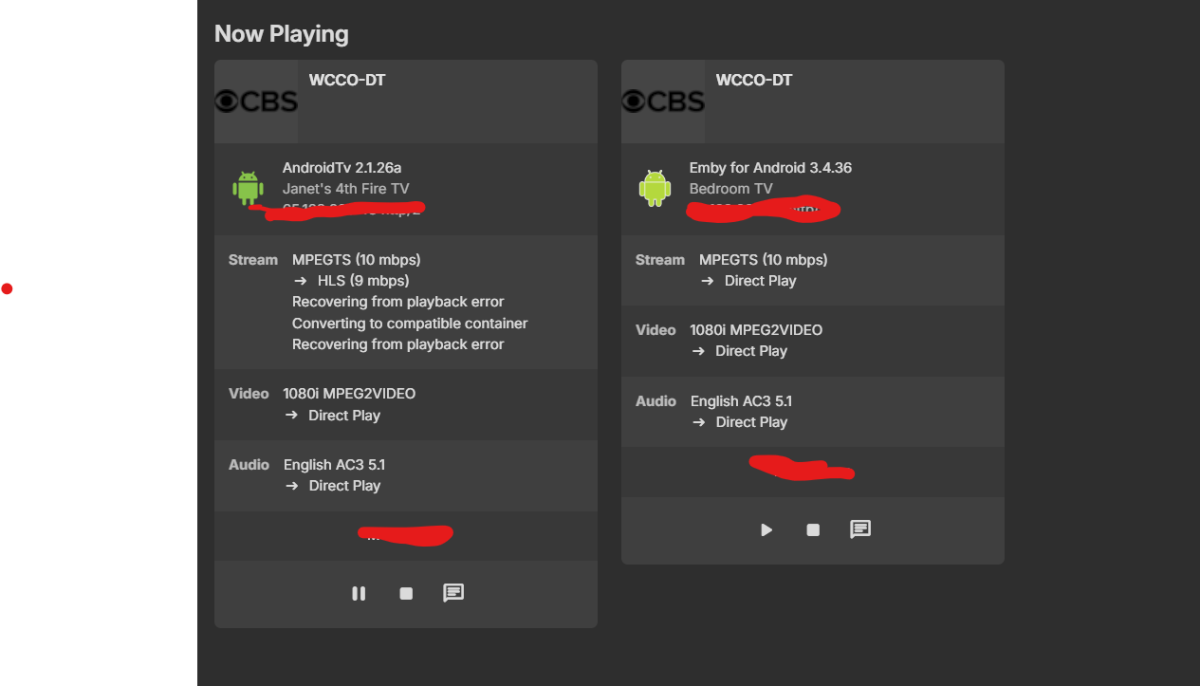
Hello, Would it be possible to add time start time stamps on the server dashboard? example below i have 2 streams going and it would be nice to see when they were started so can verify they probably are not being used and can close. for live tv its hard to see if really active. A user could have just turned off a tv as an example. thanks
 2 points
 -
@Gilgamesh_48Clearly you are a passionate supporter of Emby. And happily not an employee. Because your reply is condescending and dismissive as I'm sure you know. You're not helping Emby by being nasty to any user seeking information or making suggestions.2 points
-
I recently found a need to look up additional information on a director. I was hoping to look at the director's profile and see not only the movies I had in my collection but also a list of other movies that they have directed. This would be displayed below the library's current movies. ex: My movies: Movie 1, Movie 2 Other movies by this person: Movie 3, Movie4 ================ This could help one expand their library and to discover a missing gem.1 point
-
So, usually this place is filled with the series/season thumb or an fanart pic. I guess that's okay, no spoilers and all, but it gets boring real quick and to me it would make much more sense to have the episode thumb/screenshot there (maybe with the series logo added somehow). The only way to get it that way, is by deleting thumbs and fanart completely, but the latter are used on different places too, so I want to keep them. How about an option to use ep-thumbs for "continue" and "next up"?1 point
-
Since we can now detect end credits, or manually add them in other cases, it would be nice to see this, rather than an automatic percentage/time remaining, trigger the "next episode" popup and decide whether an episode is resumable or not. Even better if it could expand to movies for the latter point.1 point
-
Would be awsome to have trailers played in background, instead of backdrop still images... Thanks for the awsome app.1 point
-
It would be great if i could set the server to delete certain shows after a user has watched it. I happen to watch "The Daily Show with Jon Stewart" and "The Colbert Report", everyday, and with "News"ish type shows, there is no need to keep the episodes around. So i would like to set MB to auto delete those 2 shows, 3 days after one user has watched it.1 point
-
apologies, didnt realize I was in TV mode1 point
-
It's not a matter of configuration - any request made by an Emby client goes to the Emby server, which streams the data to it. The client has no direct connection with the source. Paul1 point
-
Jan, You can define caching to be on any drive you like. It is a good idea for load balancing regarding drive usage. If you had hardware to assist with the transcoding, then that would be a help for the server demand. Otherwise, transcoding is handled only by the CPU which can possible max out, depending on the bitrate and user demand. A side note is that some codec content doesn't normally need transcoding at all, unless the file size is huge and the user connection cannot handle it in real time. This means content, correctly encoded without errors, that is 1080P or under, less than 3000 kbps, h.264, AAC audio and text based subtitles encoded with CBR (not VBR) can direct play to most everyone, which is much less demand on your server. Most people do not store media with these codecs. I like the look of this video and audio combination, if the transcoding was done at a very high quality level, that typically cannot be done in real time. Most everyone prefers h.265 or some newer codec and AC3 audio which can make a smaller file size with similar quality. I find h.265 quality to be too sharp on the edges , especially when highly compressed. To me it looks like it is oversharp on all focus areas and seems not natural, compared to the older h.264, which is softer. h.265 uses hexonigal patterns to scan sectors for pixel changes and compress them. Normally people don't notice artifacts on angles and along spirals, but I don't like the look. That's perhaps just me. Hope that makes some sense and helps.1 point
-
Thanks - useful links. M1 point
-
Hi, yes this has come up before and an option for this is certainly possible. Thanks.1 point
-
Hi, yes it's not a bad idea. Thanks.1 point
-
First of all thanks for the donation. 1. Delete options. The first one removes anything that not in your output options , so anything that the current m3u processing hasn't got, so it keeps your directory up to date with your input m3u, removes everything else. Of course if you are using a different m3u you probably untick that and keep the other items. The choice is up to you. The second basically cleans up empty folders or anything that is redundant. So anything it failed to clear up before or has been altered externally. 2. The includes and ignores are for all types of content. They are basically a way to filter what to keep and what not to keep form the m3u based on keywords. Some users m3u's are huge with content from all over the world. It allows you to keep only what you want and essentially dump/dispose of the rest. I.e. trim that list down. In terms of the m3u if you open it with a text editor they are made up of basically 2 lines, the extinf line and the media URL line. Some have more but I only read these two. The plugin checks the data in these and accepts or rejects the line pair. When the filtered internal m3u file is built from the 3 inputs , it then processes the internal m3u. So in a nutshell everything actually just filters your m3u's and/or your output directory of strms. Internally all three types of list are built, live TV, TV show, movies based on your filtered m3u. What's written is just what you selected ( checked), and what is removed from the output directory depends on the options you chose. I hope this makes sense.1 point
-
In case anyone search's this topic and finds this thread, I wanted to document my full workflow that worked flawlessly. This was for migrating Emby Server from running on Windows 11 to running in Docker on Ubuntu Server. My media paths changed but I have always had my Emby Server set to save metadata to NFOs in the media folders so the changed paths did not matter. Back up the original Emby Server Create a new backup location for the new server Copy the most recent "full" and "server database" backups of the old server, to the new backup location Do a fresh install of Emby Server in its new location. DO NOT restore anything Set up the Libraries for the new server; pointing them to the correct folder locations Click through each setting on the new server and update them to match the old server (network settings will likely be a new local IP address) Create users on the new server to match the old server. They do not have to match exactly but should be easily identifiable. Wait for Libraries to completely import and populate; "watched" statuses will be gone but do not panic Go to "Backup & Restore" and set the Backup Folder to the new backup location Current Backup Date should be the date of the most recent old server backup (that was copied into the new backup folder) Click "Extract Data From Backup", make sure the old user (left) matches the new user (right); click "Restore from Backup" The watched statuses on the new server should now match the watch statuses on the old server. I hope this helps. Edit: I recommend deleting the old server backup files/folders from the new back up location. That way when the new server does its first back up, it will due a full backup of the new server.1 point
-
It should be configured in such a way that the folder used for a library is completely unavailable vs empty in order to preserve the contents. For example my storage array mounts to /mnt/raid, and one of my folders is /mnt/raid/Storage/Movies. If /mnt/raid isn't mounted at all, there is no /mnt/raid/Storage/Movies folder - it detects that the folder is unavailable (and logs it as such), and does not adjust any library content. Whereas if /mnt/raid/Storage/Movies existed, but was empty, it would detect that as a change and remove the items under that folder.1 point
-
Falls es dir hilft, hier ist ein gutes Tutorial auf Englisch. Falls dir die englische (oder durch einen Übersetzter gejagte) Version nicht hilft, kannst du mich auch gerne anschreiben. drinfernoo/repository.example: Example of how to set up a Kodi repository, hosted on GitHub pages. (Ich bin nicht Autor des Tutorials.)1 point
-
I cant edit but when I stated path I was referring to the {path} in curly brackets shown under the command line parameters. For some reason typing it into the box manually didn't work. Copying and pasting did.1 point
-
Reporting back. Things SEEM to be working after killing off all the addons @Lukesuggested to kill. ---- So, no bugs get generated from this, I do need to note Reacher, in particular, was a type-o issue. Each season was spelled 'Seaosn'. The type-o was the issue with that series. OTHER series that were having issues updating are updating now, though it often takes me having to move the folder out of the mapped folder and back into it after scanning. ---- As for series format, my nomenclature seems to remain viable. Both Reacher and MacGyver (2016) properly updated after removing ALL the metadata from the folder.1 point
-
As an update I was able to use the Emby SDK Master to correctly load a plugin. I am now just continuing to build.1 point
-
Sorry about the delay on this front. Work stuffs and all. My "permission flushing" on the folders didn't seem to have any effect. I finally got around to disabling all the plugins mentioned. I'll try replacing square brackets for rounded brackets for the years when I isolate the issue; and report back whats 'working'.1 point
-
That's totally fine. For external player support, we had underestimated the demand and that's why it had been postponed to a 2nd wave. For the full-screen subject, I just want to end that phantom discussion about a shortcoming of the Windows app that it doesn't actually have. Thanks1 point
-
I will gladly get my hands on the app when it has an option to use an external player for both videos and live TV. I know there are plans for this but until it arrives I have no alternative but to use what I have now and what I know is working in that way.1 point
-
@Theodore Once you have confirmed, please acknowledge how many times I have patiently repeated the same thing, even though you were accusing me of not reading and understanding. Thanks1 point
-
I have a problem with a Library not showing the files that should be there. I did a bunch of Google searches and found a couple of pages that indicated that the paths we choose for Libraries can;t overlap. ie. one library path cannot contain another. /path/video/movies /path/video/ TV shows ------------------------ The above two are fine. /path/video/ /path/video/movies -------------- The above two are not working because /path/video overlaps with /path/video/movies When this happens, there are no errors indicated. At no point does the UI indicate there may be be a problem. This overlap is extremely easy to detect and pop up an indicator that there may be a problem. This would prevent some very bad user experiences. It seems like it would also work to just let overlaps happen, since we can set the Library type. Although that would need a couple of extra Library types like Photos.1 point
-
Ok I will try that & update.1 point
-
Is your user an admin user? As that sounds like what a regular user would have available. Have you maybe inadvertently revoked manage server privileges from that user?1 point
-
Thank you for the detailed explanation!1 point
-
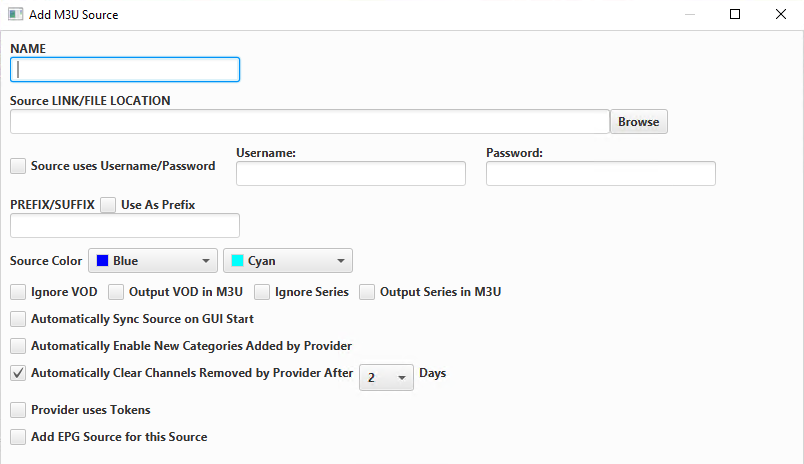
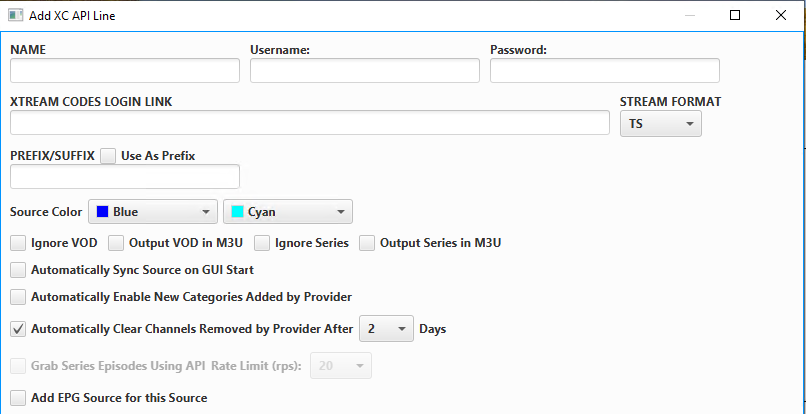
Ok so I'm going to assume you use IPTVBoss in this instance. Here's my understanding of how this all works: You buy the provider's stream and they send you an email with your login details. That will have two different sets of items listed. One will be the Xtream (XC) information (username, password, url) and the other will be the M3U link. This will ONLY provide the raw streams and will not provide the guide data. Sometimes they'll also give you EPG data with it, but that's rare in my experience. You'll then want to input this link into an IPTV editor of some kind. I used many different IPTV editors and none of them really worked super well until I found IPTVBoss which is pretty reliable. Their program requires you to install it locally on something (Windows, Mac, Docker, etc..), as opposed to others who have websites dedicated to it. Regardless, these editors perform two functions: They allow you edit the streams in the provider's link for only the streams you actually want. My provider gives me like 21,000 different channels from all over the world. I use the IPTV editor to cut it down to ~500 that my family and I would actually watch. They provide up to date guide (EPG) data. You'll have to use their service to match up the streams to the specific guide data so it's listed properly when you use Emby to watch it. For your question, I'm going to use my setup (IPTVBoss) as an example to more easily show what I'm talking about: When you first start out with IPTVBoss, you'll need to input a source for your IPTV: These sources allow you to input any of the following types of links: M3U, API (XC), or CUS. Previously, I had tried to use the M3U link given to me by my provider. Their links are structured as follows: http://provider-domain.com:80/playlist/username/password/m3u_plus?output=hls. My link (with all the important stuff taken out) is down below: When you use IPTVBoss to input the links, it'll give you the following for providing the M3U source: When I used it previously, I just filled in the Name and source link fields. This was due to my username and password being embedded into the M3U link. Whatever you do for the rest of the fields is personal preference. This is what was causing my issues with the 404 error/freezing. One step that I used to attempt to fix this was changing my output from hls to m3u8. This forces the stream to be converted from HLS to TS (MPEG-TS). Here's essentially what this means for your stream: -HLS - This takes the stream from the provider and delivers it to the device playing the stream in roughly 10-second segments. The device watching the stream would then put all of the segments back together again and then allow you to watch the stream. This allows the stream on the receiving device to adapt based on the network conditions of the home it lives in. This also allows for the stream to be supported on many different devices due to the protocol (HTTP) being so widely supported. However, it can create latency and doesn't support many Codecs. -TS - This takes the stream from the provider and delivers it to the device playing the stream in a single stream. This is the most stable version of receiving the stream, but does not adapt to changing network conditions. This is the version that all of the people in the IPTVBoss discord recommended as they said HLS is far too unstable to provide a good experience. -Think of it like this. The provider is capable of sending the stream in three different qualities: 1 - Lowest quality 2 - Medium quality 3 - Highest quality -HLS is capable of adapting and switching between the three based on your changing network conditions. TS will only come in as the medium quality, but will be one solid stream. My first iteration of adapting this was to take the link from the provider and change the output=hls to output=m3u8. From the logs I could tell that the stream was coming in as TS, but the issue was that it was still using HLS for authentication as if it was still coming in as an HLS stream. I was still getting freezing and it was buffering often. So instead, I changed it to use the XC link instead. Here's what that looks like from IPTVBoss: Here you can actually specify the server itself and the username/password separate from each other. From the logs in this setup, there won't be any authentication during the stream. This provides a single, uninterrupted stream that is reliable and stable. From here, IPTVBoss will export your edited channels/guide data to Dropbox as an "Application" within Dropbox. You'll then use the two Dropbox links (provided by IPTVBoss) to be input into Emby for your stream. And there you go, that's essentially how I got it to work without any buffering/freezing/404 errors. Try that out and let me know how it works. I'll happily answer any other questions you have as well. Thanks


 1 point
 -
Hi, that's odd. I don't think this will matter, but it looks like you enabled nfo file saving but did not ensure that emby server has write access to your media folders. This is causing the server to repeatedly try and fail to save nfo files. I would either fix those permissions or turn off nfo saving for each of your emby libraries.1 point
-
Versuch es mit \\, wie es im Beispiel steht, nicht mit //.1 point
-
You're and angel Luke. I've been lurking here for years and what I can say is that I really do appreciate your hard work and patience to help us with our problems.1 point
-
Hi, yes we are working on improving this. Thanks for the feedback.1 point
-
Why has this been discussed for years with no action? There was a lot of deflecting by one team member in particular who kept pointing out the universal audio delay feature which is, obviously, not the feature being requested. This would seem an easy feature to an idiot like me given that mpv can easily support it. But I'm an idiot. If this IS hard let us loyal paying users know and we'll probably act less entitled. In my case I have no idea why 24p, in particular, suddenly invokes this issue when playing from Windows 11 with direct sound as a separate output from the HTPC. I can work around it, and do, and this doesn't affect all the configurations I use. Just one and only when the refresh rate is changed to 24. Currently, if using direct sound, I just don't let Emby change the refresh rate and I don't have any judder because of whatever algo's are running wherever (hard to know these days if it's the GPU or the TV or both). I'd really like to go to video source framerate refresh where possible and this feature would be the only thing I could use or add in universal delays for certain refresh rates - I think this used to be an option or, perhaps, it was Kodi back in the day.1 point
-
GUYS WE ARE SAVED! The post above is from this thread for the same problem! Luke says they looking into it! maybe they'll see something this 5th time i'm so happy and excited for this, this time it's real! /s (just in case)1 point
-
@Checkoutside Hi. Can you try searching for our standard android app (Just "Emby" on Amazon and "Emby for Android on Google) on the same device's app store and see how that compares? Thanks.1 point
-
Great news it's a dynamic list ... Any hints on a beta release date @Luke?1 point
-
The plugin works now and will still continue to work even after the core feature is ready. It looks like the plugin creates and updates regular playlists. The core feature will not work like that. It will be a dynamic list.1 point
-
Sounds good thanks Luke!1 point
-
ChapterAPI did - but it didn't get any traction. It didn't save the intro marker timings - but it stored the 'fingerprint' of the intro (a tiny binary fingerprint file) - and emby just had to find it on 'your' version of the file. Storing the actual timings (based off ALL the 'versions' of that file that are available) is one option - but the ChapterAPI method works for ANY file and generates it's own timings. The 'key' is the fingerprint - as that should be the same across any version. It worked perfectly and could also be used for 'recaps', 'credit/outro's' etc - as you simply applied the same concept across the file for the different marker types. A huge missed opportunity imo.1 point
-
Correct - there is a fine balance between the 'patterns' on the chromeprint (audio fingerprint). Too loose, and it will match anything related, too tight, and it will reject the slightest difference. I think emby have this set just ok - I have very few misidentified Intro's vs the original Plugin. I just wish they had added editing, credits and TV series selection etc - but the core Intro detection part works just fine.1 point
-
Well, it should definitely be an option, you can choose, if you want. It should even be defaulted to the show thumb. That's the way Jellyfin is doing it. But there are certainly a lot of people who would like to have the episode thumbs in the Continue Watching section. I understand the fear of spoilers, although I think, this fear is a little exaggerated. Right now, I can't think of a moment, where I felt that an episode thumb has spoiled something for me. The descriptions can be spoil things occasionally. If anything, these thumbs are making me more exciting for the next episode. Also, it would just bring a little bit of variety on the Emby front page, which is so desperately needed imo.1 point
-
That would be the case for a separate thread (despite the erroneous title, even OP is about allowing manual sync). Sure, making the app better in order to not need manual adjustment would be cool. But this is a feature request for allowing the user to sync audio, which is a very simple and widespread consideration. Just do that (should be available since years ago) and then, sure, try to understand what fails and try to fix that.1 point
-
Please, please re-introduce missing episodes. It is horrible trying to see which tv shows have released episodes. It is so long winded to have to use multiple clicks to ask for them on each series and impossibly long on the TV, so much so that I don't really bother now and have to go online to look for them which is very time consuming. I have not noticed any speed difference since it was removed, so I am not sure why it was removed. Could you not just put an option so people can decide whether they want it or not. It used to be really great to go into a series and see the new missing episodes or see that it hadn't been released yet. I really, really miss the automatic function.1 point
-
Vote for "episode image" rather than "series backdrop" or "series thumb". "Episode image" is morrrrrrre distinctive for the next episode!1 point
-
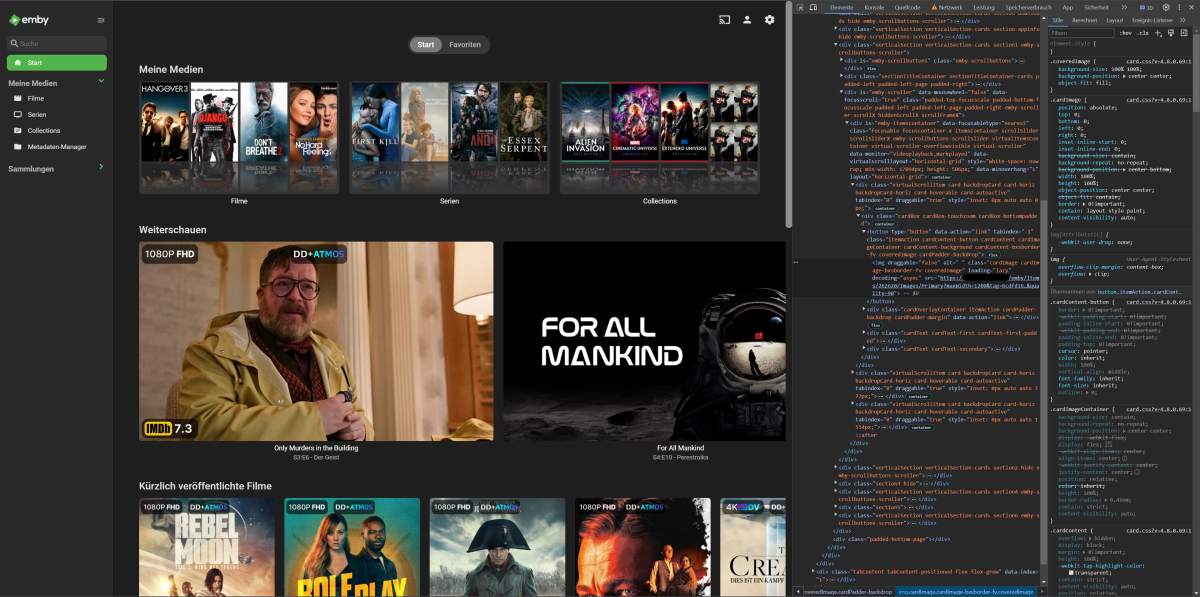
I really don't know why it isn't there already. Jellyfin has this for ages. It's probably one of the easiest changes they could possibly make. All the data they need for this is already there in the request results. It includes the image tags of the item that is showing, as well as the image tags for its parent item. So all that's missing is a new setting whether or not you want to see episode thumbs instead of show thumbs and a conditional statement in the code that checks for that setting and if it's an episode or not and then change the image link accordingly. I was able to quickly change the image just by swapping a few arguments of the image URL (item id and image tag. Image type changed from Thumb to Primary). All the values were already there in the item object, which can be viewed in the browser network console. So it shouldn't be that hard to do in my opinion.
 1 point
 -
Second this! Switched from Jellyfin to Emby, because of built-in features like scrubber images or intro-skipping. But this is one thing I really miss from Jellyfin. There, you could just set a checkbox in the settings to show the episode thumbs instead of the show thumbs. For me, it'd make this whole section more interesting. I guess there can be rare occasions where such a thumb can spoil something, but I personally can't remember a single moment where that was the case. Actually, most of the time, these thumbs make me want to watch an episode, because of what they're showing.1 point
-
It seems to me that Feature Requests don't have a good, or at least a clear way of tracking community support for the request. Likes, +1's or thread activity don't really translate to votes and are not so easy to tally. Would a poll give us and the devs a clearer picture of what the community wants most? Would it help the devs prioritize the features? It would be easier for people to vote but does that matter?1 point