Leaderboard




Popular Content
Showing content with the highest reputation on 04/01/25 in Posts
-
Emby for Apple TV 1.9.6 has been released. Here are the highlights: Fix up next getting stuck in between episodes Fix channel number showing as undefined when a channel doesn't have a number Fix genres under music videos being empty View the full article4 points
-
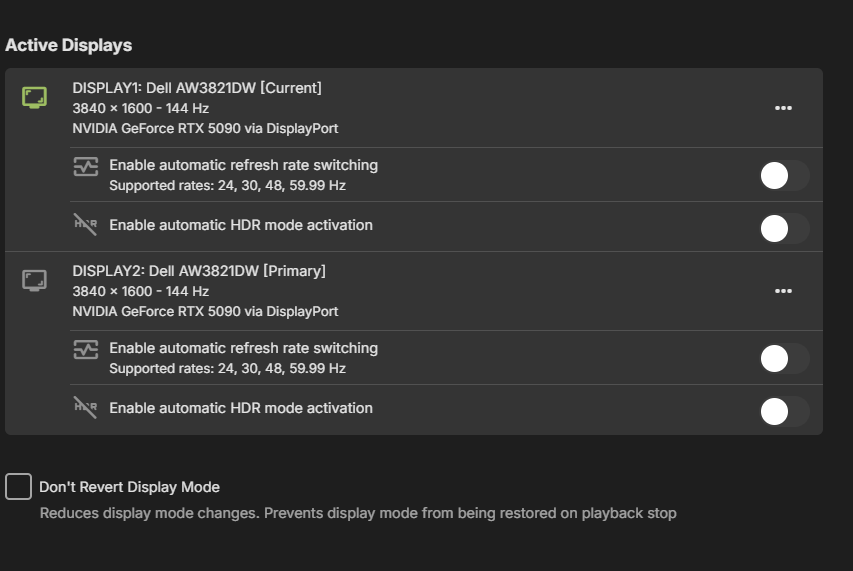
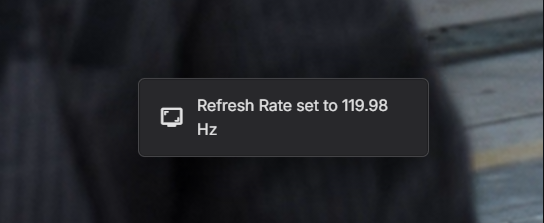
Opening a new thread because the previously one was locked even though there's still an issue. Even after the new update with the setting disable it still switches my screen's refresh rate to 120hz. This causes some issues for me because 1. I don't want my screen set to 120hz (actually 119.98hz) but rather at 144hz the native refresh rate. 2. The only way to prevent this issue is by enabling Windows Dynamic Refresh Rate (DRR), which must be done manually and cannot be scripted. This creates a problem because I use my desktop for streaming games with Sunshine/Moonlight and disable my screens while streaming. However, when I re-enable them, Windows DRR does not automatically turn back on. As a result, when I play a video with Emby, it automatically switches the refresh rate back to 120Hz, whereas I want to keep it at 144Hz. This causes an endless loop of adjustments—frustrating! Can we please fix the issue and let us disable the automatic frame rate switching? @softworkz
 3 points
 -
This also negatively impacts other programs, such as the Nvidia and Microsoft overlays. My Nvidia overlay is set to continuously record all the time and save the last 10 minutes of footage at my main monitors refresh rate at 165fps. Once Emby sets the the refresh rate to 120 - so do the recording settings on both overlays get capped to 120. Even with a "revert to previous refresh rate" it still will not help in this situation. Even more so sometimes this refresh rate swap will corrupt video recordings. Having Autodesk Fusion 360 or Netfabb running while Emby sets the monitor refresh rate bugs their UI out for whatever reason - it offsets the actual clickable target points by ~20px or something to that effect. I cannot reproduce this by switching the refresh rate manually through Windows or Nvidia settings. If I start to play a video on a secondary monitor that is capped to 120hz - I can just drag Emby over to my main screen and have it not switch frame rates. It will only switch frame rate once the video stops and another begins on my main monitor. Please revert this change, or make it so that the "Disable frame rate switching" actually works. I'm using the web Emby interface for now and not using the Windows app as this is causing way too many issues. I had to reinstall Windows and am regretting not backing up the old Emby version I had before. This update has an "Apple-esk" quality to it - "we know better than you" and has clearly not been tested on non-media-pc environments and use cases. Don't change my monitor settings. Edit: This also resets any Overdrive monitor settings that I have set.2 points
-
New PUBLIC TESTING version available 11.2.0: Emby server 4.9.X is required Delta changelog 11.1.27 -> 11.2.0 improve webservice http communication clean code fix minor episode season number issue minor performance improvements for addon mode playback start add priority options for server requests improve Kodi scan (busy) detection new node for recently added musicvideo albums fix minor shutdown issue auto resync on mandatory DB resets fix year node fix disabled certificate verification support http deflate compression improve library artwork caching adjust database PRAGMAs add option to disable BusyDialog (default on) add option to set TOS/DSCP IP headers (default best afford) add option to auto cache artwork for incremental synced content (default off) fix transcoding for newer ffmpeg versions fix favorites fix minor sync issue after wake when Kodi sync was in progress when sleep was activated and Emby removed an item while sleep fix incompatibilities with latest Emby server beta version Comment: I released this version earlier as intentionally planed. It's not too well tested, anyway. Due to incompatibilities between Emby server 4.8.X and 4.9.X it's required to update to this version when using server beta versions. This version is NOT for 4.8.X Emby server. Unfortunately I cannot release one version supporting both servers as there are major differences in API call responses.2 points
-
Okay I've figured this out. So to elaborate, I ran that command from the article you posted to verify if my ISP is not blocking it. The port website was giving me timeout errors, but my ports are open on every possible platform, what resolved it was going into my network settings on Emby and reintroducing the path to the certificate .pfx file. I am no longer getting timeout errors from that website and now I can connect remotely. Thanks for your help~2 points
-
Hi emby community. Sadly my much loved Sony Android TV died last weekend. The emby Android TV OS did just about everything I wanted and was great. I've replaced my TV with a Hisense 65R8 - https://hisense.com.au/product/65-series-8-65r8/ Unfortunately this doesn't run Android TV, instead using Hisense's own 'VIDAA U3.0 AI' OS. It has an app store named 'AppsNOW' with a very small library that doesn't include emby, nor kodi. There's an inbuilt browser but it won't load the web client either. So, my questions are: 1. What is the likelihood that an emby client app might be developed for this OS in the future? 2. What are my best options for getting back to the Android TV experience without huge expense? I'm thinking along the lines of some sort of Android TV box. In the meantime I can use my Windows 8.1 HTPC, which is running WMC with emby classic. This gets the job done but lacks a lot of the features and love that I enjoyed with the Android TV emby client. I've tried using the emby theatre (desktop) app. This gets me close but doesn't work very well with my remote and I can't work out playback controls during playback (seeking, stats for nerds, view progress, time-shifting for live tv, mini guide, etc). It also seems to make the HTPC work pretty hard with the cooling fan spinning up to annoying levels. The Windows store app doesn't appear to be available on Windows 8.1 so I haven't tried that. Ember for emby looks like another option that might be worth exploring. (BTW, my HTPC is a gen 3 core-i3 NUC - https://ark.intel.com/content/www/us/en/ark/products/76978/intel-nuc-kit-d34010wyk.html) Thanks for your input. TT1 point
-
Hi, I build webhook server to send emby events to telegram. Take a look Link to github: Emby-Telegram-Notifier1 point
-
https://www.flatpanelshd.com/news.php?subaction=showfull&id=1743140114 After removing DTS audio support in the past and reintroducing it with its 2023 models, LG is once again dropping DTS support on its 2025 OLED and LCD TVs. The confirmation comes from Vincent Teoh, who verified this through the EDID information on the LG G5. He believes this applies to all LG 2025 TVs, both OLED and LCD. FlatpanelsHD agrees with Teoh's assessment about the full line-up, as we actually heard from industry insiders at CES 2025 that DTS would be removed from the 2025 models. This is going to upset some people, and Emby have to put checks if they haven't already....1 point
-
Hello, I get the error "No compatible streams are currently available message" on Emby for LG app for relatively a lot of files. Emby app version 1.0.45 Emby server 4.8.8.0 The LG TV itself is not newest. SW Version 04.06.75. For example a movie that I cant play is called "Pandorum (2009)". Logs attached. ffmpeg-transcode-63c7234f-0baf-4d92-8de7-5aea874caa8e_1.txt embyserver.txt1 point
-
Emby Windows & Emby Xbox A new stable version 2.222.0.0 is available now. Please go to the Microsoft Store and check for updates. Changes 2.222.0 [Win] Don't wait for push channel creation on startup [Xbox] Enable HEVC Playback [Xbox] The EmbyPlus app is discontinued. EmbyPlus users will automatically transition to the regular app (2.222.0), which is now equal to the Plus app 2.221.0 [Win] Wintheme: Fix toggle button background [Win] Fix inconsistent refresh rate changes when hard-limiting [Win] AudioPlkayer: Fix exception when repeating a single song 2.219.0 [Win] MPV: Fix missing VO assignment1 point
-
i udated Ugreen Software to 1.3.0.2321 today and then updated emby debian package to 4.9.0.43 and works perfect1 point
-
I've edited it and removed that blurb.1 point
-
Thank you! Waiting for updates.1 point
-
I reinstalled the EMBY Server clean and let it rebuild another index on the entire IPTV, and now it is working as it should.1 point
-
Saving the config xml file is obviously not happening. I cannot replicate here. can you press F12 to open the browser console and see if there are any errors reported when you click save. No that's not how that works, that protects titles from being removed like "IT - It (yyyy)", you would put "It (YYYY)" and it would make sure only the first "IT -" was removed and it doesn't become "(YYYY)" But I will take on board what you are asking and maybe add the ability to do that later after the current issues are resolved.1 point
-
Okay so a follow up to my follow up (Not because I still have a problem, I did have one prompting me to come here again but I've resolved the issue with a brain-blast, and I don't want to bother you guys anymore, I'm sure you're busy and I appreciate that you've replied, but more for you guys to have some context at this point, maybe it'll help in some way?, Or for anybody who is experiencing this problem.) I had gotten it to work last night, I was able to log in from an external network, simply remounting it was enough to let me log in remotely. it showed my port as open on that canyouseeme website, Emby showed that the port is open and running on my external port with the Domain address attached, however, upon waking up I found that I couldn't connect anymore even though everything looked exactly the same as it did when I went to bed and it was working. so I tried restarting the server, restarting the server computer, remounting that .pfx again, remaking the .pfx with fresh files and using the new one, all with no results. It was working pre-update, I got it to work post update. Everything looked right. Turns out, for the first time in this router's life, the IPv6 changed. (I didn't notice it with a skim over, but, in my defense, it was like 4am.) I'm like, 98% positive the update is the culprit and the way it interacted with my network upon implementing. According to the logs in my router, the DNS error started around implementation. But it explains everything as far as I can tell? Again I'm not network savvy and I could be way off base. I imagine when I got it to work, that was really just me connecting to some sort of temp router network cache? It's working now that I've swapped to the new IPv6 on my domain's dashboard that I got from my router's dashboard. I've tested it, my buddy a couple cities over tested it, my other buddy from across my city tested it. As of this moment, everything is Golden and it hasn't changed to a new IPv6, especially upon introducing multiple connections, so it doesn't seem like it will be a continuous problem. Thank you both for your time and effort. It is much appreciated.1 point
-
Same for me, the blank spaces have gone but anything I enter and save, vanishes when I come back to the plugin. Also just out of interest is this Country Code feature also the right place to remove group titles that appear in the movie name, for example I have films such as '4K-AMZ - blah blah blah (2024)'. Can I use this to remove the '4K-AMZ' part and should I just add '4K-AMZ' or do I need to add the hypen and blank spaces '4K-AMZ - '?1 point
-
This sounds very similar to what I've been experiencing...1 point
-
You add each sub-folder instead of the parent only.....1 point
-
@gillmacca01Looks like this is the culprit , it was deleting from all folders in my first test, but shouldn't run if the options are ticked (selected). I will do some more tests - you may have just found where the extra time is coming from!1 point
-
Is there a way to downgrade to a previous version? The forced refresh rate switching regardless of settings is causing me more problems than what this app on Windows solves vs running just in browser.1 point
-
Are you saying a site like canyouseeme.org shows Emby port is open? Technically you have the previous version renamed to system.old in C:\Users\jesim\AppData\Roaming\Emby-Server. So I can guess you can test that theory if previous version still works.1 point
-
1 point
-
OK I would just blank out those discogs ids.1 point
-
That's up to you and how often your provider updates the m3u, and how often you watch 'new' items, for me once a month is just fine, but for others that may want to see new content daily then they will probably run it daily. Some people wont really care and may run it manually when they feel like it. The thing is, the choice is yours to make. There is already too much for me to want to see, and I am not a "keep up with the neighbours" kind-of person, so new content doesn't really appeal to me, until I am fed up with what is there. I hardly ever watch what is actively being advertised, I watch whatever I want and looks interesting, whether its from the 1970's or New (example) - I don't care as long as I enjoy it. If the strms are the same and the output folder is the same, it will keep them, it will only delete what is different. However @gillmacca01is saying that its not behaving that way on the QNAP nas. Its deleting them and rewriting them. We are still trying to get to the bottom of that. I think something like the directory structure might be different on the QNAP ... but we will see.1 point
-
ok @fbrassin, I found the error 50 e 50 is being removed from the title, and thus making the title empty. So what I have done is added it to the internal Edge Case detection (those that are problematic), but also added an error handler in that part of the routine, so that it will return the original string, thus preventing the result being empty, and preventing the error (hopefully), I have also added a NULL check at the end of the routine in-case anything gets past, that will change the NULL string to "~ERROR~". Anything that is output as "~ERROR~" should be added to the Edge Case Input box, and the plugin re-run. The save button is near the bottom of the page The two buttons at the side are for importing and exporting that text box to a file so you can save it on its own away from the plugin. VODtoSTRMscheduledTask.dll
 1 point
 -
OK there should be code in there that you can just copy paste.1 point
-
Hi I couldn't find this during a search of feature requests - please can we get an option to set Horizontal home screen view for all users/new users applied to all applicable devices for any user? I set my own homescreen on LG TV to horizontal view and often get asked by my users that visit - how to achieve this. Please can we get an option to set it/force it as default over Vertical? Kind regards1 point
-
There is no transcoding, it's direct play in both part. I tried using burn-in on emby and it result in no subtitles. I tried extracting the subtitle and it didn't solved. I've tried all of the option both under transcoding and subtitle option and the result are always either no subtitle at all (I tried watching the whole 30 minutes show and never had anything showed) or missing sub Jellyfin is a brand new installation. I did nothing and it worked out of the box (outside of enabling hardware encoding/decoding). Jellyfin also send it to my tv without any transcoding. So since there's no transcoding or remuxing of any kind and no burnin, it's not a codec configuration. It's something the emby player or server isn't sending or processing properly.1 point
-
No skin off my nose - my TV works just great - just trying to help OP with his particular problem - did you have a suggestion for the OP?1 point
-
How many episodes of that series do you have?1 point
-
Ah-ha! That's why I couldn't find the ffmpeg log before, I didn't have transcoding enabled. duh. Thanks for all your help!1 point
-
Hi, yes we are currently working on supporting ADM 5.0. Thanks for the feedback.1 point
-
Having this issue with the new update that was released on wednesday. My 144hz monitor gets set to 120hz when playing a video. Emby theater 3.0.20 doesn't have this issue and monitor works at 144hz.1 point
-
If you’re looking to switch from Plex to Emby, you’re not alone. Many users are making the transition to Emby for its advanced customization options, better privacy controls, and flexibility. While moving your media library might seem daunting, this guide will walk you through the entire process, ensuring a smooth migration without losing your watch history and you'll be up and running before you know it! Why Switch from Plex to Emby? Before we dive into the migration process, let’s highlight some key reasons why users prefer Emby over Plex: Greater Customization: Emby allows for more granular control over metadata, streaming quality, and transcoding. Privacy-Focused: Unlike Plex, Emby does not require an internet connection for local streaming. Better Integration with IPTV & Live TV: Emby offers superior support for IPTV playlists and tuners like HDHomeRun. Self-Hosting Benefits: You maintain full control over your server and user data. Now that you know why Emby is a great alternative, let’s get started with the migration process. Step 1: Install Emby Server First, download and install Emby Server on your preferred device: Visit Emby’s official website and download the server software for your OS. Follow the installation instructions and set up your admin account. Once installed, access the Emby dashboard via your web browser. Typically at http://localhost:8096 Step 2: Prepping Your Media Files to move to Emby Ensure your media files are well-organized before adding them to Emby. The ideal folder structure should be: /Media /Movies /MovieName (Year)/MovieName (Year).ext /TV Shows /ShowName/Season X/ShowName - SXXEXX.ext If your Plex media is stored in a different location, move or copy it to your preferred location for Emby. Keeping the same structure ensures a smoother migration. Emby's media scanners will do a great job if not all of your movies or shows are organized in this fashion, but it definitely helps to have an organized and well structured media folder. Step 3: Set Up Your Libraries in Emby Now, it’s time to add your media to Emby: Open the Emby Server Dashboard. Navigate to Library > Add Media Library. Choose the appropriate content type (Movies, TV Shows, Music, etc.). Select the folder where your media is stored. Choose metadata providers (TheMovieDB, TheTVDB, etc.). Click Save and allow Emby to scan your library. Step 4: Importing Watch History from Plex (Optional) Emby doesn’t directly have a built-in tool for importing watch history from Plex, but you can use Trakt to sync your progress. Install and setup Trakt Scrobbler in Plex and sync your watch history. Link your Trakt account in Emby, allowing it to import your watch history. Run a scheduled task for importing playstates from Trakt. This should only have to be done once. Step 5: Configure Emby for Optimal Performance To get the best experience, here are some begging tweaks to Emby’s settings that will help get the most out of your new media server: Sign up for Emby Premiere: While not required, Emby Premiere offers many benefits like hardware transcoding, offline downloads, Live TV DVR and more! Enable Hardware Transcoding: Navigate to Dashboard > Transcoding and enable hardware acceleration for smoother playback. Set Up Remote Access: Under Network, configure remote access settings if you want to stream outside your home network. Fine-Tune Metadata Fetchers: Go to Library > Metadata and choose the best providers for accurate metadata. Step 6: Install Emby Apps & Start Streaming Emby is available on multiple platforms, including Android, iOS, Apple TV, Roku, Fire TV, and more. Download the Emby client app for your devices and start enjoying your media. Final Thoughts Migrating from Plex to Emby doesn’t have to be complicated. By following this step-by-step guide, you can transition smoothly while preserving your media organization and watch history. Emby offers a flexible and customizable media server experience, making it a fantastic choice for those who want more control over their media. Are you ready to make the switch? Try Emby today and take your media streaming experience to the next level! As always, you will find unrivaled support from our users and staff over at the Emby Forums if you run into any issues or have any questions about this process. View the full article1 point
-
I just released v1.0.3.1 of the Emby plugin to the plugins store: it fixes the backdrops, adds many new settings, the tier perks are also tweaked now to offer more features for all tiers (the website was not yet updated to reflect these tier changes), a "setup instructions" link was added to help new users and "preview poster" / "preview backdrop" links were also added to be able to see how the images will look before needing to refresh the metadata of items or libraries. The new plugin release has been tested with the latest version of Emby server and web UI. I took the time to look into some of the issues users had with images not downloading or downloading slowly and this seems to happen when the server has IPv6 enabled, disabling IPv6 seems to solve the issues. (i added this to the setup instructions also) I found a few other forum posts regarding IPv6 issues and slow image downloads from plugins (even image downloads timing out) dating back as far as 2018, it seems that those issues were never resolved. The "RPDB Folders" app that works with Emby too was also recently updated to support all new features.1 point
-
Emby team has already said this plugin causes issues with duplication of db items so no one should duplicate it. They said they would allow pinning of collections to the home page like plex does. That would resolve the issue but that’s been coming soon tm for a few years now.1 point
-
Thank you so much. For some reason i had a full queue whatever that was I reset it using cmd prompt. working now. Also idk how in my head i did 20-12 does not equal 8 hahaha thank you for helping me.1 point
-
Major News for Xbox Users Versions 2.222.0 and later include the capability for HEVC playback - finally! What this means for current users of the Emby Plus app for Xbox is outlined here:1 point
-
Make sure your users aren't HIDDEN from the login screen, which may be why you have to enter the username each time. If not, then log in the users you want and switching users is very simple in both apps.1 point
-
What unsupported audio are you referring to? Atmos or dts-x? I'm using it on a 75" TCL851g via the TV's native Google TV app fed to a Denon AVR 760h. Both support these audio formats but playback stutters and stalls. I think it is either related to these audio formats as other playback works fine or related to the content being 90 mpbs Dolby Vision and the TV cannot handle the bit rate but the specs for the processor state they can. Anyhow, lest we drift off topic I'll start another thread when I can gather the necessary logs to post. Back to the regularly scheduled programming.1 point
-
It still doesn't remux unsupported audio though, which is a show-stopper for me. The ATV app has done this for many years, so don't understand why the Universal app doesn't do it.1 point
-
Hello, is there any chance of seeing Emby arrived on Hisense TVs under VidaaU? Thanks1 point
-
This part has been covered pretty detailed in the following topic, starting from the referenced comment to the end: You might also find this recent conversation of interest:1 point
-
Could series path(s) be added as a column in the reports plugin, i would like to have a csv of all tv series and their path. my series are spread across multiple disks and paths, and when i accidentally deleted a library folder, i had no record of which series were in the deleted path.1 point
-
Hi. I would get a Mi at Walmart for around $60 if you don't require HD audio (which I'm assuming since you were using the TV before). You will get the same interface and app you had before and it will probably even run better .1 point
-
This sounds like we're getting into small clusters at this point. To me, it feels like this has drifted into "New Software" territory with a very different use case then Emby. It almost sounds like some of these redundancies should be created as a sort of Emby Pro Server or something. Part of my thinking is, to do this right, you really need some team members dedicated to the creation of this tech and some members remaining on the core application; at least for the duration of the project. This is somewhat of a costly shift in resources. It almost seems fair to ask for additional resources to help develop it.1 point
-
At the moment, if you have Cinema Intros and / or Vantage Point intros, then the user can bypass/skip each intro by pressing the FF >> key on remote or direction right key, I'd like to disable that from the server side to prevent this behaviour. Often I may have a tag that has a screen of information, for example, a warning about flashing lights may affect some people, quality of a video or explanation that it is in Black and White because of strikes at the time (early 1970s) it was made.0 points