Leaderboard




Popular Content
Showing content with the highest reputation on 03/31/25 in Posts
-
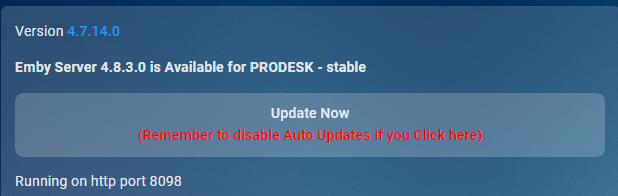
Just click it. That is what it is for. BTW: Automatic updates gets reenabled after an update so you will need to disable that again if you do not want automatic updates.2 points
-
There is a defect in the 4.8.11 server release related to the notification image. It will be resolved in 4.8.12 and is already resolved in the beta channel. Thanks.2 points
-
@LukeI'm posting this in the Android forum as this is where I first noticed it in TV Mode, but it actually impacts other Theater apps, including the new Windows App. On the homescreen with detailed preview mode enabled, if you long-press to open the context menu on an item, the active backdrop disappears and then re-appears when you close that menu. This results in a poor user experience. backdrop_disappear.mp4 The same actually happens if you hit 'Back' in this view and the focus jumps up to the top "Home" -- probably has something to do with the current item losing focus. The expected behavior is that the current backdrop remains visible. Thanks.1 point
-
Hence the skit reference... thank you Sean! Luke, this is how you should have said it. There are dummies like me around...1 point
-
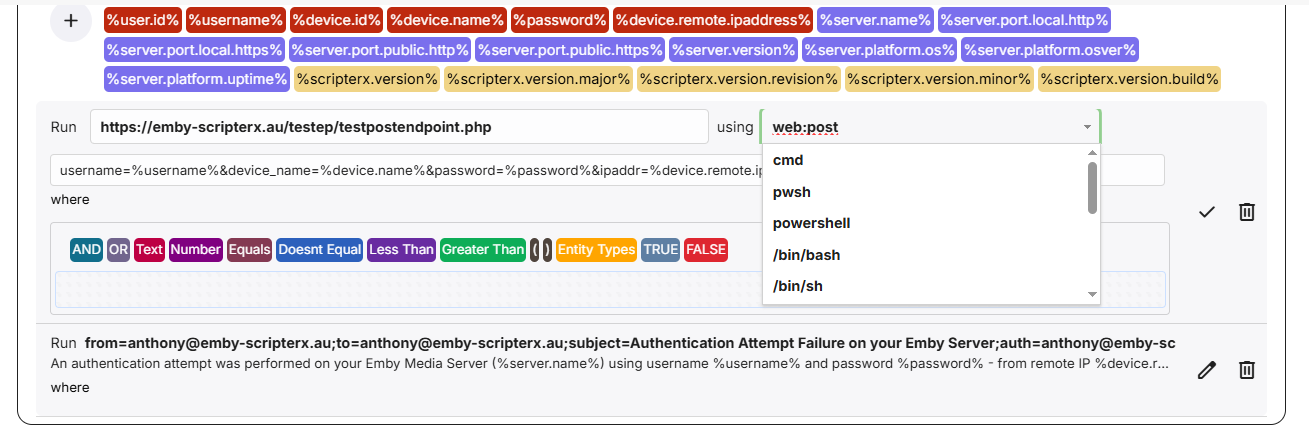
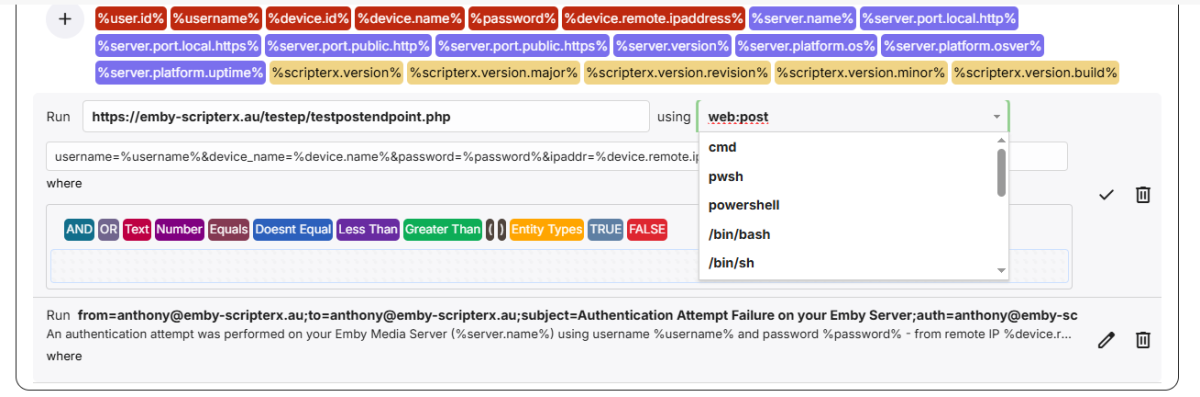
All sorted, please update to v6.0.0.7. * rectified nullable error with onPlaybackProgress, and also modernised the interpreter editor dropdown. More will be coming out of that soon
 1 point
 -
Sort of, but that button is tied to the automatic update setting so clicking it will enable automatic updates. Unless something has changed recently as I have not test this in a long time. So just disable the setting again after update. Image from css section I made back then.
 1 point
 -
I managed to find a way to get the client logs off of the shield. I will do a test run later tonight and upload them here.1 point
-
Thanks a lot1 point
-
Thanks. Went pretty smooth. Had some metadata issues. Seems to be fixed now. You are my hero Luke1 point
-
We haven't submitted yet but hopefully soon. Thanks.1 point
-
That's before a lot of changes internally. I need to find what is not being handled in your m3u that was before and make sure it is. That's why I said I would add a debugging log line to tell me what threw the error. Or maybe with full extra verbose logging, it is already there. There will be lines like this: Debugging: GetShowTitle These show the steps when converting a "show (year) Sxx Exx" into the show title "show (yyyy)" What I need is the lines where it goes from having data to not having anything right before the error.1 point
-
Hi Luke, legend - appreciate your time and the response. Thanks for confirming, I knew it must of been in hand in the back of my mind. I know you all must be really busy development wise but just wanted to be sure. All the best, you all are doing a great job with the resources at hand im certain of that.1 point
-
Hi, yes more control over this is planned for future updates. Thanks for the feedback.1 point
-
Luke & lorac, Thank you so much for pointing out that new option. I missed it because I was focusing more on the options under Emby Windows, and I just missed that new option in the first settings section. It might make sense to offer that option under the Display item in the Emby Windows section, but regardless I am MUCH happier now that I have that setting turned on. Thanks again, and I look forward to the return of the external player option.1 point
-
Have you taken a look at this? Configuration Backup1 point
-
Have you taken a look at this? Connecting from Client Apps1 point
-
Ah-ha! That's why I couldn't find the ffmpeg log before, I didn't have transcoding enabled. duh. Thanks for all your help!1 point
-
This is the backstory:1 point
-
1 point
-
Only when needed as every client has different playback capabilities. You would need to look at Nerd Stats during playback or the ffmpeg log to see why transcoding is needed.1 point
-
And if you enable all the option you disabled to try and force direct play does it play? 2025-03-31 10:12:45.380 Info App: User policy for Alan. EnablePlaybackRemuxing: False EnableVideoPlaybackTranscoding: False EnableAudioPlaybackTranscoding: False Can only guess there is something specific to the file that is not direct playable via Firefox. "Restricting access to transcoding will disable quality selection and may cause playback failures in Emby apps due to unsupported media formats or insufficient network bandwidth."1 point
-
This morning I did a factory reset of my NAS and everything is back up and functional. I'm assuming something got corrupted while doing reinstalls trying to get remote access to work which was doomed after noticing I'm stuck in double NAT by my ISP. Sorry for the senseless posts, thanks for the attempts to assist.1 point
-
Go to your Trakt account and settings and remove the Emby connection, then in Emby reissue a new pin and connection to Trakt. See if this works. After Trakt plugin update to 3.8.0 everything has been working as intended. (From my experience)1 point
-
Another Synology > Ugreen convert here! My nas is on the way. I sense huge influx of new ugreen users here. Synology really dropped the ball with their upcoming consumer line for 2025. I think many like me were holding for the upgrade for a while and are very dissapointed. With their current discount ugreen was a no brainer for me! Would love official server release for Ugreen! Thanks1 point
-
Sure - sent a sample via pm.1 point
-
HI, this should be resolved in 3.4.51+. Thanks.1 point
-
Not sure how to install it, but I noticed the other day that the captioning on my phone, for live broadcasts ARE ACTUALLY THERE, but the issue is that they are hidden under the video. When playing a video with a slightly reduced width, you can actually see the captions on each edge of the video! The captions need to be brought to the foreground on android devices so that they are displayed on top of the video content instead of behind it. Hope that helps!1 point
-
Currently it will merge them - ALL TV Shows to "TV Shows" Directory & All Movies to "Movies" Directory, if anything is of the same name it will either overwrite it with the new link or leave it the same if everything is the same If you want to output to a different directory, then at the moment you will need to change the save location, click save and re-run it, there is no way to automate 2 different m3u's to different folders, internally the m3u's are all read together, a single list created and then processed so to change that is a big ask. Here is the latest DLL - I am not sure if its quicker or not in my tests I have had full debug logging on, but I think it is more accurate at updating the output folder, and also downloading the icons as posters is now working VODtoSTRMscheduledTask.dll1 point
-
You must enable the option in plugin's config menu -> Interface -> Delete item (context menu section).1 point
-
could we get a thumbs down or a dislike button when listening to music. EX: if thumbs down, then dont add the song/artist to the playlists when shuffle etc. this should be possible without "tagging" individual items/songs as this would take centuries for people with large libraries. i think more of a pandora approach "thumbs down dont ever play for me again"1 point
-
Just chiming in to say WOW this is so unintuitive. I have no "full screen" button either so I had to come here looking for help on how to get mine back into full screen mode. I'm guessing it doesn't show for me because mine is in TV mode. If that's why, please do something better such as showing one on the title bar or when moving the mouse around.1 point
-
I can confirm that 4.9.0.42 beta fixes the issue for me. The test thumbnail video generated the correct thumbnail and others video folders too. Also the speed of thumbnail generation seems somewhat faster. Thanks1 point
-
hi, no ETA but we're working hard on it. Thanks.1 point
-
My Version 4.9.0.42 beta creates video youtube trailer lines differently. Why is there a difference? Also try testing to see if the old code trailer playsback: Try the same page with a different browser. Try clearing the browser cache. Try clicking Admin / Library / Scan Library Files button1 point
-
Some settings are shared across devices/clients and those will not get cleared. Device specific settings will - subs appearance are one of those. You can either: 1) Not clear cache on exit or 2) Use a different/dedicated browser just for Emby where cache is not cleared1 point
-
Ran into the same issue yesterday on my n150 running debian 12 with proxmox. Upgrading to debian 13 is not possible so I started backporting and it works now. Instructions adapted from https://wiki.debian.org/SimpleBackportCreation Add testing source to /etc/sources.list deb-src http://deb.debian.org/debian/ testing main non-free-firmware non-free Get the source of the required packages apt source libigdgmm-dev/testing apt source libva-dev/testing apt source libdrm-dev/testing Install 6.11 kernel apt install proxmox-kernel-6.11 Build the packages (example for the first, build others accordingly) Setup environment, use 4 cores export EMAIL=<name>@<provider> export DEB_BUILD_OPTIONS='parallel=4' Start building and install dependencies They can be removed via apt autoremove after the builds are done cd intel-gmmlib-22.7.0+ds1 sudo mk-build-deps --install --remove Create changelog, build with fakeroot, create packages dch --bpo fakeroot debian/rules binary dpkg-buildpackage --build=binary --unsigned-changes Now install the packages in the parent directory (ignore the debug builds), build and install the remaining packages, reboot and you have the renderD128 device back. ❯ ls -l /dev/dri drwxr-xr-x 2 root root 80 Mar 30 12:09 by-path crw-rw-rw- 1 root video 226, 0 Mar 30 12:09 card0 crw-rw-rw- 1 root render 226, 128 Mar 30 12:09 renderD1281 point
-
Merci Luc. Je comprends mieux pourquoi je n'es pas eu de soucis avec mon nas plus récent alors que j'en es avec ceux la.1 point
-
Hi, we are looking into this as part of the 4.9 server release. Thanks.1 point
-
Stay tuned.1 point
-
Das freut mich für Dich, dass Du keine Probleme hast. Hatte ich mit Emby 4.6 auch nicht. Ab der 4.7 funktioniert es leider bei mir nicht mehr. In der 4.7 wurden weitere Sachen kaputt optimiert, die man ganz plötzlich doch reparieren konnte. Wenigstens so halbwegs. Ich sage nur DLNA Renderer. Alles Weitere kannst Du dem Thread entnehmen. Gruß Eddie1 point
-
Yeah that I totally get. But I finally got an inadvertent solution: I deleted her once more, she made a new account with a completely new email address, I added her new account, and now she can finally log in! Issue seems to have corrected itself?1 point
-
Any updates on this? Emby still not playing in HDR, meanwhile Infuse with the same content does.1 point
-
Kodi has an option to cap the GUI at a certain nit level (which the user can set). That seems the best approach. Only altering the subtitles would still leave the OSD way too bright.1 point
-
Yes one that just says Emby and on the NVidia Shield. If not mentioned when i record TV in Emby it's clean other than occasionally it doesn't record the full show but most of the time it does and no audio cutout.1 point
-
@ragicoThe developers have not, as far as I'm aware, fully acknowledged that their app doesn't switch to HDR10, HDR10+, Dolby Vision when playing those types of content. Also, the developers never give time frames or guarentees as to when (or even if) something will be fixed. I'm on the latest beta version of Apple TV, and my HDR10 content and test Dolby Vision content still don't play in HDR. So we just have to wait and hope the developers do fix it soon. Searching the forum, it appears this issue has been known about for over 2 years, so I'm not expecting it any time soon.1 point
-
Too bad infuse does not support users.1 point
-
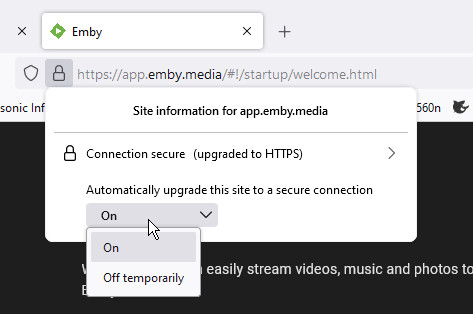
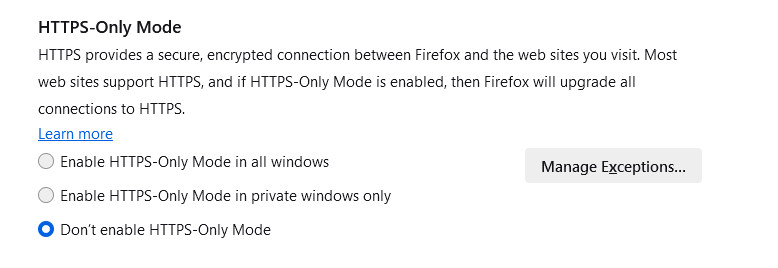
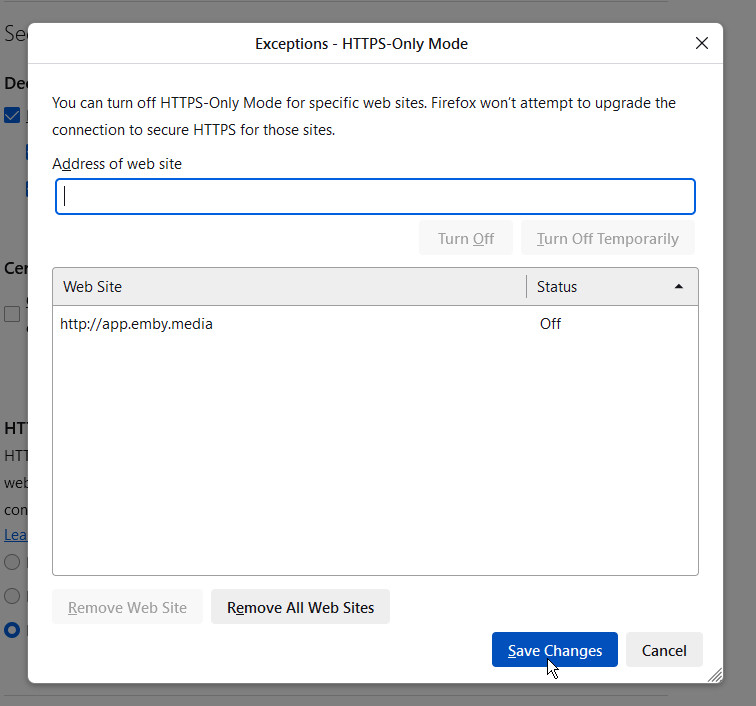
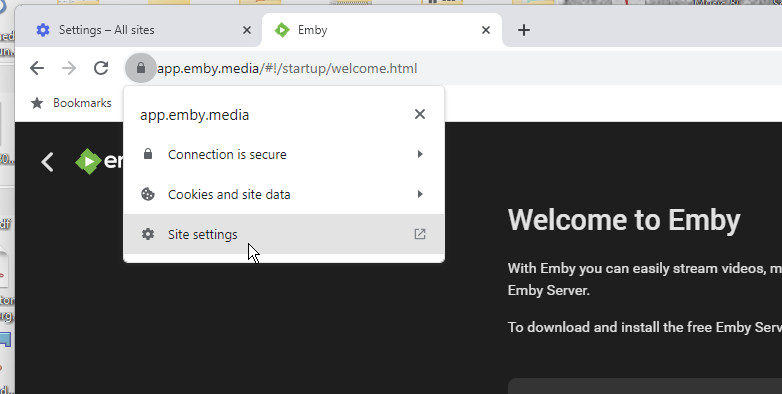
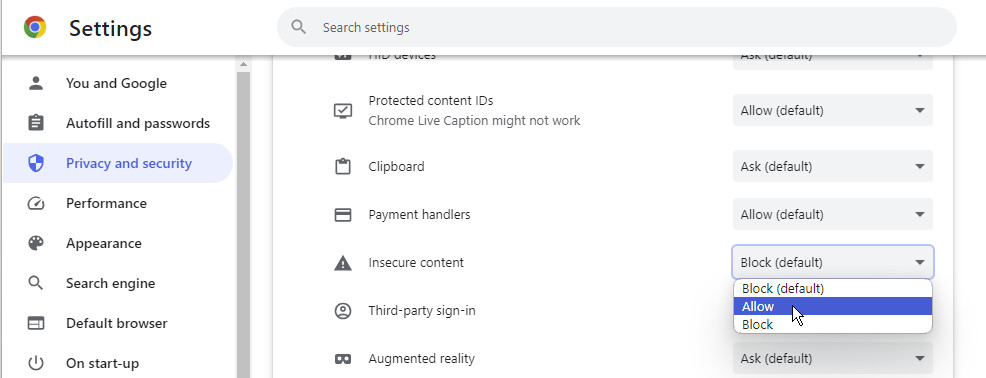
@LukeYes, the browsers may learn - but that's really inconvenient, and it's preferable to make the setting explicitly. You may want to put these settings in the wiki. Firefox: When the site has opened in secure mode, you can click the closed padlock and get an option to allow insecure, but only temporarily: However, it's preferable to do it permanently; for this you can go into settings, find "HTTPS-Only Mode", and tell Firefox to turn off secure mode permanently for any specified site by clicking the Manage Exceptions button: Note that when I tried it, saying "Don't enable HTTPS-Only Mode" in the first screen wasn't enough - in fact that was the setting I already had; going through to the exceptions was required to have the desired effect. Chrome: When the site has opened in secure mode, you can click the closed padlock and go to the site-specific settings, where you can allow insecure pages; this is not only the main page, but also allows insecure links from secure pages: Although my screenshot doesn't show it, this is, as I said above, a site-specific setting. If you go to the main settings page, you can find your way to the same option, but in that case browser-wide, which it would be better not to enable this for. Paul
 1 point
 -
If Infuse can do it then so can Emby. But I pay for Emby, so I shouldn't have to pay for Infuse Pro too just to play my HDR content.1 point