Leaderboard




Popular Content
Showing content with the highest reputation on 03/25/25 in Posts
-
Emby Windows & Emby Xbox A new stable version 2.222.0.0 is available now. Please go to the Microsoft Store and check for updates. Changes 2.222.0 [Win] Don't wait for push channel creation on startup [Xbox] Enable HEVC Playback [Xbox] The EmbyPlus app is discontinued. EmbyPlus users will automatically transition to the regular app (2.222.0), which is now equal to the Plus app 2.221.0 [Win] Wintheme: Fix toggle button background [Win] Fix inconsistent refresh rate changes when hard-limiting [Win] AudioPlkayer: Fix exception when repeating a single song 2.219.0 [Win] MPV: Fix missing VO assignment2 points
-
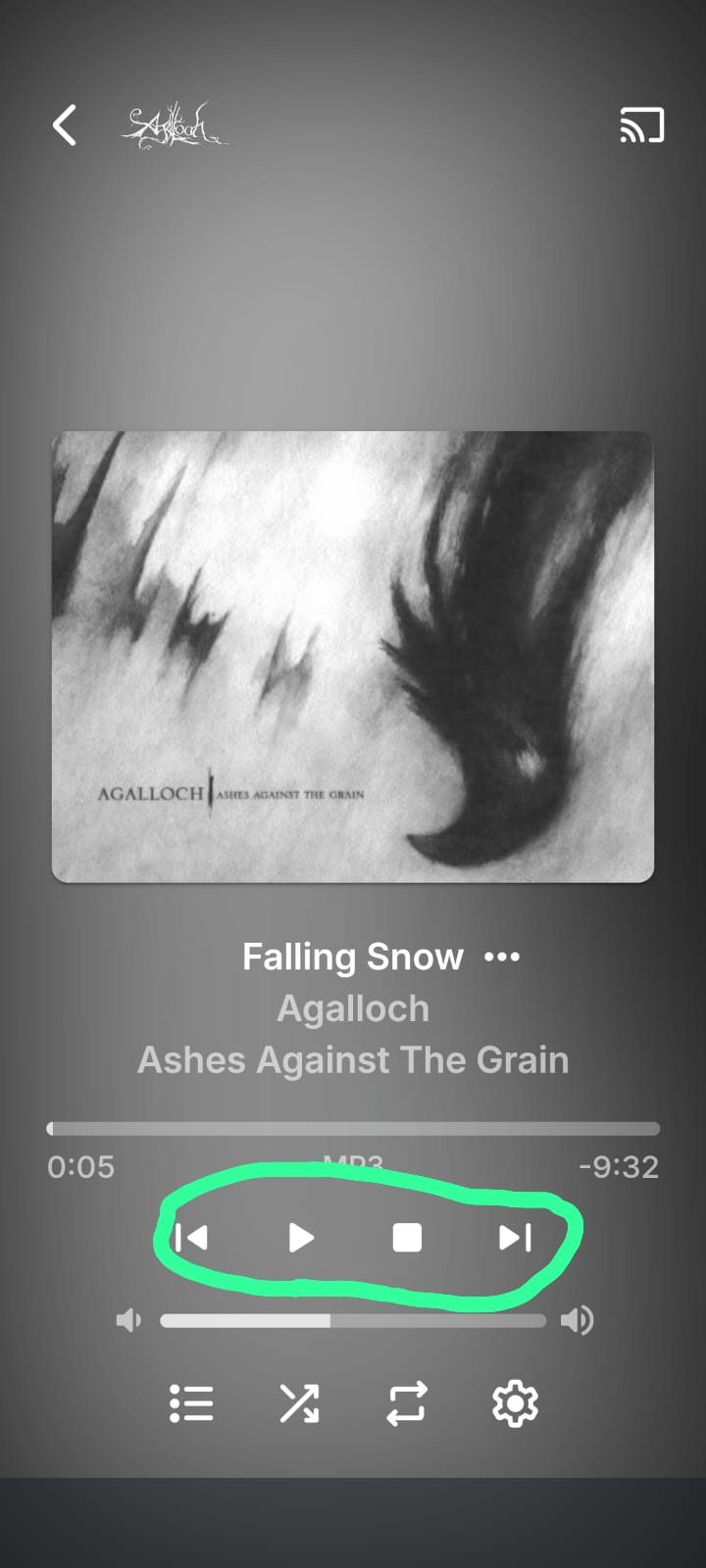
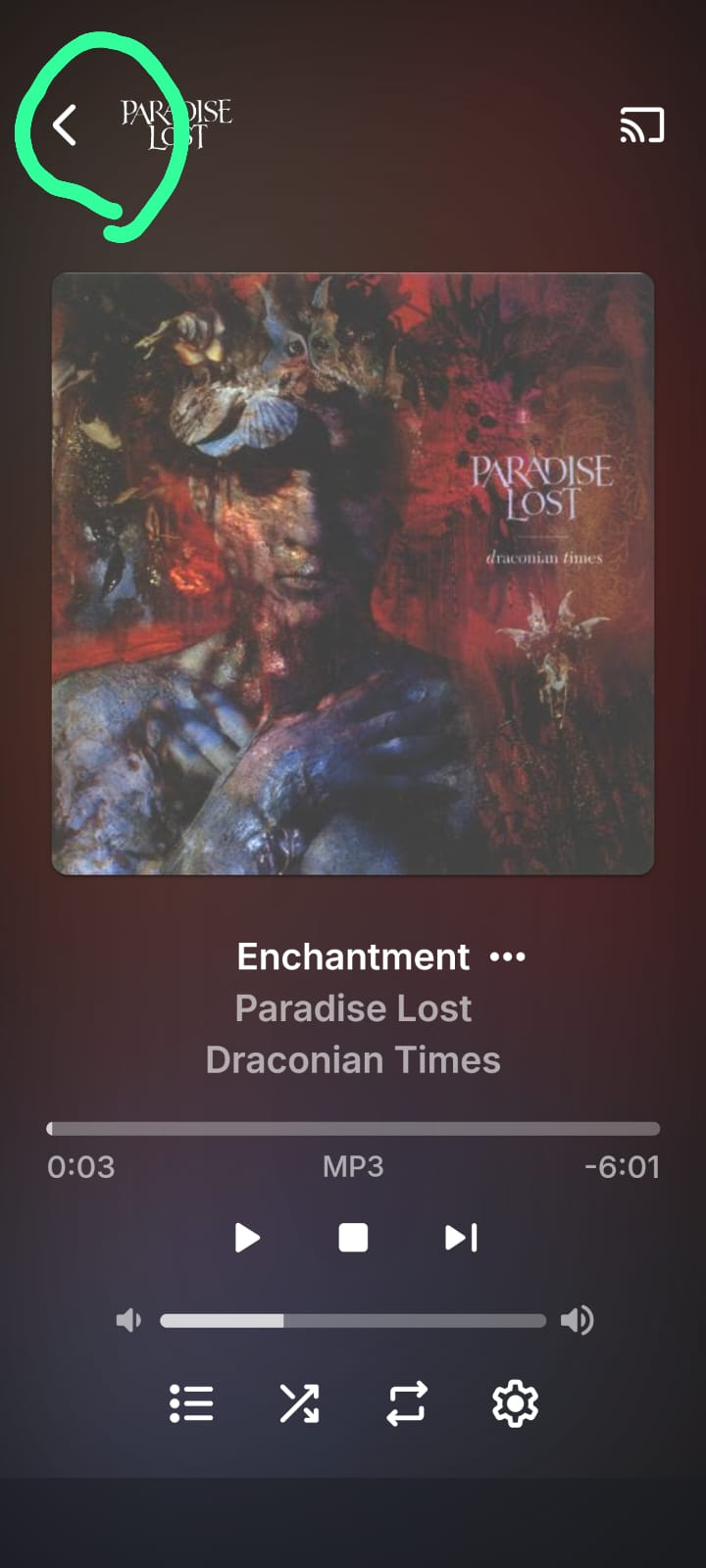
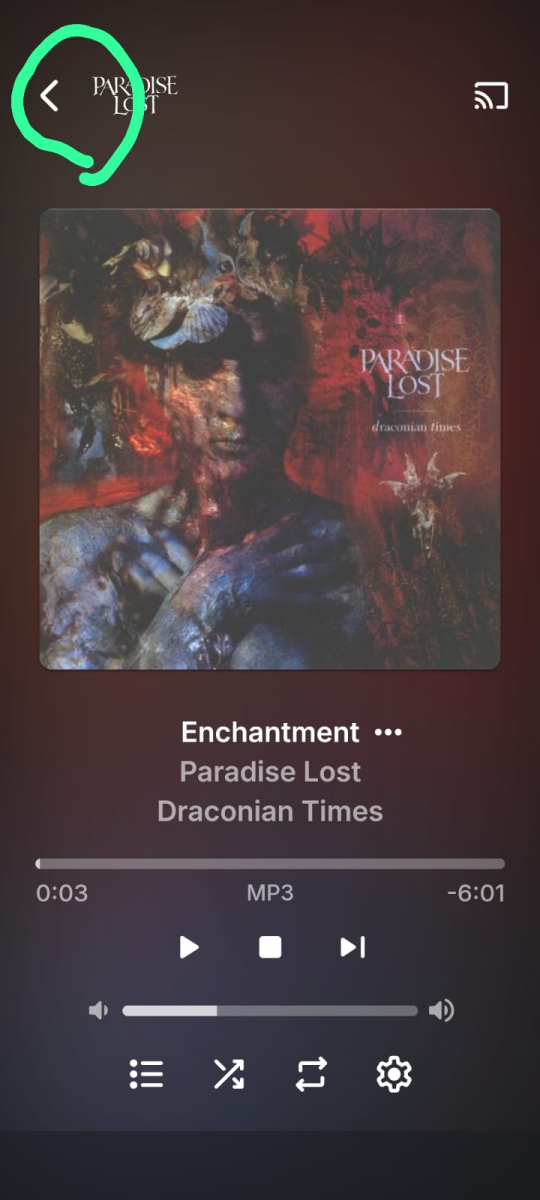
Good day I’ve been an Emby user for some time, and though the experience is fantastic for Movies and TV shows, I find it lacking for music. I often resort to third-party player apps for a satisfactory audio experience on my Android device. My goal is to use the Emby app itself for music without needing external workarounds such as third party apps that may not have the best native integration with Emby. Why This Post? Like many users, I consume most of my music on a mobile device, and the current UI and controls feel clunky and less user-friendly than a modern music player should. To improve the experience for mobile users, I’ve thought of two changes I’d love to see that would improve the experience tremendously. These are subjective but align with what I believe most mobile users would want, based on how the market alternatives are laiyng out their apps. UI Challenges: It’s a well-known fact that scrolling and navigating via mobile touchscreens is less precise than with a mouse and keyboard—especially for those with larger fingers or smaller screens. UX/UI design often addresses this with larger tap targets, gesture support, and simplified layouts. While Emby’s Android app has made efforts in the right direction, its interface for music users falls short. Music users navigate more frequently—switching songs, albums, or playlists, pausing, etc.—than video users, making these shortcomings more noticeable and frustrating. Below please find a wishlist of what i'd like to see implemented: Enlarge Playback Controls (Pause, Stop, Skip) in Music UI The app's playback controls are way too small for mobile users, especially for people with larger fingers or small phone screens. It is the most essential and most used option on a music player, yet its size is al most the smallest and hardest to touch, as it is relegated to a tiny fraction of the screen. This is particularly cumbersome in low-attention moments like walking or driving, where focusing on a small target is impractical. If you look at other mobile apps that focus on music: Spotify,Plexamp, Itunes, they all have in common that the play/pause icon is larger,o for very good reasons .Emby should follow this same standard. While I appreciate to be able to see the large album art, it shouldn’t shrink the playback controls. The album and song titles could move up or shrink slightly to give those buttons more space. Below please find a picture to illustrate what i am talking about: Changes in app menu Navigation: Add Swipe Gesture to Switch from Now Playing to Library Seamlessly Perhaps this is the single best feature that if added, would improve the mobile experience tremendously, not only in music, but all across the app too. I’d love to see a quality-of-life tweak in the Android app where I can swipe (e.g., up or down) to seamlessly switch from the Now Playing screen to the Library tab, instead of tapping the back button. This would make navigation feel more intuitive and fluid, especially during music playback to change or view a playlist, album or artist with ease. Swipe features are an industry standard nowadays in most modern mobile apps. It is far easier than pinpointing a small icon in the top-left corner, especially in distracted scenarios. If swiping isn’t feasible due to technical limitations, at least enlarge the back arrow to reduce the precision required from the user. Below a screenshot of the current back arrow that is requried to press

 2 points
 -
Ok great. I'm already seeing an improvement on searching for stuff and the loading of the images / content in the Libraries so fingers crossed this will reduce a bottleneck and the CPU won't be getting battered when more devices are online. Thanks for the help2 points
-
This means only 'matias' can see anything or change into (cd) this directory! if you really want to let emby save to anything under this you will need to open up the permissions to all user to the 'matias' dir: sudo chmod 755 /home/matias or make emby part of users group then allow the 'users' group access: sudo adduser emby matias sudo chmod 750 /home/matias1 point
-
It should rename your strm files so that they include the providers id like the example in the plugin web user interface. Emby will then read this and use it to look up the title, thus giving a more accurate import in to Emby.1 point
-
yeah i think ive just found the issue, my media directory is set to 770 with everything under the media group, however somehow group ownership got broke and while ls -la showed them belonging to the media group with 660, about half the files were only readable to user and not group, but a ``chown -R :media /media`` seems to have fixed the visibility at least, going to test and see if that was the issue with the thumbnails too, i have a feeling something may have gone funky with the perms on one of the disks during mounting after the last reboot1 point
-
Hi, have you guys seen this?1 point
-
I would avoid a variable bit-rate encoding of the video. This can cause stuttering if any packets are received out of order across a TCP connection. Also, the user's CPU needs to work harder to combine TCP packets that probably do not aline with the variable bit rate I frames. This means info inside a single TCP packet will most of the time not include an I Frame. So, any follow-up packets have to be stored in cache waiting for the I-Frame info on what variable bit-rate is needed for the next 8 seconds or so. With Internet, packets can get out of order, fail and need to be requested again. This happens mostly with remote connections. If the I frame and following B frames have to wait to be processed to make the variable bit rate work, then you will get agressive stuttering on video playback, depending on the Internet connection to a remote user. The user's mobile or computer usually can wait a while for out of order packets. At some point if they don't show up, the end user's mobile or computer discards the previous packets and asks for all of them again. Variable bit rates (VBR) make this happen more often while constant bit rate (CBR) dosn't have this issue. CBR is much eaiser to handle with a TCP packet delivery. Out of order packets are not so critical. I hope that makes sense. This is why social media video platforms are not, I believe, using VVC with a variable bit rate, rather everything is sent with a constant bit rate, CBR. In order to get the best look on a CBR encoded video, it is best to make the encoding settings very high - Example for MP4 h.264 encoding with AVIDemux 1080P at 1920 x 1040 (1.85) original 25 fps, 24 fps or 23.976 fps Constant Bitrate (Single Pass) Target Bitrate 2400 kbit/s Frametyp look ahead 40 frames Motion Estimation Hexagonal Subpixel Refinement 11 best Direct predicition Spatial Weighted Prediction for P -frames: Weighted references + duplicates Partition Search 8x8 DVT Spatial Transfor, 4x4, 4x8 and 8x4 P-Frame Intra-predicted Blocks, 8x8 Intra-predicted Blocks, 4x4 Intra predicted Blocks (these higher settings for blocks helps reduce pixel artifacts in moving action, but take a lot longer) Frame Encoding CABAC B-frames Maximum consecutive b-frames 3 Adaptive B-frame Decision Optimal B-frames as References - Non-strict (Not Blu-ray Compatible) I Frames GOP size Minimum 16, Maximum 120 I-Frame threshold 40 Analysis: Mixed References Chroma Motion Estimation Trellis Qauntization - Always On Fast Skip Detection on P-frames DCT Decimation on P-Frames Psychovisual Rate Distortion Optimisation 1, Psychovisual Trellis 0 Luma Quantisation Deadzone: Intra Luma Quantisation Deadzone 11, Inter Luma Quantisation Deadzone 21 Quantiser control, Minimum 10, Maximum 51 Maximum Quantiser Step 4 Average Bitrate Tolerance 100% I and P-Frame Quantiser ratio 1.4 P and B-frame Quantiser ratio 1.3 Chroma to Luna Quantiser offset 0 Adaptive Quantisation Variane AQ Auto Variance, Strength 1. This config takes a lot longer to encode. Without hardware, encoding can easily take 4 to 5 hours for 1080P typical 90 minute film on an average Intel Core 7. The thing I have noticed, is that everyone tends to set the encoding level to go faster and this results in much large file sizes for a similar quality. High quality .mp4 1080P at around 2200 kbps, looks very nice and will be around 1.3 GB per hour. If you have high end hardware encoding, you might be able to reach that live, but usually not. As a result, most all hardware encoding that goes live tends to make larger file sizes in .mp4 and this is why people have preferred storage in h.265 .mkv. AV1 looks good. I have not used. I would still try to set it for highest quality encoding and a CBR, if possible. It does take more CPU power to playback compared to H.264. Here is a nice comparison page: https://www.fastpix.io/blog/av1-vs-h-264-vs-h-265-best-codec-for-video-streaming I think a better answer is slower, high quality encoding, CBR and get the file size down and not try to make it happen live. When you store the results that can play back direct, the video will look good, constant bit rate has less sutttering issues and direct play works for all users. Hope that made sense. Ha...1 point
-
Just to circle back on this, I could be wrong but it appears the API scan triggers do process in parallel while a full scan is running. Which is great.1 point
-
I see a new release is now available 2.222.2.0 and I see in the notes that the fix was added in 2.221.0. Confirming that repeat for a single song is working as intended now both with hitting next or letting it repeat on its own. Thank you!1 point
-
Yes it is working fine. Thank you.1 point
-
Thanks for your explanation! In such a case i think there is nothing to do from Emby team side. I just want to find any software to check every video file i would like to add into library. Sometimes i download videos from internet so it looks like a lottery if i add it.1 point
-
Still having the same issues. I must say after a week that are less frequent but still happening Hope this helps.1 point
-
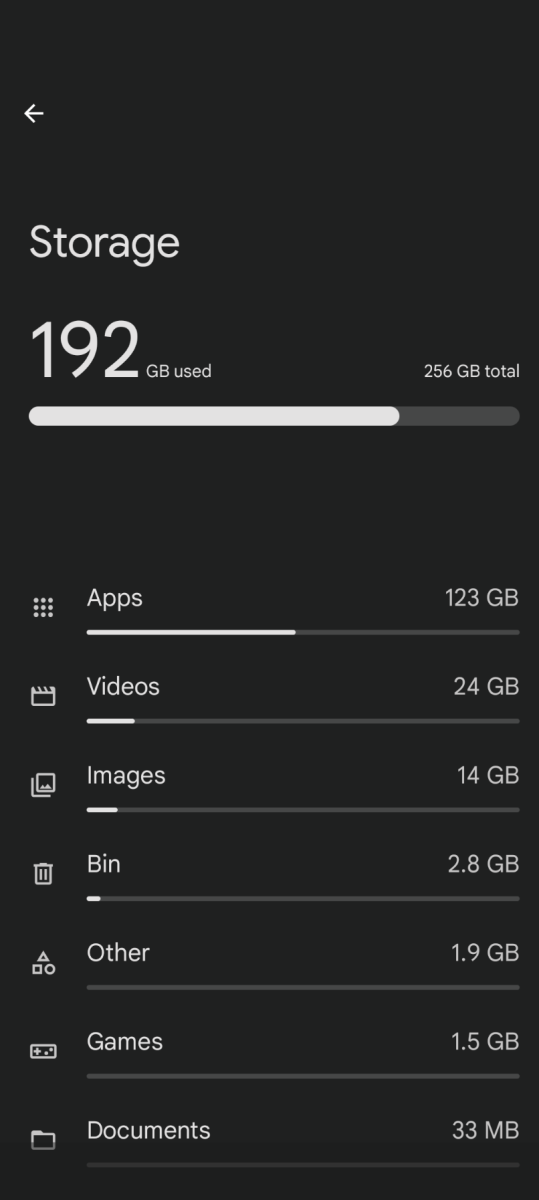
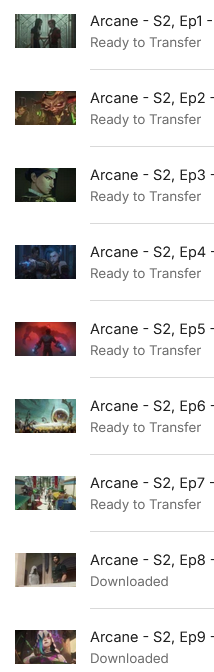
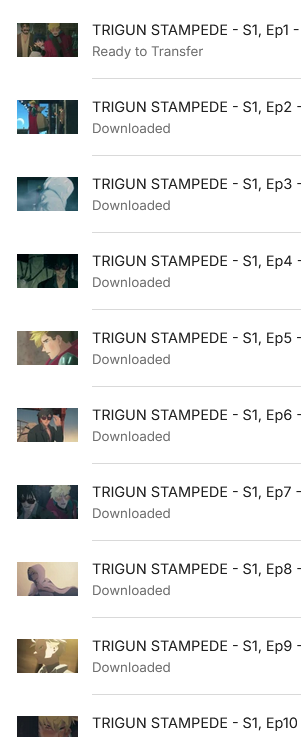
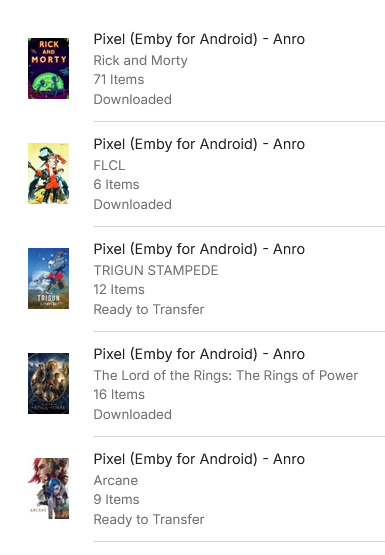
@sa2000I repeated the test overnight. I cleared all download queues, deleted all downloaded episodes from the phone, and added 5 different series to the download queue again. Here is the current state as of this morning: 3 series downloaded completely without issues 1 episode is stuck in 'ready for download' status for Trigun (interestingly, it's S01E01 again) 7 episodes are stuck in 'ready for download' status for Arcane (S02E01-07) There is still plenty of space available. Screenshots:
 1 point
 -
Annual reminder that this feature is still really missing. Can you please share why it isn't being worked on since 8 years (!) it has been asked for?1 point
-
@sa2000can you take a look at this please?1 point
-
This works for me as well but I doubt that it is a Windows bug as I'm sure that an issue like that would have gone unnoticed by the rather large user base they have compared to Emby. I don't know exactly how the app gets the time but "echo %date% %time% & tzutil /g" in a command prompt in Windows gives the current time but as it's 9:51am here I can't be sure what format it currently is in. C:\Users\richa>echo %date% %time% & tzutil /g 25/03/25 9:51:57.43 GMT Standard Time1 point
-
Started a new topic for this as I didn’t find this old thread when I searched. Here’s what I suggested: As I’ve been using Emby more and more for podcasts and audiobooks I’ve found myself frustrated by having to set playback speed to 1.25x or 1.50x every time a track changes or I resume a book after watching a TV show. It would be very handy to have the option for playback speed to be maintained. A basic option would simply to make the playback speed not reset when a track or episode advances to the next track or episode. A more advanced version could be to maintain playback speed by media type, so for instance audio tracks are maintained but video files are not. A much more advanced option would be to remember speed per-title, so that every audiobook or podcast would have playback speeds remembered server-side. The latter would be useful but probably of low priority for most people. The first basic option seems easiest to implement and would definitely solve the frustration. Thanks for considering this and for the ongoing brilliant work on Emby.1 point
-
Thanks Sean, will look into it.1 point
-
wonder why that happened, anyway, new install complete, scanning files, will take some time1 point
-
Sorry, its Emby Windows 2.219.2.0 I just installed it for the first time from the Windows store yesterday as Luke asked. I've always been using Emby Theater for years before that.1 point
-
@Kigeki An update - after the earlier shortage of storage and then freeing up storage - download transfers resumed but i have ended up now with same situation as your case - with 2 episodes not being downloaded - with over 15Gb free internal storage available. I do not know at this stage, if the earlier transient storage shortage was a factor in leading to the current state1 point
-
Ok, thanks Luke.1 point
-
the movies runs extremely slow. Its on the same server with all me other 4k movies. All just a few movies this effects. As I stated before I had the same issue with Kodi on the Zidoo and when on turned on DV Compatibility mode those movies play with no issue. If I play them using Zidoo Video player either with Emby or with Zidoo software they play with no issues1 point
-
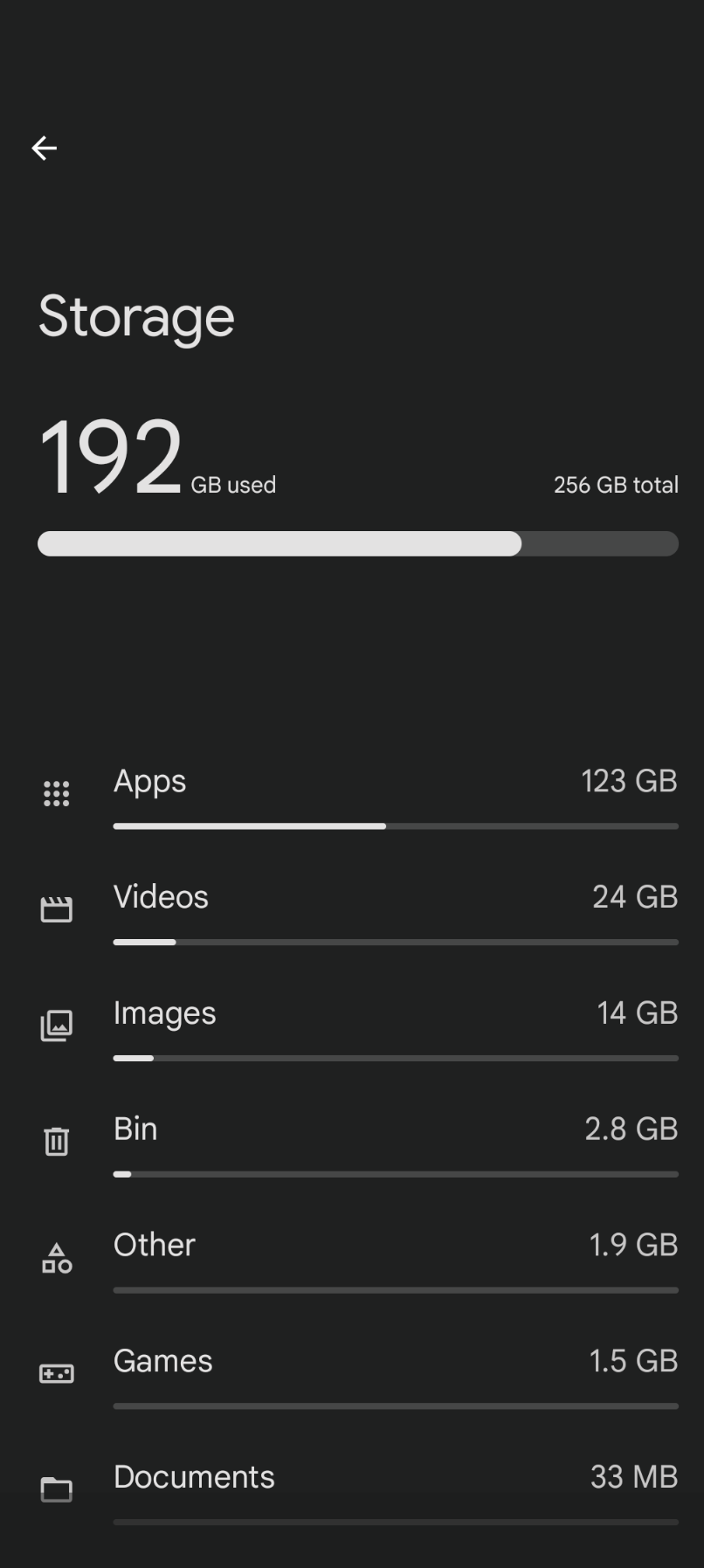
@KigekiIn my attempt to reproduce the issue, I did 5 TV shows downloads and 3 of them completed ok but 2 were in state of ready to transfer and transferring. I have 50 episodes flagged by the server as ready to transfer but the android app was logging the same log lines as you had in your logs for these 50 episodes I discovered whilst trying to share my android logs through the app that the device was short on storage - i had a pop up So I deleted the download job for the 3 series that completed ok and after that the 50 ready to transfer got redued to 38 So could you please when the problem arises, go to settings on the device and find out how much free space there is at that time on internal storage for the device1 point
-
Hi, we should have an updated ffmpeg build on the server beta channel in the very near future. Thanks guys.1 point
-
Please add a hide control for the tab button.1 point
-
Thanks for the info. Got it sorted out now!1 point
-
If not on localhost or https: three-dot menu (next to "New API key")>Switch to Table view, else item three-dot menu on the right.1 point
-
I'm using Symfonium to stream my music from Emby, and I highly recommend it for both Android and Apple users. With its sleek, user-friendly interface and seamless integration with Emby, Symfonium offers an exceptional music experience that’s both intuitive and reliable. Whether you're commuting or relaxing at home, you can enjoy high-quality audio and effortless navigation—making it the perfect choice for true music enthusiasts. Give Symfonium a try and take your Emby music experience to the next level! For more details and to download the app, visit https://symfonium.app.1 point
-
We work very hard on Emby and we thank you for your support.1 point
-
Hi guy Thanks a lot for your explanation So now I understand some "issue". That normal :) Hope that on the future it will be available ! Have a good week-end, Best regards,1 point
-
Forgot to say. Any Chrome based browser should support HEVC/H.265 natively as long as you have hardware acceleration available. Firefox supports software decoding of HEVC but does not handle HDR colors so any HDR video will have very dull colors.1 point
-
There are already replacements to hevc. Av1 vc1 vp8 and vp8. All will have same issues iirc. Plus if you don’t have hardware to decode them your cpu will choke usually.1 point
-
After using all kind of ways for remote access the only thing I feel comfortable with is by using tailscale. Opening ports when more and more ISPs block CGNAT, static IPs etc, and the most important of all... exposing my NAS to the internet is a big no for me for various reasons. Using slow relays etc is also a no for me also for various reasons. Nothing compares to the "easy to setup and always working", security, privacy and speed of a virtual private network. It would be amazing if Emby someday would have some kind of tailscale integration. So user would just add his tailscale account directly to the Emby app and won't have to install the tailscale app and to make sure it is open.1 point
-
to be clear , I am talking about the the logo during playback (TOP left corner) that pops up when paused or when tapping to view info, chapters, next… currently its very small1 point
-
HI, we'll take a look at it. Thanks.1 point
-
This might help you. With this new plugin from @TeamB its possible to keep those Ratings in check.1 point
-
can it be called Emboss1 point