Leaderboard




Popular Content
Showing content with the highest reputation on 03/24/25 in Posts
-
What are you talking about?????? Details and logs have been provided for different environments, with various playback devices, different graphics cards, content shared via Google Drive where the problem occurs, etc., and no response has been received.3 points
-
I think, that it's safe to conclude, that my TV's performance is only slightly better than of a regular toasters, so as far as I'm concerned, you guys fixed the issue, and I need to get a new TV in the foreseeable future. You people are awesome to be honest, your work is very much appreciated! Now I feel inclined to buy the Lifetime package Hope that I did not cause yous too much of a headache with this issue! Sincerely, someone who also fixes pesky bugs like this on a daily basis2 points
-
feature request ? best joke today on forum2 points
-
True it is a change in behavior that happened in 4.8 release as everything was not ported into 4.8 release related to all the subtitle changes that were happening is my understanding.2 points
-
Not quite, you have number of nested season folders (Gangs of London S03, Invincible S03, Powerbook III S04. Reacher S03, SWAT S08, The Rookie S07, Will Trent S03) making Emby think that #2nd batch is in fact series folder. Each TV show needs to have its own folder, season folder(s) underneath are not mandatory (but recommended). Restructure, rescan. TV Naming2 points
-
It's not really a feature request, because it was working fine, for years. Then an update broke it. That's a bug, which has now existed for over a year and affects huge portions of people's libraries. Also, throttling working properly via the GPU is a paid feature, which isn't working. Edit: As for reporting properly, we was told on 4 separate occasions over 8 months that they are "looking in to it" . which to me, tells me they have enough information2 points
-
Great news it's a dynamic list ... Any hints on a beta release date @Luke?2 points
-
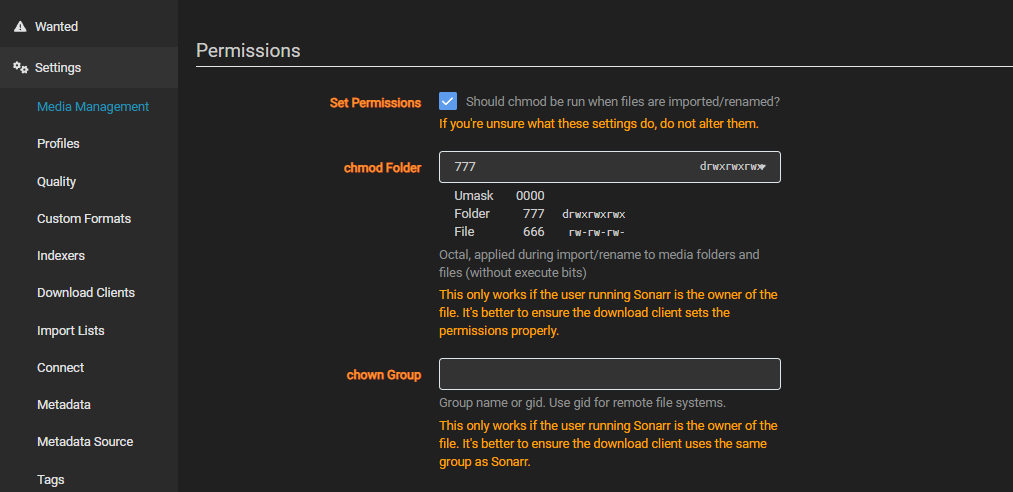
There is this in Sonarr to play with. I don't remember ever had to play around with it.
 2 points
 -
The plugin works now and will still continue to work even after the core feature is ready. It looks like the plugin creates and updates regular playlists. The core feature will not work like that. It will be a dynamic list.2 points
-
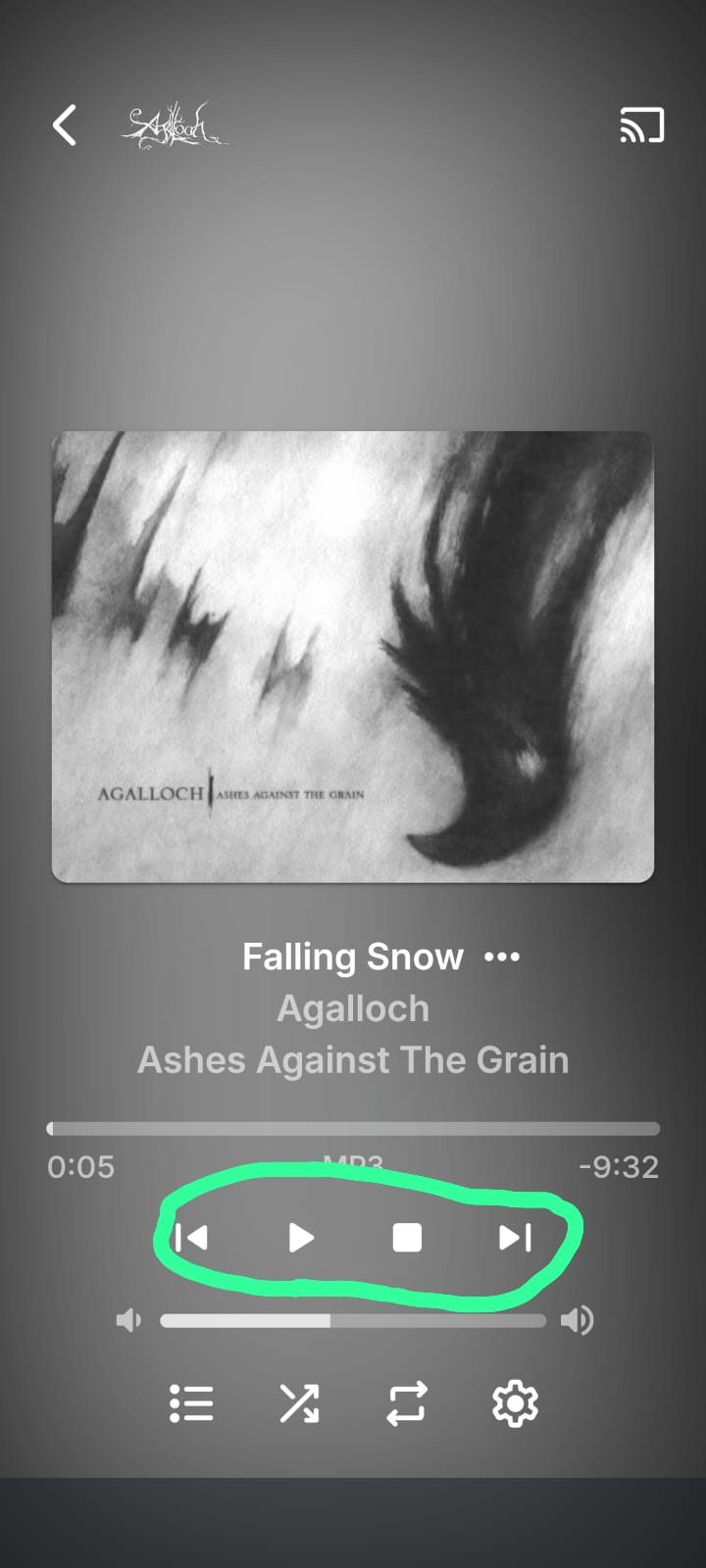
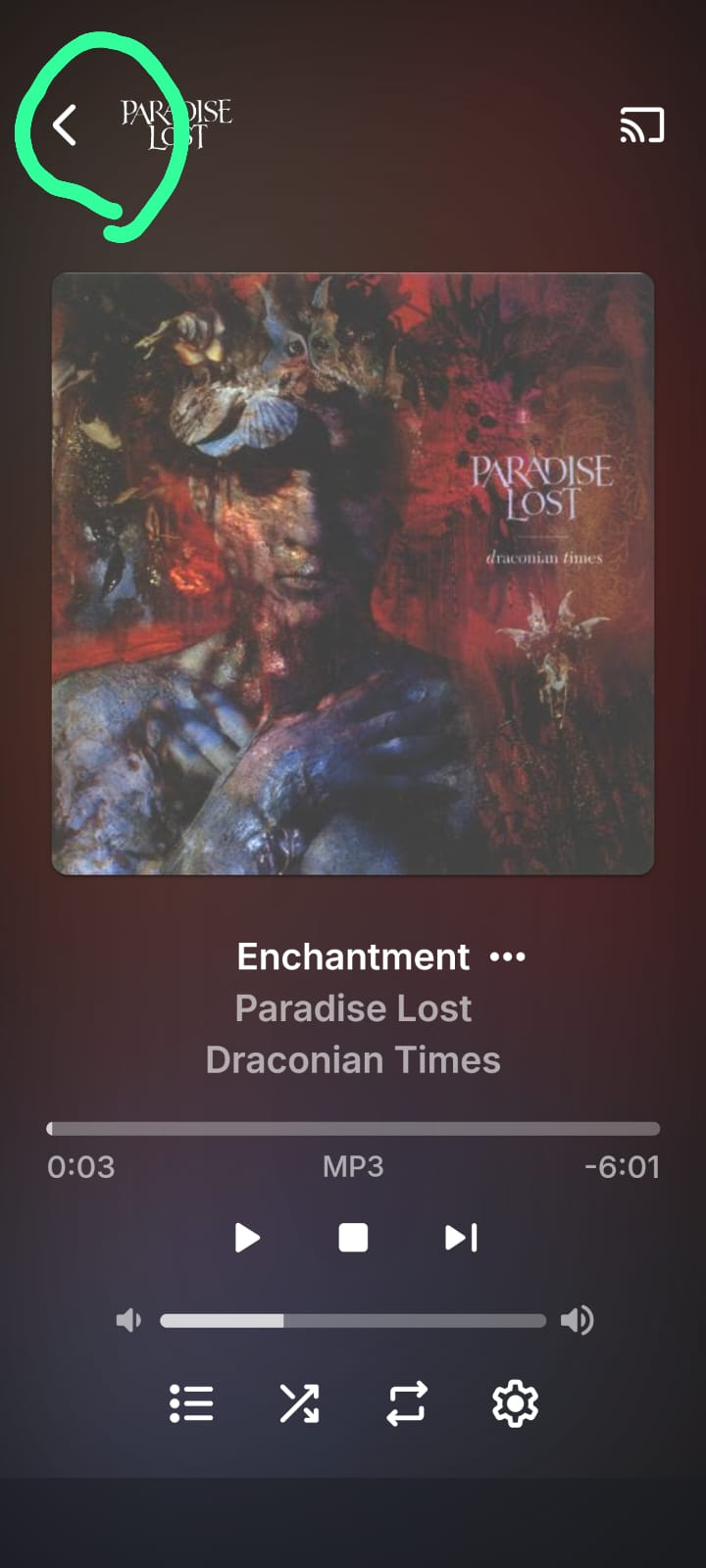
Good day I’ve been an Emby user for some time, and though the experience is fantastic for Movies and TV shows, I find it lacking for music. I often resort to third-party player apps for a satisfactory audio experience on my Android device. My goal is to use the Emby app itself for music without needing external workarounds such as third party apps that may not have the best native integration with Emby. Why This Post? Like many users, I consume most of my music on a mobile device, and the current UI and controls feel clunky and less user-friendly than a modern music player should. To improve the experience for mobile users, I’ve thought of two changes I’d love to see that would improve the experience tremendously. These are subjective but align with what I believe most mobile users would want, based on how the market alternatives are laiyng out their apps. UI Challenges: It’s a well-known fact that scrolling and navigating via mobile touchscreens is less precise than with a mouse and keyboard—especially for those with larger fingers or smaller screens. UX/UI design often addresses this with larger tap targets, gesture support, and simplified layouts. While Emby’s Android app has made efforts in the right direction, its interface for music users falls short. Music users navigate more frequently—switching songs, albums, or playlists, pausing, etc.—than video users, making these shortcomings more noticeable and frustrating. Below please find a wishlist of what i'd like to see implemented: Enlarge Playback Controls (Pause, Stop, Skip) in Music UI The app's playback controls are way too small for mobile users, especially for people with larger fingers or small phone screens. It is the most essential and most used option on a music player, yet its size is al most the smallest and hardest to touch, as it is relegated to a tiny fraction of the screen. This is particularly cumbersome in low-attention moments like walking or driving, where focusing on a small target is impractical. If you look at other mobile apps that focus on music: Spotify,Plexamp, Itunes, they all have in common that the play/pause icon is larger,o for very good reasons .Emby should follow this same standard. While I appreciate to be able to see the large album art, it shouldn’t shrink the playback controls. The album and song titles could move up or shrink slightly to give those buttons more space. Below please find a picture to illustrate what i am talking about: Changes in app menu Navigation: Add Swipe Gesture to Switch from Now Playing to Library Seamlessly Perhaps this is the single best feature that if added, would improve the mobile experience tremendously, not only in music, but all across the app too. I’d love to see a quality-of-life tweak in the Android app where I can swipe (e.g., up or down) to seamlessly switch from the Now Playing screen to the Library tab, instead of tapping the back button. This would make navigation feel more intuitive and fluid, especially during music playback to change or view a playlist, album or artist with ease. Swipe features are an industry standard nowadays in most modern mobile apps. It is far easier than pinpointing a small icon in the top-left corner, especially in distracted scenarios. If swiping isn’t feasible due to technical limitations, at least enlarge the back arrow to reduce the precision required from the user. Below a screenshot of the current back arrow that is requried to press
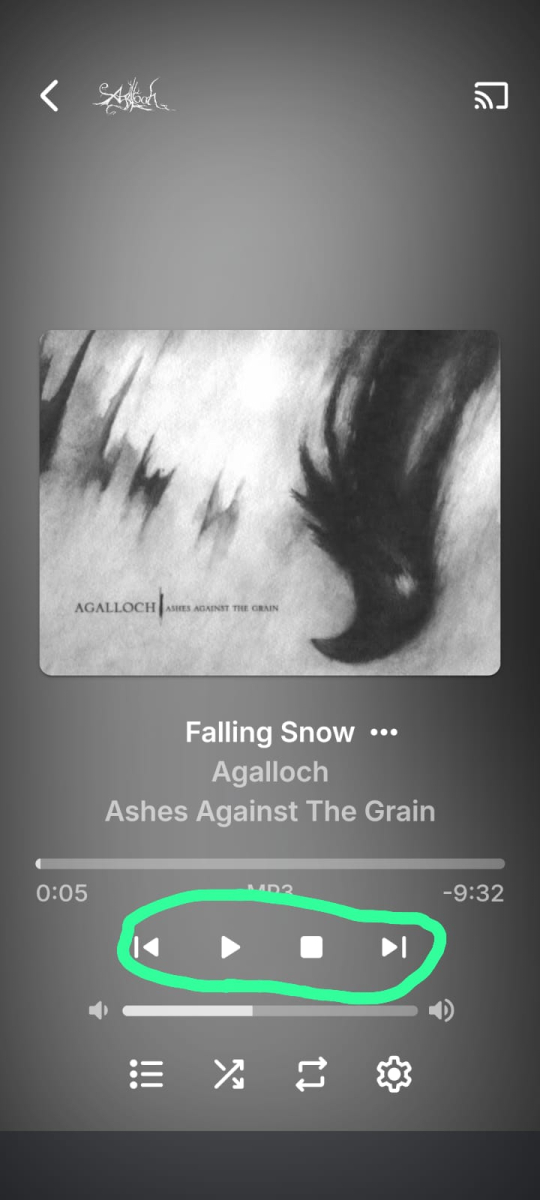
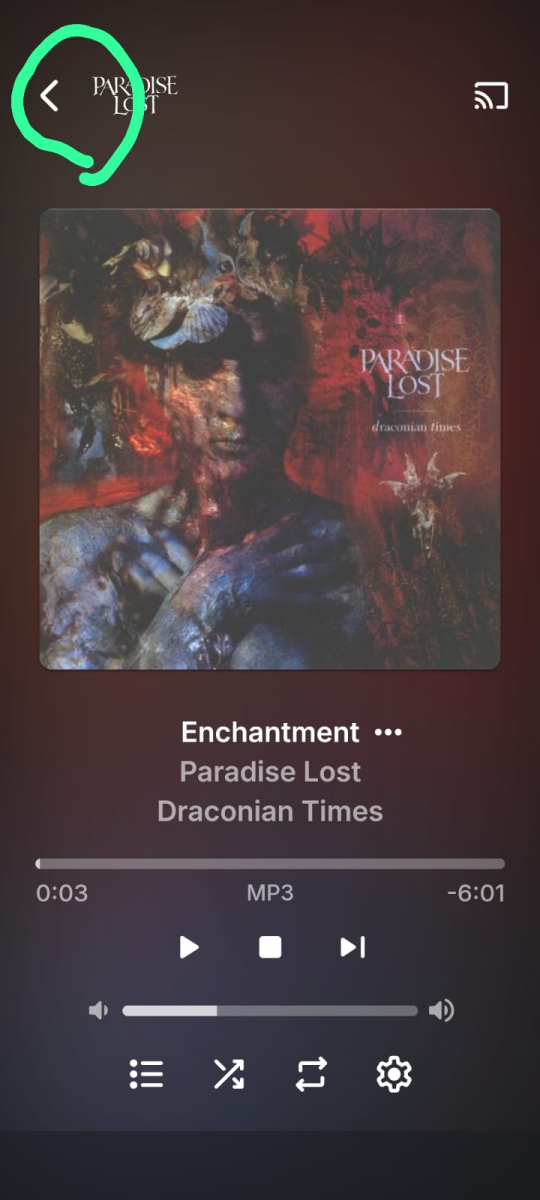 1 point
 -
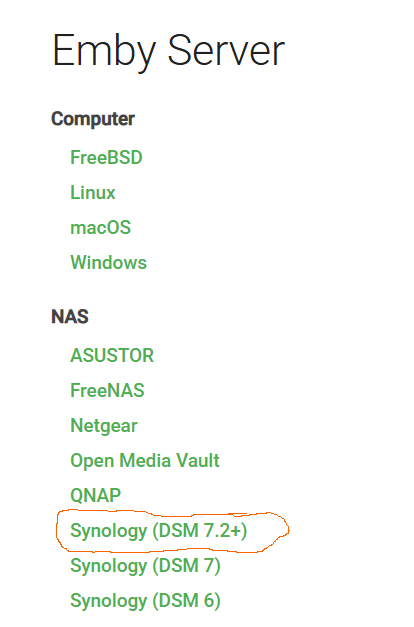
I realized I was downloading the wrong version. When you go to the download section of the server, you need to pull the Synology DSM 7.2+ version. I wasn't going to the site but working off link people had posted in the forums and apparently that was taking me to DSM 7 or DSM 6 versions which wasn't compatible with my NAS which was running 7.2+. After that, I just stopped the server and loaded in the Package Manager Manual Install option and it updated easy peasy.
 1 point
 -
Noticed this was see, massive appreciation to the devs for quick changes.1 point
-
Try downgrading nord client1 point
-
Hi, we should have an updated ffmpeg build on the server beta channel in the very near future. Thanks guys.1 point
-
That wasn't my post. I don't recall the error at the moment as I had applied the original workaround. Then undid the workaround and applied the xml fix to confirm error didn't return. I'll have to undo the xml fix when home and try it and look at the logs. See my post above about disabling it on the windows box. Is emby running bare metal on windows or within a hyper-v vm or docker container? *Edit* this could be nord specific. Do you have threat protection enabled? https://www.reddit.com/r/nordvpn/s/n9aJ0Wc0tb https://www.reddit.com/r/nordvpn/s/JZOQ9pDqWJ1 point
-
For anyone else, in theater if you switch from TV to either Desktop or Mobile/Tablet you can set the cast to whatever device, then you can switch back to TV and it will continue casting to that device. I've setup a pi with a small touchscreen so I can play my Emby music through my Sonos speakers.1 point
-
Hi Luke, I'm not really having a problem.. I was updating the topic with an issue I ran into after restoring the server (rebuilding from DSM package to Docker) in that after restoring the config and metadata to the new Docker instance everything worked, however, the first backup of the new Emby (now hosted via Docker) failed. I presumed it failed for one of two reasons: The existing full backup was not old enough (mere few hours between restoring and the full backup job running) A restored Emby Server cannot backup over its own restored data (see first point) These were guesses on my part, so I was merely updating the topic with my personal experience. I discovered (based on my thinking about the two above points) that if I completely deleted the previous backup (which was also restore data for the Emby Server that is now on Docker) then the Backup task would run like it was the first time. The backup path was the same for DSM package and Docker, so it had old data in it from the package install. Hope this helps someone who migrates from DSM package to Docker1 point
-
Hi, thanks for following up.1 point
-
Hi, we're looking into it. Thanks guys.1 point
-
Amazing! Thank you! Although I do like the TV view better. But for my purposes, this will work just fine.1 point
-
Everything is now functioning as expected for me. Thanks for the assistance on the issue.1 point
-
Hmm devs will probably have to comment on this. 16:27:29.740 [tls @ 0x1957c00] mbedtls_ssl_read reported connection reset by peer 16:27:29.740 [https @ 0x1954c00] Stream ends prematurely at 1669, should be 18446744073709551615 16:27:29.740 https://xxxxxxxxx.x:443/play/xxxxxxxxxxxxxxxxxxxxxxxxxxxxxxxxxxxxxxxxxxxxxxxxx: Input/output error1 point
-
In this case, I see a solution to do with the remux the media and an script that could be used to reset info regarding media transcoding and cache. This is a media based issue that does not happen with other media, it really is more of a feature request to have some process to clean up playback issues with media that have active, "on" SubRip PGS subtitles plus certain combination of high res video and audio and maybe even the TV model or Wifi connection interference may also trigger transcoding. A fast network is great, but that's not everything involved in issues. It similar to a feature request to playback Dolby surround better. You can call it a bug, but for most users who don’t have this combination codecs video / audio + SubRip subtitles, don’t run into this issue. It’s really important to include logs and details with a nice QA step by step report, so the problem can be replicated. When I do QA for business and the dev team cannot replicate a report, it doesn’t go any further. It just gets thrown back and asks for a step by step process with any media examples so the issue can be seen. This forum post really took a long time to get enough information to even duplicate the problem. That why logs and examples are requested. Skipping this just makes trying to diagnose the issue many times more difficult. I understand not everyone does QA for a living. Trying to explain a complex issue is tricky. It is more helpful to actually respond with requested information and logs, rather than suggesting that it doesn't matter.1 point
-
I agree that there are a lot of screens and steps, largely due to some of the more advanced features and the fact that they have their own guide data available. To each his/her own, always good to have choices.1 point
-
New pin worked for me but will only last 24hrs. I don't think the plug in update fully resolved, guess I will see in 24hrs1 point
-
It broke again yesterday evening and can’t get a new pin and connection even after revoking in Trakt, I’m going to assume this will work again in about 6 or so hours. this is an issue with Trakts new 0auth and 24hr token expiration and Emby hasn’t updated the plugin properly since this change. I'm not seeing this issue if I’m using infuse and Trakt signed into my account, this will scrobble.1 point
-
Try the EnableUserPreferenceAccess setting.1 point
-
@KigekiThanks for all the diagnostics provided. I have not been able to reproduce the issue trying out multiple series downloads. I have now referred the issue with the diagnostics to the development team1 point
-
I'm certain it didn't change. I've just double checked the external Downloads folder to confirm there is no Emby downloads. They don't, unfortunately, I enabled them the next morning when I was instructed to do so.1 point
-
No, use the latest dll in the thread rather than the first post , if you still experience errors let me know VODtoSTRMscheduledTask.dll1 point
-
I played around with it and found a way to replicate the problem. Seems to happen when you change the brightness in the app, if you set it to anything other than 1 the app will dim the display every 10 or so second.1 point
-
No luck, everything behaves the same as last time: The DLNA server is detected on the network. DLNA content is not browsable: the TV just displays a scrolling circle animation on the screen.1 point
-
I see the blog for 1.0.46 is up already. As a constant moaner about blog updates I appreciate it. Thank you!1 point
-
Any update on this bug?1 point
-
Not sure if a request was submitted for this and if so I apologize for asking for the same request but I was wondering if it might be a possibility to give us the option to add or pin individual movies from generated collections made from ACDB.TV and from manually created collections to the homepage so that they will show and be displayed on the homepage just like latest movie, latest new releases etc... Example:: Like we see on Plex, Netflix, Prime TV, Apple TV and so on. "True Story Based" collection "Trending Now" collection "Top Movies with" actor and or director collection "If you like" Genres collections (mystery, sifi) Can have the option of being accessed and displayed without having to go to the collections tab/folder to access and play the movies or content from that collection. I look forward to your reply and thanks in advance.1 point
-
Thanks for the info1 point
-
Errors have not been a problem lately - but admittedly my process has changed a bit. Somewhat like @Neminemsuggested I am processing all downloaded files with FileFlows Thanks for checking back in1 point
-
"Happy 2 Play" gave me an idea when he asked me to click on the http://localhost:8096. That got me right in the way my icon should have. Gave me an idea, and after a bit of research, I found I could make that address into an icon. I dragged the little tiny file icon just to the very left of the already open emby site. As soon as it hit my desk top it turned into an icon, for some reason, it was an I.D.M. icon. So, I found an emby i.c.s. icon file,downloaded it. I removed the non-working one from my tray, and have a normal working desktop icon. I'm sorry that I couldn't explain the problem any better. The little "X" next to office Mark does not close anything besides an open window. Thank You for bearing with me for half the evening. I really appreciate all the help1 point
-
Yes these NAS systems are notorious for issue like this depending on how media is moved around.1 point
-
Ok thanks! I'll keep that in mind, but not sur for the moment if I really want to pass CORE to SCALE without knowing the impact of my original infrastructure.1 point
-
I tried that a couple of times last night--with no luck. Just tried it again and It worked this time! Scrobbling has returned. Thanks!1 point
-
Great. Thank You. The development team will look into making this setting available in the Server Network Settings UI1 point
-
Hi, there's currently no way to do this, but bulk edit features are planned for future updates. Thanks.1 point
-
Honestly this would be extremely helpful. I've just been able to compile my own ffmpeg using the rockchip upstream work, and it works extremely well, however i can't use it within emby due to whatever customisations you guys do to ffmpeg. I really think it would be great to see this released as soon as possible or at least a mechanism by which we can use custom built ffmpegs within emby (or at least our ability to compile ffmpeg using emby's codebase).1 point
-
Emby for Apple TV 1.9.5 has been released. Here are the highlights: Fix sporadic cases of Up Next appearing blank in the video player Add new startup behavior option to control how logins are remembered (or not) Add Change Server to login screen View the full article1 point
-
hi after 6 months again i make this codes to make users and set permission for access and its great now and work fine for my project : i'll send it here if anyone need to use it leter : # Created: 2024/07/04 12:24:41 # Last modified: 2024/08/15 00:49:27 import requests import sys from config import API_KEY, EMBY_URL # Get user_id and password from command-line arguments if len(sys.argv) != 3: print("Usage: mkuser.py <user_id> <password>") sys.exit(1) user_id = sys.argv[1] password = sys.argv[2] try: # Create a new user create_user_url = f'{EMBY_URL}/Users/New' headers = { 'X-Emby-Token': API_KEY, 'Content-Type': 'application/json' } create_payload = { 'Name': user_id } response = requests.post(create_user_url, headers=headers, json=create_payload) response.raise_for_status() user_id_response = response.json()['Id'] print(f"User '{user_id}' created successfully with ID: {user_id_response}") # Set the password for the created user set_password_url = f'{EMBY_URL}/Users/{user_id_response}/Password' password_payload = { 'CurrentPw': None, # Use None if setting the password for the first time 'NewPw': password } response = requests.post(set_password_url, headers=headers, json=password_payload) response.raise_for_status() print(f"Password for user '{user_id}' set successfully to '{password}'") # Restrict user's access to all libraries user_policy_url = f'{EMBY_URL}/Users/{user_id_response}/Policy' policy_payload = { "IsAdministrator": False, "IsHidden": False, "IsDisabled": False, "BlockedTags": [], "IsTagBlockingModeInclusive": False, "EnableUserPreferenceAccess": True, "AccessSchedules": [], "BlockUnratedItems": [], "EnableRemoteControlOfOtherUsers": False, "EnableSharedDeviceControl": False, "EnableLiveTvManagement": False, "EnableLiveTvAccess": False, "EnableMediaPlayback": True, "EnableAudioPlaybackTranscoding": True, "EnableVideoPlaybackTranscoding": True, "EnablePlaybackRemuxing": True, "EnableContentDeletion": False, "EnableContentDeletionFromFolders": [], "EnableContentDownloading": False, "EnableSyncTranscoding": False, "EnableMediaConversion": False, "EnabledDevices": [], "EnableAllDevices": True, "EnabledChannels": [], "EnableAllChannels": False, "EnabledFolders": False, "EnableAllFolders": False, "InvalidLoginAttemptCount": 0, "EnablePublicSharing": False, "BlockedMediaFolders": [], "BlockedChannels": [], "RemoteClientBitrateLimit": 0, "AuthenticationProviderId": "Emby.Server.Implementations.Library.DefaultAuthenticationProvider" } response = requests.post(user_policy_url, headers=headers, json=policy_payload) response.raise_for_status() print(f"Access to all libraries restricted for user '{user_id}'") except requests.exceptions.HTTPError as e: print(f"HTTP error occurred: {e}") print(f"Response content: {response.text}") sys.exit(1) except Exception as e: print(f"An error occurred: {e}") sys.exit(1)1 point
-
HI, once we have a smart views feature you should be able to design something similar on your own.1 point
-
1 point
-
Just in case anyone else get this, here is what worked for me. I just had this exact same issue on my FireTV. Licensing error and then uninstall Emby App and then try to reinstall and it said "App not found" - just like above. It turns out that it was the personal DNS server I'm using. I use Pi-Hole on a Raspberry Pi for my DNS which will block ads and any other block list you add to it. I just needed to disable the Pi-Hole filters for 5 minutes and then it found the app and is working now. I imaging that the Licensing error is some Amazon licensing on all apps through their appstore and my filtered DNS was blocking it. I probably didn't need to uninstall first, just disable the filter and launch Emby again. I'll try that if it happens again.1 point
-
Yes I do use it. It's very good and well maintained. It is updated daily for sure, but I believe it is updated 3 times a day. The number of days I'm not sure, you would have to ask in the discord. It may vary by channel. I don't record so I don't need more than the current day.1 point
_svg.thumb.png.85e4ee6291ddd76347269c05175b5dda.png)