Leaderboard




Popular Content
Showing content with the highest reputation on 03/23/25 in Posts
-
I recently have been fired from my job so I decided to play with software to perhaps fill the void. My last job of 7 years I was a coder and occasional hacker for the gov and now looking to pair up with a company to perhaps take my stress away and benefit a community looking for something I maybe able to help with. I have been working on a Jellyfin client app with skins included as it is opensource for most common hardware like fire devices android based. Currently I have skins for the following, Netflix, Hulu & Sky UK. So far my Jellyfin app is the exact replica for the three providers I made my skins exactly the same with zero difference. My goal here would be a monthly fee to use my services $5 per month as well comes with a new live tv section that will not ever freeze while watching when I'm done. This will only work on a pc install on 64 bit devices that have 6 gigs of ram and up. Each install for the live tv will turn any 64 bit pc into an Emby app booting directly into Emby with NOTHING ELSE available. (Emby OS) Full Bluetooth with any remote including FireTV remotes.2 points
-
In the OpenSubtitles widget you can enter your Opensubtitles.com username and password. Then you press save. 1) As a user I would like to be able to test this works from the widget, rather than having to look in the logs after running the "download subtitles" scheduled task. User flow: Open Subtitles widget Enter username and password Click save Click test 2) Change the tips on the page. Replace "Open Subtitles" with "Opensubtitles.com" This makes it very clear which site is being used.2 points
-
Is there plans on the roadmap for OpenID. I have searched but not found any indication this is in development. With many admins taking up SSO through Authelia or Authentik to enhance security it would be great for Emby to support it. One of the easier open standards is OpenID which the aforementioned support. Users could continue to use LDAP if they wish while others can use the arguably better SSO experience.1 point
-
Hello all! This form post is more to take the temperature of an Emby-related open source project that I haven't been updating very much due to just life getting in the way and an upcoming move, but I've been doing a lot more freelance coding lately, and I'd like to try another push to complete an MVP if there might be even a hint of interest. In short, my project aims to extend Emby's API with Subsonic-compatible endpoints to allow for various Subsonic-compatible clients to leverage it, thus diversifying the clients that one can use to interface with Emby for audio. However, for all intents and purposes, Subsonic seems like a dead project. It appears that the last version of the Subsonic server came out over four years ago, and although arguably the Subsonic API has become a de facto standard, it isn't being updated at all either. Still, even though Subsonic may be "dead", it doesn't mean that the API isn't stable, even it has been neglected :) I currently use Navidrome for local audio although I'd rather just use Emby for everything. That said, I've been quite pleased using Symfonium (Android platform) with Navidrome - Symfonium even supports Emby native APIs. But of course that is just me. This post is an attempt to gauge if there may even be a smidge of some interest in having a stable Subsonic extension to Emby's API. So if you have any opinion on the matter, I'd love to hear it. Many thanks!1 point
-
I used to use Plex back in 2016 for about a year and a half before it suddenly stopped working for me. I uninstalled and reinstalled multiple times with no success and decided to switch to Emby. I didn't mind Plex when it worked but when I switched to Emby, I found I preferred Emby. Just read this morning, Plex has doubled it's lifetime subscription price and remote streaming will no longer be free. This now makes Emby a much preferred alternative to Plex. I just hope Emby doesn't follow suit and raise their prices or change functionality. Even if it does, I'm pretty loyal to Emby and would probably still subscribe.1 point
-
Thanks for the info. Got it sorted out now!1 point
-
Thanks1 point
-
Hey @sa2000, Please see my answers inline: Correct, it happens quite randomly. As you could see in one case only the first episode failed to download, and in the other - 7th out of total 9. Everything else, as well as other series I tried downloading finished successfully. I might try at some point, but cant promise. All this is very time consuming, sorry. Definitely not. More than 100GiB was available at all times. The fact that all other episodes downloaded successfully confirms this. Only the server logs without debug. I will dm you the full version. Short version here: $ grep -E '/(510|511|512)/' emby/logs/embyserver-63878192764.txt | cut -c-250 2025-03-21 01:42:15.862 Info VideoEncoder: ProcessRun 'Encoding 11f1a6' Execute: /app/emby/bin/ffmpeg -loglevel +timing -y -print_graphs_file "/config/logs/ffmpeg-transcode-11f1a69b-630e-4e12-bee4-b27567e5e2f1_1graph.txt" -copyts -start_at_zero -init 2025-03-21 01:47:38.258 Info MediaProbeManager: ProcessRun 'ffprobe' Execute: /app/emby/bin/ffprobe -i file:"/transcode/64/510/11f1a69b-630e-4e12-bee4-b27567e5e2f1.mkv" -threads 0 -v info -print_format json -show_streams -show_format -show_data 2025-03-21 01:47:38.317 Info VideoEncoder: ProcessRun 'Encoding 814967' Execute: /app/emby/bin/ffmpeg -loglevel +timing -y -print_graphs_file "/config/logs/ffmpeg-transcode-81496766-fd46-444e-b6f5-365937e962c2_1graph.txt" -copyts -start_at_zero -init 2025-03-21 01:50:12.128 Info SyncService-0HNB7UN934IF0:00000003: http/1.1 POST http:////192.168.200.33:8096/emby/Sync/JobItems/510/Transferred. Source Ip: 192.168.200.44, UserAgent: okhttp/4.12.0 2025-03-21 01:50:12.141 Info SyncService-0HNB7UN934IF0:00000003: http/1.1 Response 204 to 192.168.200.44. Time: 13ms. POST http:////192.168.200.33:8096/emby/Sync/JobItems/510/Transferred 2025-03-21 01:53:31.914 Info MediaProbeManager: ProcessRun 'ffprobe' Execute: /app/emby/bin/ffprobe -i file:"/transcode/64/511/81496766-fd46-444e-b6f5-365937e962c2.mkv" -threads 0 -v info -print_format json -show_streams -show_format -show_data 2025-03-21 01:53:31.959 Info VideoEncoder: ProcessRun 'Encoding 1e56f9' Execute: /app/emby/bin/ffmpeg -loglevel +timing -y -print_graphs_file "/config/logs/ffmpeg-transcode-1e56f994-b29a-40bd-9b8d-c2aac21dedd8_1graph.txt" -copyts -start_at_zero -init 2025-03-21 01:59:09.508 Info MediaProbeManager: ProcessRun 'ffprobe' Execute: /app/emby/bin/ffprobe -i file:"/transcode/64/512/1e56f994-b29a-40bd-9b8d-c2aac21dedd8.mkv" -threads 0 -v info -print_format json -show_streams -show_format -show_data 2025-03-21 01:59:14.789 Info SyncService-0HNB7UN934IF7:00000003: http/1.1 POST http:////192.168.200.33:8096/emby/Sync/JobItems/512/Transferred. Source Ip: 192.168.200.44, UserAgent: okhttp/4.12.0 2025-03-21 01:59:14.796 Info SyncService-0HNB7UN934IF7:00000003: http/1.1 Response 204 to 192.168.200.44. Time: 8ms. POST http:////192.168.200.33:8096/emby/Sync/JobItems/512/Transferred As you can see 510 finished transcoding and transferred successfully as well as 512. While 511 finished transcoding and was never downloaded. Everything is there as expected. I've also downloaded these files to my PC and they seem fine, I can play the video without issues. 17 Mar 21 01:07 /storage/emby_transcoding/64 54 Mar 21 00:47 /storage/emby_transcoding/64/511 291966442 Mar 21 00:53 /storage/emby_transcoding/64/511/81496766-fd46-444e-b6f5-365937e962c2.mkv 17 Mar 21 01:19 /storage/emby_transcoding/65 98 Mar 21 01:07 /storage/emby_transcoding/65/514 258266592 Mar 21 01:07 /storage/emby_transcoding/65/514/344974f4-c4b9-4e55-b748-d1ea60cdb3ed.mkv 52944 Apr 5 2024 /storage/emby_transcoding/65/514/b01a0a3a66ac46f58c30a23c033c12c4.ass1 point
-
Hi @WilhelmStroker, A million thanks. I was too impatient to let it timeout. I was going into a rabbit hole that I would have never got out of. For some reason it found my bridge now without having to timeout. Works to perfection. much quicker reaction than the Samsung app. (I assume it did not have to go to Korea servers and Back). The solution is really elegant as I can setup effects such as fireplace for example on some lights. Than you! Regards, Paulo1 point
-
You mean this, but yes there are several ways to do this.1 point
-
Hey, it's a bit hard to help with this, most likely it's not a script issue. Make sure that the list is updated on MDBList, it may not be instant when you add or remove items. If you add /json to the end of the mdblist url you can see what the script sees. For example this is a static list: https://mdblist.com/lists/amything/stephen-king-series Then add /json https://mdblist.com/lists/amything/stephen-king-series/json If the changes are not there the collection will not be updated.1 point
-
Yeah, it is possible as I've been making very similar changes to my Music pages. You could try this, or a variation of it, to suit what you want: /* Make the overview text 9 lines with ... at the end if it overflows */ .overview-text.readOnlyContent { display: -webkit-box; /* Makes it compatible with webkit browsers */ -webkit-box-orient: vertical; /* Specifies vertical stacking of lines */ overflow: hidden; /* Hides content after the specified number of lines */ text-overflow: ellipsis; /* Adds ellipsis after the text is truncated */ -webkit-line-clamp: 9; /* Restricts content to 9 lines */ line-clamp: 9; /* Standard property for non-webkit browsers */ } /* Hide the MORE button */ .button-link.btnReadMore.flex-shrink-zero.secondaryText.emby-button { display: none; } I'm sure others more knowledgeable than me (or my AI helper) will spot any errors!!!1 point
-
I believe once it fails to find your bridge, and you try again it gives you the option to add the ip address for the bridge.1 point
-
Same, Kodi just isn't all that user friendly to set up and get running. Really miss WMC/MB3 themes. I wish I could go back to those days. We had like a 8-9 different themes to choose from. It was awesome. If you got board of one just swap to different one and so on. The lack of customization of this product has been a major disappointment for a long time. I get that other items and aspects of EMBY need to take priority, but the fact that no themes have come along is really sad. Really looking to see what you come up with @BasementCoder Good Luck!1 point
-
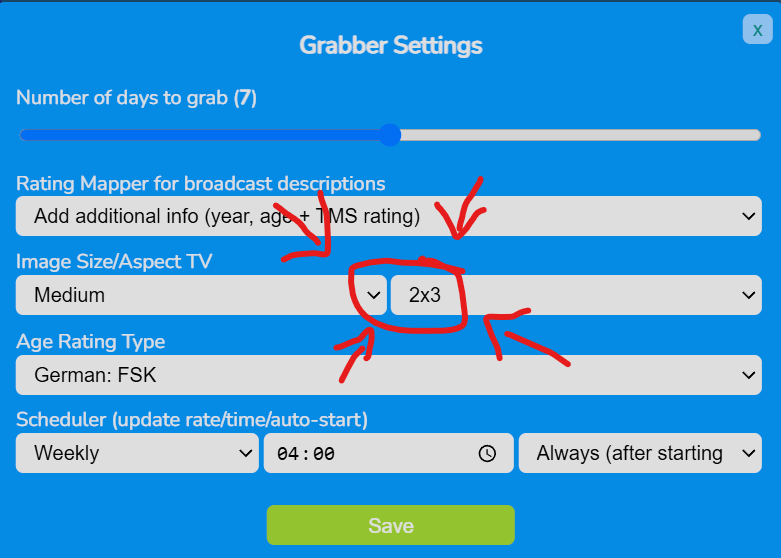
vielen Dank. Das probiere ich mal aus. Hat das Problem gelöst. Vielen Dank. @Luke Problem is solved due to the setting 2x3 in neweasyepg so you can delete it from your to-do list1 point
-
I fixed this days ago still thank you for your reply1 point
-
@dustartbut what about in your media folders? Do you have images and nfo files there? I mean next to your video files.1 point
-
Yes, mines also been updated to 3.7.9 but as of 5 hours ago scrobbling has stopped working again. Tried to get a new pin as well and still didn’t work.1 point
-
And it seems to be broken again. Trakt did say Emby needs to update the access token to 24h expiration. They’ve posted this on their GitHub and emailed.1 point
-
Yes we should make them clickable.1 point
-
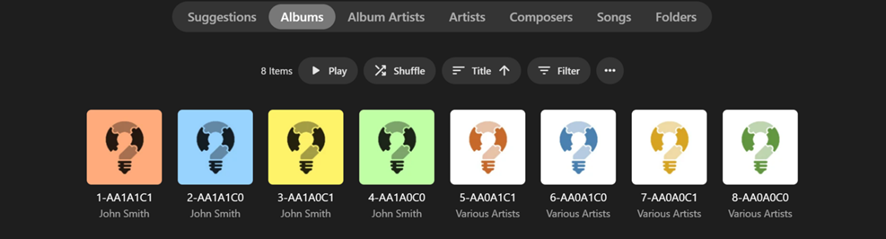
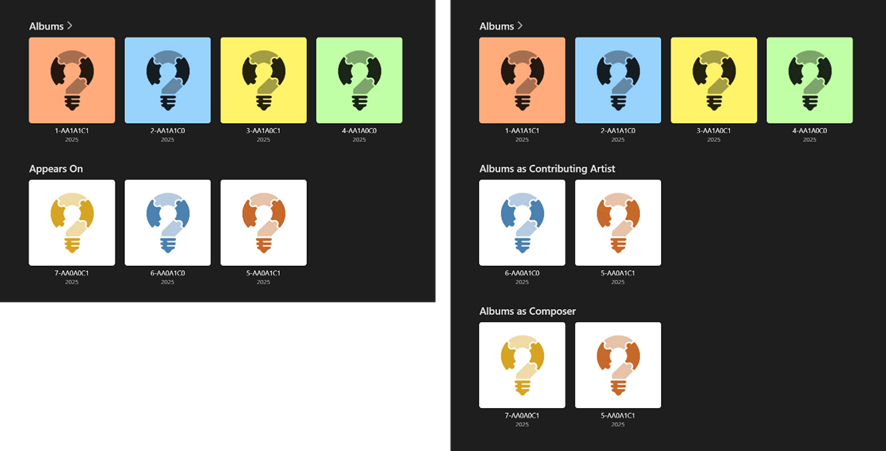
Luke, Thanks for the heads up. I’ve set it up it now and done a small test to verify for myself how it works, by tagging “John Smith” in all the different combinations of AlbumArtist, Artist and Composer: (The tagging is shown in the Album Title, where 1 = “John Smith”) The "John Smith" results for Emby 4.8.11.0 and 4.9.0.42-beta are both as I expected they would be: Therefore, I guess this will work well with my whole library when I get around to checking it out a bit more… One thing I did notice though, that seems to be inconsistent, is that, when the Album Years are all the same, the row sort order becomes ascending alphabetical title for the main Albums row but descending alphabetical title for the other rows (both stable and beta). It’s not likely going to be greatly noticeable in practical use but was obvious with the test above. I also tried with letters and got the same result. Do you have any plans for making the new rows expandable as their own separate grid page view, like the Albums row is now? Even with “Appears On” being split into two rows, there can still be many Albums in a single row with no way of further viewing/sorting/filtering/playing/etc.
 1 point
 -
Hi, you need to setup your own Emby Server to stream your content. Please check out our Quick Start Guide: Quick Start Thanks.1 point
-
Ok, thank you very much. I think I have now sorted the permissions of the Mounted drives and the file now plays. I’ll try tomorrow with another file on the same drive to see if I can maintain a stable playback and report back. Thanks.1 point
-
im making a list of all the 3rd party Emby plugins i can find so that theyre all in one place and easy to look through. if you wana check it out theres not much there yet but im curently sifting through the forums for more plugins. if you have one you want me to add you can comment here or if you wana make changes directly you can do a pull request and ill merge it with the repo. lmk what you think1 point
-
Without having any inside knowledge I'd say the status is the same that it has been for the last two years: "Dead, but we're not going to say it publicly."1 point
-
There are sites dedicated to this. I have 36 lists in my pi-hole. I even made a txt file with all the sites so it's easy to copy and paste into a new pi-hole as I've made several for friends who got sick and tired of all the ads on the internet and their phones.1 point
-
@chefmay have some tips.1 point
-
Hi, the TV does not support PGS subtitles. I know they built their own way to render them directly in the app. We don't have that right now, but it's something we plan to look at in future updates. Thanks.1 point
-
Does appear to work. Thanks!1 point
-
New version 3.4.1.1 and no more error1 point
-
Personally, I think the only reason Plex has such a good Music experience is because of Elan (their CTO & Co-Founder) treating it as his personal pet project. He seems to reply in almost every thread related to music and almost nothing else apart from that. Wonder how long it will last though ....1 point
-
Ei Gude, habe erst jetzt den Beitrag gesehen. Das Problem ist, dass dein EPG 16/9-4/3-Bilder zieht und sie auf 2/3 anzeigt, also auch links und rechts beschneidet, eventuell vom Standard her nur in Medium oder Low Res. Sofern dein easyepg-new nur Emby versorgt, klicke mal auf das Zahnrad für die Einstellungen und wähle bei der Aspect Ratio 2x3 für das Posterformat.
 1 point
 -
Your Emby server is the heart of your home entertainment system, the engine that delivers your vast media library to all your devices. But what kind of hardware does it take to run a smooth and powerful Emby server? Let's dive into the essentials, from basic requirements to advanced setups. The Foundation: Operating Systems and Supported Platforms Emby is designed to be versatile, running on a wide range of operating systems, including: Windows: A popular choice for its ease of use and broad hardware compatibility. Linux: Offers flexibility and performance, favored by many power users. macOS: Seamless integration within the Apple ecosystem. Docker: For containerized deployments, providing portability and isolation. NAS Devices: Many NAS (Network Attached Storage) devices support Emby, simplifying setup and storage management. This platform flexibility allows you to choose the operating system that best suits your needs and existing hardware. The Core Components: CPU, RAM, and Storage The performance of your Emby server hinges on three key components: CPU (Central Processing Unit): The CPU is crucial for transcoding, the process of converting media files to a format compatible with your playback devices. For basic streaming of direct play content (where no transcoding is needed), a modest CPU is sufficient. However, if you plan to transcode multiple streams simultaneously, especially high-resolution content like 4K, a more powerful CPU (with built in iGPU or a dedicated graphics card) can be essential. RAM (Random Access Memory): Emby uses RAM for caching metadata, buffering streams, and other operational tasks. For most users, 8GB of RAM is a good starting point. If you have a large library or plan to transcode multiple streams, consider 16GB or more. Storage: The size of your storage needs depend on the size of your media library. Consider using dedicated hard drives or a NAS device for ample storage capacity. SSD storage for the Operating system and Emby metadata can drastically improve the responsiveness of the web interface. For optimal performance, use high-speed drives (e.g., 7200 RPM HDDs or SSDs). Hardware Acceleration: Dedicated Transcoding Performance Hardware acceleration offloads transcoding tasks from the CPU to dedicated hardware, significantly improving performance and reducing CPU usage. Intel Quick Sync Video: Integrated into many Intel CPUs, Quick Sync Video provides efficient hardware-accelerated transcoding. Quick Sync is also available on Intel's dedicated graphics cards. NVIDIA NVENC: Available on NVIDIA GPUs, NVENC offers high-quality hardware-accelerated transcoding. AMD VCE/VCN: AMD's hardware acceleration solutions on AMD GPUs. If you plan to transcode frequently, especially 4K content, taking the time to set up dedicated hardware transcoding can significantly improve performance. Choosing the Right Hardware for Your Needs The optimal hardware for your Emby server depends on your specific use case: Basic Streaming: A modest CPU, 8GB of RAM, and sufficient storage are adequate for streaming direct play content. Moderate Transcoding: A mid-range CPU with dedicated hardware acceleration (Intel QuickSync), 16GB of RAM, and high-speed storage will handle moderate transcoding loads. Heavy Transcoding: A powerful CPU with multiple cores and robust hardware acceleration or dedicated GPU as mentioned above, 32GB or more of RAM, and fast storage are essential for heavy transcoding of high-resolution content. NAS Devices: many modern NAS devices can run Emby. Research the specifications of your NAS to ensure it meets your performance requirements. Optimizing Your Server Beyond hardware, optimizing your Emby server involves: Network Connectivity: A stable and high-speed network connection is crucial for smooth streaming. Regular Updates: Keep your Emby server and operating system up-to-date for optimal performance and security. Server Location: Place your server in a well-ventilated area to prevent overheating. Conclusion Building a powerful Emby server is about understanding your needs and choosing the right hardware. By carefully considering CPU, RAM, storage, and hardware acceleration, you can create a seamless and enjoyable media streaming experience for your entire household. Also, always keep in mind the wonderful community of Emby users and admins that you can find always active on our forums that can help with any questions you may have about hardware and initial setup. View the full article1 point
-
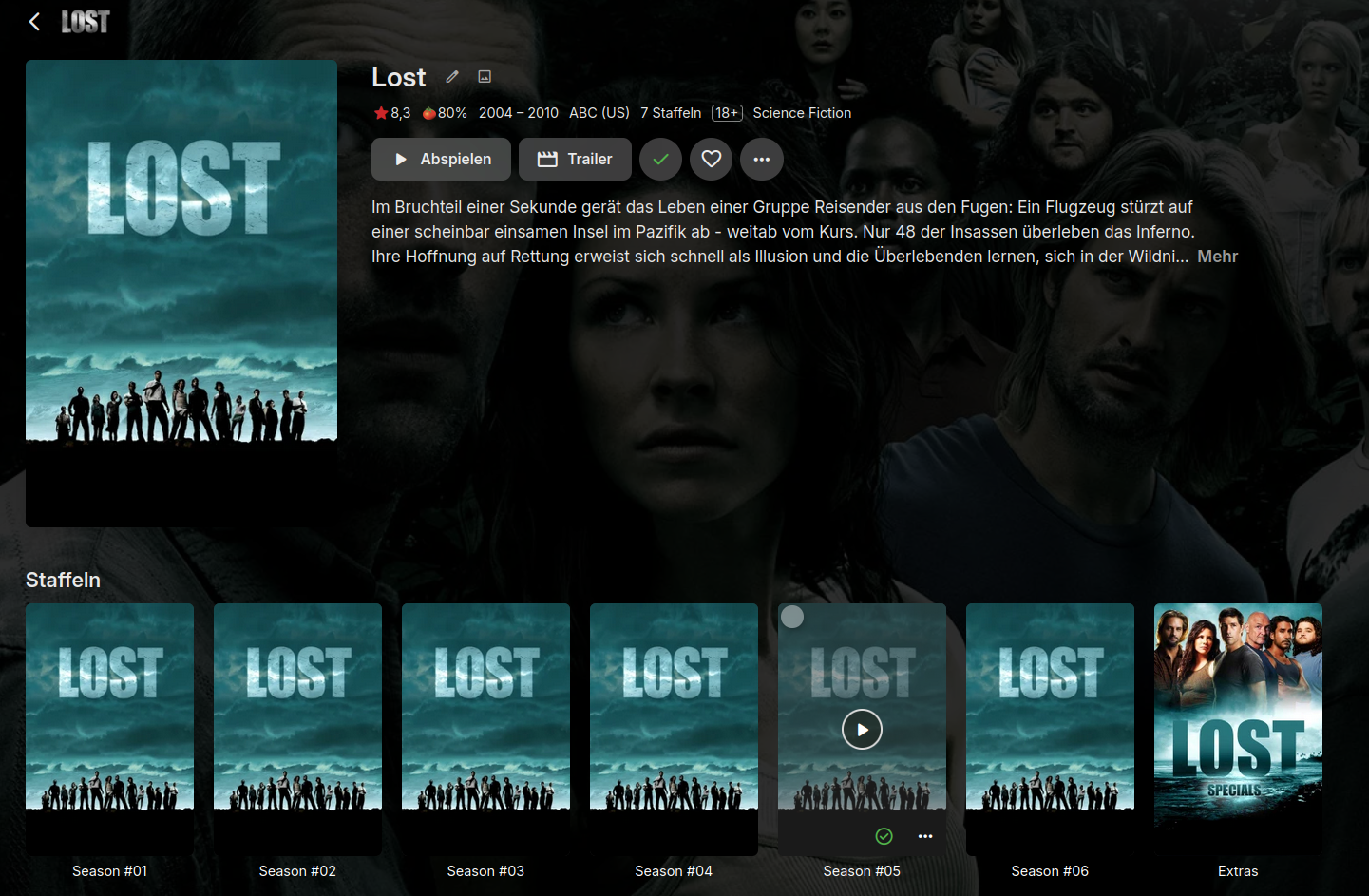
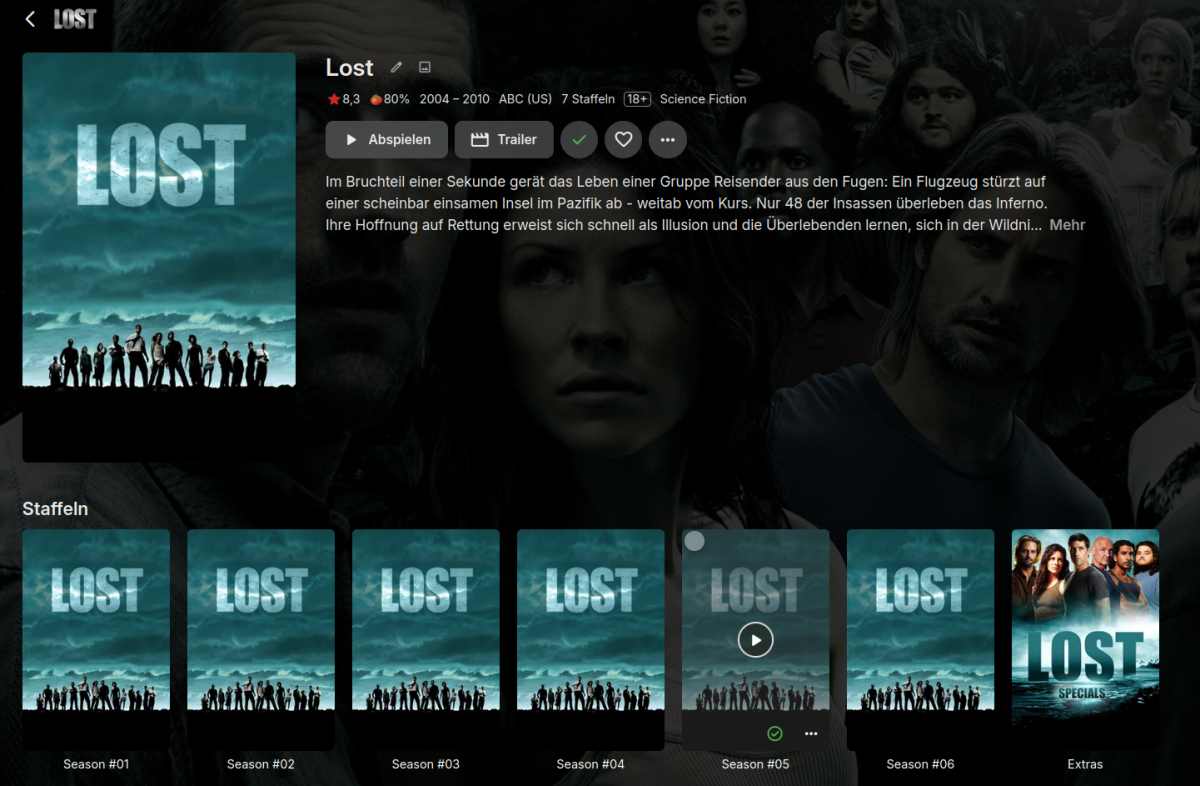
Thanks to your suggests, that did the trick and now it looks correct: it was set to "all episodes per show in a single season" - I changed it now into "Always show seasons folder" What I still don't understand is, why did this only apply to this and only this TV-show? All of the other shows where showing up seasons correctly. @GrimReaper: Main folder: Lost (2004) ├── Season #01 │ ├── Lost -S01E01- Gestrandet (1).mkv │ ├── Lost -S01E01- Gestrandet (1).nfo │ ├── ... ├── Season #02 │ ├── Lost -S02E01- Glaube und Wissenschaft.mkv │ ├── Lost -S02E01- Glaube und Wissenschaft.nfo │ ├── ... ├── Season #03 │ ├── Lost -S03E01- Die zwei Städte.mkv │ ├── Lost -S03E01- Die zwei Städte.nfo │ ├── ... ├── Season #04 │ ├── Lost -S04E01- Der Anfang vom Ende.mkv │ ├── Lost -S04E01- Der Anfang vom Ende.nfo │ ├── ... ├── Season #05 │ ├── Lost -S05E01- Weil du gegangen bist.mkv │ ├── Lost -S05E01- Weil du gegangen bist.nfo │ ├── ... ├── Season #06 │ ├── Lost -S06E01- Los Angeles (1).mkv │ ├── Lost -S06E01- Los Angeles (1).nfo │ ├── ... ├── Specials │ ├── Lost -S00E17- The watch.avi │ ├── Lost -S00E17- The watch.nfo │ ├── ... But thanks again - my problem was solved this way

 1 point
 -
@Edrock200 @Scobra@Swames@Astronut @MoLoveEnt We have added a preference in system.xml for disabling outgoing ipv6 requests. I would like to know if this would resolve your issue - as an alternative to the suggested solution of editing the "\System\EmbyServer.runtimeconfig.json" file outlined here. If you do run the beta Emby Server, please install the latest beta version 4.9.0.41, and: 1. Whilst Emby Server is shutdown, remove your edit to the "\system\EmbyServer.runtimeconfig.json" file and removing the line "System.Net.DisableIPv6": true in the "configProperties" block 2. Launch Emby Server and confirm that the issue with the vpn is back 3. Shutdown Emby Server 4. Edit programdata\config\system.xml and change this line, changing the value from false to true <DisableOutgoingIPv6>false</DisableOutgoingIPv6> 5. Launch Emby Server to test if this resolves the problem.1 point
-
I bought a lifetime license a long time ago but, until recently, I have not really needed it. I only need it now for live TV as that is a premier feature. The actual reason I bought the license was to support Emby and a little bit so I would not have to pay more if I decided I needed it later. Of all the media managers Emby, for me, is by far the best. It is not perfect but it is better, much better, than anything else. If I did not have a lifetime license at this time I would, probably, buy one as Emby makes my media consumption easier than anything else I have looked at or heard about. Emby is, for me, the best software investment I have ever made.1 point
-
While Emby already has recommendations built in based on previously watched items I find they are not all that helpful. They seem to be based on genre only, for example, because you watched a comedy here are other comedies in your library. I do like how the also directed by/appear in recommendations work though. What would be great is if Emby could incorporate Trakt's recommendations as they are much more sophisticated. Trakt's recommendations are not only based off of what you have previously watched but also what your Trakt friends and other Trakt users have watched. It takes user ratings and trending/popular media into account. Ideally Emby would include full Trakt integration allowing users to rate media after watching, view lists and recommendations, and view upcoming media all from within Emby but for now I think recommendations would be a nice addition. Trakt has the potential to give Emby that community feel and allow users to discover new media, find something to watch, and recommend media to other users. http://docs.trakt.apiary.io/#reference/recommendations1 point
-
Hi, Thanks. Not sure if this is related or just a fluke but I disabled hardware acceleration on my system, restarted Emby server and haven't been able to replicate the problem again. Its been 4 days now trouble free where before it wouldn't work at all.1 point
-
Hi, we are looking into it. Thanks.1 point
-
Understandable. But times have changed. Currently, only lack of CoverArt badge indicates SD reses (and it's both an eye poke and breaks consistency). I'd say it's reasonable to expect that users opting for CA overlays would like to show them, and don't want not having an overlay to have any meaning. Therefore hopefully you'll consider adding those sdtypes (actually only three are needed: 576p, 480p and SD for anything below 480p, as Emby lists them in MediaInfo) when the time comes to give some thought to future plugin improvements. And most important one: please put those Res badges first, it's very odd and distracting seeing them stuck between video and audio codecs, can't help but think about it every single time, even though I know they're currently set up like that.1 point


.thumb.jpg.21d888786f2104b4f688825203ce7598.jpg)



.thumb.png.f4cb0545e98b51fd9b00e427622ab761.png)