Leaderboard




Popular Content
Showing content with the highest reputation on 03/21/25 in Posts
-
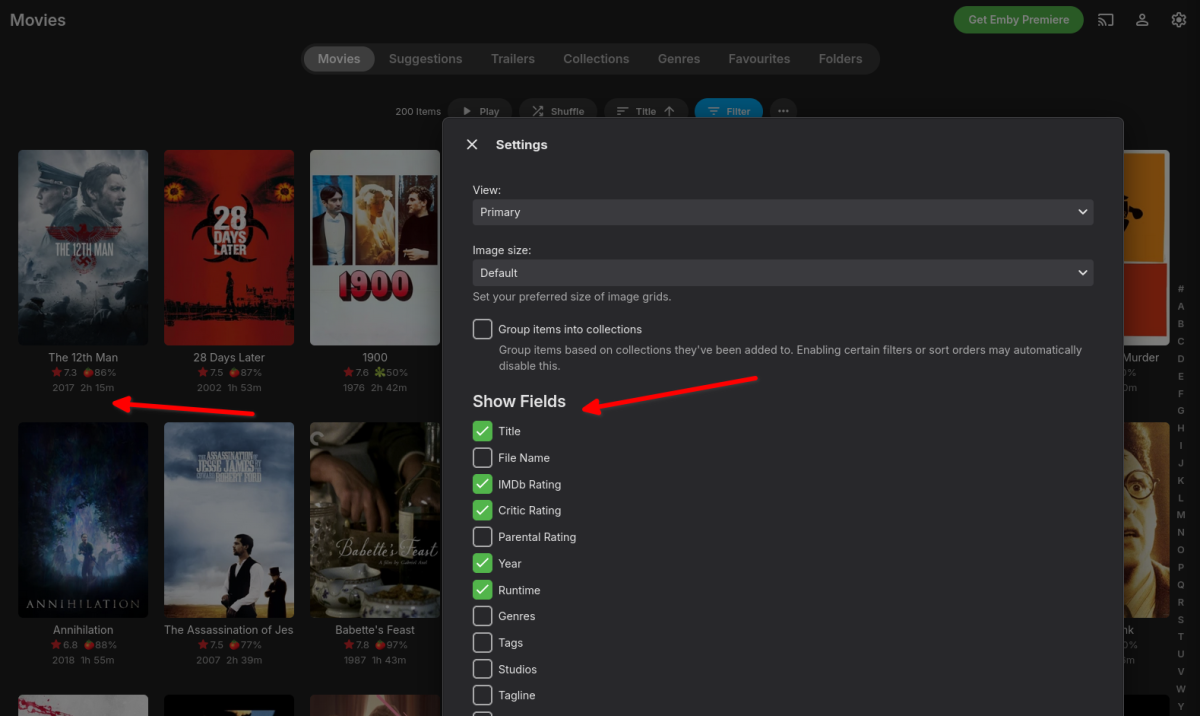
Trying again: Could we have the option to show director name in the Primary view for movies, please? Surely not a huge effort and thus not something that should take years to achieve, or am I missing something that makes this more difficult than one would think?2 points
-
The delayed Service loading did the trick. Thanks @Neminem Afterwards it is logical, but I did not think of it. You did. I will test a few days with auto shutdown and auto start and report then back. I am happy. RobB2 points
-
Try setting the service start to Delayed, that way your file mounts have time to get online, before Emby starts.2 points
-
It is really cool that Emby has the ability to support multiple versions of the same movie. It would be nice to have a setting on the client side to allow the user to set which version should be selected by default. This could be as simple a user-entered string, or it could be a list of detected strings to choose from. It could allow multiple entries and it would choose them in the order entered. On the Kodi side, it would also be nice to get the "Choose the Best Version for Me" option that the Emby app has.1 point
-
Hi. This is my first post in here, so I guess I'll start by saying thanks for developing a cool peice of media center software Now to my feature request- I wonder if it would be possible to add the director's name to the selectable fields in the overview as illustrated in my screendump below and thus have the name show up below each movie poster, just like the other fields one may have selected to be shown ?
 1 point
 -
Having an ongoing issue where while watching something on the Android app the brightness will briefly either dim or brighten and then go back to normal. Seems to happen at entirely random times, sometimes immediately after another or far apart. Seemed to go away for awhile after a system restart but this time it's back immediately after rebooting. Android version 3.4.36 (opted into the beta to see if it fixed it and it has not). Server version 4.8.11.0. Oddly I haven't seen anyone else reporting a similar issue so here I am. Any help would be greatly appreciated, I've been really enjoying using emby over my other options but this is getting really annoying!1 point
-
Changed this: { "runtimeOptions": { "tfm": "net6.0", "includedFrameworks": [ { "name": "Microsoft.NETCore.App", "version": "6.0.29" }, { "name": "Microsoft.AspNetCore.App", "version": "6.0.29" } ], "configProperties": { "System.Reflection.Metadata.MetadataUpdater.IsSupported": false, "System.Net.DisableIPv6": true } } }1 point
-
Please add this small feature already1 point
-
Jake, OK... hmmm. Have you tried to connect to your server directly with your Emby listed external IP address, thus bypassing VPN? Don't publish that number here. From outside locations, the 192 address is not reachable. You have to use the other IP number or if you purhcased a SSL certificate and domain name, then the domain name. Testing is easiest from a mobile with Wifi turned off. Then the request is coming from the Internet into your server. The local 192 address won't work and you need the other IP address. What actual use are you trying to do with the VPN with incoming traffic? I do not know of a incoming VPN service where the user calls up a VPN and gets routed to your server IP address. That is more if the user has a VPN, nothing really to do with your VPN account. I think you would have to have a outside hosting account and set it up to transfer all incoming packets to your server IP. That wouldn't really help anything unless you had some script to obscure the final IP address. Don't you just give users with your external IP address or if you purchased a domain, then that domain name? When they come in to visit, they have nothing to do with VPN, unless they have a different VPN account. What am I missing? I hope that makes sense.1 point
-
Hi, it's not the server version. We are reaching out to our guide data provider about this. We'll let you know when we have an update. Thanks guys.1 point
-
If you're running the VPN software on the same device as the Emby service and the split tunneling is not working properly then when the server makes a request to an external service to determine the external IP address it's going to return the VPN IP instead of your real IP, which will affect Emby Connect - similarly if you're using a dynamic DNS name and the DDNS client is running on the same machine and the split tunneling doesn't work it would also incorrectly update to the VPN IP. It doesn't sound like you're using a DDNS service, but the concept is the same - update it with the wrong IP and it's not going to work. Running a VPN client will not affect your ability to receive incoming traffic on the real interface, unless there is some kind of option to enable that which I doubt, but if traffic is being sent to the wrong IP that would explain why they can't connect when it's running. My entire network is behind a VPN but my DDNS client on my firewall uses the real WAN interface to determine the real external IP. How exactly is the split tunneling set up?1 point
-
Yes it has.1 point
-
Jake, Double check your 1.67 is correct IP for your server. Typically it is a lower number, unless you have selected 67, for some reason. On Windows: [Windows key R] type: cmd When the command window appears type ipconfig / all Look for the Ipv4 address and see if it is really 192.168.1.67.1 point
-
Guess that will never happen. Your issue is that you use a VPN that's not working correctly with split tunneling. NOT a Emby problem, its a you problem that you introduced with your use of VPN. Since VPN connection's is altering you network connection from the original connection. But again you do you.1 point
-
I don't expect them to resolve it. They made changes to their API. Has that changed been implemented for us?1 point
-
I'm pretty sure the code needs an update. They made a breaking change yesterday... https://forums.trakt.tv/t/embys-trakt-plugin-cannot-connect-to-the-trakt-account/49848/91 point
-
Currently all requests to Trakt are sending back a forbidden response. This is what happened last week to many apps, and several hours later Trakt resolved it on their end.1 point
-
Okay, so let's say I want l search for this track: https://musicbrainz.org/recording/7b555387-68b5-4e4c-8855-d88139b57deb Well unfortunately I can't read or type in Japanese. But I know what the song is in English, so if I could search for it using one of the aliases provided here https://musicbrainz.org/recording/7b555387-68b5-4e4c-8855-d88139b57deb/aliases that would be a pretty amazing feature.1 point
-
I hate when this happens... I re-installed ComSkip and BAM! I'm back in business. Issue resolved.1 point
-
I will look at why the "contains" are not being honoured, I doubt i will get time today, and I am working a double back-to-back shift so it might be as late as Monday before I get to this.. I can add an option to ignore items not in groups if you wish. Some m3u suppliers don't use grouping at all, so an option here like a checkbox would be best Example: #EXTINF:-1,IN-MM - King of Kotha (2023) There is nothing but the channel/movie name1 point
-
So this is basically a custom path for what Emby already does via /metadata/collections? Movie set information folder - Official Kodi Wiki1 point
-
Similar problem here. Track 3.7.8.0 2025-03-21 14:40:15.349 Info TaskManager: Export Library to Trakt Failed after 0 minute(s) and 1 seconds 2025-03-21 14:40:22.636 Info Server: http/1.1 POST https://host2:8920/emby/ScheduledTasks/Running/515a9565f7d0dfe5f375d92153f7c25d?X-Emby-Client=Emby Web&X-Emby-Device-Name=Microsoft Edge Windows&X-Emby-Device-Id=38d34b26-351a-4951-a829-7447f45d3254&X-Emby-Client-Version=4.8.11.0&X-Emby-Token=x_secret1_x&X-Emby-Language=fr. Source Ip: host1, UserAgent: Mozilla/5.0 (Windows NT 10.0; Win64; x64) AppleWebKit/537.36 (KHTML, like Gecko) Chrome/134.0.0.0 Safari/537.36 Edg/134.0.0.0 2025-03-21 14:40:22.637 Info Server: http/1.1 Response 204 to host1. Time: 1ms. POST https://host2:8920/emby/ScheduledTasks/Running/515a9565f7d0dfe5f375d92153f7c25d?X-Emby-Client=Emby Web&X-Emby-Device-Name=Microsoft Edge Windows&X-Emby-Device-Id=38d34b26-351a-4951-a829-7447f45d3254&X-Emby-Client-Version=4.8.11.0&X-Emby-Token=x_secret1_x&X-Emby-Language=fr 2025-03-21 14:40:22.637 Info TaskManager: Executing Export Library to Trakt 2025-03-21 14:40:22.637 Info Trakt: Syncing user data for Maison 2025-03-21 14:40:23.738 Info HttpClient: POST https://api.trakt.tv/oauth/token 2025-03-21 14:40:23.752 Error Trakt: Error in SyncUserData *** Error Report *** Version: 4.8.11.0 Command line: /volume1/@appstore/EmbyServer/system/EmbyServer.dll -programdata /var/packages/EmbyServer/var -ffdetect /var/packages/EmbyServer/target/bin/ffdetect -ffmpeg /var/packages/EmbyServer/target/bin/ffmpeg -ffprobe /var/packages/EmbyServer/target/bin/ffprobe -nolocalportconfig -ignore_vaapi_enabled_flag -pidfile /var/packages/EmbyServer/var/EmbyServer.pid -defaultdirectory /volume1/Public -updatepackage emby-server-synology72_{version}_x86_64.spk -noautorunwebapp Operating system: Linux version 4.4.302+ (root@build5) (gcc version 12.2.0 (GCC) ) #72806 SMP Thu Sep 5 13:44:44 CST 2024 Framework: .NET 6.0.36 OS/Process: x64/x64 Runtime: volume1/@appstore/EmbyServer/system/System.Private.CoreLib.dll Processor count: 2 Data path: /var/packages/EmbyServer/var Application path: /volume1/@appstore/EmbyServer/system MediaBrowser.Model.Net.HttpException: MediaBrowser.Model.Net.HttpException: Forbidden at Emby.Server.Implementations.HttpClientManager.CoreHttpClientManager.SendAsyncInternal(HttpRequestOptions options, String httpMethod) at Emby.Server.Implementations.HttpClientManager.CoreHttpClientManager.SendAsync(HttpRequestOptions options, String httpMethod) at Trakt.Api.TraktApi.GetResponseFromTrakt(HttpRequestOptions options, String method, CancellationToken cancellationToken) at Trakt.Api.TraktApi.PostToTrakt(String url, Object data, TraktUser traktUser, CancellationToken cancellationToken) at Trakt.Api.TraktApi.RefreshUserAuth(TraktUser traktUser, CancellationToken cancellationToken) at Trakt.Api.TraktApi.SetRequestHeaders(HttpRequestOptions options, TraktUser traktUser, CancellationToken cancellationToken) at Trakt.Api.TraktApi.GetFromTrakt[T](String url, TraktUser traktUser, CancellationToken cancellationToken) at Trakt.ScheduledTasks.TraktUserSync.SyncMovies(User user, TraktUser traktUser, TraktApi traktApi, ISplittableProgress`1 progress, CancellationToken cancellationToken) at Trakt.ScheduledTasks.TraktUserSync.SyncUserData(User user, TraktUser traktUser, TraktApi traktApi, ISplittableProgress`1 progress, CancellationToken cancellationToken) at Trakt.ScheduledTasks.SyncLibrary.Execute(CancellationToken cancellationToken, IProgress`1 progress) Source: Emby.Server.Implementations TargetSite: Void MoveNext() 2025-03-21 14:40:23.752 Error TaskManager: Error *** Error Report *** Version: 4.8.11.0 Command line: /volume1/@appstore/EmbyServer/system/EmbyServer.dll -programdata /var/packages/EmbyServer/var -ffdetect /var/packages/EmbyServer/target/bin/ffdetect -ffmpeg /var/packages/EmbyServer/target/bin/ffmpeg -ffprobe /var/packages/EmbyServer/target/bin/ffprobe -nolocalportconfig -ignore_vaapi_enabled_flag -pidfile /var/packages/EmbyServer/var/EmbyServer.pid -defaultdirectory /volume1/Public -updatepackage emby-server-synology72_{version}_x86_64.spk -noautorunwebapp Operating system: Linux version 4.4.302+ (root@build5) (gcc version 12.2.0 (GCC) ) #72806 SMP Thu Sep 5 13:44:44 CST 2024 Framework: .NET 6.0.36 OS/Process: x64/x64 Runtime: volume1/@appstore/EmbyServer/system/System.Private.CoreLib.dll Processor count: 2 Data path: /var/packages/EmbyServer/var Application path: /volume1/@appstore/EmbyServer/system MediaBrowser.Model.Net.HttpException: MediaBrowser.Model.Net.HttpException: Forbidden at Trakt.ScheduledTasks.SyncLibrary.Execute(CancellationToken cancellationToken, IProgress`1 progress) at Emby.Server.Implementations.ScheduledTasks.ScheduledTaskWorker.ExecuteInternal(TaskOptions options) Source: Emby.Server.Implementations TargetSite: Void MoveNext() 2025-03-21 14:40:23.752 Info TaskManager: Export Library to Trakt Failed after 0 minute(s) and 1 seconds1 point
-
Thanks - and please enable debug logging on the server as well beforehand - in Server Settings > Logs > Settings and get me zipped copy of the raw logs folder with the android debug log and zipped pcap Thank You1 point
-
The UI is back to normal with the 2.0.0 update.1 point
-
Hello, You're right — it seems like my impression is more about performance than the actual layout. Regarding audio and subtitles, I see what you mean about pressing up to access them. Perhaps it's just a habit from using the TV app more often, or maybe the quicker response time makes it feel like fewer steps. Either way, thanks for clarifying! I appreciate your time and help.1 point
-
Alrighty, I extracted the audio stream, padded it with 7300ms at the beginning via eac3to, and put everything back together. And that finally worked with the emby Android (not TV) app. The question remaining is whether this is an Android/Shield TV issue, or an emby Android app one?1 point
-
Bonjour Luke, J'attends, mais je vais quand même essayer. Merci.1 point
-
Bumping to say would love to see this feature. My partner likes killing time sorting/correcting metadata on her phone but I'd like to restrict server management to a sole local Admin account if possible for security reasons.1 point
-
OK @pen2paperthis is not currently supported. I'd never heard of it before until now. I'm sure we can look at supporting it, but it isn't as of right now.1 point
-
Have a read here:1 point
-
manual install of mbedtls2 then followed your page and all updated..1 point
-
Hello Salsoma, ** This is an auto reply ** Please wait for someone from staff support or our members to reply to you. It's recommended to provide more info, as it explain in this thread: Thank you. Emby Team1 point
-
Emby for LG TV's 1.0.46 has been released. Stay tuned to the blog for the release announcement.1 point
-
Thank you @xnappoI have no love for PLEX, but some of the optional features I mentioned in my original post are pretty interesting for me and maybe others.1 point
-
Setting constant frame rate in Handbrake seems to have done the trick. Sadly I don't see a way to make that happen in Emby's transcode processor.1 point
-
What are you talking about? This would be a completely optional feature. What is the world makes you think anyone here is suggesting otherwise?1 point
-
The realtime monitor has nothing to do with overlap. What you see in the log is very much normal. It's just the server reacting to you moving lots of files around. That's why I suggested you may want to shut down the server while you do this.1 point
-
Pretty sure FLAC isn't supported by any Samsung TV. It sometimes played flakey on some models at best. Digital playback tables from User manual: https://developer.samsung.com/smarttv/develop/specifications/media-specifications/2023-tv-video-specifications.html For the PCM file just guessing here, but possibly because of FHD HEVC level 4? Looking at the manual it appears HEVC is only supported for 1080p at level 4.1 (123) Have you tried turning off transcoding on the server to see if your files play direct?1 point
-
You cant in the current model. To do this you would have to have separate ignore/ contains sections for all three types "Live TV", "TV Shows" and "Movies" or An option filter on each section, "Ignore Only Live TV" , "Ignore Live TV & Movies", "Ignore Live TV & TV Shows", "Ignore Movies & TV Shows" etc , you would need all options on each section. Question back at you .... does everything apart from a few things you don't want appear to be working correctly now?1 point
-
All your NSSM pics show use of the local system account. You want to create an account on the computer that has access to all your content and use this account to run your Emby Server service. Carlo1 point
-
;,;'.仙'/,台;.:.;.#f.fff,f.f:;}(ば".,け;も:*:.の,.'紀]:___,[行;@=;,' (https://musicbrainz.org/artist/c719974c-93ff-4bfb-ac0f-0453d931e409)1 point
-
Yes that's my theory and it will never work until service restart.1 point
-
Silly question probably, but does the port number on the Emby server page show 8096? And your remote user is trying to connect HTTP not HTTPS? Also, I have had issues with firewall on the PC causing this, you might want to try with it off just as a debug step.1 point
-
I would keep it disabled to reduce the number of variables that you're dealing with. Then once you can remote connect without the VPN , then try turning it back on.1 point
-
Maybe not. I wouldn't use those unless you have to. If the server displays the correct LAN address, then you don't need to.1 point
-
Hi, yes you can do that. Also please check out our Remote setup Guide: Connecting from Client Apps1 point
-
Honestly this would be extremely helpful. I've just been able to compile my own ffmpeg using the rockchip upstream work, and it works extremely well, however i can't use it within emby due to whatever customisations you guys do to ffmpeg. I really think it would be great to see this released as soon as possible or at least a mechanism by which we can use custom built ffmpegs within emby (or at least our ability to compile ffmpeg using emby's codebase).1 point
-
Your Emby server is the heart of your home entertainment system, the engine that delivers your vast media library to all your devices. But what kind of hardware does it take to run a smooth and powerful Emby server? Let's dive into the essentials, from basic requirements to advanced setups. The Foundation: Operating Systems and Supported Platforms Emby is designed to be versatile, running on a wide range of operating systems, including: Windows: A popular choice for its ease of use and broad hardware compatibility. Linux: Offers flexibility and performance, favored by many power users. macOS: Seamless integration within the Apple ecosystem. Docker: For containerized deployments, providing portability and isolation. NAS Devices: Many NAS (Network Attached Storage) devices support Emby, simplifying setup and storage management. This platform flexibility allows you to choose the operating system that best suits your needs and existing hardware. The Core Components: CPU, RAM, and Storage The performance of your Emby server hinges on three key components: CPU (Central Processing Unit): The CPU is crucial for transcoding, the process of converting media files to a format compatible with your playback devices. For basic streaming of direct play content (where no transcoding is needed), a modest CPU is sufficient. However, if you plan to transcode multiple streams simultaneously, especially high-resolution content like 4K, a more powerful CPU (with built in iGPU or a dedicated graphics card) can be essential. RAM (Random Access Memory): Emby uses RAM for caching metadata, buffering streams, and other operational tasks. For most users, 8GB of RAM is a good starting point. If you have a large library or plan to transcode multiple streams, consider 16GB or more. Storage: The size of your storage needs depend on the size of your media library. Consider using dedicated hard drives or a NAS device for ample storage capacity. SSD storage for the Operating system and Emby metadata can drastically improve the responsiveness of the web interface. For optimal performance, use high-speed drives (e.g., 7200 RPM HDDs or SSDs). Hardware Acceleration: Dedicated Transcoding Performance Hardware acceleration offloads transcoding tasks from the CPU to dedicated hardware, significantly improving performance and reducing CPU usage. Intel Quick Sync Video: Integrated into many Intel CPUs, Quick Sync Video provides efficient hardware-accelerated transcoding. Quick Sync is also available on Intel's dedicated graphics cards. NVIDIA NVENC: Available on NVIDIA GPUs, NVENC offers high-quality hardware-accelerated transcoding. AMD VCE/VCN: AMD's hardware acceleration solutions on AMD GPUs. If you plan to transcode frequently, especially 4K content, taking the time to set up dedicated hardware transcoding can significantly improve performance. Choosing the Right Hardware for Your Needs The optimal hardware for your Emby server depends on your specific use case: Basic Streaming: A modest CPU, 8GB of RAM, and sufficient storage are adequate for streaming direct play content. Moderate Transcoding: A mid-range CPU with dedicated hardware acceleration (Intel QuickSync), 16GB of RAM, and high-speed storage will handle moderate transcoding loads. Heavy Transcoding: A powerful CPU with multiple cores and robust hardware acceleration or dedicated GPU as mentioned above, 32GB or more of RAM, and fast storage are essential for heavy transcoding of high-resolution content. NAS Devices: many modern NAS devices can run Emby. Research the specifications of your NAS to ensure it meets your performance requirements. Optimizing Your Server Beyond hardware, optimizing your Emby server involves: Network Connectivity: A stable and high-speed network connection is crucial for smooth streaming. Regular Updates: Keep your Emby server and operating system up-to-date for optimal performance and security. Server Location: Place your server in a well-ventilated area to prevent overheating. Conclusion Building a powerful Emby server is about understanding your needs and choosing the right hardware. By carefully considering CPU, RAM, storage, and hardware acceleration, you can create a seamless and enjoyable media streaming experience for your entire household. Also, always keep in mind the wonderful community of Emby users and admins that you can find always active on our forums that can help with any questions you may have about hardware and initial setup. View the full article1 point
-
@Edrock200 @Scobra@Swames@Astronut @MoLoveEnt We have added a preference in system.xml for disabling outgoing ipv6 requests. I would like to know if this would resolve your issue - as an alternative to the suggested solution of editing the "\System\EmbyServer.runtimeconfig.json" file outlined here. If you do run the beta Emby Server, please install the latest beta version 4.9.0.41, and: 1. Whilst Emby Server is shutdown, remove your edit to the "\system\EmbyServer.runtimeconfig.json" file and removing the line "System.Net.DisableIPv6": true in the "configProperties" block 2. Launch Emby Server and confirm that the issue with the vpn is back 3. Shutdown Emby Server 4. Edit programdata\config\system.xml and change this line, changing the value from false to true <DisableOutgoingIPv6>false</DisableOutgoingIPv6> 5. Launch Emby Server to test if this resolves the problem.1 point
-
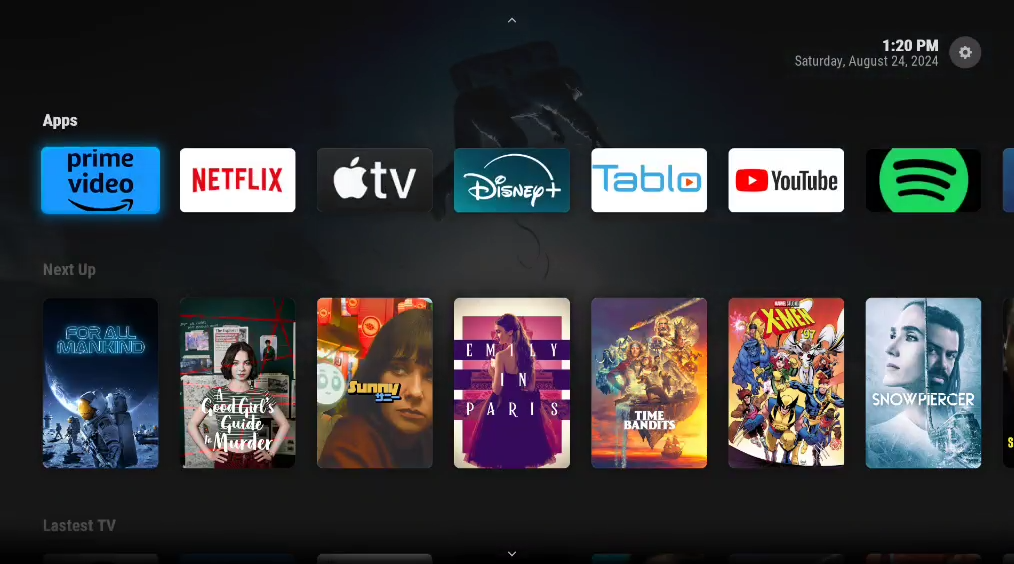
This isn't what this is about at all. Look, I get some of you want to just download everything, but I have zero need to download and keep TV, I am not going to watch it again, 99% of the time. I am also fine with paying for the streaming services. I want to currate, under my control, the content on streaming services I pay for, AND have it mixed with my local content from ripped media all in one place. It works GREAT and has very high family ease of use. The only problem is my solution is hacky as hell.
 1 point