Leaderboard




Popular Content
Showing content with the highest reputation on 03/16/25 in Posts
-
Now that you mentioned folder name, I copied the folder name into the filenames and seems there was a some issue as I can see it did do something as I can see some spaces were removed. Now everything is working.... You see, sometimes you just need someone with a different perspective and fresh pair of eyes.2 points
-
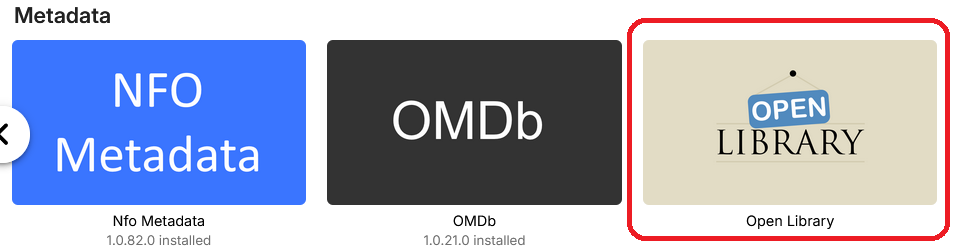
To read them you would download them onto the device through Emby then open them in your favorite ebook reader.
 2 points
 -
I love the additional subfolders for Movie Extras (eg, Shorts, Scenes, Interviews, etc.)! I would like to propose an additional folder: "Galleries". Within the Galleries folder the user would place subfolders (only one level of nesting) and each subfolder could contain any images the user chooses. Then, Emby would display the subfolder name as an Extra (in Emby Theater) and opening that extra would launch an image gallery of the containing images. For example: Movies\Disney\The Sword In The Stone (1963)\Galleries\Scrapbook Movies\Disney\The Sword In The Stone (1963)\Galleries\Film Facts "Scrapbook" is what would be listed among other Extras in Emby Theater, and the Scrapbook folder contains various images to be displayed in a slideshow that the user can navigate with their left/right arrows. This feature request is motivated by the following related post: https://emby.media/community/index.php?/topic/55912-video-ts-folder-no-longer-recognized-in-movie-extras-folder/ Basically, sometimes there are extras such as image galleries and text content which are only available via the DVD menu. I have found that I can use FFMPEG to extract all the frames from a video file, and so use that on the appropriate VOB file from the original DVD. Then I can use VisiPics to delete all the duplicates, resulting in content I can then sort into folders (eg, Concept Art, Storyboards, etc.). All I need is for there to be the above support for a Galleries extras folder, which could contain multiple subfolders (only one level deep), each containing images to be displayed as image galleries in Emby Theater, etc. Thanks for your consideration! PS - If this is something you might like to see implemented, be sure to "Like" this top/first post (as well as any subsequent posts in this thread that highlight particular aspects of what you are interested in) -- "Liking" the top/first post helps the Devs to know how much interest there is in a given Feature Request.1 point
-
OMG. Would kill for this. Most of the time it’s needed. But sometimes it is sorely needed. Bad rip, bad file format, who knows what causes it. But a simple on screen control to increase or decrease audio delay would take care of it.1 point
-
To recursively remove directories using command line add the -r option rm -r <directory>1 point
-
One more thing: When you are on a serie / movie screen and you do a back, you arrive on the home screen of the first library and not on the home screen of the library of the corresponding serie / movie. (It's not like that on the old desktop app: doing a back from a serie screen will send you to the home screen of the library in which the serie is. Not on the home screen of the first library)1 point
-
The plugin will pull in metadata for the books you have in your library. Then you can see the author, synopsis, some other details about the work. Rather than just the cover of the book you get the text too. That is what the plugin is for. As far as downloading it just requires the Emby server you are connected to has Emby Premiere. Then it should just work. The iphone is notoriously more difficult to share downloaded items among applications. If you were using Android it would just work. Apple is a different beast entirely. You probably need to make a post in the iOS/Apple section and ask specifically why downloads are not working on your device. I do not own anything Apple because of their gate keeping. Also.. when using applications tied to app stores some plugins will not be shown. Because those plugins might be against the policies of those app stores. But I believe downloading is not against the iOS terms. I could be wrong. That is why it is best to make a new post in the iOS/Apple section.1 point
-
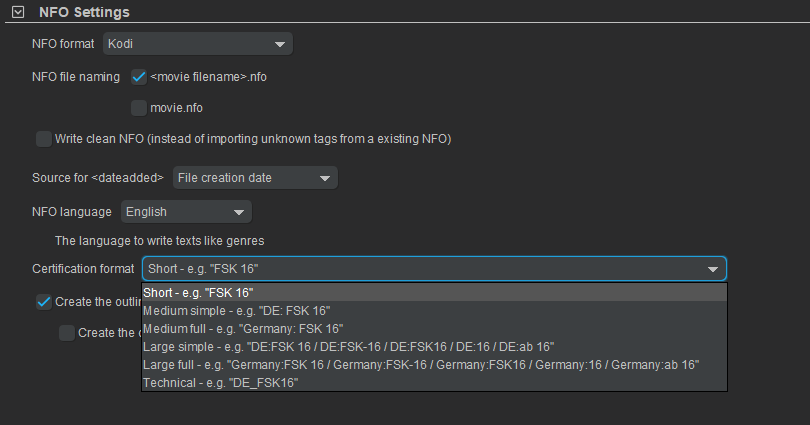
Yes was going off Luke's post as I believe that is what Emby is trying to use in the parental index per OP "large Simple" listing.1 point
-
Not sure about that one (that's "Medium simple"), but I know" Short" (just FSK-18) works.1 point
-
That is what I was thinking also per old topics. But will guess DE:FSK 18 is unknown.
 1 point
 -
Guess would be TMM "Large simple" NFO Certification format. OP would need to select "Short" format instead and rewrite all NFOs.1 point
-
numeric chapter names are currently ignored because often we users with files containing junk chapter names that are just numbers.1 point
-
That’s what we all noticed ;-1 point
-
Hi, just thought that would update as I finally managed to update the server. I got Windows 10 on successfully and installed drivepool so everything was how it had been previously. Installed 4.7 server version. By the time I added the premiere key, so I could use backup plugin, it was wanting to update to 4.8. Once I figured out how to get round that issue I restored the backup and made sure everything was pointing at the right folders. Strange problem where many older files had lost their meta data and imagery. I ended up manually moving my backed up folders into new locations and pointing everything to them and the problem was solved. All running happily now with original user accounts. Thanks for the help.1 point
-
Hi. These are general networking questions that are not really specific to Emby. Thus, the general internet is probably the best source for that information. Many of the "guides" posted out here are community contributors who are giving examples of how they setup these things in their environment at that time. They can, indeed, become stale on a specific level but should still help with the basics. I believe many of our users use Tailscale in the situation you are in.1 point
-
Hi Luke, I'm not sure what the plugin does. I don't see any changes after installation and reboot. I'm currently on v4.8.11.0 Windows. I have a few books downloaded in .epub format. There is an identify function that provides a list of similar titles. When I select one, nothing changes in the library. In particular, I don't see a field for ISBN. Good to see attention to this, however!!!1 point
-
Uninstall the version from the plugin catalog; then place your new dll in the plugins folder. Emby is re-installing the catalog version as it doesn't match what's in the folder.1 point
-
OK, I can answer my own question by myself; just in case someone else is looking for the same question: simply use the built in chapter editor within the tool mkvtoolnix and create an mkv-file with all the chapter information. works exactly like expected!!!1 point
-
After installing VS, I edited playback_report_settings.html and added the additional audio line of code. I did a build and got no errors. I shut down Emby and replaced the playback_reporting.dll in the plugins directory with the new one. I then restarted Emby. I went to the plugin settings, but noticed no change. It still only had the Episode and Movie options. Emby was also telling me that the plugin had been updated and I had to restart Emby so I did. After restarting, the plugin still only had the 2 options. So I shut down Emby, replaced the dll, and rebooted the computer. When it came back up, the Audio option was there but Emby was telling me that the Playback Reporting plugin had been updated and I needed to restart. So before I restarted, I created an Audio Activity playlist of the last 7 days and ran the Scheduled task for it. The task reported an error but the playlist was created. I then restarted Emby. When I went to Playback Reporting settings the Audio option was gone but the definition for the playlist was still there. I played some songs and audiobook chapters then ran the scheduled task for the plugin. The task reported no errors, but the list was empty. Also, the Audio playlist Definition could not be edited and saved because the dropdown no longer had an Audio option and could only be filled in with Movies or Episodes. If you attempt to edit it the Definition for the Audio plalist even if you don't save it, it will break it and it will then become a movie playlist. Which is what happened to me. So, I tried replacing the Dlll while Emby was still running then rebooted. When it came back up, the audio option was present and Emby wanted me to restart because it said the plugin had been updated. I edited the Audio playlist using audio from the drop-down and saved it. I then ran the scheduled task. I got an error and an empty playlist. I restarted Emby, then reran the task, I got no error, and now the playlist works. The option to make more Audio Activity playlists is gone, but the one I made is working. Thanks!1 point
-
Either you edited the file or you are using a Downloaded file - either way your good1 point
-
Thanks! And it seems there is no more "shut down" option in the settings menu. I don't know if it's an error or not. Would it be possible to put it back? Again, with an HTPC it's not a good think if you have to use a keyboard/mouse.1 point
-
Hey everyone! I came back to report in that everyone was right to dismiss the VPN client as the potential issue. I forgot that I had configured a remote proxy for my sever (derp) and I only started thinking about it when Emby further deteriorated, even after opting to turn the VPN off permanently. I had to get in touch with my server host to fix the issue. It was all on their end! If anyone is curious as to what was happening, I have the transcript with tech support where they shared some logs with me. I can share it upon request. It's uninteresting, and has nothing to do with Emby, however. In short, my host had to replace a node in their network, and whatever was wrong with their old switch was causing random packet losses to my server. Sorry, this issue had nothing to do with my VPN client. But I really appreciate all of you gathering to try and help me. You guys are awesome!1 point
-
Can you all start with no filters? i.e. no ignore words, no force to category and see where you go from there. It is not taking long to do the output, a full output takes about 30 mins here, that's every line and the verbose logs If you use my lines and modify to your needs (i.e. language), don't use anything else on the first run, include words EN ,EN -,EN|,US ,US| exclude words 4K,AF -,AF|,AJ -,AL -,AR -,AR-ANM -,AR-KID -,AR-,BE -,BE|,BG -,BR -,CN -,DE (BLURAY),DE -,DE|,DK -,DK|,ES -,ES|,ÈS - ,ES .,ES- ,EX -,EX - ,EX -,EXYU ,FI -,FR -,FR - ,FR-,FR|,GR -,GR|,IL -,IL|,IN -,IN-,IN|,IR -,IR-,IS -,IT -,IT|,JP -,JP|,KR -,KR|,KU -,KU|,LA -,LAT -,LAT-,LATT -,LAT.. -,LATINO,MT -,MT|MT,NF -,NF - ,NF-,NF - ,NL 24,NL FILMS,NL F,NL HBO,NL M,NL NETFLIX,NL R,N -,NL -,NL ,NL|,NO -,NO|,PK -,PL -,PT -,PT ;,PT|,QC -,QFR -,RO -,RU -,RU|,RX ,SC -,SC|,SE -,SE|,SH -,TOP -,TOD -,TR -,TR|,VIU -,WIT-,XU -,XU|,###,(DE),(FR),(GR),(IR),(KR),(RU),(TR),FOR ADULTS,XXX,XXL1 point
-
@LukeIt's been one year and a week since you posted the above. We've made it through 4.8 and 4.9 is up to 4.9.42 (not what I'd call a short beta), so we're still waiting for "things to speed up". What's the latest on TVNext being included in a beta?1 point
-
Another here as well1 point
-
I just looked through the catalogue. The topics I explored were Top Plugins, Channels, General & Metadata. I didn't look in things like Notifications, Sync, Subtitles, Reporting, or Live TV, which seemed unrelated. I didn't see anything that looked like it was related to E-books or PDF content. Do you know of a specific plugin offered that facilitates e-book or PDF reading within Emby?1 point
-
I stand corrected. I did not know that Roku TVs behaved so stupidly. This points to yet another reason why "Smart" TVs are so stupid.1 point
-
Not that hard: 2nd videos I tried just blocked everything (that video play fine in the old desktop app). But I have to do more tests...1 point
-
There are differences that have value to some users. Playlists allow you to sort the sequence to any order you want, which is very good feature for audio / music playback. Playlists can already be added to any collection and vice versa. You can invite any other member to collaborate with you on any of your playlists. Collections are created by the admin.1 point
-
Another vote for this1 point
-
I don't see why there can't be a keep-alive handshake between the server and the client every few minutes while the server thinks the client is playing. Then the server can trivially tell that the client has gone away, not merely paused. Paul1 point
-
Thanks for that suggestion! Although I do run Windows, I use a different firewall. I briefly turned off all the remote access protections within the firewall settings and then Emby connected on both my tablet and TV. I then turned them back on and was still able to connect, so I think it is fixed now. Appreciate the assistance!1 point
-
Yes I did check that and it didn't work. Thank you though for the suggestion. I just deleted and recreated them. Working good so far. Just waiting on library scan to complete.1 point
-
The Plugin is open source - so if you have Visual Studio then you can probably add the value in the playback_report_settings.html file <select id="activity_playlist_type" title="Playlist item type"> <option value="Movie" selected>Movies</option> <option value="Episode">Episodes</option> *** add here *** <option value="Audio">Audio</option> If you don't, then maybe @TeamBcan add as assuming the associated js file works with Audio, then it may be an easy thing to add... From a SQL perspective, just specify the ItemType = 'Audio' .. SELECT date(DateCreated) AS Date, SUM(PlayDuration) AS PlayTime FROM PlaybackActivity WHERE ItemType = 'Audio' GROUP BY date(DateCreated) ORDER BY date(DateCreated) ASC1 point
-
Take all the time you need, I wasn't exactly speedy with the follow up logs.1 point
-
Hi, yes this is something we can look at supporting. Thanks for the feedback.1 point
-
Automatically merging movies by Movie Db Id will be a built-in feature in the upcoming Emby Server 4.9 release. Thanks.1 point
-
Yea we'll have to look into how best to handle this. Thanks.1 point
-
I find this workaround completely unacceptable attempt to fix issue caused by poor design solution. Artist - title is extremely widely used naming pattern for music and music videos. Therefore forcing users not to use that ain't gonna fly wit with me. Proper way would be to add item naming pattern properly to library. Then you could tell the system that version qualifier exists after the second hyphen, not after the first.1 point
-
I did a search and I don't think this has been a requested feature. Personally, I think Collections and Playlists are somewhat redundant. Personally I would rather have only one but have all the functions of both merged into that ONE system. My preference would be to have Playlists be renamed "Collections", merge the functions, and add the ability to change the viewing format from lists to thumbs if applicable or preferred. Here's why; what I find in my usage is that Collections visually look better within the UX/UI but although you can change the view and sort, you cannot orchestrate playback, so your stuck with play all or shuffle but in the construct of movies, which doesn't always work for viewing purposes if the entertainment requires or requests a certain order. (ie. prequels, series, etc.) (EDIT: Of course you can always play each item once at a time in whatever order but that can take away from overall ease and employment.) Playlists provide that customizable function of ordered playback while still providing the core function of what "Collections" are. If you don't need the ordered aspect you don't have to use it but if you do it's there. Also in my opinion, the Playlist tab UX/UI can use some visual refreshing/attention, as it looks like folders in certain layouts. Lastly, doing this would streamline the tabs above when selecting "Movies" as there would effectively be one LESS tab to navigate.0 points
-
This is still happening with latest TOS 6.0 @Luke0 points













(2).thumb.jpg.c39d91ebfd11bf5afd502f20dc2c7415.jpg)