Leaderboard




Popular Content
Showing content with the highest reputation on 03/15/25 in Posts
-
@SamES@Luke@pünktchen I noticed my tv app for apple tv os got updated (1.9.5 (4) to be exact) & this is working great now no longer an issue. I'm not sure if it was the 1.9.4 or this 1.9.5 update since I didn't try to reproduce the issue lately, but either way its fixed now! This fixes the Play-On issue which as a result fixes the curated channels I have setup using the virtual-tv plugin. Thank-you all for pinpointing this and solving the issue. This can be marked solved now if its not already.3 points
-
I don't see why there can't be a keep-alive handshake between the server and the client every few minutes while the server thinks the client is playing. Then the server can trivially tell that the client has gone away, not merely paused. Paul2 points
-
This is still a problem for me (using latest build 2.219). Are you still aware of it and working on a fix? It's a killer for adoption from rest of family. They start up the app and it "just doesn't work" - they can't select anything so they go back to using Emby on the tv. They wont think (or want to) exit and go back in to try again, which does then work. thanks - (the rest of the xbox app is a hug improvement and really appreciate all the hard work!)2 points
-
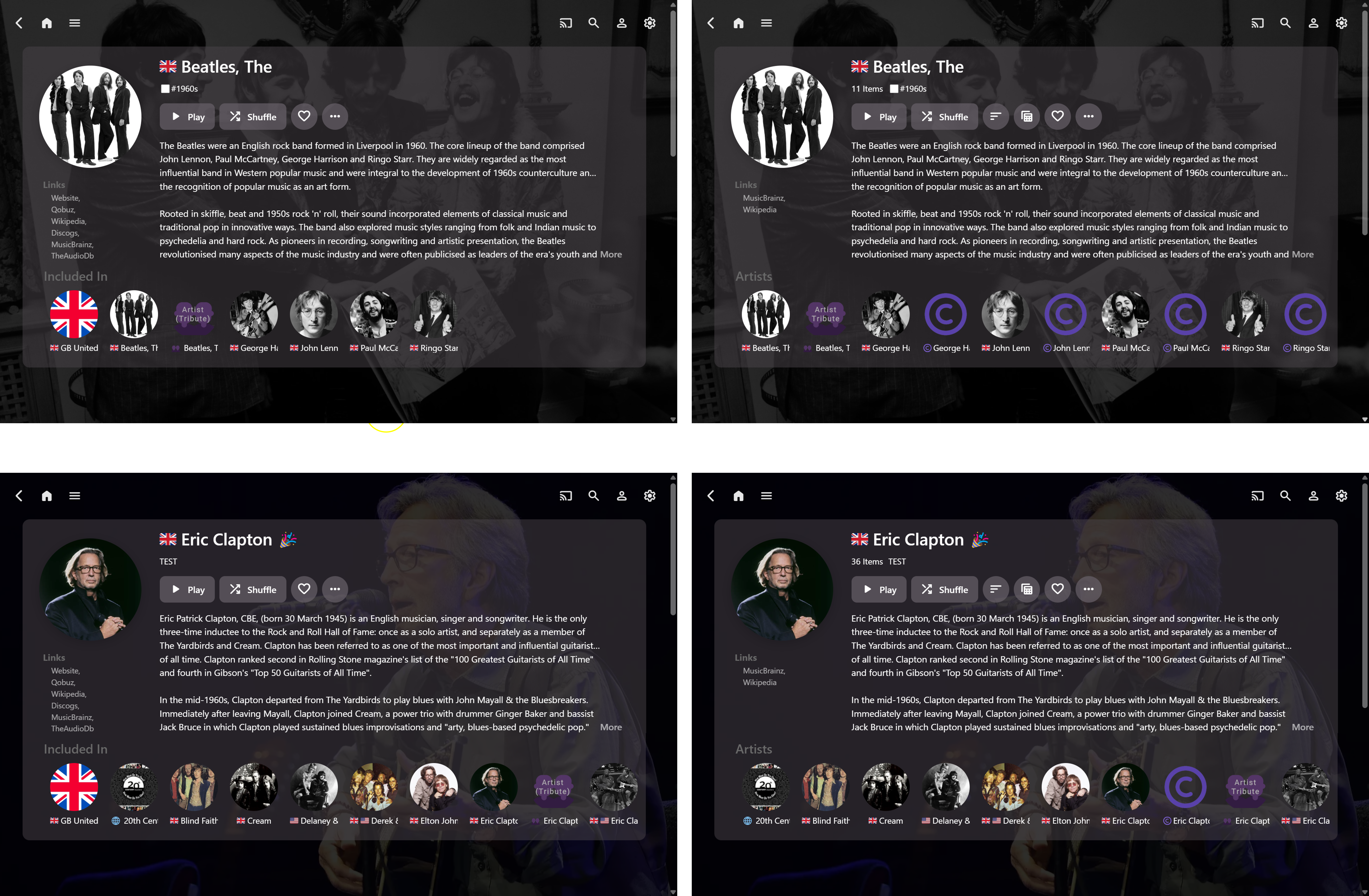
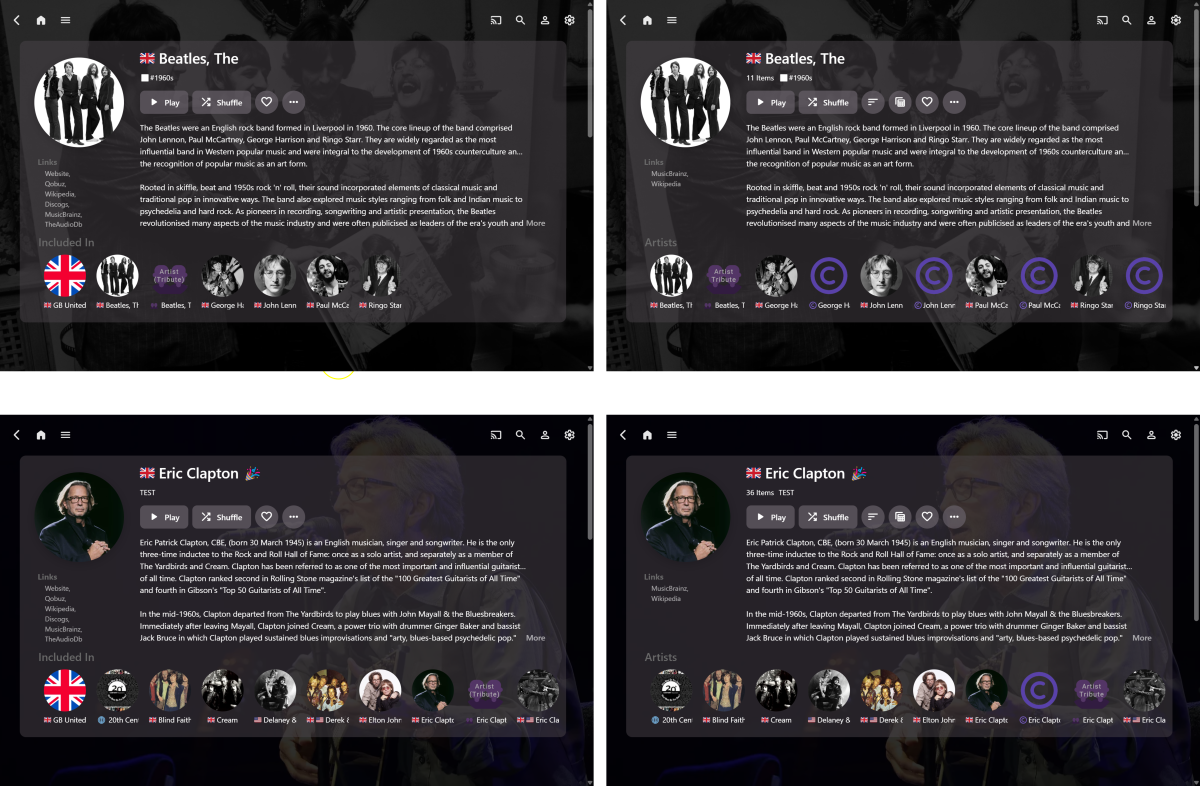
For 2000+ Album Artists, I’ve now partially set up 600 “Related Artists” Collections to test out the idea on a larger scale. The (touchscreen) navigation is great and it’s very fast to ‘jump around’ all over my music library now, but the landscape page views still need refining further... Borrowing ideas from Qobuz and Apple Music, here’s some working full-screen updated examples: (The LHS images are Artist detail pages and the RHS images are corresponding Collection detail pages.) Filling the top-of-page landscape view with Artist-specific info only, allows for more Artist detail to be shown. It seems more focused to me, but also less cluttered and less distracting because the Albums/Songs/Other info is hidden below. The layout isn’t quite as good in portrait mode, nor on a small phone screen, but that’s not my goal. So far, so good… but still a lot more to do, especially with the Sections below, when scrolling down the pages…
 2 points
 -
Version 12.1.0 Notes: Please remember to leave an updated textual review on the Play Store. Your feedback is essential for improving the app’s ranking and securing Symfonium’s future. Added: Added Smart Queue as a replacement for Continuous Playback. Automatically queue tracks based on genres, artists, or randomness. Introduced Smart Flow. Effortlessly extend your Now Playing queue with adaptive modes—insert random tracks, focus on a specific era or artists, and unlock more possibilities with Plex Sonic Analysis (requires sync for detection). Added experimental support for casting to Plex/PlexAmp clients. Expanded cover art gesture actions with more possible commands. Added new button options for the Now Playing screens. Added a new option to customize the Now Playing volume bar icon color. Added numerous new fields in string templates. Enhanced background styles and overlay with horizontal gradients. Added an option to display left navigation menus on the right. Introduced left-handed mode for the compact player. Added a stop casting option to the sleep timer. Added a new API command to refresh a stable random playlist. Added a button to clear all playback history data in Symfonium custom parser providers. Enabled styles as a possible track smart filter and now store styles per track in Symfonium custom parser. Added new smart filters for display artist, display album artists, and display composer, allowing rules to work with multiple artists simultaneously. Added original release date as a filter for album smart playlists and as a sorting option. Added a sort by “Random Albums” option for manual playlist content sorting. Introduced stable random, random albums, and stable random albums sorting options for non-smart playlists. Added random albums and stable random albums sorting options for track smart playlists. Added Medium tablet default styles, tweaked Large tablet styles and automatically apply them on first run. Added support for ID3v2 chapters tags for dynamic title update during playback. Added role as possible artists smart filter. Changed: Continuous Playback is now Smart Queue. You’ll need to reconfigure it to continue using it. Accessible from the Now Playing and Now Playing Queue screens. Bottom sheets with smart filters or a risk of data loss can no longer be closed by swiping the content—only the header. (The back button and close button still work.) LRC lyrics lines with identical timestamps will now be automatically merged. Now Playing string lines will always hide when using “At Most,” not just when set to “At Most 1.” Fixed: Improved handling of inlined text with progress bars and non-fixed-width fonts. Fixed “Go to Composers” not filtering correctly when songs have multiple composers. Fixed an issue where clicking on marquee text sometimes didn’t work. Fixed “Previous Button Rewind First” not working in the expanded player. Prevented media queue corruption when starting Internet Radio. Fixed occasional issues with transcoding from Google Drive. Fixed album type grouping with many different custom album types. Fixed some Android Auto buttons sometimes not doing anything if a sync was completed after playback start. Fixed Wear downloads not always respecting the Wear quality setting. Fixed Emby tags sync not always working. https://support.symfonium.app/t/version-12-1-0-released/72972 points
-
Be able to create playlist based on a certain criteria, like genre and or year, in order to create a dynamic playlist that it refreshes automatically when new content is added. This way you can for example, create a tv comedy playlist from the 90's, or a new sci-fi Movies playlist. Some other criteria for rules could be the rating, watched/unwantched, score, tags, language, audio codec, etc The possibilities could be endless1 point
-
When a Roku is connected via HDMI and the TV is turned off (or the tuner is used to change channels or switch inputs) the app knows this occured. The app can tell it is no longer the active source. There is no stranded playback when this happens. The playback will end. The server is notified you have stopped playback. There is no issue. All of this assumes HDMI-CEC is behaving correctly and the HDMI chain is all detected accurately. If HDMI-CEC is disabled on the TV or the TV does not support HDMI-CEC the app cannot detect the active source has changed. A RokuTV is like a TV/VCR combo unit. When you turn off the RokuTV it turns off the Roku. Playback ends because the app is forcefully killed as the TV turns off itself and the Roku. But the app never signaled to the server what was happening. It has now stranded the playback. If this is using ffmpeg it will also strand the ffmpeg process. If you turn off the RokuTV during playback or when the user of any Roku model uses the home button during playback the issue occurs. The session is stranded and the server needs to then intervene. The server does understand when a user has paused it is different than a stranded session. When a user pauses and then exits their session by turning off the RokuTV it might be an issue. The server has the session in a paused state instead of playing.1 point
-
Turning the TV off is, for anything connected to the HDMI, exactly like killing the power with the exception that the power part of HDMI stays active. the TV does nothing so the server never gets notified that the client is gone. I do NOT want any automatic disconnect no matter how long the idle period is unless it is configurable by the admin of the server. I almost stopped using Rokus because of their stupid requirement of requiring an exit if an app is idle for some time. But I dislike the Android interface and devices so much that I have mostly stayed with Roku. To me a user that does not at least press home or back after a show ends is undeserving of using a server that they do not own. I would tell that user that if the bad/stupid behavior continues they would lose access. Inconsiderate users is one of the many reasons I do not allow any access to my server except locally.1 point
-
Hi, you can renew at https://emby.media/premiere.html why not do that. we work very hard on Emby and we thank you for your support.1 point
-
I did a search and I don't think this has been a requested feature. Personally, I think Collections and Playlists are somewhat redundant. Personally I would rather have only one but have all the functions of both merged into that ONE system. My preference would be to have Playlists be renamed "Collections", merge the functions, and add the ability to change the viewing format from lists to thumbs if applicable or preferred. Here's why; what I find in my usage is that Collections visually look better within the UX/UI but although you can change the view and sort, you cannot orchestrate playback, so your stuck with play all or shuffle but in the construct of movies, which doesn't always work for viewing purposes if the entertainment requires or requests a certain order. (ie. prequels, series, etc.) (EDIT: Of course you can always play each item once at a time in whatever order but that can take away from overall ease and employment.) Playlists provide that customizable function of ordered playback while still providing the core function of what "Collections" are. If you don't need the ordered aspect you don't have to use it but if you do it's there. Also in my opinion, the Playlist tab UX/UI can use some visual refreshing/attention, as it looks like folders in certain layouts. Lastly, doing this would streamline the tabs above when selecting "Movies" as there would effectively be one LESS tab to navigate.1 point
-
There is. When you kill the power to the TV the app is not given any opportunity to do anything - it is just terminated abruptly. The same thing will happen if you press the "home" button on the remote while playing something. This is just the way the Roku system is designed due to the fact that it is not multi-task oriented - meaning only one app can run at once. Therefore, it is up to the server to determine that the app has "disappeared" after some period of time. It has logic to do this but, suffice it to say, that Emby is a very complex system that has to take a lot of different scenarios into account and there are obviously still some holes in this logic in some edge situations.1 point
-
OK, I do think though even if I misunderstood, that its not a bad idea. OR maybe some version of it, like being able to separate the output into individual language folders. There is room to explore further once everyone is happy that the current version is doing what it should. I don't have time for it right now anyway, I have to switch back to another project that I have been neglecting and fix that.1 point
-
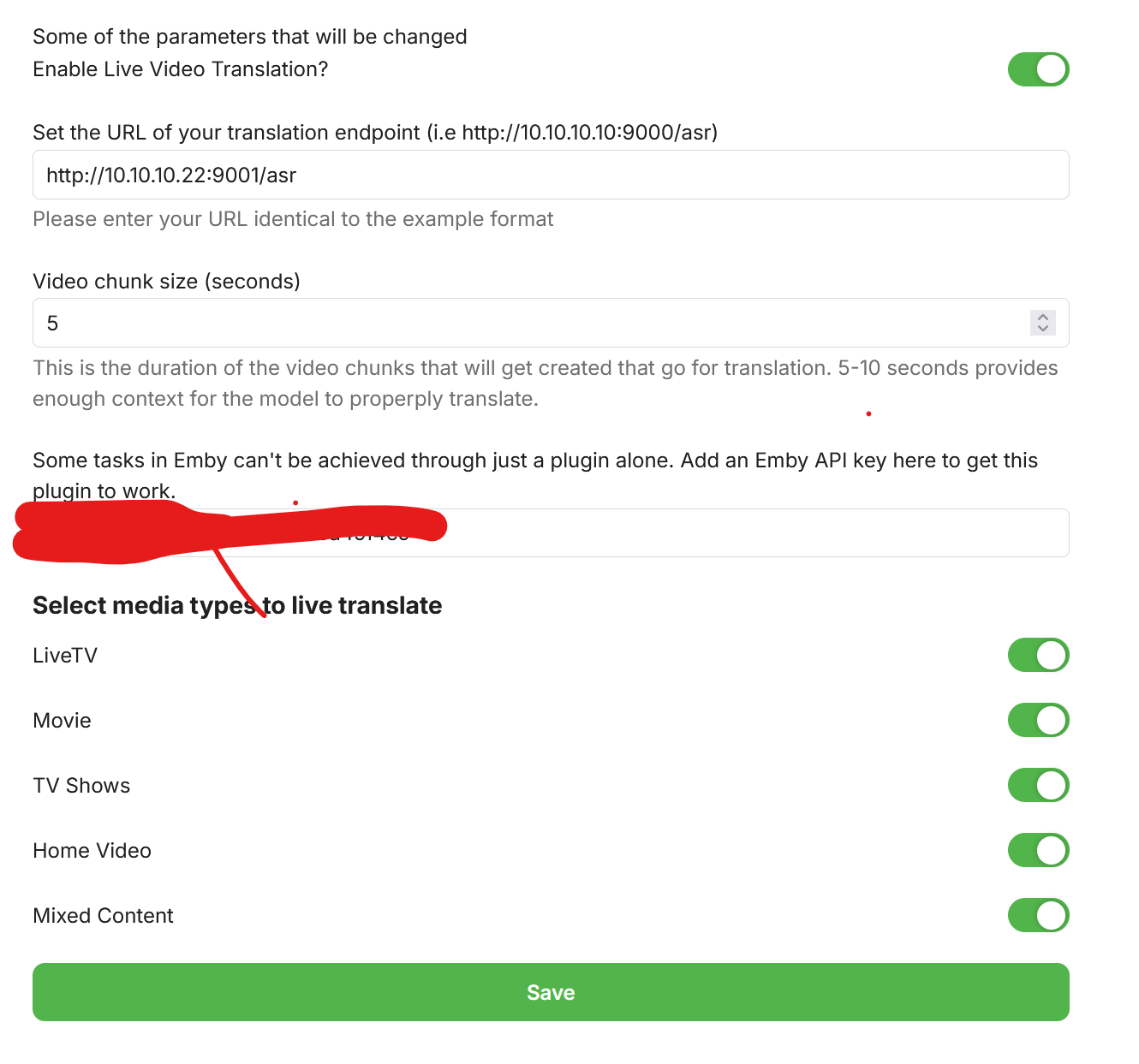
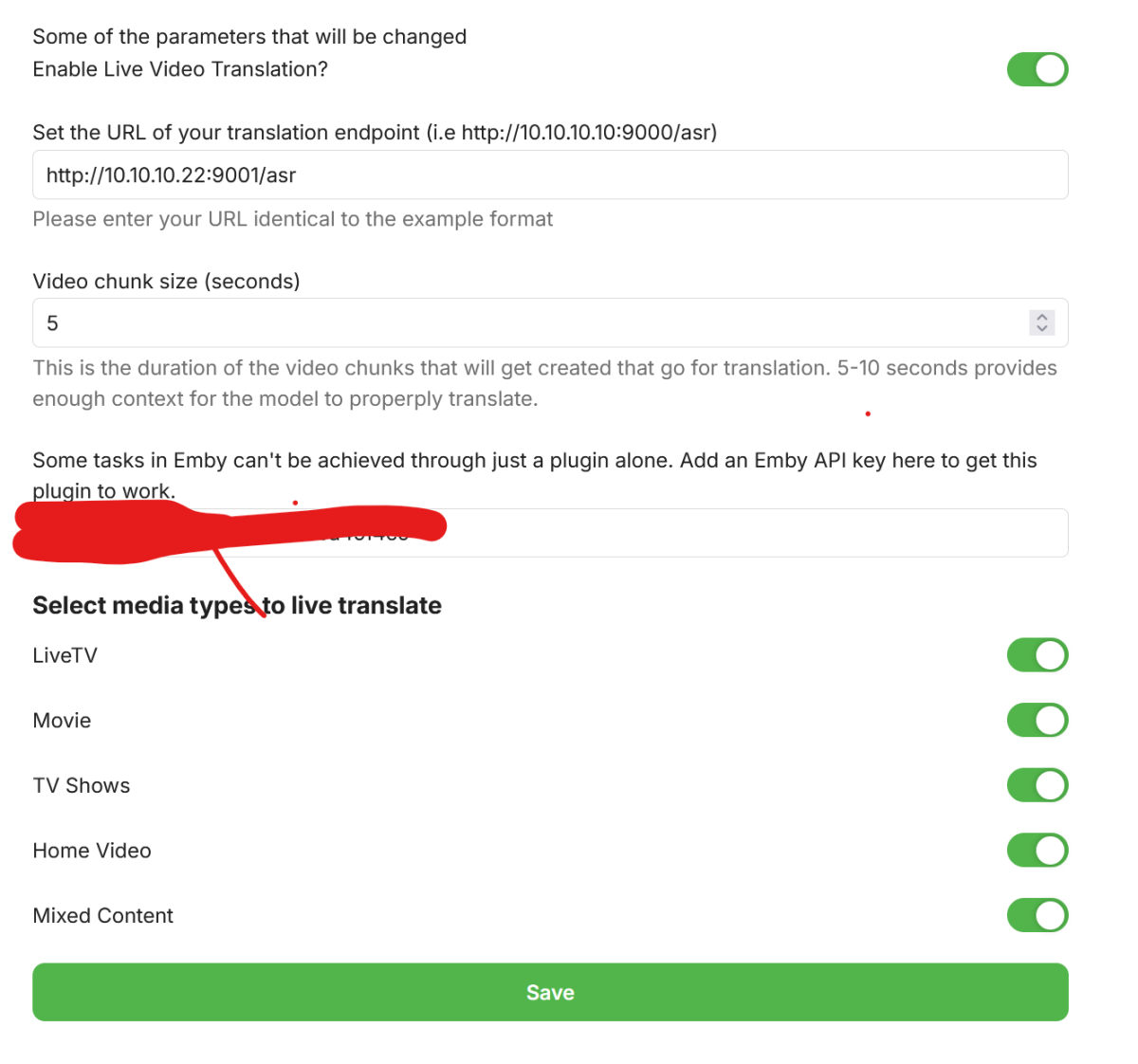
LiveVideoTranslation.dll New version of the plugin: Change log: - added option for changing "chunk size", it doesn't yet work as intended - Cleaned up the routine on starting the playback of the translated stream.1 point
-
So looking at the logs it looks like you're trying to skip ahead/scrub through the timeline ? This is currently not supported. Also I just tried it with my CPU (Ryzen 5800x3D) and it ran successfully, although was slower, which required some buffer adjustments. I have made some adjustments to the how the pausing/starting works. In short it will will automatically start the new stream. It will then pause it, then restart when ready. If you're on CPU mode for translations, you'll have to wait longer. I've added a new chunk size in the options, but you can ignore that for now, just set it to 5. I'll post a new dll in a post after this. Please try it again and post your logs again. Try a couple files, and remember you have to cleanly click "back" to stop all transcoding/translation. This plugin was really just intended to translate LiveTV. I added to options to do movies/tv shows as it wasn't that much more code.
 1 point
 -
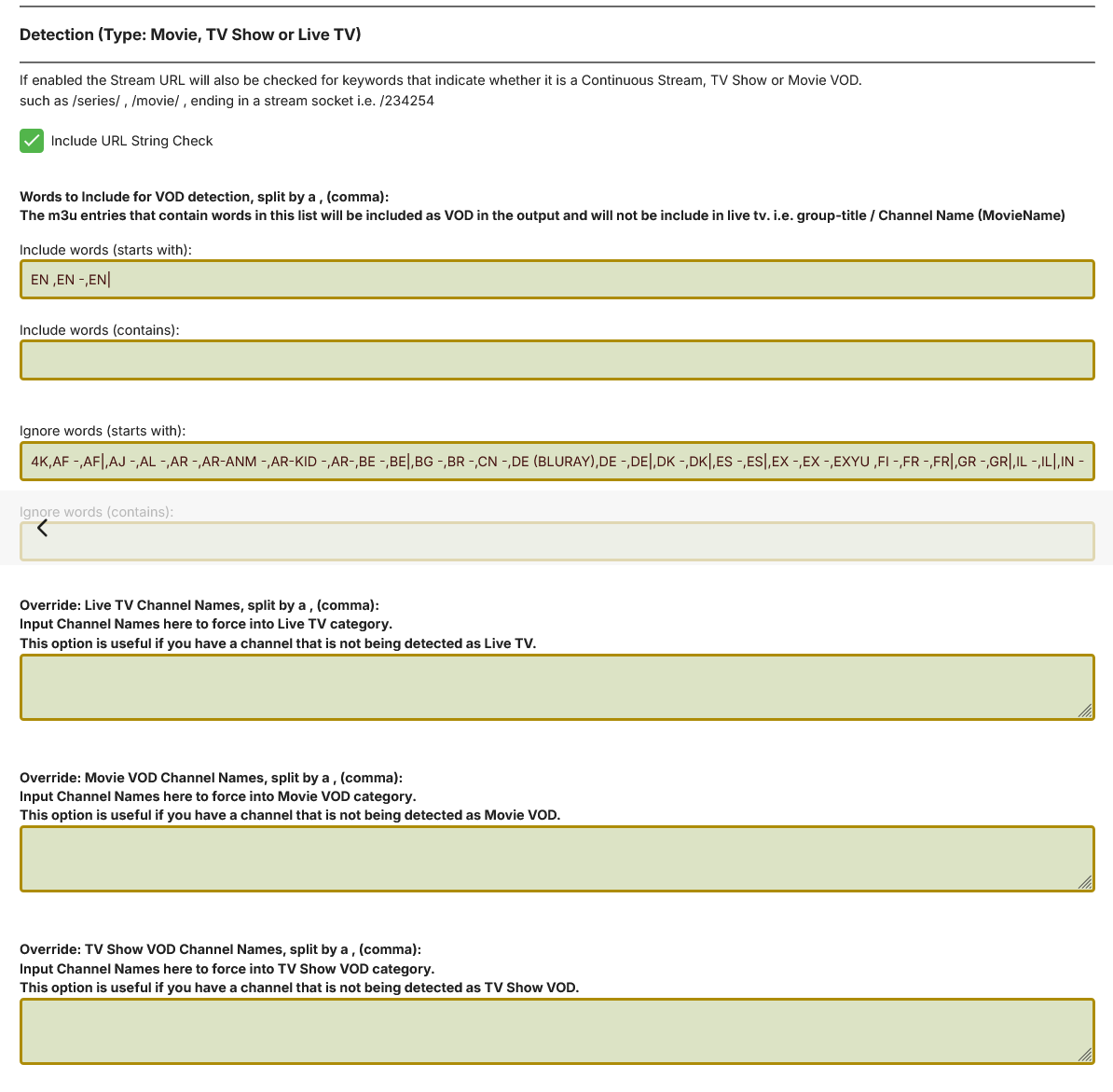
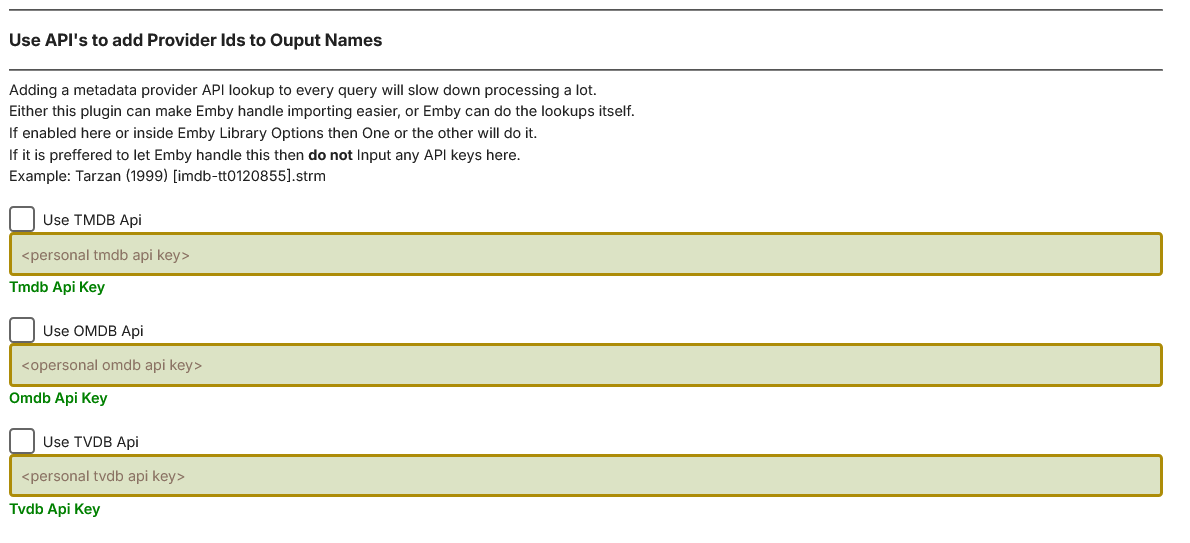
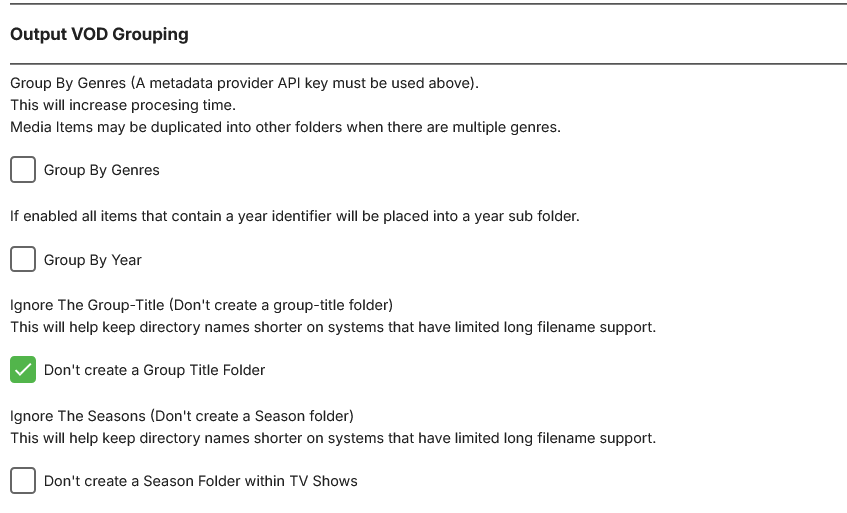
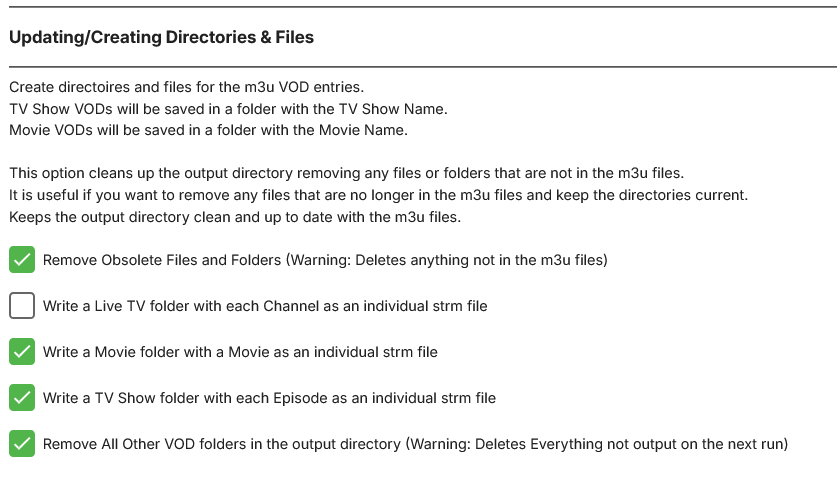
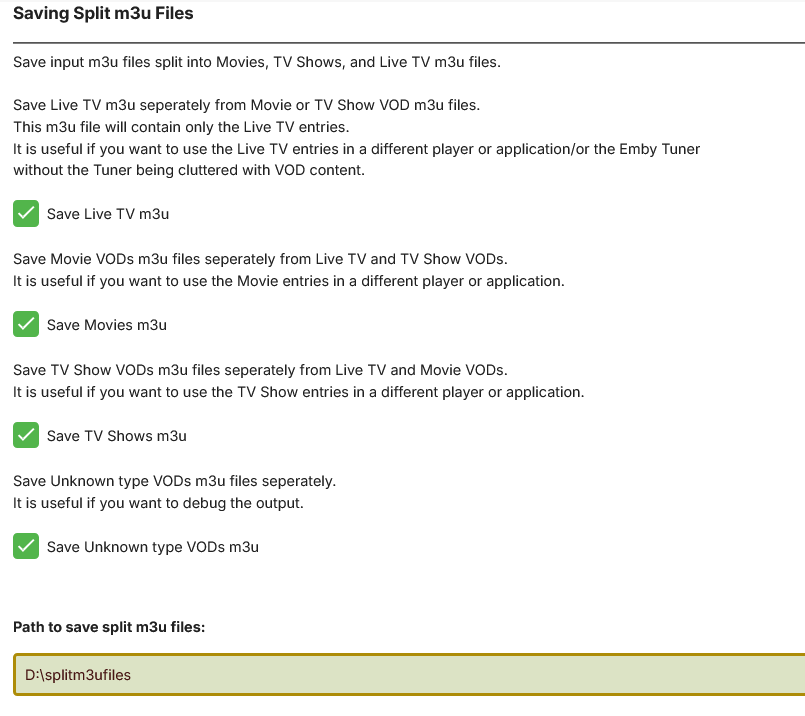
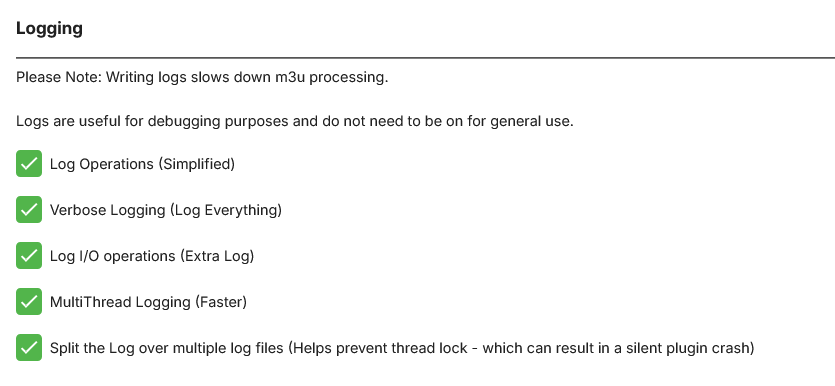
OK, here goes! Its different, so copy your old dll, and the VODtoSTRMscheduledTask.xml from the plugins/configuration directory and back them up. Currently the only thing I know that is not working is fetching the Icons/Poster images. Also I still haven't tested the group by Genres yet, so don't know if that is working or not. The detection section has changed! Include will override the ignores. You can use your personal API keys from TMDB, TVDB or OMDB to add Provider Ids or collect Genre Information VOD Output grouping has more options Choose what you wish to output, you can now output whatever strms you like. Choose what you wish to log A LOT of work has gone into this - Let me know you findings! I have taken onboard as well that this might get used to output different things, so I am also thinking about adding a saved profiles section, so that it could be run with different configs. What do you tink? VODtoSTRMscheduledTask.dll
 1 point
 -
To my knowledge credits/sort are currently not used by Emby at all. So currently AlbumArtist/Artist/Artists fields as it has many different variables depending on what field is populated as you could have each name in their own field also. But I believe Artists has a higher priority then Artist.1 point
-
Can't look any worse than a tv guide that is blank1 point
-
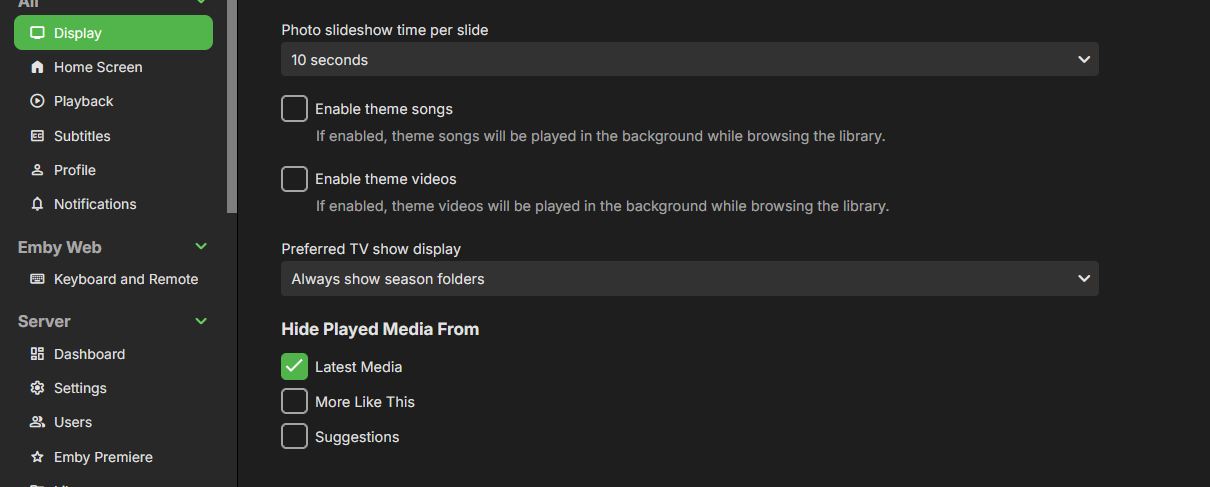
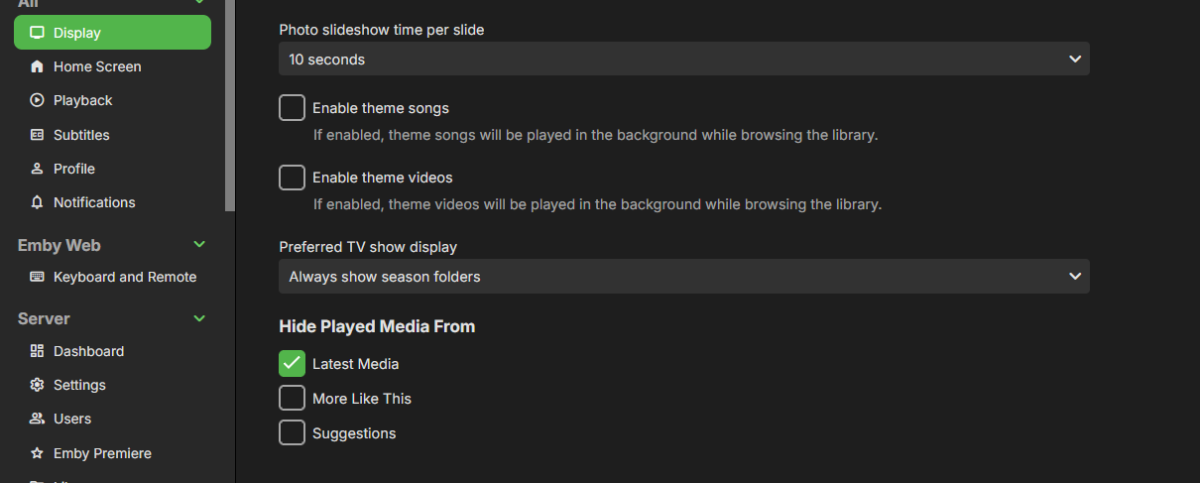
This happened to me also after a Server upgrade, it's under app settings now, per user. Set to always show season folder.
 1 point
 -
You can do that. I plan (if I can get it to work - haven't tried yet) is to use it to just show PPV, and i can create a library based on that1 point
-
They way they are identified is totally rewritten in the version I will post soon. I am testing, refining, testing etc. I am currently looking at changing the ignore section to improve it. I am thinking about adding a multilayer system with: Include (starts with) Include (contains) Ignore (starts with) Ignore (Contains) This way there would be much more control. As it stands, I have an issue with ignore "N -", it's ignoring "EN -", and changing to my idea above would prevent that. Yes this is already in the new version. It will detect either /live/ , .m3u8 , .m3u8?....., or a stream URL /588033 as a live stream.1 point
-
Have you verified your per user setting App Settings-Display?
 1 point
 -
I was away for a while. Just installed server 4.8.11.0. You guys actually solved this problem! You are wizards. I don't even want to know how you did this. Just a big thank you! I did not expect this 'semi hack' I thought I was using to exchange playlists with my DJ software to be restored. Emby are the best!1 point
-
Hi. Is your server running on Windows? Sometimes an update will cause Windows to change firewall settings. Have you checked that?1 point
-
I rebooted my mesh routers and the Server. Things appear to be working fine now.1 point
-
Noted thanks looking forward to both the new version as well as the app for other countries1 point
-
Sorry just seeing this. I found that trying a different provider the issue went away. So it was definitely linked to that provider. I was I a trial of their service so I chose not to use them. Unfortunately I am having an issue with the new provider but that is in another post. Thank you for following up. Don1 point
-
Yes, immediately after adding it. I managed to get the server running again after shutting it down, removing /var/lib/emby/data/library.db, restarting Emby and recreating my libraries.1 point
-
If you've got so many that it's not feasible to delete them individually, then that would be one option.1 point
-
Hi, during this time we have been caught up in country expansion requests to get the app released in more locations, and unfortunately the Samsung dev portal doesn't let us have an open app update submission and country addition request at the same time. That means we submit, and then we have to wait for it to completely go through it's process before we can submit anything again. So that has slowed app updates lately. Anyway, we are currently ready to submit an app update, but we are actually still waiting for our last update to completely finish as it is still in review for a few models. So hopefully that will happen soon and then we'll get the next update submitted. Thanks.1 point
-
No, it has fields for tmdb, omdb and tvdb API keys, it pulls into from them. You can get your own API key on these sites for personal use. Once I finish the next bit I have to do I might post it, so you guys can test it out. I wanted to test it a bit more first, but i don't mind posting it. I tested it creating the vod folders and cleaning up I tested the tmdb IDs being pulled from tmdb and added to the movie names. I haven't tested the genres yet, it pulls them, but I haven't tested if the genre folder creates yet. The code is there to do it, but it hasn't been checked. I tested the split m3u creation. I tested many different options work as the should, on/off for selecting outputs I have converted (well rewritten actually) most of the code to use all cpu cores instead of single threaded, speed has vastly increased. Because it is basically rewritten, almost completely, it's not even the same plugin anymore, it looks very similar and does the same thing but a lot better I think. It shouldn't be long now, I'm have a day off from work Sunday so I am hoping to finish it then if I don't have time Saturday.1 point
-
It was a deliberate decision and I explained the reasoning. That's all. We can agree that it's complicated and individual situations are multifold, so I can of course imagine that it makes sense in some cases to have being persisted. We'll surely be able to provide an option to retain the volume across runs of the app. Thanks1 point
-
Sorry but this may only hold true for non PC apps but for pc it is plain wrong. You are assuming that there is a convenient way to manage your audio device volume in your audio device. But for windows most of the time their isn't and the best we have is windows volume mixer. For example a HDMI monitor playing the audio with built in speakers. No one in their right mind is going to open a monitor OSD to adjust the output volume just for EMBY or any other Windows app. Different programs play at different volumes so it is an industry standard to have a persistent volume setting for 95% of the programs that may need any kind of volume adjustment. That is why windows has sound mixer and why a persistent audio settings in every app are common industry practice. Name a single game that does not have its own persistent software sound setting. Also to further complicate things Emby has more audio issues when combined with windows volume mixer. The audio set in volume mixer actually persists after restart while resetting the volume mixer slider back to 100 %. Meaning if you reduce EMBY app volume to 1% in volume mixer it will retain this 1% volume after app restart while resetting the volume slider back to 100% thus you cant hear anything but in-app sound is 100% and Volume mixer sound is also 100%. Moving the slider from 100% to 99% gives of an instant SPIKE in audio. So please stop calling bugs as features. I am also a software developer and I know that it is the default excuse when there actually is a scenario where it might remotely make sense. PS.: It is actually debatable even for non windows apps to keep anything at 100% in the audio source. 100% is the limit of what you device is capable of outputing and there is absolutely reason to have anything at 100% it does not effect digital audio in the slightest and analog audio will have much greater chance of getting distorted when close to any kind of audio devices limit. There is a possibility for a wave form losing details and flattening out if it can not reach its peak phase due to a hard limit of what the device is capable of outputting.1 point
-
I think this is the same issue, in which case I have fixed it already.1 point
-
Someone else did this not me, so its mentioned here somewhere...but anyway - - shut down the server - find the file homesections..js file. Mine is in the folder C:\Users\XXXXX\AppData\Roaming\Emby-Server\system\dashboard-ui\modules\homesections ........... XXXXX being your name. - make a backup of it ! - edit and search for '16'. I'm fairly sure there is only one '16'. Looks like - change the 16 to 64 (or whatever you fancy). Save and restart the server. The change only lasts for as long as that server version lasts. So any server update - rinse and repeat. I'm on Windows, no idea how / if this works (or doesn't) for Synology, Docker, Linux etc... Just tried it and it works, but proceed at you own peril...
 1 point
 -
I think it is fixed in the next update, or you can try the USB beta install to test if it resolves your issue1 point
-
Fixed! Thank you1 point
-
Thanks for your report. I can confirm that it's a bug in the current Windows app. It will be fixed in one of the next updates.1 point
-
The new version has genre grouping if you enter a provider API key. I have to test that yet It also sorts much better and accurately. I am very close to posting it. I am hoping it'll be done by Sunday evening. So from your list it looks like the saved m3u is not respectful of utf or ansi, I will check that, thanks.1 point
-
The update arrived today, everything worked as it should. Thank you very much!1 point
-
@KegTapperWell it took a while but someone finally came along with the solution that was keeping up at night. Thank you so much for getting back to me with the settings that I required. Have a wonderful Friday / weekend.1 point
-
just came back to say it worked, thanks a lot guys ♥1 point
-
Wonderful news. Thanks for all your effort1 point
-
I think a user filter could make sense. Also when clicking on a user in user setup, being able to see this same information for that user. So almost like that screen becomes a dashboard for that one user and not just their permissions.1 point
-
I appreciate the work you’ve done with Emby, but I’d like to request an improvement to the search functionality. Currently, search applies to all libraries at once, with no option to limit it to a single library. This can be frustrating for users with large/diverse media collections, as it makes finding specific content more difficult, especially when multiple libraries contain similar items. Adding the ability to search within a specific library would greatly enhance usability, making it easier to manage and locate content efficiently. I hope you’ll consider this for a future update. Thank you for your time and for continuously improving Emby!1 point
-
just getting started with ubuntu installed latest version. if i use the emby theater app 3.0.16 from ubuntu it works fine with no problems if i use the latest download of app 3.0.21 the app opens fine but wont play any video both live and files both connect to my qnap server which hosts the emby server ollie1 point
-
Hi, we’re looking into it. Thanks for reporting.1 point
-
Could Emby add support for Fan Edits and their associated metadata? The best source on the web for the metadata is: https://ifdb.fanedit.org/ and it would help streamline in the same way the metadata pull does for regular videos. I currently list my fan edits separately from their original movie so that I can have independent metadata and then group them with the original as a collection. I've thought about using the new multi version feature but from what I can see that shares the metadata between all versions so I'm thinking my current method is the best as the metadata can very significantly from the OE movie.1 point
-
Hi. It is no longer necessary to sideload this. Just search for it in the Amazon store.1 point
-
I second this. Nowadays, artists release mostly Singles that are not part of any Album (thx to streaming services). There is a need to differentiate between an "Album" and a "Single" (track released as "single" and not being part of any album) in artist profile at least. So, here comes the "RELEASETYPE" tag. Supporting the "RELEASETYPE" tag and splitting Albums from other releases (EX: Singles) in the Artist profile page will be awesome. This way we can properly organize things. Currently I have all the "Singles" tagged under a regular album named "Singles" ... but this is rather messy and just a workaround: the new releases remain "burried" in the fake "singles" albums, the album date is fixed (even when new singles are added), the cover art is mostly random (picked from one of the songs) ... and so on. Supporting the "RELEASETYPE" and splitting things up by this tag will be great !1 point
-
Actually this is going to be a focal point of the 4.9 release, so you’re all in luck.1 point
.thumb.png.1ddf135ad99a72646a26d671a28ffe35.png)