Leaderboard




Popular Content
Showing content with the highest reputation on 02/14/25 in Posts
-
This is fixed for both, Windows and Xbox, starting from Beta 2.217.0 (released today). It might take about a week until a new stable release will be available. Thanks a lot for reporting!3 points
-
It's not your fault, this all was broken when the emby team removed upcoming and missing episodes from the DB. We appreciate the effort you've done. We're trying to get the attentinon of the emby team to revert this mess.2 points
-
Hi, it will be in the next update of each Emby app that is impacted. Thanks.2 points
-
Delete and re-add did work, just scanning the media library from scratch and scraping metadata, which can be slow with a lot of data Thank you!2 points
-
Hi, thanks a lot for the feedback! Starting from Beta 2.217.0 (released today), there's a hard limit of 60 Hz on Xbox which will even be enforced when automatic rate switching is disabled. Refresh rates > 60 Hz also won't be taken into account for automatic rate switching. It might be because the Xbox Series X is a bit more powerful than Serries S (development and testing should always be based on the lower-end models). Starting from Beta 2.217.0, there's an option to disable the 30 Mbps limit, but this mode is unsupported and you'll see a big warning banner - don't complain when video is not playing properly. Can you please show the Embyx MediaInfo for such kind of file? Fixed in Beta 2.217.0 (released today). It might take about a week until a new stable release will be available. Thanks a lot for reporting!2 points
-
Auto Sync for Subtitles was recently added in Plex: https://support.plex.tv/articles/auto-sync-subtitles/ It uses the voice activity data so doesn't deal with signs etc. like in ASS subtitles, but it is still a significant improvement, especially when downloading subtitles on demand from OpenSubtitles etc.1 point
-
Basically, I want to see which collection a show belongs to when I use the Table View the same way I can see the Genres and Tags. I know I can group the series by Collection, but I just want to see it in a column. Also, if I add or remove columns from the Table View, the settings change if I navigate away from it. For example, if I add the Genres and Tags columns then switch to List View, the Genres and Tags columns are gone when I switch back to Table View. Thanks for any help!1 point
-
@GrimReaperI think they mean support for Emby working fully offline. They are afraid that Emby is getting information on what they have on their server. (Their concern might be because they seem to be peddling an illegal link in another thread.) Paul1 point
-
Next-up there will be a migration to the latest ffmpeg. This will come to the beta channel of the server AFTER the next stable release (4.9). Once that is done, we will look at the current status of the RockChip upstream work and decide whether it's mature enough to give it a try. Thanks1 point
-
hmmm so it could be more tricky but closing connexion that are direct downloading can solve the issue . I should investigate with this maybe server logs can drop more info for this special case1 point
-
Looks like it is this min-height code here that triggers the difference overriding the inline code. @media not all and (min-width: 37em), not all and (min-height: 37em) { .dialog-fullscreen-lowres-autoheight { top: initial !important; max-height: 72% !important; max-height: calc(100% - 4em - env(safe-area-inset-top, 0)) !important; min-height: 15em !important; -webkit-justify-content: flex-start !important; justify-content: flex-start !important; } } But yes there have been a few topics on this scaling/resolution issue. So using the inline code and making it important overrides the code above. But as always custom css only applies to the web client not any device client or online client. div.dialog-fullscreen-lowres-autoheight { position: fixed!important; left: 1542.68px!important; bottom: 32px!important; max-height: calc(98% - 32px - env(safe-area-inset-bottom, 0))!important; }1 point
-
You used your subtitles "hdmv_pgs_subtitle" those are really heavy on you CPU. But you can try without using subs. Or get .srt subs1 point
-
I found on a different post an interesting phrase, another member was saying that he disconnected the ethernet/LAN and connected via Wireless and it suddenly worked. Then i realized my TV has the possibility to connect Wirelessly, that's what i did. I disconnected from ethernet/LAN and connected via Wireless, uninstalled and re-installed the Emby app from Samsung Apps and when i opened the Emby app it automatically detected and saw the server, managed to login and now it works. I don't know why, but via ethernet it doesn't work. Perhaps somebody else might stumble upon this post and who knows, might find why via ethernet doesn't work.1 point
-
Just use Sonarr and Radarr to do this. Also get of your high horse, and keep you tone civil. Dev is not employed by Emby, and working on this in his free time. I have seen dev like this quit developing plugins for the community, Because of unsatisfied abusive user. Is that really what you want !!!1 point
-
fixed in 11.1.221 point
-
Tested several v2.2xx Emby WMC release in the past days: they are much faster and seems to be more stable, also the issue of sometimes not starting a live-TV stream has disappeared ! For v2.217.0: it seems also to work stable and the issue around going 'back' has been solved, although it didn't solve the earlier reported Remote Control issues: probably waiting the adoption of these keys in the kernel of Emby by @Luke? Keep up the GOOD/Perfect work! Grtz. Peter1 point
-
Docker seems to work perfectly, i now have my windows installation migrated to docker, and mounted my drives the same way as i have them on my Linux. I still had to change the paths in my library.db to the right unix paths, but at least i only had to do it once with some sql and a bit of manual editing for the few paths that are stored in a json i the db. I now have my Files under D:\Videos under windows, but emby in docker thinks they are at /home/{username}/Public/mount/d/Videos, and my Linux just has my drives there anyways. I also had to set the programdata directory in docker to a certain path that worksboth on docker and on my real installation because i saw something that uses the full path to that directory instead of some %programdata% thing, and under linux i did that with a symlink. Now I can dualboot without any problems, thank you!1 point
-
Yes, I have informed technical support, they have already fixed the problem. Now the key has been successfully added. Thank you all for wanting to help.1 point
-
How does having read access prevent you copying them? Paul1 point
-
Hi, I'm not at home currently I can't really test. I'll keep you informed when I've a moment to work on this.1 point
-
Thanks, fixed1 point
-
I can't extract the zip file, it seems to be corrupted.1 point
-
Bit of a pain ? Unusable on large libraries like mine ...1 point
-
I dod go through the network setting configuration on my server and nothing was changed because everything else works fine like it always has. It is so weird it's making me think that my isp blocked emby but plex works fine it makes no sense. And alsp there's absolutely no way to get a log file for emby if you can't log into emby to get it. Maybe there is but I'm not an expert with shell and ssh stuff I'm not a coder so idk. Update: alsp yes I tried a von to see if my isp blocked emby somehow and no emby still didn't allow me to log into it. It's the strangest thing I've ever seen smh1 point
-
I guess you will have to give detailImageContainer an assigned width, like for example: width: 20vw!important; But of course that's going to affect all detail screens and may not look good with some things.1 point
-
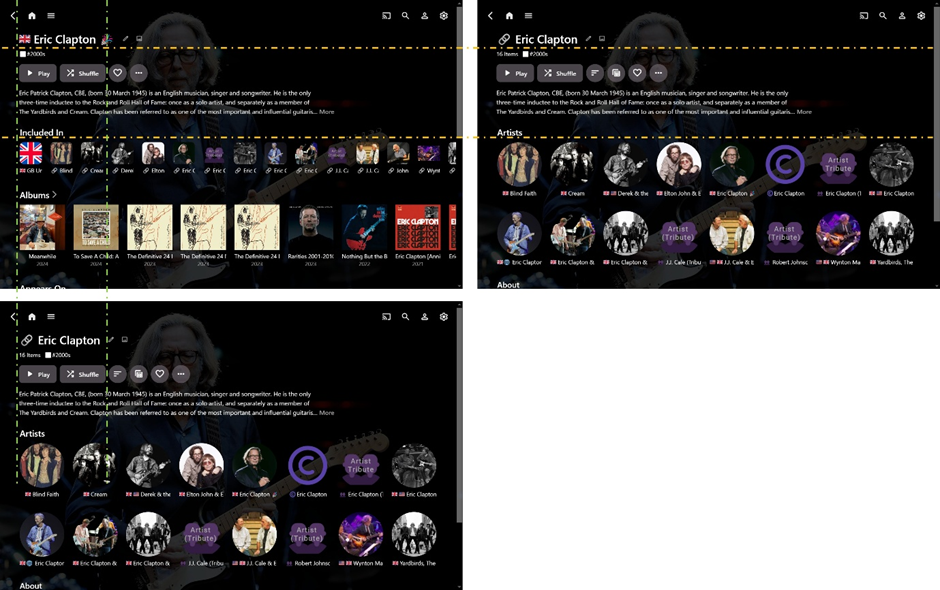
@Luke Thanks for confirming what I sort of expected. As a test, I tried hiding the main image altogether, using this code: .detailImageContainer { display: none; } Then, without the image, everything else aligns perfectly between Artist and Collection pages: I also discovered that, while there is the image size difference in the Web App, there seems to be no size difference using the Android App on a TV. Ideally, I would still like to achieve the same main image size across Artist and Collections pages in the Web App. @visproduction thanks for the extra (technical) info. Yes, I understand and agree with what you are saying about sizing and alignment. I guess what I am after is not so much an exact fixed image size compared to the other page elements, but rather the exact same consistent size between the Artist and Collection pages (similar to the Android App.) Thanks for sharing your custom CSS. I always like to see what others are doing, and the end result, but you are WAY more knowledgeable about this than me!!! You are inspiring me to learn more… but I haven't advanced any further as yet (not giving up though)... I guess I would need to change the ImageContainer size (fixed or responsive) and then scale the image inside to fit??? (BTW – I only care about the music pages in the Web App because I use the Android App for Movies and TV, so no great bother if other non-music web pages are adversely affected.) Any help is always appreciated. Cheers!
 1 point
 -
I finally figured out the problem. The files were being locked by Directory Opus (Windows Explorer replacement) I upgraded to the newest version of DOpus and now everything works as it should. Thanks for your help and a great utility!1 point
-
This is fixed for both, Windows and Xbox, starting from Beta 2.217.0 (released today). It might take about a week until a new stable release will be available. Thanks a lot for reporting!1 point
-
Pretty bad experience here! I could see the key yet could not copy to clipboard which led to a very frustrating few minutes until I came here to learn of this workaround with the table view. Why not allow to select the key and right click copy in the list view? Server 4.8.101 point
-
Hi @softworkzthank you and the team for implementing the fix! I'll keep an eye on my Dashboard for the when the new stable release has been downloaded and installed, then test again and report back. Take Care, CC1 point
-
I was about to open a request to remember my column selections in Table view. Then I found this. There seems to be a default list of selected columns, and any changes I make only last until I change the view away from Table. It would be preferable to have it remember my column selections, or to have an option to remember them. This applies to the web interface, as well as Android TV, at least. Possibly all devices.1 point
-
This is fixed for both, Windows and Xbox, starting from Beta 2.217.0 (released today). It might take about a week until a new stable release will be available. Thanks a lot for reporting!1 point
-
I've seen a convo about this before and I think it's an Intel thing.1 point
-
I have added the sub menu manually, but it would have been nice if its auto populated which what it used to be Thanks for the efforts and supports
 1 point
 -
A new Build of the WMC UI is available: https://github.com/EmbySupport/Emby.WMC.UI/releases/tag/2.217.0.0-Beta. Changelog:2.215.0 [WMC] Fixes for the WMC release 2.216.0 [WMC] Go fullscreen directly (no maximized state) [WMC] Set titlebar height to 0 in full-screen mode to make buttons accesible [WMC] Rework closing animation [WMC] Fix invalid window size and position on startup [WinUI,WMC] MPV: Fix HDR playback for Dovi5 [WinUI,WMC] WinPlayer: Fix ogg,vorbis,opus audio [WinUI,WMC] Update Webview to Edge 132 2.217.0 [WMC] Fix remote control operation [WinUI,WMC,Linux] MPV: Fix setting TargetPeak value [WMC] RC and Gamepad settings: Fix double back on exit1 point
-
same reason they have removed many of the functional things we used. such as removing the choice of "showing specials IN seasons" i paid for lifetime premium cause i was happy with how emby worked, and its features. just to have those features removed. and it takes me almost 5 hours to scan for missing episodes because it scans every movie, user, etc with no choices on what to scan and what not to. and the question of "showing the list of what media there is" ie codec etc... the response of it would take too long to process... i find that funny, cause the "reports" plug in does that perfect. just wish it did episodes separate. as far as the cache issue. i have not noticed anything with that. does that mean shows that have "fallen off" of the cache, wont show me missing episodes anymore? if that is the case, then this plug in is 100 percent useless to me now. which is also misleading, as i thought by everything i have seen, that it is using theTVDB, what is the point of having the TVDB plugin, and this plug in having code to use TVDB, if it doesnt use it?1 point
-
it did work eventually, after tenth time haha there was an error couple of times but i tryed again and again and i did it im very glad. thank you for your support1 point
-
dans la config de base au moment de l'instalation l app est parametrée sur port fermé du coup j ai ouvert le port du container et ca marche merci pour l'aide.1 point
-
Hi, is this the same issue as those other topics?1 point
-
Hi, it's hard to download log because I don't have laptop now, only smartphone and Android box. But when I watched two different shows with working subs and go back to that one where subs don't work before. Then it works OK on that box. So I think that was one time issue. Regards.1 point
-
With the exception of a couple OSes, I wish every customer who is past the "newb" stage would run the beta, as a 2nd instance used for testing. Steps to Run a Second Emby Server Instance: Download: Download the portable Emby Server ZIP file: https://emby.media/download Extract: Extract the ZIP file to C:\EmbyPortable. Shutdown Existing Server: Safely shut down your existing Emby Server instance. Start Portable Version: Navigate to the C:\EmbyPortable folder. Double-click EmbyServer.exe to launch the second Emby Server instance. Login: Log in to the portable Emby server using your newly created admin credentials. Port Change: Navigate to the "Network" settings in the Emby web interface for the portable server. Change the Local & Public HTTP ports (non-secure) to 8097. Change the Local & Public HTTPS ports (secure) to 8921. Restart Portable Server: Save the changes and then restart the portable Emby Server instance. Restart Production Server: Once the portable server is back online, restart your existing production Emby Server instance. You can run multiple servers this way on the same computer. Use the portable version to run the beta!1 point
-
Just for context: even though I'm working on and am deeply familiar with the software, I don't use beta versions privately. When I'm not working, I really don't want to have to deal with any troubles. I just need something that works without needing to stand up again and "shake it"1 point
-
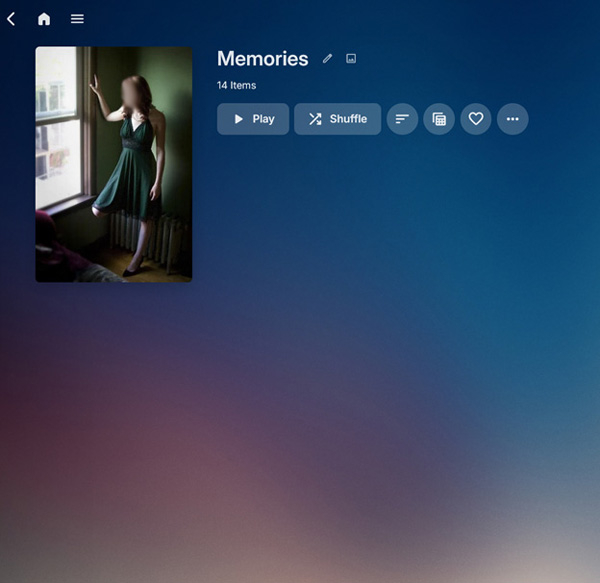
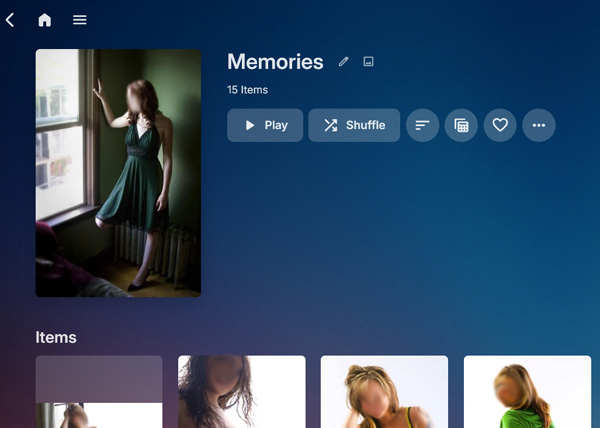
I've searched all over and was unable to find a fix to an issue I was encountering with collections of photos not showing their items, but I found a workaround I wanted to share. I’m using UnRAID so posted it here in this thread. I’ve never used Emby before or on other platforms, so not sure if this happens on other platforms. On my setup, Photo Collections don’t show their items when you select them. The items are there and can be viewed in order or randomly, but no list of thumbnails appear. See screenshots to see what I’m trying to explain. My Configuration · Emby 4.8.10.0 from linuxserver repository running in docker on unRAID. · Contains Photos in a single share · Folder structure is quite deep (genre, date, category, names, events, etc...) I'm a little OCD and still use folders to organize (I miss Picassa!) My Issue: I collected favorite photos I wanted to show into playlists, but the display of them on TV didn’t work as I wanted (seems to work better if the playlist is all videos). I was messing around and then grouped them into collections. This worked great for showing on TV, etc. but some collections would show their contents and others would not. (screenshot below to explain) Basically, all but one of my collections did not have the list of items under them. They would still play, but I could not dop any edits (remove from collection, etc.) Luckily one collection did have a list, so I started digging into the sqllite DB and into metadata to see why this one particular collection "worked" and others did not. It turns out the folder that "worked" contained an empty folder (a mistake I assume I added at some point to the collection). I added this empty folder to all the other collections and voila they all worked as expected. It adds an extra item to the collection. I named it something like zzzzz so it comes at the end (otherwise it messes up the sequencing, e.g. you click on one picture and a different one opens!) A Collection of 14 Photos - The “broken” way Only shows the image I set as the main cover image A Collection 14 Photos plus an empty folder Shows all the 14 images below the main folder.
 1 point
 -
Update for Xbox The new Xbox beta 2.212.0 (due in a few hours) will fix RC issues in the Xbox app.1 point
-
Disabling normalization seems to have worked. The file was downloaded successfully and it works fine. The plugin finished fine it's scheduled task.1 point
-
4 months since the last message, so figured it's due another check. We are getting close to a year of 4.9 being available as a beta release now (4.9.0.0 was made available on Feb. 3) with no signs of this feature. Any further update on this or a potential timeline?1 point
-
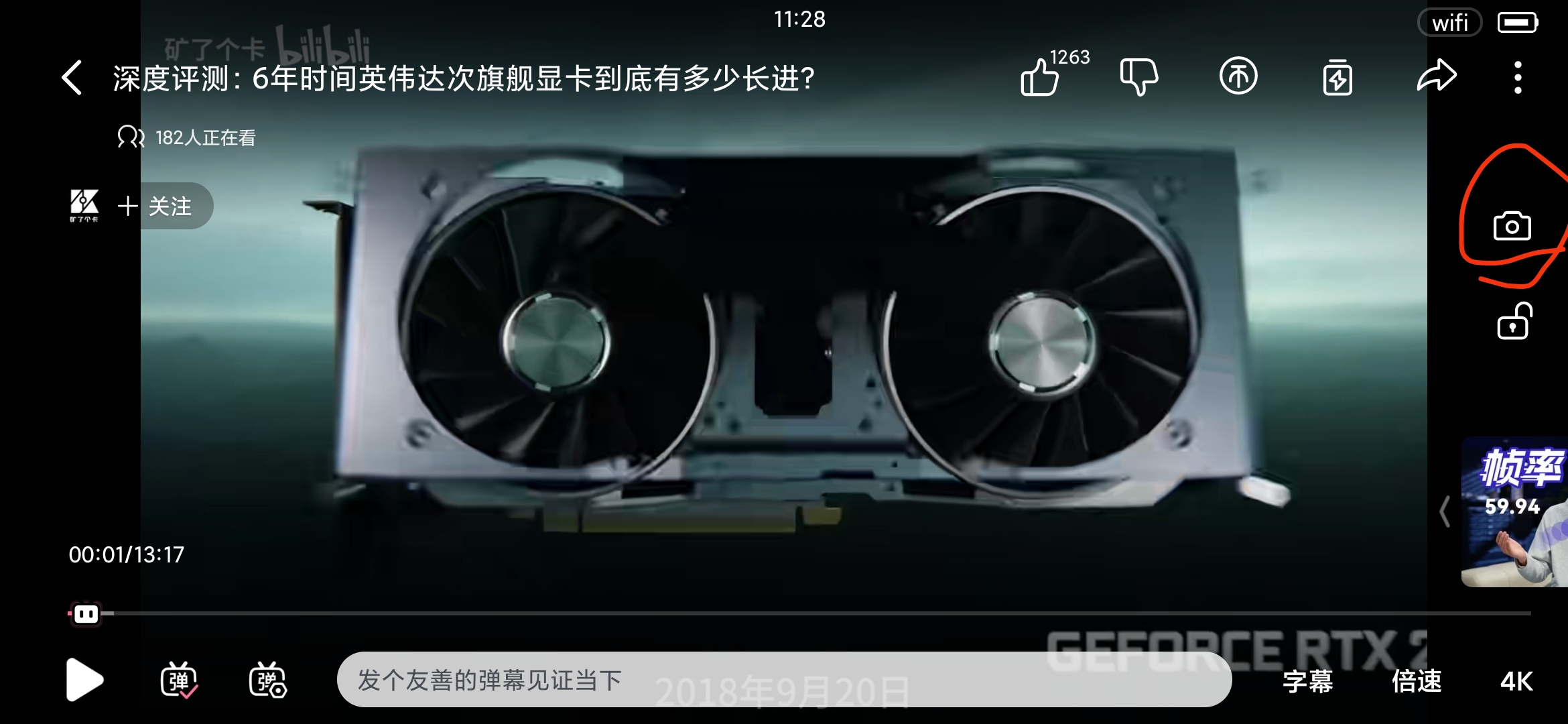
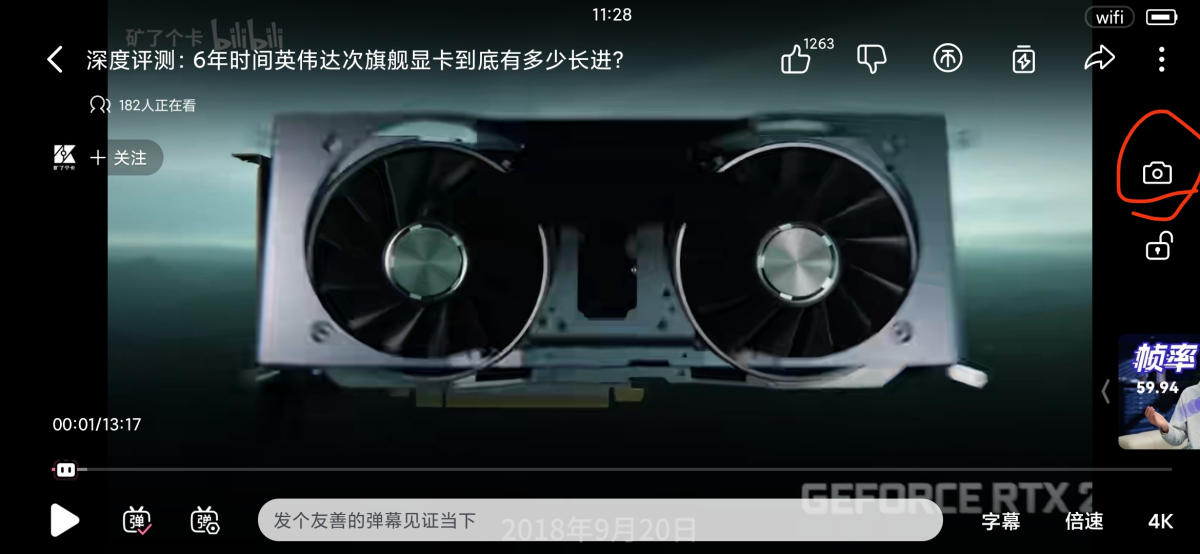
Most devices today have screens at a ratio of 21:9, 19:9, 18:9... If using the system screenshot for 16:9 videos, which are most commonly seen, there will be 2 ugly black edges on left and right sides. Many streaming players provide the screenshot button which can directly create screenshots from video sources. I wonder emby could add such a button for Android app? The circled button below is a screenshot button on bilibili.
 1 point
 -
Hi, in theory we could, but I also think you can argue that if we're going to start putting buttons there, then there are other more important functions that we could allocate the space for.0 points