Leaderboard




Popular Content
Showing content with the highest reputation on 02/13/25 in Posts
-
Thanks Dark, you have solved it. The certificate path was different between the servers so I updated the path and it was fine. I had assumed that a certificate was imported so to speak but it has to reside and be referenced. So that is a learning and it works fine now. Thanks a lot.2 points
-
Wrong way round - Jellyfin is a fork of the last opensource version of Emby. Paul2 points
-
That would be cool, but unfortunately it's just an example indeed. Here's the "Making Of" video: Vector_Drawing_Adventures_NoTrransitions_4x_1_chr2.mp42 points
-
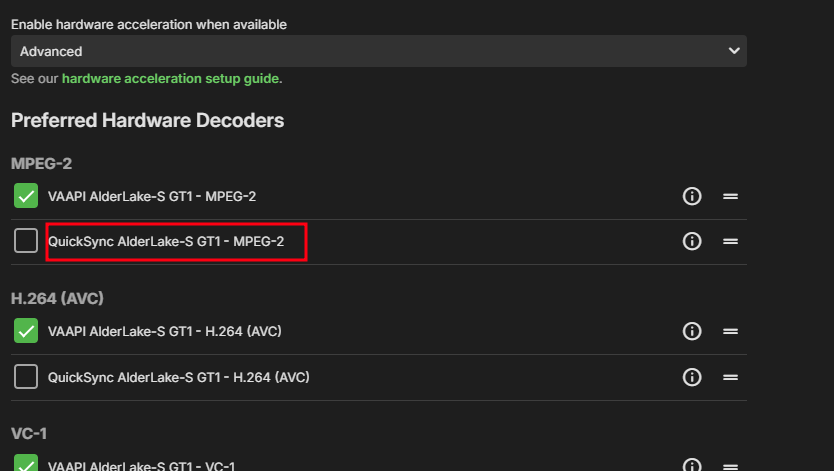
@trevoragiffordcan you do a full metadata refresh of the movie. Also switch to vaapi instead of qsv. Your hardware is old and cant hack it.1 point
-
Your server is only listening to http on 8099, and has not started listening to https at all. There are no errors indicating failures though. Do you have a certificate path and password set in settings > network? Without these, Emby won't attempt to start the https listener.1 point
-
Yup thanks, I didn't realise I needed to mark a solution. Done now, cheers.1 point
-
Yes, I did, but- and I should've tried this earlier- I got it working by disabling that access, restarting my server, and then re-authorizing it, and it worked. I should've tried that first. Thanks for your help!1 point
-
@GrimReapercan you add/update the old how to with what you posted above. As the old method is no longer valid.1 point
-
The content-type is back to "movies" on the Library tab now1 point
-
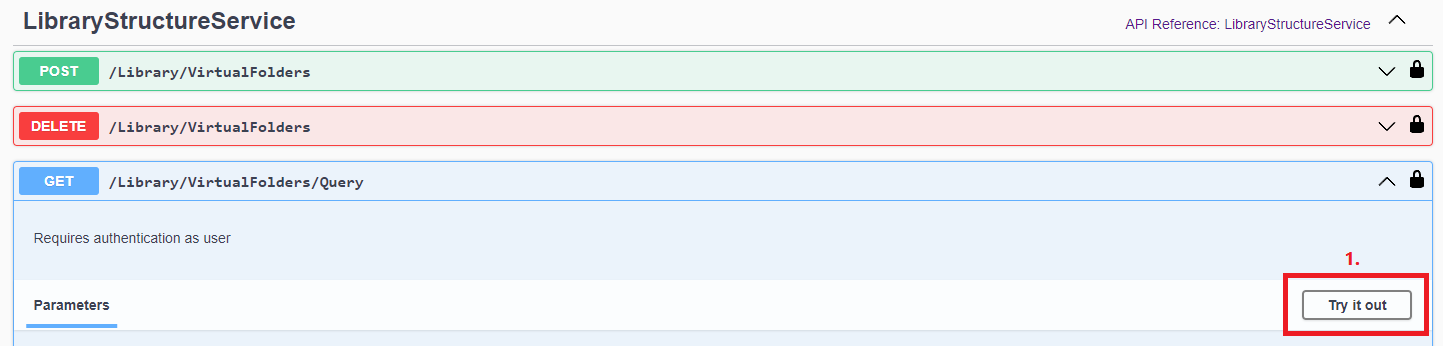
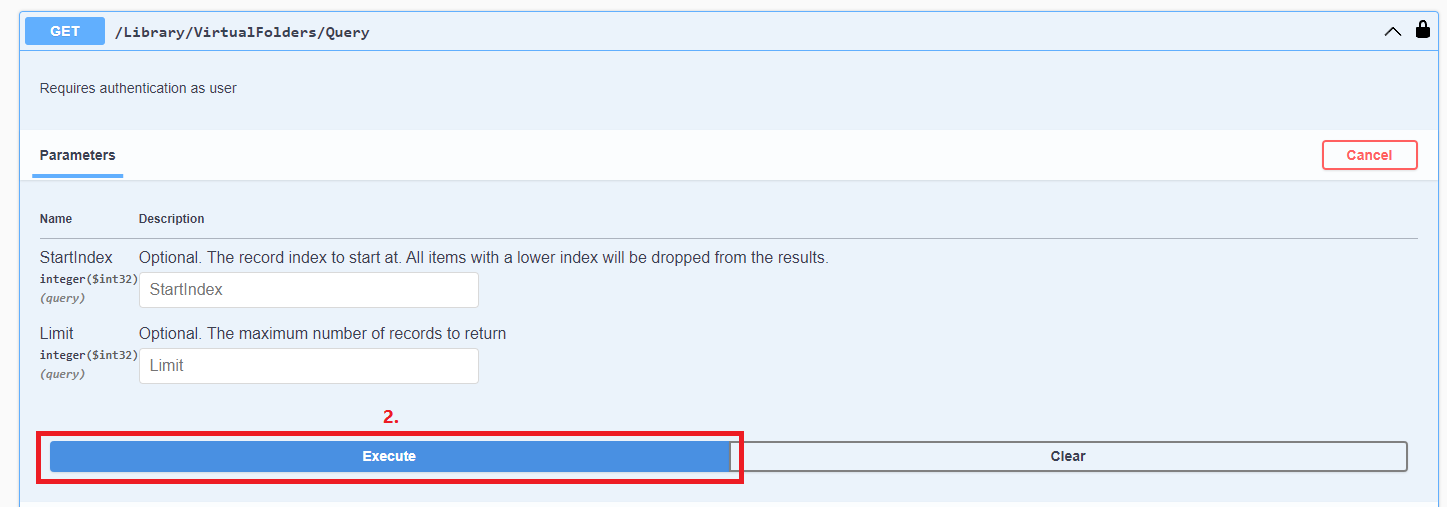
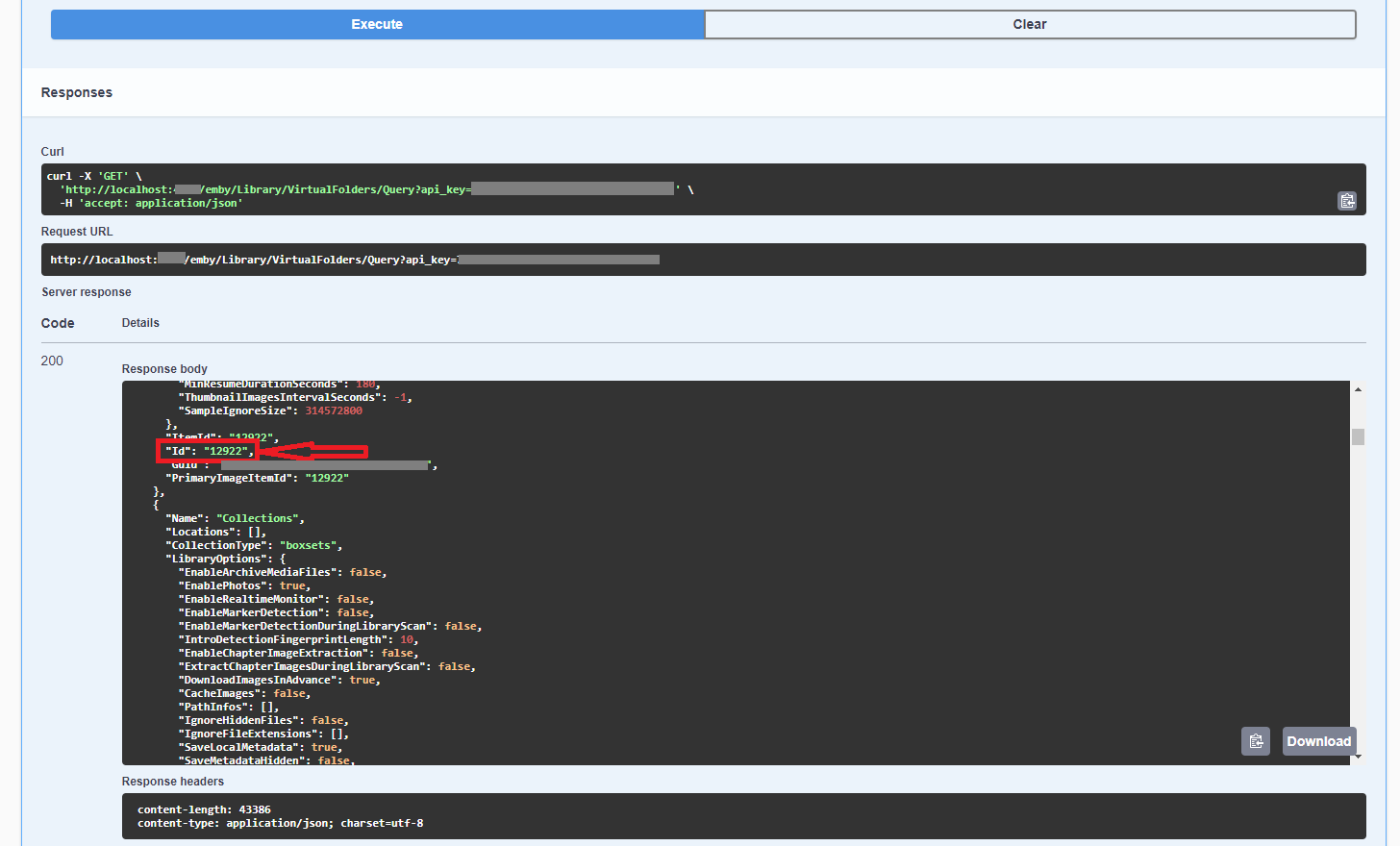
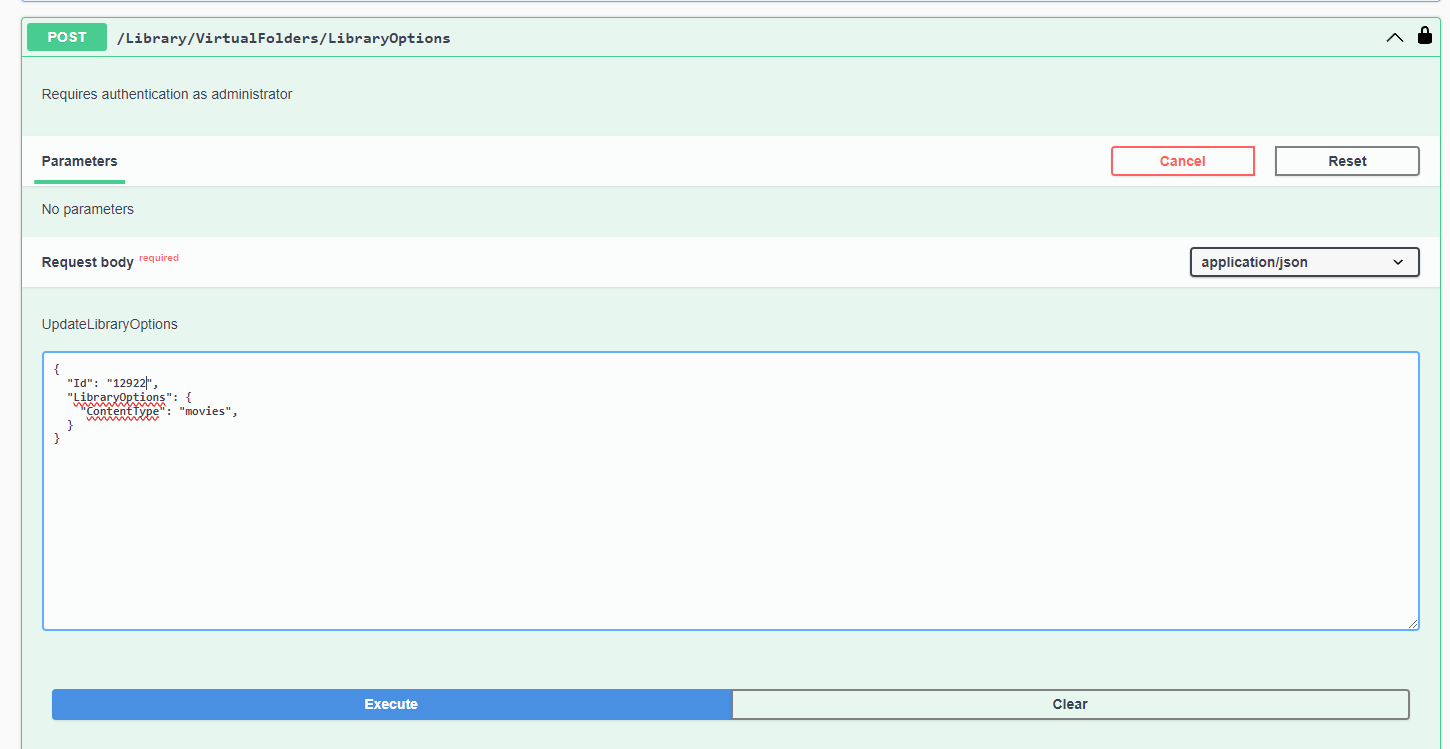
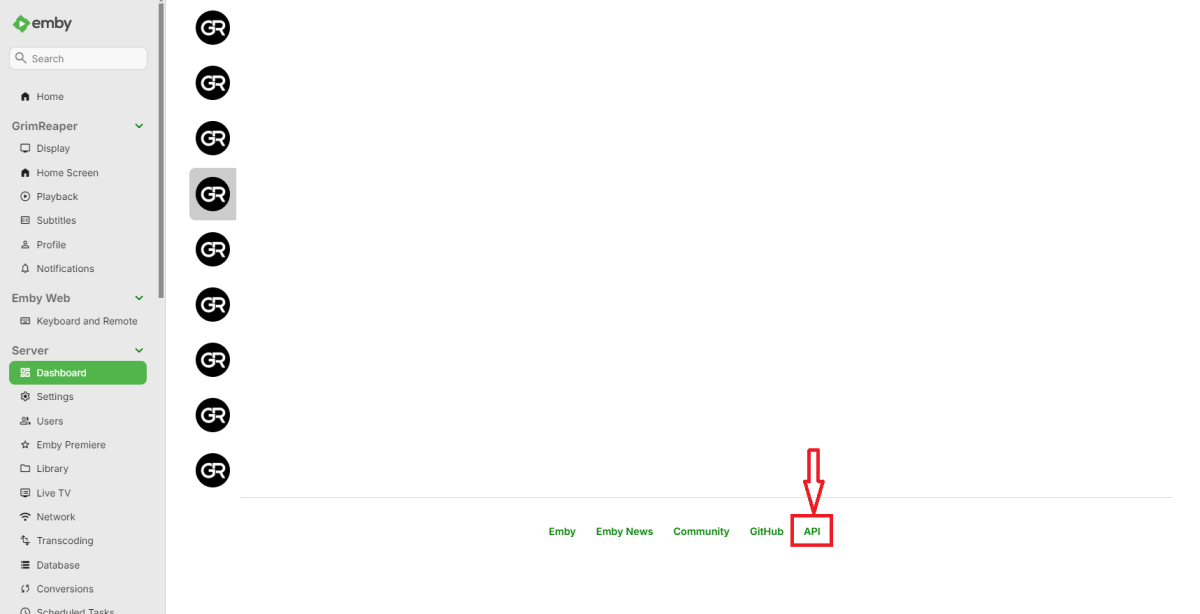
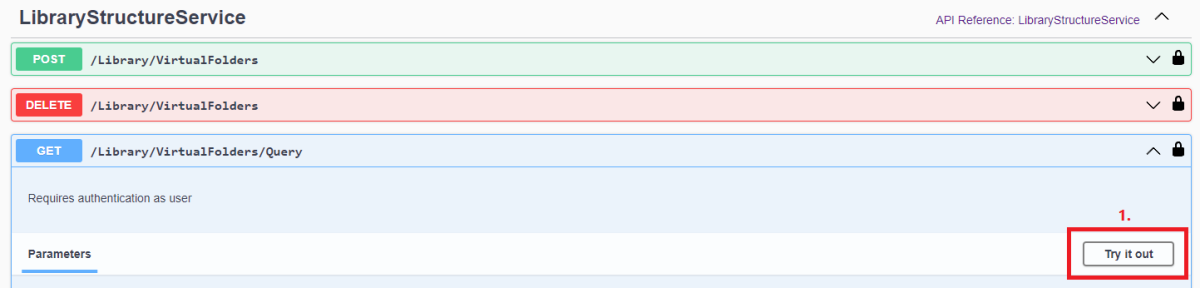
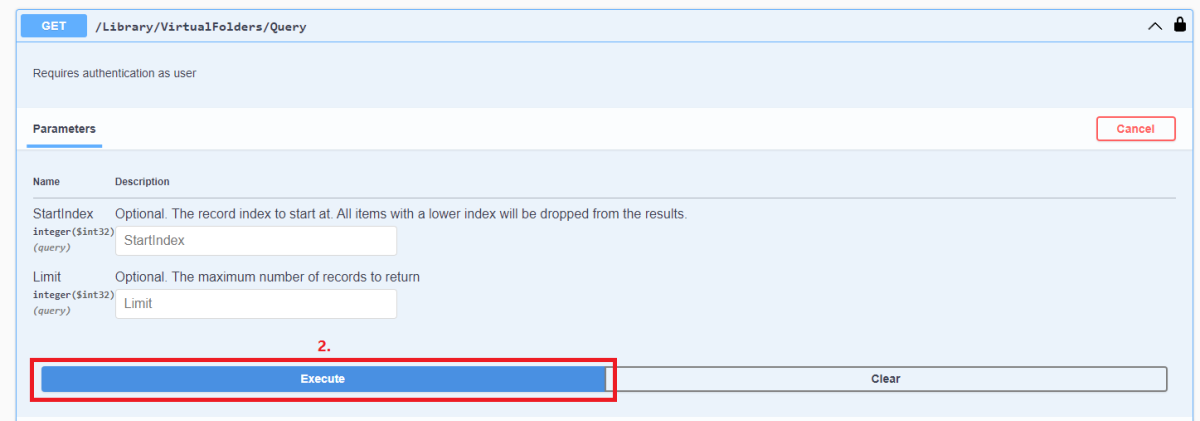
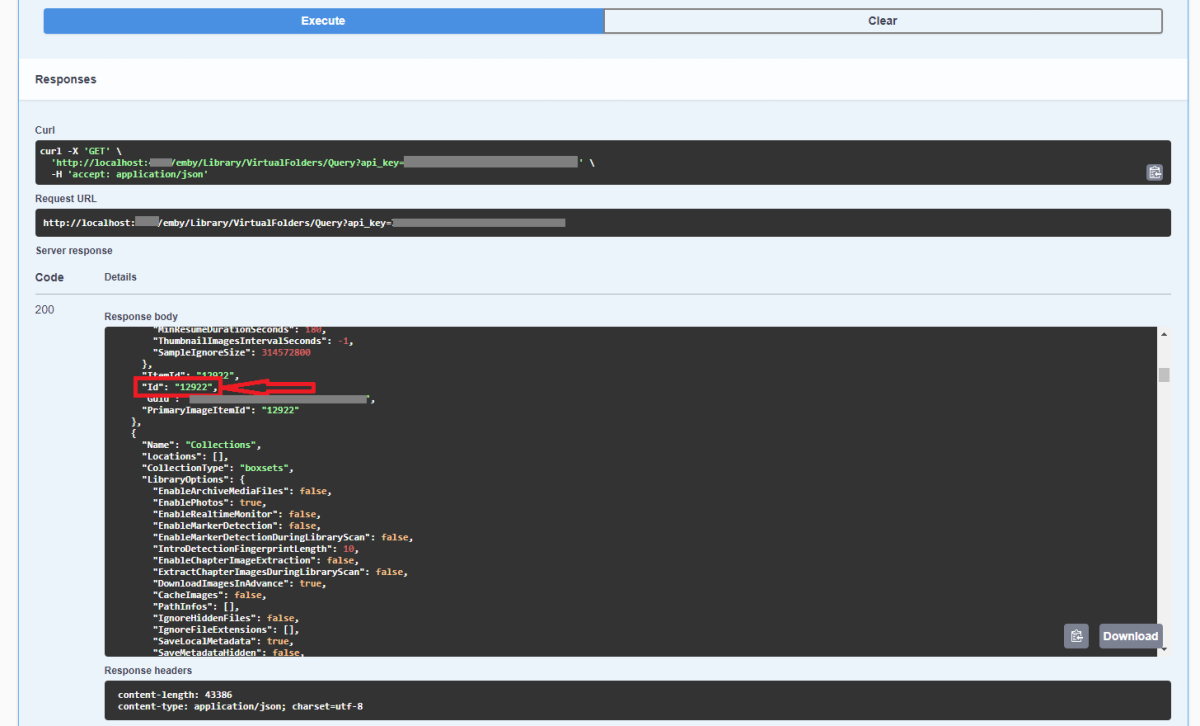
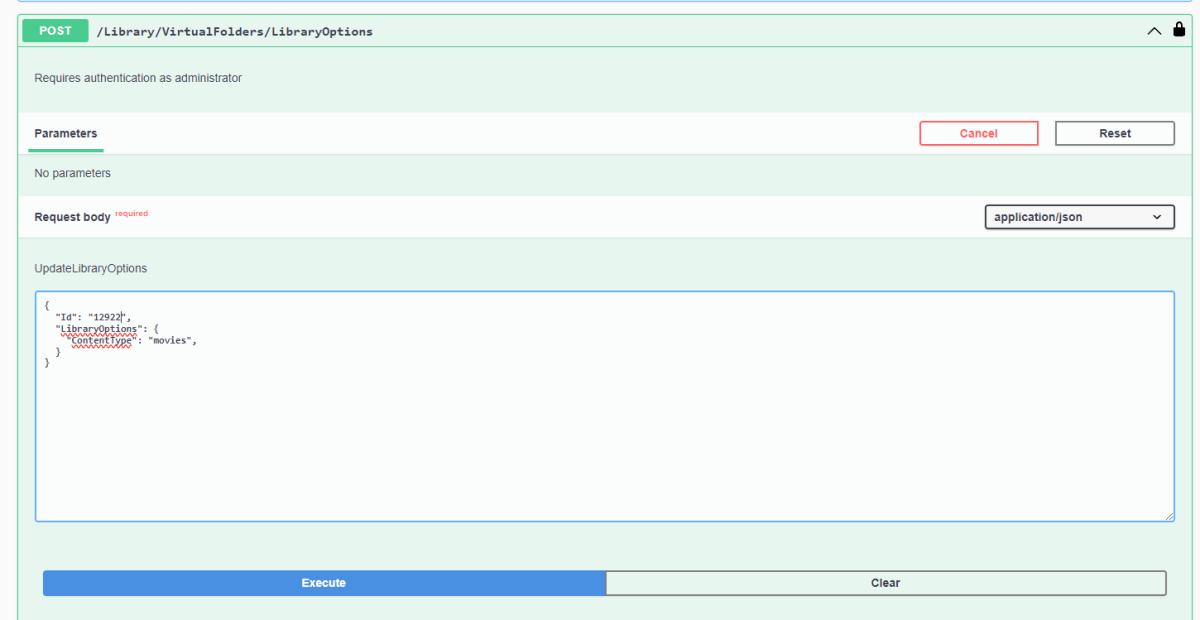
Yes, you can do it via Swagger. First you'd need to obtain library "Id" from /Library/VirtualFolders/Query endpoint: Find "Movies" library "Id" in the response: In /Library/VirtualFolders/LibraryOptions, change "Id" to above and "ContentType" to "movies". Execute.
 1 point
 -
Yes, that fixed it thanks!1 point
-
That's really odd. Have you maybe created some other library with parent folder as a library path? Can you post server log and a screenshot of your Settings>Library tab in the sidebar?1 point
-
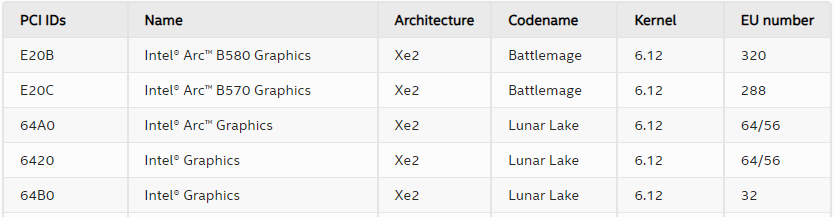
According to Intel those devices are supported in the Linux kernel 6.12 and you're on 6.11.
 1 point
 -
@NeminemHuh, never seen that before. Wonder if it's a bug in Linux or some leftover in the CPU from previous generation or something. I will eat my words about the dodgy site purchase for sure!1 point
-
Thank you very much for the good explanation. Tried this, and the sound works good. Don't really think I can see any difference in the picture quality, maybe in some fast movement, but that's OK. Thanks again!1 point
-
If you mean an Emby Update, it wouldn't even know the directory was symlinked.1 point
-
Found it and corrected; had to rename bunch of devices first. I'd suggest using "user-devicename" convention, it would make easier to distinguish, who's device it is. Thanks again.1 point
-
Thanks I will send it later as it's 1am here.1 point
-
It would be really amazing if you developers could add this option!1 point
-
Hey Luke! Thanks for checking in. I accidentally over-wrote the file while trying to use that mkv tool for the first time, making any further troubleshoot impossible. If it happens again with another file, I will reach out. Thanks again! :)1 point
-
Couple of years since i used it for anything but let's see. You seem to already know the basic like trowing the file in and getting an output so skipping that. In the "presets" scroll down to the hardware presets and pick one that fits the graphics card / internal graphics you have, if you have fx. intel graphics then pick "H.265 QSV 2160p 4K", you can't pick wrong as those for graphics cards you don't have will be grayed out. In format i would choose mkv Since this is a file to test sound we don't really care about the video it self so in the other taps you just pick automatic, in the "filters" tap you disable all. Here the one that matter: In the audio tap you make sure the right audio track is chosen, in codec depending on audio format you choose ">insert name here<passthru" like fx. "TrueHDpasstru, that should leave the audio untouched. Since you are going to use H.265 with this the file and no filters or other things are used the file might be considerably smaller, H.265 is a very efficient format. The audio will remain untouched and have it's original size inside the video file. And you are done.1 point
-
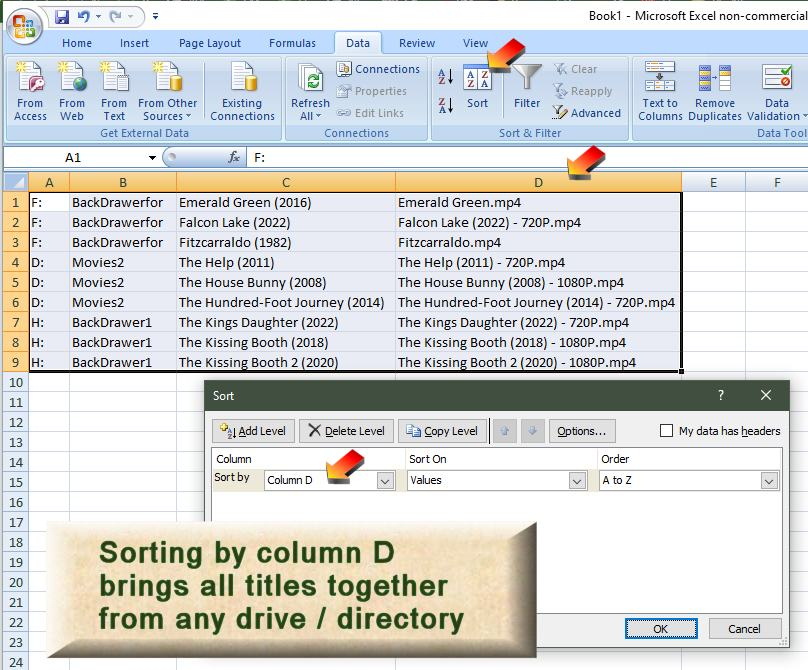
Little know Windows File Explorer trick: Open drive or folder. Search for *.mp4 or *.mkv Select all results [Ctrl a] Right click with Shift button depressed - Select Copy as path Open text editor Paste the results [Ctrl v] Sort by alpha Result: You get a list of all the *.mp4 or *.mpv files in the drive / folder and all subfolders. The list includes the full file directory addresses. If you have multiple drives / folders, just do this for every combination to get full lists of all your content. Now the problem is that a different drive and folder may have a copy of some media that is elsewhere on another folder. Just doing an alpha sort won't bring these two media file addresses together. So, you can do another hack trick to fix this. You need a good text editor, not just the standard notepad or notes. Search replace with ability to add replace with a tab. Enter in search \ Enter in replace a tab (MS Word allows ^t, advanced (more) replace for text editors allow lower expanded feature, where [Ctrl Tab] can add a tab. 2. Replace the quotes with nothing. Otherwise Excel will get confused. Copy paste this into Excel. The Tabs will make Excel put each text area into it's own cell on a row. The tricky thing left to do, is if you have subfolders that do not line up. If media is in the 2nd subfolder on a drive like Season 01. Then it will not line up with other media that is not so far down the folders. Excel lets you sort all those type of rows together and grab them all at once and drag several hundred over a column if needed. Just keep all the row data together. You want to find one column that lines up with the media file names of all your collection. Once you do that, you can sort by column for the file name and you can see 10,000 plus rows comparing media file names. Obviously with that many media files, it can become tricky to find the duplicates, even if they are now on adjacent rows. Excel has an easy answer to that. 1. Enter this code into a free, open column that has no data yet. =IF(D1=D2,"dupe","") =IF(D1=D2,"dupe","") OR =IF(D1=D2,1,0) 2. Now drag down the formula to copies to all cells below until you reach the end of the rows with data. You can also copy paste, if there are so many rows. This will add easily 100 or 10,000 lines of code in your spreadsheet in seconds. 3. Anywhere you see either "dupe" or 1, depending on which code you preferred. That shows a duplicate file name. This won't catch slightly different names. 4. If you want to lock the results showing the dupes in place, you can select the column with the dupe info, 'copy' and 'paste as value'. That will remove the formula and put in the dupe or 1 value. Now if you sort the entire rows by the dupe column, the duplicates will all come together. Summary: Yes, this is a whole slew of hack steps. It's heavy manual, but once you learn it, you can review all media files for duplicates across all your hard drives. If I wanted to check, say 5 hard drives for all .mp4 and .mpv files and sort 5000 entries to find the dupes, I think it would take me about 30 minutes. If you like this kind of hack tricks, maybe it can work for you. Most people will probably only use some automated plugin. At least this is a method where you can change your own tire, so to speak. Hope that helps

 1 point
 -
Hey @LukeIt already been removed by our mod's team @GrimReaper1 point
-
Plugin will see all shows/episode but if Emby has deleted the cached metadata there is no way for it to do calculations. So you may have to touch your Shows for the server to get metadata cache again. This plugin changed a long time ago to use Emby data instead up Emby and this plugin hitting TVDB for the exact same information. Only draw back is Emby cache clean up of everything over 30 days olds as it does eventually get it again when needed by the server.1 point
-
Yes these NAS systems are a little bit work on the users part ssh into the system. qnap path /share/CACHEDEV1_DATA/.qpkg/EmbyServer/programdata/plugins You have to remember to verify the dll permissions when you place the plugin dll into this folder. As the devs really should have an upload option in the UI to upload plugins to make is easier on all users.1 point
-
Yes by default the server deletes these cache files every 30 days so there will be times when they don't exist, and this plugin will throw the errors shown. So old shows that do not get updates will eventually have issues unless you manually touch or refresh metadata.1 point
-
I owe you an apology because your suggestion sounded a little crazy to me. I also owe you a BIG THANK YOU for pointing me to a solution that mostly works. This is Debian 12. It's not quite what you recommend but, I went ahead and made a bash script to rerun comskip if a first attempt ended with an error. I then ran it against all my recordings. In many cases the first or the second attempt ran without error. In others, both attempts got seg faults. However, in those cases, I still got what looks like a valid cut list in the edl file. I have no explanation for that. So far, it appears to be working. I'll note that I did attempt to compile comskip. Please forgive me if I'm not saying this right. I don't remember the error but, the code is using a function that was deprecated a few versions ago in ffmpeg. I don't have the skills necessary to attempt to fix the code. Considering the installed base of Debian and it's derivatives, hopefully someone with the skills will. For now, I'm going to mark this as solved.1 point
-
To conclude on the actual topic: as discussed, it is currently not possible to support directplay for WavPack containers (all kinds) since version 2.212.0 though, these files are playing at least via server transcoding a future switch to using MPV for audio playback might be able to remedy that situation Thanks to all for the discussion!1 point
-
Try using https://github.com/MediaBrowser/Emby.Releases/releases/download/4.9.0.38/emby-server-synology72_4.9.0.38_x86_64.spk1 point
-
Since the registration doesn't appear to be working and Chef isn't at hand, I have removed this plugin from the catalog for now. Any of you with it already should be fine and if there is anyone else who purchased but it isn't working, please send me a PM. Thanks.1 point
-
Hey so I got frustrated and took a break from the setup - I restarted the NAS, Server, and EmbyServer numerous times with no luck. I ended up testing Jellyfin (which is just a fork of Emby) with no intention of actually switching and noticed the connection worked immediately. Afterwards I restarted Emby and thus - the connection began to work. I believe the logs show I tried \\ip\Emby, as well as the directories like \\ip\Emby\Movies as well - although when it worked it was first try just typing in the UNC path as I had before. Thanks for taking time to look at this and I hope no one else has trouble with their setups : ) NOTE: Now that everything is working... I'm LOVING this Ubiquiti UNAS Pro + Emby setup - would recommend to anyone who comes across this post in the future!1 point
-
Hi. This is easy for them because they control your server experience and watch everything you do. We are not designed like that as your server is actually YOUR server and your users are too - unlike Plex.1 point
-
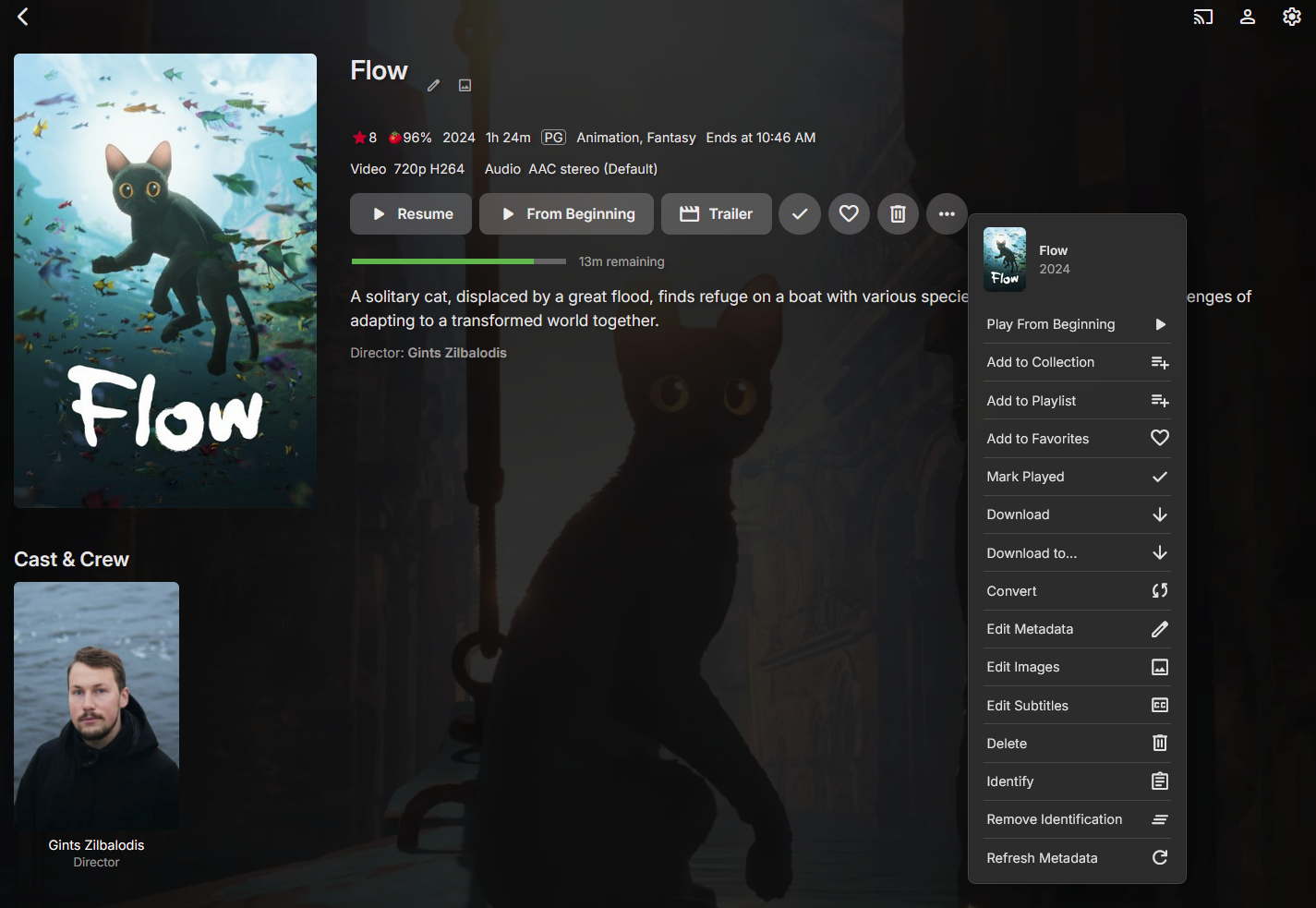
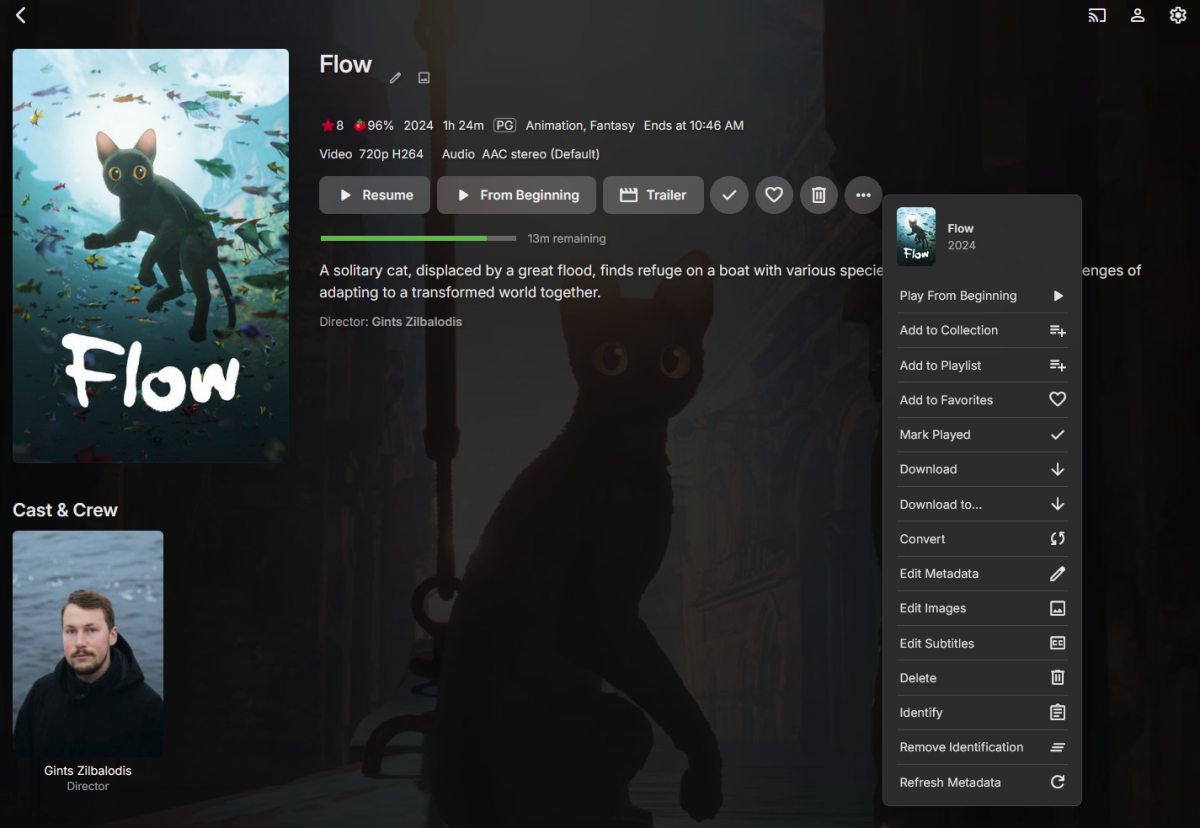
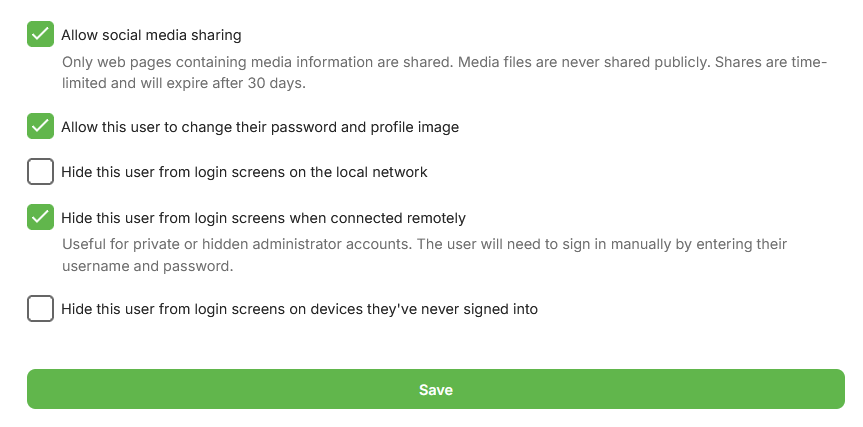
Here is what I see for a movie. (I've clicked the ... option on the right so I can see all of the options.) And here is the setting that shows my user has permission to use the feature. It's not a critical feature for me. I was just wondering too once the OP asked.
 1 point
 -
Enjoy... christmas.zip1 point
-
Emby for LG TV's 1.0.39 has been released. Stay tuned to the blog for the release announcement.1 point
-
Hi, we'll take a look at this. Thanks for reporting.1 point
-
You are entitled to your opinion, and I am sure you are right for you. But that does not apply to everyone and I doubt anyone asked. This is a request by those of us who (obviously) do care about the issue. If they are just words, then, you should complain to Emby forum admins as such language we want to get rid of is not allowed on this forum as well. Along with many other places in life. Recent quote from Luke: "Hi, please refrain from profanity as this is a family friendly environment. ". Which exactly matches what we are asking for!1 point
-
I think I might have posted about this in another thread but I'd also like to see some sort of option to have Emby read the subtitles of a movie/TV show and just mute the audio when a swear word is detected. I'm 10,000% OK if the entire sentence is muted even if there's only one swear word in it. As an adult, I'd love for my children to watch Stranger Things with me but after season one, the executives involved in this show caved to pressure from the actors and allowed their characters to start swearing like sailors. I lived through the 80's as a teen and have talked to people that grew up in major cities, and rural areas, during that time and we all say the same thing about that show ......... NONE of us swore like these kids do. It's beyond excessive. Same for HBO's Westworld. I'm so sick and tired of non-stop profanity in shows and movies, especially TV shows. What I've been doing is bringing the files into a video editor and just manually muting audio and deleting entire scenes of some content I consider objectionable. Which leads me to a question that is a bit off topic but, can anyone recommend a Windows/Linux video editor that can _EASILY_ handle MKVs?1 point
-
@yockerguess I bought a dut too. Emby transcoding devices unRaid device I would guess emby is misidentifying our gpu, and that messes with transcoding with QS enabled.
 0 points