Leaderboard




Popular Content
Showing content with the highest reputation on 02/06/25 in Posts
-
New or Upgraded Apps AURO-3D This update unlocks full support for playback of high-resolution immersive sound in AURO-3D over HDMI. Connect your NVIDIA SHIELD TV Pro to an AURO-3D compatible decoder and enjoy the most natural 3D sound experience from streaming apps such as Artist Connection. Enhancements Added support for Match audio content resolution feature when using a USB DAC Added ability to clear HDMI 1.4 flag via factory reset Added match Frame Rate (beta) enhancement Added French parental control Added security enhancement for 4K DRM playback Known Issues SHIELD TV will be removed from Google Home integration after SHIELD Experience 9.2 installation. Visit NVIDIA support to reconfigure. Resolved Bugs Fixed choppy video playback after FFWD/RWD operations Fixed remote stops responding for 60 seconds after wake from sleep Fixed SHIELD waking from lock screen without a button press Fixed issue with large file transfer to NAS (operation not permitted error) Fixed Google signing flow stuck in a loop Fixed stutters in Bose and Sony headsets while connected to 2.4Ghz Wi-Fi Fixed audio stutter in aptx supported headsets Fixed AV sync issues when Dolby Processing is enabled Fixed crash on volume change Fixed Apple Music corruption during casting Fixed Spotify empty playback when Match Audio Content resolution is enabled with Stereo Upmix Fixed Google Assistant not starting after Google GMS update Fixed full screen SHIELD Rewards notification issue Fixed Wi-Fi log filling up storage Fixed SHIELD drive filling up Fixed no audio heard when headset is connected to controller and DAP is on Fixed Geforce NOW crash after launch Fixed video distortion on "RGB 8-bit Rec.709" display mode Fixed USB HDD/Flash drive showing corrupted after hotplug Fixed NAS folder info shows 0 B and not the actual capacity Fixed mounted storages not listed after upgrade Fixed occasional crashes in DRM apps Fixed when Alexa SHIELD Skill cannot locate SHIELD TV device https://www.nvidia.com/en-us/geforce/forums/shield-tv/9/556907/shield-experience-upgrade-92-2525/ Released 5th February 2025.3 points
-
Yeah, truly outrageous - Luke, how dare you! In the meantime, @JunLui, you can lend your support here:2 points
-
Not sure if this will help or not but could be related. https://emby.media/support/articles/Hwa-Fails-with-RDP.html2 points
-
Hahaha - "throw me a bone" I said. Up pops the Grim Reaper. I wasn't expecting that one, which is part of the charm of the Grim Reaper I reckon. https://imgs.search.brave.com/JLJ4hXOoZhIOEgr1zSr_Nn1hdFjpi8w2JV1u366vtYE/rs:fit:860:0:0:0/g:ce/aHR0cHM6Ly9pLmNo/emJnci5jb20vZnVs/bC84NzY5NTkxODA4/L2g2MkFDRUUzNi9v/cmRlci1vZi1ldmls/LWRlYXRoLWdyaW0t/cmVhcGVyLXdlYi1j/b21pY3MtZnVubnk2 points
-
I think this may have something to do with how I set up the drives, let me do some work with that on my end and see if it helps, I'll be back in touch, thanks for your help2 points
-
I've been dying to know if this has garnered enough interest to be worked on. I found Emby (MediaBrowser 3 at the time) and its bookshelf plugin while I was searching for something that was like Plex for comics. Plex doesn't do this (and probably never will), Kodi doesn't have what I'm looking for either, and ComicRack seems to be dead at the moment. Unfortunately the bookshelf plugin doesn't work the way I had hoped. I was dissappointed to see it only offer a download to the file to which I can open it to the program of my choosing. Even browsing through the books I only had the option of going through folder-like directories and couldn't browse by author like the people section in the other media types. I would love for it to be fully integrated into Emby where I can open and read a comic right on my phone and tablet or even my web browser as I could with my movies and tv shows. Also, I hope to god somone is working on the "Games launching in android" feature you mentioned on your up-for-grabs blog post. That would be awesome!1 point
-
I'm a plex life time member, but I have been using Emby for over six years continuously, but there is a feature which I have always thought is missing in Emby which I would like and encourage the developer to consider including especially in this dispensation where families can social or commingle due to COVID 19. Today, I received a notification from Plex about it new feature titled Watch together you can read about it here https://support.plex.tv/articles/watch-together/ The feature allows friends and families at distance to watch same movies together instantly, you simply invite all your buddy, once they signed to the system which can be seeing in the server then play and pause as needed, this I think is cool feature should be added to emby. Let's here your though if Emby developer should consider adding this feature to our beloved Emby Media https://www.bing.com/news/search?q=Plex+Watch+Together&qpvt=plex+watch+together&FORM=EWRE1 point
-
Any plans to give us the ability to create custom skins? Not looking for super fancy stuff like Kodi has but most around onscreen layout. Emby's native skin is 'usable' but not the most efficient or intuitive as Kodi's native skin (left side menu, etc)1 point
-
With College Football and NFL seasons starting up in the States, a multi-screen option for Live TV would be a nice addition to the Emby feature set. I am thinking of what the WatchESPN app offers thru their Web Browser access. The ability to open a multi-screen window that breaks into four (4) screens that allows you to select streams (Live or Replay) for each and then go full screen. Audio is from whichever of the four screens you have as active. I can accomplish the same right now with the HDHomeRun Quick View TV app. I open multiple instances of the Windows app and then snap them to each corner on my 110" projector screen. Equivalent of four (4) 55" screens. Would be nice if this were a remote friendly option from within Emby Theater and the WebUI clients. I have only seen it in Web Browsers at the moment and not any of the Win10 UWP apps (FS GO, NBCSn, WatchESPN). But, Fox Sports Go just released a multi-screen solution for their Apple TV app. https://techcrunch.com/2016/08/26/fox-sports-go-hits-apple-tv-allows-viewing-of-four-games-at-once/1 point
-
Also, It would be cool if we have various m3u lists and have the option to choose/assign each m3u list for each user.. Example. In user settings we can choose which library to give them for VOD so this shouldnt be hard enough to do it for live tv too no? USER 1 - Playlist 1 - Playlist 2 - Playlist 3 USER 2 - Playlist 3 USER 3 - Playlist 1 - Playlist 3 Etc etc.... *** Delete this message from another topic I opened because I posted it by accident there1 point
-
This plugin leverages the metadata reader call on metadata refresh. So it really pretends to be a local file reader but its not. It accesses the only free (no paid tiers) api database there is at the moment for lyrics, both LRC and TXT. It is triggered by either "Replace metadata" or "search for missing metadata", you dont need replace metadata if you already have it, missing metadata is much faster. It does therefore trigger ffprobe. Unzip the archive and copy the dll to the plugins directory, restart the server. You will find the config at the plugin and enable it, in your library. The config screen allows you to choose what to download, It operates seemlessly with a metadata refresh on the song track or Album, or if a newly added item being scanned in. Luke recommends I should do this as a subtitle plugin and via scheduled tasks, instead of this way ( I think because it will add time to a library scan with both ffprobe and then fetching the data) , my testing showed about 1 sec per track to fetch the data - what do you think? Anyway have a play and let me know what you think. Accurate? Fast enough? Improvements? Things like that LRCLIBProvider.zip
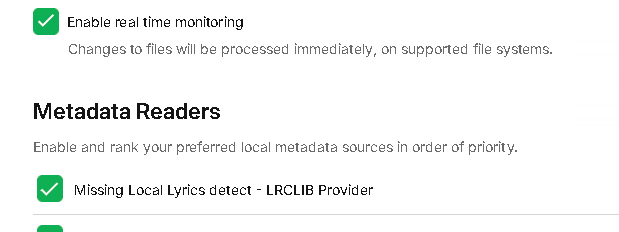
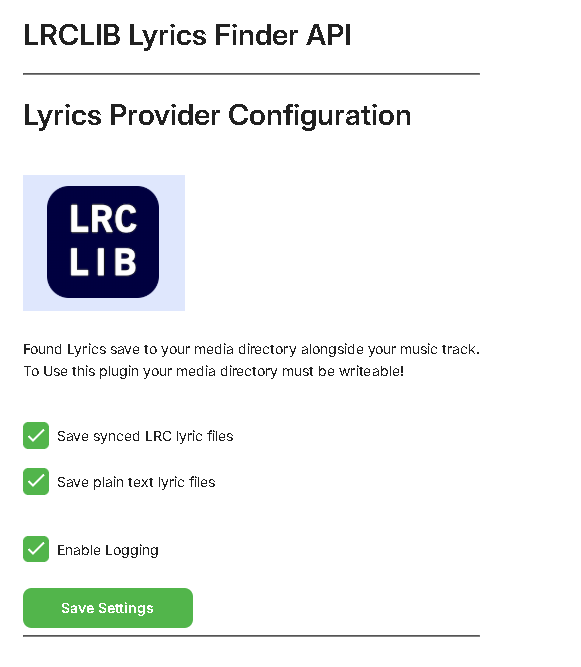 1 point
 -
Finally have everyone on Emby for little over a month. Have had Plex uninstalled from the Installed Package Center, BUT have lingering files... How can I safely delete the PlexMediaServer and making sure that Emby is not installed under that folder? Is it as simple as: Control Panel - Shared Folders - Highlight “PlexMediaServer” - DELETE Wait for DSM to delete it.
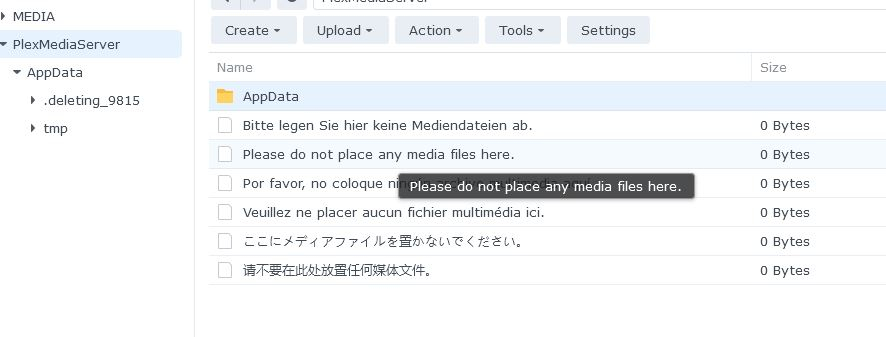 1 point
 -
I don't suppose the emby devs might consider an option to NOT use the folder name Extras as specials? Like the others here, that completely conflicts with Kodi's usage of the name. Also like the others, I imagine this is often - and I mean very often - going to come up with Anime with little extras like clean opening and ending sequences, artwork-videos, that sort of thing where you do not want them listed as episode files. I understand using "random folder names" instead of Extras, but like others have stated, some of us have very large libraries that we use with Kodi. To be frank, it seems odd to me in the first place that Specials is considered the same as Extras, but that might just be a bias on my part.1 point
-
Tx for the reply, good to know it will be working in the next update! Cheers!1 point
-
Yeah for me I couldn't tell if it was the Shield screensaver or my LG one, but the Emby slideshow never came up for sure. The real tell would be that as soon as the screensaver starts, you'll hear the audio kick back in from the should-be paused video. I'll do some testing myself as well a bit later to confirm between Shield/LG.1 point
-
Did the Local DB Reset, then added my libraries back in. I'll keep an eye on it to see if I get those messages popping up again. If so, I'll post a log.1 point
-
Which is what I am now doing, and it does seem to be working. My original design was based on an incorrect understanding that by providing an IMDB ID, that it would be directly queried against the IMDB website/APIs.1 point
-
Was wondering if it had 2 gpus and you had the monitor plugged into the 1 not used in emby. But thats a discussion for another time1 point
-
Only one, atm. it's an AMD system with an Intel Arc GPU.1 point
-
No worries Luke. Appreciate all your efforts.1 point
-
Lets wait for 4.9.0.38 to come out and the fix is confirmed and then we can see if it can be released into the stable release. Otherwise would need to wait for 4.9.0.xx to get released as the next stable release1 point
-
Just had a similar problem with a test computer that i had set up. Turns out hardware encoders disappear if you remote desktop into the computer with the Emby server.1 point
-
I'm sorry for the long downtime. I'm back looking at the code again. A] I'm reviewing everyone's comments and how to report the episode progress. I should have something new in the next build. B] I don't offer options to include/exclude libraries because as I'm aware Emby doesn't expose those to me. I make a call and get all movies/TV Shows in one big chunk. if you're not seeing everything check that all libraries are setup correctly? Maybe install another plug-in like Reports and see if it can see everything? On my side, if a developer sees this and wants to point me in the direction to API calls to get this kind of data please do so. C] I'm also working on some performance updates to help with the speed of the plug-in. That being said, that's more on the users side then mine. Factors like library size, number of users, and system performance effect the plug-in greatly. When scanning the same library my production server takes around 5 minutes, where my dev machine takes around 30-40 seconds.1 point
-
Planning for fix in beta 4.9.0.38. Let me know the outcome once 4.9.0.38 is available Thanks1 point
-
It will be a game changer1 point
-
I would quite like this! ..even if were a little techie to use.1 point
-
Don't do livetv but isn't this info in the timers.json or seriestimer.json? *\Emby-Server\programdata\data\livetv obviously there will be platform path differences.1 point
-
does this still work? if so could i use a curl cmd to retrieve all favorites and another curl cmd to restore all favorites to a different library.db?1 point
-
For posterity, here is my batch conversion solution which finds all videos with 265 in the title with mp4 extension, remuxes them to mkv & strips the tags, and deletes the original file. Maybe someone will find it useful in the future. ~/Scripts/remux.sh: #!/bin/bash # converts mp4 to mkv without tags and deletes original file # usage: bash remux.sh INPUT.mp4 input="${1}" output="${input%.*}.mkv" mkvmerge -o "${output}" "${input}" mkvpropedit "${output}" --tags all: # can comment this out if you don't want to delete original file rm ${input} find ~/Videos -iname '*265*.mp4' -execdir bash ~/Scripts/remux.sh {} \;1 point
-
The MP4 container adds global tags as header data. The MKV container adds them as streams. Those tags might not be fully supported inside an MP4 container but are supported within an MKV container. Some players can work-around bad data, other plays will choke and stumble over it. If this is something using DolbyVision you must keep them inside an MP4 container for the DolbyVision to trigger correctly. If the file is not DolbyVision you are safe to keep it as an MKV and get rid of the MP4.1 point
-
Thank you for your hard work. Subscene is back somehow at Subscene.best, I hope the plugin will be compatible with the new site with some minor updates.1 point
-
wow! you still think you're right? MakeMKV added support for profile 7, meaning it is now capable of putting the FEL layer in the mkv (not doing any conversion of course, makemkv only rips discs bit by bit, so the mkv will have profile 7 DV, not something correctly playable by the nvidia shield for example), then you need something to play it, and that's the whole point! the only device capable of it today is the ugoos 6B+ running corelec. you said use your blurays with a bluray ray player, and pirated movies are not emby's problem (i agree on this one, but that's not the point here, on the contrary as ripping your own blurays will almost always give you profile 7), so, basically, you said emby is not for your own ripped blurays, nor for downloaded piracy, so what is exactly emby used for according to you? you are funny bye1 point