Leaderboard




Popular Content
Showing content with the highest reputation on 02/03/25 in Posts
-
LOL the trifecta3 points
-
everything has been working great once i set the service to auto delayed. i have done several reboots and have not seen the issue again. thanks!2 points
-
Just for the fun of it, have fed an AI with all kinds of stuff about this and told it to make a plugin for Emby to make H265 possible.. Estimated Completion: 8-13 weeks (around April-May 2025)2 points
-
Hi there, Here it is but it requires some manual manipulation. FFMPEG-HEVC Pre-requisites: Linux host only (tested on ubuntu) install the Diagnostic Plugin from the Plugin Catalog deactivate tone-mapping completely ensure that only VAAPI is selected in your hardware decoders & encoders retrieve the Emby-server installation path (default: /opt/emby-server). You can find this information in the original ffmpeg file from emby by executing this command anywhere in your CLI : find / -type f -iname "emby-ffmpeg" 2>/dev/null -exec cat {} ";" | grep "APP_DIR=" Installation if needed, adapt the line #3 of the script by specifying the base installation path of your emby-server : APP_DIR=/opt/emby-server Copy the ffmpeg-hevc script into a location emby can reach, the default /opt/emby-server/bin/ for example is a good spot Activation Open the Diagnostic Plugin and navigate to the second tab "FFMPEG Options". Paste the full ffmpeg-hevc path into the "Custom ffmpeg path" Click save You're are good to go. Any stream requiring hardware transcoding will now be in hevc instead of h264. Nothing in the UI is updated though, so the Nerd Tool will still show h264 as the target codec. The only way to confirm this is working is by looking inside the ffmpeg-transcode logs. You should see something like this, followed by the new ffmpeg command that's executed by emby. ------------------------------------- ------ Activating HEVC encoder ------ ------------------------------------- Log file is : /var/lib/emby/logs/ffmpeg-transcode-580e8dc8-721d-4e1b-a65f-d40b15c62d1c_1.txt AVC encoder found : h264_vaapi Performing some FFMPEG args changes ... MODIFIED >> -c:v:0 h264_vaapi -> -c:v:0 hevc_vaapi MODIFIED >> -bufsize:v:0 7616004 -> -bufsize:v:0 3808002 MODIFIED >> -max_delay 5000000 -> -max_delay 500000 MODIFIED >> -max_delay 5000000 -> -max_delay 500000 MODIFIED >> -max_delay 5000000 -> -max_delay 500000 Notes The script will modify the ffmpeg call to hevc only if a valid h264 hardware encoder has been found in the original call. The direct stream and direct play are not affected QuickSync is compatible with the script but the colors are not accurate for some HDR content. That's why I recommend to use VAAPI only. You can adapt a little bit the ffmpeg-hevc script like so: BITRATE_MOD="*1" : forbid ffmpeg to go higher than the specified bitrate (by default, the bitrate_mod is x2 for h264). Uncomment LINE #60 if you want to check that the client is HEVC_COMPATIBLE. By default, this is deactivated as I don't need it myself. Have fun ffmpeg-hevc
 2 points
 -
TheTVDB now supports more alternative orders than just Aired/Absolute/DVD. Can Emby query these additional orders and add them as options? Two examples of shows I've seen this used are Re:Zero which has a "Director's Cut" display order and Money Heist which has a "Netflix" order. https://thetvdb.com/series/re-zero-starting-life-in-another-world https://thetvdb.com/series/la-casa-de-papel1 point
-
I am switching over from a Win7 box running MBC to Chromecast dongles. With the Win7 box I had a HDMI to Cat6 setup that allowed me to stream to up to 4 displays/TVs simultaneously. It was great while it lasted, but involved stapling cables to the ceiling to run it from room to room - plus it has borked Can there be an option to multi-cast to several receivers at once? i.e. simultaneously play to Chromecast dongles in my office and living room and kitchen simultaneously so i can walk from room to room without stopping and restarting the movie or show all the time? I realize that bandwidth could POTENTIALLY be an issue, but i have a fill gigabit network and a multi-port NAS so that really is the least of my worries... Thank you!1 point
-
A new Build of the WMC UI is available: https://github.com/EmbySupport/Emby.WMC.UI/releases/tag/2.215.0.0-Beta. Changelog:2.215.0 [WMC] Fixes for the WMC release 2.214.0 [WinUI,Linux,WMC] MPV: Set target peak only on HDR displays [Linux] Nothing new to test, still waiting [WMC] First WinUI based test 2.213.0 [Xbox] Live TV playback adjustments [Xbox] Xbox: Separate DeviceIds for beta and plus app [Windows,Xbox] WinPlayer: adjust seeking on start (audio) [Windows] Sync: Fix incorrect order of local playlist items1 point
-
That's not really fair or true... Because once a FR is implemented, a few people may give a like or thanks, but soon you never here about it again. It's only the ones that aren't yet implemented that people keep complaining about...1 point
-
Hmm yeah don't know why i wanted to add subnet to the "personal" IP. I know better than that. 0.0.0.0/1 to consider all local. Simple IP like x.x.x.x to consider that IP local..1 point
-
Just moved, no Internet at home until Thursday. This would happen now, can't wait to try it out!1 point
-
Basically, yes it will play the media as is as nothing is considered REMOTE and if you get stuttering and freezing it is due to ISP and or bandwidth issues. As that will/should be the first thing anyone here will say for troubleshooting is reset your Network configs.1 point
-
Missed this reply, I will grab the logs tonight.1 point
-
@TMCsw Yes, it all makes sense now. The above video mentions that only an Android device works now, because that is the only Operating System supported for decoding correctly ATSC 3.0, following the latest ATSC 3.0 interactive features activation. Thanks for finding and sharing this video. Chances are that more Emby users will start experiencing this, so if they are reading this post, they will realize why all of a sudden they can't watch live TV using the Emby client, except from an Android device, or directly using the HDHomerun app in their local network. If anyone finds a workaround, please post it here. My guess is that this might not be an easy fix, especially if it needs a HDHomerun firmware upgrade. I hope that the Emby server team is already aware about the ATSC 3.0 interactive features activation change, and probably working in the background to figure out what needs to be done. When I get a chance, I will create and report here the Emby Server Logs, as requested by @Luke Thanks!1 point
-
Is this related with my issue? This seems like it needs a separate post @sa20001 point
-
Yes, that where you add the IP's you want to be recognized as local. Edit: I made a mistake. If you know their IP and are going to use that it will most like be "IP/24" and not /1. So: 0.0.0.0/1 if you want all IP's to be known as local. IP/24 if you want a single IP to be known as local. The /number is a subnet mask, you can learn more about it here https://www.calculator.net/ip-subnet-calculator.html1 point
-
Bonjour j'ais exactement même soucis que vous si je décoche la recherche TVDB sa resoud certain problèmes de langage si je laisse en priorité la recherche par le moteur themoviedb sa fonctionne mieux c'est pas 100% certe mais il y a du mieux par contre les films que vous citez et que j'ais aussi aucun soucis la saga don camillo est bien en Francais ainsi que hotshot par contre tout est renommer par filebot chez moi bonne soiree1 point
-
Stop the car and try again, not sure if that helps, but never know.1 point
-
Remove the check mark at "Require Hash Match" to download. But that will increase the possibility of subs being out of sync. Meaning you will get subs, but IMO not useful.1 point
-
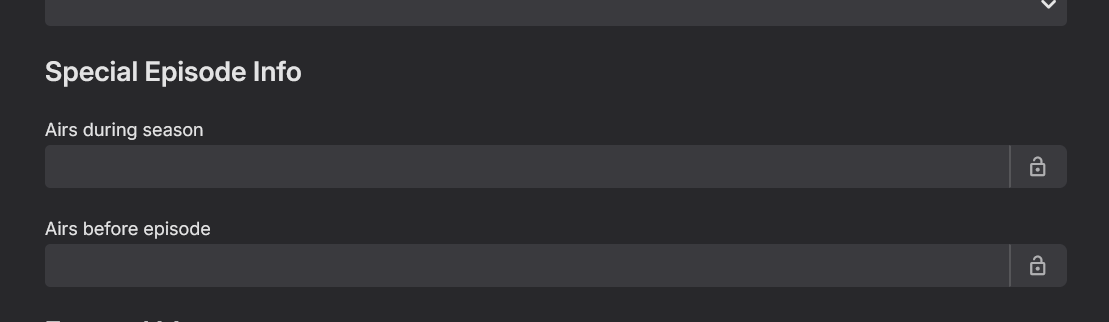
You first need to make sure the specials are named properly, and then if they are you need to check when they are told to play in regards to season position. It's possible you have them merged together, which if you do, you will want to split them apart, and then rename them properly.
 1 point
 -
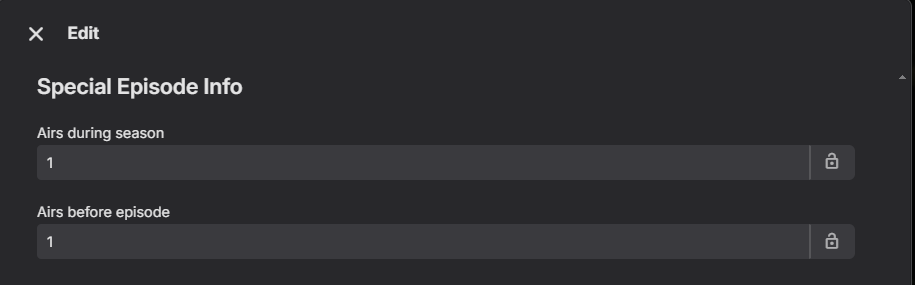
That behavior is driven by special episode metadata - if you don't want it played before/during/after any season, on special episode: Edit Metadata>clear "Airs during season" and/or "Airs before episode" .
 1 point
 -
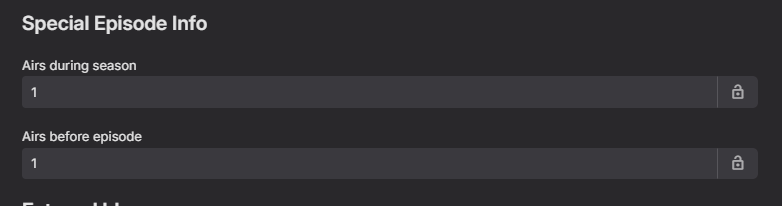
Potentially need to see the specials positioning data telling it when to play.
 1 point
 -
Okay! Thank you! We'll be looking forward to it.1 point
-
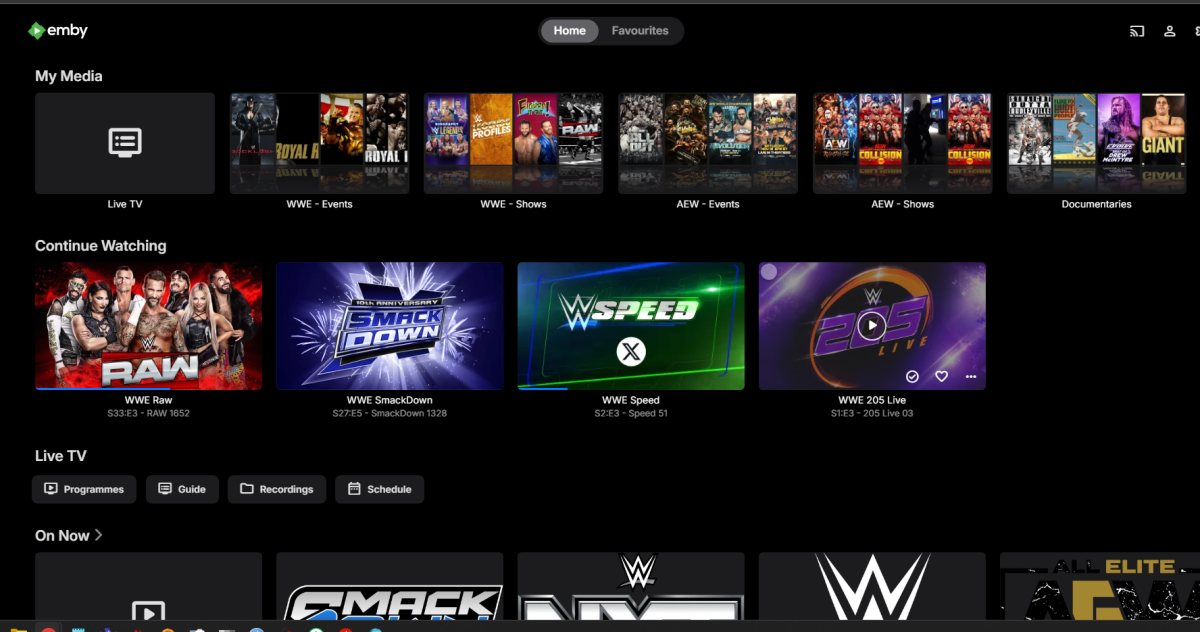
Sorry just using web through chrome Server Version 4.8.10.0 and ive reordered so my media 3rd, with your css it works great, Thank you
 1 point
 -
Great. It works even when I have the year at the beginning of the name which helps me keep the sort order within the parent folder in accordance with release date - it's helpful when I access the content from outside of Emby. Many thanks, Rob1 point
-
No info on client app used/server version, but assuming you're referring to Web app - that's actually default behavior if My Media is first or second home section; add something like: div.view-home-home div.section0 div.itemsContainer {flex-wrap: nowrap;} in Settings>Settings tab in the sidebar>Custom CSS box.1 point
-
It does look like this one you suggested might do the job, it does look like it might do "live" updates to an .m3u playlist. I'll check it out. https://github.com/Laharah/redlist1 point
-
@faandfo69 Hi there, let's look at an example. Please attach the information requested in how to report a media playback issue. Thanks!1 point
-
Will do Luke!1 point
-
thank you very much!1 point
-
All I use is a container called PlaylistSync, it automatically syncs Spotify playlists into Plex, and Jellyfin integrates through an API. Add a track in Spotify, it's added to the playlist in those 2 apps. No idea what the playlist format is, they're just there. Any chance I can get some resolution to the problem I'm having with playback controls on Cast/Play On? I'd really like to move forward with continuing to use Emby. So far it's not very useful to me without those controls.1 point
-
I'll try some deeper testing in the morning but so far, the Android app was direct playing and in HDR, thank you1 point
-
I'm certainly in no position to argue with you. I can only relay my own experience. I never saw any error messages. The two things that surprised me were that I lost my recording schedule and my user privileges (I couldn't delete anything.). I don't store my backups in the default location. Other than that, I can't think of anything that would affect it. It's working now and my wife isn't giving me shit about losing her (It's not ours.) recording schedule. So it's all good. If that's the worst thing that happens in a move to new hardware and a different OS, I have no complaints. Enjoying the new setup so far.1 point
-
OK we are looking into it. Thanks.1 point
-
Install CoverArt plugin.1 point
-
The issue with transcoding in Emby or Jellyfin or direct play stuttering over LAN through my unRAID server seems to have been the TP-Link Tri-Band BE9300 WiFi 7 Router (Archer BE550) Hopefully that sentence helps search indexers point people with the same issue here I grabbed an Eero Max 7 and instantly flawless, although hopefully it stays that way1 point
-
Hi ,yes it will create nfo files in your media folders.1 point
-
I had to use the wayback machine to get the driver version I wanted from the Intel site. Just figured I would mention this as some people may not be comfortable getting drivers from other sources.1 point
-
Hi, the rotation for this is when the collection changes, not periodically.1 point
-
It will be out of date by the time it is released. Only joking...looking forward to it, whenever we get it1 point
-
Thanks Can confirm Semicolon works perfectly1 point
-
The development cycle is sooo long and unpredictable. The product I work on for my employer has millions of LoC and we push out updates once a month and new versions once a year. Emby's lack of updates bewilders me.1 point
-
No I only have the one admin account. It appears there is a bug in the SetUpWizard in that it will allow you to change the name of an existing use to that of another existing user which hides the second one - in my case my admin user. However there is a simple fix. Set IsStartupWizardCompleted is system.xml to false and restart the server. Next time you connect to the server from a browser the setup wizard runs and a couple of steps in it asks you to set up a user. In my case I could then rename the first account back to the correct name and make my admin user accessible again.1 point
-
Finaly! I've solved my problem. I needed to get to the system.xml file via SSH terminal and with the help of Carlo's guide I figured out the commands and by deleting the file the server recreated the file. Now everything works. https://emby.media/community/index.php?/topic/118986-tutorial-ssh-into-synology-nas-with-useful-examples/1 point
-
You promise?! Based on what exactly? I have over 400 titles on my NAS.. takes many hours to set. It has happened twice already so why wouldn’t it happen again? I may consider giving your software another try if you fix the DV issue you’re having on AFS. BTW, Vimu media player is flawless on AFS and plays every single title DV7 or 10+ Emby couldn’t.1 point
-
Yup, thank you1 point
-
Thank you, Luke. I have tried to find another way to approach the problem but cannot find a way, except occasionally deleting old episodes.1 point
-
Under services what are the startup types for the Drivepool service and the emby service created by NSSM? Also just to clarify, emby and Drivepool are running on the same server right? I'm also using Drivepool and have Emby running as a service with NSSM. On my server the Drivepool service is set to Automatic and the Emby service is set to Automatic(Delayed Start). I never have any issues with this config. Try setting the Emby service to Automatic(Delayed Start) and that should resolve your problem. If for whatever reason it doesn't you can add a dependency for the Drivepool service to the Emby service in NSSM. This will ensure that Drivepool is running prior to emby starting.1 point
-
Lets wait what is actually delivered. History suggests that 'core' functional replacements while usually better integrated, lack the full functionality that the plugin originally provided... (Introskip erherrrmm..) I hope it matches what Smart Playlists 2.0 can do - but what I'm really waiting for (and have been for years..) is the ability to create virtual libraries from these playlists and display as 'rows' on the main screen. imo Only then do they start to become really useful to present dynamic content as the users themselves can customise what they see. ie the concept of Spotlight/Recommendations/Top Picks etc becomes a reality.1 point
-
@GiGoCan we get a new link please, much appreciated!1 point
-
Well you did a full metadata refresh so that’s going to prioritize nfo last. Try editing the nfo and then just running a normal library scan.1 point